 MCL-11297
Minecraft Launcher crashes with every version except the latest one
Launching any other version except the newest one makes the launcher crash.
The same issue existed before the launcher UI changed.
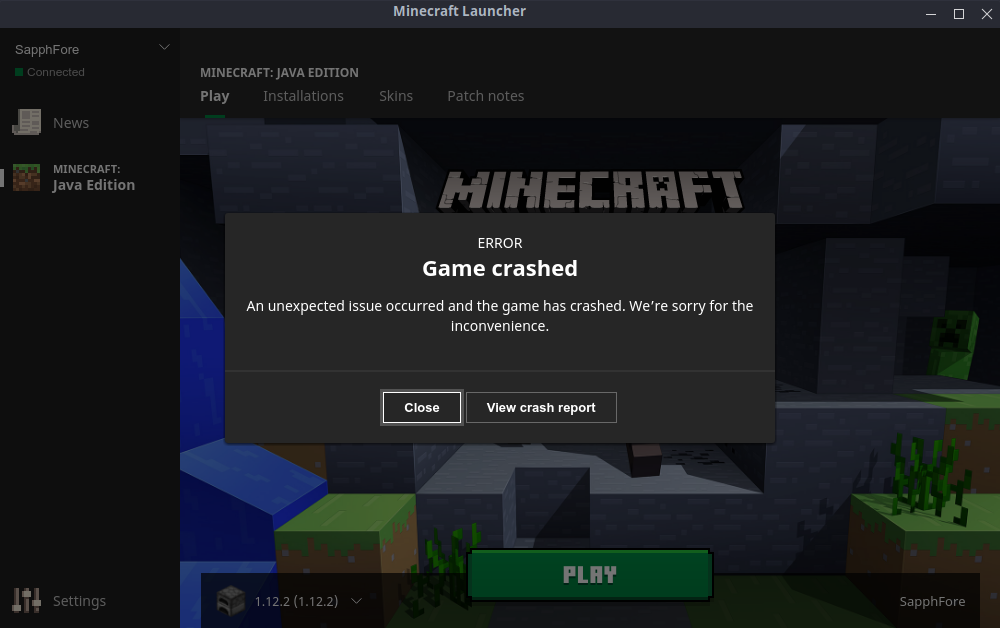
After crashing the launcher pops up again (see mc-crash.png) clicking "view crash report" doesn't do anything.
Environment
OS: Linux Mint 19.1 Cinnamon
Kernel: 4.15.0-52-generic
java - version says:
openjdk version "11.0.3" 2019-04-16
OpenJDK Runtime Environment (build 11.0.3+7-Ubuntu-1ubuntu218.04.1)
OpenJDK 64-Bit Server VM (build 11.0.3+7-Ubuntu-1ubuntu218.04.1, mixed mode, sharing)
and from the installation settings it tells me it's using the bundled Java
Attachments2


Created Issue:
Minecraft Launcher crashes with every version except the latest one
Launching any other version except the newest one makes the launcher crash.
The same issue existed before the launcher UI changed.
Environment
OS: Linux Mint 19.1 Cinnamon
Kernel: 4.15.0-52-generic
java - version says:
openjdk version "11.0.3" 2019-04-16 OpenJDK Runtime Environment (build 11.0.3+7-Ubuntu-1ubuntu218.04.1) OpenJDK 64-Bit Server VM (build 11.0.3+7-Ubuntu-1ubuntu218.04.1, mixed mode, sharing)and from the installation settings it tells me it's using the bundled Java
Attachments1
Launching any other version except the newest one makes the launcher crash.
The same issue existed before the launcher UI changed.
After crashing the launcher pops up again (see mc-crash.png) clicking "view crash report" doesn't do anything.

Thanks for your bug report! I could reproduce it, and it seems to happen when using openjre-11. Please try the following:
1. Locate the instance you want to run in the installations tab, and click on it.
2. Click "More options"
3. Write
in the "Java executable text" field.
4. Save and click play
Thanks!
It works now.