 MC-200023
Different languages labels GUI rescaling is broken
How to replicate
Settings:
- Language is set to [some particular list of bug-covered languages]. In my case it was LOLCAT (Kingdom of Cats) or Spanish (Espana).
- GUI Scale is set to Auto (sometimes other options work too).
Then try doing this:
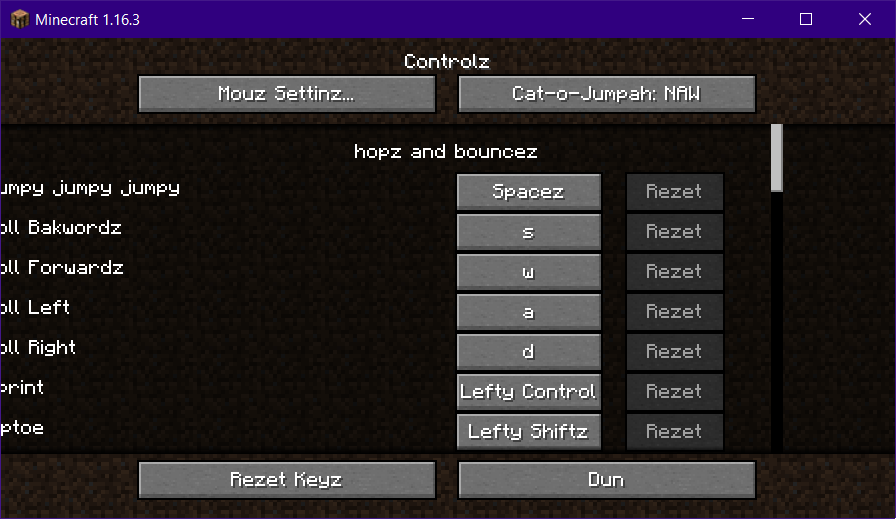
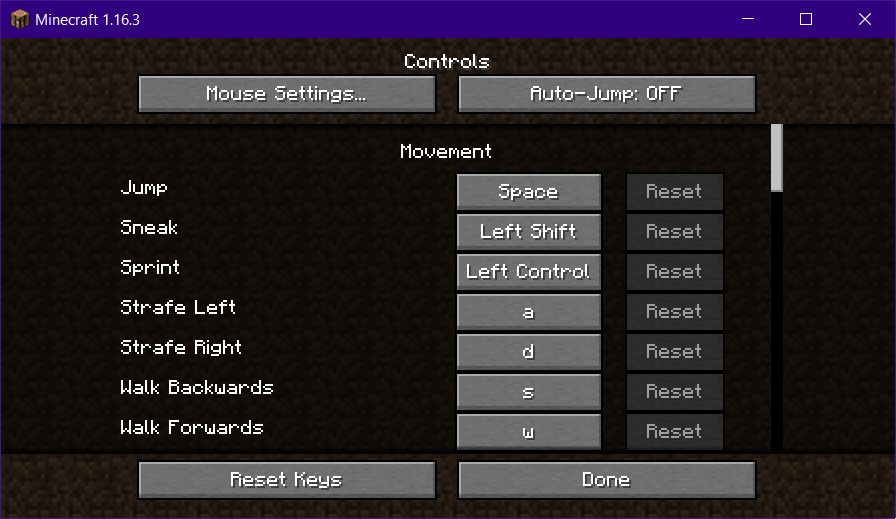
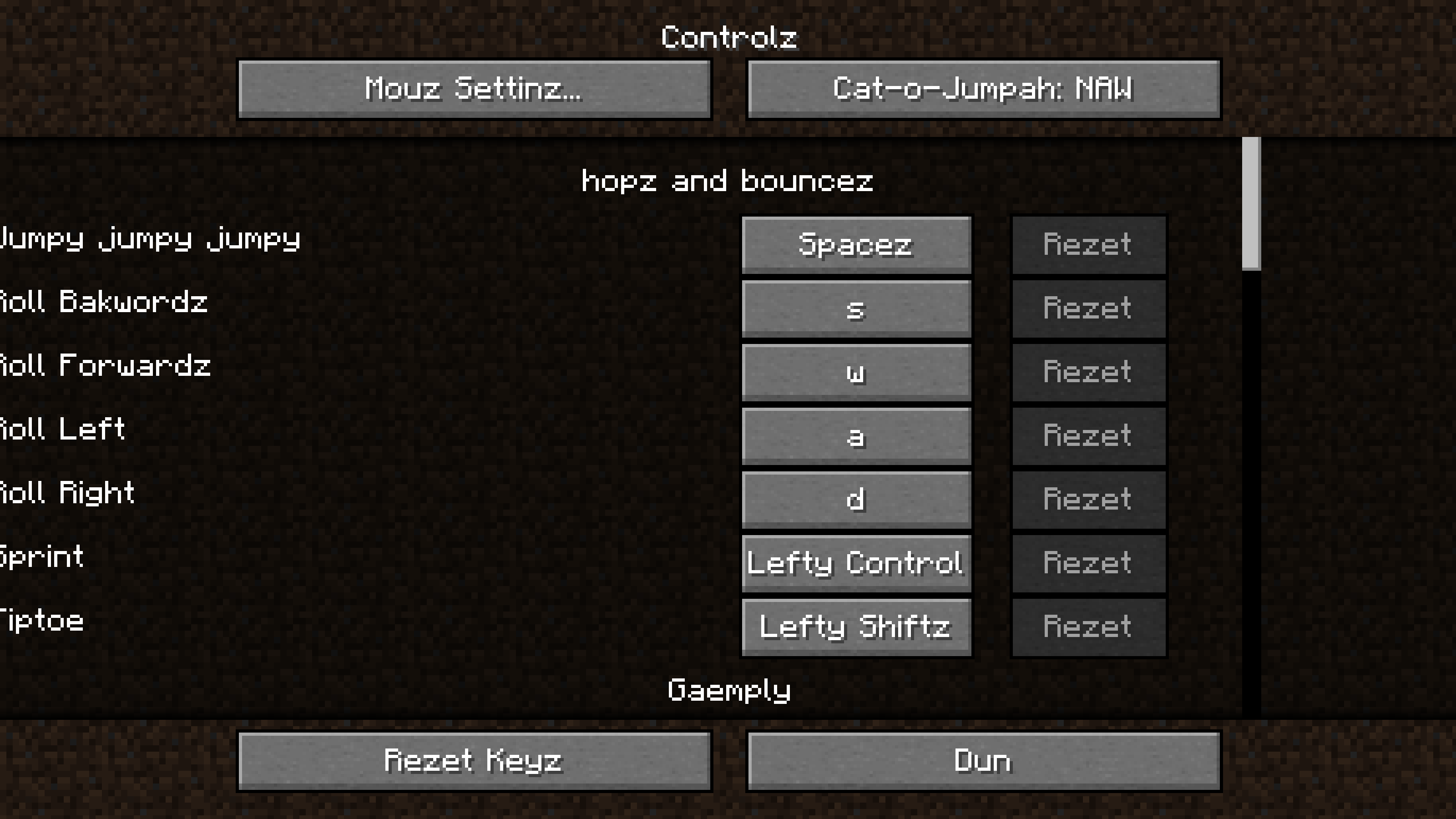
- You can just go into windowed mode and experiment with the game's window size while in Controls menu. Spanish and LOLCAT labels get pushed outside the game's borders. English (US) language passes this rescaling test fantastically - it adapts the font size to fit everything in the menu just fine.
It is fixable in Windowed mode by stretching the game window to make it wider, but you can't do anything in the Fullscreen.
Attachments notes
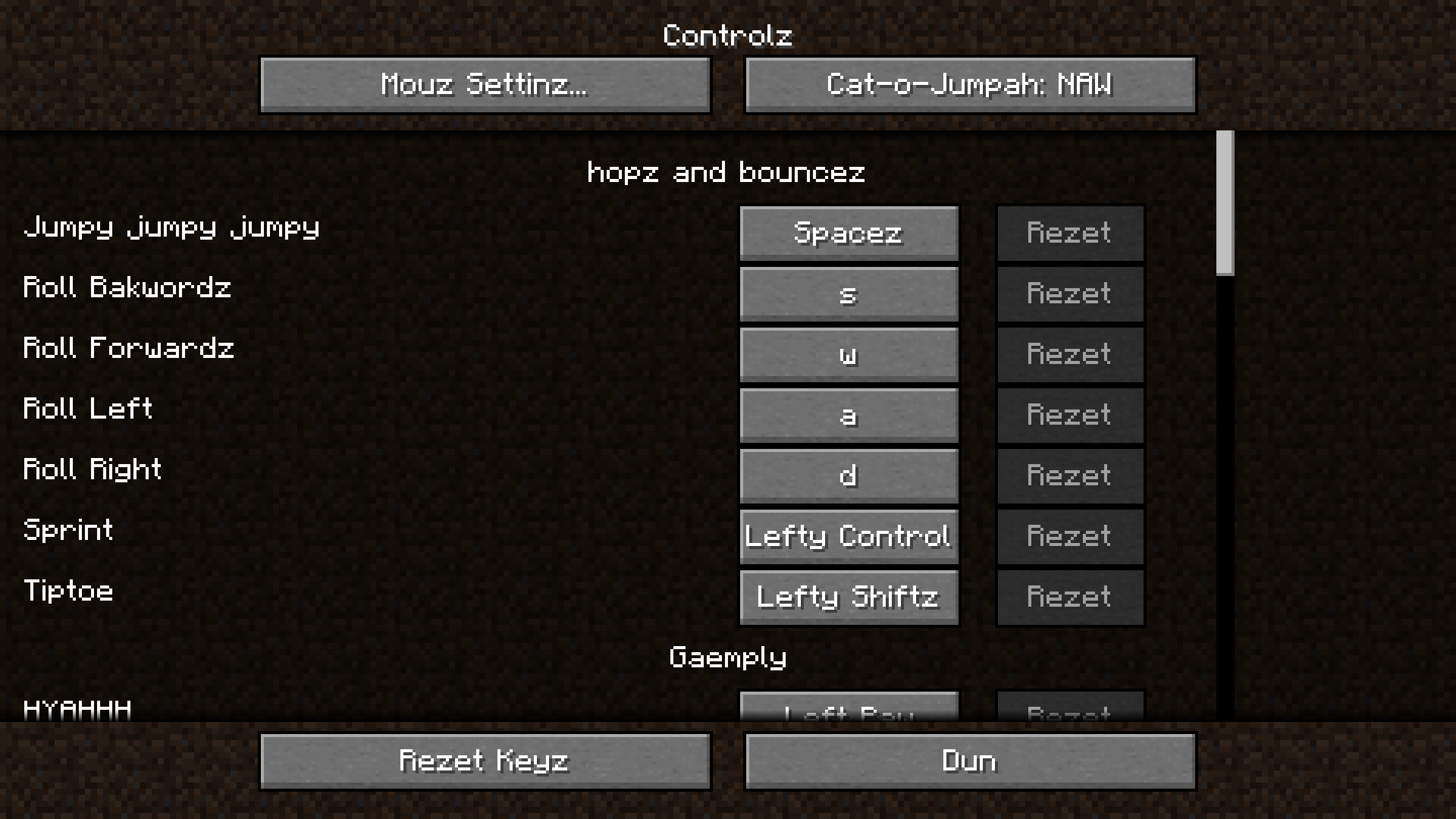
1) LOLCAT language controls menu with different resolutions (GUI scaling = Auto):
- Controls_2160p_1.16.3_Fullscreen_LOLCAT.png
- Controls_1440p_1.16.3_Fullscreen_LOLCAT.png
- Controls_1080p_1.16.3_Fullscreen_LOLCAT.png
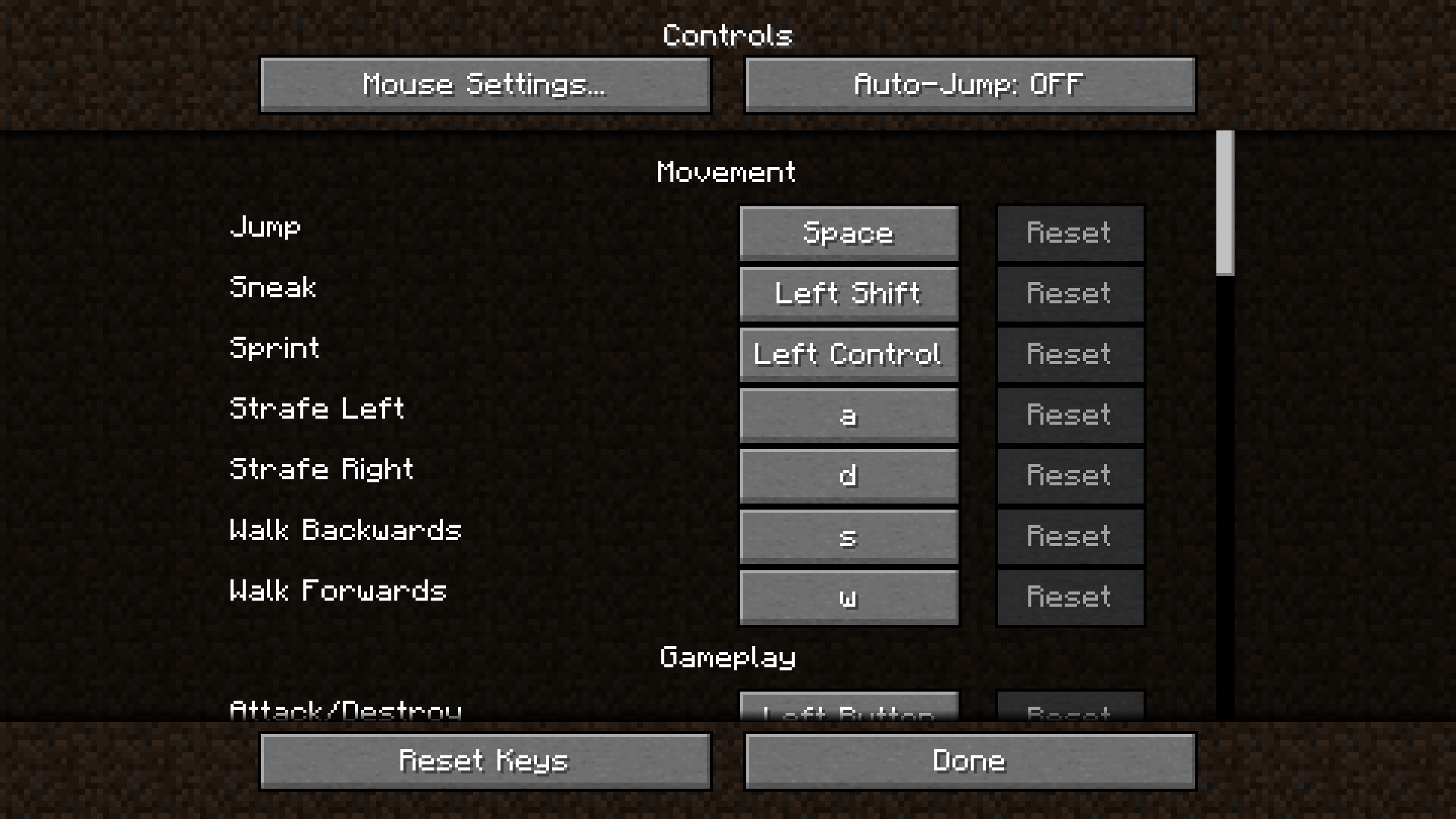
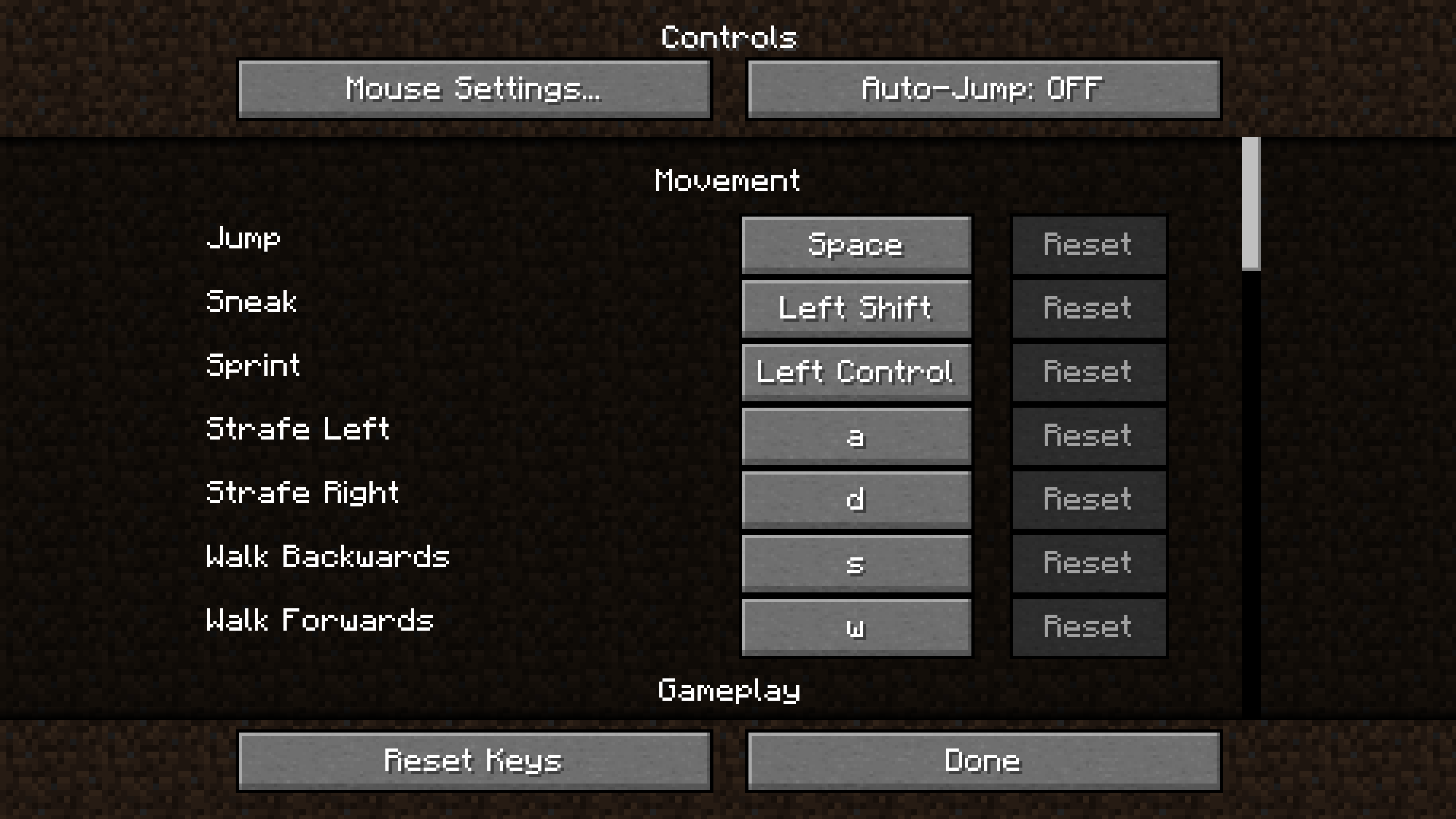
2) English (US) language controls menu with different resolutions (GUI scaling = Auto):
- Controls_2160p_16.3_Fullscreen_US.png
- Controls_1440p_16.3_Fullscreen_US.png
- Controls_1080p_16.3_Fullscreen_US.png
3) Spanish (Espana) language controls menu in 4K resolution (GUI scaling = Auto):
- Controls_2160p_1.16.2_Fullscreen_Spanish.png
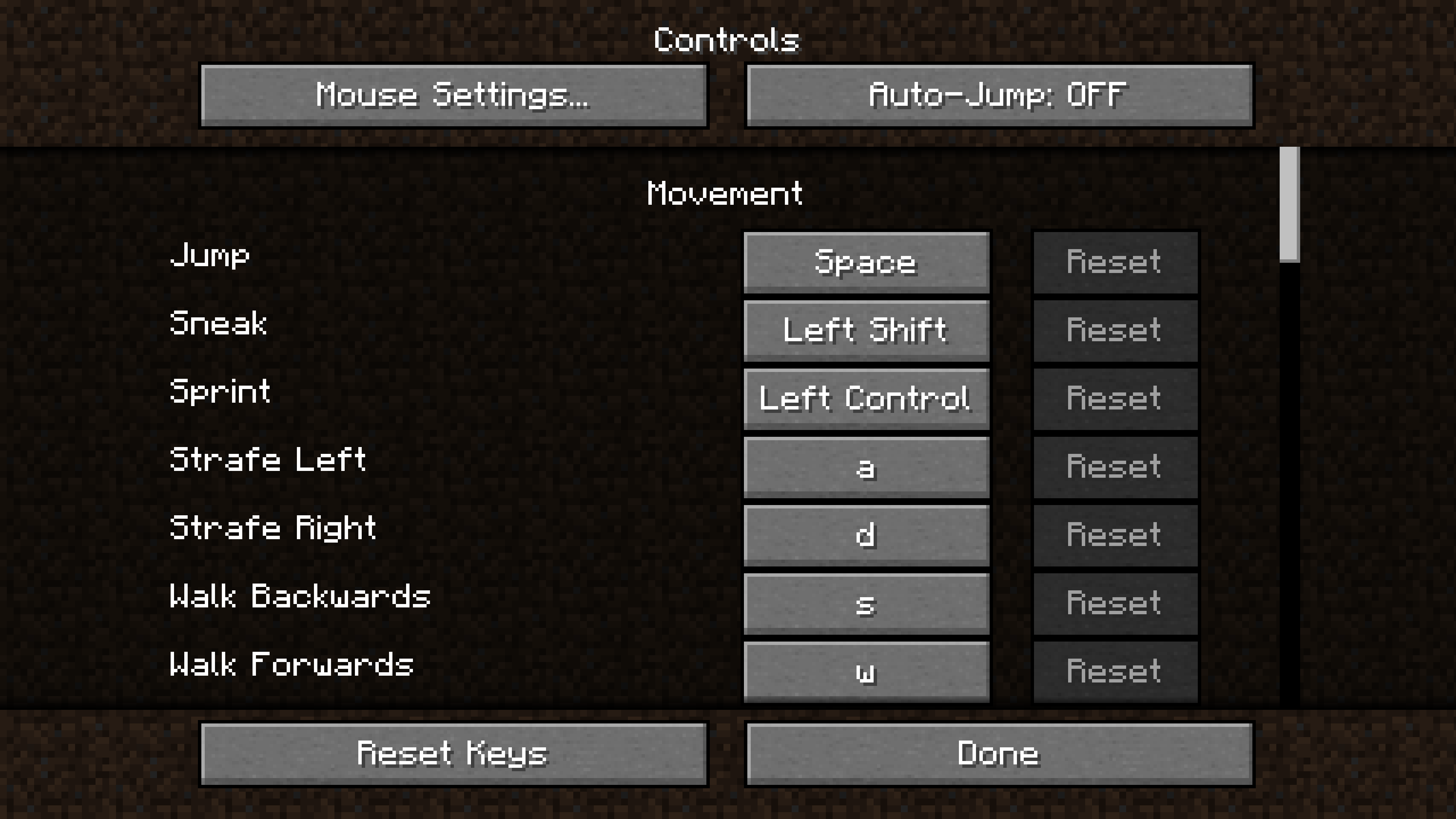
4) English (US) and LOLCAT in Windowed mode:
- Controls_1.16.3_Windowed_US.png
- Controls_1.16.3_Windowed_LOLCAT.png
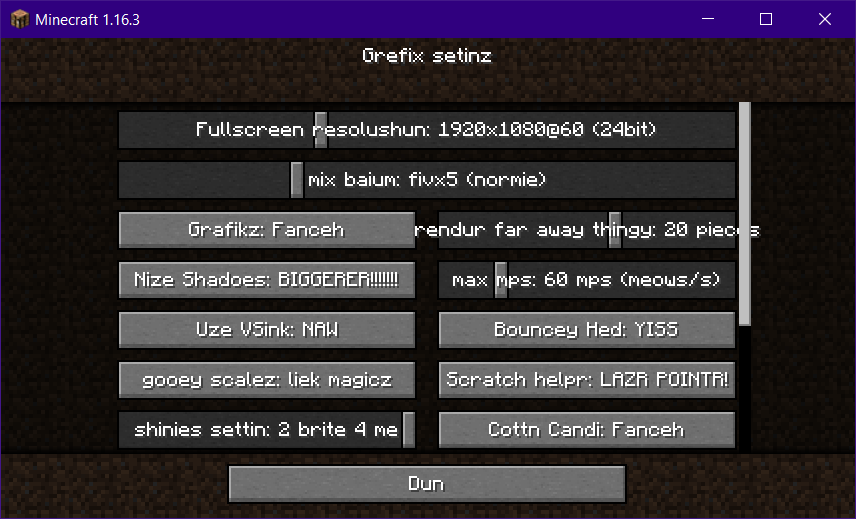
5) Many labels on sliders&buttons crave for some attention, too ("rendur far away thingy 20 piec?s"):
- Graphics_Slider_Bug.png
Environment
Java: Version 8 Update 261 (build 1.8.0_261-b12)
Windows 10 Enterprise, Version 2004, OS build 19041.508
4K Display Monitor
//Enough of Dedotated WAM and CPU+GPU Hurtz to play this game at 120 FPS//
Attachments11




Created Issue:
Different languages labels GUI rescaling is broken
How to replicate
Settings:
- Language is set to [some particular list of bug-covering languages]. In my case it was LOLCAT (Kingdom of Cats) or Spanish (Espana).
- GUI Scale is set to Auto (sometimes other options work too).
Then try doing this:
- You can just go into windowed mode and play with the game's window size while in Controls menu. Spanish and LOLCAT labels get pushed outside the game borders. English (US) language passes this rescaling test fantastically - it adapts and fits everything in the menu just fine.
It is fixable in Windowed mode by stretching the game window to make it wider, but you can't do anything in the Fullscreen.
Attachments notes
1) LOLCAT language controls menu with different resolution (GUI scaling = Auto):
- Controls_2160p_1.16.3_Fullscreen_LOLCAT.png
- Controls_1440p_1.16.3_Fullscreen_LOLCAT.png
- Controls_1080p_1.16.3_Fullscreen_LOLCAT.png
2) English (US) language controls menu with different resolution (GUI scaling = Auto):
- Controls_2160p_16.3_Fullscreen_US.png
- Controls_1440p_16.3_Fullscreen_US.png
- Controls_1080p_16.3_Fullscreen_US.png
3) Spanish (Espana) language controls menu in 4K resolution (GUI scaling = Auto):
- Controls_2160p_1.16.2_Fullscreen_Spanish.png
4) English (US) and LOLCAT in Windowed mode:
- Controls_1.16.3_Windowed_US.png
- Controls_1.16.3_Windowed_LOLCAT.png
5) Many labels on sliders&buttons crave for some attention, too ("rendur far away thingy 20 piec?s"):
- Graphics_Slider_Bug.png
Environment
Java: Version 8 Update 261 (build 1.8.0_261-b12)
Windows 10 Enterprise, Version 2004, OS build 19041.508
4K Display Monitor//Enough of Dedotated WAM and CPU+GPU Hurtz to play this game at 120 FPS//
Attachments10
How to replicate
Settings:
- Language is set to [some particular list of bug-cover
inglanguages]. In my case it was LOLCAT (Kingdom of Cats) or Spanish (Espana).- GUI Scale is set to Auto (sometimes other options work too).
Then try doing this:
- You can just go into windowed mode and play with the game's window size while in Controls menu. Spanish and LOLCAT labels get pushed outside the game borders. English (US) language passes this rescaling test fantastically - it adapts and fits everything in the menu just fine.
It is fixable in Windowed mode by stretching the game window to make it wider, but you can't do anything in the Fullscreen.
Attachments notes
1) LOLCAT language controls menu with different resolution (GUI scaling = Auto):
- Controls_2160p_1.16.3_Fullscreen_LOLCAT.png
- Controls_1440p_1.16.3_Fullscreen_LOLCAT.png
- Controls_1080p_1.16.3_Fullscreen_LOLCAT.png
2) English (US) language controls menu with different resolution (GUI scaling = Auto):
- Controls_2160p_16.3_Fullscreen_US.png
- Controls_1440p_16.3_Fullscreen_US.png
- Controls_1080p_16.3_Fullscreen_US.png
3) Spanish (Espana) language controls menu in 4K resolution (GUI scaling = Auto):
- Controls_2160p_1.16.2_Fullscreen_Spanish.png
4) English (US) and LOLCAT in Windowed mode:
- Controls_1.16.3_Windowed_US.png
- Controls_1.16.3_Windowed_LOLCAT.png
5) Many labels on sliders&buttons crave for some attention, too ("rendur far away thingy 20 piec?s"):
- Graphics_Slider_Bug.png
How to replicate
Settings:
- Language is set to [some particular list of bug-covered languages]. In my case it was LOLCAT (Kingdom of Cats) or Spanish (Espana).
- GUI Scale is set to Auto (sometimes other options work too).
Then try doing this:
- You can just go into windowed mode and play with the game's window size while in Controls menu. Spanish and LOLCAT labels get pushed outside the game borders. English (US) language passes this rescaling test fantastically - it adapts and fits everything in the menu just fine.
It is fixable in Windowed mode by stretching the game window to make it wider, but you can't do anything in the Fullscreen.
Attachments notes
1) LOLCAT language controls menu with different resolutions (GUI scaling = Auto):
- Controls_2160p_1.16.3_Fullscreen_LOLCAT.png
- Controls_1440p_1.16.3_Fullscreen_LOLCAT.png
- Controls_1080p_1.16.3_Fullscreen_LOLCAT.png
2) English (US) language controls menu with different resolutions (GUI scaling = Auto):
- Controls_2160p_16.3_Fullscreen_US.png
- Controls_1440p_16.3_Fullscreen_US.png
- Controls_1080p_16.3_Fullscreen_US.png
3) Spanish (Espana) language controls menu in 4K resolution (GUI scaling = Auto):
- Controls_2160p_1.16.2_Fullscreen_Spanish.png
4) English (US) and LOLCAT in Windowed mode:
- Controls_1.16.3_Windowed_US.png
- Controls_1.16.3_Windowed_LOLCAT.png
5) Many labels on sliders&buttons crave for some attention, too ("rendur far away thingy 20 piec?s"):
- Graphics_Slider_Bug.png

How to replicate
Settings:
- Language is set to [some particular list of bug-covered languages]. In my case it was LOLCAT (Kingdom of Cats) or Spanish (Espana).
- GUI Scale is set to Auto (sometimes other options work too).
Then try doing this:
- You can just go into windowed mode and
playwith the game's window size while in Controls menu. Spanish and LOLCAT labels get pushed outside the game borders. English (US) language passes this rescaling test fantastically - it adaptsandfitseverything in the menu just fine.It is fixable in Windowed mode by stretching the game window to make it wider, but you can't do anything in the Fullscreen.
Attachments notes
1) LOLCAT language controls menu with different resolutions (GUI scaling = Auto):
- Controls_2160p_1.16.3_Fullscreen_LOLCAT.png
- Controls_1440p_1.16.3_Fullscreen_LOLCAT.png
- Controls_1080p_1.16.3_Fullscreen_LOLCAT.png
2) English (US) language controls menu with different resolutions (GUI scaling = Auto):
- Controls_2160p_16.3_Fullscreen_US.png
- Controls_1440p_16.3_Fullscreen_US.png
- Controls_1080p_16.3_Fullscreen_US.png
3) Spanish (Espana) language controls menu in 4K resolution (GUI scaling = Auto):
- Controls_2160p_1.16.2_Fullscreen_Spanish.png
4) English (US) and LOLCAT in Windowed mode:
- Controls_1.16.3_Windowed_US.png
- Controls_1.16.3_Windowed_LOLCAT.png
5) Many labels on sliders&buttons crave for some attention, too ("rendur far away thingy 20 piec?s"):
- Graphics_Slider_Bug.png
How to replicate
Settings:
- Language is set to [some particular list of bug-covered languages]. In my case it was LOLCAT (Kingdom of Cats) or Spanish (Espana).
- GUI Scale is set to Auto (sometimes other options work too).
Then try doing this:
- You can just go into windowed mode and experiment with the game's window size while in Controls menu. Spanish and LOLCAT labels get pushed outside the game's borders. English (US) language passes this rescaling test fantastically - it adapts the font size to fit everything in the menu just fine.
It is fixable in Windowed mode by stretching the game window to make it wider, but you can't do anything in the Fullscreen.
Attachments notes
1) LOLCAT language controls menu with different resolutions (GUI scaling = Auto):
- Controls_2160p_1.16.3_Fullscreen_LOLCAT.png
- Controls_1440p_1.16.3_Fullscreen_LOLCAT.png
- Controls_1080p_1.16.3_Fullscreen_LOLCAT.png
2) English (US) language controls menu with different resolutions (GUI scaling = Auto):
- Controls_2160p_16.3_Fullscreen_US.png
- Controls_1440p_16.3_Fullscreen_US.png
- Controls_1080p_16.3_Fullscreen_US.png
3) Spanish (Espana) language controls menu in 4K resolution (GUI scaling = Auto):
- Controls_2160p_1.16.2_Fullscreen_Spanish.png
4) English (US) and LOLCAT in Windowed mode:
- Controls_1.16.3_Windowed_US.png
- Controls_1.16.3_Windowed_LOLCAT.png
5) Many labels on sliders&buttons crave for some attention, too ("rendur far away thingy 20 piec?s"):
- Graphics_Slider_Bug.png
Thank you for your report!
However, this issue is Invalid.
You have posted an issue related to a translation of the game, which are not tracked on the bug tracker. The issue here is that the translations provided by the community are too long.
Please instead go to Minecraft on Crowdin to suggest and discuss better translations.
Quick Links:
📓 Issue Guidelines – 🛠 Community Support – 📧 Customer Support – ✍️ Feedback and Suggestions – 📖 Game Wiki
💬 Mojira Subreddit – 💬 Mojira Discord
It's not exactly a "long translation" problem. The translated labels could be twice as big as original, however the problem is that the game ignores their length (as seen in screenshots) and doesn't rescale accordingly. This is what appears to require a fix.
Plus, haven't you considered making the buttons bigger or, perhaps, resizing everything down when not everything fits? Here's an issue from 2013 and it still lives to this* day:
MC-9013Sorry for the delay. This is more of a feature request and not a bug. For suggestions, visit the Feedback website, or visit Minecraft Suggestions on Reddit.