 MC-40918
Java app crash after starting to stream using integrated twitch.tv feature
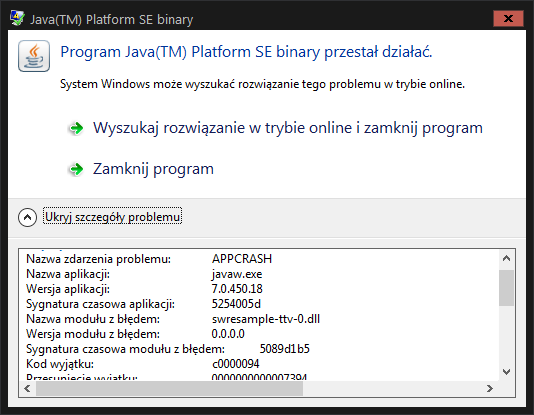
You press F6 to start streaming, the red broadcasting icon appear in the upper right corner of the screen and then windows/java appcrash window appear with information as follow:
(names will be in Polish I can't translate them):
Podpis problemu:
Nazwa zdarzenia problemu: APPCRASH
Nazwa aplikacji: javaw.exe
Wersja aplikacji: 7.0.450.18
Sygnatura czasowa aplikacji: 5254005d
Nazwa modułu z błędem: swresample-ttv-0.dll
Wersja modułu z błędem: 0.0.0.0
Sygnatura czasowa modułu z błędem: 5089d1b5
Kod wyjątku: c0000094
Przesunięcie wyjątku: 0000000000007394
Wersja systemu operacyjnego: 6.1.7601.2.1.0.256.4
Identyfikator ustawień regionalnych: 1045
Dodatkowe informacje 1: 96a1
Dodatkowe informacje 2: 96a17e72535ddea8cbb1638cff9caafb
Dodatkowe informacje 3: 98fd
Dodatkowe informacje 4: 98fd33e35fc7ce6ce9f2631f63ff56eb
Environment
Windows 7 Enterprise x64, Intel Core i5-2300, Gigabyte GA-Z68AP-D3 (rev. 2.0), 4 GB | DDR 3 | 1600 MHz, NVIDIA GeForce GTS 450 | 1024 MB GDDR5, Audio Realtek ALC889 @ Intel Cougar Point PCH - High Definition Audio Controller [B-3], Java 7 Update 45 (64-bit)


Created Issue:
Java app crash after starting to stream using integrated twitch.tv feature
You press F6 to start streaming, the red broadcasting icon appear in the upper right corner of the screen and then windows/java appcrash window appear with information as follow:
(names will be in Polish I can't translate them):
Podpis problemu:
Nazwa zdarzenia problemu: APPCRASH
Nazwa aplikacji: javaw.exe
Wersja aplikacji: 7.0.450.18
Sygnatura czasowa aplikacji: 5254005d
Nazwa modułu z błędem: swresample-ttv-0.dll
Wersja modułu z błędem: 0.0.0.0
Sygnatura czasowa modułu z błędem: 5089d1b5
Kod wyjątku: c0000094
Przesunięcie wyjątku: 0000000000007394
Wersja systemu operacyjnego: 6.1.7601.2.1.0.256.4
Identyfikator ustawień regionalnych: 1045
Dodatkowe informacje 1: 96a1
Dodatkowe informacje 2: 96a17e72535ddea8cbb1638cff9caafb
Dodatkowe informacje 3: 98fd
Dodatkowe informacje 4: 98fd33e35fc7ce6ce9f2631f63ff56ebEnvironment
Windows 7 Enterprise x64, Intel Core i5-2300, Gigabyte GA-Z68AP-D3 (rev. 2.0), 4 GB | DDR 3 | 1600 MHz, NVIDIA GeForce GTS 450 | 1024 MB GDDR5, Audio Realtek ALC889 @ Intel Cougar Point PCH - High Definition Audio Controller [B-3], Java 7 Update 45 (64-bit)
Attachments1

Is this still a concern in the current Minecraft version 1.7.4 / Launcher version 1.3.6 or later? If so, please update the affected versions in order to best aid Mojang ensuring bugs are still valid in the latest releases/pre-releases.

Incomplete without crash report (minecraft/crash-reports/crash-<DATE>-client.txt). Please attach it so that we can diagnose your issue.
There is no crash report, the folder is empty.
Please force a crash by pressing F3 + C for 10 seconds while in-game and attach the crash report (minecraft/crash-reports/crash-<DATE>-client.txt) here.
I should press this after I got live with streaming or when I should do that because I am confused, as soon as I press F6, the game stops working (meaning I can't do anything In it) with a no response and there is that Java crash I posted above, so I am kinda confused at when I am suppose to crash the game by pressing F3 + C.
Do it before you start the stream please. The java crash you posted does not provide all the information needed.
Done
-XX:HeapDumpPath=MojangTricksIntelDriversForPerformance_javaw.exe_minecraft.exe.heapdump
OpenGL: GeForce GTS 450/PCIe/SSE2 GL version 4.3.0, NVIDIA Corporation
Interesting, appears you have an integrated intel video and a GeForce card. Are you running monitors off both? If not then you may try disabling your intelgfx to see if it makes a difference. The nvidia card should work fine for it but not sure if the intel one is causing any issues.
I run dual monitor setup, both of them are connected to my GTS 450, Integrated Intel HD GPU is disabled in BIOS.
Yes this still concern Minecraft Version 1.7.4, everything was fine in pre-release because I tested and could broadcast but in final 1.7.4 version it crashes again the same as previously. Maybe it was just my luck that it worked those couple times in pre-release...
This is a technical support issue; this site is for bug reports only. For technical support please use the Mojang Support Center.