 MC-80867
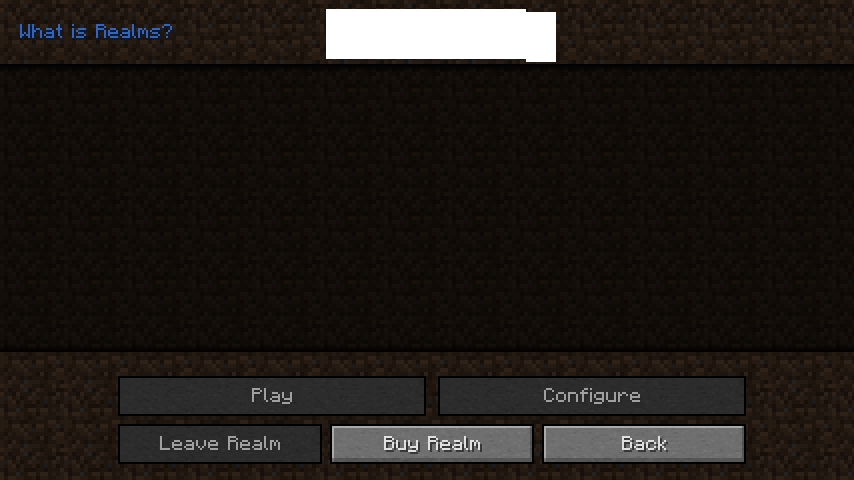
Realms GUI icons appear blank
The graphics on the Realms GUI fail to render. Tried redownloading the game but the bug persisted even across versions.
Environment
– System Details –
Details:
Minecraft Version: 1.8.6
Operating System: Windows 7 (x86) version 6.1
CPU: 2x Pentium(R) Dual-Core CPU E5500 @ 2.80GHz
Java Version: 1.8.0_25, Oracle Corporation
Java VM Version: Java HotSpot(TM) Client VM (mixed mode), Oracle Corporation
Memory: 410305424 bytes (391 MB) / 631648256 bytes (602 MB) up to 1020067840 bytes (972 MB)
JVM Flags: 5 total; -XX:HeapDumpPath=MojangTricksIntelDriversForPerformance_javaw.exe_minecraft.exe.heapdump -Xmx1G -XX:+UseConcMarkSweepGC -XX:-UseAdaptiveSizePolicy -Xmn512M
IntCache: cache: 0, tcache: 0, allocated: 0, tallocated: 0
Launched Version: 1.8.6
LWJGL: 2.9.4
OpenGL: Intel Bear Lake B GL version 1.4.0 - Build 8.14.10.1930, Intel
GL Caps: Using GL 1.3 multitexturing.
Using GL 1.3 texture combiners.
Not using framebuffer objects because OpenGL 1.4 is supported, EXT_blend_func_separate is supported, OpenGL 3.0 is not supported, ARB_framebuffer_object is not supported, and EXT_framebuffer_object is not supported.
Shaders are not available because OpenGL 2.1 is not supported, ARB_shader_objects is not supported, ARB_vertex_shader is not supported, and ARB_fragment_shader is not supported.
VBOs are available because ARB_vertex_buffer_object is supported.
Using VBOs: No
Is Modded: Probably not. Jar signature remains and client brand is untouched.
Type: Client (map_client.txt)
Resource Packs: [Gil2455526's custom pack, Peony Fix Resource Pack.zip]
Current Language: English (US)
Profiler Position: N/A (disabled)


Created Issue:
Realms GUI icons appear blank
The graphics on the Realms GUI fail to render. Tried redownloading the game but the bug persisted even across versions.
Environment
– System Details –
Details:
Minecraft Version: 1.8.6
Operating System: Windows 7 (x86) version 6.1
CPU: 2x Pentium(R) Dual-Core CPU E5500 @ 2.80GHz
Java Version: 1.8.0_25, Oracle Corporation
Java VM Version: Java HotSpot(TM) Client VM (mixed mode), Oracle Corporation
Memory: 410305424 bytes (391 MB) / 631648256 bytes (602 MB) up to 1020067840 bytes (972 MB)
JVM Flags: 5 total; -XX:HeapDumpPath=MojangTricksIntelDriversForPerformance_javaw.exe_minecraft.exe.heapdump -Xmx1G -XX:+UseConcMarkSweepGC -XX:-UseAdaptiveSizePolicy -Xmn512M
IntCache: cache: 0, tcache: 0, allocated: 0, tallocated: 0
Launched Version: 1.8.6
LWJGL: 2.9.4
OpenGL: Intel Bear Lake B GL version 1.4.0 - Build 8.14.10.1930, Intel
GL Caps: Using GL 1.3 multitexturing.
Using GL 1.3 texture combiners.
Not using framebuffer objects because OpenGL 1.4 is supported, EXT_blend_func_separate is supported, OpenGL 3.0 is not supported, ARB_framebuffer_object is not supported, and EXT_framebuffer_object is not supported.
Shaders are not available because OpenGL 2.1 is not supported, ARB_shader_objects is not supported, ARB_vertex_shader is not supported, and ARB_fragment_shader is not supported.
VBOs are available because ARB_vertex_buffer_object is supported.Using VBOs: No
Is Modded: Probably not. Jar signature remains and client brand is untouched.
Type: Client (map_client.txt)
Resource Packs: [Gil2455526's custom pack, Peony Fix Resource Pack.zip]
Current Language: English (US)
Profiler Position: N/A (disabled)
Attachments3

Your system is way below the minimum requirements to play Minecraft.
You might try to upgrade your graphics cayd drivers, this may help.
This is a technical support issue; this site is for bug reports only. For technical support please use the Mojang Support Center.