 MCL-199
Redownloads minecraft.jar with or WITHOUT mods
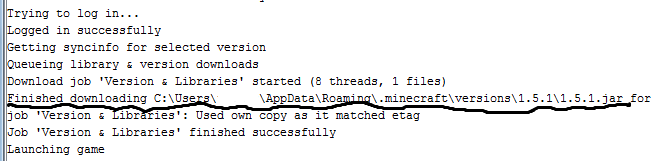
while using the Dev Launcher, it re-downloads the *.jar file over again every time i go to play. Also there is no offline mode
every time I go to play it re-downloads the .jar file so I cant have mods even, without mods it still re-downloads it
And no it is not a copy of
https://mojang.atlassian.net/browse/MC-14569
I know how to fix this problem,
First go into %appdata%
Then go into .minecraft folder
Then versions.
C:\Users\ \AppData\Roaming\.minecraft\versions
Click on a version and look for "version name".json (I.e 13w16b.json)
if not there copy and paste
to a .json file within the version u want
Change\/ id \/ to whateva u want
{
"id": "whateva u want",
"time": "Mar 20, 2013 12:00:00 PM",
"releaseTime": "Mar 20, 2013 12:00:00 PM",
"type": "release",
"processArguments": "legacy",
"libraries": [
,
,
,
,
{
"name": "org.lwjgl.lwjgl:lwjgl-platform:2.9.0",
"natives":
,
"extract":
},
{
"name": "net.java.jinput:jinput-platform:2.0.5",
"natives":
,
"extract":
}
],
"mainClass": "net.minecraft.client.Minecraft"
}
I have solved that issue, but every time I go to play it re-downloads the .jar file so I cant have mods even, without mods it still re-downloads it
Environment
Windows 7 64 bit java 6
Attachments2


Created Issue:
Redownloads minecraft.jar with or WITHOUT mods
while using the Dev Launcher, it re-downloads the *.jar file over again every time i go to play. Also there is no offline mode
every time I go to play it re-downloads the .jar file so I cant have mods even, without mods it still re-downloads itAnd no it is not a copy of
https://mojang.atlassian.net/browse/MC-14569I know how to fix this problem,
First go into %appdata%Then go into .minecraft folder
Then versions.
C:\Users\ \AppData\Roaming\.minecraft\versionsClick on a version and look for "version name".json (I.e 13w16b.json)
if not there copy and paste
to a .json file within the version u wantChange\/ id \/ to whateva u want
{
{ "name": "org.lwjgl.lwjgl:lwjgl:2.9.0" }
"id": "whateva u want",
"time": "Mar 20, 2013 12:00:00 PM",
"releaseTime": "Mar 20, 2013 12:00:00 PM",
"type": "release",
"processArguments": "legacy",
"libraries": [
,
{ "name": "org.lwjgl.lwjgl:lwjgl_util:2.9.0" }
,
{ "name": "net.java.jinput:jinput:2.0.5" }
,
{ "name": "net.java.jutils:jutils:1.0.0" }
,
{ "linux": "natives-linux", "windows": "natives-windows", "osx": "natives-osx" }
{
"name": "org.lwjgl.lwjgl:lwjgl-platform:2.9.0",
"natives":,
{ "exclude": [ "META-INF/" ] }
"extract":},
{ "linux": "natives-linux", "windows": "natives-windows", "osx": "natives-osx" }
{
"name": "net.java.jinput:jinput-platform:2.0.5",
"natives":,
{ "exclude": [ "META-INF/" ] }
"extract":}
],
"mainClass": "net.minecraft.client.Minecraft"
}I have solved that issue, but every time I go to play it re-downloads the .jar file so I cant have mods even, without mods it still re-downloads it
Environment
Windows 7 64 bit java 6
Attachments2
 MC-14628
![[Mojang] Nathan Adams](../../../data/assets/gravatar/dinnerbone.png)
![[Mod] Ezekiel (ezfe)](../../../data/assets/gravatar/ezekielelin.jpeg)
Please do not mark unreleased versions as affected. You do not have access to this yet.
You're misreading the console. If you continue to read the text from that scribbled line, just under it the text continues: "... used own copy as it matched etag". It checked with us to make sure the file was up to date, but didn't actually download the whole file all over again.