 MCL-584
Launcher don't let me play online
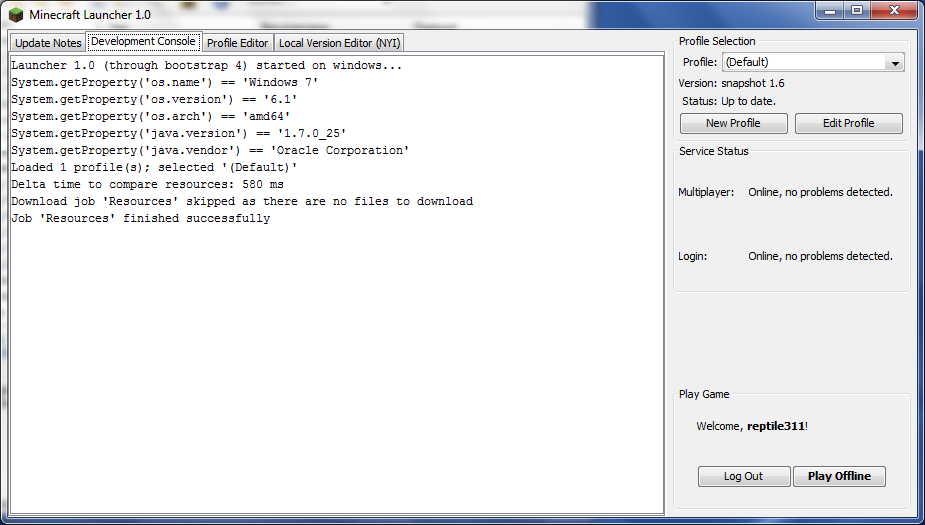
When I'm starting the launcher it says "Multiplayer ok, Login ok" and then shows the "play offline" button.
What I expected to happen was...:
The launcher shows the "Play" button.
What I did until now, was ...
Delete the .minecraft folder, delete the launcher.exe. Redownload the new launcher and start the launcher.
At the first login, I get an error in the development console. When I'm close the launcher and start it again, I get always the "Play offline" button
Environment
Win 7 64bit, Java7u25 64bit
Linked Issues


Created Issue:
Launcher don't let me play online
When I'm starting the launcher it says "Multiplayer ok, Login ok" and then shows the "play offline" button.
What I expected to happen was...:
The launcher shows the "Play" button.What I did until now, was ...
Delete the .minecraft folder, delete the launcher.exe. Redownload the new launcher and start the launcher.
At the first login, I get an error in the development console. When I'm close the launcher and start it again, I get always the "Play offline" buttonEnvironment
Win 7 64bit, Java7u25 64bit
Attachments2
- Unresolved
- Open
- Unconfirmed
- Play_offline
- 1.0.0

duplicates

Have you looked at the console error? It has to do with the new Yggdrasil, or do you only mark it as duplicated?
The launcher was reverted back to the old system which has your issue.