 MCPE-100609
Custom blocks cast shadows onto themselves
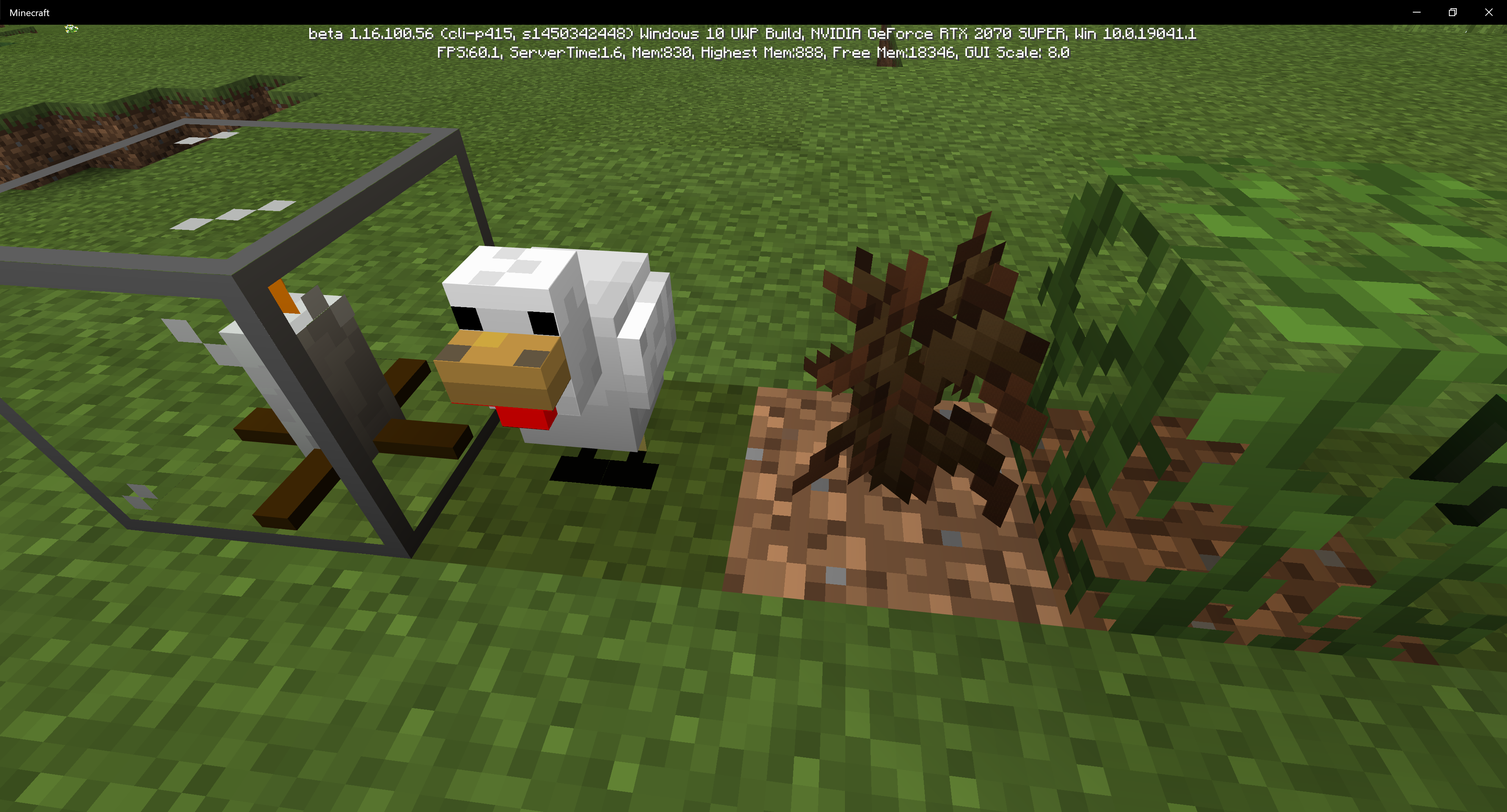
Blocks (more noticeable on custom block models) cast shadows onto themselves, or they just have dark spots on them, noticeably near the bottom of them. In this example, I used a Pig model and a custom plant-like model (with an edited gunpowder texture on it). The Pig's back legs' fronts are dark, and the whole gunpowder plant-looking thing is dark (I'm holding the item as a comparison). The other example includes a chicken model (with dark feet).
Steps to Reproduce:
Make a custom block model and put it onto a custom block.
What I expected to happen was...:
The model should be nice and bright.
What actually happened was...:
The model has a dark point(s) on some portions of it.


Created Issue:
Blocks cast shadows onto themselves
Blocks (more noticeable on custom block models) cast shadows onto themselves, or they just have black spots on them, noticeably near the bottom of them. In this example, I used a Pig model and a custom plant-like model (with an edited gunpowder texture on it). The Pig's back legs' fronts are dark, and the whole gunpowder plant-looking thing is dark (I'm holding the item as a comparison). The other example includes a chicken model (with dark feet).
Attachments2
Blocks (more noticeable on custom block models) cast shadows onto themselves, or they just have
black spots on them, noticeably near the bottom of them. In this example, I used a Pig model and a custom plant-like model (with an edited gunpowder texture on it). The Pig's back legs' fronts are dark, and the whole gunpowder plant-looking thing is dark (I'm holding the item as a comparison). The other example includes a chicken model (with dark feet).Blocks (more noticeable on custom block models) cast shadows onto themselves, or they just have dark spots on them, noticeably near the bottom of them. In this example, I used a Pig model and a custom plant-like model (with an edited gunpowder texture on it). The Pig's back legs' fronts are dark, and the whole gunpowder plant-looking thing is dark (I'm holding the item as a comparison). The other example includes a chicken model (with dark feet).
Steps to Reproduce:
Make a custom block model and put it onto a custom block.
What I expected to happen was...:
The model should be nice and bright.
What actually happened was...:
The model has a dark point(s) on some portions of it.
Blocks cast shadows onto themselvesCustom blocks cast shadows onto themselves
![[MCQA] v-magwar](../../../data/avatars/users/18935.svg)
![[MCQA] Kinga Izdebska](../../../data/avatars/users/18949.svg)
Is this still an issue in the latest version? If so, can you add it to the affected versions?
Cleaning up old tickets: This ticket had been set to 'Awaiting Response', but has not received a response from the reporter (~3 months+) so is being closed as Incomplete. If you feel this is still a valid issue then please comment, or create a new ticket following the Issue Guidelines which includes steps to reproduce the problem.
Quick Links:
📓 Issue Guidelines – 💬 Mojang Support – 📧 Suggestions – 📖 Minecraft Wiki