 BeeTeeKay64
- BeeTeeKay
- JIRAUSER491703
- America/Menominee
- Yes
- No
 MCPE-80236MCPE-96198MCPE-97005MCPE-98305MCPE-98831MCPE-102865MCPE-107394











 MC-208649
Repeating Command Blocks withalwaysactive on will sometimes not work when reloading worldRepeating Command Blocks with “Always Active” on will sometimes not work when reloading world
Do not get me wrong, having a pet parrot is amazing. However, what’s not amazing is the fact that they imitate monsters way too often. So one day I’m mining with my pet parrot and it imitates a zombie. Okay, sounds pretty good so far. But, it keeps imitating the zombie
as if there were more than one parrot, and it gets on my nerves. The parroteven moans moreoftenthan the zombie does!
To reproduce, simply tame a parrot and go near any monster it can imitate.
Do not get me wrong, having a pet parrot is amazing. However, what’s not amazing is the fact that they imitate monsters way too often. So one day I’m mining with my pet parrot and it imitates a zombie. Okay, sounds pretty good so far. But, it keeps imitating the zombie over and over again; way too much. The parrot makes more noise than the zombie does!
To reproduce, simply tame a parrot and go near any monster it can imitate with the parrot.
Do not get me wrong, having a pet parrot is amazing. However, what’s not amazing is the fact that they imitate monsters way too often. So one day I’m mining with my pet parrot and it imitates a zombie. Okay, sounds pretty good so far. But, it keeps imitating the zombie over and over again; way too much. The parrot makes more noise than the zombie does!
T
o reproduce, simply tame aparrot andgo near any monster it can imitate with the parrot.Do not get me wrong, having a pet parrot is amazing. However, what’s not amazing is the fact that they imitate monsters way too often. So one day I’m mining with my pet parrot and it imitates a zombie. Okay, sounds pretty good so far. But, it keeps imitating the zombie over and over again; way too much. The parrot makes more noise than the zombie does!
Steps to Reproduce:
1. Tame a Parrot
2. Let it imitate any monster mob nearbyObserved Results:
The Parrot imitates the monster constantly; way too much.Expected Results:
The Parrot should occasionally imitate the monster.This would be stressful for when someone has more than one parrot, and all of them suddenly start groaning like a zombie.
Do not get me wrong, having a pet parrot is amazing. However, what’s not amazing is the fact that they imitate monsters way too often. So one day I’m mining with my pet parrot and it imitates a zombie. Okay, sounds pretty good so far. But, it keeps imitating the zombie over and over again; way too much. The parrot makes more noise than the zombie does!
Steps to Reproduce:
1. Tame a Parrot
2. Let it imitate any monster mob nearbyObserved Results:
The Parrot imitates the monster constantly; way too much.Expected Results:
The Parrot should occasionally imitate the monster.This would be stressful for when someone has more than one parrot, and all of them
suddenlystart groaning like a zombie.Do not get me wrong, having a pet parrot is amazing. However, what’s not amazing is the fact that they imitate monsters way too often. So one day I’m mining with my pet parrot and it imitates a zombie. Okay, sounds pretty good so far. But, it keeps imitating the zombie over and over again; way too much. The parrot makes more noise than the zombie does!
Steps to Reproduce:
1. Tame a Parrot
2. Let it imitate any monster mob nearbyObserved Results:
The Parrot imitates the monster constantly; way too much.Expected Results:
The Parrot should occasionally imitate the monster.This would be stressful for when someone has more than one parrot, and all of them start groaning like a zombie, many, many times. The intervals of each imitate sound may be intended, but you never know.
Do not get me wrong, having a pet parrot is amazing. However, what’s not amazing is the fact that they imitate monsters way too often. So one day I’m mining with my pet parrot and it imitates a zombie. Okay, sounds pretty good so far. But, it keeps imitating the zombie over and over again; way too much. The parrot makes more noise than the zombie does!
Steps to Reproduce:
1. Tame a Parrot
2. Let it imitate any monster mob nearbyObserved Results:
The Parrot imitates the monster constantly; way too much.Expected Results:
The Parrot should occasionally imitate the monster.This would be stressful for when someone has more than one parrot, and all of them start groaning like a zombie, many, many times. The intervals of each imitate sound may be intended, but you never know.
Finding
a rare thingin the game gives a big sense of accomplishment. However, one problem I have noticed is how most things that are rare in Java Editionare seeminglycommon in the Bedrock Edition.For
oneexample, Zombies and Skeletonsseemto drop their armorvery commonly. Every time I kill a zombie or skeleton with armor, at least one of their armor pieces drop almost every time. My friend set up a mob grinder for a zombie spawner we found and the chests they dropped their loot into were filled to the brim with armor pieces!Another example includes abandoned/zombie villages. I find one near spawn on almost every other world I go on. Not only that, but villages in general are very likely to generate near spawn, making early game a lot easier.
One last example is fishing. Fishing is broken and I usually get a treasure item every 10 or so fish. One time I went fishing on another friend’s world and got an enchantment book first try (which could have just been a lucky occasion)!
Actually, another last example
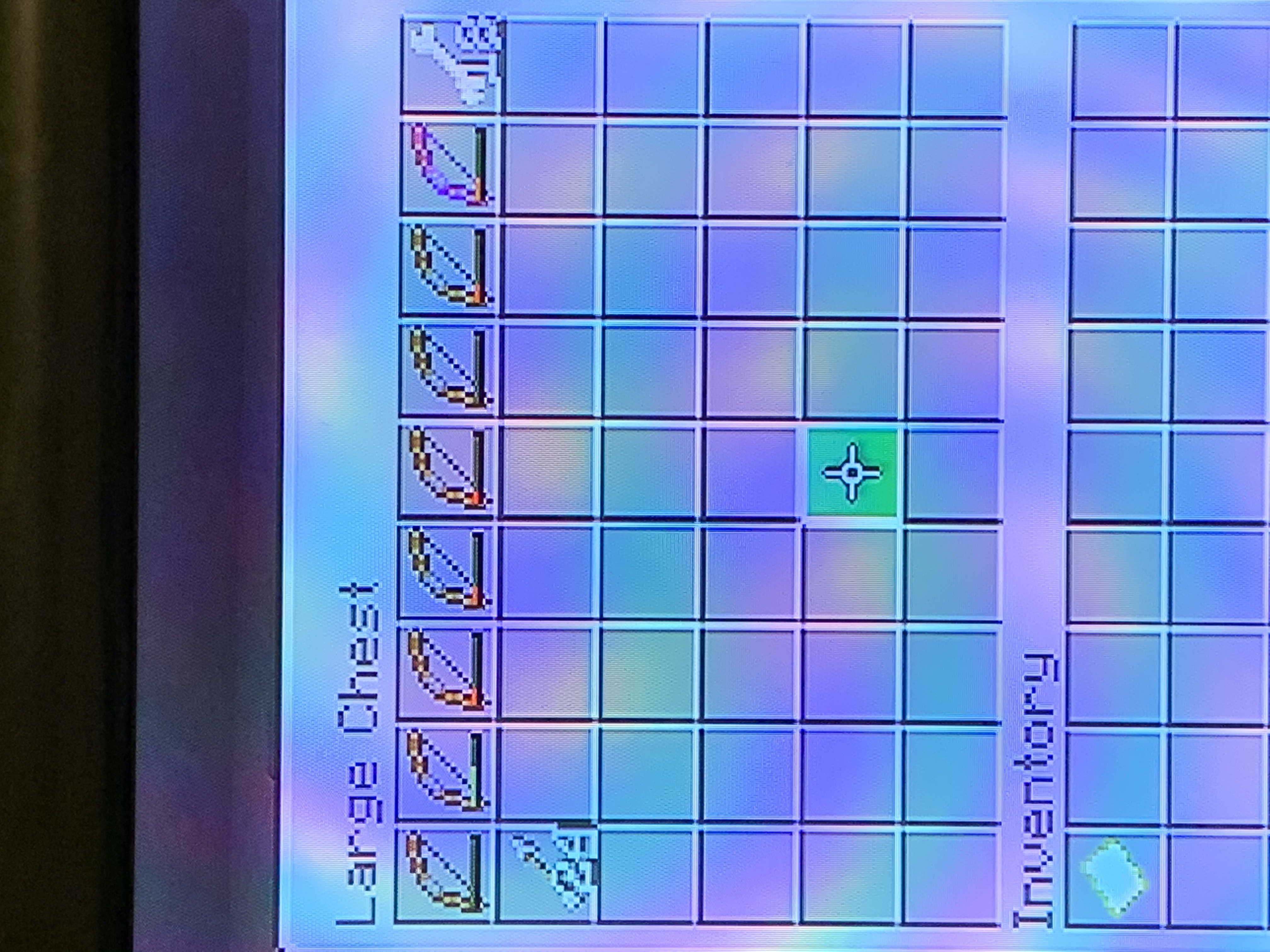
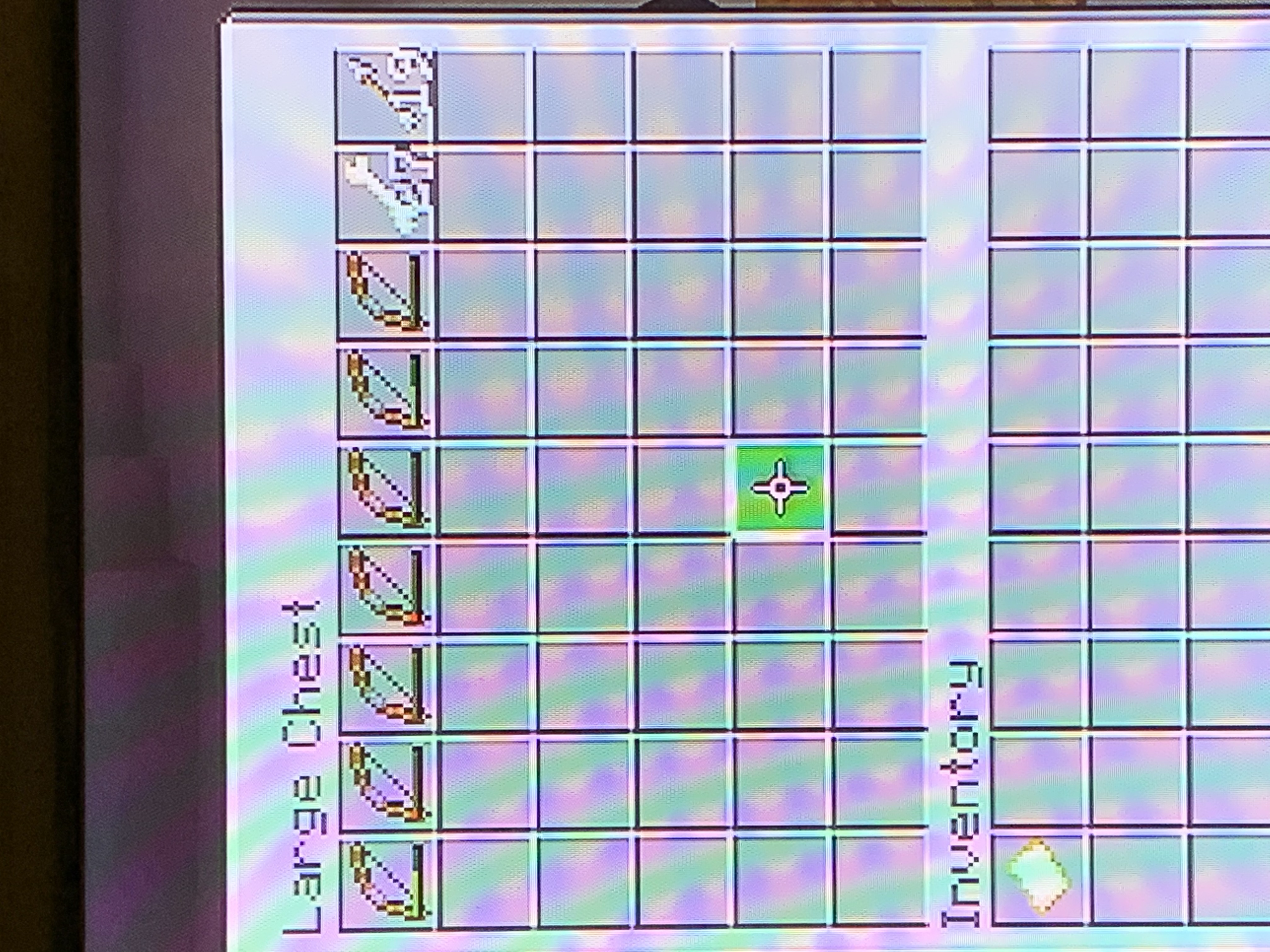
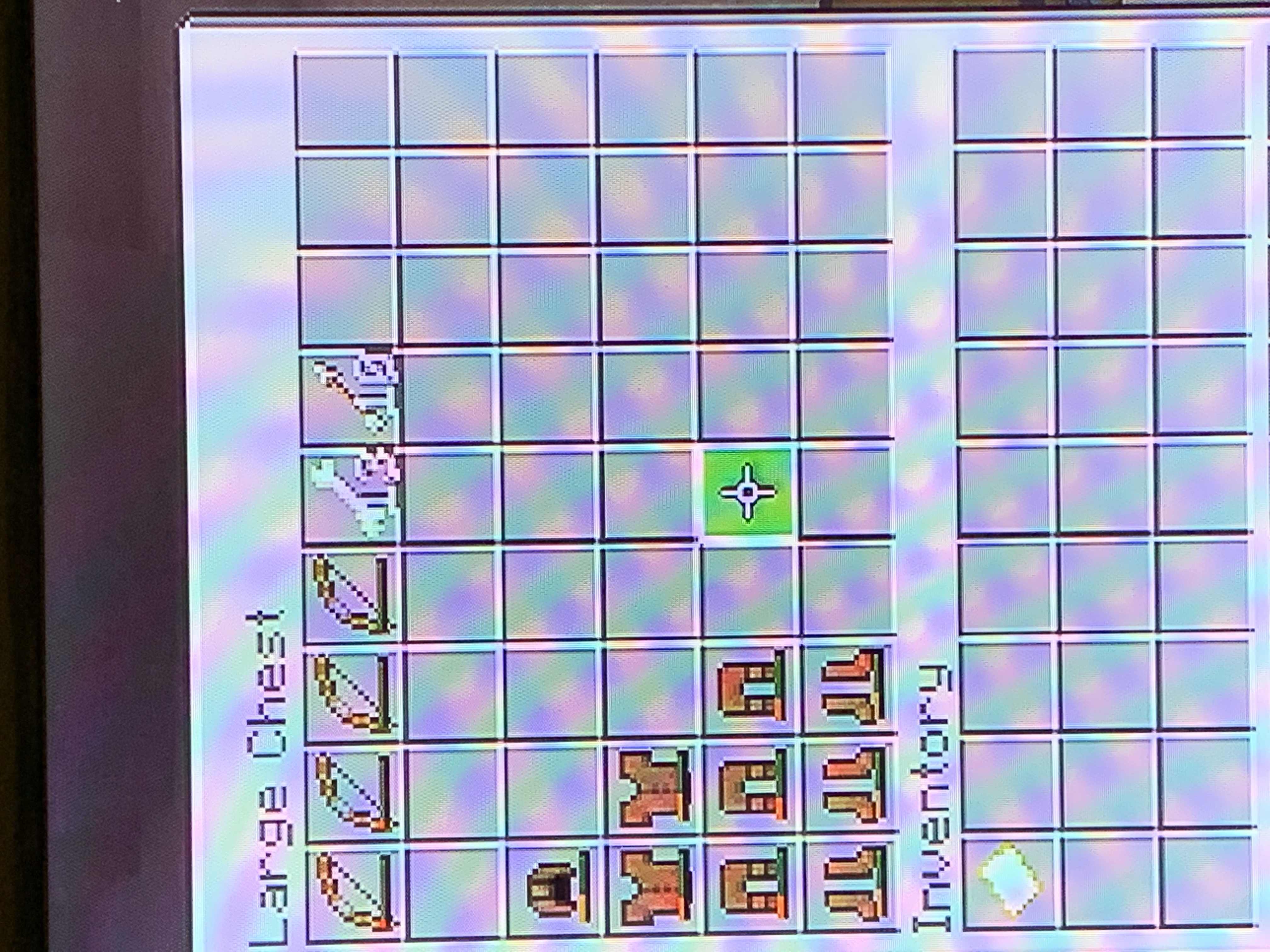
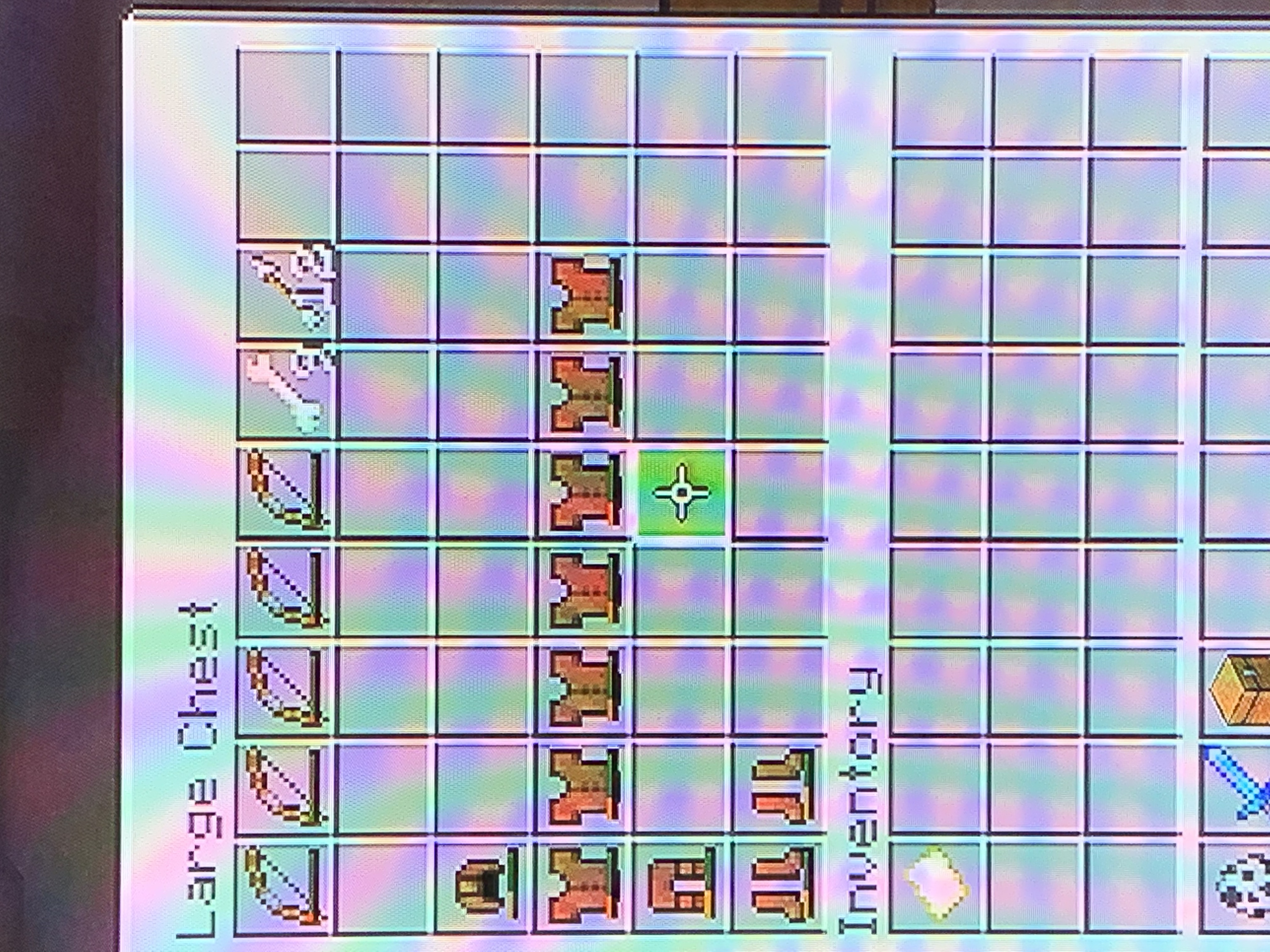
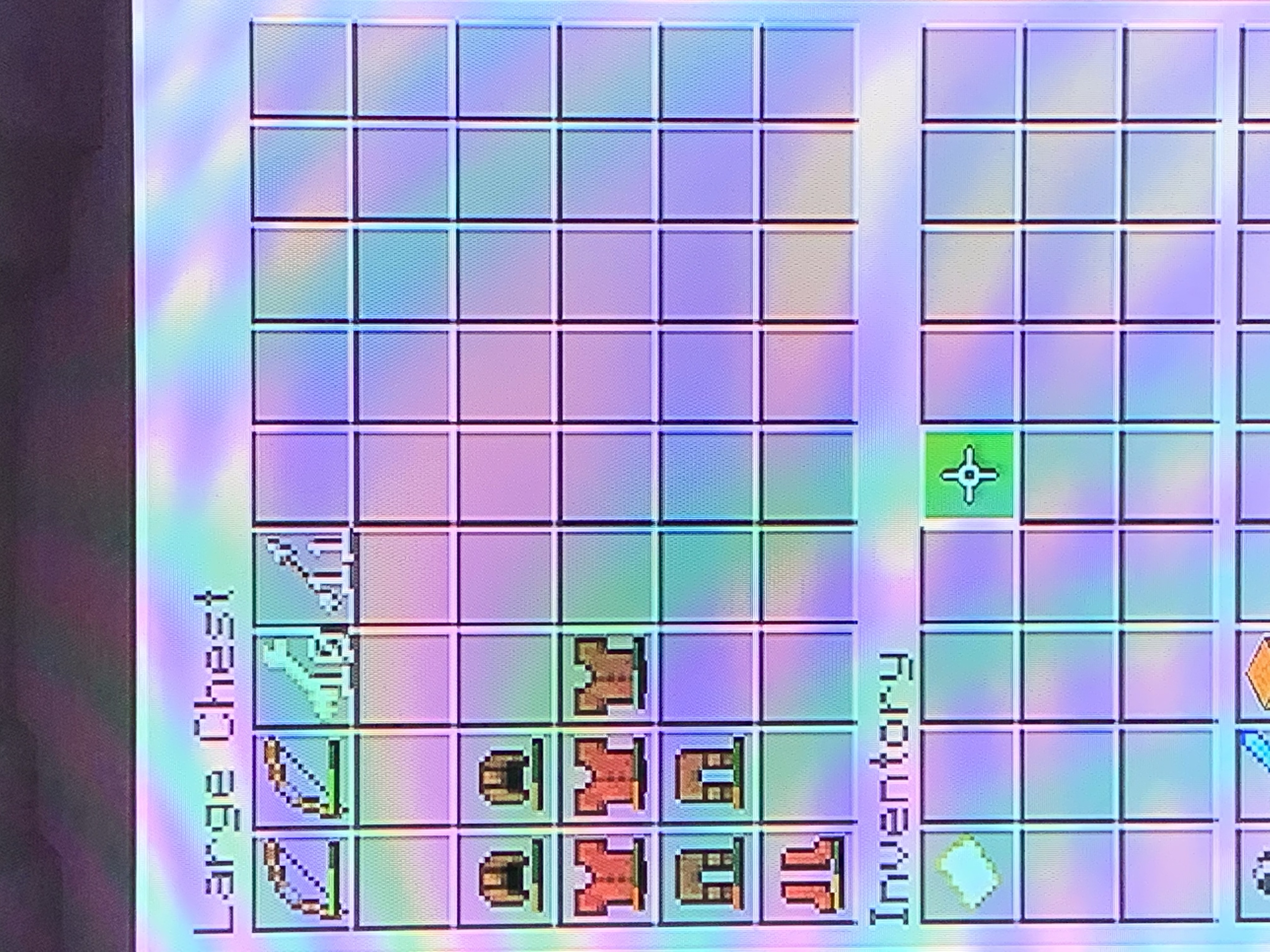
, for sure,is an experiment I conducted. Attached are 6 images. 3 are large chests filled with 20 skeletons worth of loot, and the other 3 are large chests with 10 full leather armor skeletons worth of loot. Noticeably, the chests with 20 dead skeletons have a significant amount of bows dropped, and the 10 dead full leather skeletons have a significant amount of armor dropped.In general, rare loot table items and rare generation options seem and feel like they are more common than Java Edition.
Finding something rare in the game gives a big sense of accomplishment. However, one problem I have noticed is how most things that are rare in Java Edition seem to be common in the Bedrock Edition.
For example, Zombies and Skeletons are more likely to drop their armor. Every time I kill a zombie or skeleton with armor, at least one of their armor pieces drop almost every time. My friend set up a mob grinder for a zombie spawner we found and the chests they dropped their loot into were filled to the brim with armor pieces!
Another example includes abandoned/zombie villages. I find one near spawn on almost every other world I go on. Not only that, but villages in general are very likely to generate near spawn, making early game a lot easier.
One last example is fishing. Fishing is broken and I usually get a treasure item every 10 or so fish. One time I went fishing on another friend’s world and got an enchantment book first try (which could have just been a lucky occasion)!
Actually, another last example is an experiment I conducted. Attached are 6 images. 3 are large chests filled with 20 skeletons worth of loot, and the other 3 are large chests with 10 full leather armor skeletons worth of loot. Noticeably, the chests with 20 dead skeletons have a significant amount of bows dropped, and the 10 dead full leather skeletons have a significant amount of armor dropped.
In general, rare loot table items and rare generation options seem and feel like they are more common than the Java Edition’s rare occurrence chances.
Finding something rare in the game gives a big sense of accomplishment. However, one problem I have noticed is how mo
st things that are rare in Java Editionseem to be common inthe Bedrock Edition.For example, Zombies and Skeletons are more likely to drop their armor. Every time I kill a zombie or skeleton with armor, at least one of their armor pieces drop almost every time. My friend set up a mob grinder for a zombie spawner we found and the chests they dropped their loot into were filled to the brim with armor pieces!
Another example includes abandoned/zombie villages. I find one near spawn on almost every other world I go on. Not only that, but villages in general are very likely to generate near spawn, making early game a lot easier.
One last example is fishing. Fishing is broken and I usually get a treasure item every 10 or so fish. One time I went fishing on another friend’s world and got an enchantment book first try (which could have just been a lucky occasion)!Actually, another last example is an experiment I conducted. Attached are 6 images. 3 are large chests filled with 20 skeletons worth of loot, and the other 3 are large chests with 10 full leather armor skeletons worth of loot. Noticeably, the chests with 20 dead skeletons have a significant amount of bows dropped, and the 10 dead full leather skeletons have a significant amount of armor dropped.
In general, rare loot table items and rare generation options seem and feel like they are more common than the Java Edition’s rare occurrence chances.
Finding something rare in the game gives a big sense of accomplishment. However, one problem I have noticed is how mob drops could be rarer in Java Edition compared to the Bedrock Edition.
For example, Zombies and Skeletons are more likely to drop their armor. Every time I kill a zombie or skeleton with armor, at least one of their armor pieces drop almost every time. My friend set up a mob grinder for a zombie spawner we found and the chests they dropped their loot into were filled to the brim with armor pieces!
Below is an experiment I conducted. Attached are 6 images. 3 are large chests filled with 20 skeletons worth of loot, and the other 3 are large chests with 10 full leather armor skeletons worth of loot. Noticeably, the chests with 20 dead skeletons have a significant amount of bows dropped, and the 10 dead full leather skeletons have a significant amount of armor dropped.
In general, rare loot table items seem and feel like they are more common than the Java Edition’s rare occurrence chances.
Rare mob dropsand other rare occasionsseem to be more common than Java Edition
Finding something rarein thegame gives a big sense of accomplishment. However, one problem I have noticed is how mob drops could be rarer in Java Edition compared to the Bedrock Edition.
For example, Zombies and Skeletons are more likely to drop their armor. Every time I kill a zombie orskeleton witharmor, at least one oftheir armorpieces drop almost every time. My friend set up a mob grinder for a zombie spawner we found and the chests they dropped their loot into werefilled to the brim with armor pieces!Below is an experiment I conducted. Attached are 6 images. 3 are large chests filled with 20 skeletons worth of loot, and the other 3 are large chests with 10 full leather armor skeletons worth of loot. Noticeably, the chests with 20 dead skeletons have a significant amount of bows dropped, and the 10 dead full leather skeletons have a significant amount of armor dropped.
In general, rare loot table items seem and feel like they are more common than the Java Edition’s rare occurrence chances.
Zombies and Skeletons seem to drop their equipment more on the Bedrock Edition than the Java Edition. Every time I kill a zombie or skeleton with armor, at least one of their armor pieces drop almost every time. My friend set up a mob grinder for a zombie spawner we found and the chests they dropped their loot into were filled to the brim with armor pieces!
Below is an experiment I conducted. Attached are 6 images. 3 are large chests filled with 20 skeletons worth of loot, and the other 3 are large chests with 10 full leather armor skeletons worth of loot. Noticeably, the chests with 20 dead skeletons have a significant amount of bows dropped, and the 10 dead full leather skeletons have a significant amount of armor dropped.
In general, rare loot table items seem and feel like they are more common than the Java Edition’s rare occurrence chances.
Zombies and Skeletons seem to drop their equipment more on the Bedrock Edition than the Java Edition. Every time I kill a zombie or skeleton with armor, at least one of their armor pieces drop almost every time. My friend set up a mob grinder for a zombie spawner we found and the chests they dropped their loot into were filled to the brim with armor pieces!
Below is an experiment I conducted. Attached are 6 images. 3 are large chests filled with 20 skeletons worth of loot, and the other 3 are large chests with 10 full leather armor skeletons worth of loot. Noticeably, the chests with 20 dead skeletons have a significant amount of bows dropped, and the 10 dead full leather skeletons have a significant amount of armor dropped.
In general,
rare loot table items seem and feel like they are more common than theJava Edition’srare occurrencechances.Zombies and Skeletons seem to drop their equipment more on the Bedrock Edition than the Java Edition. Every time I kill a zombie or skeleton with armor, at least one of their armor pieces drop almost every time. My friend set up a mob grinder for a zombie spawner we found and the chests they dropped their loot into were filled to the brim with armor pieces!
Below is an experiment I conducted. Attached are 6 images. 3 are large chests filled with 20 skeletons worth of loot, and the other 3 are large chests with 10 full leather armor skeletons worth of loot. Noticeably, the chests with 20 dead skeletons have a significant amount of bows dropped, and the 10 dead full leather skeletons have a significant amount of armor dropped.
In general, equipment seems to drop more than Java Edition’s equipment drop chances.
Rare mobdrops seem to be more common than Java EditionMob equipment drops seem to be more common than Java Edition
So I was playing Realms until my game crashed. I went back on the Realm, and my skin hasn’t loaded in yet, so I go into the character created to find that all my purchased content disappeared. Here are images before the event and after the event. I use the Zombie Jockey Harness as an example. Not only did this happen, but my cape button is gone as well.
Quick update: I also checked on Pocket Edition, and I can confirm it’s all gone.
Ambient music still plays when a Music Didc is playingAmbient music still plays when a Music Disc is playing
The new nether songs are amazing. However, when using the command below to play Rubedo, it sometimes stops playing in the middle of the song. It does not happen every time, but happens around 50% of the time.
Use:
/playsound music.game.nether_wastes @s ~ ~ ~ 100Edit: Apparently while using the same command (except instead of playing Rubedo, I played Chrysopoeia), I looked at an Enderman in creative mode and the music stopped playing. This may confirm that other sounds stop playing the music; possibly more than one playing at the same time, because there already is a known bug with the Enderman that makes the screaming sound multiple times when a player looks at it in creative mode
MCPE-42977.
The new nether songs are amazing. However, when using the command below to play Rubedo, it sometimes stops playing in the middle of the song. It does not happen every time, but happens around 50% of the time.
Use:
/playsound music.game.nether_wastes @s ~ ~ ~ 100Edit: Apparently while using the same command (except instead of playing Rubedo, I played Chrysopoeia), I looked at an Enderman in creative mode and the music stopped playing. This may confirm that other sounds stop playing the music; possibly more than one playing at the same time, because there already is
a known bug with the Enderman that makes the screaming sound multiple times when a player looks at it in creative modeMCPE-42977.The new nether songs are amazing. However, when using the command below to play Rubedo, it sometimes stops playing in the middle of the song. It does not happen every time, but happens around 50% of the time.
*Use:
/playsound music.game.nether_wastes @s ~ ~ ~ 100*Edit: Apparently while using the same command (except instead of playing Rubedo, I played Chrysopoeia), I looked at an Enderman in creative mode and the music stopped playing. This may confirm that other sounds stop playing the music; possibly more than one playing at the same time, because there already is a known bug with the Enderman that makes the screaming sound multiple times when a player looks at it in creative mode
MCPE-42977.
The new nether songs are amazing. However, when using the command below to play Rubedo, it sometimes stops playing in the middle of the song. It does not happen every time, but happens around 50% of the time.
*Use:
/playsound music.game.nether_wastes @s ~ ~ ~ 100*Edit: Apparently while using the same command (except instead of playing Rubedo, I played Chrysopoeia), I looked at an Enderman in creative mode and the music stopped playing. This may confirm that other sounds stop playing the music; possibly more than one playing at the same time, because there already is a known bug with the Enderman that makes the screaming sound multiple times when a player looks at it in creative mode
MCPE-42977.The new nether songs are amazing. However, when using the command below to play Rubedo, it sometimes stops playing in the middle of the song. It does not happen every time, but happens around 50% of the time.
Use:
/playsound music.game.nether_wastes @s ~ ~ ~ 100Edit: Apparently while using the same command (except instead of playing Rubedo, I played Chrysopoeia), I looked at an Enderman in creative mode and the music stopped playing. This may confirm that other sounds stop playing the music; possibly more than one playing at the same time, because there already is *a known bug with the Enderman that makes the screaming sound multiple times when a player looks at it in creative mode
MCPE-42977.*
The new nether songs are amazing. However, when using the command below to play Rubedo, it sometimes stops playing in the middle of the song. It does not happen every time, but happens around 50% of the time.
Use:
/playsound music.game.nether_wastes @s ~ ~ ~ 100Edit: Apparently while using the same command (except instead of playing Rubedo, I played Chrysopoeia), I looked at an Enderman in creative mode and the music stopped playing. This may confirm that other sounds stop playing the music; possibly more than one playing at the same time, because there already is
*a known bug with the Enderman that makes the screaming sound multiple times when a player looks at it in creative modeMCPE-42977.*The new nether songs are amazing. However, when using the command below to play Rubedo, it sometimes stops playing in the middle of the song. It does not happen every time, but happens around 50% of the time.
Use:
/playsound music.game.nether_wastes @s ~ ~ ~ 100Edit: Apparently while using the same command (except instead of playing Rubedo, I played Chrysopoeia), I looked at an Enderman in creative mode and the music stopped playing. This may confirm that other sounds stop playing the music; possibly more than one playing at the same time, because there already is a known bug with the Enderman that makes the screaming sound multiple times when a player looks at it in creative mode
MCPE-42977.
The new nether songs are amazing. However, when using the command below to play Rubedo, it sometimes stops playing in the middle of the song. It does not happen every time, but happens around 50% of the time.Use:
/playsound music.game.nether_wastes @s ~ ~ ~ 100Edit: Apparently while using the same command (except instead of playing Rubedo, I played Chrysopoeia), I looked at an Enderman in creative mode and the music stopped playing. This may confirm that other sounds stop playing the music; possibly more than one playing at the same time, because there already is a known bug with the Enderman that makes the screaming sound multiple times when a player looks at it in creative mode
MCPE-42977.So it turns out that even in recent versions, all music played using the /playsound command has a chance to randomly stop about halfway through. The main cause is unknown; however, one cause is when a different sound, or more than one sound is playing. More context is shown in the original description, which is shown below. I thought that the bug only happened in the betas, but it turns out that while playing on my Switch, the manually played music cuts out out of nowhere as well.
Original Description:
The new nether songs are amazing. However, when using the command below to play Rubedo, it sometimes stops playing in the middle of the song. It does not happen every time, but happens around 50% of the time.
Use:
/playsound music.game.nether_wastes @s ~ ~ ~ 100Edit: Apparently while using the same command (except instead of playing Rubedo, I played Chrysopoeia), I looked at an Enderman in creative mode and the music stopped playing. This may confirm that other sounds stop playing the music; possibly more than one playing at the same time, because there already is a known bug with the Enderman that makes the screaming sound multiple times when a player looks at it in creative mode
MCPE-42977.
Rubedo "Nether Wastes Music" sometimes cuts out and stopsMusic played using the /playsound command sometimes stops about halfway through
I decided to make a world today and give me and my friend a little challenge. I turned the “Entities Drop Loot” option off in the world creation menu and mobs still drop loot. I even tried turning
it off and back on, but they still dropped their loot.I decided to make a world today and give me and my friend a little challenge. I turned the “Entities Drop Loot” option off in the world creation menu and mobs still dropped their loot. I even tried turning the option off and back on, but they still dropped their loot.
Very self-explanatory; basalt pillars that generate above/on lava stop on the surface of it. On Java Edition this used to be a thing,
however,it lingers in the Bedrock Edition.Very self-explanatory; basalt pillars that generate above/on lava stop on the surface of it. On Java Edition this used to be a thing, but it was fixed in 20w it lingers in the Bedrock Edition.
Very self-explanatory; basalt pillars that generate above/on lava stop on the surface of it. On Java Edition this used to be a thing, butitwasfixed in 20w it lingers in the Bedrock Edition.Edit: Apparently I was wrong; this is intended. This is a false report; I thought on Java Edition that lava covers the end of the basalt pillars, but I was wrong. Any moderator out there that could close this report? Thank you!
O.G. Description:
Very self-explanatory; basalt pillars that generate above/on lava stop on the surface of it. On Java Edition this used to be a thing, however, it lingers in the Bedrock Edition.
(INTENDED) Basalt Pillars stop on the surface of lava
Edit: Apparently I was wrong; this is intended. This is a false report; I thought on Java Edition that lava
covers the end ofthebasalt pillars, but I was wrong. Any moderator out there that could close this report? Thank you!O.G. Description:
Very self-explanatory; basalt pillars that generate above/on lava stop on the surface of it. On Java Edition this used to be a thing, however, it lingers in the Bedrock Edition.Edit: Apparently I was wrong; this is intended. This is a false report; I thought on Java Edition that lava buries the end of basalt pillars, but I was wrong. Any moderator out there that could close this report? Thank you!
O.G. Description:
Very self-explanatory; basalt pillars that generate above/on lava stop on the surface of it. On Java Edition this used to be a thing, however, it lingers in the Bedrock Edition.
The nether wood types have the same mining speed as the overworld wood types when in reality they should be slightly faster like in the Java Edition.
Expected Results:
Crimson and Warped wood variants are mined slightly faster than other wood types.Actual Results:
All wood types have the same mining speed.On a side note, the Warped Forest clip is Bedrock Edition’s Nether wood mining speed and the Crimson Forest clip is Java Edition’s Nether wood mining speed (sorry, can’t access Java at this time so I used a wattles video :3)
The nether wood types have the same mining speed as the overworld wood types when in reality they should be slightly faster like in the Java Edition.
Expected Results:
Crimson and Warped wood variants are mined slightly faster than other wood types.
ActualResults:
All wood types have the same mining speed.On a side note, the Warped Forest clip is Bedrock Edition’s Nether wood mining speed and the Crimson Forest clip is Java Edition’s Nether wood mining speed (sorry, can’t access Java at this time so I used a wattles video :3)
The nether wood types have the same mining speed as the overworld wood types when in reality they should be slightly faster like in the Java Edition.
Expected Results:
Crimson and Warped wood variants are mined slightly faster than other wood types.Observed Results:
All wood types have the same mining speed.On a side note, the Warped Forest clip is Bedrock Edition’s Nether wood mining speed and the Crimson Forest clip is Java Edition’s Nether wood mining speed (sorry, can’t access Java at this time so I used a wattles video :3)
Using the "campfire" tag forRecipes inAdd-ons alsoApplies for Soul Campfires, even though there is a separate tag for them ("soul_campfire")Using the "campfire" tag for recipes in add-ons also applies for Soul Campfires, even though there is a separate tag for them ("soul_campfire")
Using the "campfire" tag for recipes in add-ons also applies for Soul Campfires, even though there is a separatetag for them ("soul_campfire")Using the "campfire" tag for recipes in add-ons also applies for Soul Campfires, even though there is a separate “soul_campfire” tag for them
When making a custom recipe for an add-on using the "campfire" tags, Soul Campfires are included in that tag along with Campfires, even though Soul Campfires have their own tag "soul_campfire".
Expected Results:
Using the "soul_campfire" tag in recipes allows the recipe to be used only on Soul Campfires.
Observed Results:
Using the "soul_campfire" tag in recipes doesn't allow the recipe to be used on Soul Campfires; rather, they have to use the "campfire" tag which applies for both Campfires and Soul Campfires.
The broken "soul_campfire" tag is shown in the Vanilla recipe file for all items that can be cooked in a regular campfire and smoker. Here's furnace_beef (cooking raw beef) for example:
{
{ "identifier": "minecraft:furnace_beef" }
"format_version": "1.12",
"minecraft:recipe_furnace": {
"description":,
"tags": ["furnace", "smoker", "campfire", "*soul_campfire*"],
"input": "minecraft:beef",
"output": "minecraft:cooked_beef"
}}
Note that the soul_campfire tag is purposely in bold to easily catch attention, the asterisks are not included in the Vanilla file.
When making a custom recipe for an add-on using the "campfire" tags, Soul Campfires are included in that tag along with Campfires, even though Soul Campfires have their own tag "soul_campfire".
Expected Results:
Using the
"soul_campfire"tag in recipes allows the recipe to beused only onSoul Campfires.Observed Results:
Using the
"soul_campfire"tag in recipes doesn't allow the recipe to beused onSoul Campfires; rather, they have to use the "campfire" tag which applies for both Campfires and Soul Campfires.The broken
"soul_campfire"tag is shown in the Vanilla recipe file for all items that can be cooked in a regular campfire and smoker. Here's furnace_beef (cooking raw beef) for example:{
{ "identifier": "minecraft:furnace_beef" }
"format_version": "1.12",
"minecraft:recipe_furnace": {
"description":,
"tags": ["furnace", "smoker", "campfire", "*soul_campfire*"],
"input": "minecraft:beef",
"output": "minecraft:cooked_beef"
}}
Note that the soul_campfire tag is purposely in bold to easily catch attention, the asterisks are not included in the Vanilla file.
When making a custom recipe for an add-on using the "campfire" tags, Soul Campfires are included in that tag along with Campfires, even though Soul Campfires have their own tag named "soul_campfire".
Expected Results:
Using the soul_campfire tag in recipes allows the recipe to be crafted/cooked using Soul Campfires.
Observed Results:
Using the soul_campfire tag in recipes does not allow the recipe to be crafted/cooked using Soul Campfires; rather, they have to use the "campfire" tag which applies for both Campfires and Soul Campfires.
The broken soul_campfire tag is shown in the Vanilla recipe file for all items that can be cooked in a regular campfire and smoker. Here's furnace_beef (cooking raw beef) for example:
{
{ "identifier": "minecraft:furnace_beef" }
"format_version": "1.12",
"minecraft:recipe_furnace": {
"description":,
"tags": ["furnace", "smoker", "campfire", "*soul_campfire*"],
"input": "minecraft:beef",
"output": "minecraft:cooked_beef"
}}
*Note that the soul_campfire tag is purposely in bold to easily catch attention, the asterisks are not included in the Vanilla file.
When making a custom recipe for an add-on using the "campfire" tags, Soul Campfires are included in that tag along with Campfires, even though Soul Campfires have their own tag named "soul_campfire".
Expected Results:
Using the soul_campfire tag in recipes allows the recipe to be crafted/cooked using Soul Campfires.
Observed Results:
Using the soul_campfire tag in recipes does not allow the recipe to be crafted/cooked using Soul Campfires; rather, the
y have to usethe "campfire" tag whichapplies forboth Campfires and Soul Campfires.The broken soul_campfire tag is shown in the Vanilla recipe file for all items that can be cooked in a regular campfire and smoker. Here's furnace_beef (cooking raw beef) for example:
{
{ "identifier": "minecraft:furnace_beef" }
"format_version": "1.12",
"minecraft:recipe_furnace": {
"description":,
"tags": ["furnace", "smoker", "campfire", "*soul_campfire*"],
"input": "minecraft:beef",
"output": "minecraft:cooked_beef"
}}
*Note that the soul_campfire tag is purposely in bold to easily catch attention, the asterisks are not included in the Vanilla file.
When making a custom recipe for an add-on using the "campfire" tags, Soul Campfires are included in that tag along with Campfires, even though Soul Campfires have their own tag named "soul_campfire".
Expected Results:
Using the soul_campfire tag in recipes allows the recipe to be crafted/cooked using Soul Campfires.
Observed Results:
Using the soul_campfire tag in recipes does not allow the recipe to be crafted/cooked using Soul Campfires; rather, the recipe needs the "campfire" tag which whitelists both Campfires and Soul Campfires.
The broken soul_campfire tag is shown in the Vanilla recipe file for all items that can be cooked in a regular campfire and smoker. Here's furnace_beef (cooking raw beef) for example:
{
{ "identifier": "minecraft:furnace_beef" }
"format_version": "1.12",
"minecraft:recipe_furnace": {
"description":,
"tags": ["furnace", "smoker", "campfire", "*soul_campfire*"],
"input": "minecraft:beef",
"output": "minecraft:cooked_beef"
}}
*Note that the soul_campfire tag is purposely in bold to easily catch attention, the asterisks are not included in the Vanilla file.
When making a custom recipe for an add-on using the "campfire" tags, Soul Campfires are included in that tag along with Campfires, even though Soul Campfires have their own tag named "soul_campfire".
Expected Results:
Using the soul_campfire tag in recipes allows the recipe to be crafted/cooked using Soul Campfires.
Observed Results:
Using the soul_campfire tag in recipes does not allow the recipe to be crafted/cooked using Soul Campfires; rather, the recipe needs the "campfire" tag which whitelists both Campfires and Soul Campfires.
The broken soul_campfire tag is shown in the Vanilla recipe file for all items that can be cooked in a regular campfire and smoker. Here's furnace_beef (cooking raw beef) for example:
{
{ "identifier": "minecraft:furnace_beef" }
"format_version": "1.12",
"minecraft:recipe_furnace": {
"description":,
"tags": ["furnace", "smoker", "campfire", "
*soul_campfire*"],
"input": "minecraft:beef",
"output": "minecraft:cooked_beef"
}}
*Note that the soul_campfire tag is purposely in bold to easily catch attention, the asterisks are not included in the Vanilla file.
When making a custom recipe for an add-on using the "campfire" tags, Soul Campfires are included in that tag along with Campfires, even though Soul Campfires have their own tag named "soul_campfire".
Expected Results:
Using thesoul_campfire tag in recipes allows the recipe to be crafted/cooked using Soul Campfires.Observed Results:
Using the soul_campfire tag in recipes does not allow the recipe to be crafted/cooked using Soul Campfires; rather, the recipe needs the "campfire" tag which whitelists both Campfires and Soul Campfires.
The broken soul_campfire tag is shown in the Vanilla recipe file for all items that can be cooked in a regular campfire and smoker. Here's furnace_beef (cooking raw beef) for example:
{
{ "identifier": "minecraft:furnace_beef" }
"format_version": "1.12",
"minecraft:recipe_furnace": {
"description":,
"tags": ["furnace", "smoker", "campfire", "soul_campfire"],
"input": "minecraft:beef",
"output": "minecraft:cooked_beef"
}}
When making a custom recipe for an add-on using the "campfire" tags, Soul Campfires are included in that tag along with Campfires, even though Soul Campfires have their own tag named "soul_campfire".
The broken soul_campfire tag is shown in the Vanilla recipe file for all items that can be cooked in a regular campfire and smoker. Here's furnace_beef (cooking raw beef) for example:
{
{ "identifier": "minecraft:furnace_beef" }
"format_version": "1.12",
"minecraft:recipe_furnace": {
"description":,
"tags": ["furnace", "smoker", "campfire", "soul_campfire"],
"input": "minecraft:beef",
"output": "minecraft:cooked_beef"
}}
In the example pack attached, there are two custom recipes:
"test:stick_cook_campfire"; putting a stick on a campfire transforms it into a Blaze rod; has the "campfire" tag
"test:slimeball_cook_soul_campfire"; putting a slime ball on a soul campfire transforms it into a magma cream; has the "soul_campfire" tagSteps to Reproduce:
1. Download the pack attached
2. Create a world with the pack (turn onExpected Results:
The slime ball will not cook on the soul campfire, but the stick can be cooked on the campfire and soul campfire.
Using the soul_campfire tag in recipes allows the recipe to be crafted/cooked using Soul Campfires.Observed Results:
The slime ball can only be cooked on the soul campfire, and the stick can only be cooked on the campfire.
Using the soul_campfire tag in recipes does not allow the recipe to be crafted/cooked using Soul Campfires; rather, the recipe needs the "campfire" tag which whitelists both Campfires and Soul Campfires.
When making a custom recipe for an add-on using the "campfire" tag
s, Soul Campfires are included in that tag along with Campfires, even though Soul Campfires have their own tag named "soul_campfire".The broken soul_campfire tag is shown in the Vanilla recipe file for all items that can be cooked in a regular campfire and smoker. Here's furnace_beef
(cooking raw beef)for example:{
{ "identifier": "minecraft:furnace_beef" }
"format_version": "1.12",
"minecraft:recipe_furnace": {
"description":,
"tags": ["furnace", "smoker", "campfire", "soul_campfire"],
"input": "minecraft:beef",
"output": "minecraft:cooked_beef"
}}
In the example pack attached, there are two custom recipes:
"test:stick_cook_campfire"; putting a stick on a campfiretransforms it into a Blaze rod; has the "campfire" tag
"test:slimeball_cook_soul_campfire"; putting a slime ball on a soul campfiretransforms it into a magma cream; has the "soul_campfire" tagSteps to Reproduce:
1.Download the pack attached
2.Create a world with the pack (turn onExpected Results:
The slime ball
will notcook on the soul campfire, butthe stick can be cooked on the campfireand soul campfire.
Using the soul_campfire tag in recipes allows the recipe to be crafted/cooked usingSoulCampfires.Observed Results:
The slime ball
can only becookedon the soul campfire,andthe stick canonlybe cooked on the campfire.
Using the soul_campfire tag in recipes does not allow the recipe to be crafted/cooked using Soul Campfires; rather, the recipe needsthe"campfire"tagwhich whitelists bothCampfires and Soul Campfires.When making a custom recipe for an add-on using the "campfire" tag, Soul Campfires are included in that tag along with Campfires, even though Soul Campfires have their own tag named "soul_campfire".
The broken soul_campfire tag is shown in the Vanilla recipe file for all items that can be cooked in a regular campfire and smoker. Here's furnace_beef.json for example:
{
{ "identifier": "minecraft:furnace_beef" }
"format_version": "1.12",
"minecraft:recipe_furnace": {
"description":,
"tags": ["furnace", "smoker", "campfire", "soul_campfire"],
"input": "minecraft:beef",
"output": "minecraft:cooked_beef"
}}
_______________________________In the example pack attached, there are two custom recipes:
"stick_cook_campfire.json"; putting a stick on a campfire cooks it into a Blaze rod; only has the "campfire" tag
"slimeball_cook_soul_campfire.json"; putting a slime ball on a soul campfire cooks it into a magma cream; only has the "soul_campfire" tagSteps to Reproduce:
1. Download the pack attached
2. Create a world with the pack (turn on Holiday Creator Features)
3. Place a campfire and a soul campfire
4. Attempt to cook a stick using both campfires
5. Attempt to cook a slime ball using both campfiresExpected Results:
The slime ball can only be cooked on the soul campfire (cooks into a magma cream), and the stick can only be cooked on the campfire (cooks into a blaze rod).
Using the soul_campfire tag in recipes allows the recipe to be crafted/cooked using only Soul Campfires, and using the campfire tag in recipes allows the recipe to be crafted/cooked using only Campfires.Observed Results:
The slime ball will not cook on the soul campfire, but the stick can be cooked on the campfire and soul campfire.
Using the soul_campfire tag in recipes does not allow the recipe to be crafted/cooked using Soul Campfires, and using the campfire tag in recipes allows the recipe to be crafted/cooked using Campfires and Soul Campfires.
When making a custom recipe for an add-on using the "campfire" tag, Soul Campfires are included in that tag along with Campfires, even though Soul Campfires have their own tag named "soul_campfire".
The broken "soul_campfire" tag is shown in the Vanilla recipe file for all items that can be cooked in a regular campfire and smoker. Here's "furnace_beef.json" for example:
{
{ "identifier": "minecraft:furnace_beef" }
"format_version": "1.12",
"minecraft:recipe_furnace": {
"description":,
"tags": ["furnace", "smoker", "campfire", "soul_campfire"],
"input": "minecraft:beef",
"output": "minecraft:cooked_beef"
}}
_______________________________In the example pack attached, there are two custom recipes:
"stick_cook_campfire.json"; putting a stick on a campfire cooks it into a Blaze rod; only has the "campfire" tag
"slimeball_cook_soul_campfire.json"; putting a slime ball on a soul campfire cooks it into a magma cream; only has the "soul_campfire" tagSteps to Reproduce:
1. Download the pack attached
2. Create a world with the pack (turn on Holiday Creator Features)
3. Place a campfire and a soul campfire
4. Attempt to cook a stick using both campfires
5. Attempt to cook a slime ball using both campfiresExpected Results:
The slime ball can only be cooked on the soul campfire (cooks into a magma cream), and the stick can only be cooked on the campfire (cooks into a blaze rod).
Using the soul_campfire tag in recipes allows the recipe to be crafted/cooked using only Soul Campfires, and using the campfire tag in recipes allows the recipe to be crafted/cooked using only Campfires.Observed Results:
The slime ball will not cook on the soul campfire, but the stick can be cooked on the campfire and soul campfire.
Using the soul_campfire tag in recipes does not allow the recipe to be crafted/cooked using Soul Campfires, and using the campfire tag in recipes allows the recipe to be crafted/cooked using Campfires and Soul Campfires.

When making a custom recipe for an add-on using the "campfire" tag, Soul Campfires are included in that tag along with Campfires, even though Soul Campfires have their own tag named "soul_campfire".
The broken "soul_campfire" tag is shown in the Vanilla recipe file for all items that can be cooked in a regular campfire and smoker. Here's "furnace_beef.json" for example:
{
{ "identifier": "minecraft:furnace_beef" }
"format_version": "1.12",
"minecraft:recipe_furnace": {
"description":,
"tags": ["furnace", "smoker", "campfire", "soul_campfire"],
"input": "minecraft:beef",
"output": "minecraft:cooked_beef"
}}
_______________________________In the example pack attached, there are two custom recipes:
"stick_cook_campfire.json"; putting a stick on a campfire cooks it into a Blaze rod; only has the "campfire" tag
"slimeball_cook_soul_campfire.json"; putting a slime ball on a soul campfire cooks it into a magma cream; only has the "soul_campfire" tagSteps to Reproduce:
1. Download the pack attached
2. Create a world with the pack (turn on Holiday Creator Features)
3. Place a campfire and a soul campfire
4. Attempt to cook a stick using both campfires
5. Attempt to cook a slime ball using both campfiresExpected Results:
The slime ball can only be cooked on the soul campfire (cooks into a magma cream), and the stick can only be cooked on the campfire (cooks into a blaze rod).
Using the soul_campfire tag in recipes allows the recipe to be crafted/cooked using only Soul Campfires, and using the campfire tag in recipes allows the recipe to be crafted/cooked using only Campfires.Observed Results:
The slime ball will not cook on the soul campfire, but the stick can be cooked on the campfire and soul campfire.
Using the soul_campfire tag in recipes does not allow the recipe to be crafted/cooked using Soul Campfires, and using the campfire tag in recipes allows the recipe to be crafted/cooked using Campfires and Soul Campfires.When making a custom recipe for an add-on using the "campfire" tag, Soul Campfires are included in that tag along with Campfires, even though Soul Campfires have their own tag named "soul_campfire".
The broken "soul_campfire" tag is shown in the Vanilla recipe file for all items that can be cooked in a regular campfire and smoker. Here's "furnace_beef.json" for example:
{
{ "identifier": "minecraft:furnace_beef" }
"format_version": "1.12",
"minecraft:recipe_furnace": {
"description":,
"tags": ["furnace", "smoker", "campfire", "soul_campfire"],
"input": "minecraft:beef",
"output": "minecraft:cooked_beef"
}}
This means that the "soul_campfire" tag was supposed to be a usable tag, but it remains broken.
_______________________________In the example pack attached, there are two custom recipes:
"stick_cook_campfire.json"; putting a stick on a campfire cooks it into a Blaze rod; only has the "campfire" tag
"slimeball_cook_soul_campfire.json"; putting a slime ball on a soul campfire cooks it into a magma cream; only has the "soul_campfire" tagSteps to Reproduce:
1. Download the pack attached
2. Create a world with the pack (turn on Holiday Creator Features)
3. Place a campfire and a soul campfire
4. Attempt to cook a stick using both campfires
5. Attempt to cook a slime ball using both campfiresExpected Results:
The slime ball can only be cooked on the soul campfire (cooks into a magma cream), and the stick can only be cooked on the campfire (cooks into a blaze rod).
Using the soul_campfire tag in recipes allows the recipe to be crafted/cooked using only Soul Campfires, and using the campfire tag in recipes allows the recipe to be crafted/cooked using only Campfires.Observed Results:
The slime ball will not cook on the soul campfire, but the stick can be cooked on the campfire and soul campfire.
Using the soul_campfire tag in recipes does not allow the recipe to be crafted/cooked using Soul Campfires, and using the campfire tag in recipes allows the recipe to be crafted/cooked using Campfires and Soul Campfires.
I've been trying to make a texture pack, and I cannot find the bell's item texture anywhere.Today I found out that the texture for the bell item is named "villagebell.png" and not "bell.png". This ticket should be closed whenever possible.
OG description:
I've been trying to make a texture pack, and I cannot find the bell's item texture anywhere.
(INTENDED/INVALID) The Bell item texture cannot be found in the Vanilla Resource Pack folder
(INTENDED/INVALID) The Bell item texture cannot be found in the Vanilla Resource Pack folder(RESOLVED) The Bell item texture cannot be found in the Vanilla Resource Pack folder
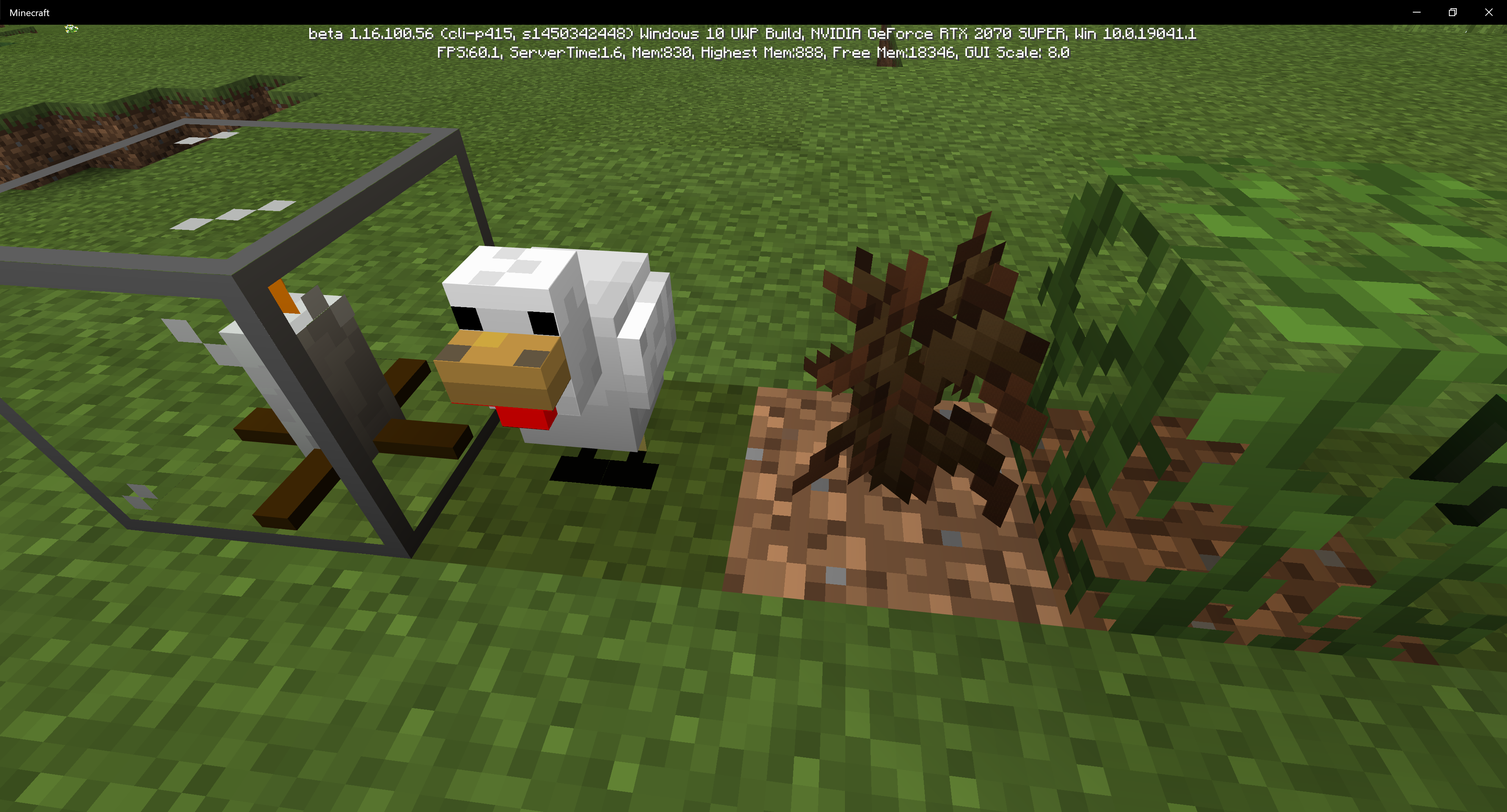
Blocks (more noticeable on custom block models) cast shadows onto themselves, or they just have
black spots on them, noticeably near the bottom of them. In this example, I used a Pig model and a custom plant-like model (with an edited gunpowder texture on it). The Pig's back legs' fronts are dark, and the whole gunpowder plant-looking thing is dark (I'm holding the item as a comparison). The other example includes a chicken model (with dark feet).Blocks (more noticeable on custom block models) cast shadows onto themselves, or they just have dark spots on them, noticeably near the bottom of them. In this example, I used a Pig model and a custom plant-like model (with an edited gunpowder texture on it). The Pig's back legs' fronts are dark, and the whole gunpowder plant-looking thing is dark (I'm holding the item as a comparison). The other example includes a chicken model (with dark feet).
Steps to Reproduce:
Make a custom block model and put it onto a custom block.
What I expected to happen was...:
The model should be nice and bright.
What actually happened was...:
The model has a dark point(s) on some portions of it.
Blocks cast shadows onto themselvesCustom blocks cast shadows onto themselves
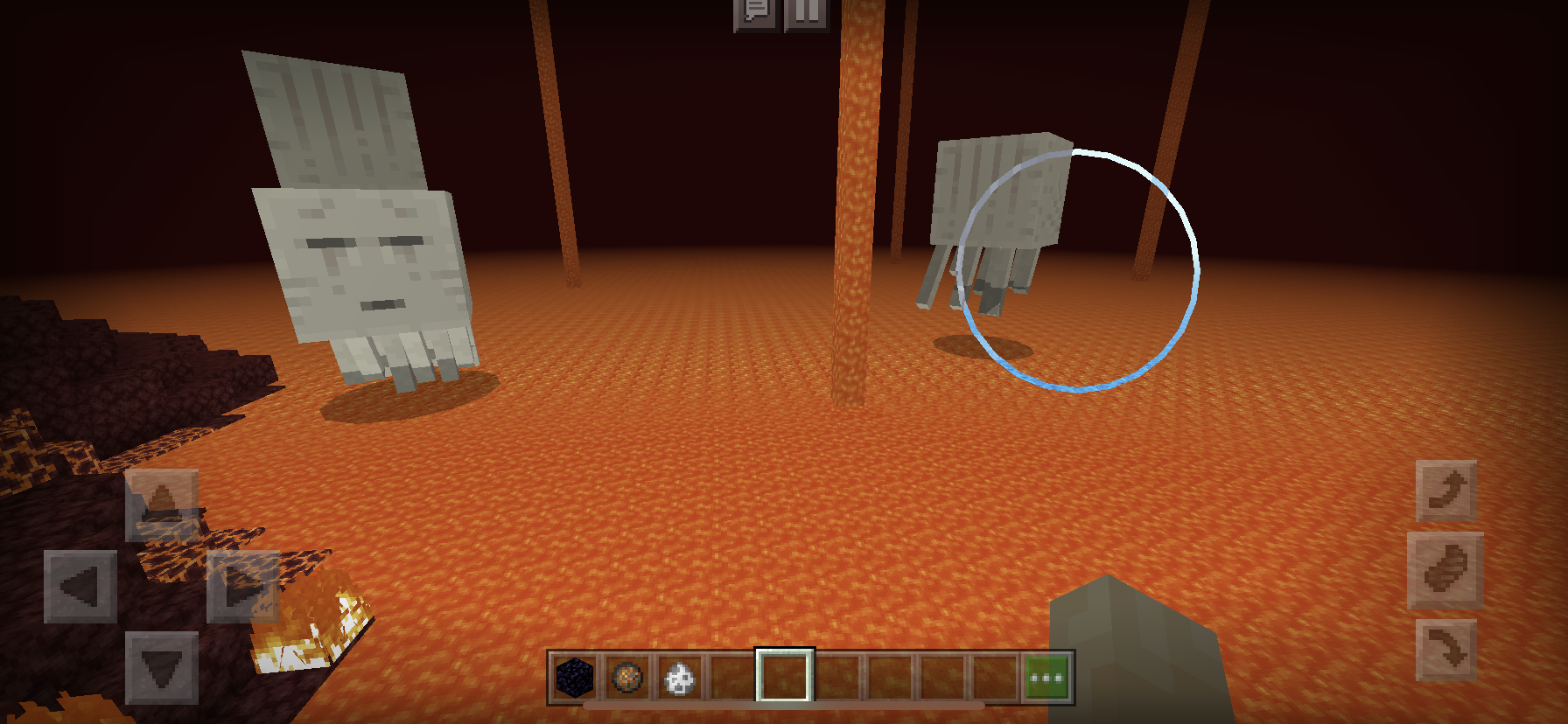
Shadows casted by mobs appear on lava, making lava look like a solid block.
Steps to Reproduce:
1. Have any mob above lava.Observed Results:
The mob casts its shadow onto the lava.Expected Results:
There should be no shadow.
Before the Nether Update, I was able to take Book and Quills from a chest, in which the book and quill was constantly being replaced by another book and quill for an infinite source. Moving forward to the Nether Update launch, I cannot take the book and quill out of the chest.
Expected Results:I am able to take out
items which are constantly being replaced bythatsameitem in a chest.Observed Results:
I can’t.
Before the Nether Update, I was able to take Book and Quills from a chest, in which the book and quill was constantly being replaced by another book and quill for an infinite source. Moving forward to the Nether Update launch, I cannot take the book and quill out of the chest.
Steps to Reproduce:
1. Have a Repeating Command Block on Always Active with the following command: "/replaceitem block ~ ~ ~-1 slot.container 0 stick".
2. Place a chest north of the command block.
3. Look inside the chest. There should be a stick in the first (0) slot. When you try to quick move or grab the stick with your cursor, it disappears.Expected Results:
I am able to take out the stick, and there should be another stick in the same slot of the chest because of the command block.
Observed Results:
The stick you tried to take from the chest disappears, however, the stick is still being replaced in the "0" slot of the chest.
Before the Nether Update, I was able to take Book and Quills from a chest, in which the book and quill was constantly being replaced by another book and quill for an infinite source. Moving forward to the Nether Update launch, I cannot take the book and quill out of the chest.
Steps to Reproduce:
1. Have a Repeating Command Block on Always Active with the following command: "/replaceitem block ~ ~ ~-1slot.container 0 stick".
2. Place a chestnorthof the command block.
3. Look inside the chest. There should be a stick in the first (0) slot. When you try to quick move or grab the stick with your cursor, it disappears.Expected Results:
I am able to take out the stick, and there should be another stick in the same slot of the chest because of the command block.
Observed Results:
The stick you tried to take from the chest disappears, however, the stick is still being replaced in the "0" slot of the chest.
Before the Nether Update, I was able to take Book and Quills from a chest, in which the book and quill was constantly being replaced by another book and quill for an infinite source. Moving forward to the Nether Update launch, I cannot take the book and quill out of the chest.
Steps to Reproduce:
1. Have a Repeating Command Block on Always Active with the following command: "/replaceitem block ~ ~1 ~ slot.container 0 stick".
2. Place a chest on top of the command block.
3. Look inside the chest. There should be a stick in the first (0) slot. When you try to quick move or grab the stick with your cursor, it disappears.Expected Results:
I am able to take out the stick, and there should be another stick in the same slot of the chest because of the command block.
Observed Results:
The stick you tried to take from the chest disappears, however, the stick is still being replaced in the "0" slot of the chest.
(DUPLICATE, CLOSE WHENEVER POSSIBLE) Grass Path and Farmland hit boxes are identical to full-block hit boxes
Right-clicking an armor stand with armor plays the stone sound effect rather than the specified armor's equip sound effect.
Steps to Reproduce:
Give an armor stand any piece of armor.
What I expected to happen was...:The armor stand should play the specified armor's equip sound.
What actually happened was...:
The armor piece (and any other armor piece) plays the
stone sound.Right-clicking an armor stand with armor plays the stone sound effect rather than the specified armor's equip sound effect.
As of 1.19.10.20 Preview: The armor equipping sound now plays when giving an armor stand armor, but the stone sound still remains, and in return both sounds play at the same time.
Steps to Reproduce:
Give an armor stand any piece of armor.
Expected Results:
The armor stand should play the specified armor's equip sound.
Observed Results:
The armor piece (and any other armor piece) plays the armor's equip sound and a stone placing sound at the same time.
Armor Stands play stonesound instead ofarmor equipping sounds when given armorArmor Stands play both stone placing sounds and armor equipping sounds when given armor
Right-clicking an armor stand with armor plays the stone sound effect rather than the specified armor's equip sound effect.
As of 1.19.10.20 Preview: The armor equipping sound now plays when giving an armor stand armor, but the stone sound still remains, and in return both sounds play at the same time.
Steps toReproduce:Give an armor stand any piece of armor.
Expected Results:
The armor stand should play the specified armor's equip sound.
Observed Results:
The armor
piece (and any other armor piece)plays the armor's equip sound and a stone placing sound at the same time.Right-clicking an armor stand with armor plays the stone sound effect rather than the specified armor's equip sound effect.
As of 1.19.10.20 Preview: The armor equipping sound now plays when giving an armor stand armor, but the stone sound still remains, and in return both sounds play at the same time.
To reproduce, simply give an armor stand any piece of armor that has a dedicated equipping sound.
Expected Results:
The armor stand should play the specified armor's equip sound.
Observed Results:
The armor stand plays the armor's equip sound and a stone placing sound at the same time.
(MARK RESOLVED) "Hooray!" Emote is broken
Side note: It appears normally in your hotbar.
Steps to Reproduce:
EITHER:
A. Hold any undyed leather armor piece
B. Drop any undyed leather armor piece
C. Put any undyed leather armor piece in an Item FrameExpected Results:
Undyed Leather Armor renders undyed anywhereObserved Results:
Undyed Leather Armor renders as if it were dyed brown in your hand, on the ground, and in item frames.Steps to Reproduce:
EITHER:
A. Hold any undyed leather armor piece
B. Drop any undyed leather armor piece
C. Put any undyed leather armor piece in an Item FrameExpected Results:
Undyed Leather Armor renders undyed anywhereObserved Results:
Undyed Leather Armor renders as if it were dyed brown in your hand, on the ground, and in item frames.-Side note: It appears normally in your hotbar.
UndyedLeather Armor appears to be dyed brown in hand, item frames, and on the groundUNDYED Leather Armor appears to be dyed brown in hand, item frames, and on the ground
UNDYEDLeather Armor appears to be dyed brown in hand, item frames, and on the groundUndyed Leather Armor appears to be dyed brown in hand, item frames, and on the ground
Hello all. Today I present one of the most frustrating bug to Nintendo Switch users. When you wait in the main menu for about 15-30 seconds, clicking the play button results in a loading bar which ever ends. After closing the software, the Switch claims that a software error occurs. This bug just appeared when 1.16.200 released. Please note that this bug occurs occasionally, but it’s extremely common.
Steps to Reproduce:
1. Wait in the main menu for about 15-30 seconds
2. Click the Play button.Expected Results:
You get taken to the world selection screen.Observed Results:
You are taken to a screen with no menu, but then an endless loading bar appears.
The player
puts their hand up too early after swapping anditem with it in first person view.Steps to Reproduce:
1. Hold any item.
2. Move your selected hotbar slot to an empty space (hand).Expected Results:
The player's hand moves up after the item moves down.Observed Results:
The player's hand renders too early, moves down, clipping with the item, then moves back up.The player moves their hand up too early after swapping an item with it in first person view.
Steps to Reproduce:
1. Hold any item.
2. Move your selected hotbar slot to an empty space (hand).Expected Results:
The player's hand moves up after the item moves down.Observed Results:
The player's hand renders too early, moves down, clipping with the item, then moves back up.

BeeTeeKay64 I just wanna let you know, that 1.16.100 will automatically be added to the list by [Bot] Arisa when your report gets marked as a duplicate.
![[Mod] EVGENSYPERPRO](../../../data/avatars/users/92853.png)
BeeTeeKay64 Now I understand what you mean. This animation also stops abruptly in Java. Therefore, most likely this will not be resolved in bedrock (you can create a similar report for Java, but I think it will be WAI).
My apologies for editing this post a few times in a row.
Can confirm. I was playing with my friend earlier and while he was playing with Structure Blocks, I was exploring the Nether, then I came across Bounding Boxes near the same coordinates in the Overworld.
I turned off the Entities Drop Loot option in the world creation menu and the “true” moving mobs dropped their stuff (e.g. zombies dropping rotten flesh)
This is very true, and gets a bit on my nerves. Let’s hope they fix this someday!
Yup, you're right
Duplicate of
MCPE-54715Small suggestion, but could someone rephrase the first half of the summary please? It doesn’t really make sense when you read it. “Endermen start screaming when...” makes a lot more sense than “Enderman sees the sound of screaming when...”. Plus, if someone is searching for this bug, they may mistake it for a different bug.
In the inventory, the beehive is backward but the bee nest is fine. Very strange.
I hope that all of the Nether Update blocks in the Nature category get reorganized. It's strange to see that out of every block, the Nether Warts group is the first. Not only that but it would make a lot more sense if the overworld blocks are listed before the nether blocks.
oop, my mistake. Got a little confused!
I have come to the conclusion that Beehives' textures are flipped and the Bee Nest is just oriented incorrectly. Found this out while making a texture pack.
Can confirm this happens on Switch to me as well.
Underground dungeons sometimes generate without chests, too.
Overworld planks’ hardness is 2
Nether planks’ hardness should be 1
YEEEES. This bug just recently appeared in one of the latest hotfixes and it has been haunting me. The lag usually occurs like 65% of the time. The lag can even last over a minute. This is terrible for tweaking Structure Blocks. What’s worse is that there is also a bug that makes every player lag when the host of the game is typing something on a Nintendo Switch system.
That makes sense. II just find it a bit odd how item amounts don’t show in the creative hotbar. Could there be an option in the settings in accessibility or a different tab to have this as an option? Other than that, I think it’s safe to say this should be closed as Working as Intended.
Can confirm. I can't find the chest recipe in the recipes folder.
Oh my, my apologies on that. I will try to gather evidence to see if the skeleton drops are different on Java. As for the structures, I’ll remove that and maybe submit another ticket/check for other tickets.
I can't find the proper drop rates for mob equipment on Bedrock, but I do know that on Java Edition all kinds of mob equipment have an 8.5% chance of dropping.
Been about a couple weeks, and I have to say, I hope this bug gets recognized by the devs soon. This is a pretty major bug for Switch users. By all means, I am NOT rushing the devs, they may have other business to take care of. However, I do hope this gets patched soon. This bug report should also get recognized more.
Was this fixed but wasn’t put on any changelog, or did it fix on its own? Lol
Affects latest beta 1.16.100.56
as of me playing the 1.16.100.56 Beta, this issue is fixed
I edited it, if by any means it helps.
This issue should definitely be reopened, not only because of Java Parity but people may still need to see the numbers of items in their hotbar, especially since on the Windows 10 edition, you grab a stack of items/blocks instead of one individual item/block. At the very least there should be a toggle in the accessibility or video settings that shows the number.
The ambient loops have not been added at all yet. This is also a duplicate of MCPE-79532
Indeed, this is still an issue in later versions.
This happens with all items, including the Book & Quill.
If it helps, I attached another example taken in Windows 10 Edition. This time the item is a stick to show that this is a reoccurring issue between all items.
As an owner of a Nintendo Switch with Minecraft 1.16.100 on it, I can confirm this. This could also be a separate bug but menu navigation tends to be very slow as well.
I’m a bit confused as to how this can’t get fixed, but I don’t blame the devs if they physically cannot fix this issue. This bug is affective on Nintendo Switch, Windows 10, and PS4 as well (and assuming this bug is affective on all other platforms). This also affects the latest beta (1.16.200.56).
I can confirm this bug still lingers in 1.16.100.
As my duplicate report states, this bug affects 1.16.100.
bugsbugsbugs Okay, sounds good. If it helps, I have added a couple screenshots to better show off the bug.
For clarification, the platform is set to multiple because me (Windows 10) and my friend (Switch) have both experienced this bug.
As mentioned in my duplicate report, holding any offhand item (not a shield) while holding a loaded crossbow makes the offhand item disappear.
Affects 1.16.200 (release)
Just tested it and I can confirm in my attachment this bug exists. I think it would be logical if the Axolotl just ate the Tropical Fish and not the water. Is it physically possible to eat water? When axolotls come out on Bedrock Edition and this bug still exists, the eating sounds would certainly feel odd when the Axolotls consume water.
In my personal opinion, I'm not a big fan of the dark blue bubbles and would like to see them removed, but that would be a feature request, and this is the bug report site.
Affects v1.16.201.
Affects 1.16.201
I'm glad this bug has been reported. This has been bothering me for ages but I've always been focused on other bugs. I hope this bug gets more recognized.
Hello, I would like to confirm that this is a different bug. The bug that this was "marked as a duplicate" for is separate from this bug. This bug states that on Java, Squids do not emit these bubble particles, but bedrock does. This report doesn't have to do anything with the color of the bubbles. I ask in hope to reopen this report, if you please.
The "Hooray!" emote looks visually better as of 1.16.201. This bug should be closed whenever possible.
The bug reporter may be inactive, so as a volunteer I can confirm this bug still exists in the latest version (1.16.201).
Affects 1.16.201
Yeah, not sure if this would count as a bug or a parity feature, but it's worth noting.
Affects 1.16.201
Affects 1.16.201
Affects 1.16.201
[Kinga Izdebska] I would like to imply that this leather armor is undyed, as specified in the title. The armor shows up differently in the hotbar.
I request for this ticket to be reopened, this issue is different from what you think. This leather armor is undyed, but appears brown in anything except your hotbar. The armor is not dyed brown.
Affects 1.16.201
If this is still relevant, this bug affects 1.16.201.
Affects 1.16.201
This can be reproduced using chests as well. Also affects 1.16.201.
In the 20w12a changelog for MC Java Edition, there is a change that says "Parrots imitate hostile mobs less often". Bedrock Edition did not receive this change. https://www.minecraft.net/en-us/article/minecraft-snapshot-20w12a
What's also odd is that lapis lazuli ore is supposed to be completely hidden inside of the deepslate (not visible in caves)
This issue is still a thing.
Affects 1.17.2
Attached an add-on example to view this bug!
Can confirm this bug happens on an online multiplayer world.
Affects 1.17.30
Affects 1.17.30
Affects 1.17.30
Affects 1.17.30
Affects 1.17.30
Hoglins can also be spawned in peaceful mode, also affects 1.17.30
Affects 1.17.30
Affects 1.17.30
This has been fixed, however, blocks now flash brighter instead of white when pushed by a piston, affecting 1.17.30. Would that count as this bug or as a new one?
Oops, did not know, my apologies
Affects 1.17.30
The newest Java Edition snapshot suggests that Copper Ore generates at a maximum height of y=95, when this was fixed so Copper Ore generates at a maximum height of y=96.
This issue is still a thing, can confirm in 1.17.30. Bows, Crossbows, and all projectiles show as their default texture, but when you throw a projectile, their texture pack texture renders.
It appears that this bug only occurs on devices without the Render Dragon engine, as this cannot be reproduced on Windows 10. Found this bug happening on my Nintendo Switch on 1.17.30.
This should not be working as intended, as previous comments have mentioned this bug has also occurred in the Java Edition and has been fixed. Affects 1.17.30.
Affects 1.17.30
This also applies to custom textures for any item. Affects 1.17.30.
Yup, just got a skeleton to kill a creeper today on a multiplayer survival while I was playing on the Windows 10 Edition and only received gunpowder sadly, hope this gets fixed soon, as this bug prevents 8 different items from being obtained through survival.
Affects 1.17.32
Due to the recent change regarding chests having the same loot across the same seeds, this issue has been re-introduced; I'm playing the 1.18.0.22 beta.
Affects 1.18.0.21 Beta
Affects 1.17.40
Affects 1.17.40
Will these be added eventually or will they be removed from the Java Edition? This is an entire feature missing from the game, so I hope there is or will be an update on this soon.
As of the recent hotfix (1.17.41), NPC names only show when you are highlighting the NPC, rather than consistently. I've attached a video to show this bug in action.
Sounds like this issue was fixed in the recent 1.18.10.20 beta. Any moderator can close this report whenever possible.
Can confirm; affects 1.18.30.21 Preview
As of 1.19.10.20 Preview, the sound now plays when you give an armor stand some armor, but the stone sounds still remain, as seen in my recently attached video 'Minecraft Preview 2022-05-29 20-24-04_Trim.mp4'
Can confirm in 1.18.31, my brother just got a realm subscription and having to use '/gamerule commandblockoutput false' every time someone rejoins is a pain. The first person to join's chat always gets spammed from repeating /testfor and /teleport commands.
Affects 1.18.31 and 1.19.10.20 Preview
Affects 1.19.0 and Preview 1.19.10.22
Affects Preview 1.19.10.22
Affects Preview 1.19.10.22
I believe this is the case for Sculk Sensors as well. I went to explore an Ancient City in the recent Preview, and the only places where there were shriekers and sensors were in the main structures/rooms. This made maneuvering and stealing loot a lot easier.
@EVGENSYPERPRO Yeah you’re right, I’ve discovered afterward that the Allay twitches normally as a separate bug. However, ignoring the twitch, the Allay’s dancing animation still abruptly stops when getting out of the detection range of a jukebox, as far as my results have shown. In the video the Allay on the right stops bobbing its head suddenly after going away from the jukebox (ignoring the twitch that it does afterward).
Yup, just discovered this bug on my older brother's realm and... wow, am I sad this bug exists. This affects realms.
...are chunks affected by this bug deleted forever? After updating to 1.19.2 the chunks affected by this bug remain missing.
Affects 1.19.2
Affects 1.19.2
Affects 1.19.2
Can confirm on Windows 10.
@yuan_xi When you summon an NPC with a name, that name also gets carried over to the name above its head, indicating that that is the NPC's real name. I believe there shouldn't be two different names for the NPC.
Affects 1.19.2
How come you cannot do this with normal Mangrove Roots?
Affects 1.19.2
Affects 1.19.2
Affects 1.19.2
@[Mod] LateLag
Hi! No, this issue no longer occurs and this ticket may be closed. Thank you!
This also affects the stick of Redstone Torches; obviously the top “flare” of the Redstone Torch is intended, but the stick shouldn’t be. This also applies to all of the colored/dyed torches behind the Education toggle. I figured they would all be related to this bug and I propose they could be added to this ticket’s summary and description.
Affects 1.19 (Bedrock)
Affects 1.19.2
Affects 1.19.2
I should also mention this affects the NPC in its dialogue menu.
Affects 1.19.2
Can confirm. Chunks also reload every time you drag and release the Minecraft window when it isn't in fullscreen.
I am unable to reproduce this bug on Windows 10 edition. Do you have any resource packs enabled?
This is an interesting report because before
MCPE-141930was a thing, NPC names would appear all the time. When 1.17.30 came along, NPC names would only appear when you are looking at the NPC, causingMCPE-141930to exist. Now that that has been fixed, this bug report has been created, stating that NPC names appear all the time, which was how it was previously. In both ways, people have been utilizing NPC names when they do appear all the time and when they don't.People who use NPC names that always display usually make hovering text (with the NPC being invisible), which is the only way to do so in the Bedrock Edition.
People who use NPC names that only show when you look at them usually have NPCs in the ground or in other secret areas so they could use the /dialogue command without add-ons, or so other players cannot see their names through buildings and whatnot.
In my opinion there should be a way to where the player is able to toggle whether the name always shows or only when they look at it. This should be specific for each NPC, so the toggle should be in their GUI, and not as a gamerule. If not then at the very least it should be a spawn event.
Can confirm. Hopefully they will fix this sooner rather than later.
Just discovered that Structure Blocks and Jigsaws are also affected by this bug, so basically any Creative/command-exclusive block with a GUI doesn't function.
As I stated in the duplicate post, this also affects Structure Blocks and Jigsaw blocks.
Affects 1.19.10
Affects 1.19.10
Affects 1.19.10
Affects 1.19.10
Affects 1.19.10
Affects 1.19.10
This also affects bubble columns
Affects 1.19.10
Affects 1.19.10
Affects 1.19.10
Affects 1.19.10
Affects 1.19.10
Affects 1.19.10
Affects 1.19.10
This is still an issue, and affects 1.19.10.
This may provide some more explanation:
Steps to Reproduce:
Expected Results:
You are able to view the structure without any rendering issues.
Observed Results:
The structure preview has many issues rendering, such as invisible blocks; glass and water makes you see through the black background of the GUI
Affects 1.19.10
In addition to my last comment, I have attached 2 images to show the bug with water and stained/tinted glass; I would also like to mention that Stained Glass and Tinted Glass lets you see through the background of the GUI, not normal glass.
Duplicate of
MCPE-156281Affects 1.19.10
@[Mod] Umija5895M This is the 'Candy Texture Pack' made by 'Minecraft'. This was probably reported because the reporter is expecting Mojang to update the textures since it is a pack owned by them.
On Bedrock when you look at a sensor north or south then you can see this bug in action. It's normal when viewing it east or west.
Affects 1.19.10
Affects 1.19.10
Affects 1.19.10
Affects 1.19.10
Affects 1.19.10
Affects 1.19.10
Affects 1.19.10
Affects 1.19.10
Hi, I understand this issue just got resolved but I just got done writing a book that took a while to write only to notice that:
"11:30 AM: Dr. Dill" was replaced with "#####3###M###r. Dill". Even if there was something in that phrase that represents something scary or bad or something, I had zero intentions on it having any relevance to anything bad or any sort of slur. I was just trying to write a book about people's haircuts being scheduled.
Affects 1.19.10
Affects 1.19.10
Affects 1.19.10
Affects 1.19.10
Affects 1.19.10
@Maciej Piornik
Hello! I have only gotten this issue to occur on Realms. I’ve just tested to see if it affects normal worlds and I can confirm this is a Realms-only bug.
Affects 1.19.10
Can confirm. Also affects Windows on the same version.
Affects 1.19.10
Affects 1.19.10
Affects 1.19.10
Just discovered something new: text from signs (glowing or not) render through blocks in the preview window.
Just stumbled upon this bug today. I edited the text of a book and quill, then closed it, went to edit it again, closed it again and edited it again, but then it started to do this bug, so the bug only started happening to me after closing and reopening the book about 3 times, hopefully that provides some new info.
When I light an armor stand on fire, it plays the player hurt sound while being burnt, and when it dies it just disappears instead of playing the armor stand destroy animation + particles + sound.
This bug is half fixed to say the least, but probably should be changed to my above point. Also affects 1.19.10
Affects 1.19.10
Affects 1.19.11
In 3 different packs I have tested, all of them have 2 earths near the top on them regardless of pattern.
Affects 1.19.11
Affects 1.19.20
Affects 1.19.20
Hi, I don’t want to sound rude at all but can you please add some extra tags, or at the very least change some things so people can find this report easier? I’ve tried several different searches before making my report on this issue and I couldn’t find one, until mine got marked as a duplicate. I think “name” and “hovering text” would be good Imo, because I haven’t considered searching for “nametag” without a space.
Affects 1.19.20
Affects 1.19.20
Affects 1.19.20
Affects 1.19.30.22 Preview
Affects 1.19.30.22 Preview
Affects 1.19.30.22 Preview
Squids also do not propel themselves forwards. Affects 1.19.30.22 Preview.
Affects 1.19.30.22 Preview
According to the changelog for 1.19.30.23, it states:
"EDU Toggle: NPC names default to only being displayed while looking at them"
According to what I said in my comment above, this means that this is the 3rd time that this "bug" has been changed, and it looks like that change was made without a link to this bug report. Lots of players are going to complain that their only form of "hovering text" is not working. I still recommend that there should be a toggle for players to be able to have NPCs names above them at all times or only when you look at them to prevent arguments within the community.
Affects 1.19.21 and 1.19.30.23 Preview
Affects 1.19.21
Affects 1.19.30.23 Preview
This issue seems to be fixed in 1.19.21 and 1.19.30.23 Preview.
I believe this issue has been fixed! I cannot reproduce this in 1.19.31.
Affects 1.19.31
Affects 1.19.31 and 1.19.50.21 Preview
This issue seems to be fixed as of 1.19.50.21 Preview
Additionally, it seems that the menu is expanded as if it had 4+ buttons. This is incorrect; when there's 3 or less buttons there should be half as much space below the dialogue box.
Affects 1.19.40
As of 1.19.40, I can no longer see this visual glitch.
Affects 1.19.40
Affects 1.19.40
I think this bug is back in the game. I am playing 1.19.40
Affects 1.19.40
Affects 1.19.40; just lost my named pet spider in a boat in this version
Affects 1.19.40
Steps to Reproduce:
1. Find a village with an Iron Golem
2. Hit a villager
Expected Results:
The Iron Golem becomes aggressive to me.
Observed Results:
The Iron Golem does nothing.
Affects 1.19.40
Affects 1.19.40