 MCPE-165392
Pumpkin bottom texture can't be made different than top
I am creating a resource pack and I want to change the bottom texture of the pumpkins. However, the pumpkin bottom texture uses the top texture.
Steps to reproduce:
- Create a resource pack or download it bellow and skip to step 4.
- Create a texture to the pumpkin bottom in "textures/blocks" file and then a identifier to it in "terrain_texture.json" (for example, "pumpkin_bottom").
- Change the bottom texture identifier of the pumpkin in "blocks.json".
- Load it in Minecraft.
Expected Results:
The pumpkin bottom texture is different from the top texture.
Observed Results:
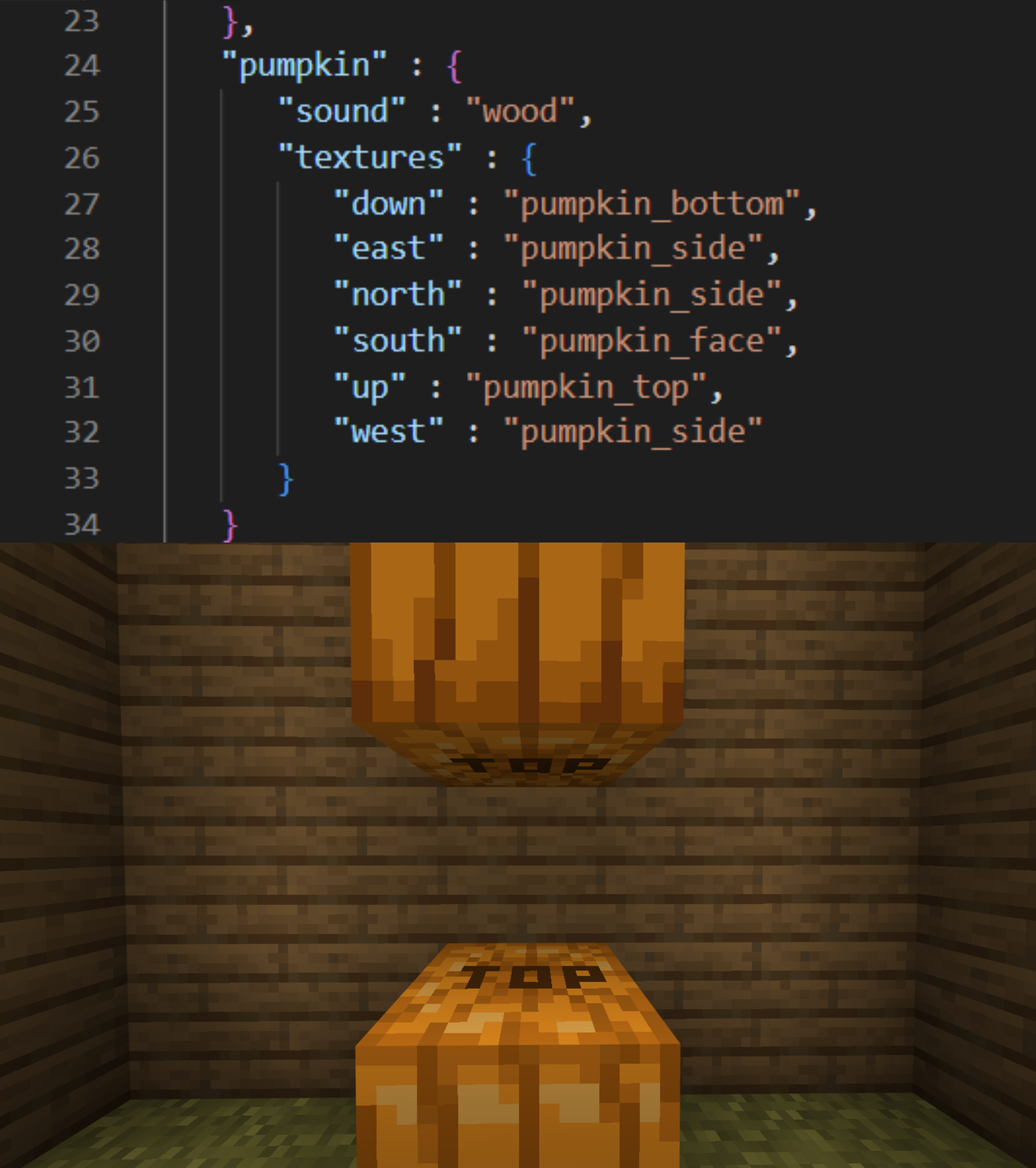
The pumpkin bottom texture is the same from the top texture. It seems that the bottom is using the top texture. This also happens to the "lit_pumpkin" (jack o'lantern) and to the "carved_pumpkin".
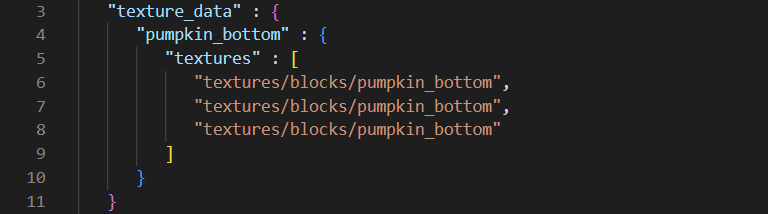
Below, you can see parts of the code (in "terrain_texture.json" and "blocks.json") and also the resource pack.


Created Issue:
it's (still) impossible to change pumpkin bottom texture - Resource Pack
(I reported this bug before, but it was considered duplicated. However, it is still in-game and the other associated bug is already fixed).
I am creating a resource pack and I want to change the bottom texture of the pumpkins. But I can't change the texture of the bottom without changing the top. I created a texture identifier in "terrain_texture.json", then put it in bottom of the pumpkin in "blocks.json" and it doesn't work (it seems that the bottom is using the top texture). This also happens to the "lit_pumpkin" (jack o'lantern) and to the "carved_pumpkin".
Below, you can see my punpkin bottom texture, the texture identifier, the supposed changed bottom and the top changed.
Attachments4
top_changed.png
![[Mod] Umija5895M](../../../data/avatars/users/10122.svg)
it's (still) impossible to change pumpkin bottom texture - Resource PackPumpkin bottom texture can't be made different than top.
![[MCQA] Bartłomiej Słodkowski](../../../data/avatars/users/18941.svg)
![[Bot] Arisa](../../../data/avatars/users/43007.png)
(I reported this bug before, but it was considered duplicated. However, it is still in-game and the other associated bug is already fixed).
I am creating a resource pack and I want to change the bottom texture of the pumpkins.
But I can't change thetextureofthebottom without changingthetop. I created atextureidentifier in "terrain_texture.json", then put it in bottom of the pumpkin in "blocks.json" and it doesn't work (it seems that the bottom is using the top texture). This also happens to the "lit_pumpkin" (jack o'lantern) and to the "carved_pumpkin".Below, you can see
my punpkin bottom texture,thetextureidentifier, the supposed changed bottom and the topchanged.(I reported this bug before, but it was considered duplicated. However, it is still in-game and the other associated bug is already fixed).
I am creating a resource pack and I want to change the bottom texture of the pumpkins. I created a texture and then a identifier to it. But I can't change the bottom texture, even if I change the texture identifier ("pumpkin_bottom"). It seems that the bottom is using the top texture. This also happens to the "lit_pumpkin" (jack o'lantern) and to the "carved_pumpkin".
Below, you can see parts of the code (in "terrain_texture.json" and "blocks.json") and also the resource pack with the top and bottom textures changed.
(I reported this bug before, but it was considered duplicated. However, it is still in-game and the other associated bug is already fixed).
I am creating a resource pack and I want to change the bottom texture of the pumpkins. I created a texture and then a identifier to it. But I can't change the bottom texture, even if I change the texture identifier ("pumpkin_bottom"). It seems that the bottom is using the top texture. This also happens to the "lit_pumpkin" (jack o'lantern) and to the "carved_pumpkin".
Below, you can see parts of the code (in "terrain_texture.json" and "blocks.json") and also the resource pack with the top and bottom textures changed.
(I reported this bug before, but it was considered duplicated. However, it is still in-game and the other associated bug is already fixed).
I am creating a resource pack and I want to change the bottom texture of the pumpkins. But we can't change the pumpkin bottom texture.
How to reproduce the bug:
1. Create a resource pack or download it bellow and go to step 4.
2. Create a texture to the pumpkin bottom in "textures/blocks" file and then a identifier to it in "terrain_texture.json" (for example, "pumpkin_bottom").
3. Change the bottom texture identifier of the pumpkin in "blocks.json".
4. Load it in Minecraft.
Result Expected:
The pumpkin bottom texture is diferent from the top texture.
Result :
The pumpkin bottom texture is the same from the top texture. It seems that the bottom is using the top texture. This also happens to the "lit_pumpkin" (jack o'lantern) and to the "carved_pumpkin".
Below, you can see parts of the code (in "terrain_texture.json" and "blocks.json") and also the resource pack with the top and bottom textures changed.
(I reported this bug before, but it was considered duplicated. However, it is still in-game and the other associated bug is already fixed).
I am creating a resource pack and I want to change the bottom texture of the pumpkins. But we can't change the pumpkin bottom texture.
How to reproduce the bug:
1. Create a resource pack or download it bellow and go to step 4.
2. Create a texture to the pumpkin bottom in "textures/blocks" file and then a identifier to it in "terrain_texture.json" (for example, "pumpkin_bottom").
3. Change the bottom texture identifier of the pumpkin in "blocks.json".
4. Load it in Minecraft.
Result Expected:
The pumpkin bottom texture is diferent from the top texture.
Result :
The pumpkin bottom texture is the same from the top texture. It seems that the bottom is using the top texture. This also happens to the "lit_pumpkin" (jack o'lantern) and to the "carved_pumpkin".
Below, you can see parts of the code (in "terrain_texture.json" and "blocks.json") and also the resource pack with the top and bottom textures changed.
(I reported this bug before, but it was considered duplicated. However, it is still in-game and the other associated bug is already fixed).
I am creating a resource pack and I want to change the bottom texture of the pumpkins. But we can't change the pumpkin bottom texture.
How to reproduce the bug:
1. Create a resource pack or download it bellow and go to step 4.
2. Create a texture to the pumpkin bottom in "textures/blocks" file and then a identifier to it in "terrain_texture.json" (for example, "pumpkin_bottom").
3. Change the bottom texture identifier of the pumpkin in "blocks.json".
4. Load it in Minecraft.
Result Expected:
The pumpkin bottom texture is diferent from the top texture.
Result :
The pumpkin bottom texture is the same from the top texture. It seems that the bottom is using the top texture. This also happens to the "lit_pumpkin" (jack o'lantern) and to the "carved_pumpkin".
Below, you can see parts of the code (in "terrain_texture.json" and "blocks.json") and also the resource pack with the top and bottom textures changed.
(I reported this bug before, but it was considered duplicated. However, it is still in-game and the other associated bug is already fixed).
I am creating a resource pack and I want to change the bottom texture of the pumpkins. But we can't change the pumpkin bottom texture.
How to reproduce the bug:
1. Create a resource pack or download it bellow and go to step 4.
2. Create a texture to the pumpkin bottom in "textures/blocks" file and then a identifier to it in "terrain_texture.json" (for example, "pumpkin_bottom").
3. Change the bottom texture identifier of the pumpkin in "blocks.json".
4. Load it in Minecraft.
Result Expected:
The pumpkin bottom texture is diferent from the top texture.
Result :
The pumpkin bottom texture is the same from the top texture. It seems that the bottom is using the top texture. This also happens to the "lit_pumpkin" (jack o'lantern) and to the "carved_pumpkin".
Below, you can see parts of the code (in "terrain_texture.json" and "blocks.json") and also the resource pack with the top and bottom textures changed.
(I reported this bug before, but it was considered duplicated. However, it is still in-game and the other associated bug is already fixed).
I am creating a resource pack and I want to change the bottom texture of the pumpkins. But we can't change the pumpkin bottom texture.
How to reproduce the bug:
1. Create a resource pack or download it bellow and go to step 4.
2. Create a texture to the pumpkin bottom in "textures/blocks" file and then a identifier to it in "terrain_texture.json" (for example, "pumpkin_bottom").
3. Change the bottom texture identifier of the pumpkin in "blocks.json".
4. Load it in Minecraft.
Result Expected:
The pumpkin bottom texture is diferent from the top texture.
Result :
The pumpkin bottom texture is the same from the top texture. It seems that the bottom is using the top texture. This also happens to the "lit_pumpkin" (jack o'lantern) and to the "carved_pumpkin".
Below, you can see parts of the code (in "terrain_texture.json" and "blocks.json") and also the resource pack with the top and bottom textures changed.
(I reported this bug before, but it was considered duplicated. However, it is still in-game and the other associated bug is already fixed).
I am creating a resource pack and I want to change the bottom texture of the pumpkins. But we can't change the pumpkin bottom texture.
How to reproduce the bug:
1. Create a resource pack or download it bellow and go to step 4.
2. Create a texture to the pumpkin bottom in "textures/blocks" file and then a identifier to it in "terrain_texture.json" (for example, "pumpkin_bottom").
3. Change the bottom texture identifier of the pumpkin in "blocks.json".
4. Load it in Minecraft.
Result Expected:
The pumpkin bottom texture is diferent from the top texture.
Result :
The pumpkin bottom texture is the same from the top texture. It seems that the bottom is using the top texture. This also happens to the "lit_pumpkin" (jack o'lantern) and to the "carved_pumpkin".
Below, you can see parts of the code (in "terrain_texture.json" and "blocks.json") and also the resource pack with the top and bottom textures changed.
(I reported this bug before, but it was considered duplicated. However, it is still in-game and the other associated bug is already fixed).
I am creating a resource pack and I want to change the bottom texture of the pumpkins. But we can't change the pumpkin bottom texture.
How to reproduce the bug:
1. Create a resource pack or download it bellow and go to step 4.
2. Create a texture to the pumpkin bottom in "textures/blocks" file and then a identifier to it in "terrain_texture.json" (for example, "pumpkin_bottom").
3. Change the bottom texture identifier of the pumpkin in "blocks.json".
4. Load it in Minecraft.
Result Expected:
The pumpkin bottom texture is diferent from the top texture.
Result :
The pumpkin bottom texture is the same from the top texture. It seems that the bottom is using the top texture. This also happens to the "lit_pumpkin" (jack o'lantern) and to the "carved_pumpkin".
Below, you can see parts of the code (in "terrain_texture.json" and "blocks.json") and also the resource pack with the top and bottom textures changed.
(I reported this bug before, but it was considered duplicated. However, it is still in-game and the other associated bug is already fixed).
I am creating a resource pack and I want to change the bottom texture of the pumpkins. But we can't change the pumpkin bottom texture.
How to reproduce the bug:
1. Create a resource pack or download it bellow and go to step 4.
2. Create a texture to the pumpkin bottom in "textures/blocks" file and then a identifier to it in "terrain_texture.json" (for example, "pumpkin_bottom").
3. Change the bottom texture identifier of the pumpkin in "blocks.json".
4. Load it in Minecraft.
Result Expected:
The pumpkin bottom texture is diferent from the top texture.
Result :
The pumpkin bottom texture is the same from the top texture. It seems that the bottom is using the top texture. This also happens to the "lit_pumpkin" (jack o'lantern) and to the "carved_pumpkin".
Below, you can see parts of the code (in "terrain_texture.json" and "blocks.json") and also the resource pack with the top and bottom textures changed.
(I reported this bug before, but it was considered duplicated. However, it is still in-game and the other associated bug is already fixed).
I am creating a resource pack and I want to change the bottom texture of the pumpkins. But we can't change the pumpkin bottom texture.
How to reproduce the bug:
1. Create a resource pack or download it bellow and go to step 4.
2. Create a texture to the pumpkin bottom in "textures/blocks" file and then a identifier to it in "terrain_texture.json" (for example, "pumpkin_bottom").
3. Change the bottom texture identifier of the pumpkin in "blocks.json".
4. Load it in Minecraft.
Expected Result:
The pumpkin bottom texture is diferent from the top texture.
Observed Result :
The pumpkin bottom texture is the same from the top texture. It seems that the bottom is using the top texture. This also happens to the "lit_pumpkin" (jack o'lantern) and to the "carved_pumpkin".
Below, you can see parts of the code (in "terrain_texture.json" and "blocks.json") and also the resource pack with the top and bottom textures changed.
(I reported this bug before, but it was considered duplicated. However, it is still in-game and the other associated bug is already fixed).
I am creating a resource pack and I want to change the bottom texture of the pumpkins. But we can't change the pumpkin bottom texture.
Howto reproducethe bug:1. Create a resource pack or download it bellow and go to step 4.
2. Create a texture to the pumpkin bottom in "textures/blocks" file and then a identifier to it in "terrain_texture.json" (for example, "pumpkin_bottom").
3. Change the bottom texture identifier of the pumpkin in "blocks.json".
4. Load it in Minecraft.
Expected Result:
The pumpkin bottom texture is diferent from the top texture.
Observed Result :
The pumpkin bottom texture is the same from the top texture. It seems that the bottom is using the top texture. This also happens to the "lit_pumpkin" (jack o'lantern) and to the "carved_pumpkin".
Below, you can see parts of the code (in "terrain_texture.json" and "blocks.json") and also the resource pack with the top and bottom textures changed.
(I reported this bug before, but it was considered duplicated. However, it is still in-game and the other associated bug is already fixed).
I am creating a resource pack and I want to change the bottom texture of the pumpkins. But we can't change the pumpkin bottom texture.
Steps to reproduce:
- Create a resource pack or download it bellow and skip to step 4.
- Create a texture to the pumpkin bottom in "textures/blocks" file and then a identifier to it in "terrain_texture.json" (for example, "pumpkin_bottom").
- Change the bottom texture identifier of the pumpkin in "blocks.json".
- Load it in Minecraft.
Expected Result:
The pumpkin bottom texture is different from the top texture.
Observed Results:
The pumpkin bottom texture is the same from the top texture. It seems that the bottom is using the top texture. This also happens to the "lit_pumpkin" (jack o'lantern) and to the "carved_pumpkin".
Below, you can see parts of the code (in "terrain_texture.json" and "blocks.json") and also the resource pack with the top and bottom textures changed.
(I reported this bug before, but it was considered duplicated. However, it is still in-game and the other associated bug is already fixed).
I am creating a resource pack and I want to change the bottom texture of the pumpkins. But we can't change the pumpkin bottom texture.
Steps to reproduce:
- Create a resource pack or download it bellow and skip to step 4.
- Create a texture to the pumpkin bottom in "textures/blocks" file and then a identifier to it in "terrain_texture.json" (for example, "pumpkin_bottom").
- Change the bottom texture identifier of the pumpkin in "blocks.json".
- Load it in Minecraft.
Expected Results:
The pumpkin bottom texture is different from the top texture.
Observed Results:
The pumpkin bottom texture is the same from the top texture. It seems that the bottom is using the top texture. This also happens to the "lit_pumpkin" (jack o'lantern) and to the "carved_pumpkin".
Below, you can see parts of the code (in "terrain_texture.json" and "blocks.json") and also the resource pack with the top and bottom textures changed.
Pumpkin bottom texture can't be made different than top.
(I reported this bug before, but it was considered duplicated. However, it is still in-game and the other associated bug is already fixed).
I am creating a resource pack and I want to change the bottom texture of the pumpkins. But we can't change the pumpkin bottom texture.
Steps to reproduce:
- Create a resource pack or download it bellow and skip to step 4.
- Create a texture to the pumpkin bottom in "textures/blocks" file and then a identifier to it in "terrain_texture.json" (for example, "pumpkin_bottom").
- Change the bottom texture identifier of the pumpkin in "blocks.json".
- Load it in Minecraft.
Expected Results:
The pumpkin bottom texture is different from the top texture.
Observed Results:
The pumpkin bottom texture is the same from the top texture. It seems that the bottom is using the top texture. This also happens to the "lit_pumpkin" (jack o'lantern) and to the "carved_pumpkin".
Below, you can see parts of the code (in "terrain_texture.json" and "blocks.json") and also the resource pack with the top and bottom textures changed.
I am creating a resource pack and I want to change the bottom texture of the pumpkins. But we can't change the pumpkin bottom texture.
Steps to reproduce:
- Create a resource pack or download it bellow and skip to step 4.
- Create a texture to the pumpkin bottom in "textures/blocks" file and then a identifier to it in "terrain_texture.json" (for example, "pumpkin_bottom").
- Change the bottom texture identifier of the pumpkin in "blocks.json".
- Load it in Minecraft.
Expected Results:
The pumpkin bottom texture is different from the top texture.
Observed Results:
The pumpkin bottom texture is the same from the top texture. It seems that the bottom is using the top texture. This also happens to the "lit_pumpkin" (jack o'lantern) and to the "carved_pumpkin".
Below, you can see parts of the code (in "terrain_texture.json" and "blocks.json") and also the resource pack with the top and bottom textures changed.
I am creating a resource pack and I want to change the bottom texture of the pumpkins.
But we can't change the pumpkin bottomtexture.Steps to reproduce:
- Create a resource pack or download it bellow and skip to step 4.
- Create a texture to the pumpkin bottom in "textures/blocks" file and then a identifier to it in "terrain_texture.json" (for example, "pumpkin_bottom").
- Change the bottom texture identifier of the pumpkin in "blocks.json".
- Load it in Minecraft.
Expected Results:
The pumpkin bottom texture is different from the top texture.
Observed Results:
The pumpkin bottom texture is the same from the top texture. It seems that the bottom is using the top texture. This also happens to the "lit_pumpkin" (jack o'lantern) and to the "carved_pumpkin".
Below, you can see parts of the code (in "terrain_texture.json" and "blocks.json") and also the resource pack
with the top and bottom textures changed.I am creating a resource pack and I want to change the bottom texture of the pumpkins. However, the pumpkin bottom texture uses the top texture.
Steps to reproduce:
- Create a resource pack or download it bellow and skip to step 4.
- Create a texture to the pumpkin bottom in "textures/blocks" file and then a identifier to it in "terrain_texture.json" (for example, "pumpkin_bottom").
- Change the bottom texture identifier of the pumpkin in "blocks.json".
- Load it in Minecraft.
Expected Results:
The pumpkin bottom texture is different from the top texture.
Observed Results:
The pumpkin bottom texture is the same from the top texture. It seems that the bottom is using the top texture. This also happens to the "lit_pumpkin" (jack o'lantern) and to the "carved_pumpkin".
Below, you can see parts of the code (in "terrain_texture.json" and "blocks.json") and also the resource pack.
Thank you for your report!
However, this issue has been temporarily closed as Awaiting Response.
Could you please attach a resource pack with which this issue can be observed?
Just a reminder, to make your bug report as effective as possible, please try and include the following steps to reproduce the problem:
If your ticket does not look like the example given here, then it's likely to be closed as incomplete.
This ticket will automatically reopen when you reply.
Quick Links:
📓 Issue Guidelines – 💬 Mojang Support – 📓 Project Summary – 📧 Suggestions – 📖 Minecraft Wiki