 MCPE-16792
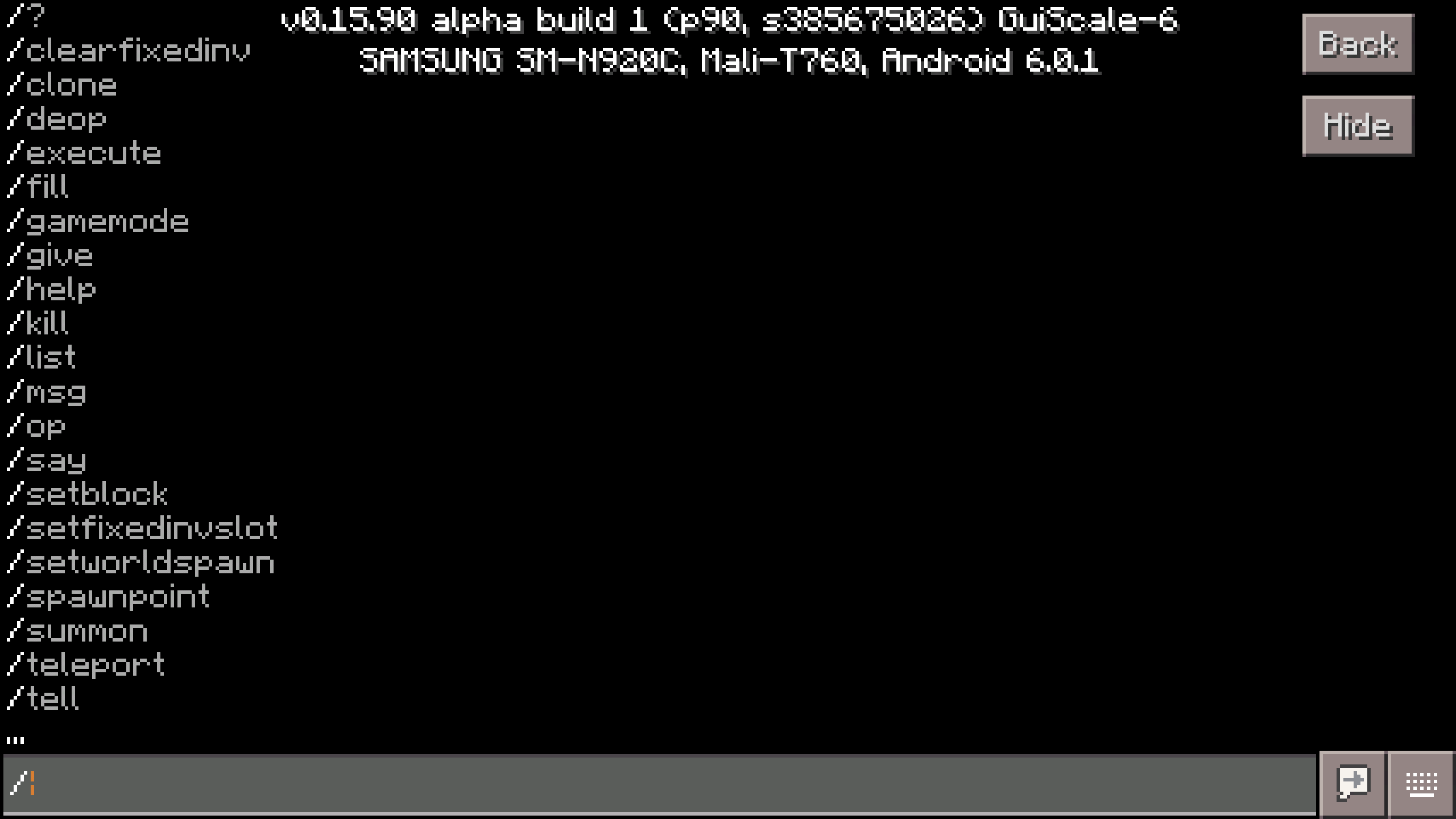
Screen behind chat goes all black (instead of showing the world) when you type / to start a command
The screen became black when u try to use commands
rplatham edit:
It looks like the autocomplete command options are forcing the background solid black. If cheats are disabled in the world, typing / does not start a command and does NOT shade the window all black.
When you open the chat window, you can still see the world through the background. However, when you type a / to start a command the window shading goes all black so you cannot see the world any more. I expected that you would still be able to see the world.
Attachments1

Created Issue:
Commands screen bug
The screen became black when u try to use commands
Attachments1

Commands screen bugScreen behind chat goes all black (instead of showing the world) when you type / to start a command
The screen became black when u try to use commands
rplatham edit:
When you open the chat window, you can still see the world through the background. However, when you type a / to start a command the window shading goes all black so you cannot see the world any more. I expected that you would still be able to see the world.
The screen became black when u try to use commands
rplatham edit:
When you open the chat window, you can still see theworld throughthe background. However, when you type a / to start a command the window shading goes all black so you cannot see the world any more. I expected that you would still be able to see the world.The screen became black when u try to use commands
rplatham edit:
It looks like the autocomplete command options are forcing the background solid black. If cheats are disabled in the world, typing / does not start a command and does NOT shade the window all black.When you open the chat window, you can still see the world through the background. However, when you type a / to start a command the window shading goes all black so you cannot see the world any more. I expected that you would still be able to see the world.

![[Mojang] Mega_Spud (Jay Wells)](../../../data/avatars/users/92696.png)
m7mx0 Your ticket descriptions need much more detail to be helpful. I have edited above to give you an example. Better descriptions mean faster bug fixes for all.
This is a bulk resolve of issues that haven't been updated to 0.16.0+ yet. Please comment below (To open the ticket) and update your affected versions. If you cannot reproduce the bug, please write in the comments so we can resolve it as "Cannot Reproduce". Thank You!
This ticket has been resolved as 'Cannot Reproduce' as it has no response was received recently.