 MCPE-31709
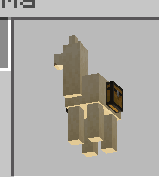
Entity models in UI are lit from below
Players and most entities in the world are lit from above – that is, they're lighter on top faces and darker on bottom faces.
However, the paper dolls (top left of screen, inventory, main menu, and pause menu) are lit from below. That is, they are darker on the top faces and lighter on the lower faces.
Player:


Paper doll:


Other examples:
Linked Issues
- Unresolved
![[Mod] tryashtar](../../../data/avatars/users/41963.png) [Mod] tryashtar
[Mod] tryashtar- 7
- 3
- Confirmed
- 387263
- Multiple
- ui vanilla-parity
1.13.0.1 Beta - 1.21.51 Hotfix
1.13.0.1 Beta 1.18.10.26 Beta 1.17.40.23 Beta 1.17.40.21 Beta 1.17.20.20 Beta 1.16.0.51 Beta 1.13.1 1.14.0.2 Beta 1.13.0.9 Beta 1.12.0.11 Beta 1.12.0.2 Beta 1.11.0.10 Beta 1.9.0.0 Beta 1.2.13.11 1.4.3.0 1.4.2.0 1.6.0.5 1.5.0.14 1.7.1 1.7.0 1.9.0 1.10.0 1.13.0.4 Beta 1.14.0 1.16.201 Hotfix 1.17.2 Hotfix 1.17.30 1.17.32 1.18.2 Hotfix 1.21.51 Hotfix
Created Issue:
Paper doll models lit from below
Players and most entities are lit consistently from above, which is find and matches Java Edition.
The paper dolls (top left of screen, inventory, main menu, and pause menu) are lit from below. That is, they are darker on the top faces and lighter on the lower faces.
See the attached images.
Player:
Paper doll:
Attachments4
Players and most entities are lit consistently from above, which is find and matches Java Edition.
The paper dolls (top left of screen, inventory, main menu, and pause menu) are lit from below. That is, they are darker on the top faces and lighter on the lower faces.
See the attached images.
Player:
Paper doll:
Players and most entities are lit consistently from above, which is find and matches Java Edition.
The paper dolls (top left of screen, inventory, main menu, and pause menu) are lit from below. That is, they are darker on the top faces and lighter on the lower faces.
See the attached images.
Player:
Paper doll:
Players and most entities are lit consistently from above, which is fin
dand matches Java Edition.The paper dolls (top left of screen, inventory, main menu, and pause menu) are lit from below. That is, they are darker on the top faces and lighter on the lower faces.
See the attached images.
Player:
Paper doll:
Players and most entities are lit consistently from above, which is fine and matches Java Edition.
The paper dolls (top left of screen, inventory, main menu, and pause menu) are lit from below. That is, they are darker on the top faces and lighter on the lower faces.
See the attached images.
Player:
Paper doll:
Players and most entities are lit consistently from above, which is fine and matches Java Edition.
The paper dolls (top left of screen, inventory, main menu, and pause menu) are lit from below. That is, they are darker on the top faces and lighter on the lower faces.
See the attached images.
Specifically note the shoulders and bottom of the hands and feet.
Player:
Paper doll:
Players and most entities
are lit consistently from above, which is fine and matches Java Edition.
The paper dolls (top left of screen, inventory, main menu, and pause menu) are lit from below. That is, they are darker on the top faces and lighter on the lower faces.See the attached images.
Player:
Paper doll:
Players and most entities in the world are lit from above – that is, they're lighter on top faces and darker on bottom faces.
However, the paper dolls (top left of screen, inventory, main menu, and pause menu) are lit from below. That is, they are darker on the top faces and lighter on the lower faces.
See the attached images.
Player:
Paper doll:
Players and most entities in the world are lit from above – that is, they're lighter on top faces and darker on bottom faces.
However, the paper dolls (top left of screen, inventory, main menu, and pause menu) are lit from below. That is, they are darker on the top faces and lighter on the lower faces.
See the attached images.
Player:
Paper doll:
Players and most entities in the world are lit from above – that is, they're lighter on top faces and darker on bottom faces.
However, the paper dolls (top left of screen, inventory, main menu, and pause menu) are lit from below. That is, they are darker on the top faces and lighter on the lower faces.
Player:
Paper doll:
Other examples:
![[Mod] OcelotOnesie](../../../data/avatars/users/43220.png)
![[MCQA] Kinga Izdebska](../../../data/avatars/users/18949.svg)
Paper doll modelslit from belowEntity modes in UI are lit from below
Entity models in UI are lit from below
relates to