 MCPE-95908
NPC Button-Mode can not interact with Gamepad
I want to use summoned NPC for a Adventure Map.
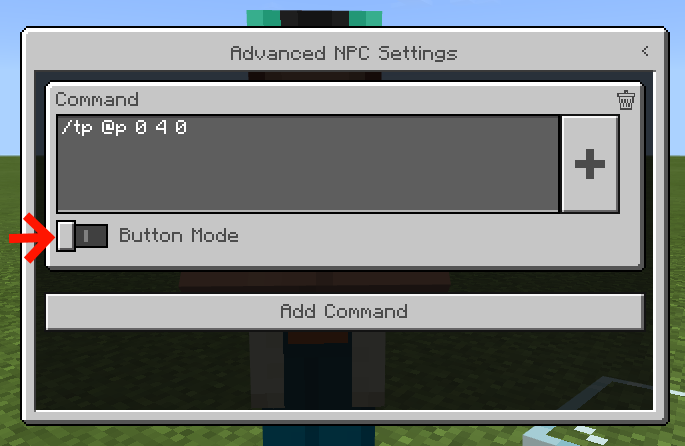
In Advanced NPC Settings, i can select all Buttons with the Gamepad, but not the
Button Mode -Control to add Buttons in the Dialog
When i join with the Win 10 Edition in this World, i can activate the Setting with the Mouse and can then complete interact Controls in XBOX ONE with Gamepad. So i think it's a Bug or forget to implementation to play with Gamepad. I dont know when i play with Gamepad, has same problem in Win 10 Edition.
Linked Issues
Attachments1

Created Issue:
NPC Button-Mode can not interact with Controller
I want to use summoned NPC for a Adventure Map.
In Advanced NPC Settings, i can select all Buttons with the Controller but not the
Button Mode -Control to add Controls in the Dialog
I want to use summoned NPC for a Adventure Map.
In Advanced NPC Settings, i can select all Buttons with the Controller but not the
Button Mode -Control to add Controls in the Dialog
When i join with the Win 10 Edition, i can activate the Setting and can complete interact in XBOX ONE with Gamepad. So i think it's a Bug
I want to use summoned NPC for a Adventure Map.
In Advanced NPC Settings, i can select all Buttons with the Controller but not the
Button Mode -Control to add Controls in the Dialog
When i join with the Win 10 Edition in this World, i can activate the Setting and can then complete interact Controls in XBOX ONE with Gamepad. So i think it's a Bug
I want to use summoned NPC for a Adventure Map.
In Advanced NPC Settings, i can select all Buttons with the
Controllerbut not theButton Mode -Control to add
Controls in the Dialog
When i join with the Win 10 Edition in this World, i can activate the Setting and can then complete interact Controls in XBOX ONE with Gamepad. So i think it's a Bug
I want to use summoned NPC for a Adventure Map.
In Advanced NPC Settings, i can select all Buttons with the Gamepad, but not the
Button Mode -Control to add Buttons in the Dialog
When i join with the Win 10 Edition in this World, i can activate the Setting and can then complete interact Controls in XBOX ONE with Gamepad. So i think it's a Bug
NPC Button-Mode can not interact withControllerNPC Button-Mode can not interact with Gamepad
I want to use summoned NPC for a Adventure Map.
In Advanced NPC Settings, i can select all Buttons with the Gamepad, but not the
Button Mode -Control to add Buttons in the Dialog
When i join with the Win 10 Edition in this World, i can activate the Setting and can then complete interact Controls in XBOX ONE with Gamepad. So i think it's a Bug or forget to implementation for Gamepad.
I want to use summoned NPC for a Adventure Map.
In Advanced NPC Settings, i can select all Buttons with the Gamepad, but not the
Button Mode -Control to add Buttons in the Dialog
When i join with the Win 10 Edition in this World, i can activate the Setting and can then complete interact Controls in XBOX ONE with Gamepad. So i think it's a Bug or forget to implementation
forGamepad.I want to use summoned NPC for a Adventure Map.
In Advanced NPC Settings, i can select all Buttons with the Gamepad, but not the
Button Mode -Control to add Buttons in the Dialog
When i join with the Win 10 Edition in this World, i can activate the Setting and can then complete interact Controls in XBOX ONE with Gamepad. So i think it's a Bug or forget to implementation to play with Gamepad.
I want to use summoned NPC for a Adventure Map.
In Advanced NPC Settings, i can select all Buttons with the Gamepad, but not the
Button Mode -Control to add Buttons in the Dialog
When i join with the Win 10 Edition in this World, i can activate the Setting and can then complete interact Controls in XBOX ONE with Gamepad. So i think it's a Bug or forget to implementation to play with Gamepad. I dont know when i play with Gamepad, has same problem in Win 10 Edition.
I want to use summoned NPC for a Adventure Map.
In Advanced NPC Settings, i can select all Buttons with the Gamepad, but not the
Button Mode -Control to add Buttons in the Dialog
When i join with the Win 10 Edition in this World, i can activate the Setting with the Mouse and can then complete interact Controls in XBOX ONE with Gamepad. So i think it's a Bug or forget to implementation to play with Gamepad. I dont know when i play with Gamepad, has same problem in Win 10 Edition.
![[Mod] OcelotOnesie](../../../data/avatars/users/43220.png)
duplicates
Thank you for your report!
We're actually already tracking this issue at
MCPE-66446, so I will resolve and link this ticket as a duplicate.If you would like to add a vote and any extra information to the main ticket it would be appreciated.
If you haven't already, you might like to make use of the search feature to see if the issue has already been mentioned.
Quick Links:
📓 Issue Guidelines – 💬 Community Support – 📧 Customer Support – ✍️ Feedback and Suggestions – 📖 Game Wiki