 48844
48844
- 48844
- 48844
- America/New_York
- Yes
- No
 MC-145256






I've been having this problem in singleplayer since 1.13 came out and I just can't stand it anymore. I know it's only been since 1.13 came out because before then it ran really nicely with clouds and particles on and graphics on fancy. But now, if I want a decent framerate, I have to have all those off. Even then it really takes up a lot of my CPU.
I really love this game but I just can't play it anymore without my computer having a bad time. This is a serious problem and it's genuinely upsetting.
While I'm not quite sure exactly when it started, I've been having this problem for several months now.
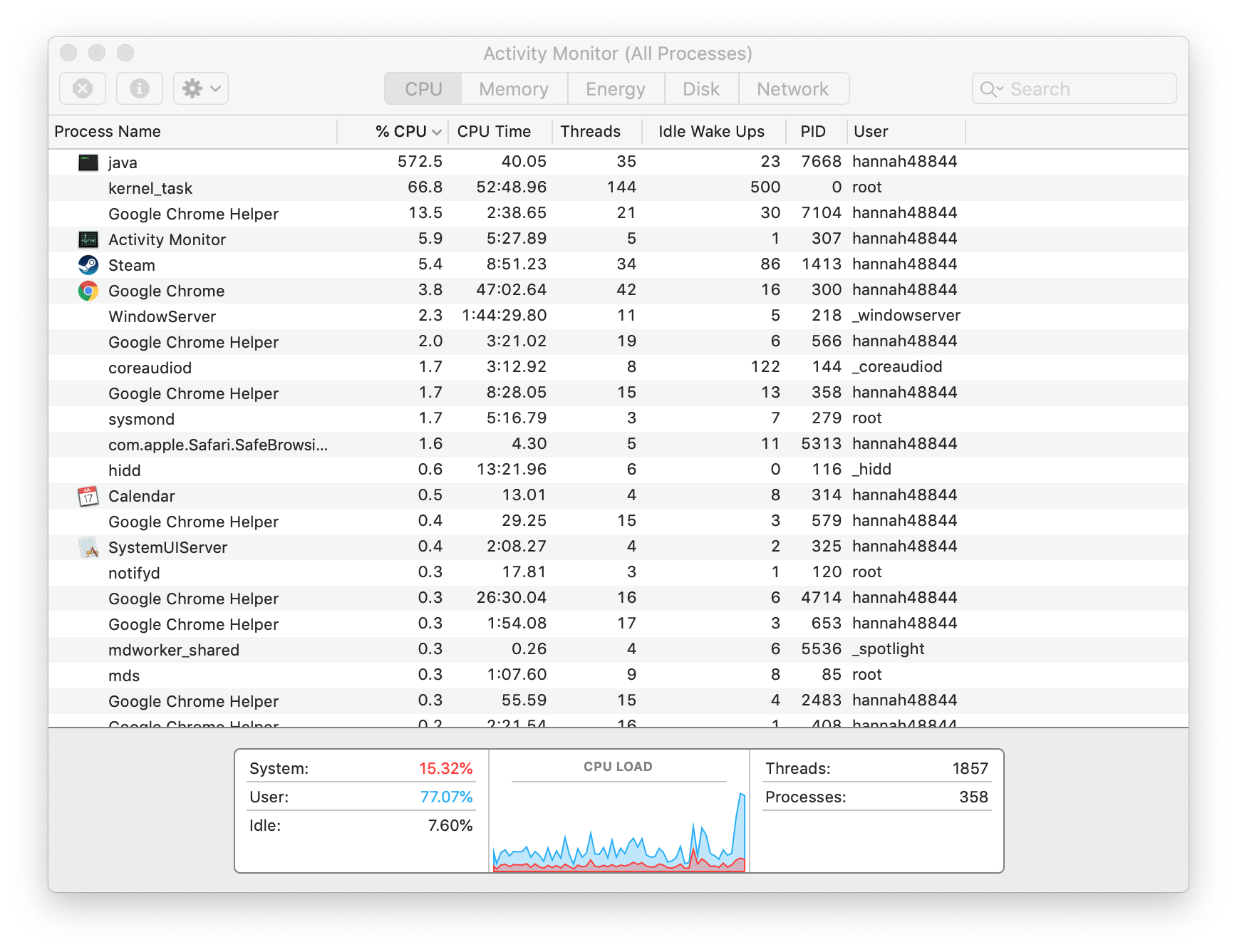
Before updating Java to the latest version, when playing Minecraft, my computer heats up, and when I opened up Activity Monitor and looked at it while having Minecraft open, it uses around 300% when opening the game itself, in the menu it tends to go down to less than 100%, and then opening up a world and playing in it brings it back up to the 260-320% range.From the last thread I found (and commented in a few days ago but it was marked as resolved so I thought I may need to report it myself), I saw screenshots of the Activity Monitor, as well as an instruction to force the game to crash and attach the crash report, so I went ahead and attached a crash report, a screenshot from opening the game, and a screenshot from playing in a creative superflat world.
Upon looking at which version of Java I had, I went ahead and downloaded it again. That may have made it worse; opening Minecraft peaked at 572%, and playing in the same world 300%. I have also added the crash report and two screenshots for this as well. The Java version appears to be the same from the crash report, so perhaps this was just an outlier. More screenshots and another crash report can't hurt, though, right?
While I'm not quite sure exactly when it started, I've been having this problem for several months now. When playing Minecraft, my computer heats up, and when I opened up Activity Monitor and looked at it while having Minecraft open, it uses around 300% when opening the game itself, in the menu it tends to go down to less than 100%, and then opening up a world and playing in it brings it back up to the 260-320% range. It then goes down to around 30-100% longer-term, but it still heats up about the same way as if I were playing a more resource-intensive game, loud fan sounds and all.
From the last thread I found (and commented in a few days ago but it was marked as resolved so I thought I may need to report it myself), I saw screenshots of the Activity Monitor, as well as an instruction to force the game to crash and attach the crash report, so I went ahead and attached a crash report, a screenshot from opening the game, and a screenshot from playing in a creative superflat world.
Upon looking at which version of Java I had, I went ahead and downloaded it again. That may have made it worse; opening Minecraft peaked at 572%, and playing in the same world 300%. I have also added the crash report and two screenshots for this as well. The Java version appears to be the same from the crash report, so perhaps this was just an outlier. More screenshots and another crash report can't hurt, though, right?
Minecrafttaking 260-320% CPU on MacBook ProMinecraft causing MacBook Pro to heat up
While I'm not quite sure exactly when it started, I've been having this problem for several months now. When playing Minecraft, my computer heats up, and when I opened up Activity Monitor and looked at it while having Minecraft open, it uses around 300% when opening the game itself, in the menu it tends to go down to less than 100%, and then opening up a world and playing in it brings it back up to the 260-320% range. It then goes down to around 30-100% longer-term, but it still heats up about the same way as if I were playing a more resource-intensive game, loud fan sounds and all.
From the last thread I found (and commented in a few days ago but it was marked as resolved so I thought I may need to report it myself), I saw screenshots of the Activity Monitor, as well as an instruction to force the game to crash and attach the crash report, so I went ahead and attached a crash report, a screenshot from opening the game, and a screenshot from playing in a creative superflat world.
Upon looking at which version of Java I had, I went ahead and downloaded it again. That may have made it worse; opening Minecraft peaked at 572%, and playing in the same world 300%. I have also added the crash report and two screenshots for this as well. The Java version appears to be the same from the crash report,
so perhaps this was justan outlier. More screenshots and another crash report can't hurt, though, right?While I'm not quite sure exactly when it started, I've been having this problem for several months now. When playing Minecraft, my computer heats up, and when I opened up Activity Monitor and looked at it while having Minecraft open, it uses around 300% when opening the game itself, in the menu it tends to go down to less than 100%, and then opening up a world and playing in it brings it back up to the 260-320% range. It then goes down to around 30-100% longer-term, but it still heats up about the same way as if I were playing a more resource-intensive game, loud fan sounds and all.
From the last thread I found (and commented in a few days ago but it was marked as resolved so I thought I may need to report it myself), I saw screenshots of the Activity Monitor, as well as an instruction to force the game to crash and attach the crash report, so I went ahead and attached a crash report, a screenshot from opening the game, and a screenshot from playing in a creative superflat world. I also added a screenshot from a creative buffet world (badlands) after several minutes in it, as it has also been displaying the same behaviour upon opening that the superflat world does.
Upon looking at which version of Java I had, I went ahead and downloaded it again. That may have made it worse; opening Minecraft peaked at 572%, and playing in the same world 300%. I have also added the crash report and two screenshots for this as well. The Java version appears to be the same from the crash report, and subsequent tests were in the previous range, so I believe it to be an outlier. More screenshots and another crash report can't hurt, though, right?
While I'm not quite sure exactly when it started, I've been having this problem for several months now. When playing Minecraft, my computer heats up, and when I opened up Activity Monitor and looked at it while having Minecraft open, it uses around 300% when opening the game itself, in the menu it tends to go down to less than 100%, and then opening up a world and playing in it brings it back up to the 260-320% range. It then goes down to around 30-100% longer-term, but it still heats up about the same way as if I were playing a more resource-intensive game, loud fan sounds and all.
From the last thread I found (and commented in a few days ago but it was marked as resolved so I thought I may need to report it myself), I saw screenshots of the Activity Monitor, as well as an instruction to force the game to crash and attach the crash report, so I went ahead and attached a crash report, a screenshot from opening the game, and a screenshot from playing in a creative superflat world. I also added a couple screenshots from a creative buffet world (badlands) after several minutes in it, as it has also been displaying the same behaviour upon opening that the superflat world does.
Upon looking at which version of Java I had, I went ahead and downloaded it again. That may have made it worse; opening Minecraft peaked at 572%, and playing in the same world 300%. I have also added the crash report and two screenshots for this as well. The Java version appears to be the same from the crash report, and subsequent tests were in the previous range, so I believe it to be an outlier. More screenshots and another crash report can't hurt, though, right?
While I'm not quite sure exactly when it started, I've been having this problem for several months now. When playing Minecraft, my computer heats up, and when I opened up Activity Monitor and looked at it while having Minecraft open, it uses around 300% when opening the game itself, in the menu it tends to go down to less than 100%, and then opening up a world and playing in it brings it back up to the 260-320% range. It then goes down to around 30-100% longer-term, but it still heats up about the same way as if I were playing a more resource-intensive game, loud fan sounds and all. Attempting to play in the latest snapshot had it more in the 120-150% range while playing.
From the last thread I found (and commented in a few days ago but it was marked as resolved so I thought I may need to report it myself), I saw screenshots of the Activity Monitor, as well as an instruction to force the game to crash and attach the crash report, so I went ahead and attached a crash report, a screenshot from opening the game, and a screenshot from playing in a creative superflat world. I also added a couple screenshots from a creative buffet world (badlands) after several minutes in it, as it has also been displaying the same behaviour upon opening that the superflat world does.
Upon looking at which version of Java I had, I went ahead and downloaded it again. That may have made it worse; opening Minecraft peaked at 572%, and playing in the same world 300%. I have also added the crash report and two screenshots for this as well. The Java version appears to be the same from the crash report, and subsequent tests were in the previous range, so I believe it to be an outlier. More screenshots and another crash report can't hurt, though, right?
Minecraft causing MacBook Pro to heat up, using up to 300% CPU
Minecraft causing MacBook Pro to heat up, using up to 300% CPUMinecraft causing MacBook Pro to heat up, using up to 330% CPU
While I'm not quite sure exactly when it started, I've been having this problem for several months now. When playing Minecraft, my computer heats up, and when I opened up Activity Monitor and looked at it while having Minecraft open, it uses around 300% when opening the game itself, in the menu it tends to go down to less than 100%, and then opening up a world and playing in it brings it back up to the 260-320% range. It then goes down to around 30-100% longer-term, but it still heats up about the same way as if I were playing a more resource-intensive game, loud fan sounds and all. Attempting to play in the latest snapshot had it more in the 120-150% range while playing.
From the last thread I found (and commented in a few days ago but it was marked as resolved so I thought I may need to report it myself), I saw screenshots of the Activity Monitor, as well as an instruction to force the game to crash and attach the crash report, so I went ahead and attached a crash report, a screenshot from opening the game, and a screenshot from playing in a creative superflat world. I also added a couple screenshots from a creative buffet world (badlands) after several minutes in it, as it has also been displaying the same behaviour upon opening that the superflat world does.
Upon looking at which version of Java I had, I went ahead and downloaded it again. That may have made it worse; opening Minecraft peaked at 572%, and playing in the same world 300%. I have also added the crash report and two screenshots for this as well. The Java version appears to be the same from the crash report, and subsequent tests were in the previous range, so I believe it to be an outlier. More screenshots and another crash report can't hurt, though, right?
Someone else commented with the same issue. They said that the resolution used by the game in windowed mode is using the native resolution of the screen, which should not be happening. To verify that this was the case, I took in-game screenshots with F3 up. One was in the default-sized window, one was in fullscreen at a set resolution, and one was with the window taking up most of the screen. The third screenshot revealed that the resolution of the game was but 200 pixels shorter than the resolution of my screen, and thus I am under the impression that this is at the very least part of the problem.
While I'm not quite sure exactly when it started, I've been having this problem for several months now. When playing Minecraft, my computer heats up, and when I opened up Activity Monitor and looked at it while having Minecraft open, it uses around 300% when opening the game itself, in the menu it tends to go down to less than 100%, and then opening up a world and playing in it brings it back up to the 260-320% range. It then goes down to around 30-100% longer-term, but it still heats up about the same way as if I were playing a more resource-intensive game, loud fan sounds and all. Attempting to play in the latest snapshot had it more in the 120-150% range while playing.
From the last thread I found (and commented in a few days ago but it was marked as resolved so I thought I may need to report it myself), I saw screenshots of the Activity Monitor, as well as an instruction to force the game to crash and attach the crash report, so I went ahead and attached a crash report, a screenshot from opening the game, and a screenshot from playing in a creative superflat world. I also added a couple screenshots from a creative buffet world (badlands) after several minutes in it, as it has also been displaying the same behaviour upon opening that the superflat world does.
Upon looking at which version of Java I had, I went ahead and downloaded it again. That may have made it worse; opening Minecraft peaked at 572%, and playing in the same world 300%. I have also added the crash report and two screenshots for this as well. The Java version appears to be the same from the crash report, and subsequent tests were in the previous range, so I believe it to be an outlier. More screenshots and another crash report can't hurt, though, right?
Someone else commented with the same issue. They said that the resolution used by the game in windowed mode is using the native resolution of the screen, which should not be happening. To verify that this was the case, I took in-game screenshots with F3 up. One was in the default-sized window, one was in fullscreen at a set resolution, and one was with the window taking up most of the screen. The third screenshot revealed that the resolution of the game was but 200 pixels shorter than the resolution of my screen, and thus I am under the impression that this
is at the very least part of the problem.While I'm not quite sure exactly when it started, I've been having this problem for several months now. When playing Minecraft, my computer heats up, and when I opened up Activity Monitor and looked at it while having Minecraft open, it uses around 300% when opening the game itself, in the menu it tends to go down to less than 100%, and then opening up a world and playing in it brings it back up to the 260-320% range. It then goes down to around 30-100% longer-term, but it still heats up about the same way as if I were playing a more resource-intensive game, loud fan sounds and all. Attempting to play in the latest snapshot had it more in the 120-150% range while playing.
From the last thread I found (and commented in a few days ago but it was marked as resolved so I thought I may need to report it myself), I saw screenshots of the Activity Monitor, as well as an instruction to force the game to crash and attach the crash report, so I went ahead and attached a crash report, a screenshot from opening the game, and a screenshot from playing in a creative superflat world. I also added a couple screenshots from a creative buffet world (badlands) after several minutes in it, as it has also been displaying the same behaviour upon opening that the superflat world does.
Upon looking at which version of Java I had, I went ahead and downloaded it again. That may have made it worse; opening Minecraft peaked at 572%, and playing in the same world 300%. I have also added the crash report and two screenshots for this as well. The Java version appears to be the same from the crash report, and subsequent tests were in the previous range, so I believe it to be an outlier. More screenshots and another crash report can't hurt, though, right?
Someone else commented with the same issue. They said that the resolution used by the game in windowed mode is using the native resolution of the screen, which should not be happening. To verify that this was the case, I took in-game screenshots with F3 up. One was in the default-sized window, one was in fullscreen at a set resolution, and one was with the window taking up most of the screen. The third screenshot revealed that the resolution of the game was but 200 pixels shorter than the resolution of my screen, and thus I am under the impression that this part of the problem, or at least exacerbating it. Attempting to play in full screen did still use 90% CPU, I caught a glimpse of the Activity Monitor right after exiting the game.
While I'm not quite sure exactly when it started, I've been having this problem for several months now. When playing Minecraft, my computer heats up, and when I opened up Activity Monitor and looked at it while having Minecraft open, it uses around 300% when opening the game itself, in the menu it tends to go down to less than 100%, and then opening up a world and playing in it brings it back up to the 260-320% range. It then goes down to around 30-100% longer-term, but it still heats up about the same way as if I were playing a more resource-intensive game, loud fan sounds and all. Attempting to play in the latest snapshot had it more in the 120-150% range while playing.
From the last thread I found (and commented in a few days ago but it was marked as resolved so I thought I may need to report it myself), I saw screenshots of the Activity Monitor, as well as an instruction to force the game to crash and attach the crash report, so I went ahead and attached a crash report, a screenshot from opening the game, and a screenshot from playing in a creative superflat world. I also added a couple screenshots from a creative buffet world (badlands) after several minutes in it, as it has also been displaying the same behaviour upon opening that the superflat world does.
Upon looking at which version of Java I had, I went ahead and downloaded it again. That may have made it worse; opening Minecraft peaked at 572%, and playing in the same world 300%. I have also added the crash report and two screenshots for this as well. The Java version appears to be the same from the crash report, and subsequent tests were in the previous range, so I believe it to be an outlier. More screenshots and another crash report can't hurt, though, right?
Someone else commented with the same issue. They said that the resolution used by the game in windowed mode is using the native resolution of the screen, which should not be happening. To verify that this was the case, I took in-game screenshots with F3 up. One was in the default-sized window, one was in fullscreen at a set resolution, and one was with the window taking up most of the screen. The third screenshot revealed that the resolution of the game was but 200 pixels shorter than the resolution of my screen, and thus I am under the impression that this part of the problem, or at least exacerbating
it. Attempting to play in full screen did still use 90% CPU,I caught a glimpse of the Activity Monitor right after exiting the game.While I'm not quite sure exactly when it started, I've been having this problem for several months now. When playing Minecraft, my computer heats up, and when I opened up Activity Monitor and looked at it while having Minecraft open, it uses around 300% when opening the game itself, in the menu it tends to go down to less than 100%, and then opening up a world and playing in it brings it back up to the 260-320% range. It then goes down to around 30-100% longer-term, but it still heats up about the same way as if I were playing a more resource-intensive game, loud fan sounds and all. Attempting to play in the latest snapshot had it more in the 120-150% range while playing.
From the last thread I found (and commented in a few days ago but it was marked as resolved so I thought I may need to report it myself), I saw screenshots of the Activity Monitor, as well as an instruction to force the game to crash and attach the crash report, so I went ahead and attached a crash report, a screenshot from opening the game, and a screenshot from playing in a creative superflat world. I also added a couple screenshots from a creative buffet world (badlands) after several minutes in it, as it has also been displaying the same behaviour upon opening that the superflat world does.
Upon looking at which version of Java I had, I went ahead and downloaded it again. That may have made it worse; opening Minecraft peaked at 572%, and playing in the same world 300%. I have also added the crash report and two screenshots for this as well. The Java version appears to be the same from the crash report, and subsequent tests were in the previous range, so I believe it to be an outlier. More screenshots and another crash report can't hurt, though, right?
Someone else commented with the same issue. They said that the resolution used by the game in windowed mode is using the native resolution of the screen, which should not be happening. To verify that this was the case, I took in-game screenshots with F3 up. One was in the default-sized window, one was in fullscreen at a set resolution, and one was with the window taking up most of the screen. The third screenshot revealed that the resolution of the game was but 200 pixels shorter than the resolution of my screen, and thus I am under the impression that this is part of the problem, or at least exacerbating the one I first detected. I caught a glimpse of the Activity Monitor right after exiting the game from attempting to play in full screen and the CPU was still 90%.
While I'm not quite sure exactly when it started, I've been having this problem for several months now. When playing Minecraft, my computer heats up, and when I opened up Activity Monitor and looked at it while having Minecraft open, it uses around 300% when opening the game itself, in the menu it tends to go down to less than 100%, and then opening up a world and playing in it brings it back up to the 260-320% range. It then goes down to around 30-100% longer-term, but it still heats up about the same way as if I were playing a more resource-intensive game, loud fan sounds and all. Attempting to play in the latest snapshot had it more in the 120-150% range while playing.
From the last thread I found (and commented in a few days ago but it was marked as resolved so I thought I may need to report it myself), I saw screenshots of the Activity Monitor, as well as an instruction to force the game to crash and attach the crash report, so I went ahead and attached a crash report, a screenshot from opening the game, and a screenshot from playing in a creative superflat world. I also added a couple screenshots from a creative buffet world (badlands) after several minutes in it, as it has also been displaying the same behaviour upon opening that the superflat world does.
Upon looking at which version of Java I had, I went ahead and downloaded it again. That may have made it worse; opening Minecraft peaked at 572%, and playing in the same world 300%. I have also added the crash report and two screenshots for this as well. The Java version appears to be the same from the crash report, and subsequent tests were in the previous range, so I believe it to be an outlier. More screenshots and another crash report can't hurt, though, right?
Someone else commented with the same issue. They said that the resolution used by the game in windowed mode is using the native resolution of the screen, which should not be happening. To verify that this was the case, I took in-game screenshots with F3 up. One was in the default-sized window, one was in fullscreen at a set resolution, and one was with the window taking up most of the screen. The third screenshot revealed that the resolution of the game was but 200 pixels shorter than the resolution of my screen, and thus I am under the impression that this is part of the problem, or at least exacerbating the one I first detected. I caught a glimpse of the Activity Monitor right after exiting the game from attempting to play in full screen and the CPU was still 90%, so I do not believe the resolution is the sole culprit.
While I'm not quite sure exactly when it started, I've been having this problem for several months now. When playing Minecraft, my computer heats up, and when I opened up Activity Monitor and looked at it while having Minecraft open, it uses around 300% when opening the game itself, in the menu it tends to go down to less than 100%, and then opening up a world and playing in it brings it back up to the 260-320% range. It then goes down to around 30-100% longer-term, but it still heats up about the same way as if I were playing a more resource-intensive game, loud fan sounds and all. Attempting to play in the latest snapshot had it more in the 120-150% range while playing.
From the last thread I found (and commented in a few days ago but it was marked as resolved so I thought I may need to report it myself), I saw screenshots of the Activity Monitor, as well as an instruction to force the game to crash and attach the crash report, so I went ahead and attached a crash report, a screenshot from opening the game, and a screenshot from playing in a creative superflat world. I also added a couple screenshots from a creative buffet world (badlands) after several minutes in it, as it has also been displaying the same behaviour upon opening that the superflat world does.
Upon looking at which version of Java I had, I went ahead and downloaded it again. That may have made it worse; opening Minecraft peaked at 572%, and playing in the same world 300%. I have also added the crash report and two screenshots for this as well. The Java version appears to be the same from the crash report, and subsequent tests were in the previous range, so I believe it to be an outlier. More screenshots and another crash report can't hurt, though, right?
Someone else commented with the same issue. They said that the resolution used by the game in windowed mode is using the native resolution of the screen, which should not be happening. To verify that this was the case, I took in-game screenshots with F3 up. One was in the default-sized window, one was in fullscreen at a set resolution, and one was with the window taking up most of the screen. The third screenshot revealed that the resolution of the game was but 200 pixels shorter than the resolution of my screen, and thus I am under the impression that this is part of the problem, or at least exacerbating the one I first detected.
I caught a glimpse of the Activity Monitor right after exiting the game from attempting to play in full screen and the CPU was still 90%,so I do not believe the resolution is the sole culprit.While I'm not quite sure exactly when it started, I've been having this problem for several months now. When playing Minecraft, my computer heats up, and when I opened up Activity Monitor and looked at it while having Minecraft open, it uses around 300% when opening the game itself, in the menu it tends to go down to less than 100%, and then opening up a world and playing in it brings it back up to the 260-320% range. It then goes down to around 30-100% longer-term, but it still heats up about the same way as if I were playing a more resource-intensive game, loud fan sounds and all. Attempting to play in the latest snapshot had it more in the 120-150% range while playing.
From the last thread I found (and commented in a few days ago but it was marked as resolved so I thought I may need to report it myself), I saw screenshots of the Activity Monitor, as well as an instruction to force the game to crash and attach the crash report, so I went ahead and attached a crash report, a screenshot from opening the game, and a screenshot from playing in a creative superflat world. I also added a couple screenshots from a creative buffet world (badlands) after several minutes in it, as it has also been displaying the same behaviour upon opening that the superflat world does.
Upon looking at which version of Java I had, I went ahead and downloaded it again. That may have made it worse; opening Minecraft peaked at 572%, and playing in the same world 300%. I have also added the crash report and two screenshots for this as well. The Java version appears to be the same from the crash report, and subsequent tests were in the previous range, so I believe it to be an outlier. More screenshots and another crash report can't hurt, though, right?
Someone else commented with the same issue. They said that the resolution used by the game in windowed mode is using the native resolution of the screen, which should not be happening. To verify that this was the case, I took in-game screenshots with F3 up. One was in the default-sized window, one was in fullscreen at a set resolution, and one was with the window taking up most of the screen. The third screenshot revealed that the resolution of the game was but 200 pixels shorter than the resolution of my screen, and thus I am under the impression that this is part of the problem, or at least exacerbating the one I first detected. Additionally, after exiting the game from playing in full screen, the Activity Monitor still shows Minecraft using about 90% CPU right before it updates (as I have the update frequency set to 5 seconds) so I do not believe the resolution is the sole culprit.
While I'm not quite sure exactly when it started, I've been having this problem for several months now. When playing Minecraft, my computer heats up, and when I opened up Activity Monitor and looked at it while having Minecraft open, it uses around 300% when opening the game itself, in the menu it tends to go down to less than 100%, and then opening up a world and playing in it brings it back up to the 260-320% range. It then goes down to around 30-100% longer-term, but it still heats up about the same way as if I were playing a more resource-intensive game, loud fan sounds and all. Attempting to play in the latest snapshot had it more in the 120-150% range while playing.
From the last thread I found (and commented in a few days ago but it was marked as resolved so I thought I may need to report it myself), I saw screenshots of the Activity Monitor, as well as an instruction to force the game to crash and attach the crash report, so I went ahead and attached a crash report, a screenshot from opening the game, and a screenshot from playing in a creative superflat world. I also added a couple screenshots from a creative buffet world (badlands) after several minutes in it, as it has also been displaying the same behaviour upon opening that the superflat world does.
Upon looking at which version of Java I had, I went ahead and downloaded it again. That may have made it worse; opening Minecraft peaked at 572%, and playing in the same world 300%. I have also added the crash report and two screenshots for this as well. The Java version appears to be the same from the crash report, and subsequent tests were in the previous range, so I believe it to be an outlier. More screenshots and another crash report can't hurt, though, right?
Someone else commented with the same issue. They said that the resolution used by the game in windowed mode is using the native resolution of the screen, which should not be happening. To verify that this was the case, I took in-game screenshots with F3 up. One was in the default-sized window, one was in fullscreen at a set resolution, and one was with the window taking up most of the screen. The third screenshot revealed that the resolution of the game was but 200 pixels shorter than the resolution of my screen, and thus I am under the impression that this is part of the problem, or at least exacerbating the one I first detected. Additionally, after exiting the game from playing in full screen, the Activity Monitor still shows Minecraft using about 90% CPU right before it updates (as I have the update frequency set to 5 seconds) so I do not believe the resolution is the sole culprit, if it is related at all.
While I'm not quite sure exactly when it started, I've been having this problem for several months now. When playing Minecraft, my computer heats up, and when I opened up Activity Monitor and looked at it while having Minecraft open, it uses around 300% when opening the game itself, in the menu it tends to go down to less than 100%, and then opening up a world and playing in it brings it back up to the 260-320% range. It then goes down to around 30-100% longer-term, but it still heats up about the same way as if I were playing a more resource-intensive game, loud fan sounds and all. Attempting to play in the
latest snapshot had it more in the 120-150% range while playing.From the last thread I found (and commented in a few days ago but it was marked as resolved so I thought I may need to report it myself), I saw screenshots of the Activity Monitor, as well as an instruction to force the game to crash and attach the crash report, so I went ahead and attached a crash report, a screenshot from opening the game, and a screenshot from playing in a creative superflat world. I also added a couple screenshots from a creative buffet world (badlands) after several minutes in it, as it has also been displaying the same behaviour upon opening that the superflat world does.
Upon looking at which version of Java I had, I went ahead and downloaded it again. That may have made it worse; opening Minecraft peaked at 572%, and playing in the same world 300%. I have also added the crash report and two screenshots for this as well. The Java version appears to be the same from the crash report, and subsequent tests were in the previous range, so I believe it to be an outlier. More screenshots and another crash report can't hurt, though, right?
Someone else commented with the same issue. They said that the resolution used by the game in windowed mode is using the native resolution of the screen, which should not be happening. To verify that this was the case, I took in-game screenshots with F3 up. One was in the default-sized window, one was in fullscreen at a set resolution, and one was with the window taking up most of the screen. The third screenshot revealed that the resolution of the game was but 200 pixels shorter than the resolution of my screen, and thus I am under the impression that this is part of the problem, or at least exacerbating the one I first detected. Additionally, after exiting the game from playing in full screen, the Activity Monitor still shows Minecraft using about 90% CPU right before it updates (as I have the update frequency set to 5 seconds) so I do not believe the resolution is the sole culprit, if it is related at all.
While I'm not quite sure exactly when it started, I've been having this problem for several months now. When playing Minecraft, my computer heats up, and when I opened up Activity Monitor and looked at it while having Minecraft open, it uses around 300% when opening the game itself, in the menu it tends to go down to less than 100%, and then opening up a world and playing in it brings it back up to the 260-320% range. It then goes down to around 30-100% longer-term, but it still heats up about the same way as if I were playing a more resource-intensive game, loud fan sounds and all. Attempting to play in the first snapshot had it more in the 120-150% range while playing, while the latest snapshot had more of a range of 170-230%.
From the last thread I found (and commented in a few days ago but it was marked as resolved so I thought I may need to report it myself), I saw screenshots of the Activity Monitor, as well as an instruction to force the game to crash and attach the crash report, so I went ahead and attached a crash report, a screenshot from opening the game, and a screenshot from playing in a creative superflat world. I also added a couple screenshots from a creative buffet world (badlands) after several minutes in it, as it has also been displaying the same behaviour upon opening that the superflat world does.
Upon looking at which version of Java I had, I went ahead and downloaded it again. That may have made it worse; opening Minecraft peaked at 572%, and playing in the same world 300%. I have also added the crash report and two screenshots for this as well. The Java version appears to be the same from the crash report, and subsequent tests were in the previous range, so I believe it to be an outlier. More screenshots and another crash report can't hurt, though, right?
Someone else commented with the same issue. They said that the resolution used by the game in windowed mode is using the native resolution of the screen, which should not be happening. To verify that this was the case, I took in-game screenshots with F3 up. One was in the default-sized window, one was in fullscreen at a set resolution, and one was with the window taking up most of the screen. The third screenshot revealed that the resolution of the game was but 200 pixels shorter than the resolution of my screen, and thus I am under the impression that this is part of the problem, or at least exacerbating the one I first detected. Additionally, after exiting the game from playing in full screen, the Activity Monitor still shows Minecraft using about 90% CPU right before it updates (as I have the update frequency set to 5 seconds) so I do not believe the resolution is the sole culprit, if it is related at all.
While I'm not quite sure exactly when it started, I've been having this problem for several months now. When playing Minecraft, my computer heats up, and when I opened up Activity Monitor and looked at it while having Minecraft open, it uses around 300% when opening the game itself, in the menu it tends to go down to less than 100%, and then opening up a world and playing in it brings it back up to the 260-320% range. It then goes down to around 30-100% longer-term, but it still heats up about the same way as if I were playing a more resource-intensive game, loud fan sounds and all. Attempting to play in the first snapshot had it more in the 120-150% range while playing, while the latest snapshot had more of a range of 170-230%.
I have all the video settings down as much as possible. Fast graphics, minimal particles, I even just tried turning the render distance down to 2 chunks
From the last thread I found (and commented in a few days ago but it was marked as resolved so I thought I may need to report it myself), I saw screenshots of the Activity Monitor, as well as an instruction to force the game to crash and attach the crash report, so I went ahead and attached a crash report, a screenshot from opening the game, and a screenshot from playing in a creative superflat world. I also added a couple screenshots from a creative buffet world (badlands) after several minutes in it, as it has also been displaying the same behaviour upon opening that the superflat world does.
Upon looking at which version of Java I had, I went ahead and downloaded it again. That may have made it worse; opening Minecraft peaked at 572%, and playing in the same world 300%. I have also added the crash report and two screenshots for this as well. The Java version appears to be the same from the crash report, and subsequent tests were in the previous range, so I believe it to be an outlier. More screenshots and another crash report can't hurt, though, right?
Someone else commented with the same issue. They said that the resolution used by the game in windowed mode is using the native resolution of the screen, which should not be happening. To verify that this was the case, I took in-game screenshots with F3 up. One was in the default-sized window, one was in fullscreen at a set resolution, and one was with the window taking up most of the screen. The third screenshot revealed that the resolution of the game was but 200 pixels shorter than the resolution of my screen, and thus I am under the impression that this is part of the problem, or at least exacerbating the one I first detected. Additionally, after exiting the game from playing in full screen, the Activity Monitor still shows Minecraft using about 90% CPU right before it updates (as I have the update frequency set to 5 seconds) so I do not believe the resolution is the sole culprit, if it is related at all.
Minecraft causing MacBook Pro to heat up, using up to 330% CPUMinecraft causing MacBook Pro to heat up, using up to 350% CPU
While I'm not quite sure exactly when it started, I've been having this problem for several months now. When playing Minecraft, my computer heats up, and when I opened up Activity Monitor and looked at it while having Minecraft open, it uses around 300% when opening the game itself, in the menu it tends to go down to less than 100%, and then opening up a world and playing in it brings it back up to the 260-3
20% range. It then goes down to around 30-100% longer-term, but it still heats up about the same way as if I were playing a more resource-intensive game, loud fan sounds and all. Attempting to play inthe first snapshothad it more in the 120-150% range while playing, whilethe latest snapshothad more of a range of 170-230%.I have all the video settings down as much as possible. Fast graphics, minimal particles, I even
justtried turning the render distance down to 2 chunksFrom the last thread I found (and commented in a few days ago but it was marked as resolved so I thought I may need to report it myself), I saw screenshots of the Activity Monitor, as well as an instruction to force the game to crash and attach the crash report, so I went ahead and attached a crash report, a screenshot from opening the game, and a screenshot from playing in a creative superflat world. I also added a couple screenshots from a creative buffet world (badlands) after several minutes in it, as it has also been displaying the same behaviour upon opening that the superflat world does.
Upon looking at which version of Java I had, I went ahead and downloaded it again. That may have made it worse; opening Minecraft peaked at 572%, and playing in the same world 300%. I have also added the crash report and two screenshots for this as well. The Java version appears to be the same from the crash report, and subsequent tests were in the previous range, so I believe it to be an outlier. More screenshots and another crash report can't hurt, though, right?
Someone else commented with the same issue. They said that the resolution used by the game in windowed mode is using the native resolution of the screen, which should not be happening. To verify that this was the case, I took in-game screenshots with F3 up. One was in the default-sized window, one was in fullscreen at a set resolution, and one was with the window taking up most of the screen. The third screenshot revealed that the resolution of the game was but 200 pixels shorter than the resolution of my screen, and thus I am under the impression that this is part of the problem, or at least exacerbating the one I first detected. Additionally, after exiting the game from playing in full screen, the Activity Monitor still shows Minecraft using about 90% CPU right before it updates (as I have the update frequency set to 5 seconds) so I do not believe the resolution is the sole culprit, if it is related at all.
While I'm not quite sure exactly when it started, I've been having this problem for several months now. When playing Minecraft, my computer heats up, and when I opened up Activity Monitor and looked at it while having Minecraft open, it uses around 300% when opening the game itself, in the menu it tends to go down to less than 100%, and then opening up a world and playing in it brings it back up to the 260-340% range. It then goes down to around 30-100% longer-term, but it still heats up about the same way as if I were playing a more resource-intensive game, loud fan sounds and all. Attempting to play in 19w09a had it more in the 120-150% range while playing, while 19w13a had more of a range of 170-230%. Personally, I find this to be an unplayable situation.
I have all the video settings down as much as possible. Fast graphics, minimal particles, I even tried turning the render distance down to 2 chunks in 19w13b, and yet the issue persists. This was not a problem I faced in 1.12; on the contrary, the game ran splendidly with the fancy graphics, clouds, and particles on, and I remember the moment when that suddenly stopped being the case quite distinctly.
From the last thread I found (and commented in a few days ago but it was marked as resolved so I thought I may need to report it myself), I saw screenshots of the Activity Monitor, as well as an instruction to force the game to crash and attach the crash report, so I went ahead and attached a crash report, a screenshot from opening the game, and a screenshot from playing in a creative superflat world. I also added a couple screenshots from a creative buffet world (badlands) after several minutes in it, as it has also been displaying the same behaviour upon opening that the superflat world does.
Upon looking at which version of Java I had, I went ahead and downloaded it again. That may have made it worse; opening Minecraft peaked at 572%, and playing in the same world 300%. I have also added the crash report and two screenshots for this as well. The Java version appears to be the same from the crash report, and subsequent tests were in the previous range, so I believe it to be an outlier. More screenshots and another crash report can't hurt, though, right?
Someone else commented with the same issue. They said that the resolution used by the game in windowed mode is using the native resolution of the screen, which should not be happening. To verify that this was the case, I took in-game screenshots with F3 up. One was in the default-sized window, one was in fullscreen at a set resolution, and one was with the window taking up most of the screen. The third screenshot revealed that the resolution of the game was but 200 pixels shorter than the resolution of my screen, and thus I am under the impression that this is part of the problem, or at least exacerbating the one I first detected. Additionally, after exiting the game from playing in full screen, the Activity Monitor still shows Minecraft using about 90% CPU right before it updates (as I have the update frequency set to 5 seconds) so I do not believe the resolution is the sole culprit, if it is related at all.
While I'm not quite sure exactly when it started, I've been having this problem for several months now. When playing Minecraft, my computer heats up, and when I opened up Activity Monitor and looked at it while having Minecraft open, it uses around 300% when opening the game itself, in the menu it tends to go down to less than 100%, and then opening up a world and playing in it brings it back up to the 260-340% range. It then goes down to around 30-100% longer-term, but it still heats up about the same way as if I were playing a more resource-intensive game, loud fan sounds and all. Attempting to play in 19w09a had it more in the 120-150% range while playing,
while19w13a had more of a range of 170-230%. Personally, I find this to be an unplayable situation.I have all the video settings down as much as possible. Fast graphics, minimal particles, I even tried turning the render distance down to 2 chunks in 19w13b, and yet the issue persists. This was not a problem I faced in 1.12; on the contrary, the game ran splendidly with the fancy graphics, clouds, and particles on, and I remember the moment when that suddenly stopped being the case quite distinctly.
From the last thread I found (and commented in a few days ago but it was marked as resolved so I thought I may need to report it myself), I saw screenshots of the Activity Monitor, as well as an instruction to force the game to crash and attach the crash report, so I went ahead and attached a crash report, a screenshot from opening the game, and a screenshot from playing in a creative superflat world. I also added a couple screenshots from a creative buffet world (badlands) after several minutes in it, as it has also been displaying the same behaviour upon opening that the superflat world does.
Upon looking at which version of Java I had, I went ahead and downloaded it again. That may have made it worse; opening Minecraft peaked at 572%, and playing in the same world 300%. I have also added the crash report and two screenshots for this as well. The Java version appears to be the same from the crash report, and subsequent tests were in the previous range, so I believe it to be an outlier. More screenshots and another crash report can't hurt, though, right?
Someone else commented with the same issue. They said that the resolution used by the game in windowed mode is using the native resolution of the screen, which should not be happening. To verify that this was the case, I took in-game screenshots with F3 up. One was in the default-sized window, one was in fullscreen at a set resolution, and one was with the window taking up most of the screen. The third screenshot revealed that the resolution of the game was but 200 pixels shorter than the resolution of my screen, and thus I am under the impression that this is part of the problem, or at least exacerbating the one I first detected. Additionally, after exiting the game from playing in full screen, the Activity Monitor still shows Minecraft using about 90% CPU right before it updates (as I have the update frequency set to 5 seconds) so I do not believe the resolution is the sole culprit, if it is related at all.
While I'm not quite sure exactly when it started, I've been having this problem for several months now. When playing Minecraft, my computer heats up, and when I opened up Activity Monitor and looked at it while having Minecraft open, it uses around 300% when opening the game itself, in the menu it tends to go down to less than 100%, and then opening up a world and playing in it brings it back up to the 260-340% range. It then goes down to around 30-100% longer-term, but it still heats up about the same way as if I were playing a more resource-intensive game, loud fan sounds and all. Attempting to play in 19w09a had it more in the 120-150% range while playing, 19w13a had more of a range of 170-230%, and 1.14 Pre-Release 2 was more between 190-210%. Personally, I find this to be an unplayable situation.
I have all the video settings down as much as possible. Fast graphics, minimal particles, I even tried turning the render distance down to 2 chunks in 19w13b, and yet the issue persists. This was not a problem I faced in 1.12; on the contrary, the game ran splendidly with the fancy graphics, clouds, and particles on, and I remember the moment when that suddenly stopped being the case quite distinctly.
From the last thread I found (and commented in a few days ago but it was marked as resolved so I thought I may need to report it myself), I saw screenshots of the Activity Monitor, as well as an instruction to force the game to crash and attach the crash report, so I went ahead and attached a crash report, a screenshot from opening the game, and a screenshot from playing in a creative superflat world. I also added a couple screenshots from a creative buffet world (badlands) after several minutes in it, as it has also been displaying the same behaviour upon opening that the superflat world does.
Upon looking at which version of Java I had, I went ahead and downloaded it again. That may have made it worse; opening Minecraft peaked at 572%, and playing in the same world 300%. I have also added the crash report and two screenshots for this as well. The Java version appears to be the same from the crash report, and subsequent tests were in the previous range, so I believe it to be an outlier. More screenshots and another crash report can't hurt, though, right?
Someone else commented with the same issue. They said that the resolution used by the game in windowed mode is using the native resolution of the screen, which should not be happening. To verify that this was the case, I took in-game screenshots with F3 up. One was in the default-sized window, one was in fullscreen at a set resolution, and one was with the window taking up most of the screen. The third screenshot revealed that the resolution of the game was but 200 pixels shorter than the resolution of my screen, and thus I am under the impression that this is part of the problem, or at least exacerbating the one I first detected. Additionally, after exiting the game from playing in full screen, the Activity Monitor still shows Minecraft using about 90% CPU right before it updates (as I have the update frequency set to 5 seconds) so I do not believe the resolution is the sole culprit, if it is related at all.
While I'm not quite sure exactly when it started, I've been having this problem for several months now. When playing Minecraft, my computer heats up, and when I opened up Activity Monitor and looked at it while having Minecraft open, it uses around 300% when opening the game itself, in the menu it tends to go down to less than 100%, and then opening up a world and playing in it brings it back up to the 260-340% range. It then goes down to around 30-100% longer-term, but it still heats up about the same way as if I were playing a more resource-intensive game, loud fan sounds and all. Attempting to play in 19w09a had it more in the 120-150% range while playing, 19w13a had more of a range of 170-230%, and 1.14 Pre-Release 2 was more between 190-210%. Personally, I find this to be an unplayable situation.
I have all the video settings down as much as possible. Fast graphics, minimal particles, I even tried turning the render distance down to 2 chunks in 19w13b, and yet the issue persists. This was not a problem I faced in 1.12; on the contrary, the game ran splendidly with the fancy graphics, clouds, and particles on, and I remember the moment when that suddenly stopped being the case quite distinctly.
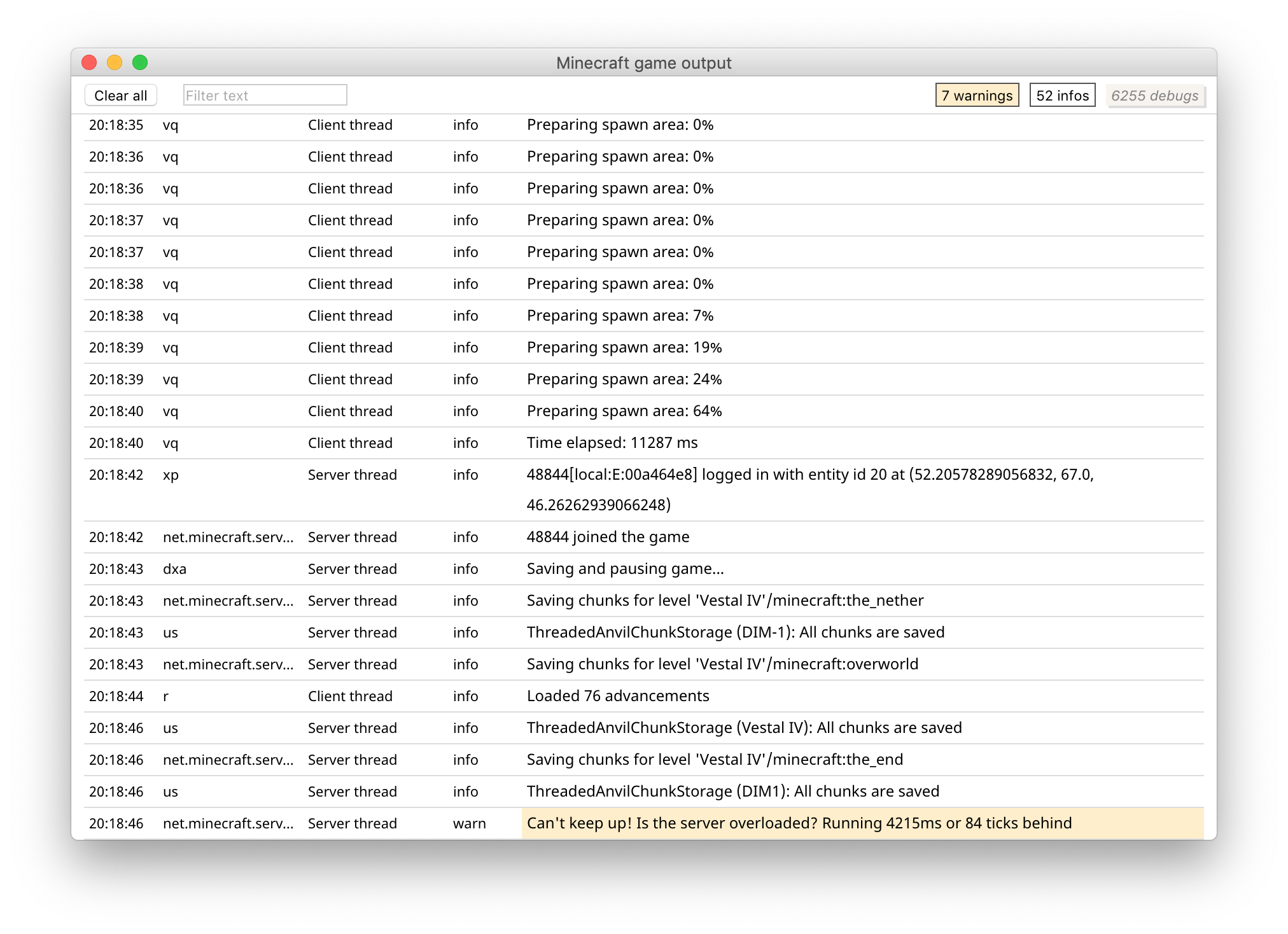
I've tried uninstalling and reinstalling the game. No dice. I also noticed something about an output log in the launcher settings, so I toggled that and took some screenshots, not sure if that's helpful.
From the last thread I found (and commented in a few days ago but it was marked as resolved so I thought I may need to report it myself), I saw screenshots of the Activity Monitor, as well as an instruction to force the game to crash and attach the crash report, so I went ahead and attached a crash report, a screenshot from opening the game, and a screenshot from playing in a creative superflat world. I also added a couple screenshots from a creative buffet world (badlands) after several minutes in it, as it has also been displaying the same behaviour upon opening that the superflat world does.
Upon looking at which version of Java I had, I went ahead and downloaded it again. That may have made it worse; opening Minecraft peaked at 572%, and playing in the same world 300%. I have also added the crash report and two screenshots for this as well. The Java version appears to be the same from the crash report, and subsequent tests were in the previous range, so I believe it to be an outlier. More screenshots and another crash report can't hurt, though, right?
Someone else commented with the same issue. They said that the resolution used by the game in windowed mode is using the native resolution of the screen, which should not be happening. To verify that this was the case, I took in-game screenshots with F3 up. One was in the default-sized window, one was in fullscreen at a set resolution, and one was with the window taking up most of the screen. The third screenshot revealed that the resolution of the game was but 200 pixels shorter than the resolution of my screen, and thus I am under the impression that this is part of the problem, or at least exacerbating the one I first detected. Additionally, after exiting the game from playing in full screen, the Activity Monitor still shows Minecraft using about 90% CPU right before it updates (as I have the update frequency set to 5 seconds) so I do not believe the resolution is the sole culprit, if it is related at all.
While I'm not quite sure exactly when it started, I've been having this problem for several months now. When playing Minecraft, my computer heats up, and when I opened up Activity Monitor and looked at it while having Minecraft open, it uses around 300% when opening the game itself, in the menu it tends to go down to less than 100%, and then opening up a world and playing in it brings it back up to the 260-340% range. It then goes down to around 30-100% longer-term, but it still heats up about the same way as if I were playing a more resource-intensive game, loud fan sounds and all. Attempting to play in 19w09a had it more in the 120-150% range while playing, 19w13a had more of a range of 170-230%, and 1.14 Pre-Release 2 was more between 190-210%. Personally, I find this to be an unplayable situation.
I have all the video settings down as much as possible. Fast graphics, minimal particles, I even tried turning the render distance down to 2 chunks in 19w13b, and yet the issue persists. This was not a problem I faced in 1.12; on the contrary, the game ran splendidly with the fancy graphics, clouds, and particles on, and I remember the moment when that suddenly stopped being the case quite distinctly.
I've tried uninstalling and reinstalling the game. No dice. I also noticed something about an output log in the launcher settings, so I toggled that and took some screenshots, not sure if that's helpful.
From the last thread I found (and commented in a few days ago but it was marked as resolved so I thought I may need to report it myself), I saw screenshots of the Activity Monitor, as well as an instruction to force the game to crash and attach the crash report, so I went ahead and attached a crash report, a screenshot from opening the game, and a screenshot from playing in a creative superflat world. I also added a couple screenshots from a creative buffet world (badlands) after several minutes in it, as it has also been displaying the same behaviour upon opening that the superflat world does.
Upon looking at which version of Java I had, I went ahead and downloaded it again. That may have made it worse; opening Minecraft peaked at 572%, and playing in the same world 300%. I have also added the crash report and two screenshots for this as well. The Java version appears to be the same from the crash report, and subsequent tests were in the previous range, so I believe it to be an outlier. More screenshots and another crash report can't hurt, though, right?
Someone else commented with the same issue. They said that the resolution used by the game in windowed mode is using the native resolution of the screen, which should not be happening. To verify that this was the case, I took in-game screenshots with F3 up. One was in the default-sized window, one was in fullscreen at a set resolution, and one was with the window taking up most of the screen. The third screenshot revealed that the resolution of the game was but 200 pixels shorter than the resolution of my screen, and thus I am under the impression that this is part of the problem, or at least exacerbating the one I first detected. Additionally, after exiting the game from playing in full screen, the Activity Monitor still shows Minecraft using about 90% CPU right before it updates (as I have the update frequency set to 5 seconds) so I do not believe the resolution is the sole culprit, if it is related at all.
While I'm not quite sure exactly when it started, I've been having this problem for several months now. When playing Minecraft, my computer heats up, and when I opened up Activity Monitor and looked at it while having Minecraft open, it uses around 300% when opening the game itself, in the menu it tends to go down to less than 100%, and then opening up a world and playing in it brings it back up to the 260-340% range. It then goes down to around 30-100% longer-term, but it still heats up about the same way as if I were playing a more resource-intensive game, loud fan sounds and all. Attempting to play in 19w09a had it more in the 120-150% range while playing, 19w13a had more of a range of 170-230%, and 1.14 Pre-Release 2 was more between 190-210%. Personally, I find this to be an unplayable situation.
I have all the video settings down as much as possible. Fast graphics, minimal particles, I even tried turning the render distance down to 2 chunks in 19w13b, and yet the issue persists. This was not a problem I faced in 1.12; on the contrary, the game ran splendidly with the fancy graphics, clouds, and particles on, and I remember the moment when that suddenly stopped being the case quite distinctly.
I've tried uninstalling and reinstalling the game. No dice. I also noticed something about an output log in the launcher settings, so I toggled that and took some screenshots, not sure if that's helpful.
From the last thread Ifound(andcommented in a few days ago but it was marked as resolved so I thought I may need to report it myself), I saw screenshots of the Activity Monitor, as well as an instruction to force thegameto crash and attach the crash report, so I went ahead and attached a crash report, a screenshot from openingthegame, and a screenshot from playing in a creative superflat world. I also added a couple screenshots from a creative buffet world (badlands) after several minutes in it, as it has also been displaying the same behaviour upon opening that the superflat world does.
Upon looking at which version of Java I had, I went ahead and downloaded it again. Thatmayhavemade it worse; opening Minecraft peaked at 572%, and playinginthesameworld 300%. I have also added the crash report and two screenshots for this as well. The Java version appears to be the same from the crash report, and subsequent tests were in the previous range, so I believe it to be an outlier. More screenshots and another crash report can't hurt, though, right?Someone else commented with the same issue. They said that the resolution used by the game in windowed mode is using the native resolution of the screen, which should not be happening. To verify that this was the case, I took in-game screenshots with F3 up. One was in the default-sized window, one was in fullscreen at a set resolution, and one was with the window taking up most of the screen. The third screenshot revealed that the resolution of the game was but 200 pixels shorter than the resolution of my screen, and thus I am under the impression that this is part of the problem, or at least exacerbating the one I first detected. Additionally, after exiting the game from playing in full screen, the Activity Monitor still shows Minecraft using about 90% CPU right before it updates (as I have the update frequency set to 5 seconds) so I do not believe the resolution is the sole culprit, if it is related at all.
While I'm not quite sure exactly when it started, I've been having this problem for several months now. When playing Minecraft, my computer heats up, and when I opened up Activity Monitor and looked at it while having Minecraft open, it uses around 300% when opening the game itself, in the menu it tends to go down to less than 100%, and then opening up a world and playing in it brings it back up to the 260-340% range. It then goes down to around 30-100% longer-term, but it still heats up about the same way as if I were playing a more resource-intensive game, loud fan sounds and all. Attempting to play in 19w09a had it more in the 120-150% range while playing, 19w13a had more of a range of 170-230%, and 1.14 Pre-Release 2 was more between 190-210%. Personally, I find this to be an unplayable situation.
I have all the video settings down as much as possible. Fast graphics, minimal particles, I even tried turning the render distance down to 2 chunks in 19w13b, and yet the issue persists. This was not a problem I faced in 1.12; on the contrary, the game ran splendidly with the fancy graphics, clouds, and particles on, and I remember the moment when that suddenly stopped being the case quite distinctly.
From the last thread I found (and commented in a few days ago but it was marked as resolved so I thought I may need to report it myself), I saw screenshots of the Activity Monitor, as well as an instruction to force the game to crash and attach the crash report, so I went ahead and attached a crash report, a screenshot from opening the game, and a screenshot from playing in a creative superflat world. I also added a couple screenshots from a creative buffet world (badlands) after several minutes in it, as it has also been displaying the same behaviour upon opening that the superflat world does.
Upon looking at which version of Java I had, I went ahead and downloaded it again. That may have made it worse; opening Minecraft peaked at 572%, and playing in the same world 300%. I have also added the crash report and two screenshots for this as well. The Java version appears to be the same from the crash report, and subsequent tests were in the previous range, so I believe it to be an outlier. More screenshots and another crash report can't hurt, though, right?
I tried uninstalling and reinstalling the game. Twice. No dice. I did make sure I kept all my saves, but I remembered to put them back after opening up the game post-reinstall, and the same CPU thing was happening so I can rule out world saves being the culprit. I also noticed something about an output log in the launcher settings when I was putting things back to the way I liked them, so I toggled that and took some screenshots, not sure if that's helpful.
Someone else commented with the same issue. They said that the resolution used by the game in windowed mode is using the native resolution of the screen, which should not be happening. To verify that this was the case, I took in-game screenshots with F3 up. One was in the default-sized window, one was in fullscreen at a set resolution, and one was with the window taking up most of the screen. The third screenshot revealed that the resolution of the game was but 200 pixels shorter than the resolution of my screen, and thus I am under the impression that this is part of the problem, or at least exacerbating the one I first detected. Additionally, after exiting the game from playing in full screen, the Activity Monitor still shows Minecraft using about 90% CPU right before it updates (as I have the update frequency set to 5 seconds) so I do not believe the resolution is the sole culprit, if it is related at all.
While I'm not quite sure exactly when it started, I've been having this problem for several months now. When playing Minecraft, my computer heats up, and when I opened up Activity Monitor and looked at it while having Minecraft open, it uses around 300% when opening the game itself, in the menu it tends to go down to less than 100%, and then opening up a world and playing in it brings it back up to the 260-340% range. It then goes down to around 30-100% longer-term, but it still heats up about the same way as if I were playing a more resource-intensive game, loud fan sounds and all. Attempting to play in 19w09a had it more in the 120-150% range while playing, 19w13a had more of a range of 170-230%, and 1.14 Pre-Release 2 was more between 190-210%. Personally, I find this to be an unplayable situation.
I have all the video settings down as much as possible. Fast graphics, minimal particles, I even tried turning the render distance down to 2 chunks in 19w13b, and yet the issue persists. This was not a problem I faced in 1.12; on the contrary, the game ran splendidly with the fancy graphics, clouds, and particles on, and I remember the moment when that suddenly stopped being the case quite distinctly.
From the last thread I found (and commented in a few days ago but it was marked as resolved so I thought I may need to report it myself), I saw screenshots of the Activity Monitor, as well as an instruction to force the game to crash and attach the crash report, so I went ahead and attached a crash report, a screenshot from opening the game, and a screenshot from playing in a creative superflat world. I also added a couple screenshots from a creative buffet world (badlands) after several minutes in it, as it has also been displaying the same behaviour upon opening that the superflat world does.
Upon looking at which version of Java I had, I went ahead and downloaded it again. That may have made it worse; opening Minecraft peaked at 572%, and playing in the same world 300%. I have also added the crash report and two screenshots for this as well. The Java version appears to be the same from the crash report, and subsequent tests were in the previous range, so I believe it to be an outlier. More screenshots and another crash report can't hurt, though, right?
I tried uninstalling and reinstalling the game. Twice. No dice. I did make sure I kept all my saves, but I remembered to put them back after opening up the game post-reinstall
,and the same CPU thing was happening so I can rule out world saves being the culprit. I also noticed something about an output log in the launcher settings when I was putting things back to the way I liked them, so I toggled that and took some screenshots, not sure if that's helpful.Someone else commented with the same issue. They said that the resolution used by the game in windowed mode is using the native resolution of the screen, which should not be happening. To verify that this was the case, I took in-game screenshots with F3 up. One was in the default-sized window, one was in fullscreen at a set resolution, and one was with the window taking up most of the screen. The third screenshot revealed that the resolution of the game was but 200 pixels shorter than the resolution of my screen, and thus I am under the impression that this is part of the problem, or at least exacerbating the one I first detected. Additionally, after exiting the game from playing in full screen, the Activity Monitor still shows Minecraft using about 90% CPU right before it updates (as I have the update frequency set to 5 seconds) so I do not believe the resolution is the sole culprit, if it is related at all.
While I'm not quite sure exactly when it started, I've been having this problem for several months now. When playing Minecraft, my computer heats up, and when I opened up Activity Monitor and looked at it while having Minecraft open, it uses around 300% when opening the game itself, in the menu it tends to go down to less than 100%, and then opening up a world and playing in it brings it back up to the 260-340% range. It then goes down to around 30-100% longer-term, but it still heats up about the same way as if I were playing a more resource-intensive game, loud fan sounds and all. Attempting to play in 19w09a had it more in the 120-150% range while playing, 19w13a had more of a range of 170-230%, and 1.14 Pre-Release 2 was more between 190-210%. Personally, I find this to be an unplayable situation.
I have all the video settings down as much as possible. Fast graphics, minimal particles, I even tried turning the render distance down to 2 chunks in 19w13b, and yet the issue persists. This was not a problem I faced in 1.12; on the contrary, the game ran splendidly with the fancy graphics, clouds, and particles on, and I remember the moment when that suddenly stopped being the case quite distinctly.
From the last thread I found (and commented in a few days ago but it was marked as resolved so I thought I may need to report it myself), I saw screenshots of the Activity Monitor, as well as an instruction to force the game to crash and attach the crash report, so I went ahead and attached a crash report, a screenshot from opening the game, and a screenshot from playing in a creative superflat world. I also added a couple screenshots from a creative buffet world (badlands) after several minutes in it, as it has also been displaying the same behaviour upon opening that the superflat world does.
Upon looking at which version of Java I had, I went ahead and downloaded it again. That may have made it worse; opening Minecraft peaked at 572%, and playing in the same world 300%. I have also added the crash report and two screenshots for this as well. The Java version appears to be the same from the crash report, and subsequent tests were in the previous range, so I believe it to be an outlier. More screenshots and another crash report can't hurt, though, right?
I tried uninstalling and reinstalling the game. Twice. No dice. I did make sure I kept all my saves, but I only remembered to put them back after opening up the game post-reinstall both times and the same CPU thing was happening, so I think I can rule out world saves being the culprit. I also noticed something about an output log in the launcher settings when I was putting things back to the way I liked them, so I toggled that and took some screenshots, not sure if that's helpful.
Someone else commented with the same issue. They said that the resolution used by the game in windowed mode is using the native resolution of the screen, which should not be happening. To verify that this was the case, I took in-game screenshots with F3 up. One was in the default-sized window, one was in fullscreen at a set resolution, and one was with the window taking up most of the screen. The third screenshot revealed that the resolution of the game was but 200 pixels shorter than the resolution of my screen, and thus I am under the impression that this is part of the problem, or at least exacerbating the one I first detected. Additionally, after exiting the game from playing in full screen, the Activity Monitor still shows Minecraft using about 90% CPU right before it updates (as I have the update frequency set to 5 seconds) so I do not believe the resolution is the sole culprit, if it is related at all.
While I'm not quite sure exactly when it started, I've been having this problem for several months now. When playing Minecraft, my computer heats up, and when I opened up Activity Monitor and looked at it while having Minecraft open, it uses around 300% when opening the game itself, in the menu it tends to go down to less than 100%, and then opening up a world and playing in it brings it back up to the 260-340% range. It then goes down to around 30-100% longer-term, but it still heats up about the same way as if I were playing a more resource-intensive game, loud fan sounds and all. Attempting to play in 19w09a had it more in the 120-150% range while playing, 19w13a had more of a range of 170-230%, and 1.14 Pre-Release 2 was more between 190-210%. Personally, I find this to be an unplayable situation.
I have all the video settings down as much as possible. Fast graphics, minimal particles, I even tried turning the render distance down to 2 chunks in 19w13b, and yet the issue persists. This was not a problem I faced in 1.12; on the contrary, the game ran splendidly with the fancy graphics, clouds, and particles on, and I remember the moment when that suddenly stopped being the case quite distinctly.
From the last thread I found (and commented in a few days ago but it was marked as resolvedsoI thought I may need to report it myself), I saw screenshots of the Activity Monitor, as well as an instruction to force the game to crash and attach the crash report, so I went ahead and attached a crash report, a screenshot from opening thegame, and a screenshot from playing in a creative superflat world. I also added a couple screenshots from a creative buffet world (badlands) after several minutes in it, as it has also been displaying the same behaviour upon opening that the superflat world does.
Upon looking at which version of Java I had,Iwent ahead anddownloaded itagain. That may have made it worse; opening Minecraft peaked at 572%, and playing in the same world 300%. I have also added the crash report and two screenshots for this as well. The Java version appears to be thesamefrom the crash report, and subsequent tests werein theprevious range, so I believe it to be an outlier. More screenshots and another crash report can't hurt, though, right?
I tried uninstalling and reinstalling the game. Twice. No dice. I did make sure I kept all my saves, but I only remembered to put them back after opening up the game post-reinstall both times and the same CPU thing was happening, so I think I can rule out world saves being the culprit. I also noticed something about an output log in the launcher settings when I was putting things back to the way I liked them, so I toggled that and took some screenshots, not sure if that's helpful.
Someone else commented with the same issue. They said that the resolution used by the game in windowed mode is using the native resolution of the screen, which should not be happening. To verify that this was the case, I took in-game screenshots with F3 up. One was in the default-sized window, one was in fullscreen at a set resolution, and one was with the window taking up most of the screen. The third screenshot revealed that the resolution of the game was but 200 pixels shorter than the resolution of my screen, and thus I am under the impression that this is part of the problem, or at least exacerbating the one I first detected. Additionally, after exiting the game from playing in full screen, the Activity Monitor still shows Minecraft using about 90% CPU right before it updates (as I have the update frequency set to 5 seconds) so I do not believe the resolution is the sole culprit, if it is related at all.While I'm not quite sure exactly when it started, I've been having this problem for several months now. When playing Minecraft, my computer heats up, and when I opened up Activity Monitor and looked at it while having Minecraft open, it uses around 300% when opening the game itself, in the menu it tends to go down to less than 100%, and then opening up a world and playing in it brings it back up to the 260-340% range. It then goes down to around 30-100% longer-term, but it still heats up about the same way as if I were playing a more resource-intensive game, loud fan sounds and all. Attempting to play in 19w09a had it more in the 120-150% range while playing, 19w13a had more of a range of 170-230%, and 1.14 Pre-Release 2 was more between 190-210%. Personally, I find this to be an unplayable situation.
I have all the video settings down as much as possible. Fast graphics, minimal particles, I even tried turning the render distance down to 2 chunks in 19w13b, and yet the issue persists. This was not a problem I faced in 1.12; on the contrary, the game ran splendidly with the fancy graphics, clouds, and particles on, and I remember the moment when that suddenly stopped being the case quite distinctly.
As of April 20, I went and downloaded 1.12.2 again to test if maybe the issue was on my end, happened to have a world lying around in that version (mind, I would have created a new one if it hadn't been there), and set about the usual tests I've been doing with the 1.14 snapshots. Launched the game, kept Activity Monitor behind the Minecraft window, opened up the world, and the game ran as splendidly as I remembered. If anything, the launcher was using more CPU when I had the output log enabled. CPU stayed below 70% for the most part during play, even going as low as 36%. This was with the render distance at 6 chunks, fancy graphics, Version 2 of the new textures if that's relevant, and smooth lighting on. If the issue never gets fixed at least this version still works.
From the last thread I found (and commented in a few days ago but it was marked as resolved so I thought I may need to report it myself), I saw screenshots of the Activity Monitor, as well as an instruction to force the game to crash and attach the crash report, so I went ahead and attached a crash report, a screenshot from opening the game, and a screenshot from playing in a creative superflat world. I also added a couple screenshots from a creative buffet world (badlands) after several minutes in it, as it has also been displaying the same behaviour upon opening that the superflat world does.
Upon looking at which version of Java I had, I went ahead and downloaded it again. That may have made it worse; opening Minecraft peaked at 572%, and playing in the same world 300%. I have also added the crash report and two screenshots for this as well. The Java version appears to be the same from the crash report, and subsequent tests were in the previous range, so I believe it to be an outlier. More screenshots and another crash report can't hurt, though, right?
I tried uninstalling and reinstalling the game. Twice. No dice. I did make sure I kept all my saves, but I only remembered to put them back after opening up the game post-reinstall both times and the same CPU thing was happening, so I think I can rule out world saves being the culprit. I also noticed something about an output log in the launcher settings when I was putting things back to the way I liked them, so I toggled that and took some screenshots, not sure if that's helpful.
Someone else commented with the same issue. They said that the resolution used by the game in windowed mode is using the native resolution of the screen, which should not be happening. To verify that this was the case, I took in-game screenshots with F3 up. One was in the default-sized window, one was in fullscreen at a set resolution, and one was with the window taking up most of the screen. The third screenshot revealed that the resolution of the game was but 200 pixels shorter than the resolution of my screen, and thus I am under the impression that this is part of the problem, or at least exacerbating the one I first detected. Additionally, after exiting the game from playing in full screen, the Activity Monitor still shows Minecraft using about 90% CPU right before it updates (as I have the update frequency set to 5 seconds) so I do not believe the resolution is the sole culprit, if it is related at all.
While I'm not quite sure exactly when it started, I've been having this problem for several months now. When playing Minecraft, my computer heats up, and when I opened up Activity Monitor and looked at it while having Minecraft open, it uses around 300% when opening the game itself, in the menu it tends to go down to less than 100%, and then opening up a world and playing in it brings it back up to the 260-340% range. It then goes down to around 30-100% longer-term, but it still heats up about the same way as if I were playing a more resource-intensive game, loud fan sounds and all. Attempting to play in 19w09a had it more in the 120-150% range while playing, 19w13a had more of a range of 170-230%, and 1.14 Pre-Release 2 was more between 190-210%. Personally, I find this to be an unplayable situation.
I have all the video settings down as much as possible. Fast graphics, minimal particles, I even tried turning the render distance down to 2 chunks in 19w13b, and yet the issue persists. This was not a problem I faced in 1.12; on the contrary, the game ran splendidly with the fancy graphics, clouds, and particles on, and I remember the moment when that suddenly stopped being the case quite distinctly.
As of April 20, I went and downloaded 1.12.2 again to test if maybe the issue was on my end, happened to have a world lying around in that version (mind, I would have created a new one if it hadn't been there), and set about the usual tests I've been doing with the 1.14 snapshots. Launched the game, kept Activity Monitor behind the Minecraft window, opened up the world, and the game ran as splendidly as I remembered. If anything, the launcher was using more CPU when I had the output log enabled. CPU stayed below 70% for the most part during play, even going as low as 36%. This was with the render distance at 6 chunks, fancy graphics, Version 2 of the new textures if that's relevant, and smooth lighting on. If the issue never gets fixed at least this version still works.
From the last thread I found (and commented in a few days ago but it was marked as resolved so I thought I may need to report it myself), I saw screenshots of the Activity Monitor, as well as an instruction to force the game to crash and attach the crash report, so I went ahead and attached a crash report, a screenshot from opening the game, and a screenshot from playing in a creative superflat world. I also added a couple screenshots from a creative buffet world (badlands) after several minutes in it, as it has also been displaying the same behaviour upon opening that the superflat world does.
Upon looking at which version of Java I had, I went ahead and downloaded it again. That may have made it worse; opening Minecraft peaked at 572%, and playing in the same world 300%. I have also added the crash report and two screenshots for this as well. The Java version appears to be the same from the crash report, and subsequent tests were in the previous range, so I believe it to be an outlier. More screenshots and another crash report can't hurt, though, right?
I tried uninstalling and reinstalling the game. Twice. No dice. I did make sure I kept all my saves, but I only remembered to put them back after opening up the game post-reinstall both times and the same CPU thing was happening, so I think I can rule out world saves being the culprit. I also noticed something about an output log in the launcher settings when I was putting things back to the way I liked them, so I toggled that and took some screenshots, not sure if that's helpful.
Someone else commented with the same issue. They said that the resolution used by the game in windowed mode is using the native resolution of the screen, which should not be happening. To verify that this was the case, I took in-game screenshots with F3 up. One was in the default-sized window, one was in fullscreen at a set resolution, and one was with the window taking up most of the screen. The third screenshot revealed that the resolution of the game was but 200 pixels shorter than the resolution of my screen, and thus I am under the impression that this is part of the problem, or at least exacerbating the one I first detected. Additionally, after exiting the game from playing in full screen, the Activity Monitor still shows Minecraft using about 90% CPU right before it updates (as I have the update frequency set to 5 seconds) so I do not believe the resolution is the sole culprit
, if it is related at all.While I'm not quite sure exactly when it started, I've been having this problem for several months now. When playing Minecraft, my computer heats up, and when I opened up Activity Monitor and looked at it while having Minecraft open, it uses around 300% when opening the game itself, in the menu it tends to go down to less than 100%, and then opening up a world and playing in it brings it back up to the 260-340% range. It then goes down to around 30-100% longer-term, but it still heats up about the same way as if I were playing a more resource-intensive game, loud fan sounds and all. Attempting to play in 19w09a had it more in the 120-150% range while playing, 19w13a had more of a range of 170-230%, and 1.14 Pre-Release 2 was more between 190-210%. Personally, I find this to be an unplayable situation.
I have all the video settings down as much as possible. Fast graphics, minimal particles, I even tried turning the render distance down to 2 chunks in 19w13b, and yet the issue persists. This was not a problem I faced in 1.12; on the contrary, the game ran splendidly with the fancy graphics, clouds, and particles on, and I remember the moment when that suddenly stopped being the case quite distinctly.
As of April 20, I went and downloaded 1.12.2 again to test if maybe the issue was on my end, happened to have a world lying around in that version (mind, I would have created a new one if it hadn't been there), and set about the usual tests I've been doing with the 1.14 snapshots. Launched the game, kept Activity Monitor behind the Minecraft window, opened up the world, and the game ran as splendidly as I remembered. If anything, the launcher was using more CPU when I had the output log enabled. CPU stayed below 70% for the most part during play, even going as low as 36%. This was with the render distance at 6 chunks, fancy graphics, Version 2 of the new textures if that's relevant, and smooth lighting on. If the issue never gets fixed at least this version still works.
From the last thread I found (and commented in a few days ago but it was marked as resolved so I thought I may need to report it myself), I saw screenshots of the Activity Monitor, as well as an instruction to force the game to crash and attach the crash report, so I went ahead and attached a crash report, a screenshot from opening the game, and a screenshot from playing in a creative superflat world. I also added a couple screenshots from a creative buffet world (badlands) after several minutes in it, as it has also been displaying the same behaviour upon opening that the superflat world does.
Upon looking at which version of Java I had, I went ahead and downloaded it again. That may have made it worse; opening Minecraft peaked at 572%, and playing in the same world 300%. I have also added the crash report and two screenshots for this as well. The Java version appears to be the same from the crash report, and subsequent tests were in the previous range, so I believe it to be an outlier. More screenshots and another crash report can't hurt, though, right?
I tried uninstalling and reinstalling the game. Twice. No dice. I did make sure I kept all my saves, but I only remembered to put them back after opening up the game post-reinstall both times and the same CPU thing was happening, so I think I can rule out world saves being the culprit. I also noticed something about an output log in the launcher settings when I was putting things back to the way I liked them, so I toggled that and took some screenshots, not sure if that's helpful.
Someone else commented with the same issue. They said that the resolution used by the game in windowed mode is using the native resolution of the screen, which should not be happening. To verify that this was the case, I took in-game screenshots with F3 up. One was in the default-sized window, one was in fullscreen at a set resolution, and one was with the window taking up most of the screen. The third screenshot revealed that the resolution of the game was but 200 pixels shorter than the resolution of my screen, and thus I am under the impression that this is part of the problem, or at least exacerbating the one I first detected. Additionally, after exiting the game from playing in full screen, the Activity Monitor still shows Minecraft using about 90% CPU right before it updates (as I have the update frequency set to 5 seconds) so I do not believe the resolution is the sole culprit. It is, however, very frustrating to be unable to change the resolution in windowed mode when there is an option to change it for fullscreen mode.
While I'm not quite sure exactly when it started, I've been having this problem for several months now. When playing Minecraft, my computer heats up, and when I opened up Activity Monitor and looked at it while having Minecraft open, it uses around 300% when opening the game itself, in the menu it tends to go down to less than 100%, and then opening up a world and playing in it brings it back up to the 260-340% range. It then goes down to around 30-100% longer-term, but it still heats up about the same way as if I were playing a more resource-intensive game, loud fan sounds and all. Attempting to play in 19w09a had it more in the 120-150% range while playing, 19w13a had more of a range of 170-230%, and 1.14 Pre-Release 2 was more between 190-210%. 1.14.4 Pre-Release 2 had it in the 100-200% range depending on the size of the window. Personally, I find this to be an unplayable situation.
I have all the video settings down as much as possible. Fast graphics, minimal particles, I even tried turning the render distance down to 2 chunks in 19w13b, and yet the issue persists. This was not a problem I faced in 1.12; on the contrary, the game ran splendidly with the fancy graphics, clouds, and particles on, and I remember the moment when that suddenly stopped being the case quite distinctly.
As of April 20, I went and downloaded 1.12.2 again to test if maybe the issue was on my end, happened to have a world lying around in that version (mind, I would have created a new one if it hadn't been there), and set about the usual tests I've been doing with the 1.14 snapshots. Launched the game, kept Activity Monitor behind the Minecraft window, opened up the world, and the game ran as splendidly as I remembered. If anything, the launcher was using more CPU when I had the output log enabled. CPU stayed below 70% for the most part during play, even going as low as 36%. This was with the render distance at 6 chunks, fancy graphics, Version 2 of the new textures if that's relevant, and smooth lighting on. If the issue never gets fixed at least this version still works.
From the last thread I found (and commented in a few days ago but it was marked as resolved so I thought I may need to report it myself), I saw screenshots of the Activity Monitor, as well as an instruction to force the game to crash and attach the crash report, so I went ahead and attached a crash report, a screenshot from opening the game, and a screenshot from playing in a creative superflat world. I also added a couple screenshots from a creative buffet world (badlands) after several minutes in it, as it has also been displaying the same behaviour upon opening that the superflat world does.
Upon looking at which version of Java I had, I went ahead and downloaded it again. That may have made it worse; opening Minecraft peaked at 572%, and playing in the same world 300%. I have also added the crash report and two screenshots for this as well. The Java version appears to be the same from the crash report, and subsequent tests were in the previous range, so I believe it to be an outlier. More screenshots and another crash report can't hurt, though, right?
I tried uninstalling and reinstalling the game. Twice. No dice. I did make sure I kept all my saves, but I only remembered to put them back after opening up the game post-reinstall both times and the same CPU thing was happening, so I think I can rule out world saves being the culprit. I also noticed something about an output log in the launcher settings when I was putting things back to the way I liked them, so I toggled that and took some screenshots, not sure if that's helpful.
Someone else commented with the same issue. They said that the resolution used by the game in windowed mode is using the native resolution of the screen, which should not be happening. To verify that this was the case, I took in-game screenshots with F3 up. One was in the default-sized window, one was in fullscreen at a set resolution, and one was with the window taking up most of the screen. The third screenshot revealed that the resolution of the game was but 200 pixels shorter than the resolution of my screen, and thus I am under the impression that this is part of the problem, or at least exacerbating the one I first detected. Additionally, after exiting the game from playing in full screen, the Activity Monitor still shows Minecraft using about 90% CPU right before it updates (as I have the update frequency set to 5 seconds) so I do not believe the resolution is the sole culprit. It is, however, very frustrating to be unable to change the resolution in windowed mode when there is an option to change it for fullscreen mode.
Not OP, but I've also been having the same issue for a while on my MacBook Pro, still happens in 1.13.2 for me.
Yeah, pretty sure that's just a fluke. Hasn't gone up past 350% any other time I've had it open, usually tends to be around 300% plus or minus 30% when opening up the game or loading a world.
Just went and took three screenshots, one in fullscreen mode and two in windowed, and I have to say you're right about the resolution. I'll have to upload those as well.
That does sound quite awful, David, however I'm afraid you have no business commenting in this specific issue unless you're having the same problem. Instead, you ought to create your own issue if your problem seems to be caused by Minecraft.
Yeah, game still gets up to 200% in the larger window, 100% in the smaller one.
Still don't know why this hasn't been reopened when it hasn't been fixed. My report even got closed as a duplicate.
@[Helper] Matthew
Even with the render distance at 2 chunks it still consistently stays around 80-110% CPU usage, and that's after the 250% when entering the world. That's with all the other settings down like OP has in the comment above. My computer specs are in the bug report I made that was closed as a duplicate of this one, which was made after mine. Still don't entirely get that, but as long as the issue is being taken care of I'm not troubled.
As OP has stated, the problem is the computer heats up; If I put my hand near it, I can feel the hot air being blown out by the fan, which is also very audibly working pretty hard. The cause of this behavior is the abnormal CPU usage. Now, this is not something that was an issue in 1.12, so I'm inclined to believe that this is a bug, introduced somewhere around 1.13.2 from what I've recorded of trying to figure it out.
I find it completely unacceptable that we are being told to do things to mitigate the problem that we've already tried and found to not work. Turning down the render distance does not work. Turning down the resolution does not work. Bringing the graphics settings down does not work. The only thing that works is reverting to a version that does not have the bug.
It's the middle of December, 1.15 is out, and guess what's still not fixed? Minecraft eats my CPU, meaning that I can't play it. Mojang, seriously, reopen this.
1.15.2 also has the bug.
So, what are we supposed to do now since it's been marked as fixed when it isn't? How do we get this reopened and properly seen to?
Surely they'll get around to it eventually, right? I mean, it'd be a shame to force paying customers to be unable to play past 1.12.2 just by leaving a reported problem unfixed. Certainly they can't have forgotten about us.
Backhanded remarks aside, I'm kinda starting to lose hope, too.