 Thomas Clinton
- aquosking
- aquosking
- America/New_York
- Yes
- No
 MC-835


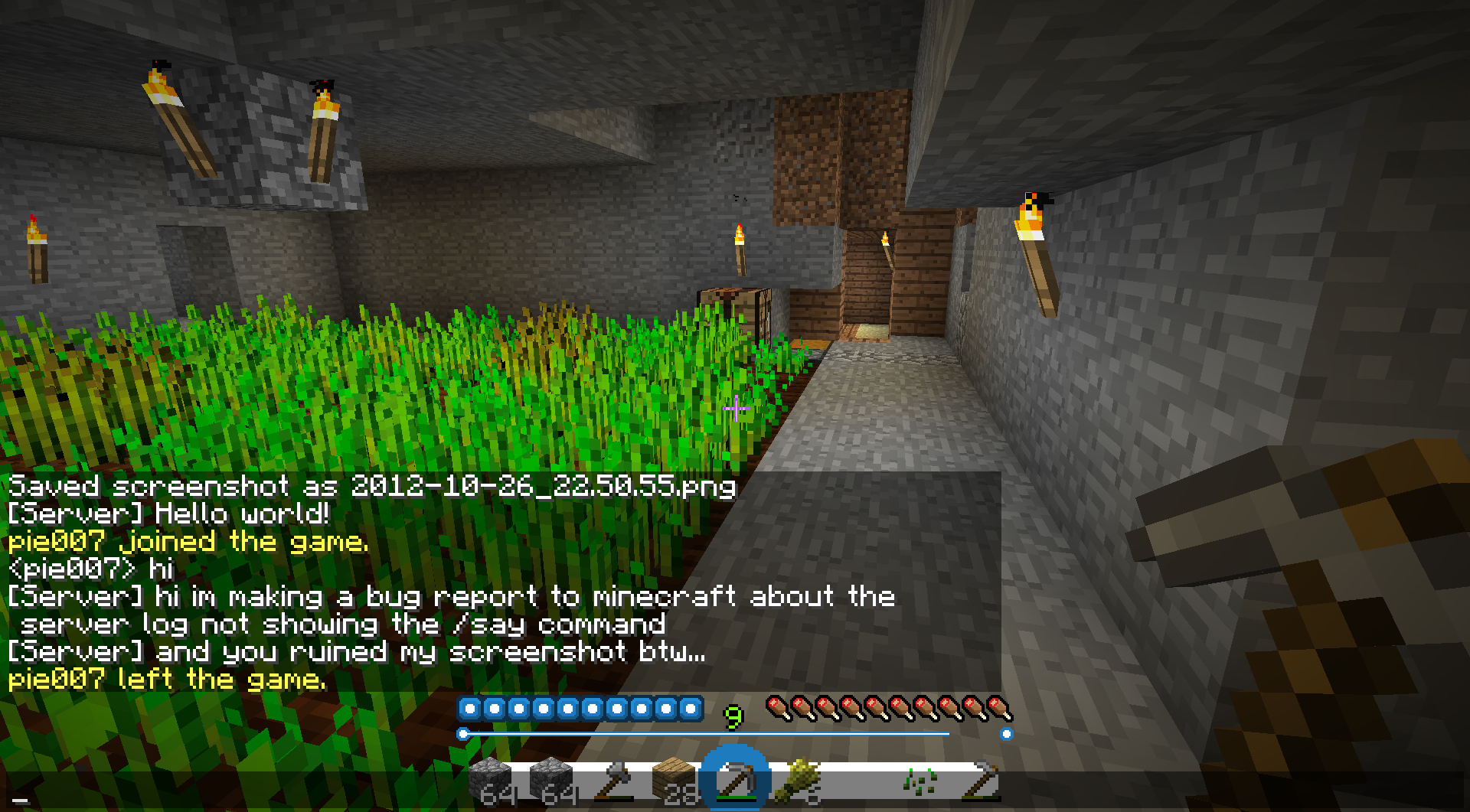


Not technically an in-game bug, just a bug with the server broadcasting a /say command. The command sent by the console will not show up in the console, failing to indicate whether it was actually sent or not.
What I expected to happen was...:
For the line [CONSOLE] or [Server] Hello World! to appear.What actually happened was...:
The server log gave no indication that a message was sent and appeared to disappear from existence.Steps to Reproduce:
1. In a minecraft server console, type the /say command.
2. Type any text after the command.
3. Hit "Enter" to send the message.
4. Watch as the message shows up in-game and not in the console.
Not technically an in-game bug, just a bug with the server broadcasting a /say command. The command sent by the console will not show up in the console, failing to indicate whether it was actually sent or not.
What I expected to happen was...:
For the line [CONSOLE] or [Server] Hello World! to appear.What actually happened was...:
The server log gave no indication that a message was sent and appeared to disappear from existence.Steps to Reproduce:
1. In a minecraft server console, type the /say command.
2. Type any text after the command.
3. Hit "Enter" to send the message.
4. Watch as the message shows up in-game and not in the console.Not technically an in-game bug, just a bug with the server broadcasting a /say command. The command sent by the console will not show up in the console, failing to indicate whether it was actually sent or not.
What I expected to happen was...:
For the line [ CONSOLE ] or [ Server ] Hello World! to appear.What actually happened was...:
The server log gave no indication that a message was sent and appeared to disappear from existence.Steps to Reproduce:
1. In a minecraft server console, type the /say command.
2. Type any text after the command.
3. Hit "Enter" to send the message.
4. Watch as the message shows up in-game and not in the console.
Not technically an in-game bug, just a bug with the server broadcasting a /say command. The command sent by the console will not show up in the console, failing to indicate whether it was actually sent or not.
What I expected to happen was...:
For the line [ CONSOLE ] or [ Server ] Hello World! to appear.What actually happened was...:
The server log gave no indication that a message was sent and the message appeared to disappear from existence.Steps to Reproduce:
1. In a minecraft server console, type the /say command.
2. Type any text after the command.
3. Hit "Enter" to send the message.
4. Watch as the message shows up in-game and not in the console.
Yes, this bug being reported previously. But it has been ignored and pinned as a duplicate of
MC-57516every single time it has been submitted. But issueMC-57516, doesn't address the problem at hand. Searge stated that:"The CustomNameVisible tag does not work on animals and mobs, because they have different rules about showing the name. For the other entities it should work."
Prior to 1.8, however, the tag served a function on animals and mobs, whereas now it does literally nothing! I consider the unprecedented drop of a harmless feature an issue.
I tested 4 commands in order to display exactly what the issue is.
/summon Zombie ~ ~ ~
{CustomName:"Please Fix This",CustomNameVisible:1}This spawns a zombie whose name only displays when you look at him. Now, Mog mentioned that:
"Clearly CustomNameVisible is working if it shows when you look directly at the mob. Looking at the code, that's how it's worked since at least August of last year."
Well, then something must be wrong here, right? because if you use the following command:
/summon Zombie ~ ~ ~
{CustomName:"Please Fix This",CustomNameVisible:0}You get a zombie that obeys the exact same behavior as the previous one. This means that this tag has absolutely no significance now when applied to mobs.
Meanwhile, on item entities, the tag functions as expected.
/summon Item ~ ~ ~
{CustomName:"Please Fix This",CustomNameVisible:1}This spawns a stone block that always displays its name, no matter where you look.
/summon Item ~ ~ ~
{CustomName:"Please Fix This",CustomNameVisible:0}This spawns a stone block that never displays its name.
If this issue is labeled as a duplicate of
MC-57516, I will be very disappointed.MC-57516has been resolved - this issue has not.
Yes, this bug being reported previously. But it has been ignored and pinned as a duplicate ofMC-57516every single time it has been submitted. But issueMC-57516, doesn't address the problem at hand. Searge stated that:"The CustomNameVisible tag does not work on animals and mobs, because they have different rules about showing the name. For the other entities it should work."
Prior to 1.8, however, the tag served a function on animals and mobs, whereas now it does literally nothing! I consider the unprecedented drop of a harmless feature an issue.
I tested 4 commands in order to display exactly what the issue is.
/summon Zombie ~ ~ ~
{CustomName:"Please Fix This",CustomNameVisible:1}This spawns a zombie whose name only displays when you look at him. Now, Mog mentioned that:
"Clearly CustomNameVisible is working if it shows when you look directly at the mob. Looking at the code, that's how it's worked since at least August of last year."
Well, then something must be wrong here, right? because if you use the following command:
/summon Zombie ~ ~ ~
{CustomName:"Please Fix This",CustomNameVisible:0}You get a zombie that obeys the exact same behavior as the previous one. This means that this tag has absolutely no significance now when applied to mobs.
Meanwhile, on item entities, the tag functions as expected.
/summon Item ~ ~ ~
{CustomName:"Please Fix This",CustomNameVisible:1}This spawns a stone block that always displays its name, no matter where you look.
/summon Item ~ ~ ~
{CustomName:"Please Fix This",CustomNameVisible:0}This spawns a stone block that never displays its name.
If this issue is labeled as a duplicate of
MC-57516, I will be very disappointed.MC-57516has been resolved - this issue has not.
Yes, this bug being reported previously. But it has been ignored and pinned as a duplicate ofMC-57516every single time it has been submitted. But issueMC-57516, doesn't address the problem at hand. Searge stated that:"The CustomNameVisible tag does not work on animals and mobs, because they have different rules about showing the name. For the other entities it should work."
Prior to 1.8, however, the tag served a function on animals and mobs, whereas now it does literally nothing! I consider the unprecedented drop of a harmless feature an issue.
I tested 4 commands in order to display exactly what the issue is.
/summon Zombie ~ ~ ~
{CustomName:"Please Fix This",CustomNameVisible:1}This spawns a zombie whose name only displays when you look at him. Now, Mog mentioned that:
"Clearly CustomNameVisible is working if it shows when you look directly at the mob. Looking at the code, that's how it's worked since at least August of last year."
Well, then something must be wrong here, right? because if you use the following command:
/summon Zombie ~ ~ ~
{CustomName:"Please Fix This",CustomNameVisible:0}You get a zombie that obeys the exact same behavior as the previous one. This means that this tag has absolutely no significance now when applied to mobs.
Meanwhile, on item entities, the tag functions as expected.
/summon Item ~ ~ ~
{CustomName:"Please Fix This",CustomNameVisible:1}This spawns a stone block that always displays its name, no matter where you look.
/summon Item ~ ~ ~
{CustomName:"Please Fix This",CustomNameVisible:0}This spawns a stone block that never displays its name.
If this issue is labeled as a duplicate of
MC-57516, I will be very disappointed.MC-57516has been resolved - this issue has not.
Yes, this bug being reported previously. But it has been ignored and pinned as a duplicate ofMC-57516every single time it has been submitted. But issueMC-57516, doesn't address the problem at hand. Searge stated that:
"The CustomNameVisible tag does not work on animals and mobs, because they have different rules about showing the name. For the other entities it should work."Prior to 1.8, however, the tag served a function on animals and mobs, whereas now it does literally nothing! I consider the unprecedented drop of a harmless feature an issue.
I tested 4 commands in order to display exactly what the issue is.
/summon Zombie ~ ~ ~
{CustomName:"Please Fix This",CustomNameVisible:1}This spawns a zombie whose name only displays when you look at him. Now, Mog mentioned that:
"Clearly CustomNameVisible is working if it shows when you look directly at the mob. Looking at the code, that's how it's worked since at least August of last year."
Well, then something must be wrong here, right? because if you use the following command:
/summon Zombie ~ ~ ~
{CustomName:"Please Fix This",CustomNameVisible:0}You get a zombie that obeys the exact same behavior as the previous one. This means that this tag has absolutely no significance now when applied to mobs.
Meanwhile, on item entities, the tag functions as expected.
/summon Item ~ ~ ~
{CustomName:"Please Fix This",CustomNameVisible:1}This spawns a stone block that always displays its name, no matter where you look.
/summon Item ~ ~ ~
{CustomName:"Please Fix This",CustomNameVisible:0}This spawns a stone block that never displays its name.
If this issue is labeled as a duplicate of
MC-57516, I will be very disappointed.MC-57516has been resolved - this issue has not.
Yes, this bug being reported previously. But it has been ignored and pinned as a duplicate ofMC-57516every single time it has been submitted. But issueMC-57516, doesn't address the problem at hand. Searge stated that:
"The CustomNameVisible tag does not work on animals and mobs, because they have different rules about showing the name. For the other entities it should work."Prior to 1.8, however, the tag served a function on animals and mobs, whereas now it does literally nothing! I consider the unprecedented drop of a harmless feature an issue.
I tested 4 commands in order to display exactly what the issue is.
/summon Zombie ~ ~ ~
{CustomName:"Please Fix This",CustomNameVisible:1}This spawns a zombie whose name only displays when you look at him. Now, Mog mentioned that:
"Clearly CustomNameVisible is working if it shows when you look directly at the mob. Looking at the code, that's how it's worked since at least August of last year."
Well, then something must be wrong here, right? because if you use the following command:
/summon Zombie ~ ~ ~
{CustomName:"Please Fix This",CustomNameVisible:0}You get a zombie that obeys the exact same behavior as the previous one. This means that this tag has absolutely no significance now when applied to mobs.
Meanwhile, on item entities, the tag functions as expected.
/summon Item ~ ~ ~
{CustomName:"Please Fix This",CustomNameVisible:1}This spawns a stone block that always displays its name, no matter where you look.
/summon Item ~ ~ ~
{CustomName:"Please Fix This",CustomNameVisible:0}This spawns a stone block that never displays its name.
If this issue is labeled as a duplicate of
MC-57516, I will be very disappointed.MC-57516has been resolved - this issue has not.
Yes, this bug being reported previously. But it has been ignored and pinned as a duplicate ofMC-57516every single time it has been submitted. But issueMC-57516, doesn't address the problem at hand. Searge stated that:
"The CustomNameVisible tag does not work on animals and mobs, because they have different rules about showing the name. For the other entities it should work."
Prior to 1.8, however, the tag served a function on animals and mobs, whereas now it does literally nothing! I consider the unprecedented drop of a harmless feature an issue.
I tested 4 commands in order to display exactly what the issue is.-/summon Zombie ~ ~ ~
{CustomName:"Please Fix This",CustomNameVisible:1}-
This spawns a zombie whose name only displays when you look at him. Now, Mog mentioned that:
"Clearly CustomNameVisible is working if it shows when you look directly at the mob. Looking at the code, that's how it's worked since at least August of last year."
Well, then something must be wrong here, right? because if you use the following command:-/summon Zombie ~ ~ ~
{CustomName:"Please Fix This",CustomNameVisible:0}-
You get a zombie that obeys the exact same behavior as the previous one. This means that this tag has absolutely no significance now when applied to mobs.
Meanwhile, on item entities, the tag functions as expected.-/summon Item ~ ~ ~
{CustomName:"Please Fix This",CustomNameVisible:1}-
This spawns a stone block that always displays its name, no matter where you look.-/summon Item ~ ~ ~
{CustomName:"Please Fix This",CustomNameVisible:0}-
This spawns a stone block that never displays its name.If this issue is labeled as a duplicate of
MC-57516, I will be very disappointed.MC-57516has been resolved - this issue has not.
Yes, this bug being reported previously. But it has been ignored and pinned as a duplicate ofMC-57516every single time it has been submitted. But issueMC-57516, doesn't address the problem at hand. Searge stated that:
"The CustomNameVisible tag does not work on animals and mobs, because they have different rules about showing the name. For the other entities it should work."
Prior to 1.8, however, the tag served a function on animals and mobs, whereas now it does literally nothing! I consider the unprecedented drop of a harmless feature an issue.
I tested 4 commands in order to display exactly what the issue is.-/summon Zombie ~ ~ ~
{CustomName:"Please Fix This",CustomNameVisible:1}-
This spawns a zombie whose name only displays when you look at him. Now, Mog mentioned that:
"Clearly CustomNameVisible is working if it shows when you look directly at the mob. Looking at the code, that's how it's worked since at least August of last year."
Well, then something must be wrong here, right? because if you use the following command:-/summon Zombie ~ ~ ~
{CustomName:"Please Fix This",CustomNameVisible:0}-
You get a zombie that obeys the exact same behavior as the previous one. This means that this tag has absolutely no significance now when applied to mobs.
Meanwhile, on item entities, the tag functions as expected.-/summon Item ~ ~ ~
{CustomName:"Please Fix This",CustomNameVisible:1}-
This spawns a stone block that always displays its name, no matter where you look.-/summon Item ~ ~ ~
{CustomName:"Please Fix This",CustomNameVisible:0}-
This spawns a stone block that never displays its name.If this issue is labeled as a duplicate of
MC-57516, I will be very disappointed.MC-57516has been resolved - this issue has not.I'm a little disappointed, but I have to admit, that according to Searge this isn't supposed to work. Regardless of the fact that this tag is applicable to all entities, it's just not meant to function the way it used to. Despite the fact that there was nothing wrong with the previous behavior where the name displayed forever
Yes, this bug being reported previously. But it has been ignored and pinned as a duplicate ofMC-57516every single time it has been submitted. But issueMC-57516, doesn't address the problem at hand. Searge stated that:
"The CustomNameVisible tag does not work on animals and mobs, because they have different rules about showing the name. For the other entities it should work."
Prior to 1.8, however, the tag served a function on animals and mobs, whereas now it does literally nothing! I consider the unprecedented drop of a harmless feature an issue.
I tested 4 commands in order to display exactly what the issue is.-/summon Zombie ~ ~ ~
{CustomName:"Please Fix This",CustomNameVisible:1}-
This spawns a zombie whose name only displays when you look at him. Now, Mog mentioned that:
"Clearly CustomNameVisible is working if it shows when you look directly at the mob. Looking at the code, that's how it's worked since at least August of last year."
Well, then something must be wrong here, right? because if you use the following command:-/summon Zombie ~ ~ ~
{CustomName:"Please Fix This",CustomNameVisible:0}-
You get a zombie that obeys the exact same behavior as the previous one. This means that this tag has absolutely no significance now when applied to mobs.
Meanwhile, on item entities, the tag functions as expected.-/summon Item ~ ~ ~
{CustomName:"Please Fix This",CustomNameVisible:1}-
This spawns a stone block that always displays its name, no matter where you look.-/summon Item ~ ~ ~
{CustomName:"Please Fix This",CustomNameVisible:0}-
This spawns a stone block that never displays its name.
If this issue is labeled as a duplicate ofMC-57516, I will be very disappointed.MC-57516has been resolved - this issue has not.
I'm a little disappointed, but I have to admit, that according to Searge this isn't supposed to work. Regardless of the fact that this tag is applicable to all entities, it's just not meant to function the way it used to. Despite the fact that there was nothing wrong with the previous behavior where the name displayed forever, I'm willing to face the fact that this is the intended outcome. I really wish I
Yes, this bug being reported previously. But it has been ignored and pinned as a duplicate ofMC-57516every single time it has been submitted. But issueMC-57516, doesn't address the problem at hand. Searge stated that:
"The CustomNameVisible tag does not work on animals and mobs, because they have different rules about showing the name. For the other entities it should work."
Prior to 1.8, however, the tag served a function on animals and mobs, whereas now it does literally nothing! I consider the unprecedented drop of a harmless feature an issue.
I tested 4 commands in order to display exactly what the issue is.-/summon Zombie ~ ~ ~
{CustomName:"Please Fix This",CustomNameVisible:1}-
This spawns a zombie whose name only displays when you look at him. Now, Mog mentioned that:
"Clearly CustomNameVisible is working if it shows when you look directly at the mob. Looking at the code, that's how it's worked since at least August of last year."
Well, then something must be wrong here, right? because if you use the following command:-/summon Zombie ~ ~ ~
{CustomName:"Please Fix This",CustomNameVisible:0}-
You get a zombie that obeys the exact same behavior as the previous one. This means that this tag has absolutely no significance now when applied to mobs.
Meanwhile, on item entities, the tag functions as expected.-/summon Item ~ ~ ~
{CustomName:"Please Fix This",CustomNameVisible:1}-
This spawns a stone block that always displays its name, no matter where you look.-/summon Item ~ ~ ~
{CustomName:"Please Fix This",CustomNameVisible:0}-
This spawns a stone block that never displays its name.
If this issue is labeled as a duplicate ofMC-57516, I will be very disappointed.MC-57516has been resolved - this issue has not.
I'm a little disappointed, but I have to admit, that according to Searge this isn't supposed to work. Regardless of the fact that this tag is applicable to all entities, it's just not meant to function the way it used to. Despite the fact that there was nothing wrong with the previous behavior where the name displayed forever, I'm willing to face the fact that this is the intended outcome. I really wish I could close this issue on my own, because I feel kinda stupid now.
Yes, this bug being reported previously. But it has been ignored and pinned as a duplicate ofMC-57516every single time it has been submitted. But issueMC-57516, doesn't address the problem at hand. Searge stated that:
"The CustomNameVisible tag does not work on animals and mobs, because they have different rules about showing the name. For the other entities it should work."
Prior to 1.8, however, the tag served a function on animals and mobs, whereas now it does literally nothing! I consider the unprecedented drop of a harmless feature an issue.
I tested 4 commands in order to display exactly what the issue is.-/summon Zombie ~ ~ ~
{CustomName:"Please Fix This",CustomNameVisible:1}-
This spawns a zombie whose name only displays when you look at him. Now, Mog mentioned that:
"Clearly CustomNameVisible is working if it shows when you look directly at the mob. Looking at the code, that's how it's worked since at least August of last year."
Well, then something must be wrong here, right? because if you use the following command:-/summon Zombie ~ ~ ~
{CustomName:"Please Fix This",CustomNameVisible:0}-
You get a zombie that obeys the exact same behavior as the previous one. This means that this tag has absolutely no significance now when applied to mobs.
Meanwhile, on item entities, the tag functions as expected.-/summon Item ~ ~ ~
{CustomName:"Please Fix This",CustomNameVisible:1}-
This spawns a stone block that always displays its name, no matter where you look.-/summon Item ~ ~ ~
{CustomName:"Please Fix This",CustomNameVisible:0}-
This spawns a stone block that never displays its name.
If this issue is labeled as a duplicate ofMC-57516, I will be very disappointed.MC-57516has been resolved - this issue has not.
Only one skin is allowed for a player's skulls per session, regardless of world, and the skull using the most recent skin uploaded in the first world you load will override any other skin that corresponds to skulls with the same player name.
Issues like
That was likely really complicated and hard to follow, so here are the steps to reproduce this glaring issue.
Steps to Reproduce:
{SkullOwner:PLAYERNAME}
1. Create a world.
2. Obtain your skull with /give @p skull 1 33. Place the skull in the world
4. Exit the game and change your skin.
5. Re-enter the world and give yourself another skull. This skull will have the old skin.
6. Place the second skull in the world
7. Exit the game, reopen, and re-enter the world.
8. Both skulls will now use your new skin.
9. If you destroy the second skull, remove it from your inventory, and relog once more, the first skull will once again display the first skin.This also results in issues between worlds.
Perform steps 1-4 above.
5. Create a new world, create and place a skull.
6. Now, if you load the first world, the first skull will display the second skin.
7. If you relog and load the first world before loading the second world, the second skull will display the first skin when you enter the second world.As you can see, the skull with the most recently uploaded skin in the first world you load becomes the only skin that can be loaded into skulls with your name until you log out. This means that a single player can only create one skull that differs from their current skin.
In regards to the "custom skulls" people keep tweeting me about: Custom URLs is a bug & will be fixed. You can do it in a legit way though. -Dinnerbone
The problem right now is that the legit way isn't working properly. Someone did notice this previously, however it was in a comment a few months ago and they never formed an issue about it.
In that case, when a skull is placed in a new world, all skulls update their textures, regardless of world. Also, all skulls belonging to the same player have the same skin; even if the player creates a skull after they changed their skin it will have the old texture. These inconsistencies imply that something is broken at least. -Carl Nathans
I have known about this issue, and I have been looking for duplicates for a day or so to insure I didn't waste anyone's time. But when I saw this comment on
MC-52806that went unnoticed for 2 months, I decided it was time to finally report this issue.
Only one skin is allowed for a player's skulls per session, regardless of world, and the skull using the most recent skin uploaded in the first world you load will override any other skin that corresponds to skulls with the same player name.
Issues like
That was likely really complicated and hard to follow, so here are the steps to reproduce this glaring issue.
Steps to Reproduce:
{SkullOwner:PLAYERNAME}
1. Create a world.
2. Obtain your skull with /give @p skull 1 33. Place the skull in the world
4. Exit the game and change your skin.
5. Re-enter the world and give yourself another skull. This skull will have the old skin.
6. Place the second skull in the world
7. Exit the game, reopen, and re-enter the world.
8. Both skulls will now use your new skin.
9. If you destroy the second skull, remove it from your inventory, and relog once more, the first skull will once again display the first skin.This also results in issues between worlds.
Perform steps 1-4 above.
5. Create a new world, create and place a skull.
6. Now, if you load the first world, the first skull will display the second skin.
7. If you relog and load the first world before loading the second world, the second skull will display the first skin when you enter the second world.As you can see, the skull with the most recently uploaded skin in the first world you load becomes the only skin that can be loaded into skulls with your name until you log out. This means that a single player can only create one skull that differs from their current skin.
In regards to the "custom skulls" people keep tweeting me about: Custom URLs is a bug & will be fixed. You can do it in a legit way though. -Dinnerbone
The problem right now is that the legit way isn't working properly. Someone did notice this previously, however it was in a comment a few months ago and they never formed an issue about it.
In that case, when a skull is placed in a new world, all skulls update their textures, regardless of world. Also, all skulls belonging to the same player have the same skin; even if the player creates a skull after they changed their skin it will have the old texture. These inconsistencies imply that something is broken at least. -Carl Nathans
I have known about this issue, and I have been looking for duplicates for a day or so to insure I didn't waste anyone's time. But when I saw this comment on
MC-52806that went unnoticed for 2 months, I decided it was time to finally report this issue.Only one skin is allowed for a player's skulls per session, regardless of world, and the skull using the most recent skin uploaded in the first world you load will override any other skin that corresponds to skulls with the same player name.
Issues like
MC-52806,MC-53393, andMC-58796address old skulls not updating to the new skin. However, that's not how skulls work anymore. Even so, skulls are failing to display the correct texture that they are assigned. Old skulls will not show the old skin if there is a skull with the new skin present in the world.That was likely really complicated and hard to follow, so here are the steps to reproduce this glaring issue.
Steps to Reproduce:
{SkullOwner:PLAYERNAME}
1. Create a world.
2. Obtain your skull with /give @p skull 1 33. Place the skull in the world
4. Exit the game and change your skin.
5. Re-enter the world and give yourself another skull. This skull will have the old skin.
6. Place the second skull in the world
7. Exit the game, reopen, and re-enter the world.
8. Both skulls will now use your new skin.
9. If you destroy the second skull, remove it from your inventory, and relog once more, the first skull will once again display the first skin.This also results in issues between worlds.
Perform steps 1-4 above.
5. Create a new world, create and place a skull.
6. Now, if you load the first world, the first skull will display the second skin.
7. If you relog and load the first world before loading the second world, the second skull will display the first skin when you enter the second world.As you can see, the skull with the most recently uploaded skin in the first world you load becomes the only skin that can be loaded into skulls with your name until you log out. This means that a single player can only create one skull that differs from their current skin.
In regards to the "custom skulls" people keep tweeting me about: Custom URLs is a bug & will be fixed. You can do it in a legit way though. -Dinnerbone
The problem right now is that the legit way isn't working properly. Someone did notice this previously, however it was in a comment a few months ago and they never formed an issue about it.
In that case, when a skull is placed in a new world, all skulls update their textures, regardless of world. Also, all skulls belonging to the same player have the same skin; even if the player creates a skull after they changed their skin it will have the old texture. These inconsistencies imply that something is broken at least. -Carl Nathans
I have known about this issue, and I have been looking for duplicates for a day or so to insure I didn't waste anyone's time. But when I saw this comment on
MC-52806that went unnoticed for 2 months, I decided it was time to finally report this issue.
Skulls Updating -Multiple Skull Skins Per Player
Only one skin is allowed for a player's skulls per session, regardless of world, andthe skull usingthe most recent skin uploadedin the first world you load will override any other skin that corresponds to skulls with the same player name.Issues like
MC-52806,MC-53393, andMC-58796address old skulls not updating to the new skin. However, that's not how skulls work anymore. Even so, skulls are failing to display the correct texture that they are assigned. Old skulls will not show the old skin if there is a skull with the new skin present in the world.That was likely really complicated and hard to follow, so here are the steps to reproduce this glaring issue.
Steps to Reproduce:
{SkullOwner:PLAYERNAME}
1. Create a world.
2. Obtain your skull with /give @p skull 1 33. Place the skull in the world
4. Exit the game and change your skin.
5. Re-enter the world and give yourself another skull. This skull will have the old skin.
6. Place the second skull in the world
7. Exit the game, reopen, and re-enter the world.
8. Both skulls will now use your new skin.
9. If you destroy the second skull, remove it from your inventory, and relog once more, the first skull will once again display the first skin.This also results in issues between worlds.
Perform steps 1-4 above.
5. Create a new world, create and place a skull.
6. Now, if you load the first world, the first skull will display the second skin.
7. If you relog and load the first world before loading the second world, the second skull will display the first skin when you enter the second world.As you can see, the skull with the most recently uploaded skin in the first world you load becomes the only skin that can be loaded into skulls with your name until you log out. This means that a single player can only create one skull that differs from their current skin.
In regards to the "custom skulls" people keep tweeting me about: Custom URLs is a bug & will be fixed. You can do it in a legit way though. -Dinnerbone
The problem right now is that the legit way isn't working properly. Someone did notice this previously, however it was in a comment a few months ago and they never formed an issue about it.
In that case, when a skull is placed in a new world, all skulls update their textures, regardless of world. Also, all skulls belonging to the same player have the same skin; even if the player creates a skull after they changed their skin it will have the old texture. These inconsistencies imply that something is broken at least. -Carl Nathans
I have known about this issue, and I have been looking for duplicates for a day or so to insure I didn't waste anyone's time. But when I saw this comment on
MC-52806that went unnoticed for 2 months, I decided it was time to finally report this issue.When you make a skull, it's supposed to retain the skin that you had when you made it. However it fails to do so when there are multiple skulls with your name loaded into the world.
Steps to Reproduce:
{SkullOwner:PLAYERNAME}
1. Create a world.
2. Obtain your skull with /give @p skull 1 33. Place the skull in the world
4. Exit the game and change your skin.
5. Re-enter the world and give yourself another skull. This skull will have the old skin.
6. Place the second skull in the world
7. Exit the game, reopen, and re-enter the world.
8. Both skulls will now use your new skin.
9. If you destroy the second skull, remove it from your inventory, and relog once more, the first skull will once again display the first skin.This also results in issues between worlds.
Perform steps 1-4 above.
5. Create a new world, create and place a skull.
6. Now, if you load the first world, the first skull will display the second skin.
7. If you relog and load the first world before loading the second world, the second skull will display the first skin when you enter the second world.As you can see, the skull with the most recently uploaded skin in the first world you load becomes the only skin that can be loaded into skulls with your name until you log out. This means that a single player can only create one skull that differs from their current skin.
In regards to the "custom skulls" people keep tweeting me about: Custom URLs is a bug & will be fixed. You can do it in a legit way though. -Dinnerbone
The problem right now is that the legit way isn't working properly. Someone did notice this previously, however it was in a comment a few months ago and they never formed an issue about it.
In that case, when a skull is placed in a new world, all skulls update their textures, regardless of world. Also, all skulls belonging to the same player have the same skin; even if the player creates a skull after they changed their skin it will have the old texture. These inconsistencies imply that something is broken at least. -Carl Nathans
I have known about this issue, and I have been looking for duplicates for a day or so to insure I didn't waste anyone's time. But when I saw this comment on
MC-52806that went unnoticed for 2 months, I decided it was time to finally report this issue.
When you make a skull, it's supposed to retain the skin that you had when you made it. However it fails to do so when there are multiple skulls with your name loaded into the world.
Steps to Reproduce:
{SkullOwner:PLAYERNAME}
1. Create a world.
2. Obtain your skull with /give @p skull 1 33. Place the skull in the world
4. Exit the game and change your skin.
5. Re-enter the world and give yourself another skull. This skull will have the old skin.
6. Place the second skull in the world
7. Exit the game, reopen, and re-enter the world.
8. Both skulls will now use your new skin.
9. If you destroy the second skull, remove it from your inventory, and relog once more, the first skull will once again display the first skin.This also results in issues between worlds.
Perform steps 1-4 above.
5. Create a new world, create and place a skull.
6. Now, if you load the first world, the first skull will display the second skin.
7. If you relog and load the first world before loading the second world, the second skull will display the first skin when you enter the second world.As you can see, the skull with the most recently uploaded skin in the first world you load becomes the only skin that can be loaded into skulls with your name until you log out. This means that a single player can only create one skull that differs from their current skin.
In regards to the "custom skulls" people keep tweeting me about: Custom URLs is a bug & will be fixed. You can do it in a legit way though. -Dinnerbone
The problem right now is that the legit way isn't working properly. Someone did notice this previously, however it was in a comment a few months ago and they never formed an issue about it.
In that case, when a skull is placed in a new world, all skulls update their textures, regardless of world. Also, all skulls belonging to the same player have the same skin; even if the player creates a skull after they changed their skin it will have the old texture. These inconsistencies imply that something is broken at least. -Carl Nathans
I have known about this issue, and I have been looking for duplicates for a day or so to insure I didn't waste anyone's time. But when I saw this comment on
MC-52806that went unnoticed for 2 months, I decided it was time to finally report this issue.
When you make a skull, it's supposed to retain the skin that you had when you made it. However it fails to do so when there are multiple skulls with your name loaded into the world.
Steps to Reproduce:
{SkullOwner:PLAYERNAME}
1. Create a world.
2. Obtain your skull with /give @p skull 1 33. Place the skull in the world
4. Exit the game and change your skin.
5. Re-enter the world and give yourself another skull. This skull will have the old skin.
6. Place the second skull in the world
7. Exit the game, reopen, and re-enter the world.
8. Both skulls will now use your new skin.
9. If you destroy the second skull, remove it from your inventory, and relog once more, the first skull will once again display the first skin.This also results in issues between worlds.
Perform steps 1-4 above.
5. Create a new world, create and place a skull.
6. Now, if you load the first world, the first skull will display the second skin.
7. If you relog and load the first world before loading the second world, the second skull will display the first skin when you enter the second world.As you can see, the skull with the most recently uploaded skin in the first world you load becomes the only skin that can be loaded into skulls with your name until you log out. This means that a single player can only create one skull that differs from their current skin.
When you make a skull, it's supposed to retain the skin that you had when you made it. However it fails to do so when there are multiple skulls with your name loaded into the world.
Steps to Reproduce:
{SkullOwner:PLAYERNAME}
1. Create a world.
2. Obtain your skull with /give @p skull 1 33. Place the skull in the world
4. Exit the game and change your skin.
5. Re-enter the world and give yourself another skull. This skull will have the old skin.
6. Place the second skull in the world
7. Exit the game, reopen, and re-enter the world.
8. Both skulls will now use your new skin.
9. If you destroy the second skull, remove it from your inventory, and relog once more, the first skull will once again display the first skin.This also results in issues between worlds.
Perform steps 1-4 above.
5. Create a new world, create and place a skull.
6. Now, if you load the first world, the first skull will display the second skin.
7. If you relog and load the first world before loading the second world, the second skull will display the first skin when you enter the second world.As you can see, the skull with the most recently uploaded skin in the first world you load becomes the only skin that can be loaded into skulls with your name until you log out. This means that a single player can only create one skull that differs from their current skin.
When you make a skull, it's supposed to retain the skin that you had when you made it. However it fails to do so when there are multiple skulls with your name loaded into the world.
Steps to Reproduce:
{SkullOwner:PLAYERNAME}
1. Create a world.
2. Obtain your skull with /give @p skull 1 33. Place the skull in the world
4. Exit the game and change your skin.
5. Re-enter the world and give yourself another skull. This skull will have the old skin.
6. Place the second skull in the world
7. Exit the game, reopen, and re-enter the world.
8. Both skulls will now use your new skin.
9. If you destroy the second skull, remove it from your inventory, and relog once more, the first skull will once again display the first skin.This also results in issues between worlds.
Perform steps 1-4 above.
5. Create a new world, create and place a skull.
6. Now, if you load the first world, the first skull will display the second skin.
7. If you relog and load the first world before loading the second world, the second skull will display the first skin when you enter the second world.As you can see, the skull with the most recently uploaded skin in the first world you load becomes the
only skin that can be loaded into skulls with your name until you log out.This means that a single player can only create one skull that differs from their current skin.When you make a skull, it's supposed to retain the skin that you had when you made it. However it fails to do so when there are multiple skulls with your name loaded into the world.
Steps to Reproduce:
{SkullOwner:PLAYERNAME}
1. Create a world.
2. Obtain your skull with /give @p skull 1 33. Place the skull in the world
4. Exit the game and change your skin.
5. Re-enter the world and give yourself another skull. This skull will have the old skin.
6. Place the second skull in the world
7. Exit the game, reopen, and re-enter the world.
8. Both skulls will now use your new skin.
9. If you destroy the second skull, remove it from your inventory, and relog once more, the first skull will once again display the first skin.This also results in issues between worlds.
Perform steps 1-4 above.
5. Create a new world, create and place a skull.
6. Now, if you load the first world, the first skull will display the second skin.
7. If you relog and load the first world before loading the second world, the second skull will display the first skin when you enter the second world.As you can see, the skull with the most recently uploaded skin in the first world you load becomes the only skin that can be loaded into skulls with your name until you log out. This means that a single player can only create one skull that differs from their current skin.
When you make a skull, it's supposed to retain the skin that you had when you made it. However it fails to do so when there are multiple skulls with your name loaded into the world.
Steps to Reproduce:
{SkullOwner:PLAYERNAME}
1. Create a world.
2. Obtain your skull with /give @p skull 1 33. Place the skull in the world
4. Exit the game and change your skin.
5. Re-enter the world and give yourself another skull. This skull will have the old skin.
6. Place the second skull in the world
7. Exit the game, reopen, and re-enter the world.
8. Both skulls will now use your new skin.
9. If you destroy the second skull, remove it from your inventory, and relog once more, the first skull will once again display the first skin.This also results in issues between worlds.
Perform steps 1-4 above.
5. Create a new world, create and place a skull.
6. Now, if you load the first world, the first skull will display the second skin.
7. If you relog and load the first world before loading the second world, the second skull will display the first skin when you enter the second world.As you can see, the skull with the most recently uploaded skin in the first world you load becomes the only skin that can be loaded into skulls with your name until you log out. This means that a single player can only create one skull that differs from their current skin.
When you make a skull, it's supposed to retain the skin that you had when you made it. However it fails to do so when there are multiple skulls with your name loaded into the world.
Steps to Reproduce:
{SkullOwner:PLAYERNAME}
1. Create a world.
2. Obtain your skull with /give @p skull 1 33. Place the skull in the world
4. Exit the game and change your skin.
5. Re-enter the world and give yourself another skull. This skull will have the old skin.
6. Place the second skull in the world
7. Exit the game, reopen, and re-enter the world.
8. Both skulls will now use your new skin.
9. If you destroy the second skull, remove it from your inventory, and relog once more, the first skull will once again display the first skin.This also results in issues between worlds.
Perform steps 1-4 above.
5. Create a new world, create and place a skull.
6. Now, if you load the first world, the first skull will display the second skin.
7. If you relog and load the first world before loading the second world, the second skull will display the first skin when you enter the second world.As you can see, the skull with the most recently uploaded skin in the first world you load becomes the only skin that can be loaded into skulls with your name until you log out. This means that
asingle player can only create one skull that differs from their current skin.When you make a skull, it's supposed to retain the skin that you had when you made it. However it fails to do so when there are multiple skulls with your name loaded into the world.
Steps to Reproduce:
{SkullOwner:PLAYERNAME}
1. Create a world.
2. Obtain your skull with /give @p skull 1 33. Place the skull in the world
4. Exit the game and change your skin.
5. Re-enter the world and give yourself another skull. This skull will have the old skin.
6. Place the second skull in the world
7. Exit the game, reopen, and re-enter the world.
8. Both skulls will now use your new skin.
9. If you destroy the second skull, remove it from your inventory, and relog once more, the first skull will once again display the first skin.This also results in issues between worlds.
Perform steps 1-4 above.
5. Create a new world, create and place a skull.
6. Now, if you load the first world, the first skull will display the second skin.
7. If you relog and load the first world before loading the second world, the second skull will display the first skin when you enter the second world.I should note more clearly what is happening with the in-between worlds issue. The skull that loads first will be the only one displayed on your player skulls until you fully exit the game.
A single player can only create one skull that differs from their current skin.
When you make a skull, it's supposed to retain the skin that you had when you made it. However it fails to do so when there are multiple skulls with your name loaded into the world.
Steps to Reproduce:
{SkullOwner:PLAYERNAME}
1. Create a world.
2. Obtain your skull with /give @p skull 1 33. Place the skull in the world
4. Exit the game and change your skin.
5. Re-enter the world and give yourself another skull. This skull will have the old skin.
6. Place the second skull in the world
7. Exit the game, reopen, and re-enter the world.
8. Both skulls will now use your new skin.
9. If you destroy the second skull, remove it from your inventory, and relog once more, the first skull will once again display the first skin.This also results in issues between worlds.
Perform steps 1-4 above.
5. Create a new world, create and place a skull.
6. Now, if you load the first world, the first skull will display the second skin.
7. If you relog and load the first world before loading the second world, the second skull will display the first skin when you enter the second world.I should note more clearly what is happening with the in-between worlds issue. The skull that loads first will be the only one displayed on your player skulls until you fully exit the game. Once you re enter the game after fully closing it, the first of your player skulls that you load next will then be the only one.
A single player can only create one skull that differs from their current skin.
When you make a skull, it's supposed to retain the skin that you had when you made it. However it fails to do so when there are multiple skulls with your name loaded into the world.
Steps to Reproduce:
{SkullOwner:PLAYERNAME}
1. Create a world.
2. Obtain your skull with /give @p skull 1 33. Place
the skull in the world
4. Exit the game and change your skin.
5. Re-enter the world and give yourself another skull. This skullwill havethe old skin.
6. Place thesecond skull in the world
7. Exit the game, reopen, and re-enter the world.
8. Bothskullswill now use your new skin.
9. If you destroythe second skull, remove it from your inventory, and relog once more, thefirst skull will once again display the first skin.This also results in issues between worlds.
Perform steps 1-4 above.
5. Create a new world, create and place a skull.
6. Now, if you load the first world, the first skullwill display the second skin.
7. If you relog and loadthe firstworld before loading thesecondworld, thesecond skull will display thefirst skin when you enter the second world.I should note more clearly what is happening with the in-between worlds issue. The skull that loads first will be the only one displayed on your player skulls until you fully exit the game. Once you re enter the game after fully closing it, the first of your player skulls that you load next will then be the only one.
A single player can only create one skull that differs from their current skin.
EDIT: Decided to clarify which skull I'm talking about in the steps
When you make a skull, it's supposed to retain the skin that you had when you made it. However it fails to do so when there are multiple skulls with your name loaded into the world.
Steps to Reproduce:
{SkullOwner:PLAYERNAME}
1. Create a world.
2. Obtain your skull with /give @p skull 1 3. This is Skull 1.
3. Place Skull 1 in the world
4. Exit the game and change your skin.
5. Re-enter the world and give yourself another skull. This skull is Skull 2. You may notice that Skull 2 has the old skin.
6. Place the Skull 2 in the world
7. Exit the game, reopen, and re-enter the world.
8. Both Skull 1 and Skull 2 will now use your new skin.
9. If you destroy Skull 2, remove it from your inventory, and relog once more, the Skull 1 will once again display the first skin correctly.This also results in issues between worlds.
Perform steps 1-4 above.
5. Create a new world, create and place a skull. Think of this as Skull 3.
6. Now, if you load the first world with Skull 1, it will display the skin of Skull 3.
7. If you relog and load Skull 1's world before loading the Skull 3's world, then Skull 3 will display the skin of Skull 1.I should note more clearly what is happening with the in-between worlds issue. The skull that loads first will be the only one displayed on your player skulls until you fully exit the game. Once you re enter the game after fully closing it, the first of your player skulls that you load next will then be the only one.
A single player can only create one skull that differs from their current skin.
EDIT: Decided to clarify which skull I'm talking about in the steps
When you make a skull, it's supposed to retain the skin that you had when you made it. However it fails to do so when there are multiple skulls with your name loaded into the world.
Steps to Reproduce:
{SkullOwner:PLAYERNAME/}
1. Create a world.
2. Obtain your skull with /give @p skull 1 3 /. This is Skull 1.
3. Place Skull 1 in the world
4. Exit the game and change your skin.
5. Re-enter the world and give yourself another skull. This skull is Skull 2. You may notice that Skull 2 has the old skin.
6. Place the Skull 2 in the world
7. Exit the game, reopen, and re-enter the world.
8. Both Skull 1 and Skull 2 will now use your new skin.
9. If you destroy Skull 2, remove it from your inventory, and relog once more, the Skull 1 will once again display the first skin correctly.This also results in issues between worlds.
Perform steps 1-4 above.
5. Create a new world, create and place a skull. Think of this as Skull 3.
6. Now, if you load the first world with Skull 1, it will display the skin of Skull 3.
7. If you relog and load Skull 1's world before loading the Skull 3's world, then Skull 3 will display the skin of Skull 1.I should note more clearly what is happening with the in-between worlds issue. The skull that loads first will be the only one displayed on your player skulls until you fully exit the game. Once you re enter the game after fully closing it, the first of your player skulls that you load next will then be the only one.
A single player can only create one skull that differs from their current skin.
EDIT: Decided to clarify which skull I'm talking about in the steps
When you make a skull, it's supposed to retain the skin that you had when you made it. However it fails to do so when there are multiple skulls with your name loaded into the world.
Steps to Reproduce:
{SkullOwner:PLAYERNAME
1. Create a world.
2. Obtain your skull with /give @p skull 1 3//}. This is Skull 1.
3. Place Skull 1 in the world
4. Exit the game and change your skin.
5. Re-enter the world and give yourself another skull. This skull is Skull 2. You may notice that Skull 2 has the old skin.
6. Place the Skull 2 in the world
7. Exit the game, reopen, and re-enter the world.
8. Both Skull 1 and Skull 2 will now use your new skin.
9. If you destroy Skull 2, remove it from your inventory, and relog once more, the Skull 1 will once again display the first skin correctly.This also results in issues between worlds.
Perform steps 1-4 above.
5. Create a new world, create and place a skull. Think of this as Skull 3.
6. Now, if you load the first world with Skull 1, it will display the skin of Skull 3.
7. If you relog and load Skull 1's world before loading the Skull 3's world, then Skull 3 will display the skin of Skull 1.I should note more clearly what is happening with the in-between worlds issue. The skull that loads first will be the only one displayed on your player skulls until you fully exit the game. Once you re enter the game after fully closing it, the first of your player skulls that you load next will then be the only one.
A single player can only create one skull that differs from their current skin.
EDIT: Decided to clarify which skull I'm talking about in the steps
When you make a skull, it's supposed to retain the skin that you had when you made it. However it fails to do so when there are multiple skulls with your name loaded into the world.
Steps to Reproduce:
{SkullOwner:PLAYERNAME}
1. Create a world.
2. Obtain your skull with {{/give @p skull 1 3}}. This is Skull 1.
3. Place Skull 1 in the world
4. Exit the game and change your skin.
5. Re-enter the world and give yourself another skull. This skull is Skull 2. You may notice that Skull 2 has the old skin.
6. Place the Skull 2 in the world
7. Exit the game, reopen, and re-enter the world.
8. Both Skull 1 and Skull 2 will now use your new skin.
9. If you destroy Skull 2, remove it from your inventory, and relog once more, the Skull 1 will once again display the first skin correctly.This also results in issues between worlds.
Perform steps 1-4 above.
5. Create a new world, create and place a skull. Think of this as Skull 3.
6. Now, if you load the first world with Skull 1, it will display the skin of Skull 3.
7. If you relog and load Skull 1's world before loading the Skull 3's world, then Skull 3 will display the skin of Skull 1.I should note more clearly what is happening with the in-between worlds issue. The skull that loads first will be the only one displayed on your player skulls until you fully exit the game. Once you re enter the game after fully closing it, the first of your player skulls that you load next will then be the only one.
A single player can only create one skull that differs from their current skin.
EDIT: Decided to clarify which skull I'm talking about in the steps
When you make a skull, it's supposed to retain the skin that you had when you made it. However it fails to do so when there are multiple skulls with your name loaded into the world.
Steps to Reproduce:
{SkullOwner:PLAYERNAME}
1. Create a world.
2. Obtain your skull with {{/give @p skull 1 3}}. This is Skull 1.
3. Place Skull 1 in the world
4. Exit the game and change your skin.
5. Re-enter the world and give yourself another skull. This skull is Skull 2. You may notice that Skull 2 has the old skin.
6. Place the Skull 2 in the world
7. Exit the game, reopen, and re-enter the world.
8. Both Skull 1 and Skull 2 will now use your new skin.
9. If you destroy Skull 2, remove it from your inventory, and relog once more, the Skull 1 will once again display the first skin correctly.This also results in issues between worlds.
Perform steps 1-4 above.
5. Create a new world, create and place a skull. Think of this as Skull 3.
6. Now, if you load the first world with Skull 1, it will display the skin of Skull 3.
7. If you relog and load Skull 1's world before loading the Skull 3's world, then Skull 3 will display the skin of Skull 1.I should note more clearly what is happening with the in-between worlds issue. The skull that loads first will be the only one displayed on your player skulls until you fully exit the game. Once you re enter the game after fully closing it, the first of your player skulls that you load next will then be the only one.
A single player can only create one skull that differs from their current skin.
EDIT: Decided to clarify which skull I'm talking about in the steps
When you make a skull, it's supposed to retain the skin that you had when you made it. However it fails to do so when there are multiple skulls with your name loaded into the world.
Steps to Reproduce:
1. Create a world.
2. Obtain your skull with /give @p skull 1 3 {SkullOwner:PLAYERNAME}. This is Skull 1.
3. Place Skull 1 in the world
4. Exit the game and change your skin.
5. Re-enter the world and give yourself another skull. This skull is Skull 2. You may notice that Skull 2 has the old skin.
6. Place the Skull 2 in the world
7. Exit the game, reopen, and re-enter the world.
8. Both Skull 1 and Skull 2 will now use your new skin.
9. If you destroy Skull 2, remove it from your inventory, and relog once more, the Skull 1 will once again display the first skin correctly.This also results in issues between worlds.
Perform steps 1-4 above.
5. Create a new world, create and place a skull. Think of this as Skull 3.
6. Now, if you load the first world with Skull 1, it will display the skin of Skull 3.
7. If you relog and load Skull 1's world before loading the Skull 3's world, then Skull 3 will display the skin of Skull 1.I should note more clearly what is happening with the in-between worlds issue. The skull that loads first will be the only one displayed on your player skulls until you fully exit the game. Once you re enter the game after fully closing it, the first of your player skulls that you load next will then be the only one.
A single player can only create one skull that differs from their current skin.
EDIT: Decided to clarify which skull I'm talking about in the steps
When you make a skull, it's supposed to retain the skin that you had when you made it. However it fails to do so when there are multiple skulls with your name loaded into the world.
Steps to Reproduce:
1. Create a world.
2. Obtain your skull with /give @p skull 1 3 {SkullOwner:PLAYERNAME}. This is Skull 1.
3. Place Skull 1 in the world
4. Exit the game and change your skin.
5. Re-enter the world and give yourself another skull. This skull is Skull 2. You may notice that Skull 2 has the old skin.
6. Place the Skull 2 in the world
7. Exit the game, reopen, and re-enter the world.
8. Both Skull 1 and Skull 2 will now use your new skin.
9. If you destroy Skull 2, remove it from your inventory, and relog once more, the Skull 1 will once again display the first skin correctly.This also results in issues between worlds.
Perform steps 1-4 above.
5. Create a new world, create and place a skull. Think of this as Skull 3.
6. Now, if you load the first world with Skull 1, it will display the skin of Skull 3.
7. If you relog and load Skull 1's world before loading the Skull 3's world, then Skull 3 will display the skin of Skull 1.I should note more clearly what is happening with the in-between worlds issue. The skull that loads first will be the only one displayed on your player skulls until you fully exit the game. Once you re enter the game after fully closing it, the first of your player skulls that you load next will then be the only one.
A single player can only create one skull that differs from their current skin.
EDIT: I have found a temporary workaround for mapmakers who need custom skulls but can't get them due to this bug. It's located at the bottom of the description.
When you make a skull, it's supposed to retain the skin that you had when you made it. However it fails to do so when there are multiple skulls with your name loaded into the world.
Steps to Reproduce:
1. Create a world.
2. Obtain your skull with /give @p skull 1 3 {SkullOwner:PLAYERNAME}. This is Skull 1.
3. Place Skull 1 in the world
4. Exit the game and change your skin.
5. Re-enter the world and give yourself another skull. This skull is Skull 2. You may notice that Skull 2 has the old skin.
6. Place the Skull 2 in the world
7. Exit the game, reopen, and re-enter the world.
8. Both Skull 1 and Skull 2 will now use your new skin.
9. If you destroy Skull 2, remove it from your inventory, and relog once more, the Skull 1 will once again display the first skin correctly.This also results in issues between worlds.
Perform steps 1-4 above.
5. Create a new world, create and place a skull. Think of this as Skull 3.
6. Now, if you load the first world with Skull 1, it will display the skin of Skull 3.
7. If you relog and load Skull 1's world before loading the Skull 3's world, then Skull 3 will display the skin of Skull 1.I should note more clearly what is happening with the in-between worlds issue. The skull that loads first will be the only one displayed on your player skulls until you fully exit the game. Once you re enter the game after fully closing it, the first of your player skulls that you load next will then be the only one.
A single player can only create one skull that differs from their current skin.
A current workaround is to change the "Name" tag in the "SkullOwner" tag for skulls in inventories or worn as mob equipment, or the "Name" tag in the "Owner" tag for placed skulls to something other than your player name, but also something other than the name of any other skull in the world. This will trick the game into the thinking the skull belongs to another player who doesn't yet have a skull so that it properly updates to the skin that it was assigned.
EDIT: I have found a temporary workaround for mapmakers who need custom skulls but can't get them due to this bug. It's located at the bottom of the description.
When you make a skull, it's supposed to retain the skin that you had when you made it. However it fails to do so when there are multiple skulls with your name loaded into the world.
Steps to Reproduce:
1. Create a world.
2. Obtain your skull with /give @p skull 1 3 {SkullOwner:PLAYERNAME}. This is Skull 1.
3. Place Skull 1 in the world
4. Exit the game and change your skin.
5. Re-enter the world and give yourself another skull. This skull is Skull 2. You may notice that Skull 2 has the old skin.
6. Place the Skull 2 in the world
7. Exit the game, reopen, and re-enter the world.
8. Both Skull 1 and Skull 2 will now use your new skin.*
9. If you destroy Skull 2, remove it from your inventory, and relog once more, the Skull 1 will once again display the first skin correctly.*The skull that it loads first actually seems to be related to coordinates rather than when its skin was uploaded, which makes a lot more sense.
This also results in issues between worlds.
Perform steps 1-4 above.
5. Create a new world, create and place a skull. Think of this as Skull 3.
6. Now, if you load the first world with Skull 1, it will display the skin of Skull 3.
7. If you relog and load Skull 1's world before loading the Skull 3's world, then Skull 3 will display the skin of Skull 1.I should note more clearly what is happening with the in-between worlds issue. The skull that loads first will be the only one displayed on your player skulls until you fully exit the game. Once you re enter the game after fully closing it, the first of your player skulls that you load next will then be the only one.
A single player can only create one skull that differs from their current skin.
A current workaround is to use the "/blockdata" or "/entitydata" command to change the "Name" tag in the "SkullOwner" tag for skulls in inventories or worn as mob equipment, or the "Name" tag in the "Owner" tag for placed skulls to something other than your player name, but also something other than the name of any other skull in the world. This will trick the game into the thinking the skull belongs to another player who doesn't yet have a skull so that it properly updates to the skin that it was assigned.
EDIT: I have found a temporary workaround for mapmakers who need custom skulls but can't get them due to this bug. It's located at the bottom of the description.
When you make a skull, it's supposed to retain the skin that you had when you made it. However it fails to do so when there are multiple skulls with your name loaded into the world.
Steps to Reproduce:
1. Create a world.
2. Obtain your skull with /give @p skull 1 3 {SkullOwner:PLAYERNAME}. This is Skull 1.
3. Place Skull 1 in the world
4. Exit the game and change your skin.
5. Re-enter the world and give yourself another skull. This skull is Skull 2. You may notice that Skull 2 has the old skin.
6. Place the Skull 2 in the world
7. Exit the game, reopen, and re-enter the world.
8. Both Skull 1 and Skull 2 will now use your new skin.*
9. If you destroy Skull 2, remove it from your inventory, and relog once more, the Skull 1 will once again display the first skin correctly.*The skull that it loads first actually seems to be related to coordinates rather than when its skin was uploaded, which makes a lot more sense.
This also results in issues between worlds.
Perform steps 1-4 above.
5. Create a new world, create and place a skull. Think of this as Skull 3.
6. Now, if you load the first world with Skull 1, it will display the skin of Skull 3.
7. If you relog and load Skull 1's world before loading the Skull 3's world, then Skull 3 will display the skin of Skull 1.I should note more clearly what is happening with the in-between worlds issue. The skull that loads first will be the only one displayed on your player skulls until you fully exit the game. Once you re enter the game after fully closing it, the first of your player skulls that you load next will then be the only one.
A single player can only create one skull that differs from their current skin.
A current workaround is to use the "/blockdata" or "/entitydata" command to change the "Name" tag in the "SkullOwner" tag for skulls in inventories or worn as mob equipment, or the "Name" tag in the "Owner" tag for placed skulls to something other than your player name, but also something other than the name of any other skull in the world. This will trick the game into the thinking the skull belongs to another player who doesn't yet have a skull so that it properly updates to the skin that it was assigned.
For a block on the ground: /blockdata x y z {Owner:{Name:"NEW NAME"}}
For an entity you will need to include all of the mob's equipment information, or else it will be lost in the process. For example, my command ended up being:
/entitydata @e[ANY SPECIFICS TO FIND THE MOB] {Equipment:[0:{},1:{},2:{},3:{},4:{id:"minecraft:skull",Damage:3s,Count:1b,tag:{SkullOwner:{Name:"NEW NAME",Id:"e57faec0-3293-4bd1-b43c-ebbde7489d9e",Properties:{textures:[0:{Value:"eyJ0aW1lc3RhbXAiOjE0MTk2MTU3OTEwMTUsInByb2ZpbGVJZCI6ImU1N2ZhZWMwMzI5MzRiZDFiNDNjZWJiZGU3NDg5ZDllIiwicHJvZmlsZU5hbWUiOiJBcXVvc2tpbmciLCJ0ZXh0dXJlcyI6eyJTS0lOIjp7InVybCI6Imh0dHA6Ly90ZXh0dXJlcy5taW5lY3JhZnQubmV0L3RleHR1cmUvM2Y3YzRhZGI3MDlmNmZlZjQ1ZWE2YWFlMWJkZjhmNmUyMTQ0OGI2OTYxNWU1ODBhNDNmZTFmZjg5MzcxNmYifX19",},],},},},},],}
You can get this extremely long data tag by performing /entitydata @e[ANY SPECIFICS] {} in a command block (on a mob that already has the skull on) and scrolling through the previous output.
EDIT: I have
found atemporary workaround for mapmakers who need custom skulls but can't get them due to this bug. It's located at the bottom of the description.When you make a skull, it's supposed to retain the skin that you had when you made it. However it fails to do so when there are multiple skulls with your name loaded into the world.
Steps to Reproduce:
1. Create a world.
2. Obtain your skull with /give @p skull 1 3 {SkullOwner:PLAYERNAME}. This is Skull 1.
3. Place Skull 1 in the world
4. Exit the game and change your skin.
5. Re-enter the world and give yourself another skull. This skull is Skull 2. You may notice that Skull 2 has the old skin.
6. Place the Skull 2 in the world
7. Exit the game, reopen, and re-enter the world.
8. Both Skull 1 and Skull 2 will now use your new skin.*
9. If you destroy Skull 2, remove it from your inventory, and relog once more, the Skull 1 will once again display the first skin correctly.*The skull that it loads first actually seems to be related to coordinates rather than when its skin was uploaded, which makes a lot more sense.
This also results in issues between worlds.
Perform steps 1-4 above.
5. Create a new world, create and place a skull. Think of this as Skull 3.
6. Now, if you load the first world with Skull 1, it will display the skin of Skull 3.
7. If you relog and load Skull 1's world before loading the Skull 3's world, then Skull 3 will display the skin of Skull 1.I should note more clearly what is happening with the in-between worlds issue. The skull that loads first will be the only one displayed on your player skulls until you fully exit the game. Once you re enter the game after fully closing it, the first of your player skulls that you load next will then be the only one.
A single player can only create one skull that differs from their current skin.
A current workaround is to use the "/blockdata" or "/entitydata" command to change the "Name" tag in the "SkullOwner" tag for skulls in inventories or worn as mob equipment, or the "Name" tag in the "Owner" tag for placed skulls to something other than your player name, but also something other than the name of any other skull in the world. This will trick the game into the thinking the skull belongs to another player who doesn't yet have a skull so that it properly updates to the skin that it was assigned.
For a block on the ground: /blockdata x y z {Owner:{Name:"NEW NAME"}}
For an entity you will need to include all of the mob's equipment information, or else it will be lost in the process. For example, my command ended up being:
/entitydata @e[ANY SPECIFICS TO FIND THE MOB] {Equipment:[0:{},1:{},2:{},3:{},4:{id:"minecraft:skull",Damage:3s,Count:1b,tag:{SkullOwner:{Name:"NEW NAME",Id:"e57faec0-3293-4bd1-b43c-ebbde7489d9e",Properties:{textures:[0:{Value:"eyJ0aW1lc3RhbXAiOjE0MTk2MTU3OTEwMTUsInByb2ZpbGVJZCI6ImU1N2ZhZWMwMzI5MzRiZDFiNDNjZWJiZGU3NDg5ZDllIiwicHJvZmlsZU5hbWUiOiJBcXVvc2tpbmciLCJ0ZXh0dXJlcyI6eyJTS0lOIjp7InVybCI6Imh0dHA6Ly90ZXh0dXJlcy5taW5lY3JhZnQubmV0L3RleHR1cmUvM2Y3YzRhZGI3MDlmNmZlZjQ1ZWE2YWFlMWJkZjhmNmUyMTQ0OGI2OTYxNWU1ODBhNDNmZTFmZjg5MzcxNmYifX19",},],},},},},],}
You can get this extremely long data tag by performing /entitydata @e[ANY SPECIFICS] {} in a command block (on a mob that already has the skull on) and scrolling through the previous output.
EDIT: I have given some more specific information on the temporary workaround for mapmakers who need custom skulls but can't get them due to this bug. It's located at the bottom of the description.
When you make a skull, it's supposed to retain the skin that you had when you made it. However it fails to do so when there are multiple skulls with your name loaded into the world.
Steps to Reproduce:
1. Create a world.
2. Obtain your skull with /give @p skull 1 3 {SkullOwner:PLAYERNAME}. This is Skull 1.
3. Place Skull 1 in the world
4. Exit the game and change your skin.
5. Re-enter the world and give yourself another skull. This skull is Skull 2. You may notice that Skull 2 has the old skin.
6. Place the Skull 2 in the world
7. Exit the game, reopen, and re-enter the world.
8. Both Skull 1 and Skull 2 will now use your new skin.*
9. If you destroy Skull 2, remove it from your inventory, and relog once more, the Skull 1 will once again display the first skin correctly.*The skull that it loads first actually seems to be related to coordinates rather than when its skin was uploaded, which makes a lot more sense.
This also results in issues between worlds.
Perform steps 1-4 above.
5. Create a new world, create and place a skull. Think of this as Skull 3.
6. Now, if you load the first world with Skull 1, it will display the skin of Skull 3.
7. If you relog and load Skull 1's world before loading the Skull 3's world, then Skull 3 will display the skin of Skull 1.I should note more clearly what is happening with the in-between worlds issue. The skull that loads first will be the only one displayed on your player skulls until you fully exit the game. Once you re enter the game after fully closing it, the first of your player skulls that you load next will then be the only one.
A single player can only create one skull that differs from their current skin.
A current workaround is to use the "/blockdata" or "/entitydata" command to change the "Name" tag in the "SkullOwner" tag for skulls in inventories or worn as mob equipment, or the "Name" tag in the "Owner" tag for placed skulls to something other than your player name, but also something other than the name of any other skull in the world. This will trick the game into the thinking the skull belongs to another player who doesn't yet have a skull so that it properly updates to the skin that it was assigned.
For a block on the ground: /blockdata x y z {Owner:{Name:"NEW NAME"}}
For an entity you will need to include all of the mob's equipment information, or else it will be lost in the process. For example, my command ended up being:
/entitydata @e[ANY SPECIFICS TO FIND THE MOB] {Equipment:[0:{},1:{},2:{},3:{},4:{id:"minecraft:skull",Damage:3s,Count:1b,tag:{SkullOwner:{Name:"NEW NAME",Id:"e57faec0-3293-4bd1-b43c-ebbde7489d9e",Properties:{textures:[0:{Value:"eyJ0aW1lc3RhbXAiOjE0MTk2MTU3OTEwMTUsInByb2ZpbGVJZCI6ImU1N2ZhZWMwMzI5MzRiZDFiNDNjZWJiZGU3NDg5ZDllIiwicHJvZmlsZU5hbWUiOiJBcXVvc2tpbmciLCJ0ZXh0dXJlcyI6eyJTS0lOIjp7InVybCI6Imh0dHA6Ly90ZXh0dXJlcy5taW5lY3JhZnQubmV0L3RleHR1cmUvM2Y3YzRhZGI3MDlmNmZlZjQ1ZWE2YWFlMWJkZjhmNmUyMTQ0OGI2OTYxNWU1ODBhNDNmZTFmZjg5MzcxNmYifX19",},],},},},},],}
You can get this extremely long data tag by performing /entitydata @e[ANY SPECIFICS] {} in a command block (on a mob that already has the skull on) and scrolling through the previous output.
EDIT: I have given some more specific information on the temporary workaround for mapmakers who need custom skulls but can't get them due to this bug. It's located at the bottom of the description.
When you make a skull, it's supposed to retain the skin that you had when you made it. However it fails to do so when there are multiple skulls with your name loaded into the world.
Steps to Reproduce:
1. Create a world.
2. Obtain your skull with /give @p skull 1 3 {SkullOwner:PLAYERNAME}. This is Skull 1.
3. Place Skull 1 in the world
4. Exit the game and change your skin.
5. Re-enter the world and give yourself another skull. This skull is Skull 2. You may notice that Skull 2 has the old skin.
6. Place the Skull 2 in the world
7. Exit the game, reopen, and re-enter the world.
8. Both Skull 1 and Skull 2 will now use your new skin.*
9. If you destroy Skull 2, remove it from your inventory, and relog once more, the Skull 1 will once again display the first skin correctly.*The skull that it loads first actually seems to be related to coordinates rather than when its skin was uploaded, which makes a lot more sense.
This also results in issues between worlds.
Perform steps 1-4 above.
5. Create a new world, create and place a skull. Think of this as Skull 3.
6. Now, if you load the first world with Skull 1, it will display the skin of Skull 3.
7. If you relog and load Skull 1's world before loading the Skull 3's world, then Skull 3 will display the skin of Skull 1.I should note more clearly what is happening with the in-between worlds issue. The skull that loads first will be the only one displayed on your player skulls until you fully exit the game. Once you re enter the game after fully closing it, the first of your player skulls that you load next will then be the only one.
A single player can only create one skull that differs from their current skin.
A current workaround is to use the "/blockdata" or "/entitydata" command to change the "Name" tag in the "SkullOwner" tag for skulls in inventories or worn as mob equipment, or the "Name" tag in the "Owner" tag for placed skulls to something other than your player name, but also something other than the name of any other skull in the world. This will trick the game into the thinking the skull belongs to another player who doesn't yet have a skull so that it properly updates to the skin that it was assigned.
For a block on the ground: /blockdata x y z {Owner:{Name:"NEW NAME"}}
For an entity you will need to include all of the mob's equipment information, or else it will be lost in the process. For example, my command ended up being:
/entitydata @e[ANY SPECIFICS TO FIND THE MOB] {Equipment:[0:{},1:{},2:{},3:{},4:{id:"minecraft:skull",Damage:3s,Count:1b,tag:{SkullOwner:{Name:"NEW NAME",Id:"e57faec0-3293-4bd1-b43c-ebbde7489d9e",Properties:{textures:[0:{Value:"eyJ0aW1lc3RhbXAiOjE0MTk2MTU3OTEwMTUsInByb2ZpbGVJZCI6ImU1N2ZhZWMwMzI5MzRiZDFiNDNjZWJiZGU3NDg5ZDllIiwicHJvZmlsZU5hbWUiOiJBcXVvc2tpbmciLCJ0ZXh0dXJlcyI6eyJTS0lOIjp7InVybCI6Imh0dHA6Ly90ZXh0dXJlcy5taW5lY3JhZnQubmV0L3RleHR1cmUvM2Y3YzRhZGI3MDlmNmZlZjQ1ZWE2YWFlMWJkZjhmNmUyMTQ0OGI2OTYxNWU1ODBhNDNmZTFmZjg5MzcxNmYifX19",},],},},},},],}
You can get this extremely long data tag by performing /entitydata @e[ANY SPECIFICS] {} in a command block (on a mob that already has the skull on) and scrolling through the previous output.
EDIT: I have given some more specific information on the temporary workaround for mapmakers who need custom skulls but can't get them due to this bug. It's located at the bottom of the description.
When you make a skull, it's supposed to retain the skin that you had when you made it. However it fails to do so when there are multiple skulls with your name loaded into the world.
A single player can only create one skull that differs from their current skin.Steps to Reproduce:
1. Create a world.
2. Obtain your skull with /give @p skull 1 3 {SkullOwner:PLAYERNAME}. This is Skull 1.
3. Place Skull 1 in the world
4. Exit the game and change your skin.
5. Re-enter the world and give yourself another skull. This skull is Skull 2. You may notice that Skull 2 has the old skin.
6. Place the Skull 2 in the world
7. Exit the game, reopen, and re-enter the world.
8. Both Skull 1 and Skull 2 will now use your new skin.*
9. If you destroy Skull 2, remove it from your inventory, and relog once more, the Skull 1 will once again display the first skin correctly.*The skull that it loads first actually seems to be related to coordinates rather than when its skin was uploaded, which makes a lot more sense.
This also results in issues between worlds.
Perform steps 1-4 above.
5. Create a new world, create and place a skull. Think of this as Skull 3.
6. Now, if you load the first world with Skull 1, it will display the skin of Skull 3.
7. If you relog and load Skull 1's world before loading the Skull 3's world, then Skull 3 will display the skin of Skull 1.I should note more clearly what is happening with the in-between worlds issue. The skull that loads first will be the only one displayed on your player skulls until you fully exit the game. Once you re enter the game after fully closing it, the first of your player skulls that you load next will then be the only one.
A current workaround is to use the "/blockdata" or "/entitydata" command to change the "Name" tag in the "SkullOwner" tag for skulls in inventories or worn as mob equipment, or the "Name" tag in the "Owner" tag for placed skulls to something other than your player name, but also something other than the name of any other skull in the world. This will trick the game into the thinking the skull belongs to another player who doesn't yet have a skull so that it properly updates to the skin that it was assigned.
For a block on the ground: /blockdata x y z {Owner:{Name:"NEW NAME"}}
For an entity you will need to include all of the mob's equipment information, or else it will be lost in the process. For example, my command ended up being:
/entitydata @e[ANY SPECIFICS TO FIND THE MOB] {Equipment:[0:{},1:{},2:{},3:{},4:{id:"minecraft:skull",Damage:3s,Count:1b,tag:{SkullOwner:{Name:"NEW NAME",Id:"e57faec0-3293-4bd1-b43c-ebbde7489d9e",Properties:{textures:[0:{Value:"eyJ0aW1lc3RhbXAiOjE0MTk2MTU3OTEwMTUsInByb2ZpbGVJZCI6ImU1N2ZhZWMwMzI5MzRiZDFiNDNjZWJiZGU3NDg5ZDllIiwicHJvZmlsZU5hbWUiOiJBcXVvc2tpbmciLCJ0ZXh0dXJlcyI6eyJTS0lOIjp7InVybCI6Imh0dHA6Ly90ZXh0dXJlcy5taW5lY3JhZnQubmV0L3RleHR1cmUvM2Y3YzRhZGI3MDlmNmZlZjQ1ZWE2YWFlMWJkZjhmNmUyMTQ0OGI2OTYxNWU1ODBhNDNmZTFmZjg5MzcxNmYifX19",},],},},},},],}
You can get this extremely long data tag by performing /entitydata @e[ANY SPECIFICS] {} in a command block (on a mob that already has the skull on) and scrolling through the previous output.
EDIT: I have given some more specific information on the temporary workaround for mapmakers who need custom skulls but can't get them due to this bug. It's located at the bottom of the description.
When you make a skull, it's supposed to retain the skin that you had when you made it. However it fails to do so when there are multiple skulls with your name loaded into the world.
A single player can only create one skull that differs from their current skin.Steps to Reproduce:
1. Create a world.
2. Obtain your skull with /give @p skull 1 3 {SkullOwner:PLAYERNAME}. This is Skull 1.
3. Place Skull 1 in the world
4. Exit the game and change your skin.
5. Re-enter the world and give yourself another skull. This skull is Skull 2. You may notice that Skull 2 has the old skin.
6. Place the Skull 2 in the world
7. Exit the game, reopen, and re-enter the world.
8. Both Skull 1 and Skull 2 will now use your new skin.*
9. If you destroy Skull 2, remove it from your inventory, and relog once more, the Skull 1 will once again display the first skin correctly.*The skull that it loads first actually seems to be related to coordinates rather than when its skin was uploaded, which makes a lot more sense.
This also results in issues between worlds.
Perform steps 1-4 above.
5. Create a new world, create and place a skull. Think of this as Skull 3.
6. Now, if you load the first world with Skull 1, it will display the skin of Skull 3.
7. If you relog and load Skull 1's world before loading the Skull 3's world, then Skull 3 will display the skin of Skull 1.I should note more clearly what is happening with the in-between worlds issue. The skull that loads first will be the only one displayed on your player skulls until you fully exit the game. Once you re enter the game after fully closing it, the first of your player skulls that you load next will then be the only one.
A current workaround is to usethe "/blockdata" or "/entitydata" commandtochange the "Name" tag in the "SkullOwner" tag for skulls in inventories or worn as mob equipment, or the "Name" tag in the "Owner" tag for placed skulls to something other than your player name, but also something other than the name of any other skull in the world. This will trick the game into the thinking the skull belongs to another player who doesn't yet have a skull so that it properly updates to the skin that it was assigned.For a block on the ground: /blockdata x y z {Owner:{Name:"NEW NAME"}}
For an entity you will need to include all of the mob's equipment information, or else it will be lost in the process. For example, my command ended up being:
/entitydata @e[ANY SPECIFICS TO FIND THE MOB] {Equipment:[0:{},1:{},2:{},3:{},4:{id:"minecraft:skull",Damage:3s,Count:1b,tag:{SkullOwner:{Name:"NEW NAME",Id:"e57faec0-3293-4bd1-b43c-ebbde7489d9e",Properties:{textures:[0:{Value:"eyJ0aW1lc3RhbXAiOjE0MTk2MTU3OTEwMTUsInByb2ZpbGVJZCI6ImU1N2ZhZWMwMzI5MzRiZDFiNDNjZWJiZGU3NDg5ZDllIiwicHJvZmlsZU5hbWUiOiJBcXVvc2tpbmciLCJ0ZXh0dXJlcyI6eyJTS0lOIjp7InVybCI6Imh0dHA6Ly90ZXh0dXJlcy5taW5lY3JhZnQubmV0L3RleHR1cmUvM2Y3YzRhZGI3MDlmNmZlZjQ1ZWE2YWFlMWJkZjhmNmUyMTQ0OGI2OTYxNWU1ODBhNDNmZTFmZjg5MzcxNmYifX19",},],},},},},],}
You can get this extremely long data tag by performing /entitydata @e[ANY SPECIFICS] {} in a command block (on a mob that already has the skull on) and scrolling through the previous output.
EDIT: I have given some more specific information on the temporary workaround for mapmakers who need custom skulls but can't get them due to this bug. It's located at the bottom of the description.
When you make a skull, it's supposed to retain the skin that you had when you made it. However it fails to do so when there are multiple skulls with your name loaded into the world.
A single player can only create one skull that differs from their current skin.Steps to Reproduce:
1. Create a world.
2. Obtain your skull with /give @p skull 1 3 {SkullOwner:PLAYERNAME}. This is Skull 1.
3. Place Skull 1 in the world
4. Exit the game and change your skin.
5. Re-enter the world and give yourself another skull. This skull is Skull 2. You may notice that Skull 2 has the old skin.
6. Place the Skull 2 in the world
7. Exit the game, reopen, and re-enter the world.
8. Both Skull 1 and Skull 2 will now use your new skin.*
9. If you destroy Skull 2, remove it from your inventory, and relog once more, the Skull 1 will once again display the first skin correctly.*The skull that it loads first actually seems to be related to coordinates rather than when its skin was uploaded, which makes a lot more sense.
This also results in issues between worlds.
Perform steps 1-4 above.
5. Create a new world, create and place a skull. Think of this as Skull 3.
6. Now, if you load the first world with Skull 1, it will display the skin of Skull 3.
7. If you relog and load Skull 1's world before loading the Skull 3's world, then Skull 3 will display the skin of Skull 1.I should note more clearly what is happening with the in-between worlds issue. The skull that loads first will be the only one displayed on your player skulls until you fully exit the game. Once you re enter the game after fully closing it, the first of your player skulls that you load next will then be the only one.
Current Workaround
Using the "/blockdata" or "/entitydata" command, you can change the "Name" tag in the "SkullOwner" tag for skulls in inventories or worn as mob equipment, or the "Name" tag in the "Owner" tag for placed skulls to something other than your player name, but also something other than the name of any other skull in the world. This will trick the game into the thinking the skull belongs to another player who doesn't yet have a skull so that it properly updates to the skin that it was assigned.
For a block on the ground: /blockdata x y z {Owner:{Name:"NEW NAME"}}
For an entity you will need to include all of the mob's equipment information, or else it will be lost in the process. For example, my command ended up being:
/entitydata @e[ANY SPECIFICS TO FIND THE MOB] {Equipment:[0:{},1:{},2:{},3:{},4:{id:"minecraft:skull",Damage:3s,Count:1b,tag:{SkullOwner:{Name:"NEW NAME",Id:"e57faec0-3293-4bd1-b43c-ebbde7489d9e",Properties:{textures:[0:{Value:"eyJ0aW1lc3RhbXAiOjE0MTk2MTU3OTEwMTUsInByb2ZpbGVJZCI6ImU1N2ZhZWMwMzI5MzRiZDFiNDNjZWJiZGU3NDg5ZDllIiwicHJvZmlsZU5hbWUiOiJBcXVvc2tpbmciLCJ0ZXh0dXJlcyI6eyJTS0lOIjp7InVybCI6Imh0dHA6Ly90ZXh0dXJlcy5taW5lY3JhZnQubmV0L3RleHR1cmUvM2Y3YzRhZGI3MDlmNmZlZjQ1ZWE2YWFlMWJkZjhmNmUyMTQ0OGI2OTYxNWU1ODBhNDNmZTFmZjg5MzcxNmYifX19",},],},},},},],}
You can get this extremely long data tag by performing /entitydata @e[ANY SPECIFICS] {} in a command block (on a mob that already has the skull on) and scrolling through the previous output.
EDIT: I have given some more specific information on the temporary workaround for mapmakers who need custom skulls but can't get them due to this bug. It's located at the bottom of the description.
When you make a skull, it's supposed to retain the skin that you had when you made it. However it fails to do so when there are multiple skulls with your name loaded into the world.
A single player can only create one skullthat differs from their current skin.Steps to Reproduce:
1. Create a world.
2. Obtain your skull with /give @p skull 1 3 {SkullOwner:PLAYERNAME}. This is Skull 1.
3. Place Skull 1 in the world
4. Exit the game and change your skin.
5. Re-enter the world and give yourself another skull. This skull is Skull 2. You may notice that Skull 2 has the old skin.
6. Place the Skull 2 in the world
7. Exit the game, reopen, and re-enter the world.
8. Both Skull 1 and Skull 2 will now use your new skin.*
9. If you destroy Skull 2, remove it from your inventory, and relog once more, the Skull 1 will once again display the first skin correctly.*The skull that it loads first actually seems to be related to coordinates rather than when its skin was uploaded, which makes a lot more sense.
This also results in issues between worlds.
Perform steps 1-4 above.
5. Create a new world, create and place a skull. Think of this as Skull 3.
6. Now, if you load the first world with Skull 1, it will display the skin of Skull 3.
7. If you relog and load Skull 1's world before loading the Skull 3's world, then Skull 3 will display the skin of Skull 1.I should note more clearly what is happening with the in-between worlds issue. The skull that loads first will be the only one displayed on your player skulls until you fully exit the game. Once you re enter the game after fully closing it, the first of your player skulls that you load next will then be the only one.
Current Workaround
Using the "/blockdata" or "/entitydata" command, you can change the "Name" tag in the "SkullOwner" tag for skulls in inventories or worn as mob equipment, or the "Name" tag in the "Owner" tag for placed skulls to something other than your player name, but also something other than the name of any other skull in the world. This will trick the game into the thinking the skull belongs to another player who doesn't yet have a skull so that it properly updates to the skin that it was assigned.
For a block on the ground: /blockdata x y z {Owner:{Name:"NEW NAME"}}
For an entity you will need to include all of the mob's equipment information, or else it will be lost in the process. For example, my command ended up being:
/entitydata @e[ANY SPECIFICS TO FIND THE MOB] {Equipment:[0:{},1:{},2:{},3:{},4:{id:"minecraft:skull",Damage:3s,Count:1b,tag:{SkullOwner:{Name:"NEW NAME",Id:"e57faec0-3293-4bd1-b43c-ebbde7489d9e",Properties:{textures:[0:{Value:"eyJ0aW1lc3RhbXAiOjE0MTk2MTU3OTEwMTUsInByb2ZpbGVJZCI6ImU1N2ZhZWMwMzI5MzRiZDFiNDNjZWJiZGU3NDg5ZDllIiwicHJvZmlsZU5hbWUiOiJBcXVvc2tpbmciLCJ0ZXh0dXJlcyI6eyJTS0lOIjp7InVybCI6Imh0dHA6Ly90ZXh0dXJlcy5taW5lY3JhZnQubmV0L3RleHR1cmUvM2Y3YzRhZGI3MDlmNmZlZjQ1ZWE2YWFlMWJkZjhmNmUyMTQ0OGI2OTYxNWU1ODBhNDNmZTFmZjg5MzcxNmYifX19",},],},},},},],}
You can get this extremely long data tag by performing /entitydata @e[ANY SPECIFICS] {} in a command block (on a mob that already has the skull on) and scrolling through the previous output.
EDIT: I have given some more specific information on the temporary workaround for mapmakers who need custom skulls but can't get them due to this bug. It's located at the bottom of the description.
When you make a skull, it's supposed to retain the skin that you had when you made it. However it fails to do so when there are multiple skulls with your name loaded into the world.
A single player can only create one skull. Every skull they create afterwards that is linked to their name will continue using that skin until they exit the game, regardless of what skin the skull should display.Steps to Reproduce:
1. Create a world.
2. Obtain your skull with /give @p skull 1 3 {SkullOwner:PLAYERNAME}. This is Skull 1.
3. Place Skull 1 in the world
4. Exit the game and change your skin.
5. Re-enter the world and give yourself another skull. This skull is Skull 2. You may notice that Skull 2 has the old skin.
6. Place the Skull 2 in the world
7. Exit the game, reopen, and re-enter the world.
8. Both Skull 1 and Skull 2 will now use your new skin.*
9. If you destroy Skull 2, remove it from your inventory, and relog once more, the Skull 1 will once again display the first skin correctly.*The skull that it loads first actually seems to be related to coordinates rather than when its skin was uploaded, which makes a lot more sense.
This also results in issues between worlds.
Perform steps 1-4 above.
5. Create a new world, create and place a skull. Think of this as Skull 3.
6. Now, if you load the first world with Skull 1, it will display the skin of Skull 3.
7. If you relog and load Skull 1's world before loading the Skull 3's world, then Skull 3 will display the skin of Skull 1.I should note more clearly what is happening with the in-between worlds issue. The skull that loads first will be the only one displayed on your player skulls until you fully exit the game. Once you re enter the game after fully closing it, the first of your player skulls that you load next will then be the only one.
Current Workaround
Using the "/blockdata" or "/entitydata" command, you can change the "Name" tag in the "SkullOwner" tag for skulls in inventories or worn as mob equipment, or the "Name" tag in the "Owner" tag for placed skulls to something other than your player name, but also something other than the name of any other skull in the world. This will trick the game into the thinking the skull belongs to another player who doesn't yet have a skull so that it properly updates to the skin that it was assigned.
For a block on the ground: /blockdata x y z {Owner:{Name:"NEW NAME"}}
For an entity you will need to include all of the mob's equipment information, or else it will be lost in the process. For example, my command ended up being:
/entitydata @e[ANY SPECIFICS TO FIND THE MOB] {Equipment:[0:{},1:{},2:{},3:{},4:{id:"minecraft:skull",Damage:3s,Count:1b,tag:{SkullOwner:{Name:"NEW NAME",Id:"e57faec0-3293-4bd1-b43c-ebbde7489d9e",Properties:{textures:[0:{Value:"eyJ0aW1lc3RhbXAiOjE0MTk2MTU3OTEwMTUsInByb2ZpbGVJZCI6ImU1N2ZhZWMwMzI5MzRiZDFiNDNjZWJiZGU3NDg5ZDllIiwicHJvZmlsZU5hbWUiOiJBcXVvc2tpbmciLCJ0ZXh0dXJlcyI6eyJTS0lOIjp7InVybCI6Imh0dHA6Ly90ZXh0dXJlcy5taW5lY3JhZnQubmV0L3RleHR1cmUvM2Y3YzRhZGI3MDlmNmZlZjQ1ZWE2YWFlMWJkZjhmNmUyMTQ0OGI2OTYxNWU1ODBhNDNmZTFmZjg5MzcxNmYifX19",},],},},},},],}
You can get this extremely long data tag by performing /entitydata @e[ANY SPECIFICS] {} in a command block (on a mob that already has the skull on) and scrolling through the previous output.
EDIT: I have given some more specific information on the temporary workaround for mapmakers who need custom skulls but can't get them due to this bug. It's located at the bottom of the description.
When you make a skull, it's supposed to retain the skin that you had when you made it. However it fails to do so when there are multiple skulls with your name loaded into the world.
A single player can only create one skull. Every skull they create afterwardsthat is linked to their name will continue using that skin until they exit the game, regardless of what skin the skull should display.Steps to Reproduce:
1. Create a world.
2. Obtain your skull with /give @p skull 1 3 {SkullOwner:PLAYERNAME}. This is Skull 1.
3. Place Skull 1 in the world
4. Exit the game and change your skin.
5. Re-enter the world and give yourself another skull. This skull is Skull 2. You may notice that Skull 2 has the old skin.
6. Place the Skull 2 in the world
7. Exit the game, reopen, and re-enter the world.
8. Both Skull 1 and Skull 2 will now use your new skin.*
9. If you destroy Skull 2, remove it from your inventory, and relog once more, the Skull 1 will once again display the first skin correctly.*The skull that it loads first actually seems to be related to coordinates rather than when its skin was uploaded, which makes a lot more sense.
This also results in issues between worlds.
Perform steps 1-4 above.
5. Create a new world, create and place a skull. Think of this as Skull 3.
6. Now, if you load the first world with Skull 1, it will display the skin of Skull 3.
7. If you relog and load Skull 1's world before loading the Skull 3's world, then Skull 3 will display the skin of Skull 1.I should note more clearly what is happening with the in-between worlds issue. The skull that loads first will be the only one displayed on your player skulls until you fully exit the game. Once you re enter the game after fully closing it, the first of your player skulls that you load next will then be the only one.
Current Workaround
Using the "/blockdata" or "/entitydata" command, you can change the "Name" tag in the "SkullOwner" tag for skulls in inventories or worn as mob equipment, or the "Name" tag in the "Owner" tag for placed skulls to something other than your player name, but also something other than the name of any other skull in the world. This will trick the game into the thinking the skull belongs to another player who doesn't yet have a skull so that it properly updates to the skin that it was assigned.
For a block on the ground: /blockdata x y z {Owner:{Name:"NEW NAME"}}
For an entity you will need to include all of the mob's equipment information, or else it will be lost in the process. For example, my command ended up being:
/entitydata @e[ANY SPECIFICS TO FIND THE MOB] {Equipment:[0:{},1:{},2:{},3:{},4:{id:"minecraft:skull",Damage:3s,Count:1b,tag:{SkullOwner:{Name:"NEW NAME",Id:"e57faec0-3293-4bd1-b43c-ebbde7489d9e",Properties:{textures:[0:{Value:"eyJ0aW1lc3RhbXAiOjE0MTk2MTU3OTEwMTUsInByb2ZpbGVJZCI6ImU1N2ZhZWMwMzI5MzRiZDFiNDNjZWJiZGU3NDg5ZDllIiwicHJvZmlsZU5hbWUiOiJBcXVvc2tpbmciLCJ0ZXh0dXJlcyI6eyJTS0lOIjp7InVybCI6Imh0dHA6Ly90ZXh0dXJlcy5taW5lY3JhZnQubmV0L3RleHR1cmUvM2Y3YzRhZGI3MDlmNmZlZjQ1ZWE2YWFlMWJkZjhmNmUyMTQ0OGI2OTYxNWU1ODBhNDNmZTFmZjg5MzcxNmYifX19",},],},},},},],}
You can get this extremely long data tag by performing /entitydata @e[ANY SPECIFICS] {} in a command block (on a mob that already has the skull on) and scrolling through the previous output.
EDIT: I have given some more specific information on the temporary workaround for mapmakers who need custom skulls but can't get them due to this bug. It's located at the bottom of the description.
When you make a skull, it's supposed to retain the skin that you had when you made it. However it fails to do so when there are multiple skulls with your name loaded into the world.
A single player can only create one skull. Every skullthey create after that is linked to their namewill continue using that skin until they exit the game, regardless of what skin the skull should display.Steps to Reproduce:
1. Create a world.
2. Obtain your skull with /give @p skull 1 3 {SkullOwner:PLAYERNAME}. This is Skull 1.
3. Place Skull 1 in the world
4. Exit the game and change your skin.
5. Re-enter the world and give yourself another skull. This skull is Skull 2. You may notice that Skull 2 has the old skin.
6. Place the Skull 2 in the world
7. Exit the game, reopen, and re-enter the world.
8. Both Skull 1 and Skull 2 will now use your new skin.*
9. If you destroy Skull 2, remove it from your inventory, and relog once more, the Skull 1 will once again display the first skin correctly.*The skull that it loads first actually seems to be related to coordinates rather than when its skin was uploaded, which makes a lot more sense.
This also results in issues between worlds.
Perform steps 1-4 above.
5. Create a new world, create and place a skull. Think of this as Skull 3.
6. Now, if you load the first world with Skull 1, it will display the skin of Skull 3.
7. If you relog and load Skull 1's world before loading the Skull 3's world, then Skull 3 will display the skin of Skull 1.I should note more clearly what is happening with the in-between worlds issue. The skull that loads first will be the only one displayed on your player skulls until you fully exit the game. Once you re enter the game after fully closing it, the first of your player skulls that you load next will then be the only one.
Current Workaround
Using the "/blockdata" or "/entitydata" command, you can change the "Name" tag in the "SkullOwner" tag for skulls in inventories or worn as mob equipment, or the "Name" tag in the "Owner" tag for placed skulls to something other than your player name, but also something other than the name of any other skull in the world. This will trick the game into the thinking the skull belongs to another player who doesn't yet have a skull so that it properly updates to the skin that it was assigned.
For a block on the ground: /blockdata x y z {Owner:{Name:"NEW NAME"}}
For an entity you will need to include all of the mob's equipment information, or else it will be lost in the process. For example, my command ended up being:
/entitydata @e[ANY SPECIFICS TO FIND THE MOB] {Equipment:[0:{},1:{},2:{},3:{},4:{id:"minecraft:skull",Damage:3s,Count:1b,tag:{SkullOwner:{Name:"NEW NAME",Id:"e57faec0-3293-4bd1-b43c-ebbde7489d9e",Properties:{textures:[0:{Value:"eyJ0aW1lc3RhbXAiOjE0MTk2MTU3OTEwMTUsInByb2ZpbGVJZCI6ImU1N2ZhZWMwMzI5MzRiZDFiNDNjZWJiZGU3NDg5ZDllIiwicHJvZmlsZU5hbWUiOiJBcXVvc2tpbmciLCJ0ZXh0dXJlcyI6eyJTS0lOIjp7InVybCI6Imh0dHA6Ly90ZXh0dXJlcy5taW5lY3JhZnQubmV0L3RleHR1cmUvM2Y3YzRhZGI3MDlmNmZlZjQ1ZWE2YWFlMWJkZjhmNmUyMTQ0OGI2OTYxNWU1ODBhNDNmZTFmZjg5MzcxNmYifX19",},],},},},},],}
You can get this extremely long data tag by performing /entitydata @e[ANY SPECIFICS] {} in a command block (on a mob that already has the skull on) and scrolling through the previous output.
EDIT: I have given some more specific information on the temporary workaround for mapmakers who need custom skulls but can't get them due to this bug. It's located at the bottom of the description.
When you make a skull, it's supposed to retain the skin that you had when you made it. However it fails to do so when there are multiple skulls with your name loaded into the world.
A single player can only create one skull. Every skull linked to their name that they create afterwards will continue using that skin until they exit the game, regardless of what skin the skull should display.Steps to Reproduce:
1. Create a world.
2. Obtain your skull with /give @p skull 1 3 {SkullOwner:PLAYERNAME}. This is Skull 1.
3. Place Skull 1 in the world
4. Exit the game and change your skin.
5. Re-enter the world and give yourself another skull. This skull is Skull 2. You may notice that Skull 2 has the old skin.
6. Place the Skull 2 in the world
7. Exit the game, reopen, and re-enter the world.
8. Both Skull 1 and Skull 2 will now use your new skin.*
9. If you destroy Skull 2, remove it from your inventory, and relog once more, the Skull 1 will once again display the first skin correctly.*The skull that it loads first actually seems to be related to coordinates rather than when its skin was uploaded, which makes a lot more sense.
This also results in issues between worlds.
Perform steps 1-4 above.
5. Create a new world, create and place a skull. Think of this as Skull 3.
6. Now, if you load the first world with Skull 1, it will display the skin of Skull 3.
7. If you relog and load Skull 1's world before loading the Skull 3's world, then Skull 3 will display the skin of Skull 1.I should note more clearly what is happening with the in-between worlds issue. The skull that loads first will be the only one displayed on your player skulls until you fully exit the game. Once you re enter the game after fully closing it, the first of your player skulls that you load next will then be the only one.
Current Workaround
Using the "/blockdata" or "/entitydata" command, you can change the "Name" tag in the "SkullOwner" tag for skulls in inventories or worn as mob equipment, or the "Name" tag in the "Owner" tag for placed skulls to something other than your player name, but also something other than the name of any other skull in the world. This will trick the game into the thinking the skull belongs to another player who doesn't yet have a skull so that it properly updates to the skin that it was assigned.
For a block on the ground: /blockdata x y z {Owner:{Name:"NEW NAME"}}
For an entity you will need to include all of the mob's equipment information, or else it will be lost in the process. For example, my command ended up being:
/entitydata @e[ANY SPECIFICS TO FIND THE MOB] {Equipment:[0:{},1:{},2:{},3:{},4:{id:"minecraft:skull",Damage:3s,Count:1b,tag:{SkullOwner:{Name:"NEW NAME",Id:"e57faec0-3293-4bd1-b43c-ebbde7489d9e",Properties:{textures:[0:{Value:"eyJ0aW1lc3RhbXAiOjE0MTk2MTU3OTEwMTUsInByb2ZpbGVJZCI6ImU1N2ZhZWMwMzI5MzRiZDFiNDNjZWJiZGU3NDg5ZDllIiwicHJvZmlsZU5hbWUiOiJBcXVvc2tpbmciLCJ0ZXh0dXJlcyI6eyJTS0lOIjp7InVybCI6Imh0dHA6Ly90ZXh0dXJlcy5taW5lY3JhZnQubmV0L3RleHR1cmUvM2Y3YzRhZGI3MDlmNmZlZjQ1ZWE2YWFlMWJkZjhmNmUyMTQ0OGI2OTYxNWU1ODBhNDNmZTFmZjg5MzcxNmYifX19",},],},},},},],}
You can get this extremely long data tag by performing /entitydata @e[ANY SPECIFICS] {} in a command block (on a mob that already has the skull on) and scrolling through the previous output.
EDIT: I have given some more specific information on the temporary workaround for mapmakers who need custom skulls but can't get them due to this bug. It's located at the bottom of the description.
When you make a skull, it's supposed to retain the skin that you had when you made it. However it fails to do so when there are multiple skulls with your name loaded into the world.
A single player can only create one skull. Every skull linked to their name that they create afterwards will continue using that skin until they exit the game, regardless of what skin the skull should display.Steps to Reproduce:
1. Create a world.
2. Obtain your skull with /give @p skull 1 3 {SkullOwner:PLAYERNAME}. This is Skull 1.
3. Place Skull 1 in the world
4. Exit the game and change your skin.
5. Re-enter the world and give yourself another skull. This skull is Skull 2. You may notice that Skull 2 has the old skin.
6. Place the Skull 2 in the world
7. Exit the game, reopen, and re-enter the world.
8. Both Skull 1 and Skull 2 will now use your new skin.*
9. If you destroy Skull 2, remove it from your inventory, and relog once more, the Skull 1 will once again display the first skin correctly.*The skull that it loads first actually seems to be related to coordinates rather than when its skin was uploaded, which makes a lot more sense. So they may both use your old skin.
This also results in issues between worlds.
Perform steps 1-4 above.
5. Create a new world, create and place a skull. Think of this as Skull 3.
6. Now, if you load the first world with Skull 1, it will display the skin of Skull 3.
7. If you relog and load Skull 1's world before loading the Skull 3's world, then Skull 3 will display the skin of Skull 1.I should note more clearly what is happening with the in-between worlds issue. The skull that loads first will be the only one displayed on your player skulls until you fully exit the game. Once you re enter the game after fully closing it, the first of your player skulls that you load next will then be the only one.
Current Workaround
Using the "/blockdata" or "/entitydata" command, you can change the "Name" tag in the "SkullOwner" tag for skulls in inventories or worn as mob equipment, or the "Name" tag in the "Owner" tag for placed skulls to something other than your player name, but also something other than the name of any other skull in the world. This will trick the game into the thinking the skull belongs to another player who doesn't yet have a skull so that it properly updates to the skin that it was assigned.
For a block on the ground: /blockdata x y z {Owner:{Name:"NEW NAME"}}
For an entity you will need to include all of the mob's equipment information, or else it will be lost in the process. For example, my command ended up being:
/entitydata @e[ANY SPECIFICS TO FIND THE MOB] {Equipment:[0:{},1:{},2:{},3:{},4:{id:"minecraft:skull",Damage:3s,Count:1b,tag:{SkullOwner:{Name:"NEW NAME",Id:"e57faec0-3293-4bd1-b43c-ebbde7489d9e",Properties:{textures:[0:{Value:"eyJ0aW1lc3RhbXAiOjE0MTk2MTU3OTEwMTUsInByb2ZpbGVJZCI6ImU1N2ZhZWMwMzI5MzRiZDFiNDNjZWJiZGU3NDg5ZDllIiwicHJvZmlsZU5hbWUiOiJBcXVvc2tpbmciLCJ0ZXh0dXJlcyI6eyJTS0lOIjp7InVybCI6Imh0dHA6Ly90ZXh0dXJlcy5taW5lY3JhZnQubmV0L3RleHR1cmUvM2Y3YzRhZGI3MDlmNmZlZjQ1ZWE2YWFlMWJkZjhmNmUyMTQ0OGI2OTYxNWU1ODBhNDNmZTFmZjg5MzcxNmYifX19",},],},},},},],}
You can get this extremely long data tag by performing /entitydata @e[ANY SPECIFICS] {} in a command block (on a mob that already has the skull on) and scrolling through the previous output.
Can't Have Multiple Skull Skins Per Player Name
EDIT: I have given some more specific information on the temporary workaround for mapmakers who need custom skulls but can't get them due to this bug. It's located at the bottom of the description.
When you make a skull, it's supposed to retain the skin that you had when you made it. However it fails to do so when there are multiple skulls with your name loaded into the world.
A single player can only create one skull. Every skull linked to their name that they create afterwards will continue using that skin until they exit the game, regardless of what skin the skull should display.Steps to Reproduce:
1. Create a world.
2. Obtain your skull with /give @p skull 1 3 {SkullOwner:PLAYERNAME}. This is Skull 1.
3. Place Skull 1 in the world
4. Exit the game and change your skin.
5. Re-enter the world and give yourself another skull using the same command. This skull is Skull 2. You may notice that Skull 2 has the old skin.
6. Place the Skull 2 in the world
7. Exit the game, reopen, and re-enter the world.
8. Both Skull 1 and Skull 2 will now use your new skin.*
9. If you destroy Skull 2, remove it from your inventory, and relog once more, the Skull 1 will once again display the first skin correctly.*The skull that it loads first actually seems to be related to coordinates rather than when its skin was uploaded, which makes a lot more sense. So they may both use your old skin.
This also results in issues between worlds.
Perform steps 1-4 above.
5. Create a new world, create and place a skull. Think of this as Skull 3.
6. Now, if you load the first world with Skull 1, it will display the skin of Skull 3.
7. If you relog and load Skull 1's world before loading the Skull 3's world, then Skull 3 will display the skin of Skull 1.I should note more clearly what is happening with the in-between worlds issue. The skull that loads first will be the only one displayed on your player skulls until you fully exit the game. Once you re enter the game after fully closing it, the first of your player skulls that you load next will then be the only one.
Current Workaround
Using the "/blockdata" or "/entitydata" command, you can change the "Name" tag in the "SkullOwner" tag for skulls in inventories or worn as mob equipment, or the "Name" tag in the "Owner" tag for placed skulls to something other than your player name, but also something other than the name of any other skull in the world. This will trick the game into the thinking the skull belongs to another player who doesn't yet have a skull so that it properly updates to the skin that it was assigned.
For a block on the ground: /blockdata x y z {Owner:{Name:"NEW NAME"}}
For an entity you will need to include all of the mob's equipment information, or else it will be lost in the process. For example, my command ended up being:
/entitydata @e[ANY SPECIFICS TO FIND THE MOB] {Equipment:[0:{},1:{},2:{},3:{},4:{id:"minecraft:skull",Damage:3s,Count:1b,tag:{SkullOwner:{Name:"NEW NAME",Id:"e57faec0-3293-4bd1-b43c-ebbde7489d9e",Properties:{textures:[0:{Value:"eyJ0aW1lc3RhbXAiOjE0MTk2MTU3OTEwMTUsInByb2ZpbGVJZCI6ImU1N2ZhZWMwMzI5MzRiZDFiNDNjZWJiZGU3NDg5ZDllIiwicHJvZmlsZU5hbWUiOiJBcXVvc2tpbmciLCJ0ZXh0dXJlcyI6eyJTS0lOIjp7InVybCI6Imh0dHA6Ly90ZXh0dXJlcy5taW5lY3JhZnQubmV0L3RleHR1cmUvM2Y3YzRhZGI3MDlmNmZlZjQ1ZWE2YWFlMWJkZjhmNmUyMTQ0OGI2OTYxNWU1ODBhNDNmZTFmZjg5MzcxNmYifX19",},],},},},},],}
You can get this extremely long data tag by performing /entitydata @e[ANY SPECIFICS] {} in a command block (on a mob that already has the skull on) and scrolling through the previous output.
When summoning a splash potion with custom potion effects, instead of applying the effects, nothing happens.
I tested this with the commands below, where the first command uses the named ids, and the second uses the numbered ids. I don't think the numbered ids for items are supposed to work anymore, but some aspects of the game still refer to them, so I tested it anyways.
Feel free to pick apart the syntax and tell me how many mistakes I made, if any.
Also, when testing with these commands, try increasing the duration. I did try that every once in a while for testing purposes, but it didn't end up working. If it actually does end up functioning, a regeneration effect that lasts for 2 ticks would likely be easy to miss, especially while in creative mode.
/summon ThrownPotion ~ ~1 ~ {Potion:{Count:1,id:minecraft:potion,Damage:16385,tag:{CustomPotionEffects:[
{Id:minecraft:regeneration,Amplifier:5,Duration:2}]}}}
/summon ThrownPotion ~ ~1 ~ {Potion:{Count:1,id:373,Damage:16385,tag:{CustomPotionEffects:[
{Id:10,Amplifier:5,Duration:2}]}}}
The screenshot shows the potion splashing without an effect appearing next to the inventory.
When summoning a splash potion with custom potion effects, instead of applying the effects, nothing happens.
I tested this with the commands below, where the first command uses the named ids, and the second uses the numbered ids. I don't think the numbered ids for items are supposed to work anymore, but some aspects of the game still refer to them, so I tested it anyways.
Feel free to pick apart the syntax and tell me how many mistakes I made, if any.
Also, when testing with these commands, try increasing the duration. I did try that every once in a while for testing purposes, but it didn't end up working. If it actually does end up functioning, a regeneration effect that lasts for 2 ticks would likely be easy to miss, especially while in creative mode.
/summon ThrownPotion ~ ~1 ~ {Potion:{Count:1,id:minecraft:potion,Damage:16385,tag:{CustomPotionEffects:[
{Id:10,Amplifier:5,Duration:2}]}}}
/summon ThrownPotion ~ ~1 ~ {Potion:{Count:1,id:373,Damage:16385,tag:{CustomPotionEffects:[
{Id:10,Amplifier:5,Duration:2}]}}}
The screenshot shows the potion splashing without an effect appearing next to the inventory.
When summoning a splash potion with custom potion effects, instead of applying the effects, nothing happens.I tested this with the commands below, where the first command uses the named ids, and the second uses the numbered ids. I don't think the numbered ids for items are supposed to work anymore, but some aspects of the game still refer to them, so I tested it anyways.
Feel free to pick apart the syntax and tell me how many mistakes I made, if any.
Also, when testing with these commands, try increasing the duration. I did try that every once in a while for testing purposes, but it didn't end up working. If it actually does end up functioning, a regeneration effect that lasts for 2 ticks would likely be easy to miss, especially while in creative mode.
/summon ThrownPotion ~ ~1 ~ {Potion:{Count:1,id:minecraft:potion,Damage:16385,tag:{CustomPotionEffects:[
{Id:10,Amplifier:5,Duration:2}]}}}
/summon ThrownPotion ~ ~1 ~ {Potion:{Count:1,id:373,Damage:16385,tag:{CustomPotionEffects:[
{Id:10,Amplifier:5,Duration:2}]}}}
The screenshot shows the potion splashing without an effect appearing next to the inventory.
Disregard this, apparently using a duration shorter than 22 ticks on a splash potion doesn't function at all. I guess you can resolve as invalid.
When summoning a splash potion with custom potion effects, instead of applying the effects, nothing happens.
I tested this with the commands below, where the first command uses the named ids, and the second uses the numbered ids. I don't think the numbered ids for items are supposed to work anymore, but some aspects of the game still refer to them, so I tested it anyways.
Feel free to pick apart the syntax and tell me how many mistakes I made, if any.
Also, when testing with these commands, try increasing the duration. I did try that every once in a while for testing purposes, but it didn't end up working. If it actually does end up functioning, a regeneration effect that lasts for 2 ticks would likely be easy to miss, especially while in creative mode.
The screenshot shows the potion splashing without an effect appearing next to the inventory.
CustomPotionEffects do not work on a summoned ThrownPotion (Resolve as Invalid)
CustomPotionEffects do not work on a summoned ThrownPotion (Please Resolve as Invalid)
Yea, my main problem was the lack of verification. I legitimately thought that my messages weren't sending until I personally asked the people on my server afterwards. All I really feel I need from this is some sort of notification that it was sent, since unless someone responds or there's a notification it seems as if it doesn't work.
Sigh Maybe I'll try the suggestions reddit. I don't see the logic in them having an NBT tag that is supported by all entities that does nothing to quite a large amount of them, but what you said is undoubtedly true. I think I'm just upset that they removed such a cool thing from mobs. It's not like it was a detriment to the game or anything, and that's probably what bothers me the most.
If worse comes to worse, I guess I could just have a Wither Skull or an Item ride the mob with a custom name or something like that. Though that just makes me wonder why I have to go through the trouble to do so... :/
How is this a duplicate of
MC-52806? That addresses the issue of old skulls not updating to the new skin. I'm talking about how old skulls don't display the old skin like they should!I seriously ask that this be reopened, as
MC-52806,MC-53393, andMC-58796address old skulls not updating to the new skin. My issue addresses the way that Dinnerbone stated they should work, and how they fail to do so when multiple skins of a single player are involved.Yeah, it will always result in both of the skulls displaying the same skin, even though they should display two different ones.
Tested, and this is still in 1.8 pre.
Well it doesn't work for regeneration. The result of 2 ticks of regeneration 6 is exactly one heart healing virtually instantaneously. However, the potion, instead, did not affect my health. I should have mentioned that. Also, when I used this same command with a duration of 22 ticks or more, it worked properly but didn't have the duration I wanted and, thus, did not have the desired effect. I did find a workaround, however.
I gave the player regeneration 6 using /effect, then using a scoreboard I kept track of game ticks, and after 2 ticks of regeneration it removes it. That seems to work really well.
Well that would be a separate bug. I will work on creating a new ticket for that, though I don't know how that will turn out.
Scratch that, I did some testing with drinkable potions and splash potions. I found that it is simply the result of the way splash potions calculate their area of effect.
http://minecraft.gamepedia.com/Splash_potion#Area_of_effect
At less than 22 ticks, the duration is so short, resulting in an area of effect that is so small that it's impossible to get within the potions effect range.
Which is a tad disappointing, as now there's no simple way to directly apply an effect like regeneration 6 on a player for 2 ticks to give exactly 1 heart of regeneration extremely quickly.
I think his point is that many data tags are converted to the correct data type when the command is run. I haven't personally tested other tags that use floats recently, but I don't remember having to do this for numerous other data tags. Yes, it works by inputting "f" afterwards, but many other tags don't require that you specify the data type.
I tested this once again in the latest snapshot - it hasn't been fixed yet. I haven't played Minecraft for a little while, so I only just got around to checking this. Updating the affected versions.