 ArcherLee127chen
- ArcherLee127chen
- JIRAUSER769986
- Asia/Shanghai
- Yes
- No
 BDS-18961
 MCPE-178227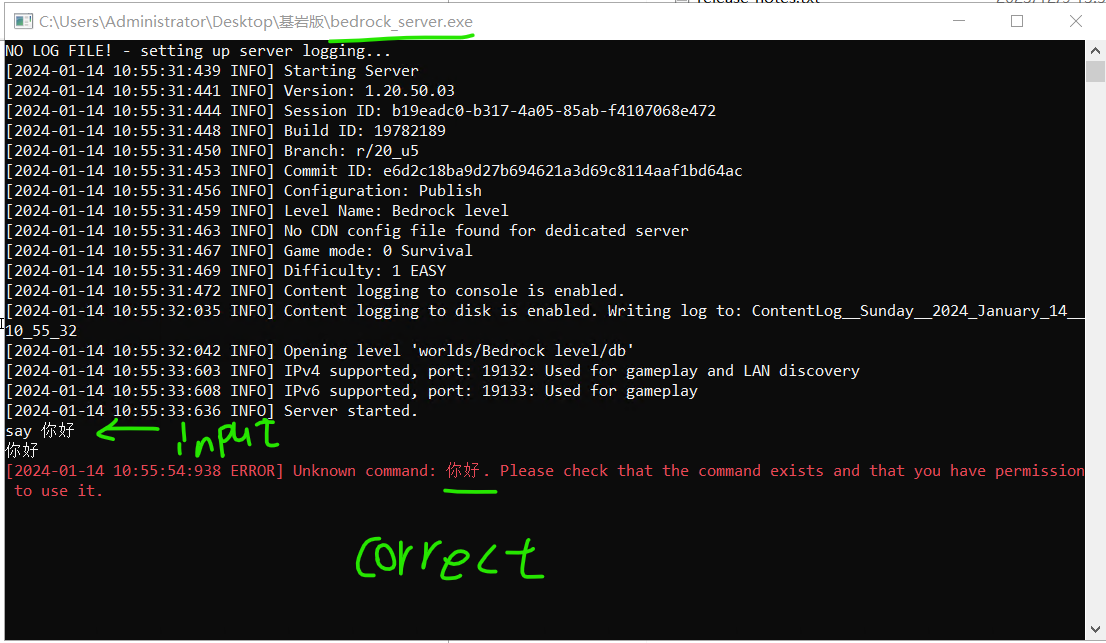


image-2024-01-14-12-00-17-739.png
Even though Minecraft Bedrock 1.20 claims to support UTF-8 and the command "say 你好" displays chinese correctly when entering it directly into the bedrock_server.exe, I encountered an issue when attempting to run bedrock_server.exe as a subprocess in a Python program.
Commands with UTF-8 characters input into this subprocess are automatically decoded into ISO-8859-1 characters. As a result, the original Chinese characters "你好" on the server and cilent appear as "ä½ å¥½"
This screenshot shows the official bedrock_server.exe running independently.
but in python
I wrote it into a Python subprocess to facilitate remote command sending and receiving live comments. Originally, I intended for comments on my channel to be displayed as dialogues in Minecraft. However, I discovered that Chinese characters were being compiled into Latin letters.
Even though I have enabled UTF-8 encoding for the pipeline, it still doesn't work. This issue doesn't exist when interacting with other programs. I suspect that the subprocess form may cause some internal code in the server program to handle UTF-8 characters in the same way as in previous versions, converting them into ISO-8859-1.
I have another piece of code here that can be used to illustrate what happened.
If a solution can be identified, I would be extremely grateful. If the issue lies within the server program itself, I sincerely hope it can be resolved. Thank you!

Even though Minecraft Bedrock 1.20 claims to support UTF-8 and the command "say 你好" displays chinese correctly when entering it directly into the bedrock_server.exe, I encountered an issue when attempting to run bedrock_server.exe as a subprocess in a Python program.
Commands with UTF-8 characters input into this subprocess are automatically decoded into ISO-8859-1 characters. As a result, the original Chinese characters "你好" on the server and cilent appear as "ä½ å¥½"
This screenshot shows the official bedrock_server.exe running independently.
but in python
I wrote it into a Python subprocess to facilitate remote command sending and receiving live comments. Originally, I intended for comments on my channel to be displayed as dialogues in Minecraft. However, I discovered that Chinese characters were being compiled into Latin letters.
Even though I have enabled UTF-8 encoding for the pipeline, it still doesn't work. This issue doesn't exist when interacting with other programs. I suspect that the subprocess form may cause some internal code in the server program to handle UTF-8 characters in the same way as in previous versions, converting them into ISO-8859-1.
I have another piece of code here that can be used to illustrate what happened.
If a solution can be identified, I would be extremely grateful. If the issue lies within the server program itself, I sincerely hope it can be resolved. Thank you!
Even though Minecraft Bedrock 1.20 claims to support UTF-8 and the command "say 你好" displays chinese correctly when entering it directly into the bedrock_server.exe, I encountered an issue when attempting to run bedrock_server.exe as a subprocess in a Python program.
Commands with UTF-8 characters input into this subprocess are automatically decoded into ISO-8859-1 characters. As a result, the original Chinese characters "你好" on the server and cilent appear as "ä½ å¥½"
This screenshot shows the official bedrock_server.exe running independently.
but in python
I wrote it into a Python subprocess to facilitate remote command sending and receiving live comments. Originally, I intended for comments on my channel to be displayed as dialogues in Minecraft. However, I discovered that Chinese characters were being compiled into Latin letters.
Even though I have enabled UTF-8 encoding for the pipeline, it still doesn't work. This issue doesn't exist when interacting with other programs. I suspect that the subprocess form may cause some internal code in the server program to handle UTF-8 characters in the same way as in previous versions, converting them into ISO-8859-1.
I have another piece of code here that can be used to illustrate what happened.
If a solution can be identified, I would be extremely grateful. If the issue lies within the server program itself, I sincerely hope it can be resolved. Thank you!
Even though Minecraft Bedrock 1.20 claims to support UTF-8 and the command "say 你好" displays chinese correctly when entering it directly into the bedrock_server.exe, I encountered an issue when attempting to run bedrock_server.exe as a subprocess in a Python program.
Commands with UTF-8 characters input into this subprocess are automatically decoded into ISO-8859-1 characters. As a result, the original Chinese characters "你好" on the server and cilent appear as "ä½ å¥½"
This screenshot shows the official bedrock_server.exe running independently.
but in python
I wrote it into a Python subprocess to facilitate remote command sending and receiving live comments. Originally, I intended for comments on my channel to be displayed as dialogues in Minecraft. However, I discovered that Chinese characters were being compiled into Latin letters.
Even though I have enabled UTF-8 encoding for the pipeline, it still doesn't work. This issue doesn't exist when interacting with other programs. I suspect that the subprocess form may cause some internal code in the server program to handle UTF-8 characters in the same way as in previous versions, converting them into ISO-8859-1.
I have another piece of code here that can be used to illustrate what happened.
If a solution can be identified, I would be extremely grateful. If the issue lies within the server program itself, I sincerely hope it can be resolved. Thank you!
Even though Minecraft Bedrock 1.20 claims to support UTF-8 and the command "say 你好" displays chinese correctly when entering it directly into the bedrock_server.exe, I encountered an issue when attempting to run bedrock_server.exe as a subprocess in a Python program.
Commands with UTF-8 characters input into this subprocess are automatically decoded into ISO-8859-1 characters. As a result, the original Chinese characters "你好" on the server and cilent appear as "ä½ å¥½"
This screenshot shows the official bedrock_server.exe running independently.
but in python
I wrote it into a Python subprocess to facilitate remote command sending and receiving live comments. Originally, I intended for comments on my channel to be displayed as dialogues in Minecraft. However, I discovered that Chinese characters were being compiled into Latin letters.
Even though I have enabled UTF-8 encoding for the pipeline, it still doesn't work. This issue doesn't exist when interacting with other programs. I suspect that the subprocess form may cause some internal code in the server program to handle UTF-8 characters in the same way as in previous versions, converting them into ISO-8859-1.
I have another piece of code here that can be used to illustrate what happened.
If a solution can be identified, I would be extremely grateful. If the issue lies within the server program itself, I sincerely hope it can be resolved. Thank you!
Even though Minecraft Bedrock 1.20 claims to support UTF-8 and the command "say 你好" displays chinese correctly when entering it directly into the bedrock_server.exe, I encountered an issue when attempting to run bedrock_server.exe as a subprocess in a Python program.
Commands with UTF-8 characters input into this subprocess are automatically decoded into ISO-8859-1 characters. As a result, the original Chinese characters "你好" on the server and cilent appear as "ä½ å¥½"
This screenshot shows the official bedrock_server.exe running independently.
but in python
I wrote it into a Python subprocess to facilitate remote command sending and receiving live comments. Originally, I intended for comments on my channel to be displayed as dialogues in Minecraft. However, I discovered that Chinese characters were being compiled into Latin letters.
Even though I have enabled UTF-8 encoding for the pipeline, it still doesn't work. This issue doesn't exist when interacting with other programs. I suspect that the subprocess form may cause some internal code in the server program to handle UTF-8 characters in the same way as in previous versions, converting them into ISO-8859-1.
I have another piece of code here that can be used to illustrate what happened.
I have attached my code in the comments section
If a solution can be identified, I would be extremely grateful. If the issue lies within the server program itself, I sincerely hope it can be resolved. Thank you!
Even though Minecraft Bedrock 1.20 claims to support UTF-8 and the command "say 你好" displays chinese correctly when entering it directly into the bedrock_server.exe, I encountered an issue when attempting to run bedrock_server.exe as a subprocess in a Python program.
Commands with UTF-8 characters input into this subprocess are automatically decoded into ISO-8859-1 characters. As a result, the original Chinese characters "你好" on the server and cilent appear as "ä½ å¥½"
This screenshot shows the official bedrock_server.exe running independently.
but in python
I wrote it into a Python subprocess to facilitate remote command sending and receiving
livecomments. Originally, I intended for comments on my channel to be displayed as dialogues in Minecraft. However, I discovered that Chinese characters were being compiled into Latin letters.
Even though I have enabled UTF-8 encoding for the pipeline, it still doesn't work. This issue doesn't exist when interacting with other programs. I suspect that the subprocess form may cause some internal code in the server program to handle UTF-8 characters in the same way as in previous versions, converting them into ISO-8859-1.
I have another piece of code here that can be used to illustrate what happened.
I have attached my code in the comments section
If a solution can be identified, I would be extremely grateful. If the issue lies within the server program itself, I sincerely hope it can be resolved. Thank you!
Even though Minecraft Bedrock 1.20 claims to support UTF-8 and the command "say 你好" displays chinese correctly when entering it directly into the bedrock_server.exe, I encountered an issue when attempting to run bedrock_server.exe as a subprocess in a Python program.
Commands with UTF-8 characters input into this subprocess are automatically decoded into ISO-8859-1 characters. As a result, the original Chinese characters "你好" on the server and cilent appear as "ä½ å¥½"
This screenshot shows the official bedrock_server.exe running independently.
but in python
I wrote it into a Python subprocess to facilitate remote command sending and receiving comments. Originally, I intended for comments on my live channel to be displayed as dialogues in Minecraft. However, I discovered that Chinese characters were being compiled into Latin letters.
Even though I have enabled UTF-8 encoding for the pipeline, it still doesn't work. This issue doesn't exist when interacting with other programs. I suspect that the subprocess form may cause some internal code in the server program to handle UTF-8 characters in the same way as in previous versions, converting them into ISO-8859-1.
I have another piece of code here that can be used to illustrate what happened.
I have attached my code in the comments section
If a solution can be identified, I would be extremely grateful. If the issue lies within the server program itself, I sincerely hope it can be resolved. Thank you!
Even though Minecraft Bedrock 1.20 claims to support UTF-8 and the command "say 你好" displays chinese correctly when entering it directly into the bedrock_server.exe, I encountered an issue when attempting to run bedrock_server.exe as a subprocess in a Python program.
Commands with UTF-8 characters input into this subprocess are automatically decoded into ISO-8859-1 characters. As a result, the original Chinese characters "你好" on the server and cilent appear as "ä½ å¥½"
This screenshot shows the official bedrock_server.exe running independently.
but in python
I wrote it into a Python subprocess to facilitate remote command sending and receiving comments. Originally, I intended for comments on my live channel to be displayed as dialogues in Minecraft. However, I discovered that Chinese characters were being compiled into Latin letters.
Even though I have enabled UTF-8 encoding for the pipeline, it still doesn't work. This issue doesn't exist when interacting with other programs. I suspect that the subprocess form may cause some internal code in the server program to handle UTF-8 characters in the same way as in previous versions, converting them into ISO-8859-1.
I have another piece of code here that can be used to illustrate what happened.
I have attached my code in the comments section
If a solution can be identified, I would be extremely grateful. If the issue lies within the server program itself, I sincerely hope it can be resolved. Thank you!
Bedrock Dedicated Server Unknown encoding error
#This is my Python code
#from selenium import webdriver
#from selenium.webdriver.common.by import By
#from bs4 import BeautifulSoup
import subprocess
import asyncio
import websockets
import shutil
import os
import time
from time import gmtime, strftime
import _thread
encoding = 'utf-8'
chat_historty = []
history_queue = []
links = []
lastsend = ""
process = subprocess.Popen(['bedrock_server.exe'], stdin=subprocess.PIPE, stdout=subprocess.PIPE, stderr=subprocess.STDOUT \
, text=True, encoding=encoding, creationflags=subprocess.CREATE_NEW_PROCESS_GROUP)
def server_order(msg):
w = msg + "\n"
process.stdin.write(w)
process.stdin.flush()
def server_sender(msg):
#w = 'say '+msg +'\n'
#process.stdin.write(w)
#process.stdin.flush()
server_order(f"say {msg}\n")
def count_subdirectories(folder_path):
items = os.listdir(folder_path)
subdirectories = [item for item in items if os.path.isdir(os.path.join(folder_path, item))]
return len(subdirectories)
def run_scripts(): # a message sender
# still run
while True:
time.sleep(3.5)
msg = "你好"
print("msg in python: ", msg)
server_order(msg) # check immediately
server_sender(msg) # check in game
def read_live(): # a message sender
# Send comments from my live channel
# For privacy reasons, I did not display the cookies code here
pass
def run_popen():
global lastsend
def run_async_function(func, args):
# Running asynchronous functions in a new protocol
loop = asyncio.new_event_loop()
asyncio.set_event_loop(loop)
try:
loop.run_until_complete(func(args))
finally:
loop.close()
while True:
try:
output = process.stdout.readline()
if output == '' and process.poll() is not None:
print("not null but get nothing")
break
if output:
print("get message from process => ", output.strip())
time = strftime('%a, %d %b %Y %H:%M:%S', gmtime())
timestamped_output = f"{output.strip()}\t{time}"
if lastsend != time:
history_queue.append(timestamped_output)
for L in links:
run_async_function(L.send, timestamped_output)
lastsend = time
except asyncio.CancelledError:
break
except websockets.exceptions.ConnectionClosedOK:
break
except Exception as e:
print(f"An error occurred in run_popen: {e}")
async def handle_client(websocket, path):
links.append(websocket)
global history_queue
global process
print("listening")
# functions
try:
# send history chats to websocket client
for history_entry in history_queue:
await websocket.send(history_entry)
# listening messages from websocket client
while True:
message = await websocket.recv()
print(f"Message from Client: {message}")
server_sender(message)
server_order(message)
if message == "stop":
print("stopping...")
if process:
process.terminate()
break
elif message == "restart":
print("need restart")
process.kill()
print("killed")
process = subprocess.Popen(['bedrock_server.exe'], stdout=subprocess.PIPE, stderr=subprocess.STDOUT,
text=True,encoding=encoding, creationflags=subprocess.CREATE_NEW_PROCESS_GROUP)
elif message == "/new_world":
if process:
process.terminate()
# create target folder
old_worlds_folder = "old_worlds"
if not os.path.exists(old_worlds_folder):
os.makedirs(old_worlds_folder)
old_name = f"old_world{count_subdirectories(old_worlds_folder) + 1}"
os.mkdir(old_name)
shutil.move("worlds/Bedrock level", os.path.join(old_worlds_folder, old_name))
if process:
process.communicate() # wait for process stop
wt = 3
for i in range(wt):
wt_msg = f"restart afterwards {wt - i} sec"
print(wt_msg)
await websocket.send(wt_msg)
await asyncio.sleep(1) # wait a sec
process = subprocess.Popen(['bedrock_server.exe'], stdout=subprocess.PIPE, stderr=subprocess.STDOUT,
text=True,encoding=encoding, creationflags=subprocess.CREATE_NEW_PROCESS_GROUP)
await websocket.send("restart done!")
print("restart done!")
except websockets.exceptions.ConnectionClosedOK:
print("The websocket client has been closed")
await websocket.close()
links.remove(websocket)
finally:
print("Closing websocket server")
await websocket.close()
links.remove(websocket)
async def main():
print("subprocess main started")
print("powered by python")
start_server_coroutine = websockets.serve(handle_client, "xxx.xx.xxx.xx", 8765) # Connect your websocket client here, if you have one, otherwise ignore it
# create task and run it
websocket_task = asyncio.ensure_future(start_server_coroutine)
# run functions on other thread
_thread.start_new_thread(run_popen,())
#_thread.start_new_thread(read_live,())
_thread.start_new_thread(run_scripts,()) # test sending
await asyncio.Future()
if _name_ == "_main_":
try:
asyncio.run(main())
except Exception as e:
print(e)
If possible, I suggest adding built-in character encoding functionality for commands like 'say' and 'tell', 'tellraw', etc.
For example:
/tellraw @a {"rawtext":[\{"text":"ä½ å¥½,"encoding":['iso-8859-1','utf-8']}]}
> 你好
/say "ä½ å¥½" ['iso-8859-1','utf-8']
> [server]你好
Voting for your issues, perhaps we have similar concerns as well.
BDS-18961Thank you