 buyifan
- buyifan43
- buyifan43
- Europe/Stockholm
- Yes
- No
 MCPE-67733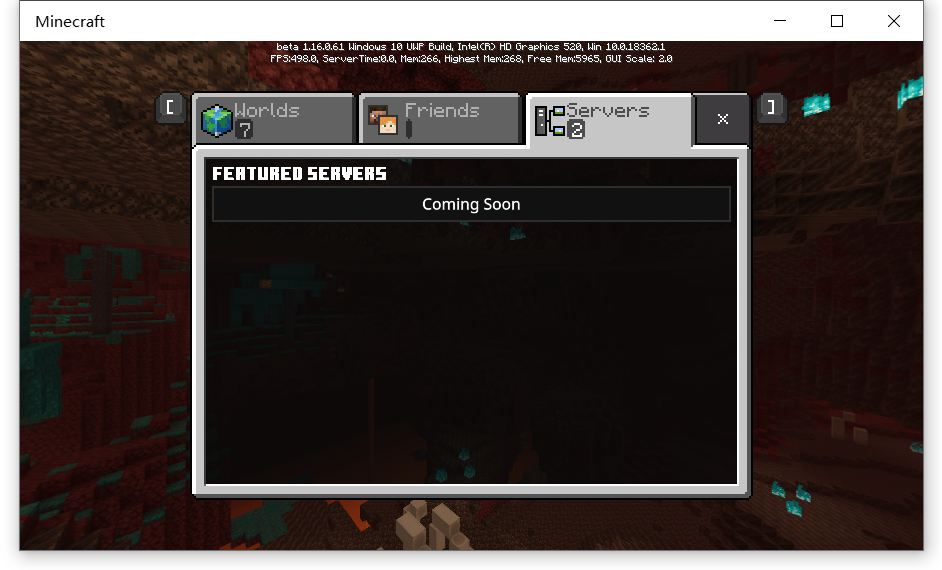
I found that when you are in creative mode , the game only plays music that can only be heard in creative mode (such as "creative3.ogg")but dosen't play the music that can be heard in all modes when the player is in the overworld (such as "calm1.ogg")
In Java Edition, the game plays all the music that can be heard in the overworld.
Thanks a lot if you can fix this.
Because I'm going mad hearing all the same musics .QAQ
By the way,this problem also exists on Android Devices.

I cannot add servers
see in the picture
there's not a button for me todo thatI cannot add servers
Please see in the picture
There's not a button for me to add servers
Steps to Reproduce:
1.Start the game
2.Click"play"
3.Swich to "servers"
4.You will see there is no buttons for you to add servers.
I'm using port mapping to map my LAN multiplayer gaming to WAN in order to create a server that Beta users can join in and play,but without adding servers, I can do nothing XD. Please fix
I cannot add servers and see those I added before in the list
I cannot add servers
Please see in the picture
There's not a button for me to add servers
Steps to Reproduce:
1.Start the game
2.Click"play"
3.Swich to "servers"(which is the third
4.You will see there is no buttons for you to add servers.
I'm using port mapping to map my LAN multiplayer gaming to WAN in order to create a server that Beta users can join in and play,but without adding servers, I can do nothing XD. Please fix
I cannot add servers
Please see in the pictureThere's not a button for me to add servers
Steps to Reproduce:
1.Start the game
2.Click"play"
3.Swich to "servers"(which is the third
4.You will see there is no buttons for you to add servers.
I'm using port mapping to map my LAN multiplayer gaming to WAN in order to create a server that Beta users can join in and play,but without adding servers, I can do nothing XD. Please fix
I cannot add servers and please see in the picture.
There's not a button for me to add servers
I'm using port mapping to map my LAN multiplayer gaming to WAN in order to create a server that Beta users can join in and play,but without adding servers, I can do nothing XD. Please fix
Steps to Reproduce:
1.Start the game
2.Click"play"
3.Swich to "servers"(which is the third selection )
4.You will see there is no buttons for you to add servers.
I found that when using slime blocks to bounce entities(I used primed TNT),you can only bounce them for about 5 blocks instead of 6-7 blocks in previous versions and Java Edition.You can see in the test world I uploded.The huge tower made by obsidian is my elevator that worked fine in 1.13 but dosen't work now.
I used 1.16.100.59 for test but 1.16.40 also have this.
It break my elevator and tunnelbore machine.
May be related to the imcomplete fix of MCPE-62419.
this thing looks like a primed TNT which didn't explode
This thing seems to only affect players because when I used zombies or villagers as a test it worked correctly.And when in multiplayer mode, players will also be affected when other players use machines built to launch players.
There's only a message shows below featured servers says"Coming Soon".However before 1.16.0.61 there's a button says"add servers" which allows me to add servers
Affects both 1.16.0.61 and 1.16.0.63
Well this is fixed XD
Well in Java Edition this issue does not exist, so it's diffferent from JE and in order to make the synchronization between BE and JE, please fix this.
I geuss you guys can give a tag to the becaon light beam which marks it to be a enity can be rendered from far away distances.
Well the slime block now bounces entities(at least TNT is) for 3-4 blocks away instade of 6-7blocks horizionally, breaking my tunnelbore machine.XD
Also, players can only be bounced upward for only 5 blocks intead of 6, breaking the slime block elevator.
I hope it can be fixed to let the block bounce entities for 6-7blocks again
Oh on JE I just can't use the way that I used in BE because primed TNTs will just fall down.
And please wait until Friday when I can use my own PC so that I can do another recording, cause now I'm using computers in my school.
Thanks
I just uploaded 2 videos which are "BE(2)" and "BE~3".
BE(2) showed what will it be like when I use the same way in the previous video of JE, also it showed a strange thing about TNT being bounced.TNTs will be shown like it have been bounced, but the explosion happened in the place where it isn't being moved.
BE~3 showed that players can't be bounced by my elevator but a villager can.
BTW,you can download my testworld here:https://www.mediafire.com/file/9c1xumjw86f9grb/TestWorld.mcworld/file
Maybe disabling Vsync can solve it? IDK though.
Just open options.txt and change vsync:1 to vsync:0
I don't have a NIVIDA card and only Intel Graphics, however it looks like the delay is lower on Intel Cards.
To disable Vsync, just open options.txt in C:\Users(Your username)\AppData\Local\Packages\Microsoft.MinecraftUWP_8wekyb3d8bbwe\LocalState\games\com.mojang\minecraftpe, and change gfx_vsync:1 to gfx_vsync:0.
This could be a solution temporarily.
Affects 1.16.210.56 Beta and versions before
Somehow on my laptop with only a Intel HD Graphics 520 turning off the vsync in options.txt dosen't seem to let the framerate boost (in previous versions which renderdragon was used ,I am able to boost my fps to 120FPS while in windowed mode)
And there is a input lag which isn't very big but sensible though,happens when I swing my view crazily when my mouse stops but my view will keep moving for about 200ms
On snapdragon platforms with Adreno GPU, by modifying the game apk to delete those ESSL_310 renderers and keep ESSL_100 renderers, this issue can be temporarily solved. Need to unpack renderers, delete ESSL_310, and modify the json, then repack and put the renderers back.