 CaptainStarbuck
- CaptainStarbuck
- captainstarbuck
- America/Los_Angeles
- Yes
- No
 MC-26793
 WEB-6317
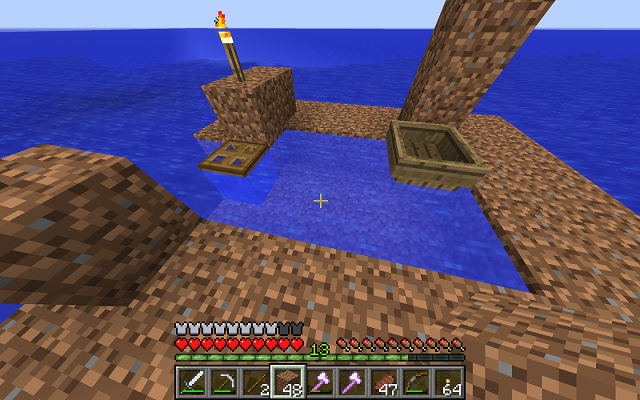
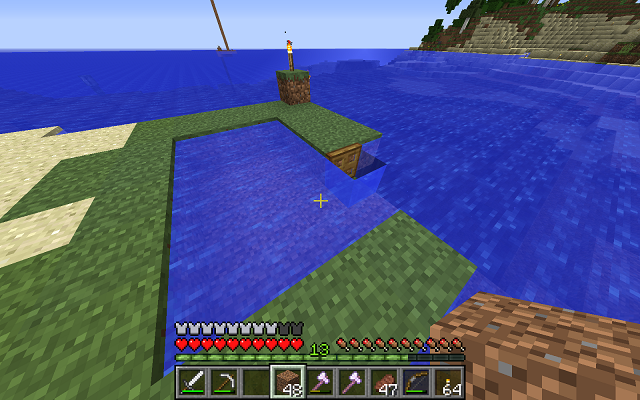


Windows 8 amd64 java.version 1.7.0_
25 sun.arch.data.model = '64'Windows 8 amd64 java.version 1.7.0_51 sun.arch.data.model = '64'
I have a hosted server over Linux with anywhere from 1-3 players at any given time. Most of the map runs fine. When any player enters specific chunks, that player will experience extreme lag. Back away from the lag zone into a non-affected chunk, and performance resumes to normal. This is 100% repeatable and affects all players running on different PCs. The chunks are 100% consistent. The issue seems to be data corruption. I've been trying to map which ones are affected but it's too big an area. Server does not report errors. Client reports a stream of:
[Client thread/INFO]: Warning: Clientside chunk ticking took 1616 msI've attached a crash dump from when I am just about to enter a lag chunk, and another from right after it's entered. The only obvious difference I see is that memory surges from 45MB to 134MB.
On request I can make a server snapshot available and will provide developers access to the server. This is 100% reproducible.
At some point we created a farm with about 200 animals and that caused the first lag. We killed all animals but the lag persisted and expanded several chunks away from the original chunk.
The affected chunks are almost entirely undeveloped and we can delete/regenerate them if required - but I'd think you would want to know what causes this. There is no redstone and the entity counts are normal.
EDIT: The original report and debug attachments were for v1.7.5. I've just updated to CraftBukkit 1.7.9 and updated clients to 1.7.9 and the exact same issue persists. Again, I believe this is a data issue, not software, but I think it would be good to find out what the exact issue is for anyone who may encounter this in the future.
I'll provide other info on request. Thanks.
CraftBukkit server v1.7.5. Current clients running unmodded v1.7.5 for compatibility with server. I apologize that the Affected Version is set to 1.7.9. This is not accurate but the dropdown doesn't allow for 1.7.5. I can't try a release after v1.7.5 because CraftBukkit isn't available for later releases yet.
CraftBukkit server v1.7.9. Current clients running unmodded v1.7.9.
CraftBukkit server v1.7.9. Current clients running unmodded v1.7.9.Windows clients with SSP or SMP server. Latest Java.
SMP lag in specific undeveloped chunksClient lag when redstone timer is at max chunk render distance
Quote: "Lapis Lazuli Ore generates below height 64, with a strong bias towards height 0. However, Lapis Lazuli Ore below height -32 or above height 32 cannot generate exposed to air. It will either be buried or inside water."
Ref https://www.minecraft.net/en-us/article/caves---cliffs--part-ii-out-today-java
Article by Adrian Östergård.The graphic that follows that quote, and below, shows Lapis from -32 up to 32 as NO air exposure. The asterisk on that refers to text: "REDUCED air exposure ... if it is exposed to air then it has a chance of being skipped".
So either the text is wrong, and/or the graphic is wrong, and/or the asterisk note is wrong.
To be clear, the text says below -32 and above +32 "cannot generate exposed to air", which translates to "between -32 and 32 it CAN".
This would agree with the graphic. The graphic says NO air exposure, which would agree with the text if the -32/+32 numbers were reversed, but the asterisk note says REDUCED exposure, not NO exposure, which is consistent with all of the other ores. That is, if there is "a chance" that an ore might be skipped, then there is an opposite chance that it might be exposed to air, which does not mean "no" exposure.These are trivial "typos" by themselves, but given the significance of this information to the community, as seen in published math, wikis, videos, etc, it seems a correction is in order.
- Please check the code for the actual facts and update that article.
- Please create and refer to a new article if changes have been made in this area since 1.18.
- Check info published for Bedrock for similar issues.
There are a LOT of community references to this graphic, and this article as a canonical source. Changing the graphic and/or the text will require an announcement so that corrections can be made in the field.
Quote: "Lapis Lazuli Ore generates below height 64, with a strong bias towards height 0. However, Lapis Lazuli Ore below height -32 or above height 32 cannot generate exposed to air. It will either be buried or inside water."
Ref https://www.minecraft.net/en-us/article/caves---cliffs--part-ii-out-today-java
Article by Adrian Östergård.The graphic that follows that quote, and below, shows Lapis from -32 up to 32 as NO air exposure. The asterisk on that refers to text: "REDUCED air exposure ... if it is exposed to air then it has a chance of being skipped".
So either the text is wrong, and/or the graphic is wrong, and/or the asterisk note is wrong.
To be clear, the text says below -32 and above +32 "cannot generate exposed to air", which translates to "between -32 and 32 it CAN". But the graphic says NO air exposure, which would agree with the text if the -32/+32 numbers were reversed. The asterisk note says REDUCED exposure, not NO exposure, which is consistent with all of the other ores. That is, if there is "a chance" that an ore might be skipped, then there is an opposite chance that it might be exposed to air, which does not mean "no" exposure. It's possible that "NO air exposure" is correct, but the numbers and graphic are still out of sync with that, and if this is the case, there shouldn't be an asterisk there.
These are trivial "typos" by themselves, but given the significance of this information to the community, as seen in published math, wikis, videos, etc, it seems a correction is in order.
- Please check the code for the actual facts and update that article.
- Please create and refer to a new article if changes have been made in this area since 1.18.
- Check info published for Bedrock for similar issues.
There are a LOT of community references to this graphic, and this article as a canonical source. Changing the graphic and/or the text will require an announcement so that corrections can be made in the field.
![[Mod] Torabi](../../../data/assets/gravatar/torabi.png)
Are you saying that the problem no longer occurs at all with render distance set to 10? Have you tried moving further away? Because CaptainStarbuck's comment on MC-44801 says that changing the render distance didn't solve it for him, just changed the range at which the bug occurred.
Justin W, that sounds a lot like the behavior CaptainStarbuck described here.
Just documenting general confusion:
1) The demo web pages are explicit that the download is for those who have made a purchase. But after doing the download I see that it does indeed offer the 1.6.2 demo.
2)
MC-12949refers to http://hopper.minecraft.net/help/out-of-memory/ which says for 32bit we need to reduce memory, but it doesn't go any further. I have 8GB RAM and can only guess at what value <1GB that I should try. Understanding the issue now I see my crash report shows my memory usage at -Xmx1g. Might this issue be fixed for me with -Xmx2g or is JRE32 still only using a max of 1GB?3) I run the v1.5.2 demo on a different Win7/32bit with no issues. The problem here seems unique to JRE32 over Win/64/WoW32. I'll install JRE64. Running in the 32bit browser will probably not change anything so I'll run with the downloaded launcher and JRE64 and see how that goes. Thanks for that tip.
There's no ocean exposure and in this naturally occurring village the only water is in a few gardening beds that have 1-deep water. The golems don't wander from the town center - as discussed in other tickets here, they're following the same logic that keeps villagers focused in one area of town.
I think iron golems have 100 hits. It would take a hoard of zombies to inflict that much damage - and there's another golem here to help. The attack would have had to happen all at once. (Do golems heal over time or are they like armor that just wears down?) Since we don't have sieges in 1.6.4 and there's no access to the town, it's unlikely this is what happened. Also it's unlikely that all the mobs killed a single golem and left the villagers unharmed.
All I can think of is that a spider (or spider jockey) hopped the fence and got stuck attacking a golem who also got stuck just taking the punishment. Afterward the attacker moved to a different target and was then killed by the second golem.
All of these scenarios are extremely unlikely, leading me to believe something has gone wrong.
Is there any code that would cause an iron golem to despawn if it gets stuck in an infinite loop in routing or fighting?
At this point I would be comfortable if this got flagged as a dupe/effect of
MC-2025. The most plausible explanation is that the golem glitched out and suffocated.Can't imaging what purpose there is to hearing ground-level weather when we're near bedrock. While this has been resolved as "works as intended", I'd like this to get another review to question whether it should work like that at all.
Also note that this thunder is audible and loud when the audio for weather is low and even off. I'm guessing that's a separate issue?
v1.7.4
I don't know about the lag. I can confirm that I'm seeing chickens running around in the nether, and their eggs are all around as well. I have an overworld mob farm where it "seems" that chicken jockeys are falling from a height of 40+ blocks, they rarely survive the fall, but the chickens do survive. So at my collection base (hoppers/chest) way out above the ocean I have chickens running around and laying eggs.
Before creating what may be another duplicate: In 1.7.4 almost every time I exit the boat I land about 20 blocks away from the boat. Is that what was fixed in 14w02c?
Not sure if this is another manifestation of the same bug but when in 1.7.4 SSP when I exit a boat it usually becomes inaccessible. I can no longer get in it, I can't break it. If I exit and return it returns to a different location. (I have an enclosed pier and it always returns in a random location in water about 20 blocks away.) EDIT: This is described exactly in
MC-44750Glad I found this. I see the exact same issue all the time in Windows with v1.7.4 in SSP. Thought it was a symptom of
MC-162. Easy to reproduce here. Just entered game, got in my boat, rode, exited, lost access to it. Attaching dump.Updated Java to latest release and attached screenshots showing trapdoor configuration. Will reconfirm here that issue occurs next time I see it. Happens frequently enough.
Also verifying for 1.7.4. Happens to me every single time I exit a boat. No fail. 100% easily reproducible. And in Survival.
Just to be clear, this happens to me 100%, all the time, in SSP, on Windows 8/64. I get in the boat and ride. I get out and I get dumped back to where I got in (another ticket). When I swim back to the boat there is no interaction - it's an unbreakable, unmovable block. The only way to get the boat out of this condition is to exit game and come back in. At that point it comes back in about 20 blocks from where it was left (yet another ticket). In short, there's no point at all in taking a boat anywhere, so now I just swim. This started for me in v1.7. v1.6 was fine.
Issue is not 100% repeatable in 14W11b with 1.3.11, but it is still present.
Suffice to say, this is a long recognized bug, not yet fixed, and it happens with all mobs. I see villagers and all other mobs dangling like spiders as they glitch through a floor or wall and then snap back- or perhaps they don't snap back during chunk load.
Mojang, we don't need more features right now. Please dedicate a build to fixing these widely recognized annoyances. Thanks.
Client and server upgraded. Description updated.
I just moved the world to my PC and get the exact same results in the exact same chunks when running unmodified vanilla 1.7.9.
I just used MCEdit to delete a selection of contiguous chunks. On opening the game the chunks regenerate but the exact same chunks are still affected. I can attach a zip of the world for diagnostic if requested. Or - what else can I do to get a detail log of activity, memory consumption, entities, etc? I have saves of the world pre- and post- the MCEdit.
I just found the issue is due to a mob farm we have nearby to the lagging chunks. If I turn off the redstone timer (hoppers feeding into one another pushing redstone to activate a circuit), lagging elsewhere goes away. We only lag when the timer is running and we have moved away from it. If the client Render Distance is 6 chunks, the player lags when moving 6 chunks away from that timer. If the Render Distance is 16 chunks, the player lags 16 chunks away from the timer and not any closer! I'm guessing some code attempts to take chunks out of memory for a player when that player is out of range, but it's having a problem doing so. Does that help?
Modified description and other headers. This is not a SMP issue, nor is it related to mods or data corruption. This seems to be a chunk memory release issue in the current version, perhaps related to locks.
This appears to be the same issue reported in
MC-44801.Also seems to be documented in this forum post:
http://forums.teamextrememc.com/index.php?/topic/22158-about-chunk-ticking-client-lag/
In that posting the hopper timer is specifically referenced as a cause of this symptom in 1.7. Falling water is also cited as another trigger, as are dispensers with buckets - I have all of these.
Google "minecraft chunk ticking" for many other reports of similar symptoms.
I opened
MC-55467today and when a comment said it was invalid I did more research. This is a highly documented issue with timers, dispensers, or water falls, where if the client is just moving out of "render distance" range from one of those active areas, they will experience lag as the game fails to unload the active chunk. This has nothing to do with where you are when the lag occurs. The problem is how far away you are from the source. Change your render distance and you'll see that the problem occurs at that radius from the source rather than where you first experienced the issue. This is 100% repeatable in SSP and SMP in v1.7.5 and 1.7.9.This is a critical issue if we can't play more than some number of chunks away from another active chunk.
I believe one solution is to teleport away from the active chunk. Everything gets unloaded and the new destination chunk is loaded.
It's sort of insane for Mojang to not make a determined effort on this issue but to ask people to confirm that the issue is still present in each new snapshot. I mean, we don't need to confirm the issue is present, we can assume that's the case until told otherwise, so don't bother reporting the issue as still present in every single snapshot. They can setup a test as easily as any of us. Mojang, how about You make an effort to address this specific issue, rather than playing with bunnies, and then just tell us when this one looks finished, eh?
Issue does appear to be resolved in 14w30c.
Same experience. I just loaded 14w30c to re-test issues I reported on 1.7.x. I can walk around for a couple minutes after starting game but then it goes into a bad lag and FPS drops to zero. The pause lasts about 5 seconds, releases for a second, then resumes. In-game I'm in a village with a very high villager count and lots of farm animals, plus rain - so there are a LOT of entities. Tried with VBO on, and off, no change. Happy to change JVM flags or other settings as directed, but hesitant to load different drivers just for this.
I just re-checked 1.7.10, verified that the problem exists there, then loaded 14w30c and verified that the problem does NOT exist there. I went back and forth a couple times (resetting each world since downgrading is problematic) and testing slightly differently. It looks to me like this one is fixed.
Yes, still happening in 14w30c.
Duplicate of
MC-63784- hard to blame drivers if the problem didn't exist in the immediately prior production release.Duplicate of
MC-63784That makes me think about this as being a rather simple matter - probably complicated by the realities of the code. When unloading a chunk, I'd think the order should be 1) stop all entity/block actions, 2) unload entities (mobs, animals), 3) unload blocks. When loading, do the opposite: 1) load blocks, 2) load entities, 3) activate entity actions. As to actions across chunks, any action that involves another chunk needs to get put into a hold queue until the other chunk is loaded. So an active mob in a chunk that was just loaded shouldn't be able to move into the first block of the next chunk until that other chunk is itself fully loaded and active. Doesn't that solve the problem?
@Alejandro - as a software developer who writes this kind of stuff every day, I'll confirm for you that the method I described is exactly how we do things - we unload software in the exact opposite order of loading. For example, you walk into your room, boot your system, start your game, and play. Then you stop playing, turn off the game, shutdown the system, and leave the room. It goes 1,2,3,4, then 4,3,2,1. Anything other than that is either impossible or problematic. The order I proposed suggests that for loading, solid objects get placed first, movable objects second and Then that movable things can start moving - once the solid objects are firmly in place mobs won't move into/through them. For unloading, mobs need to stop moving before solid blocks are removed. Otherwise when everything comes back their location will be where a block was and they'll suffocate when blocks reload.
As to your statement "Otherwise you would find dead chicken, cows, even villagers everywhere sofocating in walls and stuff" - that's exactly the problem that needs to be fixed. That's what this whole thing is about.
And all that said, obviously Mojang knows their own code and doesn't need us to analyse it - but then again this issue has been around for 2 years now so I'm not sure what kind of nudge they do or don't need anymore.
There are way too many comments off-topic and about other bugs. In order to keep the developers focused on this one issue, I'm hoping people will keep comments focused - though really there's nothing more to discuss on this until it's fixed.
This is Not about density, we see this happening with just a few entities. The AI (gathering) issues are already documented in other tickets. This is not about glitching - whether the snap-back type or getting locked into fences, though it's probably related. Technically, while it's in the subject, this also has nothing to do with "suffocating", since that's just a consequence of where some entities happy to reload.
This is only about entities which are in one location when a chunk unloads, and somewhere else when the chunk reloads. That's very simple and it's easy for the developers to see for themselves. After a couple years this ticket doesn't need any more analysis. Thanks for your time.
With JVM switches -Xms1500M -Xmx2G, I thought that's where the min/max is set. For old/new objects there's
-Xmn250M. The F3 showed progressive usage from about 20% with flickering changes of +2/-1, through 30%, 40%...100%. I got the log at about 95%. Which part of that would be 124MB?
I originally started at max 1GB and watched this pattern. Increased to 2 with same result, filed this ticket.
Yes: I increased max memory to 4GB with the same results: Entities at E: 10/530. I just sat in one spot, did absolutely nothing, and watched memory increase until eventually the game froze and returned 'Exception in thread "File IO Thread" java.lang.OutOfMemoryError: Java heap space'.
On restart I left the populated area, found an area with about 35 entities. With normal playing for about an hour usage increased into the 80% range. After leaving it sit with no activity it did drop to about 70% (2.8/4GB). Resuming normal activity with new cave on a newly discovered island, memory again increased over a period of about an hour until the game stopped responding.
On exit/resume I was able to play with memory not going above 80% - as expected it follows a pattern, going up to about 80 and then dropping back to 75 (3-3.5/4GB). So at this point the game is playable as long as I don't trip on whatever it is that causes the memory leak.
Yes: It does take longer to consume 4GB than 2, probably about twice as long.
May or may not be related - memory is not released on "Save and Exit Game" to exit a world - so going back into the game it's still pegged at 99%. Memory is only released on a full "Quit Game".
I'll be happy to load a debug version if you have logging which might help to trace the life-cycle of entities and other objects. Thanks.
Still in 1.8.8 Production/vanilla, no plugins, SSP, Overworld.
Adding info: I experienced the described lag in a village. I was able to sit in that village with hundreds of villagers for a couple hours, and memory follows the well-behaved pattern of moving between 65% and 80% usage. I moved about 10 blocks away, and memory slowly rose to 99%/4GB. The sitting location now was not the same as the one described earlier. It's possible that I crossed into another chunk and/or came within range of a farm that's another couple chunks away, and that's what triggered the memory consumption. My view is currently 5 chunks and that's about the right range to the far with a lot of mobs.
I'll experiment with increasing/decreasing the chunk range and watching mob counts.
I guess my question is: Shouldn't we expect that at a point there is some kind of handling to flush out entities or distant chunks in order to keep enough memory available? Or is it defined behaviour that memory consumption will increase until it hits the limit and then we should expect to see lag? If I'm really asking the game to utilize all of the memory then I can't consider this a bug. But I'd hope that the game is smart enough to do garbage collection and other entity management to avoid simply running out of resources.
Thanks.
Windows 8.1 Java 1.8, v1.8.8, SSP, vanilla.
I get this often, not all the time.
Always happens while/after saving The End : Might be a clue that I've never been to The End in this world.
No, I will not disable anti-virus.
[13:15:56] [Server thread/INFO]: Stopping server
[13:15:56] [Server thread/INFO]: Saving players
[13:15:56] [Server thread/INFO]: Saving worlds
[13:15:56] [Server thread/INFO]: Saving chunks for level 'Europa'/Overworld
[13:15:56] [Server thread/INFO]: Saving chunks for level 'Europa'/Nether
[13:15:56] [Server thread/INFO]: Saving chunks for level 'Europa'/The End
java.io.IOException: Stream Closed
at java.io.RandomAccessFile.seek0(Native Method)
at java.io.RandomAccessFile.seek(Unknown Source)
at anh.a(SourceFile:315)
at anh.a(SourceFile:255)
at anh$a.close(SourceFile:236)
at java.util.zip.DeflaterOutputStream.close(Unknown Source)
at java.io.FilterOutputStream.close(Unknown Source)
at anj.b(SourceFile:140)
at anj.c(SourceFile:124)
at auc.c(SourceFile:37)
at auc.run(SourceFile:30)
at java.lang.Thread.run(Unknown Source)
[13:16:45] [Client thread/INFO]: Stopping!
[13:16:45] [Client thread/INFO]: SoundSystem shutting down...
[13:16:45] [Client thread/WARN]: Author: Paul Lamb, www.paulscode.com
Saw this again in v1.8.8 production. While riding in a boat I came to doc in the structure shown in attached images. Opened the trap door while in the boat and it refused to close. Exited boat (surprise I didn't teleport somewhere else) and trap door closed immediately. I'm just reporting this in case someone stumbles by and will try to report again if I can reproduce it.
So shouldn't this be re-opened? Or since the original issue was fixed should this be a new issued against 1.8.8?
Just happened to me, first time. v1.8.8 with launcher 1.6.13. Solution to remove _tmp extension from servers.dat was successful.
Might have been due to network drop at some critical moment. I left a server, opened a local creative world, closed, and attempted to go back to server. I was not due to rapid clicking on Refresh. My network had gone down. Refreshed the network connection and then found I had no server list.
When I opened the creative world a chunk was missing. I couldn't move into it. I exited the game, restarted, and the chunk was back. Then I moved to multiplayer. That's never happened to me. I understand that's probably not related but two kinds of funkiness at the same time is an unusual coincidence.
Rather than getting a notice that this issue is present in every weekly snapshot over the last three years, it might be better if we could just get a notification when the issue is actively being processed by developers. Then we'll get a single "we/Mojang think it might be fixed in snapshot X" rather than a field report equivalent to "we were hoping it was accidentally fixed by some other changes in this snapshot but it didn't work out that way".
So perhaps Mojang can temporarily lock this issue, and just re-open it when They believe something may have changed? Thanks.
Java 1.15.2 + Spigot
I have a couple bee areas. One with all nests, one all hives (collectively 'homes'). There are many more homes than bees. There are plenty of homes for existing and newly bred bees. The area under and around the homes is densely populated with flowers. Campfires are protected from horizontal And vertical entry. The bees have no obvious reason to go anywhere other than from home to flowers a few blocks away and back. I have not seen a bee die or despawn. I have No berries anywhere in the area. But I do see them flying away, maybe about 50 blocks. And after doing other game activities I frequently come back to find very few left.
So far I have three theories:
1) They may be getting slowly hit and killed by torches. I use a lot of pumpkins but there torches everywhere as well for complete mob spawning coverage.
2) They may get into a loop of damage when near water, constantly dipping down/up until death. I have not seen this, just guessing.
3) They may be despawning when there is no player in range, maybe on reaching a mob cap for bee count?
My immediate plan, move all existing bees from nests to hives, build a glass wall around the whole thing, and then setup redstone for auto-harvesting.
I really like having bees flying all around. I hope that either a bug is fixed or that we get some insight into what else is required in the environment to keep them alive.
Confirming same undesirable behaviour in 1.16 / 20w13b. I've reconfigured the border of this trap many times with same results:
Golems are spawning inside half-slabs which are on top of glass/transparent blocks.
They spawn half-in glass blocks, no slabs involved.
They spawn partially in wood and take damage.
I need to apologize. I am just now seeing that the original report here was for Bedrock but I'm running Java. So this is a confirmation that the issue was/is not Bedrock-only.
FWIW, I think I found my bees. The simply flew far away and I just happned to find them as I was adventuring across the ocean to the North-West of my base. Of course, how do I know those were my bees? I don't, but I found a group of them just off the ocean in a desert with no nests, so I'm making a big assumption that this group of bees without a home came from my base.
So my best guess on this now is that the bees are losing interest like other mobs occasionally do, and then they're flying Northwest, sort of like mobs used to do when they huddled in a corner of any enclosure.
HTH
+1 on 20w19a : I have completely new constructions in different worlds with similar behaviours. I've tried many different kinds of walls with fences, all solid blocks, half blocks together and staggered, and a combination of a fence in the ground-level block with a full/solid block above that - the idea so far has been to allow the golem to spawn in a block with a fence or other partial block next to it but to try to get it to keep away from the higher solid block. Golems continue to spawn partially in walls.
The golems are also getting stuck in solid blocks on their side as they're flowing in water. So with a typical iron farm the golem spawns then starts to float away, but it will get stuck in the walls bordering the water flow.
HTH