 Chris Greenbank
- chrisgbk
- chrisgbk
- Europe/Stockholm
- Yes
- No
 MC-3254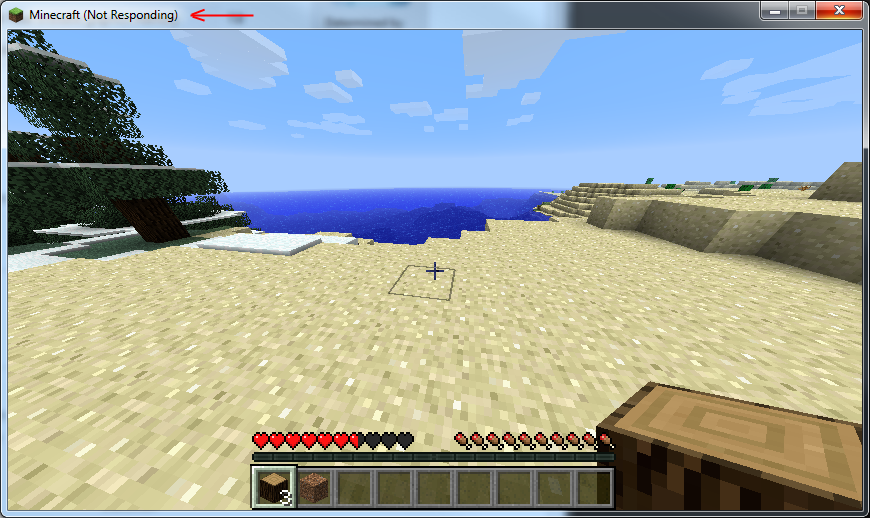

Since I've built this system(~11 months ago), Minecraft(and only Minecraft) has been horribly unstable on it. Updating every driver, flashing updated BIOS, running Java with 8 gigs of RAM allocated all fail to solve.
Game freezes on newly generated worlds simply walking around and exploring a tiny portion(around 10 blocks) of the game world after a random time from 1-20 minutes, or occasionally on it's own if allowed to just sit idle. Also affected when joining internet servers. Makes game completely unplayable. Note that game does NOT unfreeze, it remains frozen.
No crash report is generated since it only freezes, followed by Windows detecting that it's stopped working. Always reproducable on my system, so if there is a way to get more debug info I'll supply it.
Jave 7 Update 9 64 bit
Windows 7 x64
Intel(R) Core(TM) i7-2600K CPU @ 3.40GHz
16 GB RAM
NVIDIA GeForce GTX 560 Ti4GB (Driver 306.97 WHQL)
Vanilla (No mods)Jave 7 Update 9 64 bit
Windows 7 x64
Intel(R) Core(TM) i7-2600K CPU @ 3.40GHz
16 GB RAM
NVIDIA GeForce GTX 560 Ti 2GB (Driver 306.97 WHQL)
Vanilla (No mods)
Since I've built this system(~11 months ago), Minecraft(and only Minecraft) has been horribly unstable on it. Updating every driver, flashing updated BIOS, running Java with 8 gigs of RAM allocated all fail to solve.
Game freezes on newly generated worlds simply walking around and exploring a tiny portion(around 10 blocks) of the game world after a random time from 1-20 minutes, or occasionally on it's own if allowed to just sit idle. Also affected when joining internet servers. Makes game completely unplayable. Note that game does NOT unfreeze, it remains frozen.
No crash report is generated most times since it only freezes, followed by Windows detecting that it's stopped working. Always reproducable on my system, so if there is a way to get more debug info I'll supply it.
Since I've built this system(~11 months ago), Minecraft(and only Minecraft) has been horribly unstable on it. Updating every driver, flashing updated BIOS, running Java with 8 gigs of RAM allocated all fail to solve. Updating LWJGL
Game freezes on newly generated worlds simply walking around and exploring a tiny portion(around 10 blocks) of the game world after a random time from 1-20 minutes, or occasionally on it's own if allowed to just sit idle. Also affected when joining internet servers. Makes game completely unplayable. Note that game does NOT unfreeze, it remains frozen.
No crash report is generated most times since it only freezes, followed by Windows detecting that it's stopped working. Always reproducable on my system, so if there is a way to get more debug info I'll supply it.
Since I've built this system(~11 months ago), Minecraft(and only Minecraft) has been horribly unstable on it. Updating every driver, flashing updated BIOS, running Java with 8 gigs of RAM allocated all fail to solve. Updating LWJGL also makes no difference.
Game freezes on newly generated worlds simply walking around and exploring a tiny portion(around 10 blocks) of the game world after a random time from 1-20 minutes, or occasionally on it's own if allowed to just sit idle. Also affected when joining internet servers. Makes game completely unplayable. Note that game does NOT unfreeze, it remains frozen.
No crash report is generated most times since it only freezes, followed by Windows detecting that it's stopped working. Always reproducable on my system, so if there is a way to get more debug info I'll supply it.
Tried that, no change.
Screenshot of what happens. Screenshot was taken after letting Minecraft run for an additional 10 hours after initially freezing. Note that it remained unresponsive the entire time, there was no further rendering in the 10 hours after freezing, which would have been apparent with the movement of the clouds.
Was using Java 6 before updating to Java 7. Used both 32 bit, and 64 bit versions. Currently using 64 bit, as noted in the Environment section above. As I've said, this issue has been happening to me for almost a year. Have used about 10 different versions of Java, and various releases of Minecraft over the past year. Various driver versions for different components of my system as well.
I haven't been able to play Minecraft on this computer for a year. My prior system (XP 32bit) ran fine.
Since the odd time it DOES actually crash instead of just locking up, attaching this crash log in the hope it can help.
Tried that, no change; however I did a few things and one of them seems to have solved the issue, but not sure which it was: