 Yui
Yui
- d291623
- d291623
- Asia/Taipei
- Yes
- No
 MC-233336
 NormalMC-272157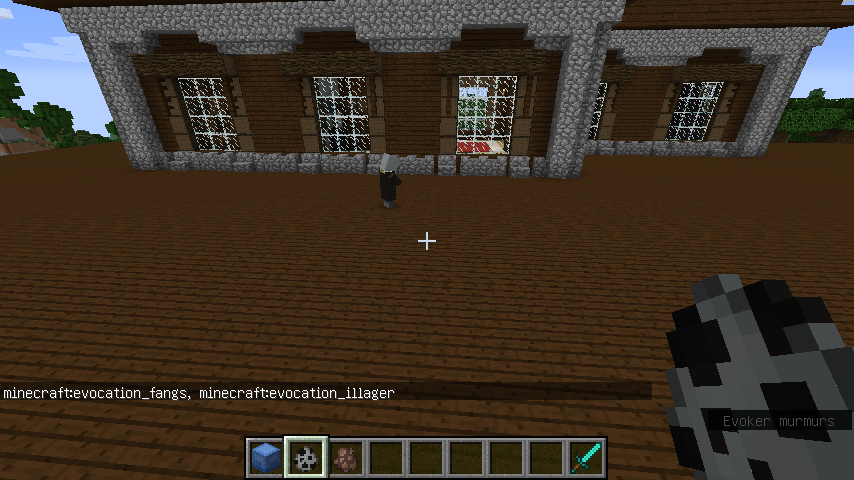






What I expected to happen was...:
Ithink Evoker's id is "minecraft:evocation_villager"What actually happened was...:
In 16w39b, it's id is "minecraft:evocation_illager"Steps to Reproduce:
type "/summonminecraft:evoc" and pressTabkeyWhat I expected to happen was...:
If your off hand hold 64 totems, it will be used by 64 timesWhat actually happened was...:
If your off hand hold 64 totems, it will be used by only one timeSteps to Reproduce:
type "/give @p minecraft:totem 64" and press F key to make it on your off hand, then hurt yourself.
Evoker's id is wrongTotem
 chinesefont.png
Abnormalperformancerelated to the generic.max_health attributeAbnormal behavior related to the generic.max_health attribute
After reducing the attribute generic.max_health of a player, the player's HP will not be capped automatically until taking damage. If the value of this damage is higher than generic.max_health attribute, "client-side fake death" will happen.
After reducing the attribute generic.max_health of a player, the player's HP will not be capped automatically until taking damage. If the value of this damage is higher than generic.max_health attribute, "client-side fake death" will happen.
After reducing the attribute generic.max_health of a player, the player's HP will not be capped automatically until taking damage. If the value of this damage is higher than generic.max_health attribute, "client-side fake death" will happen.
Steps to reproduce:
- modify the attribute
/attribute @s minecraft:generic.max_health base set 6
- check current HP
/data get entity @s Health#
After reducing the attribute generic.max_health of a player, the player's HP will not be capped automatically until taking damage. If the value of this damage is high
er thangeneric.max_health attribute, "client-side fake death" will happen.Steps to reproduce:
- modify the attribute
/attribute @s minecraft:generic.max_health base set 6
check current HP/data get entity @s Health#
After reducing the attribute generic.max_health of a player, the player's HP will not be capped automatically until taking damage. If the value of this damage is high enough, "client-side fake death" will happen.
Steps to reproduce:
- Modify the attribute
/attribute @s minecraft:generic.max_health base set 6
- Check current HP
/data get entity @s HealthThe result is 20.0f
- Take any damage
After reducing the attribute generic.max_health of a player, the player's HP will not be capped automatically until taking damage. If the value of this damage is high enough, "client-side fake death" will happen.
Steps to reproduce:
- Modify the attribute
/attribute @s minecraft:generic.max_health base set 6
- Check current HP
/data get entity @s HealthThe result is 20.0f
- Take any damage
After reducing the attribute generic.max_health of a player, the player's HP will not be capped automatically until taking damage. If the value of this damage is high enough, "client-side fake death" will happen.
Steps to reproduce:
1. Modify the attribute/attribute @s minecraft:generic.max_health base set 62. Check current HP
/data get entity @s HealthThe result is 20.0f
3. Take any damage
After reducing the attribute generic.max_health of a player, the player's HP will not be capped automatically until taking damage. If the value of
this damage is high enough, "client-side fake death" will happen.Steps to reproduce:
1. Modify the attribute/attribute @s minecraft:generic.max_health base set 6
2. Check current HP/data get entity @s HealthThe result is 20.0f
3. Take any damageAfter reducing the attribute generic.max_health of a player, the player's HP will not be capped automatically until taking damage. If the value of generic.max_health is lower than half of the original HP, "client-side fake death" will happen.
Steps to reproduce:
1. Modify the attribute/attribute @s minecraft:generic.max_health base set 62. Check current HP
/data get entity @s HealthThe result is 20.0f
3. Take any damage
After reducing the attribute generic.max_health of a player, the player's HP will not be capped automatically until taking damage. If the value of generic.max_health is lower than half of the original HP, "client-side fake death" will happen.
Steps to reproduce:
1.Modify the attribute/attribute @s minecraft:generic.max_health base set 6
2. Check current HP/data get entity @s HealthThe result is 20.0f
3. Take any damageAfter reducing the attribute generic.max_health of a player, the player's HP will not be capped automatically until taking damage. If the value of generic.max_health is lower than half of the original HP, "client-side fake death" will happen.
Steps to reproduce:
1. Reset the player's state/attribute @s minecraft:generic.max_health base set 20 /effect give @s minecraft:instant_health 1 32. Modify the attribute
/attribute @s minecraft:generic.max_health base set 63. Check current HP
/data get entity @s HealthThe result is 20.0f, not 6.0f
4. Take any damage
After reducing the attribute generic.max_health of a player, the player's HP will not be capped automatically until taking damage. If the value of generic.max_health is lower than half of the original HP, "client-side fake death" will happen.
Steps to reproduce:
1. Reset the player's state/attribute @s minecraft:generic.max_health base set 20 /effect give @s minecraft:instant_health 1 32. Modify the attribute
/attribute @s minecraft:generic.max_health base set 63. Check current HP
/data get entity @s HealthThe result is 20.0f, not 6.0f
4. Take any damage
After reducing the attribute generic.max_health of a player, the player's HP will not be capped automatically until taking damage. If the value of generic.max_health is lower than half of the original HP, "client-side fake death" will happen.
Steps to reproduce:
1. Reset the player's state/attribute @s minecraft:generic.max_health base set 20 /effect give @s minecraft:instant_health 1 32. Modify the attribute
/attribute @s minecraft:generic.max_health base set 63. Check current HP
/data get entity @s Health
The result is 20.0f, not 6.0f4. Take any damageAfter reducing the attribute generic.max_health of a player, the player's HP will not be capped automatically until taking damage. If the value of generic.max_health is lower than half of the original HP, "client-side fake death" will happen.
Steps to reproduce:
1. Reset the player's state
/attribute @s minecraft:generic.max_health base set 20 /effect give @s minecraft:instant_health 1 32. Modify the attribute
/attribute @s minecraft:generic.max_health base set 63. Check current HP
/data get entity @s HealthThe result is 20, not 6
4. Take any damage
For example, step onto a magma block. After taking damage, the player's HP will be 5 and the "You Died" UI will pop up.
Some parts of the durability bar are at the top of the action
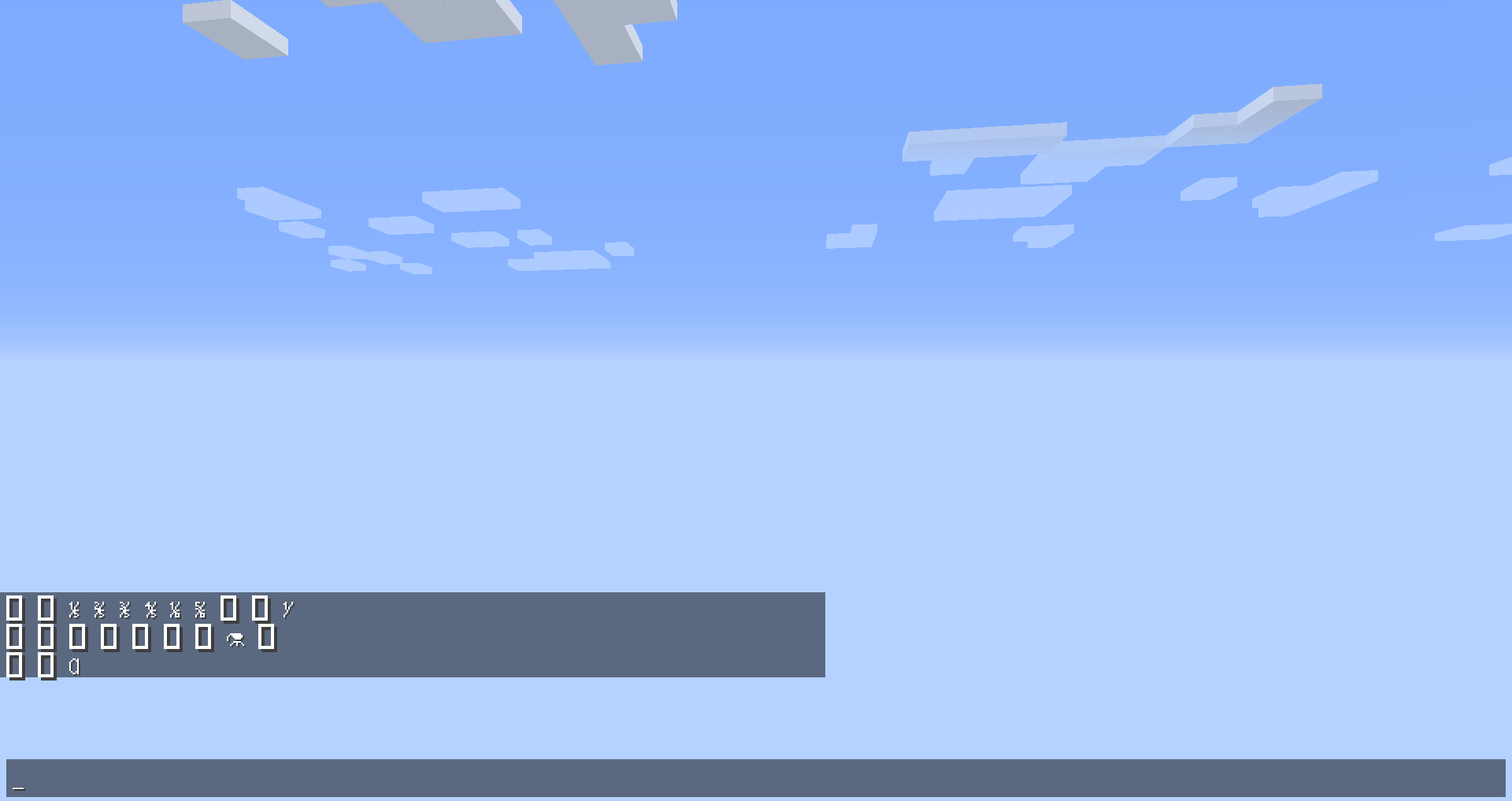
bar text, while other parts are at the bottom of the text. Also affects the capacity bar of Bundle.In the attachment, there are two translucent characters with negative ascent covering the hotbar (position 0 and 1). Some parts of the bars are darker because these parts are covered by the character.
Some parts of the durability bar are at the top of the actionbar text, while other parts are at the bottom of the text. Also affects the capacity bar of Bundle.
In the attachment, there are two translucent characters with negative ascent covering the hotbar (position 0 and 1). Some parts of the bars are darker because these parts are covered by the characters.
Some parts of the durability bar are at the top of the actionbar text, while other parts are at the bottom of the text. Also affects the capacity bar of Bundle.
In the attachment, there are two translucent characters with negative ascent covering the hotbar (position 0 and 1). Some parts of the bars are darker because these parts are covered by the characters.
Edit: the covered parts are transparent parts of the item texture.
Some parts of the durability bar are at the top of the actionbar text, while other parts are at the bottom of the text. Also affects the capacity bar of Bundle.
In the attachment, there are two translucent characters with negative ascent covering the hotbar (position 0 and 1). Some parts of the bars are darker because these parts are covered by the characters.
Edit: the covered parts are transparent parts of the item texture.Some parts of the durability bar are at the top of the actionbar text, while other parts are at the bottom of the text. Also affects the capacity bar of Bundle.
In the attachment, there are two translucent characters with negative ascent covering the hotbar (position 0 and 1). Some parts of the bars are darker because these parts are covered by the characters.
Update: the covered parts are transparent parts of the item texture.
Regardless of values in the slots field, when launching a melee attack, value effects of minecraft:damage are always active if the enchanted item is in the mainhand, and are always inactive if the item is in other slots.
The same thing happens to value effects of minecraft:armor_effectiveness.
Howto reproduce
- Create an enchantment to add exaggeratedly large value to minecraft:damage when the item is held in the offhand
- Enchant a supported item with the enchantment
- Hit some mob with the item in the mainhand
- Hit some mob with the item in the offhand
An enchanement which adds 100 damage in offhand is attached.
Expected behavior
Mobs are one-hit killed when the item is in the offhand.Observed behavior
Mobs are one-hit killed when the item is in the mainhand.
The enchanted_hit particles are also produced when hitting mobs with the item in the mainhand.Regardless of values in the slots field, when launching a melee attack, value effects of minecraft:damage are always active if the enchanted item is in the mainhand, and are always inactive if the item is in other slots.
The same thing happens to value effects of minecraft:armor_effectiveness.Steps to reproduce
- Create an enchantment to add exaggeratedly large value to minecraft:damage when the item is held in the offhand
- Enchant a supported item with the enchantment
- Hit some mob with the item in the mainhand
- Hit some mob with the item in the offhand
An enchanement which adds 100 damage in offhand is attached.
Expected behavior
Mobs are one-hit killed when the item is in the offhand.Observed behavior
Mobs are one-hit killed when the item is in the mainhand.
The enchanted_hit particles are also produced when hitting mobs with the item in the mainhand.
Regardless of values in the slots field, when launching a melee attack, value effects of minecraft:damage are always active if the enchanted item is in the mainhand, and are always inactive if the item is in other slots.
The same thing happens to value effects of minecraft:armor_effectiveness.Steps to reproduce
- Create an enchantment
toadd exaggeratedly large value to minecraft:damage when the item is held in the offhand- Enchant a supported item with the enchantment
- Hit some mob with the item in the mainhand
- Hit some mob with the item in the offhand
An enchanement which adds 100 damage in offhand is attached.
Expected behavior
Mobs are one-hit killed when the item is in the offhand.Observed behavior
Mobs are one-hit killed when the item is in the mainhand.
The enchanted_hit particles are also produced when hitting mobs with the item in the mainhand.Regardless of values in the slots field, when launching a melee attack, value effects of minecraft:damage are always active if the enchanted item is in the mainhand, and are always inactive if the item is in other slots.
The same thing happens to value effects of minecraft:armor_effectiveness.Steps to reproduce
- Create an enchantment which adds exaggeratedly large value to minecraft:damage when the item is held in the offhand
- Enchant a supported item with the enchantment
- Hit some mob with the item in the mainhand
- Hit some mob with the item in the offhand
An enchanement which adds 100 damage in offhand is attached.
Expected behavior
Mobs are one-hit killed when the item is in the offhand.Observed behavior
Mobs are one-hit killed when the item is in the mainhand.
The enchanted_hit particles are also produced when hitting mobs with the item in the mainhand.
Regardless of values in the slots field, when launching a melee attack, value effects of minecraft:damage are always active if the enchanted item is in
themainhand, and are always inactive if the item is in other slots.
The same thing happens to value effects of minecraft:armor_effectiveness.Steps to reproduce
- Create an enchantment which adds exaggeratedly large value to
minecraft:damagewhen the item is held in theoffhandEnchant a supported item with the enchantment- Hit some mob with the
item in the mainhand- Hit some mob with the item in the offhand
An enchanement which adds 100 damage in offhand is attached.
Expected behavior
Mobs are one-hit killed when theitemis intheoffhand.Observed behavior
Mobs are one-hit killed when the item is inthemainhand.
The enchanted_hit particles are also produced when hitting mobs with the item inthemainhand.Regardless of values in the slots field, when launching a melee attack, value effects of minecraft:damage are always active if the enchanted item is in mainhand, and are always inactive if the item is in other slots.
The same thing happens to value effects of minecraft:armor_effectiveness.Steps to reproduce
- Install the attached datapack mc272006.zip
- Enchant a sword with the command: /enchant @s test:increase_damage_in_offhand
- Hit some mob with the sword in mainhand
- Hit some mob with the sword in offhand
Expected behavior
Mobs are one-hit killed when the sword is in offhand.Observed behavior
Mobs are one-hit killed when the item is in mainhand.
The enchanted_hit particles are also produced when hitting mobs with the item in mainhand.
I've checked.
You're right.
But how to remove this bug reporting?
Can I change it to another bug?
I think unicode-font is better in Chinese.
ascii:

unicode:

In your test, the one with full netherite set takes 6.12 damage per hit, while the other takes 6.48.
Both take 4 hits to defeat, as expected.