 d3fin3d
- d3fin3d
- d3fin3d
- Europe/Stockholm
- Yes
- No
 MC-3117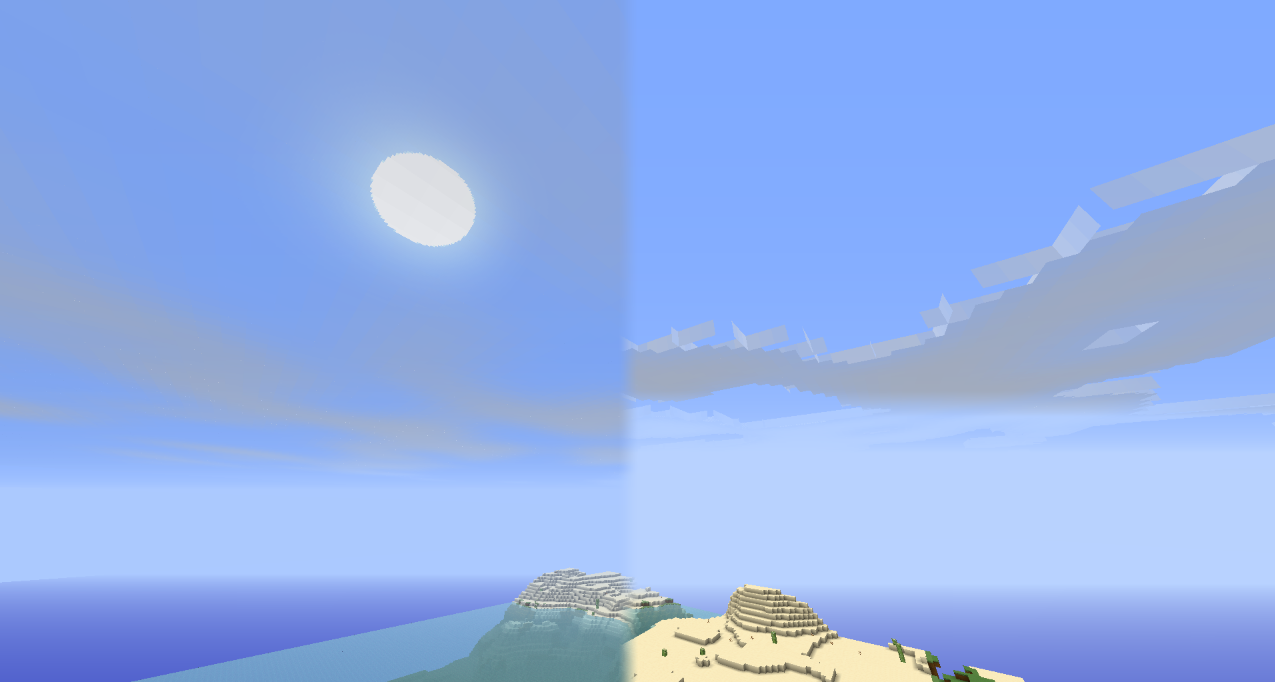
The font within the enchantment table extends beyond the enchantment table interface; It no longer wraps around to the next line as it used to.
This issue is not present in any version prior to this one.
NB: This is not a duplicate of this issue as I am experiencing a significant performance drop with all HD packs, 32x and up.
—I am the author of Defscape, a 16x, 32x and 64x texture pack.
Having used 1.5 for quite some time while texturing, I've noticed that native HD texture performance is very poor.
Changing settings doesn't seem to affect my fps, although V-sync on tends to lower my frames.
The following results use the settings:
Distance: Normal
Graphics: Fancy
Smooth lighting: On/Maximum1.5:
Default: 25-40fps (120 looking at the sky)
16x: 20-35fps (70 looking at the sky)
32x: 15-30fps (50 looking at the sky)
64x: 10-20fps (20 looking at the sky)Note: All frames are generally stuttery and unsmooth, no matter the figure in f3.
1.4.7:
Default: 35-60fps (200 looking at the sky)
16x: 35-60fps (200 looking at the sky)
32x: 35-60fps (180 looking at the sky)
64x: 35-60fps (180 looking at the sky)Note: All frames are smooth.
1.5 & Optifine:
Default: 60-100fps (240 looking at the sky - 120 looking at the ground)
16x: 60-100fps (220 looking at the sky - 120 looking at the ground)
32x: 60-100fps (210 looking at the sky - 115 looking at the ground)
64x: 60-100fps (210 looking at the sky - 115 looking at the ground)At the moment, the only way 1.5 is playable for me is by using Optifine which seems to fix all the lag-enducing code that has been introduced between 1.4.7 and 1.5.
If you wish to test this yourself, here are the different Defscape resolutions:
Mediafire:
NB: This is not a duplicate of this issue as I am experiencing a significant performance drop with all HD packs, 32x and up.
—I am the author of Defscape, a 16x, 32x and 64x texture pack.
Having used 1.5 for quite some time while texturing, I've noticed that native HD texture performance is very poor.
Changing settings doesn't seem to affect my fps, although V-sync on tends to lower my frames.
The following results use the settings:
Distance: Normal
Graphics: Fancy
Smooth lighting: On/Maximum1.5:
Default: 25-40fps (120 looking at the sky)
16x: 20-35fps (70 looking at the sky)
32x: 15-30fps (50 looking at the sky)
64x: 10-20fps (20 looking at the sky)Note: All frames are generally stuttery and unsmooth, no matter the figure in f3.
1.4.7:
Default: 35-60fps (200 looking at the sky)
16x: 35-60fps (200 looking at the sky)
32x: 35-60fps (180 looking at the sky)
64x: 35-60fps (180 looking at the sky)Note: All frames are smooth.
1.5 & Optifine:
Default: 60-100fps (240 looking at the sky - 120 looking at the ground)
16x: 60-100fps (220 looking at the sky - 120 looking at the ground)
32x: 60-100fps (210 looking at the sky - 115 looking at the ground)
64x: 60-100fps (210 looking at the sky - 115 looking at the ground)At the moment, the only way 1.5 is playable for me is by using Optifine which seems to fix all the lag-enducing code that has been introduced between 1.4.7 and 1.5.
If you wish to test this yourself, here are the different Defscape resolutions:
Mediafire:
NB: This is not a duplicate of this issue as I am experiencing a significant performance drop with all HD packs, 32x and up.
—I am the author of Defscape, a 16x, 32x and 64x texture pack.
Having used 1.5 for quite some time while texturing, I've noticed that native HD texture performance is very poor.
Changing settings doesn't seem to affect my fps, although V-sync on tends to lower my frames.
The following results use the settings:
Distance: Normal
Graphics: Fancy
Smooth lighting: On/Maximum (there is no difference in performance between minimum/maximum)1.5:
Default: 25-40fps (120 looking at the sky)
16x: 20-35fps (70 looking at the sky)
32x: 15-30fps (50 looking at the sky)
64x: 10-20fps (20 looking at the sky)Note: All frames are generally stuttery and unsmooth, no matter the figure in f3.
1.4.7:
Default: 35-60fps (200 looking at the sky)
16x: 35-60fps (200 looking at the sky)
32x: 35-60fps (180 looking at the sky)
64x: 35-60fps (180 looking at the sky)Note: All frames are smooth.
1.5 & Optifine:
Default: 60-100fps (240 looking at the sky - 120 looking at the ground)
16x: 60-100fps (220 looking at the sky - 120 looking at the ground)
32x: 60-100fps (210 looking at the sky - 115 looking at the ground)
64x: 60-100fps (210 looking at the sky - 115 looking at the ground)At the moment, the only way 1.5 is playable for me is by using Optifine which seems to fix all the lag-enducing code that has been introduced between 1.4.7 and 1.5.
If you wish to test this yourself, here are the different Defscape resolutions:
Mediafire:
NB: This is not a duplicate of this issue as I am experiencing a significant performance drop with all HD packs, 32x and up.
—I am the author of Defscape, a 16x, 32x and 64x texture pack.
Having used 1.5 for quite some time while texturing, I've noticed that native HD texture performance is very poor.
Changing settings doesn't seem to affect my fps, although V-sync on tends to lower my frames.
The following results use the settings:
Distance: Normal
Graphics: Fancy
Smooth lighting: On/Maximum (there is no difference in performance between minimum/maximum)1.5:
Default: 25-40fps (120 looking at the sky)
16x: 20-35fps (70 looking at the sky)
32x: 15-30fps (50 looking at the sky)
64x: 10-20fps (20 looking at the sky)Note: All frames are generally stuttery and unsmooth, no matter the figure in f3.
1.4.7:
Default: 35-60fps (200 looking at the sky)
16x: 35-60fps (200 looking at the sky)
32x: 35-60fps (180 looking at the sky)
64x: 35-60fps (180 looking at the sky)Note: All frames are smooth.
1.5 & Optifine:
Default: 60-100fps (240 looking at the sky - 120 looking at the ground)
16x: 60-100fps (220 looking at the sky - 120 looking at the ground)
32x: 60-100fps (210 looking at the sky - 115 looking at the ground)
64x: 60-100fps (210 looking at the sky - 115 looking at the ground)At the moment, the only way 1.5 is playable for me is by using Optifine which seems to fix all the lag-enducing code that has been introduced between 1.4.7 and 1.5.
If you wish to test this yourself, here are the different Defscape resolutions:
Mediafire:
NB: This is not a duplicate of this issue as I am experiencing a significant performance drop with all HD packs, 32x and up.
—I am the author of Defscape, a 16x, 32x and 64x texture pack.
Having used 1.5 for quite some time while texturing, I've noticed that native HD texture performance is very poor.
Changing settings doesn't seem to affect my fps, although V-sync on tends to lower my frames.
The following results use the settings:
Distance: Normal
Graphics: Fancy
Smooth lighting: On/Maximum (there is no difference in performance between minimum/maximum)1.5:
Default: 25-40fps (120 looking at the sky)
16x: 20-35fps (70 looking at the sky)
32x: 15-30fps (50 looking at the sky)
64x: 10-20fps (20 looking at the sky)Note: All frames are generally stuttery and unsmooth, no matter the figure in f3.
1.4.7:
Default: 35-60fps (200 looking at the sky)
16x: 35-60fps (200 looking at the sky)
32x: 35-60fps (180 looking at the sky)
64x: 35-60fps (180 looking at the sky)Note: All frames are smooth.
1.5 & Optifine:
Default: 60-100fps (240 looking at the sky - 120 looking at the ground)
16x: 60-100fps (220 looking at the sky - 120 looking at the ground)
32x: 60-100fps (210 looking at the sky - 115 looking at the ground)
64x: 60-100fps (210 looking at the sky - 115 looking at the ground)At the moment, the only way 1.5 is playable for me is by using Optifine which seems to fix all the lag-enducing code that has been introduced between 1.4.7 and 1.5.
If you wish to test this yourself, here are the different Defscape resolutions:
Mediafire:
NB: This is not a duplicate of this issue as I am experiencing a significant performance drop with all HD packs, 32x and up.
—I am the author of Defscape, a 16x, 32x and 64x texture pack.
Having used 1.5 for quite some time while texturing, I've noticed that native HD texture performance is very poor.
Changing settings doesn't seem to affect my
fps, although V-sync on tends to lower my frames.The following results use the settings:
Distance: Normal
Graphics: Fancy
Smooth lighting: On/Maximum (there is no difference in performance between minimum/maximum)1.5:
Default: 25-40
fps(120 looking at the sky)
16x: 20-35fps (70looking at the sky)
32x: 15-30fps (50looking at the sky)
64x: 10-20fps (20looking at the sky)Note: All frames are generally stuttery and unsmooth, no matter the figure in f3.
1.4.7:
Default: 35-60
fps(200 looking at the sky)
16x: 35-60fps(200 looking at the sky)
32x: 35-60fps(180 looking at the sky)
64x: 35-60fps(180 looking at the sky)Note: All frames are smooth.
1.5 & Optifine:
Default: 60-100
fps(240 looking at the sky - 120 looking at the ground)
16x: 60-100fps(220 looking at the sky - 120 looking at the ground)
32x: 60-100fps(210 looking at the sky - 115 looking at the ground)
64x: 60-100fps(210 looking at the sky - 115 looking at the ground)At the moment, the only way 1.5 is playable for me is by using Optifine which seems to fix all the lag-enducing code that has been introduced between 1.4.7 and 1.5.
If you wish to test this yourself, here are the different Defscape resolutions:Mediafire:
NB: This is not a duplicate of this issue as I am experiencing a significant performance drop with all HD packs, 32x and up.
—I am the author of Defscape, a 16x, 32x and 64x texture pack.
Having used 1.5 for quite some time while texturing, I've noticed that native HD texture performance is very poor.
Changing settings doesn't seem to affect my FPS, although V-sync on tends to lower my frames.
The following results use the settings:
Distance: Normal
Graphics: Fancy
Smooth lighting: On/Maximum (there is no difference in performance between minimum/maximum)1.5:
Default: 25-40 FPS (120 FPS looking at the sky)
16x: 20-35 FPS (70 FPS looking at the sky)
32x: 15-30 FPS (50 FPS looking at the sky)
64x: 10-20 FPS (20 FPS looking at the sky)Note: All frames are generally stuttery and unsmooth, no matter the figure in f3.
1.4.7:
Default: 35-60 FPS (200 FPS looking at the sky)
16x: 35-60 FPS (200 FPS looking at the sky)
32x: 35-60 FPS (180 FPS looking at the sky)
64x: 35-60 FPS (180 FPS looking at the sky)Note: All frames are smooth.
1.5 & Optifine:
Default: 60-100 FPS (240 FPS looking at the sky - 120 FPS looking at the ground)
16x: 60-100 FPS (220 FPS looking at the sky - 120 FPS looking at the ground)
32x: 60-100 FPS (210 FPS looking at the sky - 115 FPS looking at the ground)
64x: 60-100 FPS (210 FPS looking at the sky - 115 FPS looking at the ground)At the moment, the only way 1.5 is playable for me is by using Optifine which seems to fix all the lag-enducing code that has been introduced between 1.4.7 and 1.5.
That said, having to use a third party modification obviously isn't ideal and shouldn't be a prerequisite for smooth choppy-less gameplay with HD texture packs.
If you wish to test this yourself, here are the different Defscape resolutions:
Mediafire:
Defscape 16x 1.5
Defscape 32x 1.5
Defscape 64x 1.5Thanks.
NB: This is not a duplicate of this issue as I am experiencing a significant performance drop with all HD packs, 32x and up.
—I am the author of Defscape, a 16x, 32x and 64x texture pack.
Having used 1.5 for quite some time while texturing, I've noticed that native HD texture performance is very poor.
Changing settings doesn't seem to affect my FPS, although V-sync on tends to lower my frames.
The following results use the settings:
Distance: Normal
Graphics: Fancy
Smooth lighting: On/Maximum (there is no difference in performance between minimum/maximum)13w12~
Default: 40-50 FPS (70 FPS looking at the sky - 75 FPS looking at the ground)
16x: 35-50 FPS (60 FPS looking at the sky - 65 FPS looking at the ground)
32x: 25-45 FPS (45 FPS looking at the sky - 50 FPS looking at the ground)
64x: 10-20 FPS (20 FPS looking at the sky - 30 FPS looking at the ground)Note: Although slightly smoother, frames are generally stuttery and unsmooth, no matter the figure in f3.
1.5:
Default: 25-40 FPS (120 FPS looking at the sky)
16x: 20-35 FPS (70 FPS looking at the sky)
32x: 15-30 FPS (50 FPS looking at the sky)
64x: 10-20 FPS (20 FPS looking at the sky)Note: All frames are generally stuttery and unsmooth, no matter the figure in f3.
1.4.7:
Default: 35-60 FPS (200 FPS looking at the sky)
16x: 35-60 FPS (200 FPS looking at the sky)
32x: 35-60 FPS (180 FPS looking at the sky)
64x: 35-60 FPS (180 FPS looking at the sky)Note: All frames are smooth.
1.5 & Optifine:
Default: 60-100 FPS (240 FPS looking at the sky - 120 FPS looking at the ground)
16x: 60-100 FPS (220 FPS looking at the sky - 120 FPS looking at the ground)
32x: 60-100 FPS (210 FPS looking at the sky - 115 FPS looking at the ground)
64x: 60-100 FPS (210 FPS looking at the sky - 115 FPS looking at the ground)At the moment, the only way 1.5 is playable for me is by using Optifine which seems to fix all the lag-enducing code that has been introduced between 1.4.7 and 1.5.
That said, having to use a third party modification obviously isn't ideal and shouldn't be a prerequisite for smooth choppy-less gameplay with HD texture packs.
If you wish to test this yourself, here are the different Defscape resolutions:
Mediafire:
Defscape 16x 1.5
Defscape 32x 1.5
Defscape 64x 1.5Thanks.
NB: This is not a duplicate of this issue as I am experiencing a significant performance drop with all HD packs, 32x and up.
—I am the author of Defscape, a 16x, 32x and 64x texture pack.
Having used 1.5 for quite some time while texturing, I've noticed that native HD texture performance is very poor.
Changing settings doesn't seem to affect my FPS, although V-sync on tends to lower my frames.
The following results use the settings:
Distance: Normal
Graphics: Fancy
Smooth lighting: On/Maximum (there is no difference in performance between minimum/maximum)13w12~
Default: 40-50 FPS (70 FPS looking at the sky - 75 FPS looking at the ground)
16x: 35-50 FPS (60 FPS looking at the sky - 65 FPS looking at the ground)
32x: 25-45 FPS (45 FPS looking at the sky - 50 FPS looking at the ground)
64x: 10-20 FPS (20 FPS looking at the sky - 30 FPS looking at the ground)Note: Although slightly smoother, frames are generally stuttery and unsmooth, no matter the figure in f3.
1.5:
Default: 25-40 FPS (120 FPS looking at the sky)
16x: 20-35 FPS (70 FPS looking at the sky)
32x: 15-30 FPS (50 FPS looking at the sky)
64x: 10-20 FPS (20 FPS looking at the sky)Note: All frames are generally stuttery and unsmooth, no matter the figure in f3.
1.4.7:
Default: 35-60 FPS (200 FPS looking at the sky)
16x: 35-60 FPS (200 FPS looking at the sky)
32x: 35-60 FPS (180 FPS looking at the sky)
64x: 35-60 FPS (180 FPS looking at the sky)Note: All frames are smooth.
1.5 & Optifine:
Default: 60-100 FPS (240 FPS looking at the sky - 120 FPS looking at the ground)
16x: 60-100 FPS (220 FPS looking at the sky - 120 FPS looking at the ground)
32x: 60-100 FPS (210 FPS looking at the sky - 115 FPS looking at the ground)
64x: 60-100 FPS (210 FPS looking at the sky - 115 FPS looking at the ground)At the moment, the only way 1.5 is playable for me is by using Optifine which seems to fix all the lag-enducing
codethat hasbeen introduced between 1.4.7 and 1.5.That said, having to use a third party modification obviously isn't ideal and shouldn't be a prerequisite for smooth choppy-less gameplay with HD texture packs.
If you wish to test this yourself, here are the different Defscape resolutions:
Mediafire:
Defscape 16x 1.5
Defscape 32x 1.5
Defscape 64x 1.5Thanks.
NB: This is not a duplicate of this issue as I am experiencing a significant performance drop with all HD packs, 32x and up.
—I am the author of Defscape, a 16x, 32x and 64x texture pack.
Having used 1.5 for quite some time while texturing, I've noticed that native HD texture performance is very poor.
Changing settings doesn't seem to affect my FPS, although V-sync on tends to lower my frames.
The following results use the settings:
Distance: Normal
Graphics: Fancy
Smooth lighting: On/Maximum (there is no difference in performance between minimum/maximum)13w12~
Default: 40-50 FPS (70 FPS looking at the sky - 75 FPS looking at the ground)
16x: 35-50 FPS (60 FPS looking at the sky - 65 FPS looking at the ground)
32x: 25-45 FPS (45 FPS looking at the sky - 50 FPS looking at the ground)
64x: 10-20 FPS (20 FPS looking at the sky - 30 FPS looking at the ground)Note: Although slightly smoother, frames are generally stuttery and unsmooth, no matter the figure in f3.
1.5:
Default: 25-40 FPS (120 FPS looking at the sky)
16x: 20-35 FPS (70 FPS looking at the sky)
32x: 15-30 FPS (50 FPS looking at the sky)
64x: 10-20 FPS (20 FPS looking at the sky)Note: All frames are generally stuttery and unsmooth, no matter the figure in f3.
1.4.7:
Default: 35-60 FPS (200 FPS looking at the sky)
16x: 35-60 FPS (200 FPS looking at the sky)
32x: 35-60 FPS (180 FPS looking at the sky)
64x: 35-60 FPS (180 FPS looking at the sky)Note: All frames are smooth.
1.5 & Optifine:
Default: 60-100 FPS (240 FPS looking at the sky - 120 FPS looking at the ground)
16x: 60-100 FPS (220 FPS looking at the sky - 120 FPS looking at the ground)
32x: 60-100 FPS (210 FPS looking at the sky - 115 FPS looking at the ground)
64x: 60-100 FPS (210 FPS looking at the sky - 115 FPS looking at the ground)At the moment, the only way 1.5 is playable for me is by using Optifine which seems to fix all the lag-enducing issues that have been introduced between 1.4.7 and 1.5.
That said, having to use a third party modification obviously isn't ideal and shouldn't be a prerequisite for smooth choppy-less gameplay with HD texture packs.
If you wish to test this yourself, here are the different Defscape resolutions:
Mediafire:
Defscape 16x 1.5
Defscape 32x 1.5
Defscape 64x 1.5Thanks.
I'm working on updating my resource pack, Defscape, to 1.7.2 however I've run into a problem with my cloud texture.
It appears as though Minecraft has changed the way it renders various levels of transparency in the clouds.png texture file.
In 1.6.4, Minecraft was able to correctly read various levels of transparency, however in 1.7.2 transparency rendering seems to be pretty much completely removed, resulting in sharp, buggy cloud edges.
I'm not sure if this is a bug or intended, but it has hampered my ability to create various transparency levels in the custom clouds.png texture.
To illustrate this, see the attached image.
Left = 1.6.4 and right = 1.7.2.If anyone knows a work-around to fix this, that would be great.
I'm working on updating my resource pack, Defscape, to 1.7.2 however I've run into a problem with my cloud texture.
It appears as though Minecraft has changed the way it renders various levels of transparency in the clouds.png texture file.
In 1.6.4, Minecraft was able to correctly read various levels of transparency, however in 1.7.2 transparency rendering seems to be pretty much completely removed, resulting in sharp, buggy cloud edges.
I'm not sure if this is a bug or intended, but it has hampered my ability to create various transparency levels in the custom clouds.png texture.
To illustrate this, see the attached image.
Left = 1.6.4 and right = 1.7.2.
If anyone knows a work-around to fix this, that would be great.
I'm working on updating my resource pack, Defscape, to 1.7.2 however I've run into a problem with my cloud texture.
It appears as though Minecraft has changed the way it renders various levels of transparency in the clouds.png texture file.
In 1.6.4, Minecraft was able to correctly read
various levels of transparency, however in 1.7.2 transparency rendering seems to be pretty much completely removed, resulting in sharp, buggy cloud edges.I'm not sure if this is a bug or intended, but it has hampered my ability to create various transparency levels in the custom clouds.png texture.
To illustrate this, see the attached image.
Left = 1.6.4 and right = 1.7.2.
If anyone knows a work-around to fix this, that would be great.
I'm working on updating my resource pack, Defscape, to 1.7.2 however I've run into a problem with my cloud texture.
It appears as though Minecraft has changed the way it renders various levels of transparency in the clouds.png texture file.
In 1.6.4, Minecraft was able to correctly read different degrees of opacity, however in 1.7.2 transparency rendering seems to be pretty much completely removed, resulting in sharp, buggy cloud edges.
I'm not sure if this is a bug or intended, but it has hampered my ability to create various transparency levels in the custom clouds.png texture.
To illustrate this, see the attached image.
Left = 1.6.4 and right = 1.7.2.
If anyone knows a work-around to fix this, that would be great.
I'm working on updating my resource pack, Defscape, to 1.7.2 however I've run into a problem with my cloud texture.
It appears as though Minecraft has changed the way it renders various levels of transparency in the clouds.png texture file.
In 1.6.4, Minecraft was able to correctly read different degrees of opacity, however in 1.7.2 transparency rendering seems to be pretty much completely removed, resulting in sharp, buggy cloud edges.
I'm not sure if this is a bug or intended, but it has hampered my ability to create various transparency levels in the custom clouds.png texture.
To illustrate this, see the attached image.
Left = 1.6.4 and right = 1.7.2+.
If anyone knows a work-around to fix this, that would be great.
To confirm, this issue exists on the PC version too. I've had to manually enter the hosts network IP and randomly generated port to continue to play via LAN.
I'm also experiencing this. It looks as though experience orbs are also bug-flickering.
I can confirm that with the default textures:
Render distance: Normal
Fancy graphics.
Smooth lighting off: Stable 60-70 FPS.
Smooth lighting set to either minimum or maximum: Very stuttery 20-30 FPS.
With smooth lighting on, if I leave my player idle for a few minutes, then look around horizontally from a stationary position, frames are smooth at 60-90 FPS (170 looking up, 110 looking down). The second I move my player, the stutturing returns for several minutes.
I'm also experiencing some very extreme stuttering with my newly converted 64x texture pack, "Defscape". The pack completely overhauls pretty much every Minecraft texture and has some custom animations (water, lava, compass) which may contribute to the screen lag.
With a 64x texture pack:
Render distance: Normal
Fancy graphics.
Smooth lighting off: Very stuttery 15-20 FPS. (The framerate here tends to display inaccurately, with occasions where it jumps to 60+ but the screen is still very clearly jerky)
Smooth lighting set to either minimum or maximum: Extremely stuttery 10-15 FPS. (Again, inaccurately displayed FPS jumps)
No amount of standing still and idling fixes the jerkyness with a 64x texture pack running.
I believe the texture pack lag is also due to both the lighting updates and the new tp format.
Ezekiel (or anyone else) If you'd like to test the severity of the 64x or 32x lag and the difference between 1.5 and 1.4.x, here are the different packs:
Defscape 64x 1.5
Defscape 32x 1.5
Defscape 64x 1.4.7
Defscape 32x 1.4.7
AMD Phenom X4 64, 4GB Ram, Windows 7 64, ATI Radeon HD 7770, latest java.
Although the FPS and smoothness of default has improved slightly with 13w12~, the core issue remains. I believe, as Jeb has mentioned, this ultimately is due to the new texture pack format:
The following results use the settings:
Distance: Normal
Graphics: Fancy
Smooth lighting: On/Maximum (there is no difference in performance between minimum/maximum)
13w12~
Default: 40-50 FPS (70 FPS looking at the sky - 75 FPS looking at the ground)
16x: 35-50 FPS (60 FPS looking at the sky - 65 FPS looking at the ground)
32x: 25-45 FPS (45 FPS looking at the sky - 50 FPS looking at the ground)
64x: 10-20 FPS (20 FPS looking at the sky - 30 FPS looking at the ground)
Note: Although slightly smoother, frames are generally stuttery and unsmooth, no matter the figure in f3.
1.5:
Default: 25-40 FPS (120 FPS looking at the sky)
16x: 20-35 FPS (70 FPS looking at the sky)
32x: 15-30 FPS (50 FPS looking at the sky)
64x: 10-20 FPS (20 FPS looking at the sky)
Note: All frames are generally stuttery and unsmooth, no matter the figure in f3.
1.4.7:
Default: 35-60 FPS (200 FPS looking at the sky)
16x: 35-60 FPS (200 FPS looking at the sky)
32x: 35-60 FPS (180 FPS looking at the sky)
64x: 35-60 FPS (180 FPS looking at the sky)
Note: All frames are smooth.
As this issue is related but not specifically focussed on here, I have raised a separate ticket dealing with FPS with both default and various HD texture pack resolutions.
FPS seems a lot smoother and faster in the latest snapshot.
Yes, this problem persists in 14w02c