 David
David
- davidjpfeiffer
- JIRAUSER701173
- Europe/Stockholm
- Yes
- No
 MC-240235
 MCL-20365



Steps to reproduce:
- Launch Minecraft: Java Edition using the latest launcher
- Close Minecraft after playing for a while
- Attempt to re-open the Minecraft launcher again
- Nothing happens
I am forced to restart my computer every time. No matter how many times I attempt to re-open the launcher nothing happens. This happens for me almost every time. The only way to fix this is my completely restarting my computer. This makes it really hard to switch between different Minecraft accounts.
Okay I downloaded the world and loaded it into singleplayer but I am not able to reproduce. At least I know it's not a bug in the Minecraft client. Thanks for the help.
I pre-generated (aka loaded) all chunks on my 1.18 server to improve performance. I then upgraded the server to 1.19 and am now unable to locate any strongholds. This is because all the strongholds were loaded in 1.18. I am able to reproduce this in vanilla Minecraft.
Steps to reproduce:
- Create a new Overworld world in Minecraft 1.18.1
- Use the locate command to locate and teleport to a stronghold
- Note that using the /locate stronghold command while in the stronghold will locate the stronghold that you are in (which makes sense)
- Upgrade the world to 1.19.3
- The /locate structure stronghold command no longer locates the stronghold that you are in, but is able to locate strongholds in chunks that have never been loaded in 1.18 (if any)
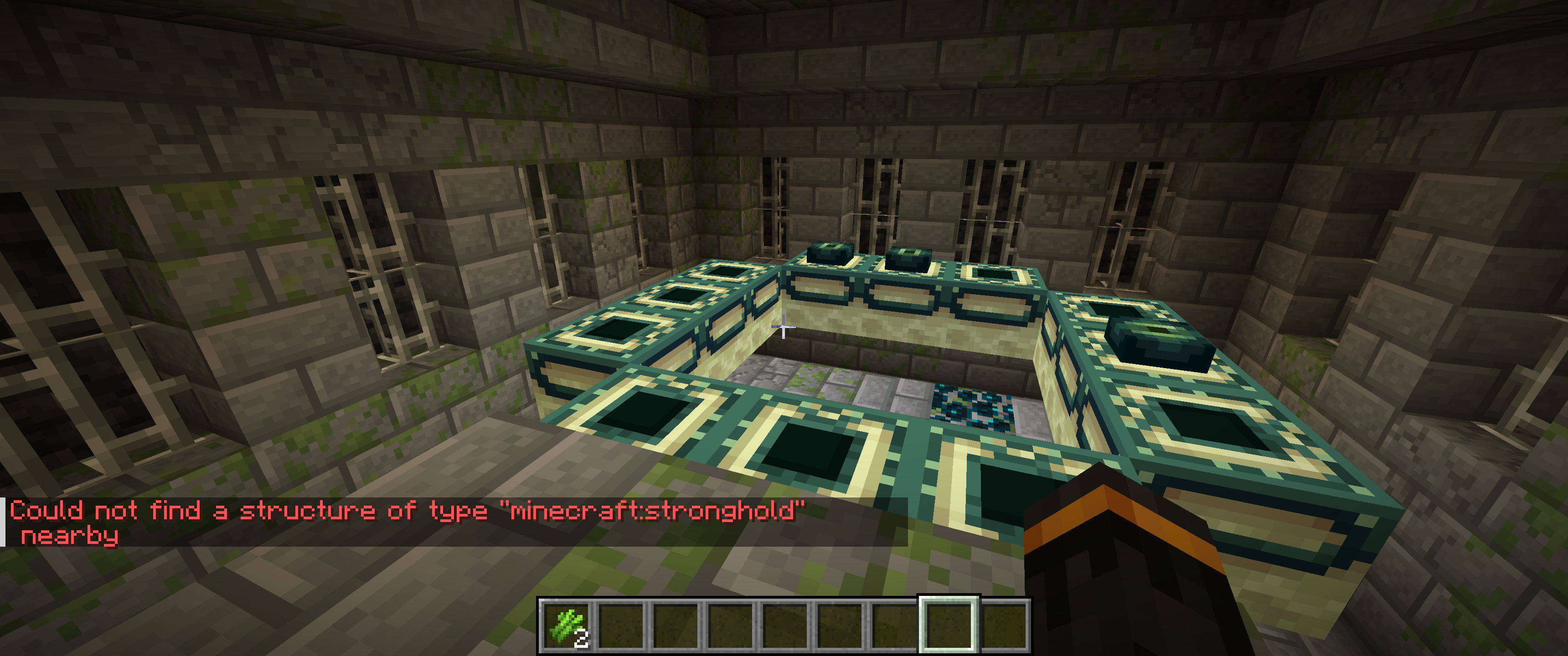
I pre-generated all chunks in 1.18 so I am not able to locate any strongholds on my 1.19.3 server. The locate command does not work for certain structures, such as villages and strongholds (screenshot attached below) and also eyes of ender are completely broken.
This bug was first reported here
MC-159346
Chat validation error kicksallonline players
After enabling chat message signing my server has started to randomly get "Chat validation error"s which happened for no apparent reason. All of the sudden everyone on the server will be unable to chat, when players try to chat it says "Chat validation error" in red and then a few seconds later
almost everyonegetskicked from the server. The message shown to players when they get kicked is "Received chat packets with missing or invalid signature."There is no info in the logs about these chat validation errors whatsoever. There are no errors in the logs when this is happening.
The server will go hours without this happening, then all at once it will happen up to 3 times in a row in just a few minutes.
Lots of others have created tickets about this, but those tickets were closed because "the server is modded" but this appears to be a Minecraft bug with chat signing. If you don't fix it then servers are just going to keep chat signing disabled. If you want servers to enable chat signing then you should fix this bug. It's happens for no apparent reason so you should stop telling server owners to try and reproduce it with vanilla.
After enabling chat message signing my server has started to randomly get "Chat validation error"s which happened for no apparent reason. All of the sudden everyone on the server will be unable to chat, when players try to chat it says "Chat validation error" in red and then a few seconds later lots of players get kicked from the server. The message shown to players when they get kicked is "Received chat packets with missing or invalid signature."
There is no info in the logs about these chat validation errors whatsoever. There are no errors in the logs when this is happening.
The server will go hours without this happening, then all at once it will happen up to 3 times in a row in just a few minutes.
Lots of others have created tickets about this, but those tickets were closed because "the server is modded" but this appears to be a Minecraft bug with chat signing. If you don't fix it then servers are just going to keep chat signing disabled. If you want servers to enable chat signing then you should fix this bug. It's happens for no apparent reason so you should stop telling server owners to try and reproduce it with vanilla.
I was unaware of the quit shortcut, but I do use the cmd key for sprinting. I think that is probably what is happening. Thank you for the info @tryashtar! You can consider this issue resolved.
No, I am not using Optifine or any other client mods. I was playing on a Paper server when I first noticed this, but I did some testing for you this morning to confirm that this has nothing to do with Bukkit / Spigot / Paper or any server plugins.
I started up a singleplayer world in vanilla Minecraft this morning and opened the world up to LAN so that I could test with two players. I then shot one of the players using a standard bow and arrow, without any enchantments, until the player died. Shortly after respawn the player did not have any arrows on them in game, but once again the arrows did show up in the rendering of the player in the player inventory.
Just to be clear, the player inventory view can be opened by opening the player's inventory, and while open, this view includes a rendering of the player. It is this rendering that incorrectly shows the arrows still on the player.
This is definitely a bug in Minecraft, and I am able to consistently reproduce it on version 1.18.1 in both singleplayer and multiplayer.
Please let me know if I can provide any additional information.
What OS are you using?
Are you able to provide a seed for which this happens?
When I went to record this morning the bug was not happening in either singleplayer or multiplayer. I was able to reproduce it when I created this ticket, and when I posted the first comment on this ticket, but as of today it looks like this issue is no longer happening. I'm assuming this was fixed elsewhere, either intentionally or unintentionally.
In any case this ticket can be closed. Thank you to everyone who spent time on this. The whole community is very appreciative of all the bug fixes! Keep up the great work
I created a Jira issue earlier today with a similar description, but please notice that the issue described here is clearly an issue with the Minecraft client and not related to any server software I am using. Thank you so much for your help resolving this very important issue.
Thank you for the response. I was able to properly test this on vanilla Minecraft, Spigot, and Paper. Both vanilla Minecraft and Spigot have a similar issue with these same areas, but they are rendered much faster (usually taking less than one second). But for Paper it takes multiple seconds to render the same thing, so I think I've made some progress figuring this out. Sorry for creating another invalid ticket here. Thanks for the help.
Can confirm 1.19.3
Is there any chance this will be fixed? I understand the algorithms were changed but this is a big deal for servers. Old worlds are unable to use eyes of ender. Are we just supposed to reset the entire world every time there is a new Minecraft update?
Can confirm that this is still a bug in 1.19.3. Avoma is exactly right, this is inconsistent with other statistics such as smelting.
This is still a bug in the latest version and it has been a bug for a very long time. When the server thinks that a player is flying, the following is logged to the console:
[Disconnect] User PLAYER has disconnected, reason: Flying is not enabled on this server
[Server] INFO [Player] PLAYER left the game
[Server] WARN PLAYER was kicked for floating too long!
The bug is that the "was kicked for floating too long" message is logged hundreds of times all at once in response to a single kick event (it was logged 382 times in response to a single kick event on my server today), which floods the console with the same message over using up lots of disk space over time and is also very annoying. This may also cause a lag spike on the server, as others have reported.
Not everyone gets kicked when this happens, some do, but even if you don't get kicked your chat is still broken and the only way to fix it is by logging out and back in.