 dderby22
- dderby22
- JIRAUSER532582
- Europe/Stockholm
- Yes
- No
 MCPE-93840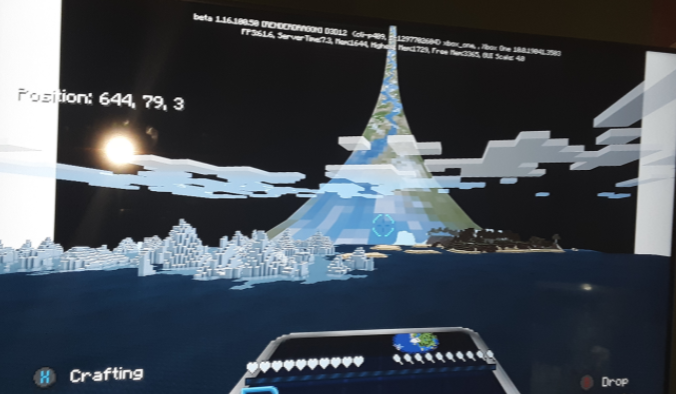
Multible bugs in the beta allong with a mashup packMultiple bugs in the beta allong with a mashup pack
-A bug that would accure where if you left the game you skin would be stuck as your custom persona skin. And would not let you change back into a classic skin. **++
-A bug where on a rare occurrence will put the player's cape on the front of the player.**++
-A bug that would accure where if you used 5 fireworks at once it would crash the game. **++
-A bug that would accure where if you used 5 fireworks at once it would crash the game.
-A bug where player's custom skins will get switched with another player's custom skin upon entering a world. **++
-A bug where player's custom skins will get switched with another player's custom skin upon entering a world.
-A bug where on rare occurance a Drowned mob will spawn with an Illager banner on its back. **++
-A bug when you enter a world the player's cape will disappear **++
-A bug when you enter a world the player's cape will disappear.
-A bug where mobs will spawn in light levels greater than 8. **++
-A bug where mobs will spawn in light levels greater than 8.
-A bug where mobs will overly abundently spawn.**++
-A bug where mobs will overly abundently spawn.
-A bug where mobs will overly abundently spawn. Basically more than one mob will spawn on one block at a time.Even on easy youll have five zombies or any other hostile mobe spawn on one block.
-A bug where mobs will overly abundently spawn. Basically more than one mob will spawn on one block at a time.Even on easy youll have five zombies or any other hostile mob
espawn on one block.
As you can see below the sky box follows the cursor around no matter where you look. I've re downloaded this pack 4 times and restarted the game twice as you can see in the photo this is confirmed in 1.16.100.50 Please fix this it's really annoying. Thank you.
Steps to Reproduce:
1. Fix the sky box so it fits the whole sky instead of a certain point of view of it.2. Go into Minecraft to see if the changes are applied.
3. I would recommend coping the sky box graphic from legacy and just port it in and see if that works.
4. Changes are applied and the pack is fixed thank you for your time.
Observed Results:
The sky box meant for the pack follows the players cursor and its really annoying. It will sometimes block the point of view.Expected Results:
The sky box is just as shown in the store pictures and is applied properly to this awesome pack.
@[Mod] OcelotOnesie this is an entirely different issue tho they sky box isnt just white and black the picture of the halo ring follows the players cursor that's why it annoying please tell me this will be fixed.
-A texture with the pig where all transparent parts are grey.
-A texture with the pig where all transparent parts are grey.
Steps to Reproduce:
1. Replace all the grey parts of the pigs texture layout with transparent textures.
2. Leave the white and pink textures there.
3. And your done just reapply to minecraft.Observed Results:
All the pigs textures were grey instead of transparent.Expected Results:
When fixed the pigs textures should be see though showing a skeleton and some skin giving it a spoooky appeal.
Sorry this is my first time doing this. But I hope it doesn't matter too much.
@Bart Simpson... I've tried to spread it out. Can I just make the halloween mash-up another ticket then delete it from here and leave the rest alone or do they all need there own ticket?
@Bart Simpson, Ok thank you. This is gonna take awhile lol
@[MCPE Mod] Celesian, Thank you and as i mentioned before I'm new to this. I've reuploaded eachbug but this time they have there own individual ticket.
@[MCPE Mod] Celesian, Thank you and sorry lol
@[Mod] OcelotOnesie basically it looks like if you downloaded a skin from the internet and you get that .png image or jpg image it looks like that but its in the game and walking around.
@[Helper] Jarl-Penguin, yes because my friends who aren't in the beta have experienced this and still are.
No this isn't the problem the problem is they both ended up with eachothers skin upon entering the world.
I'm sorry this again wasn't addressed to you the ones who read this know who they are. However you've helped me in the past and I really appreciate it. However no matter how much proof you have it instantly gets maked as incomplete and resolved. It just so annoying because you tell us to report these things and when we do it automatically gets marked with these things.
It's bc of the cape on the dragon skin ik bc this has been a problem since the beginning of bedrock cuz i had that skin back on the 360 and ported it over to bedrock but on the 360 it worked hope they can fix it.
Steps to Reproduce:
1. Puts on cape.
2. enters world.
3. Cape still is on the player,
Observed Results: When entering your own world or a friends world the cape on the player model will disappear.
Expected Results:
When entering a world you player model still has the cape on the player and it doesn't disappear.
[Minecraft]Mega_Spud (Jay Wells)
Steps to Reproduce:
1. Replace all the grey parts of the pigs texture layout with transparent textures.
2. Leave the white and pink textures there.
3. And your done just reapply to minecraft.
Observed Results:
All the pigs textures were grey instead of transparent.
Expected Results:
When fixed the pigs textures should be see though showing a skeleton and some skin giving it a spoooky appeal.
@AristoLynx Yea same thing with the halo mash-up.