 Jack Caldwell
- drbravo
- drbravo
- Europe/Stockholm
- Yes
- No
 MC-3303


Hello
I bought a laptop a few months back that is more than capable of running Minecraft in 64bit. I can supply more specs if required.
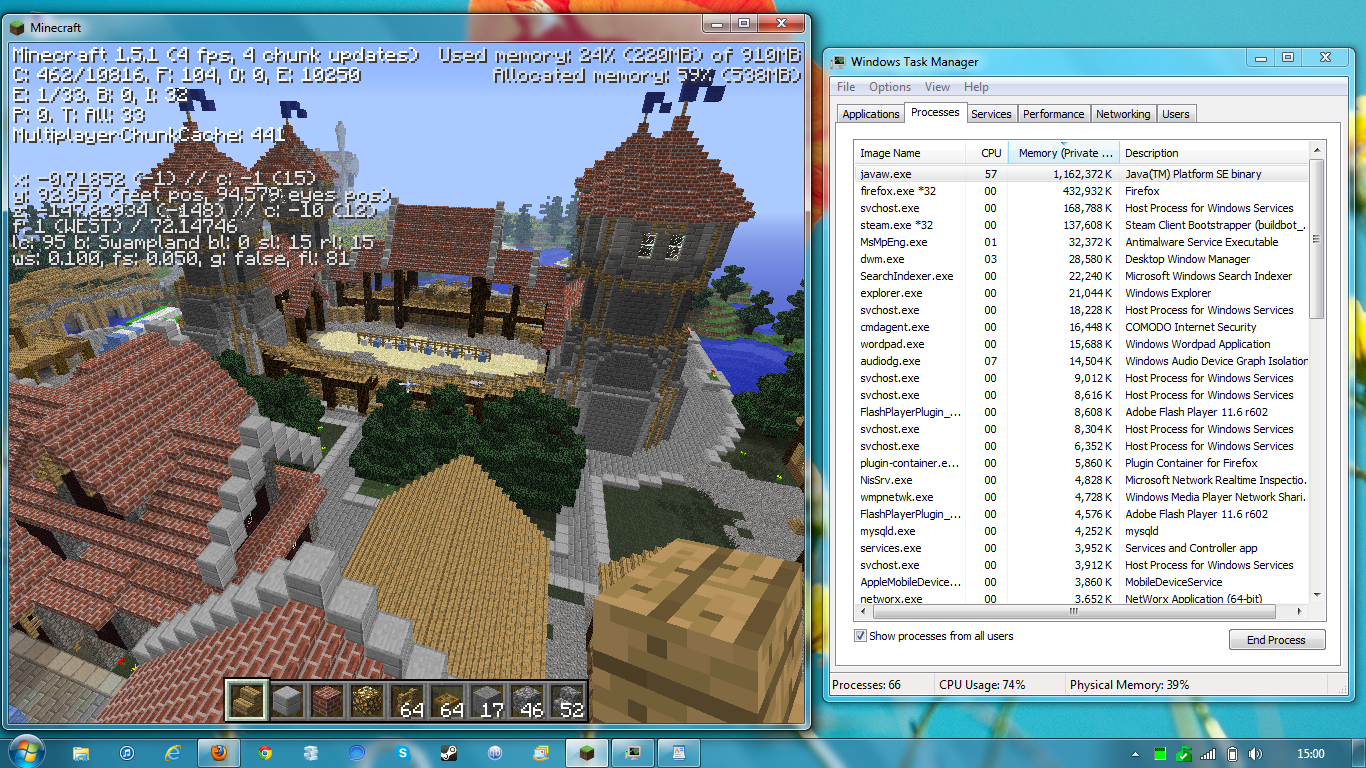
Whenever I boot Minecraft, javaw.exe takes up 400,000mb RAM (normal) and steadily climbs. In 15 minutes time, Java will have taken up all 8GB RAM, crashing my PC. Obviously this causes the frame rate to fluctuate. I have tried the following;
*Limiting the amount of RAM Java can take up upon execution of an application
*Installing 64 bit or 32 bit versions of Java on my 64bit machine
*Switching off and on features in the game
*Re installation of Java
*Uninstalling any conflicting apps (but nothing else uses Javaw.exe)
*Putting javaw.exe to high and realtime priority
*Changing the active cores from 2 to 1
*Using the web based applet in case the launcher was causing the problem
*Rolling back Java RE versions (tried current stable release and Java Runtime 5 stable)None of this worked on vanilla Minecraft. Please help. There are other noted cases noted here (http://www.minecraftforum.net/topic/1335721-minecraft-125-memory-leak/).
Once again, please help. You can probably guess how desperate I am to play Minecraft again after my last computer broke.
Thanks in advance
JackDetailed specs can be given upon request.
Specs are as follows:
Laptop name: ASUS K54C
Processor - Intel Pentium CPU B960 @ 2.20GHz
OS: Windows 7 Home Premium 64 Bit
RAM: 8GB (Total physical memory 7.91GB)
Availible Virtual Memory: 12.9GB
Graphics: Intel "HD" on-board GPU
As stated, Java tried has been Java 7 Update 9 (latest)and I also tried Java 5 (without updates) but got the same results.
For some reason, this bug is listed as minor. It is not for me as this has persisted since August 2012 when I got this laptop and there are many similar problems around the web saying that it breaks peoples games. There is a link in my first post.
Like I say, it doesn't matter how much it has allocated. Even if I do try starting it with a custom launcher that limits the RAM allocated to, say 800MB, Javaw.exe will still go right over this.
It's completely vanilla using the Minecraft launcher to start, but the web interface makes no difference. If you goto the link in my original post, some people are speculating it may be the garbage collector not functioning properly. If this is the case, it is out of the end users control.
Thanks for your replys, guys. I do appreciate this.
Jack.
Still a problem. Tried launching in launcher which gives option to limit memory - completely ignores it.
Been 7 months unable to play Minecraft now ;(
Attached screenshot is about 4 minutes after launch
For reference, laptop is part of the Asus x54c series. Specs in original post.
Tails - I have now attached the crash report. This report was generated just after MC booted up so will not show a huge amount of RAM eaten.
Markku - That's what I'm wondering. Does anyone have a different Java applet I could run so see if it's the same results (if so, obv wouldn't be a MC problem). I can't think of anything else that uses it right now.
CubeTheThird - I can't get it to go over 1.4gb any more (just fluctates above the mark pictured). Considering this picture shows "memory used" in the Minecraft window a completely separate number from the task manager, it's looking likely it's a Java issue and I may need to take it to Oracle.
Thanks for your guys continued support. Much appreciated.
My bad, Tails. Real Crash report is uploaded now.
Cube, how much memory would you recommend allocating? I've tried 300MB, 400MB and 800MB limits but will completely bypass this limit.
Thanks
Forced crash on Minecraft after 20 seconds or so gameplay.
Yeah, I'm sure it's a true leak as it doesn't stabilise. It does as I say stop now around 1.5GB - 2GB depending but the performance will be so poor it's unplayable as seen in the screenshots.
Okay, thanks for your help guys. I guess I'll try asking someone at a Java forum or StackExchange - will report back any findings here.
Would be interesting if any other X54c users experience the same problem (hopefully this will now appear high in search rankings) so we know if it's a a specific piece of hardware.
I could also pray Mojang release a C++ port :O
Cheers again