 Erlend Pilø
- Erlpil
- JIRAUSER636262
- Europe/Stockholm
- Yes
- No
 MCL-20948


If a Windows user with the Norwegian as system language buys Minecraft and download the launcher prompted on minecraft.net or via Microsoft Store, their launcher will not start. When clicking the icon for the new launcher on Windows does nothing. The courser has a quick spin, and nothing opens.
We have tried to run the program in several ways, via cmd, as admin etc.
The only current workaround is to change the Windows language from Norwegian Bokmål to English. When changing the system language you are able to open the launcher.
This makes us believe that the issue is related to the Norwegian language files in the launcher. This conclusion is supported by the fact that we are not able to find anyone else except Norwegians having this issue.The only way to play Minecraft in Norway is currently to use the old launcher (if you are lucky to have it installed) or use a third party launcher.
If a user buys Minecraft in Norway now, they will be unable to play Minecraft.
It has been like this since the release of the new launcher.
We are tracking the Norwegian Minecraft Java Edition player counts from Norwegian servers and we can see that they are on a steady downward trend since the release of the new launcher, because users are not able to figure out how to play Minecraft due to the broken launcher.Norwegian Minecraft support Facebook/Discord groups are flooded with "I can't open the launcher" related issues.
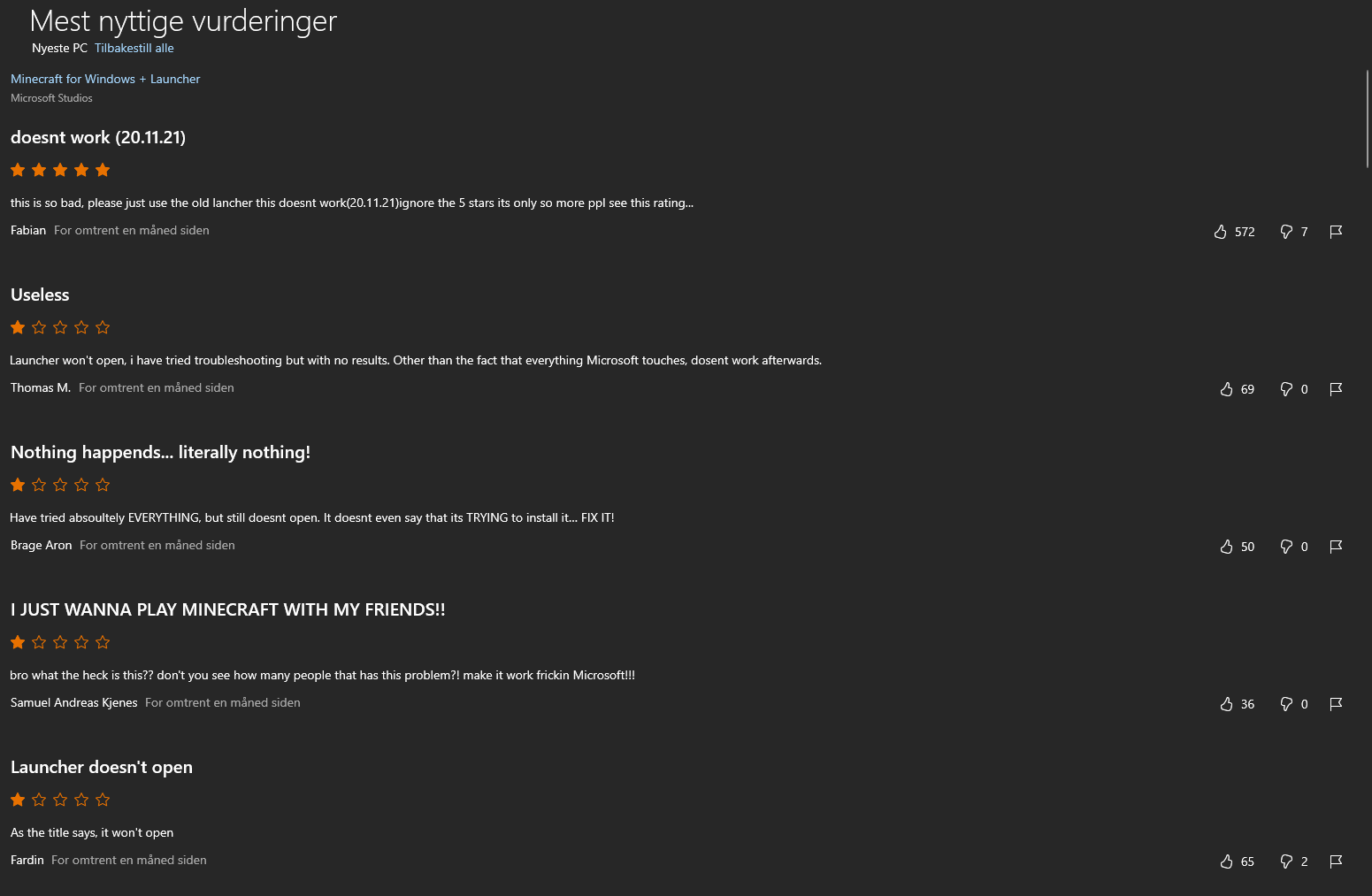
You can also see this on the ratings from the Microsoft store that is sorted to be ratings from Norwegian users. See attached screenshots. (They are written in English, but the submitter names are Norwegian.)We have had this issue before on the old launcher, but this was "resolved" and broken multiple times. I will link to the issue for the OLD launcher, but this seems like it is the same for the new launcher. The problem with the old launcher is tracked in this issue:
MCL-17664
Multiple people have replied and posted issues in the old bug report that is related to the new launcher.
If a Windows user with the Norwegian as system language buys Minecraft and download the launcher prompted on minecraft.net or via Microsoft Store, their launcher will not start. When clicking the icon for the new launcher on Windows does nothing. The courser has a quick spin, and nothing opens.
We have tried to run the program in several ways, via cmd, as admin etc.
The only current workaround is to change the Windows language from Norwegian Bokmål to English. When changing the system language you are able to open the launcher.
This makes us believe that the issue is related to the Norwegian language files in the launcher. This conclusion is supported by the fact that we are not able to find anyone else except Norwegians having this issue.The only way to play Minecraft in Norway is currently to use the old launcher (if you are lucky to have it installed) or use a third party launcher.
If a user buys Minecraft in Norway now, they will be unable to play Minecraft.
It has been like this since the release of the new launcher.
We are tracking the Norwegian Minecraft Java Edition player counts from Norwegian servers and we can see that they are on a steady downward trend since the release of the new launcher, because users are not able to figure out how to play Minecraft due to the broken launcher.Norwegian Minecraft support Facebook/Discord groups are flooded with "I can't open the launcher" related issues.
You can also see this on the ratings from the Microsoft store that is sorted to be ratings from Norwegian users. See attached screenshots. (They are written in English, but the submitter names are Norwegian.)We have had this issue before on the old launcher, but this was "resolved" and broken multiple times. I will link to the issue for the OLD launcher, but this seems like it is the same for the new launcher. The problem with the old launcher is tracked in this issue:
MCL-17664
Multiple people have replied and posted issues in the old bug report that is related to the new launcher.If a Windows user with the Norwegian as system language buys Minecraft and download the launcher prompted on minecraft.net or via Microsoft Store, their launcher will not start. When clicking the icon for the new launcher on Windows does nothing. The courser has a quick spin, and nothing opens. Please see this Youtube video that showcases the issue: https://youtu.be/ENbIheZwzew
We have tried to run the program in several ways, via cmd, as admin etc.
The only current workaround is to change the Windows language from Norwegian Bokmål to English. When changing the system language you are able to open the launcher.
This makes us believe that the issue is related to the Norwegian language files in the launcher. This conclusion is supported by the fact that we are not able to find anyone else except Norwegians having this issue.The only way to play Minecraft in Norway is currently to use the old launcher (if you are lucky to have it installed) or use a third party launcher.
If a user buys Minecraft in Norway now, they will be unable to play Minecraft.
It has been like this since the release of the new launcher.
We are tracking the Norwegian Minecraft Java Edition player counts from Norwegian servers and we can see that they are on a steady downward trend since the release of the new launcher, because users are not able to figure out how to play Minecraft due to the broken launcher.Norwegian Minecraft support Facebook/Discord groups are flooded with "I can't open the launcher" related issues.
You can also see this on the ratings from the Microsoft store that is sorted to be ratings from Norwegian users. See attached screenshots. (They are written in English, but the submitter names are Norwegian.)We have had this issue before on the old launcher, but this was "resolved" and broken multiple times. I will link to the issue for the OLD launcher, but this seems like it is the same for the new launcher. The problem with the old launcher is tracked in this issue:
MCL-17664
Multiple people have replied and posted issues in the old bug report that is related to the new launcher.
Can confirm issue. Multiple people including my self are unable to open the Java Edition launcher on Windows 10. Linux works fine.
Seems based on user reports to only happen for users i Norway.
I have not found any other user reporting this issue except norwegians.
https://twitter.com/pskeeee/status/1384444273274277890
https://twitter.com/CarlTakahashi01/status/1384422457440931840
https://twitter.com/GraceFireHeart/status/1384398285834752001
Can confirm issue. Seems to be the same issue as MCL-17657
Multiple people including my self are unable to open the Java Edition launcher on Windows 10. Linux works fine.
Seems based on user reports to only happen for users i Norway.
I have not found any other user reporting this issue except norwegians.
https://twitter.com/pskeeee/status/1384444273274277890
https://twitter.com/CarlTakahashi01/status/1384422457440931840
https://twitter.com/GraceFireHeart/status/1384398285834752001
Can confirm issue. Only found Norwegians so far having the issue.
The amount of support requests from this issue will explode very soon when everyone gets back from school/work.
There is hardly anyone online on only Norwegian Minecraft servers either, so this seems to affect everyone in Norway on Java Edition on Windows.
Added screenshot of player counts on only norwegian servers from yesterday and now in the same timeframe. Something is obviously very wrong. The only users online are those with Mac, Linux and third party launchers.
Can we get some sort of confirmation/acknowledgement that this issue is beeing worked on?
Several users reported that there was an update on the launcher last night. How ever I can not see any change in the version number on Linux and Mac. Was there a legitimate update that was pushed last night?
There are a lot of users impacted by this issue.
Main issue here:
MCL-17664You are not alone...
Here you go
Restartet computer and flushed dns. Still not working im afraid.
The launcher_log was not changed either (20. april 2021, 11:23:37)
EDIT:
C:\Program Files (x86)\Minecraft Launcher\game\.version
Says: 2.2.2311
Not sure if this is relevant.
Still not working for us who have not reinstalled the game.
Did a new restart and DNS flush. Still not able to launch. Same symptoms as before.
I have not reinstalled the game.
The issue is fixed for new users and users who did not open Minecraft yesterday.
It is not fixed for everyone who tried to open the launcher after the broken build was published before the revert.
I have created a guide in Norwegian on how to repair the Minecraft launcher here: https://skogliv.no/hvordan-reparere-minecraft-launcheren/
I hope this guide can help others who are still stuck with the broken launcher build.
Also broken for me. Second time in three weeks.
Dear launcher team,
On the 17th of may we are doing a massive Minecraft event during the celebration for Norway’s national day.
22 000 people have already marked their interest for the event. We expect the player counts to be in the tens of thousands during the day.
Please, do not deploy this update again in the timeframe around or during the 17th of may.
It will be a complete disaster for all the kids who are looking forward to this, and all the Norwegian municipalities who have gathered their residents to celebrate virtually.
Facebook event: https://www.facebook.com/events/158480012811085
Please. Do not redeploy this or another build that can cause similar issues around the 17th of may.
Thank you.
My old launcher works just fine, but the new one launched recently refuses to open. Same symptoms as when the old refused to start. Installed via Microsoft Store.
Using Norwegian as system language.
"try using lunar client?"
This does not resolve the core issue that the native launcher is not working.
This issue was finally resolved in the launcher from the Microsoft store version 1.0.113.0.
Who ever did this. On behalf of Norway: Thank you! You are a legend <3
This issue should be resolved. Ref: MCL-20948
Please try to update your launcher or reinstall it if it does not work.