 Ethan Plaza
- Ethan0815
- JIRAUSER528918
- Europe/Stockholm
- Yes
- No
 MCPE-92576




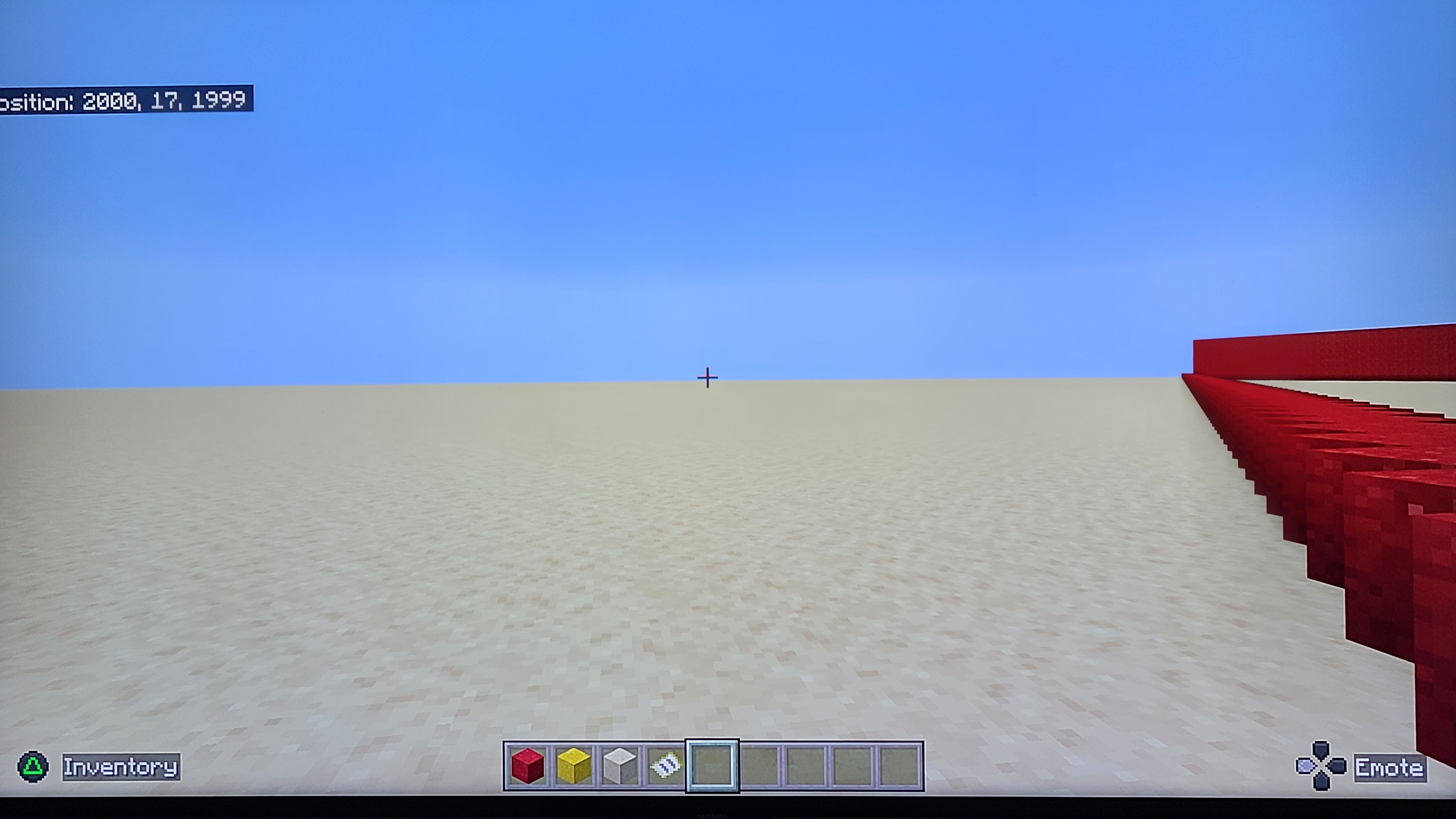


I found a bug since I first installed the nether update into minecraft bedrock edition ps4 version 2.07 and this bug is weird it doesn't break the game at least but it's annoying, I'mnowon version 2.10 and the recent hotfix didn't seem to fix it. there's red horizontal lines at the far end of the render distance. Please fix this. Thanks.here's a better Screenshot of the red lines at the end of the render distance if you zoom in you'll be able to notice it. I also tried making new different worlds no matter what biome I make or what block is in front of me this bug is still there. Please fix this I'm on version 1.16.1 even the new beta
here's a better Screenshot of the red lines at the end of the render distance if you zoom in you'll be able to notice it. I also tried making new different worlds no matter what biome I make or what block is in front of me this bug is still there. Please fix this I'm on version 1.16.1 even the new
betahere's a better Screenshot of the red lines at the end of the render distance if you zoom in you'll be able to notice it. I also tried making new different worlds no matter what biome I make or what block is in front of me this bug is still there. Please fix this I'm on version 1.16.1 even the new 1.16.2 beta doesn't seem to fix it for me.
Yikeswhen I use the fill command it doesn't always fill in completely and ended up with this and when Ipresssave and exit my ps4 complete crashes please fix this I've been having this issuesince the 1.16 nether update released last year.What's the point with autosave when it doesn't even work at all since bedrock edition released back in 2019 for ps4 and now when I use the fill command it doesn't always fill in completely and ended up with this and when I save and exit manually my ps4 completely crashes please fix this I've been having this issue for a long time.
Oh boy I hope this gets fixed soon I'm starting to have controller drift and my character camera look
sup at the sky and it's annoying. this only seems to happen with minecraft, all of my other ps4 games I don't have this issue at all, I've already tried using another ps4 controller brand new and it still does the same thing with minecraft. please fix this.How to reproduce:
With the ps4 controller in your hand very slightly move up the right analog stick and let go and the camera will look up at the sky.
Oh boy I hope this gets fixed soon I'm starting to have controller drift and my characters camera will look up at the sky and it's annoying. this only seems to happen with minecraft, all of my other ps4 games I don't have this issue at all, even legacy console edition no issues (old version of minecraft) I've already tried using another ps4 controller brand new and it still does the same thing with minecraft bedrock edition. please fix this.
How to reproduce:
With the ps4 controller in your hand very slightly move up the right analog stick and let go and the camera will look up at the sky.
Wow minecraft is unplayable with this new experimental frame rate option it's so choppy even when set to 60FPS. This experimental frame rate option is an official setting I don't have experimental features enabled in my world.
How to produce:
1) load up any world
2) pause and go to the video settings
3) go all the way down to where it says Max Framerate (Experimental) and set the frame rate from any number from 10 - unlimited.
(Example mine is set to 60FPS to match the refresh rate of my tv)
4) resume game and walk around, rotate camera around, place blocks, break blocks, attack mobs whatever and you'll see how much lag there is now than the previous update.
At least it doesn't crash the game. This bug makes it harder for me to see farther out in the distance. My render distance is set to 22 chunks max.
It's been fixed