 farpras
- farpras
- farpras
- Europe/Stockholm
- Yes
- No
1 issues
Key
Summary
Status
Reporter
Assignee
Created
 MCPE-35624


Added Attachments:
Added Attachments:
explorer_Hd6tlkOM9x.png
Removed Attachments:
Changed Description:
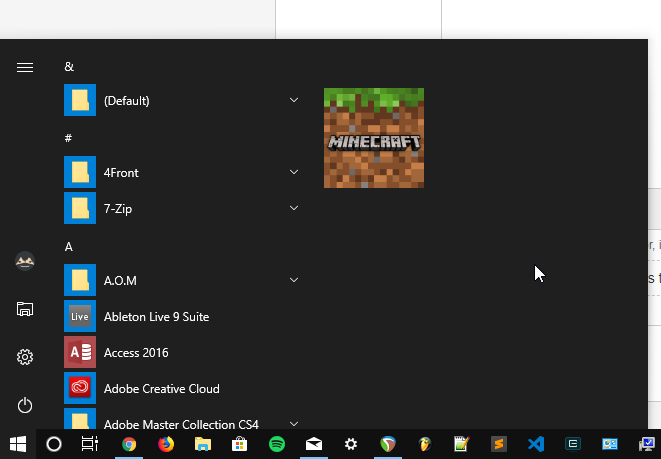
Other store apps have full icon without the black border. It might not a big issue, but it doesn't really looks right.
- startscreen.png - it has black border on the start screen app list (not in Windows 10 20H2).
- pinned-taskbar.png - it also has the black border when pinned on taskbar
- pinned-start.png - it looks fine when pinned on start screen
Changed Description:
Other store apps have full icon without the black border. It might not a big issue, but it doesn't really looks right.
- startscreen.png - it has black border on the start screen app list (not in Windows 10 20H2).
- pinned-taskbar.png - it also has the black border when pinned on taskbar
- pinned-start.png - it looks fine when pinned on start screen
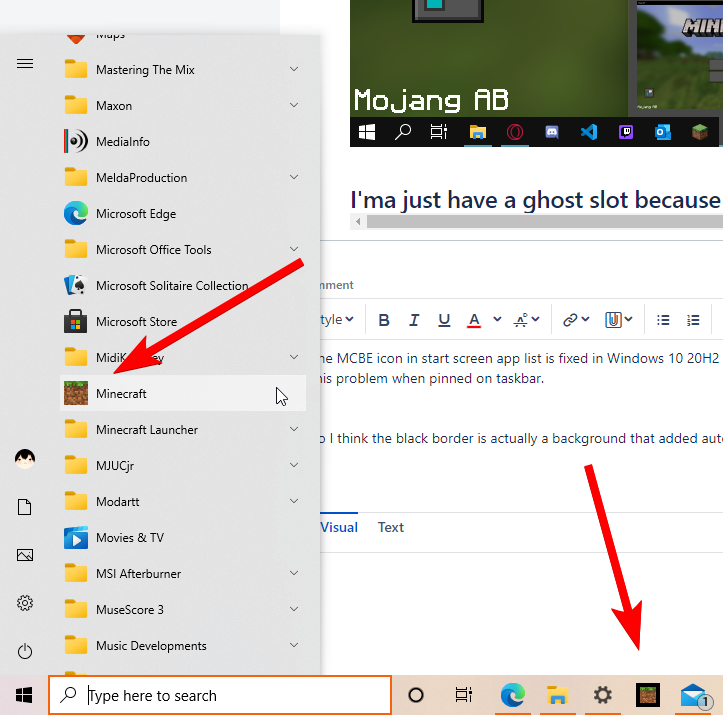
- 0yfRuh0TjI.png - startscreen app list icon is fixed on Windows 10 20H2. but not in the taskbar icon.
Changed Description:
Other store apps have full icon without the black border. It might not a big issue, but it doesn't really looks right.
- startscreen.png - it has black border on the start screen app list (not in Windows 10 20H2).
- pinned-taskbar.png - it also has the black border when pinned on taskbar
- pinned-start.png - it looks fine when pinned on start screen
- 0yfRuh0TjI.png - startscreen app list icon is fixed on Windows 10 20H2. but not in the taskbar icon.
Docs of app icons & logos for UWP app:
https://docs.microsoft.com/en-us/windows/uwp/design/style/app-icons-and-logos
you mean the difference between MC Bedrock and Java icon?
they already don't look the same either way. (top: Java, bottom: Bedrock)
The MCBE icon in start screen app list is fixed in Windows 10 20H2 because in this version of Windows 10 app icon has no background anymore, but it's still has this problem when pinned on taskbar.
So I think the black border is actually a background that added automatically by Windows because the MCBE icon is not made in the correct size. .
.
And I think what the dev need to do is fix the app icon size
Docs of app icons & logos for UWP apps:
https://docs.microsoft.com/en-us/windows/uwp/design/style/app-icons-and-logos
Can confirm this happening on my Arch Linux GNOME 47 Wayland session. No cursor issue on X11/Xorg.
EDIT (Nov/2): It seems the issue is more related to Gnome and KDE with Wayland rather than Minecraft. I tried playing on Hyprland (Wayland compositor), and there was no cursor issue.
Happening on latest 1.21.50 update as well. I'm on Win11 23H2.