 FlashTeens Chiang
- flashteens
- flashteens
- Europe/Stockholm
- Yes
- No
 MC-126274


The bug
The NBT attribute "CustomDisplayTile" allows displaying a custom tile in a minecart. For example, when typing the following command in the chat:
1.12.x: /summon minecraft:minecart ~ ~1 ~ {CustomDisplayTile:1,DisplayTile:"minecraft:wool",DisplayData:4} 1.13 (expected): /summon minecraft:minecart ~ ~1 ~ {CustomDisplayTile:1,DisplayTile:"minecraft:yellow_wool"}and a yellow wool block should be displayed in the minecart:
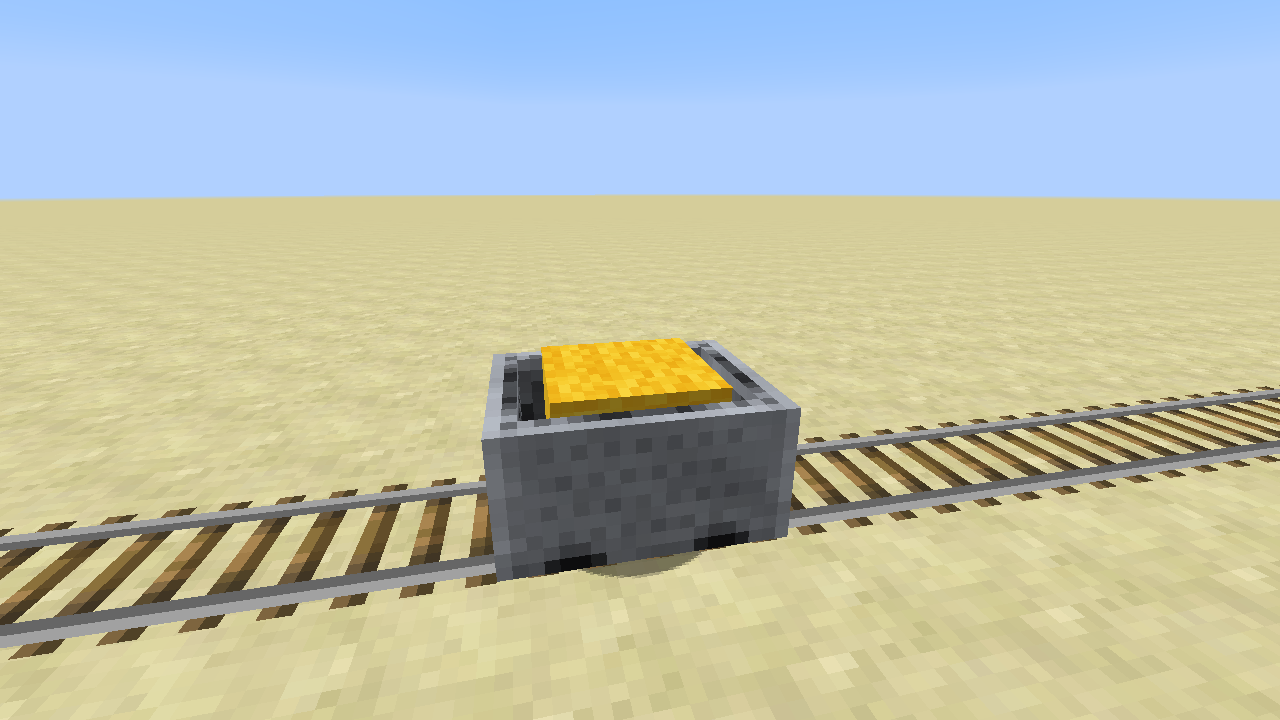
It works in Minecraft 1.12.x (i.e. 1.12, 1.12.1, and 1.12.2), while it does not work in Snapshot 18w08b. In 18w08b, it seems that CustomDisplayTile is ignored, and the minecart is summoned without displaying any tiles. Not sure whether or not the attribute name CustomDisplayTile is renamed, or just not implemented yet.
Edit: corrected the command for "1.13 (expected)", and it is still not working.
The bug
The NBT attribute "CustomDisplayTile" allows displaying a custom tile in a minecart. For example, when typing the following command in the chat:
1.12.x: /summonminecraft:minecart ~ ~1 ~ {CustomDisplayTile:1,DisplayTile:"minecraft:wool",DisplayData:4} 1.13 (expected): /summonminecraft:minecart ~ ~1 ~ {CustomDisplayTile:1,DisplayTile:"minecraft:yellow_wool"}and a yellow wool block should be displayed in the minecart:
It works in Minecraft 1.12.x (i.e. 1.12, 1.12.1, and 1.12.2), while it does not work in Snapshot 18w08b. In 18w08b, it seems that CustomDisplayTile is ignored, and the minecart is summoned without displaying any tiles. Not sure whether or not the attribute name CustomDisplayTile is renamed, or just not implemented yet.
Edit: corrected the command for "1.13 (expected)", and it is still not working.
Introduction
Imagine when you are building a large Minecraft map of cities, it is often necessary to have high speed transportation through the map to help it convenient for travelling. Since Java Edition 1.12+, it is already possible to design a minecart-based high-speed railway in Vanilla Minecraft, as demonstrated in one of my videos that shows such way of transportation. I did not encounter any critical issues on chunk loaders on Minecraft versions 1.12.x and 1.13.x; however, such an issue presents on newer Minecraft versions like 1.14.x and 1.15.x. I will show the reproducing steps below based on single-player mode of Vanilla Minecraft 1.15.2.
In the following context, note that we supposes every block is 1 meter (1 m) in length, width, and height; and every tick is expected to equal to 1/20 second by default.
How High-speed Minecarts Work in Vanilla Minecraft
Briefly speaking, a minecart can be made faster than its default maximum speed 8 m/sec (i.e. 28.8 km/hr) by being continuously teleported on a same direction every tick. To make our reproducing steps as simple as possible, here we make a simple datapack as shown below in a step-by-step descriptions.
Step 1. Create an empty datapack following this tutorial on Minecraft Wiki.
Step 2. Create a command file called loop.mcfunction under directory "mynamespace/functions/" and write a single line of function in it as follows:
execute as @e[type=minecart,tag=needtp] at @s run tp @s ~5 ~ ~
Step 3. Add function tag mynamespace:loop in the file data/minecraft/tags/functions/tick.json.
Now, we have made a datapack that makes every minecart very fast (100 m/sec) if it has a tag called "needtp".
Next, we are going through the full reproducing steps below as an example.
The Full Reproducing Steps of This Bug
Step 1. Create a new world save with the following settings:
- Default gamemode: Creative
- Cheats: ON
- World Type: Default
- Seed: 0
- Leave default values for all other options.
Step 2. Enter the following commands on the chat line by line to configure game rules:
/gamerule doDaylightCycle false
/gamerule doWeatherCycle false
/gamerule doMobSpawning false
/gamerule keepInventory true
/gamerule commandBlockOutput falseStep 3. Build a glass platform at coordinate Y=100, and build a simple railway structure upon the floor with two command blocks, as shown in the following screenshot:
Step 4. Enter the following command for Command #1 in the screenshot, so it will let a minecart enter a "high-speed mode" and start running eastward at high speed.
tag @e[type=minecart,distance=..2,limit=1] add needtp
Step 5. To simplify our reproducing steps, enter the following command for Command #2 in the screenshot to add the property NoGravity onto the minecart. Note that
we do not often use this in realistic application; instead,it can be replaced with just a straight trackthat is long enough for testing.{{data merge entity @e[type=minecart,distance=..3,limit=1,tag=needtp]
{NoGravity:1b}}}
Step 6. Place a minecart on an ordinary rail and get on it, and then hold the W key to slowly move the minecart until it triggers the previously entered commands by the detector rail.
Step 7. Once the high-speed commands are triggered, it is expected that chunks are always loaded on the way. Minor lags could occur on Minecraft 1.13.x, but they are acceptable. However, in Minecraft 1.14.x or later versions, once an occasional lag occurred, it is likely for the player to enter unloaded chunks. To make things worse, new chunks are sometimes not able to be loaded anymore, and the game freezes forever accordingly. It is even unable to leave the minecart with the Left-Shift key on such a scenario. The only way to get rid of this condition we found is to switch the player's gamemode to spectator.
The following screenshot shows the scenario when a player gets stuck in such a condition:
Note: In all screenshots above, the scores on the right-hand-side indicate the current speed of the player, implemented with another speedometer datapack developed by myself. Since all manipulations in the speedometer datapack are only related to scoreboard operations to players, not minecarts, it will not affect the behavior of our reproducing steps.
Introduction
Imagine when you are building a large Minecraft map of cities, it is often necessary to have high speed transportation through the map to help it convenient for travelling. Since Java Edition 1.12+, it is already possible to design a minecart-based high-speed railway in Vanilla Minecraft, as demonstrated in one of my videos that shows such way of transportation. I did not encounter any critical issues on chunk loaders on Minecraft versions 1.12.x and 1.13.x; however, such an issue presents on newer Minecraft versions like 1.14.x and 1.15.x. I will show the reproducing steps below based on single-player mode of Vanilla Minecraft 1.15.2.
In the following context, note that we supposes every block is 1 meter (1 m) in length, width, and height; and every tick is expected to equal to 1/20 second by default.
How High-speed Minecarts Work in Vanilla Minecraft
Briefly speaking, a minecart can be made faster than its default maximum speed 8 m/sec (i.e. 28.8 km/hr) by being continuously teleported on a same direction every tick. To make our reproducing steps as simple as possible, here we make a simple datapack as shown below in a step-by-step descriptions.
Step 1. Create an empty datapack following this tutorial on Minecraft Wiki.
Step 2. Create a command file called loop.mcfunction under directory "mynamespace/functions/" and write a single line of function in it as follows:
execute as @e[type=minecart,tag=needtp] at @s run tp @s ~5 ~ ~
Step 3. Add function tag mynamespace:loop in the file data/minecraft/tags/functions/tick.json.
Now, we have made a datapack that makes every minecart very fast (100 m/sec) if it has a tag called "needtp".
Next, we are going through the full reproducing steps below as an example.
The Full Reproducing Steps of This Bug
Step 1. Create a new world save with the following settings:
- Default gamemode: Creative
- Cheats: ON
- World Type: Default
- Seed: 0
- Leave default values for all other options.
Step 2. Enter the following commands on the chat line by line to configure game rules:
/gamerule doDaylightCycle false
/gamerule doWeatherCycle false
/gamerule doMobSpawning false
/gamerule keepInventory true
/gamerule commandBlockOutput falseStep 3. Build a glass platform at coordinate Y=100, and build a simple railway structure upon the floor with two command blocks, as shown in the following screenshot:
Step 4. Enter the following command for Command #1 in the screenshot, so it will let a minecart enter a "high-speed mode" and start running eastward at high speed.
tag @e[type=minecart,distance=..2,limit=1] add needtp
Step 5. To simplify our reproducing steps, enter the following command for Command #2 in the screenshot to add the property NoGravity onto the minecart. Note that we do not often use this in realistic application; instead, it can be replaced with just a straight track that is long enough for testing.
{{data merge entity @e[type=minecart,distance=..3,limit=1,tag=needtp]
{NoGravity:1b}}}
Step 6. Place a minecart on an ordinary rail and get on it, and then hold the W key to slowly move the minecart until it triggers the previously entered commands by the detector rail.
Step 7. Once the high-speed commands are triggered, it is expected that chunks are always loaded on the way. Minor lags could occur on Minecraft 1.13.x, but they are acceptable. However, in Minecraft 1.14.x or later versions, once an occasional lag occurred, it is likely for the player to enter unloaded chunks. To make things worse, new chunks are sometimes not able to be loaded anymore, and the game freezes forever accordingly. It is even unable to leave the minecart with the Left-Shift key on such a scenario. The only way to get rid of this condition we found is to switch the player's gamemode to spectator.
The following screenshot shows the scenario when a player gets stuck in such a condition:
Note: In all screenshots above, the scores on the right-hand-side indicate the current speed of the player, implemented with another speedometer datapack developed by myself. Since all manipulations in the speedometer datapack are only related to scoreboard operations to players, not minecarts, it will not affect the behavior of our reproducing steps.
Introduction
Imagine when you are building a large Minecraft map of cities, it is often necessary to have high speed transportation through the map to help it convenient for travelling. Since Java Edition 1.12+, it is already possible to design a minecart-based high-speed railway in Vanilla Minecraft, as demonstrated in one of my videos that shows such way of transportation. I did not encounter any critical issues on chunk loaders on Minecraft versions 1.12.x and 1.13.x; however, such an issue presents on newer Minecraft versions like 1.14.x and 1.15.x. I will show the reproducing steps below based on single-player mode of Vanilla Minecraft 1.15.2.
In the following context, note that we supposes every block is 1 meter (1 m) in length, width, and height; and every tick is expected to equal to 1/20 second by default.
How High-speed Minecarts Work in Vanilla Minecraft
Briefly speaking, a minecart can be made faster than its default maximum speed 8 m/sec (i.e. 28.8 km/hr) by being continuously teleported on a same direction every tick. To make our reproducing steps as simple as possible, here we make a simple datapack as shown below in a step-by-step descriptions.
Step 1. Create an empty datapack following this tutorial on Minecraft Wiki.
Step 2. Create a command file called loop.mcfunction under directory "mynamespace/functions/" and write a single line of function in it as follows:
execute as @e[type=minecart,tag=needtp] at @s run tp @s ~5 ~ ~
Step 3. Add function tag mynamespace:loop in the file data/minecraft/tags/functions/tick.json.
Now, we have made a datapack that makes every minecart very fast (100 m/sec) if it has a tag called "needtp".
Next, we are going through the full reproducing steps below as an example.
The Full Reproducing Steps of This Bug
Step 1. Create a new world save with the following settings:
- Default gamemode: Creative
- Cheats: ON
- World Type: Default
- Seed: 0
- Leave default values for all other options.
Step 2. Enter the following commands on the chat line by line to configure game rules:
/gamerule doDaylightCycle false
/gamerule doWeatherCycle false
/gamerule doMobSpawning false
/gamerule keepInventory true
/gamerule commandBlockOutput falseStep 3. Build a glass platform at coordinate Y=100, and build a simple railway structure upon the floor with two command blocks, as shown in the following screenshot:
Step 4. Enter the following command for Command #1 in the screenshot, so it will let a minecart enter a "high-speed mode" and start running eastward at high speed.
tag @e[type=minecart,distance=..2,limit=1] add needtp
Step 5. To simplify our reproducing steps, enter the following command for Command #2 in the screenshot to add the property NoGravity onto the minecart. Note that we do not often use this in realistic application; instead, it can be replaced with just a straight track that is long enough for testing.
{NoGravity:1b}
{{data merge entity @e[type=minecart,distance=..3,limit=1,tag=needtp]}}
Step 6. Place a minecart on an ordinary rail and get on it, and then hold the W key to slowly move the minecart until it triggers the previously entered commands by the detector rail.
Step 7. Once the high-speed commands are triggered, it is expected that chunks are always loaded on the way. Minor lags could occur on Minecraft 1.13.x, but they are acceptable. However, in Minecraft 1.14.x or later versions, once an occasional lag occurred, it is likely for the player to enter unloaded chunks. To make things worse, new chunks are sometimes not able to be loaded anymore, and the game freezes forever accordingly. It is even unable to leave the minecart with the Left-Shift key on such a scenario. The only way to get rid of this condition we found is to switch the player's gamemode to spectator.
The following screenshot shows the scenario when a player gets stuck in such a condition:
Note: In all screenshots above, the scores on the right-hand-side indicate the current speed of the player, implemented with another speedometer datapack developed by myself. Since all manipulations in the speedometer datapack are only related to scoreboard operations to players, not minecarts, it will not affect the behavior of our reproducing steps.
Introduction
Imagine when you are building a large Minecraft map of cities, it is often necessary to have high speed transportation through the map to help it convenient for travelling. Since Java Edition 1.12+, it is already possible to design a minecart-based high-speed railway in Vanilla Minecraft, as demonstrated in one of my videos that shows such way of transportation. I did not encounter any critical issues on chunk loaders on Minecraft versions 1.12.x and 1.13.x; however, such an issue presents on newer Minecraft versions like 1.14.x and 1.15.x. I will show the reproducing steps below based on single-player mode of Vanilla Minecraft 1.15.2.
In the following context, note that we supposes every block is 1 meter (1 m) in length, width, and height; and every tick is expected to equal to 1/20 second by default.
How High-speed Minecarts Work in Vanilla Minecraft
Briefly speaking, a minecart can be made faster than its default maximum speed 8 m/sec (i.e. 28.8 km/hr) by being continuously teleported on a same direction every tick. To make our reproducing steps as simple as possible, here we make a simple datapack as shown below in a step-by-step descriptions.
Step 1. Create an empty datapack following this tutorial on Minecraft Wiki.
Step 2. Create a command file called loop.mcfunction under directory "mynamespace/functions/" and write a single line of function in it as follows:
execute as @e[type=minecart,tag=needtp] at @s run tp @s ~5 ~ ~
Step 3. Add function tag mynamespace:loop in the file data/minecraft/tags/functions/tick.json.
Now, we have made a datapack that makes every minecart very fast (100 m/sec) if it has a tag called "needtp".
Next, we are going through the full reproducing steps below as an example.
The Full Reproducing Steps of This Bug
Step 1. Create a new world save with the following settings:
- Default gamemode: Creative
- Cheats: ON
- World Type: Default
- Seed: 0
- Leave default values for all other options.
Step 2. Enter the following commands on the chat line by line to configure game rules:
/gamerule doDaylightCycle false
/gamerule doWeatherCycle false
/gamerule doMobSpawning false
/gamerule keepInventory true
/gamerule commandBlockOutput falseStep 3. Build a glass platform at coordinate Y=100, and build a simple railway structure upon the floor with two command blocks, as shown in the following screenshot:
Step 4. Enter the following command for Command #1 in the screenshot, so it will let a minecart enter a "high-speed mode" and start running eastward at high speed.
tag @e[type=minecart,distance=..2,limit=1] add needtp
Step 5. To simplify our reproducing steps, enter the following command for Command #2 in the screenshot to add the property NoGravity onto the minecart. Note that we do not often use this in realistic application; instead, it can be replaced with just a straight track that is long enough for testing.
data merge entity @e[type=minecart,distance=..3,limit=1,tag=needtp] {NoGravity:1b}
Step 6. Place a minecart on an ordinary rail and get on it, and then hold the W key to slowly move the minecart until it triggers the previously entered commands by the detector rail.
Step 7. Once the high-speed commands are triggered, it is expected that chunks are always loaded on the way. Minor lags could occur on Minecraft 1.13.x, but they are acceptable. However, in Minecraft 1.14.x or later versions, once an occasional lag occurred, it is likely for the player to enter unloaded chunks. To make things worse, new chunks are sometimes not able to be loaded anymore, and the game freezes forever accordingly. It is even unable to leave the minecart with the Left-Shift key on such a scenario. The only way to get rid of this condition we found is to switch the player's gamemode to spectator.
The following screenshot shows the scenario when a player gets stuck in such a condition:
Note: In all screenshots above, the scores on the right-hand-side indicate the current speed of the player, implemented with another speedometer datapack developed by myself. Since all manipulations in the speedometer datapack are only related to scoreboard operations to players, not minecarts, it will not affect the behavior of our reproducing steps.
Introduction
Imagine when you are building a large Minecraft map of cities, it is often necessary to have high speed transportation through the map to help it convenient for travelling. Since Java Edition 1.12+, it is already possible to design a minecart-based high-speed railway in Vanilla Minecraft, as demonstrated in one of my videos that shows such way of transportation. I did not encounter any critical issues on chunk loaders on Minecraft versions 1.12.x and 1.13.x; however, such an issue presents on newer Minecraft versions like 1.14.x and 1.15.x. I will show the reproducing steps below based on single-player mode of Vanilla Minecraft 1.15.2.
In the following context, note that we supposes every block is 1 meter (1 m) in length, width, and height; and every tick is expected to equal to 1/20 second by default.
How High-speed Minecarts Work in Vanilla Minecraft
Briefly speaking, a minecart can be made faster than its default maximum speed 8 m/sec (i.e. 28.8 km/hr) by being continuously teleported on a same direction every tick. To make our reproducing steps as simple as possible, here we make a simple datapack as shown below in a step-by-step descriptions.
Step 1. Create an empty datapack following this tutorial on Minecraft Wiki.
Step 2. Create a command file called loop.mcfunction under directory "mynamespace/functions/" and write a single line of function in it as follows:
execute as @e[type=minecart,tag=needtp] at @s run tp @s ~5 ~ ~
Step 3. Add function tag mynamespace:loop in the file data/minecraft/tags/functions/tick.json.
Now, we have made a datapack that makes every minecart very fast (100 m/sec) if it has a tag called "needtp".
Next, we are going through the full reproducing steps below as an example.
The Full Reproducing Steps of This Bug
Step 1. Create a new world save with the following settings:
- Default gamemode: Creative
- Cheats: ON
- World Type: Default
- Seed: 0
- Leave default values for all other options.
Step 2. Enter the following commands on the chat line by line to configure game rules:
/gamerule doDaylightCycle false
/gamerule doWeatherCycle false
/gamerule doMobSpawning false
/gamerule keepInventory true
/gamerule commandBlockOutput falseStep 3. Build a glass platform at coordinate Y=100, and build a simple railway structure upon the floor with two command blocks, as shown in the following screenshot:
Step 4. Enter the following command for Command #1 in the screenshot, so it will let a minecart enter a "high-speed mode" and start running eastward at high speed.
tag @e[type=minecart,distance=..2,limit=1] add needtp
Step 5. To simplify our reproducing steps, enter the following command for Command #2 in the screenshot to add the property NoGravity onto the minecart. Note that we do not often use this in realistic application; instead, it can be replaced with just a straight track that is long enough for testing.
data merge entity @e[type=minecart,distance=..3,limit=1,tag=needtp] {NoGravity:1b}
Step 6. Place a minecart on an ordinary rail and get on it, and then hold the W key to slowly move the minecart until it triggers the previously entered commands by the detector rail.
Step 7. Once the high-speed commands are triggered, it is expected that chunks are always loaded on the way. Minor lags could occur on Minecraft 1.13.x, but they are acceptable. However, in Minecraft 1.14.x or later versions, once an occasional lag occurred, it is likely for the player to enter unloaded chunks. To make things worse, new chunks are sometimes not able to be loaded anymore, and the game freezes forever accordingly. It is even unable to leave the minecart with the Left-Shift key on such a scenario. The only way to get rid of this condition we found is to switch the player's gamemode to spectator.
The following screenshot shows the scenario when a player gets stuck in such a condition:
Note: In all screenshots above, the scores on the right-hand-side indicate the current speed of the player, implemented with another speedometer datapack developed by myself. Since all manipulations in the speedometer datapack are only related to scoreboard operations to players, not minecarts, it will not affect the behavior of our reproducing steps.
Introduction
Imagine when you are building a large Minecraft map of cities, it is often necessary to have high speed transportation through the map to help it convenient for travelling. Since Java Edition 1.12+, it is already possible to design a minecart-based high-speed railway in Vanilla Minecraft, as demonstrated in one of my videos that shows such way of transportation. I did not encounter any critical issues on chunk loaders on Minecraft versions 1.12.x and 1.13.x; however, such an issue presents on newer Minecraft versions like 1.14.x and 1.15.x. I will show the reproducing steps below based on single-player mode of Vanilla Minecraft 1.15.2.
In the following context, note that we supposes every block is 1 meter (1 m) in length, width, and height; and every tick is expected to equal to 1/20 second by default.
How High-speed Minecarts Work in Vanilla Minecraft
Briefly speaking, a minecart can be made faster than its default maximum speed 8 m/sec (i.e. 28.8 km/hr) by being continuously teleported on a same direction every tick. To make our reproducing steps as simple as possible, here we make a simple datapack as shown below in a step-by-step descriptions.
Step 1. Create an empty datapack following this tutorial on Minecraft Wiki.
Step 2. Create a command file called loop.mcfunction under directory "mynamespace/functions/" and write a single line of function in it as follows:
execute as @e[type=minecart,tag=needtp] at @s run tp @s ~5 ~ ~
Step 3. Add function tag mynamespace:loop in the file data/minecraft/tags/functions/tick.json.
Now, we have made a datapack that makes every minecart very fast (100 m/sec) if it has a tag called "needtp".
Next, we are going through the full reproducing steps below as an example.
The Full Reproducing Steps of This Bug
Step 1. Create a new world save with the following settings:
- Default gamemode: Creative
- Cheats: ON
- World Type: Default
- Seed: 0
- Leave default values for all other options.
Step 2. Enter the following commands on the chat line by line to configure game rules:
/gamerule doDaylightCycle false
/gamerule doWeatherCycle false
/gamerule doMobSpawning false
/gamerule keepInventory true
/gamerule commandBlockOutput falseStep 3. Build a glass platform at coordinate Y=100, and build a simple railway structure upon the floor with two command blocks, as shown in the following screenshot:
Step 4. Enter the following command for Command #1 in the screenshot, so it will let a minecart enter a "high-speed mode" and start running eastward at high speed.
tag @e[type=minecart,distance=..2,limit=1] add needtp
Step 5. To simplify our reproducing steps, enter the following command for Command #2 in the screenshot to add the property NoGravity onto the minecart. Note that we do not often use this in realistic application; instead, it can be replaced with just a straight track that is long enough for testing.
{{data merge entity @e[type=minecart,distance=..3,limit=1,tag=needtp]
{NoGravity:1b}}}
Step 6. Place a minecart on an ordinary rail and get on it, and then hold the W key to slowly move the minecart until it triggers the previously entered commands by the detector rail.
Step 7. Once the high-speed commands are triggered, it is expected that chunks are always loaded on the way. Minor lags could occur on Minecraft 1.13.x, but they are acceptable. However, in Minecraft 1.14.x or later versions, once an occasional lag occurred, it is likely for the player to enter unloaded chunks. To make things worse, new chunks are sometimes not able to be loaded anymore, and the game freezes forever accordingly. It is even unable to leave the minecart with the Left-Shift key on such a scenario. The only way to get rid of this condition we found is to switch the player's gamemode to spectator.
The following screenshot shows the scenario when a player gets stuck in such a condition:
Notes
- In all screenshots above, the scores on the right-hand-side indicate the current speed of the player, implemented with another speedometer datapack developed by myself. Since all manipulations in the speedometer datapack are only related to scoreboard operations to players, not minecarts, it will not affect the behavior of our reproducing steps.
- It is easier to reproduce this bug using a lower-end computer than my environment as mentioned in the "Environment" section of this bug.
Introduction
Imagine when you are building a large Minecraft map of cities, it is often necessary to have high speed transportation through the map to help it convenient for travelling. Since Java Edition 1.12+, it is already possible to design a minecart-based high-speed railway in Vanilla Minecraft, as demonstrated in one of my videos that shows such way of transportation. I did not encounter any critical issues on chunk loaders on Minecraft versions 1.12.x and 1.13.x; however, such an issue presents on newer Minecraft versions like 1.14.x and 1.15.x. I will show the reproducing steps below based on single-player mode of Vanilla Minecraft 1.15.2.
In the following context, note that we supposes every block is 1 meter (1 m) in length, width, and height; and every tick is expected to equal to 1/20 second by default.
How High-speed Minecarts Work in Vanilla Minecraft
Briefly speaking, a minecart can be made faster than its default maximum speed 8 m/sec (i.e. 28.8 km/hr) by being continuously teleported on a same direction every tick. To make our reproducing steps as simple as possible, here we make a simple datapack as shown below in a step-by-step descriptions.
Step 1. Create an empty datapack following this tutorial on Minecraft Wiki.
Step 2. Create a command file called loop.mcfunction under directory "mynamespace/functions/" and write a single line of function in it as follows:
execute as @e[type=minecart,tag=needtp] at @s run tp @s ~5 ~ ~
Step 3. Add function tag mynamespace:loop in the file data/minecraft/tags/functions/tick.json.
Now, we have made a datapack that makes every minecart very fast (100 m/sec) if it has a tag called "needtp".
Next, we are going through the full reproducing steps below as an example.
The Full Reproducing Steps of This Bug
Step 1. Create a new world save with the following settings:
- Default gamemode: Creative
- Cheats: ON
- World Type: Default
- Seed: 0
- Leave default values for all other options.
Step 2. Enter the following commands on the chat line by line to configure game rules:
/gamerule doDaylightCycle false
/gamerule doWeatherCycle false
/gamerule doMobSpawning false
/gamerule keepInventory true
/gamerule commandBlockOutput falseStep 3. Build a glass platform at coordinate Y=100, and build a simple railway structure upon the floor with two command blocks, as shown in the following screenshot:
Step 4. Enter the following command for Command #1 in the screenshot, so it will let a minecart enter a "high-speed mode" and start running eastward at high speed.
tag @e[type=minecart,distance=..2,limit=1] add needtp
Step 5. To simplify our reproducing steps, enter the following command for Command #2 in the screenshot to add the property NoGravity onto the minecart. Note that we do not often use this in realistic application; instead, it can be replaced with just a straight track that is long enough for testing.
{NoGravity:1b}
{{data merge entity @e[type=minecart,distance=..3,limit=1,tag=needtp]}}
Step 6. Place a minecart on an ordinary rail and get on it, and then hold the W key to slowly move the minecart until it triggers the previously entered commands by the detector rail.
Step 7. Once the high-speed commands are triggered, it is expected that chunks are always loaded on the way. Minor lags could occur on Minecraft 1.13.x, but they are acceptable. However, in Minecraft 1.14.x or later versions, once an occasional lag occurred, it is likely for the player to enter unloaded chunks. To make things worse, new chunks are sometimes not able to be loaded anymore, and the game freezes forever accordingly. It is even unable to leave the minecart with the Left-Shift key on such a scenario. The only way to get rid of this condition we found is to switch the player's gamemode to spectator.
The following screenshot shows the scenario when a player gets stuck in such a condition:
Notes
- In all screenshots above, the scores on the right-hand-side indicate the current speed of the player, implemented with another speedometer datapack developed by myself. Since all manipulations in the speedometer datapack are only related to scoreboard operations to players, not minecarts, it will not affect the behavior of our reproducing steps.
- It is easier to reproduce this bug using a lower-end computer than my environment as mentioned in the "Environment" section of this bug.
Introduction
Imagine when you are building a large Minecraft map of cities, it is often necessary to have high speed transportation through the map to help it convenient for travelling. Since Java Edition 1.12+, it is already possible to design a minecart-based high-speed railway in Vanilla Minecraft, as demonstrated in one of my videos that shows such way of transportation. I did not encounter any critical issues on chunk loaders on Minecraft versions 1.12.x and 1.13.x; however, such an issue presents on newer Minecraft versions like 1.14.x and 1.15.x. I will show the reproducing steps below based on single-player mode of Vanilla Minecraft 1.15.2.
In the following context, note that we supposes every block is 1 meter (1 m) in length, width, and height; and every tick is expected to equal to 1/20 second by default.
How High-speed Minecarts Work in Vanilla Minecraft
Briefly speaking, a minecart can be made faster than its default maximum speed 8 m/sec (i.e. 28.8 km/hr) by being continuously teleported on a same direction every tick. To make our reproducing steps as simple as possible, here we make a simple datapack as shown below in a step-by-step descriptions.
Step 1. Create an empty datapack following this tutorial on Minecraft Wiki.
Step 2. Create a command file called loop.mcfunction under directory "mynamespace/functions/" and write a single line of function in it as follows:
execute as @e[type=minecart,tag=needtp] at @s run tp @s ~5 ~ ~
Step 3. Add function tag mynamespace:loop in the file data/minecraft/tags/functions/tick.json.
Now, we have made a datapack that makes every minecart very fast (100 m/sec) if it has a tag called "needtp".
Next, we are going through the full reproducing steps below as an example.
The Full Reproducing Steps of This Bug
Step 1. Create a new world save with the following settings:
- Default gamemode: Creative
- Cheats: ON
- World Type: Default
- Seed: 0
- Leave default values for all other options.
Step 2. Enter the following commands on the chat line by line to configure game rules:
/gamerule doDaylightCycle false
/gamerule doWeatherCycle false
/gamerule doMobSpawning false
/gamerule keepInventory true
/gamerule commandBlockOutput falseStep 3. Build a glass platform at coordinate Y=100, and build a simple railway structure upon the floor with two command blocks, as shown in the following screenshot:
Step 4. Enter the following command for Command #1 in the screenshot, so it will let a minecart enter a "high-speed mode" and start running eastward at high speed.
tag @e[type=minecart,distance=..2,limit=1] add needtp
Step 5. To simplify our reproducing steps, enter the following command for Command #2 in the screenshot to add the property NoGravity onto the minecart. Note that we do not often use this in realistic application; instead, it can be replaced with just a straight track that is long enough for testing.
data merge entity @e[type=minecart,distance=..3,limit=1,tag=needtp] {NoGravity:1b}
Step 6. Place a minecart on an ordinary rail and get on it, and then hold the W key to slowly move the minecart until it triggers the previously entered commands by the detector rail.
Step 7. Once the high-speed commands are triggered, it is expected that chunks are always loaded on the way. Minor lags could occur on Minecraft 1.13.x, but they are acceptable. However, in Minecraft 1.14.x or later versions, once an occasional lag occurred, it is likely for the player to enter unloaded chunks. To make things worse, new chunks are sometimes not able to be loaded anymore, and the game freezes forever accordingly. It is even unable to leave the minecart with the Left-Shift key on such a scenario. The only way to get rid of this condition we found is to switch the player's gamemode to spectator.
The following screenshot shows the scenario when a player gets stuck in such a condition:
Notes
- In all screenshots above, the scores on the right-hand-side indicate the current speed of the player, implemented with another speedometer datapack developed by myself. Since all manipulations in the speedometer datapack are only related to scoreboard operations to players, not minecarts, it will not affect the behavior of our reproducing steps.
- It is easier to reproduce this bug using a lower-end computer than my environment as mentioned in the "Environment" section of this bug.
Windows 10
Java 1.8.0 Update 51
CPU: 8x Intel Core-i7-4790 (3.6 GHz)
GPU: NVIDIA GeForce GT 720
RAM: 8GB
Window Resolution: 1366 x 705 pixels
Tested on Minecraft 1.15.2 (Vanilla, single-player)Windows 10
Java 1.8.0 Update 51
CPU: 8x Intel Core-i7-4790 (3.6 GHz)
GPU: NVIDIA GeForce GT 720
RAM: 8GB (where 1280MB is allocated for game)
Window Resolution: 1366 x 705 pixels
Tested on Minecraft 1.15.2 (Vanilla, single-player)
Introduction
Imagine when you are building a large Minecraft map of cities, it is often necessary to have high speed transportation through the map to help it convenient for travelling. Since Java Edition 1.12+, it is already possible to design a minecart-based high-speed railway in Vanilla Minecraft, as demonstrated in one of my videos that shows such way of transportation. I did not encounter any critical issues on chunk loaders on Minecraft versions 1.12.x and 1.13.x; however, such an issue presents on newer Minecraft versions like 1.14.x and 1.15.x. I will show the reproducing steps below based on single-player mode of Vanilla Minecraft 1.15.2.
In the following context, note that we supposes every block is 1 meter (1 m) in length, width, and height; and every tick is expected to equal to 1/20 second by default.
How High-speed Minecarts Work in Vanilla Minecraft
Briefly speaking, a minecart can be made faster than its default maximum speed 8 m/sec (i.e. 28.8 km/hr) by being continuously teleported on a same direction every tick. To make our reproducing steps as simple as possible, here we make a simple datapack as shown below in a step-by-step de
scriptions.Step 1. Create an empty datapack following this tutorial on Minecraft Wiki.
Step 2. Create a command file called loop.mcfunction under directory "mynamespace/functions/" and write a single line of function in it as follows:
execute as @e[type=minecart,tag=needtp] at @s run tp @s ~5 ~ ~
Step 3. Add function tag mynamespace:loop in the file data/minecraft/tags/functions/tick.json.
Now, we have made a datapack that makes every minecart very fast (100 m/sec) if it has a tag called "needtp".
Next, we are going through the full reproducing steps below as an example.
The Full Reproducing Steps of This Bug
Step 1. Create a new world save with the following settings:
- Default gamemode: Creative
- Cheats: ON
- World Type: Default
- Seed: 0
- Leave default values for all other options.
Step 2. Enter the following commands on the chat line by line to configure game rules:
/gamerule doDaylightCycle false
/gamerule doWeatherCycle false
/gamerule doMobSpawning false
/gamerule keepInventory true
/gamerule commandBlockOutput falseStep 3. Build a glass platform at coordinate Y=100, and build a simple railway structure upon the floor with two command blocks, as shown in the following screenshot:
Step 4. Enter the following command for Command #1 in the screenshot, so it will let a minecart enter a "high-speed mode" and start running eastward at high speed.
tag @e[type=minecart,distance=..2,limit=1] add needtp
Step 5. To simplify our reproducing steps, enter the following command for Command #2 in the screenshot to add the property NoGravity onto the minecart. Note that we do not often use this in realistic application; instead, it can be replaced with just a straight track that is long enough for testing.
data merge entity @e[type=minecart,distance=..3,limit=1,tag=needtp] {NoGravity:1b}
Step 6. Place a minecart on an ordinary rail and get on it, and then hold the W key to slowly move the minecart until it triggers the previously entered commands by the detector rail.
Step 7. Once the high-speed commands are triggered, it is expected that chunks are always loaded on the way. Minor lags could occur on Minecraft 1.13.x, but they are acceptable. However, in Minecraft 1.14.x or later versions, once an occasional lag occurred, it is likely for the player to enter unloaded chunks. To make things worse, new chunks are sometimes not able to be loaded anymore, and the game freezes forever accordingly. It is even unable to leave the minecart with the Left-Shift key on such a scenario. The only way to get rid of this condition we found is to switch the player's gamemode to spectator.
The following screenshot shows the scenario when a player gets stuck in such a condition:
Notes
- In all screenshots above, the scores on the right-hand-side indicate the current speed of the player, implemented with another speedometer datapack developed by myself. Since all manipulations in the speedometer datapack are only related to scoreboard operations to players, not minecarts, it will not affect the behavior of our reproducing steps.
- It is easier to reproduce this bug using a lower-end computer than my environment as mentioned in the "Environment" section of this bug.
Introduction
Imagine when you are building a large Minecraft map of cities, it is often necessary to have high speed transportation through the map to help it convenient for travelling. Since Java Edition 1.12+, it is already possible to design a minecart-based high-speed railway in Vanilla Minecraft, as demonstrated in one of my videos that shows such way of transportation. I did not encounter any critical issues on chunk loaders on Minecraft versions 1.12.x and 1.13.x; however, such an issue presents on newer Minecraft versions like 1.14.x and 1.15.x. I will show the reproducing steps below based on single-player mode of Vanilla Minecraft 1.15.2.
In the following context, note that we supposes every block is 1 meter (1 m) in length, width, and height; and every tick is expected to equal to 1/20 second by default.
How High-speed Minecarts Work in Vanilla Minecraft
Briefly speaking, a minecart can be made faster than its default maximum speed 8 m/sec (i.e. 28.8 km/hr) by being continuously teleported on a same direction every tick. To make our reproducing steps as simple as possible, here we make a simple datapack as shown below in a step-by-step demostration.
Step 1. Create an empty datapack following this tutorial on Minecraft Wiki.
Step 2. Create a command file called loop.mcfunction under directory "mynamespace/functions/" and write a single line of function in it as follows:
execute as @e[type=minecart,tag=needtp] at @s run tp @s ~5 ~ ~
Step 3. Add function tag mynamespace:loop in the file data/minecraft/tags/functions/tick.json.
Now, we have made a datapack that makes every minecart very fast (100 m/sec) if it has a tag called "needtp".
Next, we are going through the full reproducing steps below as an example.
The Full Reproducing Steps of This Bug
Step 1. Create a new world save with the following settings:
- Default gamemode: Creative
- Cheats: ON
- World Type: Default
- Seed: 0
- Leave default values for all other options.
Step 2. Enter the following commands on the chat line by line to configure game rules:
/gamerule doDaylightCycle false
/gamerule doWeatherCycle false
/gamerule doMobSpawning false
/gamerule keepInventory true
/gamerule commandBlockOutput falseStep 3. Build a glass platform at coordinate Y=100, and build a simple railway structure upon the floor with two command blocks, as shown in the following screenshot:
Step 4. Enter the following command for Command #1 in the screenshot, so it will let a minecart enter a "high-speed mode" and start running eastward at high speed.
tag @e[type=minecart,distance=..2,limit=1] add needtp
Step 5. To simplify our reproducing steps, enter the following command for Command #2 in the screenshot to add the property NoGravity onto the minecart. Note that we do not often use this in realistic application; instead, it can be replaced with just a straight track that is long enough for testing.
{{data merge entity @e[type=minecart,distance=..3,limit=1,tag=needtp]
{NoGravity:1b}}}
Step 6. Place a minecart on an ordinary rail and get on it, and then hold the W key to slowly move the minecart until it triggers the previously entered commands by the detector rail.
Step 7. Once the high-speed commands are triggered, it is expected that chunks are always loaded on the way. Minor lags could occur on Minecraft 1.13.x, but they are acceptable. However, in Minecraft 1.14.x or later versions, once an occasional lag occurred, it is likely for the player to enter unloaded chunks. To make things worse, new chunks are sometimes not able to be loaded anymore, and the game freezes forever accordingly. It is even unable to leave the minecart with the Left-Shift key on such a scenario. The only way to get rid of this condition we found is to switch the player's gamemode to spectator.
The following screenshot shows the scenario when a player gets stuck in such a condition:
Notes
- In all screenshots above, the scores on the right-hand-side indicate the current speed of the player, implemented with another speedometer datapack developed by myself. Since all manipulations in the speedometer datapack are only related to scoreboard operations to players, not minecarts, it will not affect the behavior of our reproducing steps.
- It is easier to reproduce this bug using a lower-end computer than my environment as mentioned in the "Environment" section of this bug.
Introduction
Imagine when you are building a large Minecraft map of cities, it is often necessary to have high speed transportation through the map to help it convenient for travelling. Since Java Edition 1.12+, it is already possible to design a minecart-based high-speed railway in Vanilla Minecraft, as demonstrated in one of my videos that shows such way of transportation. I did not encounter any critical issues on chunk loaders on Minecraft versions 1.12.x and 1.13.x; however, such an issue presents on newer Minecraft versions like 1.14.x and 1.15.x. I will show the reproducing steps below based on single-player mode of Vanilla Minecraft 1.15.2.
In the following context, note that we supposes every block is 1 meter (1 m) in length, width, and height; and every tick is expected to equal to 1/20 second by default.
How High-speed Minecarts Work in Vanilla Minecraft
Briefly speaking, a minecart can be made faster than its default maximum speed 8 m/sec (i.e. 28.8 km/hr) by being continuously teleported on a same direction every tick. To make our reproducing steps as simple as possible, here we make a simple datapack as shown below in a step-by-step demostration.
Step 1. Create an empty datapack following this tutorial on Minecraft Wiki.
Step 2. Create a command file called loop.mcfunction under directory "mynamespace/functions/" and write a single line of function in it as follows:
execute as @e[type=minecart,tag=needtp] at @s run tp @s ~5 ~ ~
Step 3. Add function tag mynamespace:loop in the file data/minecraft/tags/functions/tick.json.
Now, we have made a datapack that makes every minecart very fast (100 m/sec) if it has a tag called "needtp".
Next, we are going through the full reproducing steps below as an example.
The Full Reproducing Steps of This Bug
Step 1. Create a new world save with the following settings:
- Default gamemode: Creative
- Cheats: ON
- World Type: Default
- Seed: 0
- Leave default values for all other options.
Step 2. Enter the following commands on the chat line by line to configure game rules:
/gamerule doDaylightCycle false
/gamerule doWeatherCycle false
/gamerule doMobSpawning false
/gamerule keepInventory true
/gamerule commandBlockOutput falseStep 3. Build a glass platform at coordinate Y=100, and build a simple railway structure upon the floor with two command blocks, as shown in the following screenshot:
Step 4. Enter the following command for Command #1 in the screenshot, so it will let a minecart enter a "high-speed mode" and start running eastward at high speed.
tag @e[type=minecart,distance=..2,limit=1] add needtp
Step 5. To simplify our reproducing steps, enter the following command for Command #2 in the screenshot to add the property NoGravity onto the minecart. Note that we do not often use this in realistic application; instead, it can be replaced with just a straight track that is long enough for testing.
{NoGravity:1b}
{{data merge entity @e[type=minecart,distance=..3,limit=1,tag=needtp]}}
Step 6. Place a minecart on an ordinary rail and get on it, and then hold the W key to slowly move the minecart until it triggers the previously entered commands by the detector rail.
Step 7. Once the high-speed commands are triggered, it is expected that chunks are always loaded on the way. Minor lags could occur on Minecraft 1.13.x, but they are acceptable. However, in Minecraft 1.14.x or later versions, once an occasional lag occurred, it is likely for the player to enter unloaded chunks. To make things worse, new chunks are sometimes not able to be loaded anymore, and the game freezes forever accordingly. It is even unable to leave the minecart with the Left-Shift key on such a scenario. The only way to get rid of this condition we found is to switch the player's gamemode to spectator.
The following screenshot shows the scenario when a player gets stuck in such a condition:
Notes
- In all screenshots above, the scores on the right-hand-side indicate the current speed of the player, implemented with another speedometer datapack developed by myself. Since all manipulations in the speedometer datapack are only related to scoreboard operations to players, not minecarts, it will not affect the behavior of our reproducing steps.
- It is easier to reproduce this bug using a lower-end computer than my environment as mentioned in the "Environment" section of this bug.
Introduction
Imagine when you are building a large Minecraft map of cities, it is often necessary to have high speed transportation through the map to help it convenient for travelling. Since Java Edition 1.12+, it is already possible to design a minecart-based high-speed railway in Vanilla Minecraft, as demonstrated in one of my videos that shows such way of transportation. I did not encounter any critical issues on chunk loaders on Minecraft versions 1.12.x and 1.13.x; however, such an issue presents on newer Minecraft versions like 1.14.x and 1.15.x. I will show the reproducing steps below based on single-player mode of Vanilla Minecraft 1.15.2.
In the following context, note that we supposes every block is 1 meter (1 m) in length, width, and height; and every tick is expected to equal to 1/20 second by default.
How High-speed Minecarts Work in Vanilla Minecraft
Briefly speaking, a minecart can be made faster than its default maximum speed 8 m/sec (i.e. 28.8 km/hr) by being continuously teleported on a same direction every tick. To make our reproducing steps as simple as possible, here we make a simple datapack as shown below in a step-by-step demostration.
Step 1. Create an empty datapack following this tutorial on Minecraft Wiki.
Step 2. Create a command file called loop.mcfunction under directory "mynamespace/functions/" and write a single line of function in it as follows:
execute as @e[type=minecart,tag=needtp] at @s run tp @s ~5 ~ ~
Step 3. Add function tag mynamespace:loop in the file data/minecraft/tags/functions/tick.json.
Now, we have made a datapack that makes every minecart very fast (100 m/sec) if it has a tag called "needtp".
Next, we are going through the full reproducing steps below as an example.
The Full Reproducing Steps of This Bug
Step 1. Create a new world save with the following settings:
- Default gamemode: Creative
- Cheats: ON
- World Type: Default
- Seed: 0
- Leave default values for all other options.
Step 2. Enter the following commands on the chat line by line to configure game rules:
/gamerule doDaylightCycle false
/gamerule doWeatherCycle false
/gamerule doMobSpawning false
/gamerule keepInventory true
/gamerule commandBlockOutput falseStep 3. Build a glass platform at coordinate Y=100, and build a simple railway structure upon the floor with two command blocks, as shown in the following screenshot:
Step 4. Enter the following command for Command #1 in the screenshot, so it will let a minecart enter a "high-speed mode" and start running eastward at high speed.
tag @e[type=minecart,distance=..2,limit=1] add needtp
Step 5. To simplify our reproducing steps, enter the following command for Command #2 in the screenshot to add the property NoGravity onto the minecart. Note that we do not often use this in realistic application; instead, it can be replaced with just a straight track that is long enough for testing.
data merge entity @e[type=minecart,distance=..3,limit=1,tag=needtp] {NoGravity:1b}
Step 6. Place a minecart on an ordinary rail and get on it, and then hold the W key to slowly move the minecart until it triggers the previously entered commands by the detector rail.
Step 7. Once the high-speed commands are triggered, it is expected that chunks are always loaded on the way. Minor lags could occur on Minecraft 1.13.x, but they are acceptable. However, in Minecraft 1.14.x or later versions, once an occasional lag occurred, it is likely for the player to enter unloaded chunks. To make things worse, new chunks are sometimes not able to be loaded anymore, and the game freezes forever accordingly. It is even unable to leave the minecart with the Left-Shift key on such a scenario. The only way to get rid of this condition we found is to switch the player's gamemode to spectator.
The following screenshot shows the scenario when a player gets stuck in such a condition:
Notes
- In all screenshots above, the scores on the right-hand-side indicate the current speed of the player, implemented with another speedometer datapack developed by myself. Since all manipulations in the speedometer datapack are only related to scoreboard operations to players, not minecarts, it will not affect the behavior of our reproducing steps.
- It is easier to reproduce this bug using a lower-end computer than my environment as mentioned in the "Environment" section of this bug.
Introduction
Imagine when you are building a large Minecraft map of cities, it is often necessary to have high speed transportation through the map to help it convenient for travelling. Since Java Edition 1.12+, it is already possible to design a minecart-based high-speed railway in Vanilla Minecraft, as demonstrated in one of my videos that shows such way of transportation. I did not encounter any critical issues on chunk loaders on Minecraft versions 1.12.x and 1.13.x; however, such an issue presents on newer Minecraft versions like 1.14.x and 1.15.x. I will show the reproducing steps below based on single-player mode of Vanilla Minecraft 1.15.2.
In the following context, note that we supposes every block is 1 meter (1 m) in length, width, and height; and every tick is expected to equal to 1/20 second by default.
How High-speed Minecarts Work in Vanilla Minecraft
Briefly speaking, a minecart can be made faster than its default maximum speed 8 m/sec (i.e. 28.8 km/hr) by being continuously teleported on a same direction every tick. To make our reproducing steps as simple as possible, here we make a simple datapack as shown below in a step-by-step demostration.
Step 1. Create an empty datapack following this tutorial on Minecraft Wiki.
Step 2. Create a command file called loop.mcfunction under directory "mynamespace/functions/" and write a single line of function in it as follows:
execute as @e[type=minecart,tag=needtp] at @s run tp @s ~5 ~ ~
Step 3. Add function tag mynamespace:loop in the file data/minecraft/tags/functions/tick.json.
Now, we have made a datapack that makes every minecart very fast (100 m/sec) if it has a tag called "needtp".
Next, we are going through the full reproducing steps below as an example.
The Full Reproducing Steps of This Bug
Step 1. Create a new world save with the following settings:
- Default gamemode: Creative
- Cheats: ON
- World Type: Default
- Seed: 0
- Leave default values for all other options.
Step 2. Enter the following commands on the chat line by line to configure game rules:
/gamerule doDaylightCycle false
/gamerule doWeatherCycle false
/gamerule doMobSpawning false
/gamerule keepInventory true
/gamerule commandBlockOutput falseStep 3. Build a glass platform at coordinate Y=100, and build a simple railway structure upon the floor with two command blocks, as shown in the following screenshot:
Step
4. Enter the following command for Command #1 in the screenshot, so it will let a minecart enter a "high-speed mode" and start running eastward at high speed.tag @e[type=minecart,distance=..2,limit=1] add needtp
Step
5. To simplify our reproducing steps, enter the following command for Command #2 in the screenshot to add the property NoGravity onto the minecart. Note that we do not often use this in realistic application; instead, it can be replaced with just a straight track that is long enough for testing.data merge entity @e[type=minecart,distance=..3,limit=1,tag=needtp] {NoGravity:1b}
Step
6. Place a minecart on an ordinary rail and get on it, and then hold the W key to slowly move the minecart until it triggers the previously entered commands by the detector rail.Step
7. Once the high-speed commands are triggered, it is expected that chunks are always loaded on the way. Minor lags could occur on Minecraft 1.13.x, but they are acceptable. However, in Minecraft 1.14.x or later versions, once an occasional lag occurred, it is likely for the player to enter unloaded chunks. To make things worse, new chunks are sometimes not able to be loaded anymore, and the game freezes forever accordingly. It is even unable to leave the minecart with the Left-Shift key on such a scenario. The only way to get rid of this condition we found is to switch the player's gamemode to spectator.The following screenshot shows the scenario when a player gets stuck in such a condition:
Notes
- In all screenshots above, the scores on the right-hand-side indicate the current speed of the player, implemented with another speedometer datapack developed by myself. Since all manipulations in the speedometer datapack are only related to scoreboard operations to players, not minecarts, it will not affect the behavior of our reproducing steps.
- It is easier to reproduce this bug using a lower-end computer than my environment as mentioned in the "Environment" section of this bug.
Introduction
Imagine when you are building a large Minecraft map of cities, it is often necessary to have high speed transportation through the map to help it convenient for travelling. Since Java Edition 1.12+, it is already possible to design a minecart-based high-speed railway in Vanilla Minecraft, as demonstrated in one of my videos that shows such way of transportation. I did not encounter any critical issues on chunk loaders on Minecraft versions 1.12.x and 1.13.x; however, such an issue presents on newer Minecraft versions like 1.14.x and 1.15.x. I will show the reproducing steps below based on single-player mode of Vanilla Minecraft 1.15.2.
In the following context, note that we supposes every block is 1 meter (1 m) in length, width, and height; and every tick is expected to equal to 1/20 second by default.
How High-speed Minecarts Work in Vanilla Minecraft
Briefly speaking, a minecart can be made faster than its default maximum speed 8 m/sec (i.e. 28.8 km/hr) by being continuously teleported on a same direction every tick. To make our reproducing steps as simple as possible, here we make a simple datapack as shown below in a step-by-step demostration.
Step 1. Create an empty datapack following this tutorial on Minecraft Wiki.
Step 2. Create a command file called loop.mcfunction under directory "data/mynamespace/functions/" and write a single line of function in it as follows:
execute as @e[type=minecart,tag=needtp] at @s run tp @s ~5 ~ ~
Step 3. Add function tag mynamespace:loop in the file data/minecraft/tags/functions/tick.json.
Now, we have made a datapack that makes every minecart very fast (100 m/sec) if it has a tag called "needtp".
Next, we are going through the full reproducing steps below as an example.
The Full Reproducing Steps of This Bug
Step 1. Create a new world save with the following settings:
- Default gamemode: Creative
- Cheats: ON
- World Type: Default
- Seed: 0
- Leave default values for all other options.
Step 2. Enter the following commands on the chat line by line to configure game rules:
/gamerule doDaylightCycle false
/gamerule doWeatherCycle false
/gamerule doMobSpawning false
/gamerule keepInventory true
/gamerule commandBlockOutput falseStep 3. Copy the datapack as we made in the previous section, into the new world save. Then, enter the command /reload to let it work.
Step 4. Build a glass platform at coordinate Y=100, and build a simple railway structure upon the floor with two command blocks, as shown in the following screenshot:
Step 5. Enter the following command for Command #1 in the screenshot, so it will let a minecart enter a "high-speed mode" and start running eastward at high speed.
tag @e[type=minecart,distance=..2,limit=1] add needtp
Step 6. To simplify our reproducing steps, enter the following command for Command #2 in the screenshot to add the property NoGravity onto the minecart. Note that we do not often use this in realistic application; instead, it can be replaced with just a straight track that is long enough for testing.
data merge entity @e[type=minecart,distance=..3,limit=1,tag=needtp] {NoGravity:1b}
Step 7. Place a minecart on an ordinary rail and get on it, and then hold the W key to slowly move the minecart until it triggers the previously entered commands by the detector rail.
Step 8. Once the high-speed commands are triggered, it is expected that chunks are always loaded on the way. Minor lags could occur on Minecraft 1.13.x, but they are acceptable. However, in Minecraft 1.14.x or later versions, once an occasional lag occurred, it is likely for the player to enter unloaded chunks. To make things worse, new chunks are sometimes not able to be loaded anymore, and the game freezes forever accordingly. It is even unable to leave the minecart with the Left-Shift key on such a scenario. The only way to get rid of this condition we found is to switch the player's gamemode to spectator.
The following screenshot shows the scenario when a player gets stuck in such a condition:
Notes
- In all screenshots above, the scores on the right-hand-side indicate the current speed of the player, implemented with another speedometer datapack developed by myself. Since all manipulations in the speedometer datapack are only related to scoreboard operations to players, not minecarts, it will not affect the behavior of our reproducing steps.
- It is easier to reproduce this bug using a lower-end computer than my environment as mentioned in the "Environment" section of this bug.
Introduction
Imagine when you are building a large Minecraft map of cities, it is often necessary to have high speed transportation through the map to help it convenient for travelling. Since Java Edition 1.12+, it is already possible to design a minecart-based high-speed railway in Vanilla Minecraft, as demonstrated in one of my videos that shows such way of transportation. I did not encounter any critical issues on chunk loaders on Minecraft versions 1.12.x and 1.13.x; however, such an issue presents on newer Minecraft versions like 1.14.x and 1.15.x. I will show the reproducing steps below based on single-player mode of Vanilla Minecraft 1.15.2.
In the following context, note that we
supposesevery block is 1 meter (1 m) in length, width, and height; and every tick is expected to equal to 1/20 second by default.How High-speed Minecarts Work in Vanilla Minecraft
Briefly speaking, a minecart can be made faster than its default maximum speed 8 m/sec (i.e. 28.8 km/hr) by being continuously teleported on a same direction every tick. To make our reproducing steps as simple as possible, here we make a simple datapack as shown below in a step-by-step demostration.
Step 1. Create an empty datapack following this tutorial on Minecraft Wiki.
Step 2. Create a command file called loop.mcfunction under directory "data/mynamespace/functions/" and write a single line of function in it as follows:
execute as @e[type=minecart,tag=needtp] at @s run tp @s ~5 ~ ~
Step 3. Add function tag mynamespace:loop in the file data/minecraft/tags/functions/tick.json.
Now, we have made a datapack that makes every minecart very fast (100 m/sec) if it has a tag called "needtp".
Next, we are going through the full reproducing steps below as an example.
The Full Reproducing Steps of This Bug
Step 1. Create a new world save with the following settings:
- Default gamemode: Creative
- Cheats: ON
- World Type: Default
- Seed: 0
- Leave default values for all other options.
Step 2. Enter the following commands on the chat line by line to configure game rules:
/gamerule doDaylightCycle false
/gamerule doWeatherCycle false
/gamerule doMobSpawning false
/gamerule keepInventory true
/gamerule commandBlockOutput falseStep 3. Copy the datapack as we made in the previous section, into the new world save. Then, enter the command /reload to let it work.
Step 4. Build a glass platform at coordinate Y=100, and build a simple railway structure upon the floor with two command blocks, as shown in the following screenshot:
Step 5. Enter the following command for Command #1 in the screenshot, so it will let a minecart enter a "high-speed mode" and start running eastward at high speed.
tag @e[type=minecart,distance=..2,limit=1] add needtp
Step 6. To simplify our reproducing steps, enter the following command for Command #2 in the screenshot to add the property NoGravity onto the minecart. Note that we do not often use this in realistic application; instead, it can be replaced with just a straight track that is long enough for testing.
data merge entity @e[type=minecart,distance=..3,limit=1,tag=needtp] {NoGravity:1b}
Step 7. Place a minecart on an ordinary rail and get on it, and then hold the W key to slowly move the minecart until it triggers the previously entered commands by the detector rail.
Step 8. Once the high-speed commands are triggered, it is expected that chunks are always loaded on the way. Minor lags could occur on Minecraft 1.13.x, but they are acceptable. However, in Minecraft 1.14.x or later versions, once an occasional lag occurred, it is likely for the player to enter unloaded chunks. To make things worse, new chunks are sometimes not able to be loaded anymore, and the game freezes forever accordingly. It is even unable to leave the minecart with the Left-Shift key on such a scenario. The only way to get rid of this condition we found is to switch the player's gamemode to spectator.
The following screenshot shows the scenario when a player gets stuck in such a condition:
Notes
- In all screenshots above, the scores on the right-hand-side indicate the current speed of the player, implemented with another speedometer datapack developed by myself. Since all manipulations in the speedometer datapack are only related to scoreboard operations to players, not minecarts, it will not affect the behavior of our reproducing steps.
- It is easier to reproduce this bug using a lower-end computer than my environment as mentioned in the "Environment" section of this bug.
Introduction
Imagine when you are building a large Minecraft map of cities, it is often necessary to have high speed transportation through the map to help it convenient for travelling. Since Java Edition 1.12+, it is already possible to design a minecart-based high-speed railway in Vanilla Minecraft, as demonstrated in one of my videos that shows such way of transportation. I did not encounter any critical issues on chunk loaders on Minecraft versions 1.12.x and 1.13.x; however, such an issue presents on newer Minecraft versions like 1.14.x and 1.15.x. I will show the reproducing steps below based on single-player mode of Vanilla Minecraft 1.15.2.
In the following context, note that we assume every block is 1 meter (1 m) in length, width, and height; and every tick is expected to equal to 1/20 second by default.
How High-speed Minecarts Work in Vanilla Minecraft
Briefly speaking, a minecart can be made faster than its default maximum speed 8 m/sec (i.e. 28.8 km/hr) by being continuously teleported on a same direction every tick. To make our reproducing steps as simple as possible, here we make a simple datapack as shown below in a step-by-step demostration.
Step 1. Create an empty datapack following this tutorial on Minecraft Wiki.
Step 2. Create a command file called loop.mcfunction under directory "data/mynamespace/functions/" and write a single line of function in it as follows:
execute as @e[type=minecart,tag=needtp] at @s run tp @s ~5 ~ ~
Step 3. Add function tag mynamespace:loop in the file data/minecraft/tags/functions/tick.json.
Now, we have made a datapack that makes every minecart very fast (100 m/sec) if it has a tag called "needtp".
Next, we are going through the full reproducing steps below as an example.
The Full Reproducing Steps of This Bug
Step 1. Create a new world save with the following settings:
- Default gamemode: Creative
- Cheats: ON
- World Type: Default
- Seed: 0
- Leave default values for all other options.
Step 2. Enter the following commands on the chat line by line to configure game rules:
/gamerule doDaylightCycle false
/gamerule doWeatherCycle false
/gamerule doMobSpawning false
/gamerule keepInventory true
/gamerule commandBlockOutput falseStep 3. Copy the datapack as we made in the previous section, into the new world save. Then, enter the command /reload to let it work.
Step 4. Build a glass platform at coordinate Y=100, and build a simple railway structure upon the floor with two command blocks, as shown in the following screenshot:
Step 5. Enter the following command for Command #1 in the screenshot, so it will let a minecart enter a "high-speed mode" and start running eastward at high speed.
tag @e[type=minecart,distance=..2,limit=1] add needtp
Step 6. To simplify our reproducing steps, enter the following command for Command #2 in the screenshot to add the property NoGravity onto the minecart. Note that we do not often use this in realistic application; instead, it can be replaced with just a straight track that is long enough for testing.
data merge entity @e[type=minecart,distance=..3,limit=1,tag=needtp] {NoGravity:1b}
Step 7. Place a minecart on an ordinary rail and get on it, and then hold the W key to slowly move the minecart until it triggers the previously entered commands by the detector rail.
Step 8. Once the high-speed commands are triggered, it is expected that chunks are always loaded on the way. Minor lags could occur on Minecraft 1.13.x, but they are acceptable. However, in Minecraft 1.14.x or later versions, once an occasional lag occurred, it is likely for the player to enter unloaded chunks. To make things worse, new chunks are sometimes not able to be loaded anymore, and the game freezes forever accordingly. It is even unable to leave the minecart with the Left-Shift key on such a scenario. The only way to get rid of this condition we found is to switch the player's gamemode to spectator.
The following screenshot shows the scenario when a player gets stuck in such a condition:
Notes
- In all screenshots above, the scores on the right-hand-side indicate the current speed of the player, implemented with another speedometer datapack developed by myself. Since all manipulations in the speedometer datapack are only related to scoreboard operations to players, not minecarts, it will not affect the behavior of our reproducing steps.
- It is easier to reproduce this bug using a lower-end computer than my environment as mentioned in the "Environment" section of this bug.
Thanks for the correction. I didn't know that the attribute was technically renamed. Sorry for that.
I'm one of his coworkers on Minecraft map projects. Let me add some comments to the description:
1. The command he mentioned above should be revised as:
execute as @e[type=minecart,limit=1,sort=nearest] at @s positioned ~ ~ ~ run tp @s ~ ~ ~1
and he intended to run this command every tick (i.e. 20 times a second), so the minecart is expected to run at a speed of 20 m/s.
2. For some low-end computers, such scenario may easily cause chunk loader to work incorrectly, and it could also freeze the map and prevent the player from getting off the minecart. If the minecart were teleported even faster (say 5 block per tick, or 100 m/s), then most computers may have this issue as well.
3. This issue only occurs on version 1.14.x (including 1.14.4), while we didn't find the same scenario on 1.13.2 or earlier versions.
Thanks for your demonstration. It's indeed the condition that I encountered as well. 🙂
Attached the debug report using the command "/debug report".
The source map for reproducing this bug is available on my Google Drive:
https://drive.google.com/open?id=1W3C3VppoR1WN-ksif-raRWqqu_TcBAch
I have created a new bug report with much simpler reproducing steps, which can lead to the same problem without involving any commands or datapacks.
Here's the link for the new bug report: https://bugs.mojang.com/browse/MC-176240
If the new bug is confirmed, please help me mark this old bug report as a "duplicate". Thanks.