 Martin
- HawK3yLV
- hawk3ylv
- Europe/Helsinki
- Yes
- No
 MC-15244
 MCL-2263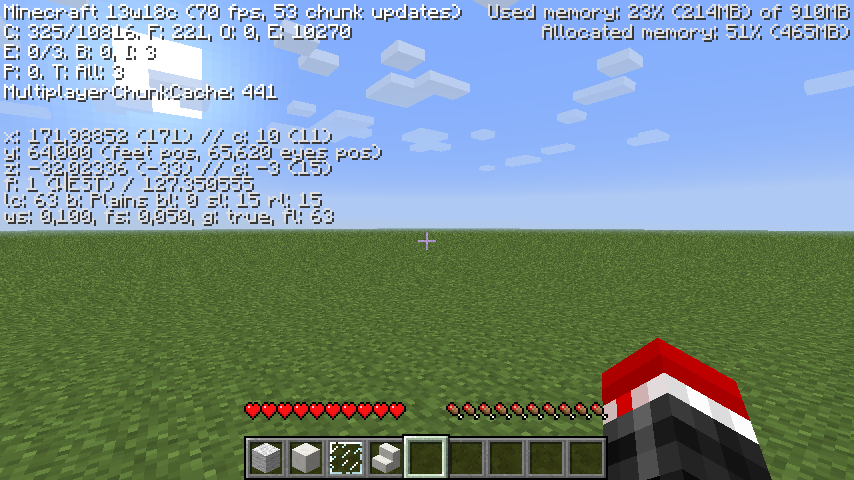


I made a server for my friends to join. So
weit was all good until we made a portal to nether. After we entered it, i noticed some huge masses of errors in console. I though it's nothing big as far as server works great. Although i suppose nether didn't work very well if this happened... (below more info)What I expected to happen was...:
Nether world shouldn't regenerate every time server restarts or everyone disconnectsWhat actually happened was...:
Nether world doesn't save, which means, if you make something in nether, next time it will be goneSteps to Reproduce:
Go to nether and modify it in any way (build/destroy something) and then:
1. Restart server
or
2. Reconnect (Make sure everyone else on server does it too)
Result: All your progress will be lostI made a server for my friends to join. So it was all good until we made a portal to nether. After we entered it, i noticed some huge masses of errors in console. I though it's nothing big as far as server works great. Although i suppose nether didn't work very well if this happened... (below is more info)
What I expected to happen was...:
Nether world shouldn't regenerate every time server restarts or everyone disconnectsWhat actually happened was...:
Nether world doesn't save, which means, if you make something in nether, next time it will be goneSteps to Reproduce:
Go to nether and modify it in any way (build/destroy something) and then:
1. Restart server
or
2. Reconnect (Make sure everyone else on server does it too)
Result: All your progress will be lost
I made a server for my friends to join. So it was all good until we made a portal to nether. After we entered it, i noticed some huge masses of errors in console. I though it's nothing big as far as server works great. Although i suppose nether didn't work very well if this happened... (below is more info)
What I expected to happen was...:
Nether world shouldn't regenerate every time server restarts or everyone disconnectsWhat actually happened was...:
Nether world doesn't save, which means, if you make something in nether, next time it will be goneSteps to Reproduce:
Go to nether and modify it in any way (build/destroy something) and then:
1. Restart server
or
2. Reconnect (Make sure everyone else on server does it too)
Result: All your progress will be lostEDIT Problem - Corrupted world data due to power loss
A weird bug that doesn't show up custom player skin. Instead it uses the default Steve's skin
Skin's size: 64x64 (Minecraft 1.8)My current skin associated with account:
A weird bug that doesn't show up custom player skin. Instead it uses the default Steve's skin
Skin's size: 64x64 (Minecraft 1.8)My current skin associated with account:
A weird bug that doesn't show up custom player skin. Instead it uses the default Steve's skin
Skin's size: 64x64 (Minecraft 1.8)My current skin associated with account: https://dl.dropboxusercontent.com/u/75943102/HawK3yLV.png
A weird bug that doesn't show up custom player skin. Instead it uses the default Steve's skin
Skin's size: 64x64 (Minecraft 1.8)My current skin associated with account: https://dl.dropboxusercontent.com/u/75943102/HawK3yLV.png
But this is how it shows up in-game:
A weird bug that doesn't show up custom player skin. Instead it uses the default Steve's skin
Skin's size: 64x64 (Minecraft 1.8)My current skin associated with account: https://dl.dropboxusercontent.com/u/75943102/HawK3yLV.png
But this is how it shows up in-game:A weird bug that doesn't show up custom player skin. Instead it uses the default Steve's skin
Skin's size: 64x64 (Minecraft 1.8)I guess it got fixed, was mojang skin server down?
Hello,
I recently made a server to play together with a family member, so I made it offline (doesn't connect to mojang), everything went alright, except the fact, that the other player can see me, but I can't see him. I suppose that it could be, because I have the default Alex skin while he haven't changed his skin for a very long time.Just in case, his username:
kenedy813@gmail.comThe picture doesn't tell much, but he's standing approximitely at my cursor's position
here you go. That was the best i could get, because server doesn't crash so it doesn't make a log file
server.log file is empty (0KB)
the bug seems to be fixed, it probably occured due to power loss on my pc which, i suppose, corrupted server world data
It still affects. Whenever I use "/spawnpoint @p ~ ~-5 ~" with a command block and I die, it drops out a message - "Your bed was missing or obstructed"
Confirmed! Ladders really do crash the game D:
Bumb, I can't finish my map anymore...
And sadly relative coordinates aren't allowed either:
I found out that this happens only if you have an older skin, but the fact is. that people can still do this to basically cheat on servers