 Jar Uca
- jaruca
- jaruca
- America/New_York
- Yes
- No
 MC-74799
![[Mojang] Searge (Michael Stoyke)](../../../data/assets/gravatar/searge.png)

Using decimals in the arguments for a player causes the command to fail. It appears that the player arguments are registered as the name of a player or it gives an error of "The entity UUID provided is in a invalid format".
Doing /tp @a[ry=95.0,rym=85.0] ~0 ~10 ~0 should teleport any player looking in that direction. It instead says "The entity UUID provided is in an invalid format" without moving the player. If the command were to be /tp @a[ry=95,rym=85] ~0 ~10 ~0 , the error is not thrown up and the player is teleported if looking in the specified direction.
Steps to reproduce:
1. Type /tp @p ~0 ~0 ~0 90 0
2. Type /testfor @p[ry=95,rym=85] (Should be teleported up 10 blocks)
3. Type /testfor @p[ry=95.0,rym=85.0] (Should fail and give error)This also applies to giving coordinates with decimals as shown in this (https://bugs.mojang.com/browse/MC-9074) bug report. I wanted to expand on it by showing rotation values being non-functional and to bring the issue to light, as the original report was from nearly two years ago. If you would like to reproduce the issue using coordinates instead of rotational values, here are the commands:
1. Type /tp @p 0 1 0
2. Type /testfor @p[0,1,0,r=1]
3. Type /testfor @p[0.0,1.0,0.0,r=1]Note: In the examples I used easy numbers for the sake of simplicity, but a real-world command that needs this kind of usage looks more like this:
/scoreboard players set @a[-34,21,128,r=10,rym=-122.2,ry=-119.1] hBlock 1
Using decimals in the arguments for a player causes the command to fail. It appears that the player arguments are registered as the name of a player or it gives an error of "The entity UUID provided is in a invalid format".
Doing /tp @a[ry=95.0,rym=85.0] ~0 ~10 ~0 should teleport any player looking in that direction. It instead says "The entity UUID provided is in an invalid format" without moving the player. If the command were to be /tp @a[ry=95,rym=85] ~0 ~10 ~0 , the error is not thrown up and the player is teleported if looking in the specified direction.
Steps to reproduce:
1. Type /tp @p ~0 ~0 ~0 90 0
2. Type /testfor @p[ry=95,rym=85] (Should be teleported up 10 blocks)
3. Type /testfor @p[ry=95.0,rym=85.0] (Should fail and give error)This also applies to giving coordinates with decimals as shown in this (https://bugs.mojang.com/browse/MC-9074) bug report. I wanted to expand on it by showing rotation values being non-functional and to bring the issue to light, as the original report was from nearly two years ago. If you would like to reproduce the issue using coordinates instead of rotational values, here are the commands:
1. Type /tp @p 0 1 0
2. Type /testfor @p[0,1,0,r=1]
3. Type /testfor @p[0.0,1.0,0.0,r=1]Note: In the examples I used easy numbers for the sake of simplicity, but a real-minecraftian-world command that needs this kind of usage looks more like this:
/scoreboard players set @a[-34,21,128,r=10,rym=-122.2,ry=-119.1] hBlock 1
Using decimals in the arguments for a player causes the command to fail. It appears that the player arguments are registered as the name of a player or it gives an error of "The entity UUID provided is in a invalid format". This is present in both Singleplayer and Multiplayer.
Doing /tp @a[ry=95.0,rym=85.0] ~0 ~10 ~0 should teleport any player looking in that direction. It instead says "The entity UUID provided is in an invalid format" without moving the player. If the command were to be /tp @a[ry=95,rym=85] ~0 ~10 ~0 , the error is not thrown up and the player is teleported if looking in the specified direction.
Steps to reproduce:
1. Type /tp @p ~0 ~0 ~0 90 0
2. Type /testfor @p[ry=95,rym=85] (Should be teleported up 10 blocks)
3. Type /testfor @p[ry=95.0,rym=85.0] (Should fail and give error)This also applies to giving coordinates with decimals as shown in this (https://bugs.mojang.com/browse/MC-9074) bug report. I wanted to expand on it by showing rotation values being non-functional and to bring the issue to light, as the original report was from nearly two years ago. If you would like to reproduce the issue using coordinates instead of rotational values, here are the commands:
1. Type /tp @p 0 1 0
2. Type /testfor @p[0,1,0,r=1]
3. Type /testfor @p[0.0,1.0,0.0,r=1]Note: In the examples I used easy numbers for the sake of simplicity, but a real-minecraftian-world command that needs this kind of usage looks more like this:
/scoreboard players set @a[-34,21,128,r=10,rym=-122.2,ry=-119.1] hBlock 1
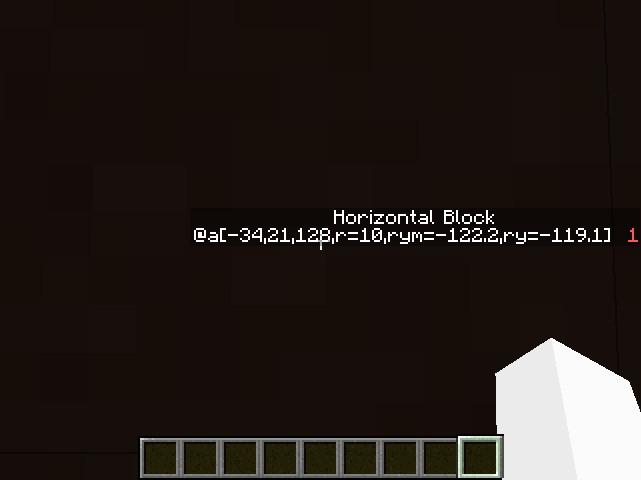
The attached image shows the result of using this command.
Using decimals in the arguments for a player causes the command to fail. It appears that the player arguments are registered as the name of a player or it gives an error of "The entity UUID provided is in a invalid format". This is present in both Singleplayer and Multiplayer.
Doing /tp @a[ry=95.0,rym=85.0] ~0 ~10 ~0 should teleport any player looking in that direction. It instead says "The entity UUID provided is in an invalid format" without moving the player. If the command were to be /tp @a[ry=95,rym=85] ~0 ~10 ~0 , the error is not thrown up and the player is teleported if looking in the specified direction.
Steps to reproduce:
1. Type /tp @p ~0 ~0 ~0 90 0
2. Type /testfor @p[ry=95,rym=85](Should be teleported up 10 blocks)
3. Type /testfor @p[ry=95.0,rym=85.0](Should fail and give error)This also applies to giving coordinates with decimals as shown in this (https://bugs.mojang.com/browse/MC-9074) bug report. I wanted to expand on it by showing rotation values being non-functional and to bring the issue to light, as the original report was from nearly two years ago. If you would like to reproduce the issue using coordinates instead of rotational values, here are the commands:
1. Type /tp @p 0 1 0
2. Type /testfor @p[0,1,0,r=1]
3. Type /testfor @p[0.0,1.0,0.0,r=1]Note: In the examples I used easy numbers for the sake of simplicity, but a real-minecraftian-world command that needs this kind of usage looks more like this:
/scoreboard players set @a[-34,21,128,r=10,rym=-122.2,ry=-119.1] hBlock 1
The attached image shows the result of using this command.Using decimals in the arguments for a player causes the command to fail. It appears that the player arguments are registered as the name of a player or it gives an error of "The entity UUID provided is in a invalid format". This is present in both Singleplayer and Multiplayer.
Doing /tp @a[ry=95.0,rym=85.0] ~0 ~10 ~0 should teleport any player looking in that direction. It instead says "The entity UUID provided is in an invalid format" without moving the player. If the command were to be /tp @a[ry=95,rym=85] ~0 ~10 ~0 , the error is not thrown up and the player is teleported if looking in the specified direction.
Steps to reproduce:
1. Type /tp @p ~0 ~0 ~0 90 0
2. Type /testfor @p[ry=95,rym=85] (Should say "Found [Your username here]")
3. Type /testfor @p[ry=95.0,rym=85.0] (Should say "The entity UUID provided is in an invalid format")This also applies to giving coordinates with decimals as shown in this (https://bugs.mojang.com/browse/MC-9074) bug report. I wanted to expand on it by showing rotation values being non-functional and to bring the issue to light, as the original report was from nearly two years ago. If you would like to reproduce the issue using coordinates instead of rotational values, here are the commands:
1. Type /tp @p 0 1 0
2. Type /testfor @p[0,1,0,r=1]
3. Type /testfor @p[0.0,1.0,0.0,r=1]In the examples I'm using easy numbers for the sake of simplicity, but a real-minecraftian-world command that needs this kind of usage looks more like this:
/scoreboard players set @a[-34,21,128,r=10,rym=-122.2,ry=-119.1] hBlock 1
The attached image shows the result of using this command.When using scoreboards, a player is created with the name "@a[-34,21,128,r=10,rym=-122.2,ry=-119.1]" instead of giving a score of 1 to players who are facing in that direction. If you wish to reproduce this, here are the commands:
1. Type /scoreboard objectives add test dummy Test
2. Type /scoreboard objectives setdisplay sidebar test
3. Type /scoreboard players set @p[r=5] test 1 (Should display your username on the sidebar with a 'test' score of 1.
4. Type /scoreboard players set @p[r=5.0] test 1 (Instead of finding the player, it creates a player with the name "@p[r=5.0]")Note: This has been brought up in this (https://bugs.mojang.com/browse/MC-9074) bug report, but it's nearly two years old and doesn't show what happens when used with scoreboards or rotation values. It's also marked as "resolved" even though the problem has never been fixed.
Windows 7; Java Version 7 Update 65
As the title states, when using a command such as /testfor, you cannot enter the command with decimals in the arguments.Example:
testfor @p[10.0,64,0.0,5]The problem is how the game interprets the command when no decimals are used.
testfor @p[10,64,0,5]In this example, the game actually looks at x=10.5 and z=0.5, and you cannot center your check point from there.
With how it is now, all points need to be a circle with an odd width, instead of even.
Using decimals in the arguments for a player causes the command to fail. It appears that the player arguments are registered as the name of a player or it gives an error of "The entity UUID provided is in a invalid format". This is present in both Singleplayer and Multiplayer.
Doing /tp @a[ry=95.0,rym=85.0] ~0 ~10 ~0 should teleport any player looking in that direction. It instead says "The entity UUID provided is in an invalid format" without moving the player. If the command were to be /tp @a[ry=95,rym=85] ~0 ~10 ~0 , the error is not thrown up and the player is teleported if looking in the specified direction. (Notice the only difference is adding decimals to specify the exact direction}
Steps to reproduce:
1. Type /tp @p ~0 ~0 ~0 90 0
2. Type /testfor @p[ry=95,rym=85] (Should say "Found [Your username here]")
3. Type /testfor @p[ry=95.0,rym=85.0] (Should say "The entity UUID provided is in an invalid format")This also applies to giving coordinates with decimals as shown in this (
MC-9074) bug report. I wanted to expand on it by showing rotation values being non-functional and to bring the issue to light, as the original report was from nearly two years ago. If you would like to reproduce the issue using coordinates instead of rotational values, here are the commands:1.
{code.xml}/tp @p 0 1 0
2. {code.xml}/testfor @p[0,1,0,r=1]
3. {code.xml}/testfor @p[0.0,1.0,0.0,r=1]In the examples I'm using easy numbers for the sake of simplicity, but a real-minecraftian-world command that needs this kind of usage looks more like this:
/scoreboard players set @a[-34,21,128,r=10,rym=-122.2,ry=-119.1] hBlock 1
The attached image shows the result of using this command.When using scoreboards, a player is created with the name "@a[-34,21,128,r=10,rym=-122.2,ry=-119.1]" instead of giving a score of 1 to players who are facing in that direction. If you wish to reproduce this, here are the commands:
1.
/scoreboard objectives add test dummy Test2.
/scoreboard objectives setdisplay sidebar test3.
/scoreboard players set @p[r=5] test 1(Should display your username on the sidebar with a 'test' score of 1.
4./scoreboard players set @p[r=5.0] test 1(Instead of finding the player, it creates a player with the name "@p[r=5.0]")
As the title states, when using a command such as /testfor, you cannot enter the command with decimals in the arguments.
Example:
testfor @p[10.0,64,0.0,5]The problem is how the game interprets the command when no decimals are used.
testfor @p[10,64,0,5]In this example, the game actually looks at x=10.5 and z=0.5, and you cannot center your check point from there.
With how it is now, all points need to be a circle with an odd width, instead of even.
Using decimals in the arguments for a player causes the command to fail. It appears that the player arguments are registered as the name of a player or it gives an error of "The entity UUID provided is in a invalid format". This is present in both Singleplayer and Multiplayer.
Doing /tp @a[ry=95.0,rym=85.0] ~0 ~10 ~0 should teleport any player looking in that direction. It instead says "The entity UUID provided is in an invalid format" without moving the player. If the command were to be /tp @a[ry=95,rym=85] ~0 ~10 ~0 , the error is not thrown up and the player is teleported if looking in the specified direction. (Notice the only difference is adding decimals to specify the exact direction}
Steps to reproduce:
1. Type /tp @p ~0 ~0 ~0 90 0
2. Type /testfor @p[ry=95,rym=85] (Should say "Found [Your username here]")
3. Type /testfor @p[ry=95.0,rym=85.0] (Should say "The entity UUID provided is in an invalid format")This also applies to giving coordinates with decimals as shown in this (
MC-9074) bug report. I wanted to expand on it by showing rotation values being non-functional and to bring the issue to light, as the original report was from nearly two years ago. If you would like to reproduce the issue using coordinates instead of rotational values, here are the commands:1.
{code.xml}/tp @p 0 1 0
2. {code.xml}/testfor @p[0,1,0,r=1]
3. {code.xml}/testfor @p[0.0,1.0,0.0,r=1]In the examples I'm using easy numbers for the sake of simplicity, but a real-minecraftian-world command that needs this kind of usage looks more like this:
/scoreboard players set @a[-34,21,128,r=10,rym=-122.2,ry=-119.1] hBlock 1
The attached image shows the result of using this command.When using scoreboards, a player is created with the name "@a[-34,21,128,r=10,rym=-122.2,ry=-119.1]" instead of giving a score of 1 to players who are facing in that direction. If you wish to reproduce this, here are the commands:
1.
/scoreboard objectives add test dummy Test2.
/scoreboard objectives setdisplay sidebar test3.
/scoreboard players set @p[r=5] test 1(Should display your username on the sidebar with a 'test' score of 1.
4./scoreboard players set @p[r=5.0] test 1(Instead of finding the player, it creates a player with the name "@p[r=5.0]")
As the title states, when using a command such as /testfor, you cannot enter the command with decimals in the arguments.
Example:
testfor @p[10.0,64,0.0,5]The problem is how the game interprets the command when no decimals are used.
testfor @p[10,64,0,5]In this example, the game actually looks at x=10.5 and z=0.5, and you cannot center your check point from there.
With how it is now, all points need to be a circle with an odd width, instead of even.
Using decimals in the arguments for a player causes the command to fail. It appears that the player arguments are registered as the name of a player or it gives an error of "The entity UUID provided is in a invalid format". This is present in both Singleplayer and Multiplayer.
Doing /tp @a[ry=95.0,rym=85.0] ~0 ~10 ~0 should teleport any player looking in that direction. It instead says "The entity UUID provided is in an invalid format" without moving the player. If the command were to be /tp @a[ry=95,rym=85] ~0 ~10 ~0 , the error is not thrown up and the player is teleported if looking in the specified direction. (Notice the only difference is adding decimals to specify the exact direction}
Steps to reproduce:
1.
/tp @p ~0 ~0 ~0 90 02.
/testfor @p[ry=95,rym=85](Should say "Found [Your username here]")
3./testfor @p[ry=95.0,rym=85.0](Should say "The entity UUID provided is in an invalid format")
This also applies to giving coordinates with decimals. If you would like to reproduce the issue using coordinates instead of rotational values, here are the commands:
1.
/tp @p 0 1 02.
/testfor @p[0,1,0,r=1]3.
/testfor @p[0.0,1.0,0.0,r=1]In the examples I'm using easy numbers for the sake of simplicity, but a real-minecraftian-world command that needs this kind of usage looks more like this:
/scoreboard players set @a[-34,21,128,r=10,rym=-122.2,ry=-119.1] hBlock 1The attached image shows the result of using this command.
When using scoreboards, a player is created with the name "@a[-34,21,128,r=10,rym=-122.2,ry=-119.1]" instead of giving a score of 1 to players who are facing in that direction. If you wish to reproduce this, here are the commands:
1.
/scoreboard objectives add test dummy Test2.
/scoreboard objectives setdisplay sidebar test3.
/scoreboard players set @p[r=5] test 1(Should display your username on the sidebar with a 'test' score of 1.
4./scoreboard players set @p[r=5.0] test 1(Instead of finding the player, it creates a player with the name "@p[r=5.0]")
As the title states, when using a command such as /testfor, you cannot enter the command with decimals in the arguments.
Example:
testfor @p[10.0,64,0.0,5]The problem is how the game interprets the command when no decimals are used.
testfor @p[10,64,0,5]In this example, the game actually looks at x=10.5 and z=0.5, and you cannot center your check point from there.
With how it is now, all points need to be a circle with an odd width, instead of even.
Using decimals in the arguments for a player causes the command to fail. It appears that the player arguments are registered as the name of a player or it gives an error of "The entity UUID provided is in a invalid format". This is present in both Singleplayer and Multiplayer.
Doing /tp @a[ry=95.0,rym=85.0] ~0 ~10 ~0 should teleport any player looking in that direction. It instead says "The entity UUID provided is in an invalid format" without moving the player. If the command were to be /tp @a[ry=95,rym=85] ~0 ~10 ~0 , the error is not thrown up and the player is teleported if looking in the specified direction. (Notice the only difference is adding decimals to specify the exact direction}
Steps to reproduce:
1.
/tp @p ~0 ~0 ~0 90 02.
/testfor @p[ry=95,rym=85](Should say "Found [Your username here]")
3./testfor @p[ry=95.0,rym=85.0](Should say "The entity UUID provided is in an invalid format")
This also applies to giving coordinates with decimals. If you would like to reproduce the issue using coordinates instead of rotational values, here are the commands:
1.
/tp @p 0 1 02.
/testfor @p[0,1,0,r=1]3.
/testfor @p[0.0,1.0,0.0,r=1]In the examples I'm using easy numbers for the sake of simplicity, but a real-minecraftian-world command that needs this kind of usage looks more like this:
/scoreboard players set @a[-34,21,128,r=10,rym=-122.2,ry=-119.1] hBlock 1The attached image shows the result of using this command.
When using scoreboards, a player is created with the name "@a[-34,21,128,r=10,rym=-122.2,ry=-119.1]" instead of giving a score of 1 to players who are facing in that direction. If you wish to reproduce this, here are the commands:
1.
/scoreboard objectives add test dummy Test2.
/scoreboard objectives setdisplay sidebar test3.
/scoreboard players set @p[r=5] test 1(Should display your username on the sidebar with a 'test' score of 1.
4./scoreboard players set @p[r=5.0] test 1(Instead of finding the player, it creates a player with the name "@p[r=5.0]")
As the title states, when using a command such as /testfor, you cannot enter the command with decimals in the arguments.
Example:
testfor @p[10.0,64,0.0,5]The problem is how the game interprets the command when no decimals are used.
testfor @p[10,64,0,5]In this example, the game actually looks at x=10.5 and z=0.5, and you cannot center your check point from there.
With how it is now, all points need to be a circle with an odd width, instead of even.
Using decimals in the arguments for a player causes the command to fail. It appears that the player arguments are registered as the name of a player or it gives an error of "The entity UUID provided is in a invalid format". This is present in both Singleplayer and Multiplayer.
Doing /tp @a[ry=95.0,rym=85.0] ~0 ~10 ~0 should teleport any player looking in that direction. It instead says "The entity UUID provided is in an invalid format" without moving the player. If the command were to be /tp @a[ry=95,rym=85] ~0 ~10 ~0 , the error is not thrown up and the player is teleported if looking in the specified direction. (Notice the only difference is adding decimals to specify the exact direction}
Steps to reproduce:
1.
/tp @p ~0 ~0 ~0 90 02.
/testfor @p[ry=95,rym=85](Should say "Found [Your username here]")
3.
/testfor @p[ry=95.0,rym=85.0](Should say "The entity UUID provided is in an invalid format")
This also applies to giving coordinates with decimals. If you would like to reproduce the issue using coordinates instead of rotational values, here are the commands:
1.
/tp @p 0 1 02.
/testfor @p[0,1,0,r=1]3.
/testfor @p[0.0,1.0,0.0,r=1]In the examples I'm using easy numbers for the sake of simplicity, but a real-minecraftian-world command that needs this kind of usage looks more like this:
/scoreboard players set @a[-34,21,128,r=10,rym=-122.2,ry=-119.1] hBlock 1The attached image shows the result of using this command.
When using scoreboards, a player is created with the name "@a[-34,21,128,r=10,rym=-122.2,ry=-119.1]" instead of giving a score of 1 to players who are facing in that direction. If you wish to reproduce this, here are the commands:
1.
/scoreboard objectives add test dummy Test2.
/scoreboard objectives setdisplay sidebar test3.
/scoreboard players set @p[r=5] test 1(Should display your username on the sidebar with a 'test' score of 1.
4./scoreboard players set @p[r=5.0] test 1(Instead of finding the player, it creates a player with the name "@p[r=5.0]")
As the title states, when using a command such as /testfor, you cannot enter the command with decimals in the arguments.
Example:
testfor @p[10.0,64,0.0,5]The problem is how the game interprets the command when no decimals are used.
testfor @p[10,64,0,5]In this example, the game actually looks at x=10.5 and z=0.5, and you cannot center your check point from there.
With how it is now, all points need to be a circle with an odd width, instead of even.
Windows 7; Java Version 7 Update 65
Windows 7; Java Version 7 Update 65
Windows 10; Java Version 8 Update 25
Windows 7; Java Version 7 Update 65
Windows 10 (Preview); Java Version 8 Update 25
Windows 7; Java Version 7 Update 65
Windows 10(Preview); Java Version 8 Update 25Windows 7; Java Version 7 Update 65
Windows 10 Technical Preview Build 9879; Java Version 8 Update 25
Using decimals in the arguments for a player causes the command to fail. It appears that the player arguments are registered as the name of a player or it gives an error of "The entity UUID provided is in a invalid format". This is present in both Singleplayer and Multiplayer.
Doing /tp @a[ry=95.0,rym=85.0] ~0 ~10 ~0 should teleport any player looking in that direction. It instead says "The entity UUID provided is in an invalid format" without moving the player. If the command were to be /tp @a[ry=95,rym=85] ~0 ~10 ~0 , the error is not thrown up and the player is teleported if looking in the specified direction. (Notice the only difference is adding decimals to specify the exact direction}
Steps to reproduce:
1.
/tp @p ~0 ~0 ~0 90 02.
/testfor @p[ry=95,rym=85](Should say "Found [Your username here]")
3.
/testfor @p[ry=95.0,rym=85.0](Should say "The entity UUID provided is in an invalid format")
This also applies to giving coordinates with decimals. If you would like to reproduce the issue using coordinates instead of rotational values, here are the commands:
1.
/tp @p 0 1 02.
/testfor @p[0,1,0,r=1]3.
/testfor @p[0.0,1.0,0.0,r=1]In the examples I'm using easy numbers for the sake of simplicity, but a real-minecraftian-world command that needs this kind of usage looks more like this:
/scoreboard players set @a[-34,21,128,r=10,rym=-122.2,ry=-119.1] hBlock 1The attached image shows the result of using this command.
When using scoreboards, a player is created with the name "@a[-34,21,128,r=10,rym=-122.2,ry=-119.1]" instead of giving a score of 1 to players who are facing in that direction. If you wish to reproduce this, here are the commands:
1.
/scoreboard objectives add test dummy Test2.
/scoreboard objectives setdisplay sidebar test3.
/scoreboard players set @p[r=5] test 1(Should display your username on the sidebar with a 'test' score of 1.
4./scoreboard players set @p[r=5.0] test 1(Instead of finding the player, it creates a player with the name "@p[r=5.0]")
As the
title states, when using a command such as /testfor, you cannot enter the command with decimals in the arguments.Example:
testfor @p[10.0,64,0.0,5]The problem is how the game interprets the command when no decimals are used.
testfor @p[10,64,0,5]In this example, the game actually looks at x=10.5 and z=0.5, and you cannot center your check point from there.
With how it is now, all points need to be a circle with an odd width, instead of even.
Using decimals in the arguments for a player causes the command to fail. It appears that the player arguments are registered as the name of a player or it gives an error of "The entity UUID provided is in a invalid format". This is present in both Singleplayer and Multiplayer.
Doing /tp @a[ry=95.0,rym=85.0] ~0 ~10 ~0 should teleport any player looking in that direction. It instead says "The entity UUID provided is in an invalid format" without moving the player. If the command were to be /tp @a[ry=95,rym=85] ~0 ~10 ~0 , the error is not thrown up and the player is teleported if looking in the specified direction. (Notice the only difference is adding decimals to specify the exact direction}
Steps to reproduce:
1.
/tp @p ~0 ~0 ~0 90 02.
/testfor @p[ry=95,rym=85](Should say "Found [Your username here]")
3.
/testfor @p[ry=95.0,rym=85.0](Should say "The entity UUID provided is in an invalid format")
This also applies to giving coordinates with decimals. If you would like to reproduce the issue using coordinates instead of rotational values, here are the commands:
1.
/tp @p 0 1 02.
/testfor @p[0,1,0,r=1]3.
/testfor @p[0.0,1.0,0.0,r=1]In the examples I'm using easy numbers for the sake of simplicity, but a real-minecraftian-world command that needs this kind of usage looks more like this:
/scoreboard players set @a[-34,21,128,r=10,rym=-122.2,ry=-119.1] hBlock 1The attached image shows the result of using this command.
When using scoreboards, a player is created with the name "@a[-34,21,128,r=10,rym=-122.2,ry=-119.1]" instead of giving a score of 1 to players who are facing in that direction. If you wish to reproduce this, here are the commands:
1.
/scoreboard objectives add test dummy Test2.
/scoreboard objectives setdisplay sidebar test3.
/scoreboard players set @p[r=5] test 1(Should display your username on the sidebar with a 'test' score of 1.
4./scoreboard players set @p[r=5.0] test 1(Instead of finding the player, it creates a player with the name "@p[r=5.0]")
As the last author of this bug brings up a good point, I'm going to keep their original post here:
As the title states, when using a command such as /testfor, you cannot enter the command with decimals in the arguments.
Example:
testfor @p[10.0,64,0.0,5]The problem is how the game interprets the command when no decimals are used.
testfor @p[10,64,0,5]In this example, the game actually looks at x=10.5 and z=0.5, and you cannot center your check point from there.
With how it is now, all points need to be a circle with an odd width, instead of even.
Using decimals in the arguments for a player causes the command to fail. It appears that the player arguments are registered as the name of a player or it gives an error
of"The entity UUID provided is in a invalid format". This is present in both Singleplayer and Multiplayer.Doing /tp @a[ry=95.0,rym=85.0] ~0 ~10 ~0 should teleport any player looking in that direction. It instead says "The entity UUID provided is in an invalid format" without moving the player. If the command were to be /tp @a[ry=95,rym=85] ~0 ~10 ~0 ,
theerroris not thrown upand the player is teleported if looking in the specified direction. (Notice the only difference is adding decimals to specify the exact direction}Steps to reproduce:
1.
/tp @p ~0 ~0 ~0 90 02.
/testfor @p[ry=95,rym=85](Should say "Found [Your username here]")
3.
/testfor @p[ry=95.0,rym=85.0](Should say "The entity UUID provided is in an invalid format")
This also applies to giving coordinates with decimals. If you would like to reproduce the issue using coordinates instead of rotational values, here are the commands:
1.
/tp @p 0 1 02.
/testfor @p[0,1,0,r=1]3.
/testfor @p[0.0,1.0,0.0,r=1]In the examples I'm using easy numbers for the sake of simplicity, but a real-minecraftian-world command that needs this kind of usage looks more like this:
/scoreboard players set @a[-34,21,128,r=10,rym=-122.2,ry=-119.1] hBlock 1The attached image shows the result of using this command.
When using scoreboards, a player is created with the name "@a[-34,21,128,r=10,rym=-122.2,ry=-119.1]" instead of giving a score of 1 to players who are facing in that direction. If you wish to reproduce this, here are the commands:
1.
/scoreboard objectives add test dummy Test2.
/scoreboard objectives setdisplay sidebar test3.
/scoreboard players set @p[r=5] test 1(Should display your username on the sidebar with a 'test' score of 1.
4./scoreboard players set @p[r=5.0] test 1(Instead of finding the player, it creates a player with the name "@p[r=5.0]")
As the last author of this bug brings up a good point, I'm going to keep their original post here:
As the title states, when using a command such as /testfor, you cannot enter the command with decimals in the arguments.
Example:
testfor @p[10.0,64,0.0,5]The problem is how the game interprets the command when no decimals are used.
testfor @p[10,64,0,5]In this example, the game actually looks at x=10.5 and z=0.5, and you cannot center your check point from there.
With how it is now, all points need to be a circle with an odd width, instead of even.
Using decimals in the arguments for a player causes the command to fail. It appears that the player arguments are registered as the name of a player or it gives an error stating that "The entity UUID provided is in a invalid format". This is present in both Singleplayer and Multiplayer.
Doing /tp @a[ry=95.0,rym=85.0] ~0 ~10 ~0 should teleport any player looking in that direction. It instead says "The entity UUID provided is in an invalid format" without moving the player. If the command were to be /tp @a[ry=95,rym=85] ~0 ~10 ~0 , no error appears and the player is teleported if looking in the specified direction. (Notice the only difference is adding decimals to specify the exact direction)
Steps to reproduce:
1.
/tp @p ~0 ~0 ~0 90 02.
/testfor @p[ry=95,rym=85](Should say "Found [Your username here]")
3.
/testfor @p[ry=95.0,rym=85.0](Should say "The entity UUID provided is in an invalid format")
This also applies to giving coordinates with decimals. If you would like to reproduce the issue using coordinates instead of rotational values, here are the commands:
1.
/tp @p 0 1 02.
/testfor @p[0,1,0,r=1]3.
/testfor @p[0.0,1.0,0.0,r=1]In the examples I'm using easy numbers for the sake of simplicity, but a real-minecraftian-world command that needs this kind of usage looks more like this:
/scoreboard players set @a[-34,21,128,r=10,rym=-122.2,ry=-119.1] hBlock 1The attached image shows the result of using this command.
When using scoreboards, a player is created with the name "@a[-34,21,128,r=10,rym=-122.2,ry=-119.1]" instead of giving a score of 1 to players who are facing in that direction. If you wish to reproduce this, here are the commands:
1.
/scoreboard objectives add test dummy Test2.
/scoreboard objectives setdisplay sidebar test3.
/scoreboard players set @p[r=5] test 1(Should display your username on the sidebar with a 'test' score of 1.
4./scoreboard players set @p[r=5.0] test 1(Instead of finding the player, it creates a player with the name "@p[r=5.0]")
As the last author of this bug brings up a good point, I'm going to keep their original post here:
As the title states, when using a command such as /testfor, you cannot enter the command with decimals in the arguments.
Example:
testfor @p[10.0,64,0.0,5]The problem is how the game interprets the command when no decimals are used.
testfor @p[10,64,0,5]In this example, the game actually looks at x=10.5 and z=0.5, and you cannot center your check point from there.
With how it is now, all points need to be a circle with an odd width, instead of even.
According to Searge, "Decimals are not recognized, the selector parameters are all integers. But it should now consistently fail instead of creating a player on the scoreboard with the selector as name." Upon testing in 16w07b, it appears that it is still consistently failing instead of creating a new player. (Minecraft should say "The entity UUID provided is in an invalid format")
(THIS HAS BEEN RESOLVED)
Searge: "Decimals are not recognized, the selector parameters are all integers. But it should now consistently fail instead of creating a player on the scoreboard with the selector as name."Using decimals in the arguments for a player causes the command to fail. It appears that the player arguments are registered as the name of a player or it gives an error stating that "The entity UUID provided is in a invalid format". This is present in both Singleplayer and Multiplayer.
Doing /tp @a[ry=95.0,rym=85.0] ~0 ~10 ~0 should teleport any player looking in that direction. It instead says "The entity UUID provided is in an invalid format" without moving the player. If the command were to be /tp @a[ry=95,rym=85] ~0 ~10 ~0 , no error appears and the player is teleported if looking in the specified direction. (Notice the only difference is adding decimals to specify the exact direction)
Steps to reproduce:
1.
/tp @p ~0 ~0 ~0 90 02.
/testfor @p[ry=95,rym=85](Should say "Found [Your username here]")
3.
/testfor @p[ry=95.0,rym=85.0](Should say "The entity UUID provided is in an invalid format")
This also applies to giving coordinates with decimals. If you would like to reproduce the issue using coordinates instead of rotational values, here are the commands:
1.
/tp @p 0 1 02.
/testfor @p[0,1,0,r=1]3.
/testfor @p[0.0,1.0,0.0,r=1]In the examples I'm using easy numbers for the sake of simplicity, but a real-minecraftian-world command that needs this kind of usage looks more like this:
/scoreboard players set @a[-34,21,128,r=10,rym=-122.2,ry=-119.1] hBlock 1The attached image shows the result of using this command.
When using scoreboards, a player is created with the name "@a[-34,21,128,r=10,rym=-122.2,ry=-119.1]" instead of giving a score of 1 to players who are facing in that direction. If you wish to reproduce this, here are the commands:
1.
/scoreboard objectives add test dummy Test2.
/scoreboard objectives setdisplay sidebar test3.
/scoreboard players set @p[r=5] test 1(Should display your username on the sidebar with a 'test' score of 1.
4./scoreboard players set @p[r=5.0] test 1(Instead of finding the player, it creates a player with the name "@p[r=5.0]")
As the last author of this bug brings up a good point, I'm going to keep their original post here:
As the title states, when using a command such as /testfor, you cannot enter the command with decimals in the arguments.
Example:
testfor @p[10.0,64,0.0,5]The problem is how the game interprets the command when no decimals are used.
testfor @p[10,64,0,5]In this example, the game actually looks at x=10.5 and z=0.5, and you cannot center your check point from there.
With how it is now, all points need to be a circle with an odd width, instead of even.
Done with the command
/scoreboard players set @a[-34,21,128,r=10,rym=-122.2,ry=-119.1] hBlock 1
As you can see, instead of searching for people using the arguments @a[-34,21,128,r=10,rym=-122.2,ry=-119.1], Minecraft set it as the name of a player.
Done with the command
As you can see, instead of searching for people using the arguments @a[-34,21,128,r=10,rym=-122.2,ry=-119.1], Minecraft set it as the name of a player.