 Jason
Jason
- JasonD157
- jasond157
- Europe/Stockholm
- Yes
- No
 MC-167183
 MCPE-68584MCPE-68592


When placing stairs in certain ways some of the stairs get messed up.
How to reproduce:
Place a stair in any direction.
Place another stair right next to it to create an L formation in the top part.
Place another stair to the opposing direction of the first stair was placed.
If done correctly, the stair will appear as a corner stair when it shouldn't be.
This was done on a server that runs on 1.13.2, and a local world, in 1.15.3 pre-release and 1.15.6 pre-release. This can be very annoying when building. This also allows for other weird things to occur, as can be seen on the
second attachment.When placing stairs in certain ways some of the stairs get messed up.
How to reproduce:
Place a stair in any direction.
Place another stair right next to it to create an L formation in the top part.
Place another stair to the opposing direction of the first stair was placed.
If done correctly, the stair will appear as a corner stair when it shouldn't be.
This was done on a server that runs on 1.13.2, and a local world, in 1.15.3 pre-release and 1.15.6 pre-release. This can be very annoying when building. This also allows for other weird things to occur, as can be seen on the third attachment.
How to recreate: if you have two lava streams seperated by one air block, and let them flow in a 3 long and 1 wide trench, and then place a barrier block above the middle lava block, as seen in the attached picture, the lava in the trenches will become invisible.
How to reproduce:
1
How to recreate: if you have two lava streams seperated by one air block, and let them flow in a 3 long and 1 wide trench, and then place a barrier block above the middle lava block, as seen in the attached picture, the lava in the trenches will become invisible.
How to reproduce:
1
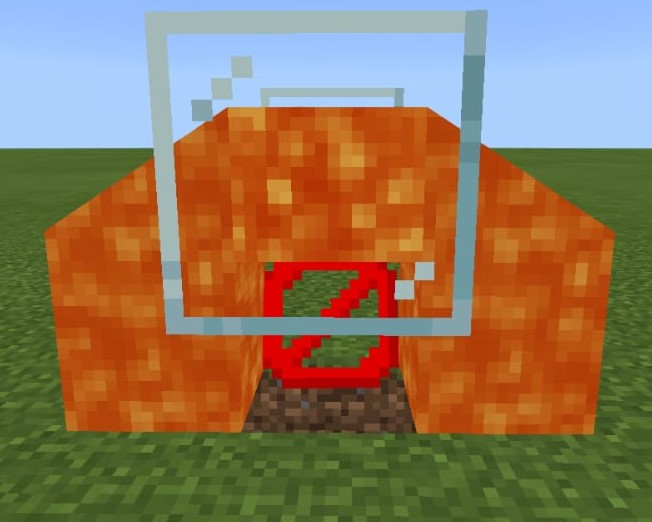
Flowing lava is invisible when looked at through a specific setup.
How to reproduce:
- Place a barrier on a platform that is at least 3 blocks wide, 5 blocks long and 2 blocks deep (normal flat world works fine).
- Make a trench that is 1 block wide and 3 blocks long, with the barrier as centre (barrier is above the trench, not in it)
- Place a block on top of the barrier from step 1.
- Place 1 blocks to both sides of the block from the previous step. IMPORTANT: place them in the opposite axis that you built the trench in, so that when you look at it from above, your build looks like a cross, using both the trench and the placed blocks.
- Remove the block from step 3.
- Place a lava source on top of the barrier from step 1.
- Let the lava flow.
Observed results:
The flowing lava is not visible through the barrier if you look at it from the side.Expected results:
The flowing lava is visible through the barrier if you look at it from the side.
If there is a waterlogged stair upside down and there is a transparent block below it, the water cannot be seen from below (as seen in picture). Is non-directional from my testing.
How to reproduce:
- Place stair in such a way that there is an "empty" area facing down.
- Place a transparant block, such as a barrier or glass, 1 block below the stair (no air gap).
- [Optional] For a cleaner setup, surround the blocks around the stair so that the water doesn't flow out when you do step 4.
- Waterlog the stair.
Observed results:
From beneath, it looks like the stair is not waterlogged.
Expected results:
From beneath, it looks like the stair is waterlogged.
When using the /gametest create command, e.g. /gametest create "TesT" 1 1 1, the structure block that is generated will have "test". This appears in the field where you input the structure that is to be saved/loaded/exported. It removes all uppercase characters, and replaces them with lowercase characters. This seems like unintended behavior to me, as structure files are indeed case-sensitive. The command block that is placed with it generates correctly, as it keeps the original string as name.
How to reproduce:
- Input command /gametest create "TesT" 1 1 1.
- Right-click on structure block that is generated.
- Observe that the text in the structure block is "test"
When using the /gametest create command, e.g. /gametest create "TesT" 1 1 1, the structure block that is generated will have "test". This appears in the field where you input the structure that is to be saved/loaded/exported. It removes all uppercase characters, and replaces them with lowercase characters. This seems like unintended behavior to me, as structure files are indeed case-sensitive. The command block that is placed with it generates correctly, as it keeps the original string as name.
How to reproduce:
- Input command /gametest create "TesT" 1 1 1.
- Right-click on structure block that is generated.
Observed results:
Text in structure block is "test".
Expected results:
Text in structure block is "TesT".
Naming items in anvil using formatting codes sometimes reverts item name to hashes.[Delete] Realized halfway through typing bug isn't reproducable.
When naming items using formatting codes such asHowever, do fix Crtl+Alt+Shift+S automatically posting your issue. Very annoying when trying to type §.
Just checked in 1.16.220, the bug still seems to occur.