 Julius Potasz
- JPWaterFlame
- jpwaterflame
- Pacific/Midway
- Yes
- No
 MCPE-29749MCPE-29925MCPE-33167MCPE-35859MCPE-41994



Iron golems in PE and Windows 10 are a nuisance not because they get themselves stuck underwater, but they take a LONG LONG TIME to react to enemies! Even when they are WELL WITHIN their vicinity! I would say it takes 5-10 seconds for them to react, but I would REALLY LOVE IT if this delay issue can be fixed. A MUCH MUCH MUCH needed fix! I've got a villager population I'm trying to protect from zombies and these beasts AREN'T BEING BEASTS! Real seconds means A LOT of lives for my villagers and I think its safe to say, these golems aren't familiar with this principle.
Once again, this is an issue that needs to be fixed with them, yet they dont seem to have a problem in creative.
Iron golems in PE and Windows 10 are a nuisance not because they get themselves stuck underwater, but they take a LONG LONG TIME to react to enemies! Even when they are WELL WITHIN their vicinity!
I would sayit takes 5-10 seconds for them to react,butI would REALLY LOVE IT if this delay issue can be fixed. A MUCH MUCH MUCH needed fix! I've got a villager population I'm trying to protect from zombies and these beasts AREN'T BEING BEASTS! Real seconds means A LOT of lives for my villagers and I think its safe to say, these golems aren't familiar with this principle.Once again, this is an issue that needs to be fixed with them, yet they dont seem to have a problem in creative.
Iron golems in PE and Windows 10 are a nuisance not because they get themselves stuck underwater, but they take a LONG LONG TIME to react to enemies! Even when they are WELL WITHIN their vicinity! This doesn't happen every an IG comes into contact with an enemy, but when it happens, it takes 5-10 seconds for them to react, and I would REALLY LOVE IT if this delay issue can be fixed. A MUCH MUCH MUCH needed fix! I've got a villager population I'm trying to protect from zombies and these beasts AREN'T BEING BEASTS! Real seconds means A LOT of lives for my villagers and I think its safe to say, these golems aren't familiar with this principle.
Once again, this is an issue that needs to be fixed with them, yet they dont seem to have a problem in creative.
Delay in Iron Golems responding to the enemy glitch!
Delay in Iron Golems responding to the enemy glitch! They're supposed to react instantly!
Iron golems in PE and Windows 10 are a nuisance not because they get themselves stuck underwater, but they take a LONG LONG TIME to react to enemies! Even when they are WELL WITHIN their vicinity! This doesn't happen every time an IG comes into contact with an enemy, but when it happens, it takes 5-10 seconds for them to react, and I would REALLY LOVE IT if this delay issue can be fixed. A MUCH MUCH MUCH needed fix! I've got a villager population I'm trying to protect from zombies and these beasts AREN'T BEING BEASTS! Real seconds means A LOT of lives for my villagers and I think its safe to say, these golems aren't familiar with this principle.
Once again, this is an issue that needs to be fixed with them, yet they dont seem to have a problem in creative.
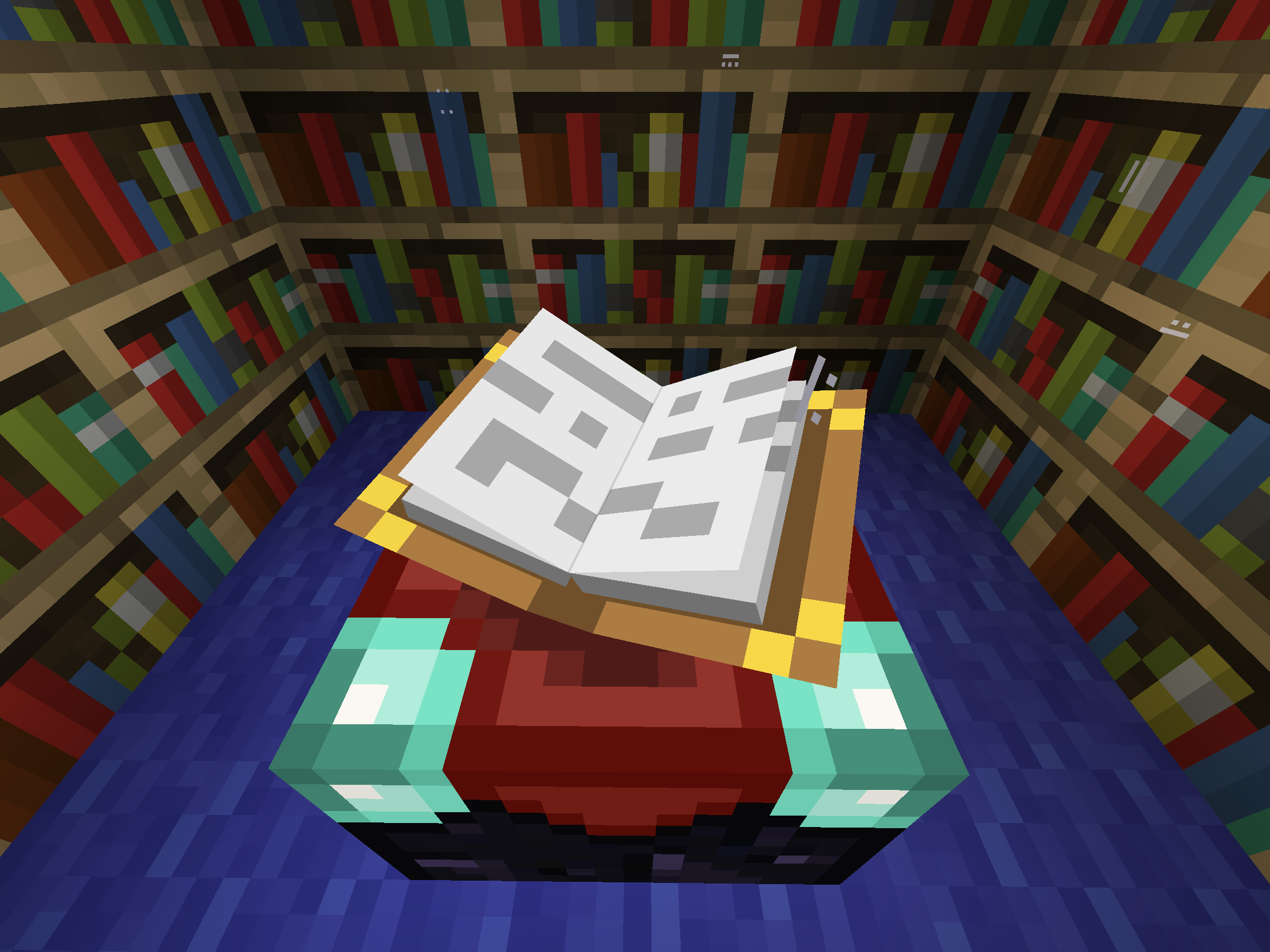
This really isn’t much of an issue, in terms of game performance, but isn’t the book on the enchantment table supposed to be directly facing the player, as if it were looking at the player?
For me, every time it opens, it is always at a crooked angle.This is a really annoying bug! That is all!
Enchanted book isnotdirectly facing the playerEnchanted book is NOT directly facing the player
This is
a really annoying bug! That is all!This is only a visual bug and it does not affect the actual functionality of the table itself. However, it's really bugging me. Please forgive me for the pun.
This visual bug happens to also be present on Xbox One and Windows 10, not just iOS.
This is only a visual bug and it does not affect the actual functionality of the table itself. However, it's really bugging me. Please forgive me for the pun.
This visual bug happens to also be present on Xbox One and Windows 10, not just iOS.
It's always like this regardless of what gamemode I am on.
This is only a visual bug and it does not affect the actual functionality of the table itself. However, it's really bugging me. Please forgive me for the pun.
This visual bug happens to also be present on Xbox One and Windows 10, not just iOS.It's always like this regardless of what gamemode I am on.
This is only a visual bug and it does not affect the actual functionality of the table itself. However, it's really bugging me. Please forgive me for the pun.
Since I play on 3 platforms, I noticed this visual bug happens to also be present on Xbox One and Windows 10, not just iOS.
It's always like this regardless of what gamemode I am on.
This is only a visual bug and it does not affect the actual functionality of the table itself. However, it's really bugging me.
Please forgive me for the pun.Since I play on 3 platforms, I noticed this visual bug happens to also be present on Xbox One and Windows 10, not just iOS.
It's always like this regardless of what gamemode I am on.
This is only a visual bug and it does not affect the actual functionality of the table itself. However, it's really bugging me. I apologize for the pun.
Since I play on 3 platforms, I noticed this visual bug happens to also be present on Xbox One and Windows 10, not just iOS.
It's always like this regardless of what gamemode I am on.
This is only a visual bug and it does not affect the actual functionality of the table itself. However, it's really bugging me
.I apologize for the pun.Since I play on 3 platforms, I noticed this visual bug happens to also be present on Xbox One and Windows 10, not just iOS.
It's always like this regardless of what gamemode I am on.
This is only a visual bug and it does not affect the actual functionality of the table itself. However, it's really bugging me and I apologize for the pun.
Since I play on 3 platforms, I noticed this visual bug happens to also be present on Xbox One and Windows 10, not just iOS.
It's always like this regardless of what gamemode I am on.
There is an issue when at some random point when breaking blocks (i.e. mining), they will eventually stop dropping themselves as items when I mine blocks like stone. I suspect my game has stopped responding whenever this happens. I mean I can STILL break them. They just wont become those floaty items that I cannot get back. As a result, I have to be constantly disconnecting and reconnecting from my worlds to temporarily fix this. Since this bug exists, I have to be very careful when mining valuables like gold and diamonds because once I break em and they don’t drop as items, they are gone for good. I also don’t receive any experience for ores that give me XP. I hope I am not the only one experiencing this bug and on that note, I really hope that this bug can be crushed in the very next update. Here are some very brief clips if no one wants to believe me.
There is an issue when at some random point when breaking blocks (i.e. mining), they will eventually stop dropping themselves as items when I mine blocks like stone. I suspect my game has stopped responding whenever this happens. I mean I can STILL break them. They just wont become those floaty items that I cannot get back. As a result, I have to be constantly disconnecting and reconnecting from my worlds to temporarily fix this. Since this bug exists, I have to be very careful when mining valuables like gold and diamonds because once I break em and they don’t drop as items, they are gone for good. I also don’t receive any experience for ores that give me XP. I hope I am not the only one experiencing this bug and on that note, I really hope that this bug can be crushed in the very next update. Here are some very brief clips if no one wants to believe me. Notice that in one of the clips I am earning ZERO experience from nether quartz ore.
There is an issue when at some random point when breaking blocks (i.e. mining), they will eventually stop dropping themselves as items when I mine blocks like stone. I suspect my game has stopped responding whenever this happens. I mean I can STILL break them. They just wont become those floaty items that I cannot get back. As a result, I have to be constantly disconnecting and reconnecting from my worlds to temporarily fix this. Since this bug exists, I have to be very careful when mining valuables like gold and diamonds because once I break em and they don’t drop as items, they are gone for good. I also don’t receive any experience for ores that give me XP. I hope I am not the only one experiencing this bug and on that note, I really hope that this bug can be crushed in the very next update. Here are some very brief clips if no one wants to believe me. Notice that in one of the clips I am earning ZERO experience from nether quartz ore. This bug seems to be taking effect mostly after killing ghasts.
7EC7305B-6DA3-450B-A57D-C12713470C4B.MP4
For me, it’s not just a visual problem, but also a functional problem as well. Due to this annoying bug, my mine-cart elevator has been very unreliable in terms of going up and down seamlessly. Because I’m unable to reach the next mine-cart above me when going up, I have to get out, maybe even jump to get into it, so I had to replace a portion of my elevator with a waterfall, which actually a great alternative. That being said, now I’m not too worried about, but still would like to have it crushed for the greater good.
For me, it’s not just a visual problem, but also a functional problem as well. Due to this annoying bug, my mine-cart elevator has been very unreliable in terms of going up and down seamlessly. Because I’m unable to reach the next mine-cart above me when going up, I have to get out, maybe even jump to get into it, so I had to replace a portion of my elevator with a waterfall, which actually is a great alternative. That being said, now I’m not too worried about, but still would like to have it crushed for the greater good.
For me, it’s not just a visual problem, but also a functional problem as well. Due to this annoying bug, my mine-cart elevator has been very unreliable in terms of going up and down seamlessly. Because I’m unable to reach the next mine-cart above me when going up, I have to get out, maybe even jump to get into it, so I had to replace a portion of my elevator with a waterfall, which actually is a great alternative. That being said, now I’m not too worried about it, but I still would like to have it crushed for the greater good.
Lost everythingwhen reloading world. Spawned where I initiallystarted worldwith nothing.I got a message when reloading world and I lost everything I’ve done in game. Spawned where I initially created world from Minecraft day 1.
I had so much going on in my world, only to lose it all. I would get this message when clicking on my world. It will say “There was a problem loading this world.” And below that is the “OK” button. I
’mclick it and it would take me back to the main menu. When I tried again, I ended up in the exact same state when I first created the world with absolutely nothing. Everything I’ve built was also lost. All of that hard work for absolutely nothing.
I had so much going on in my world, only to lose it all. I would get this message when clicking on my world. It will say “There was a problem loading this world.” And below that is the “OK” button. I click it and it would take me back to the main menu. When I tried again, I ended up in the exact same state when I first created the world with absolutely nothing. Everything I’ve built was also lost. All of that hard work for absolutely nothing. Well I guess it’s time to take a break from the game.........again.
I had so much going on in my world, only to lose it all. I would get this message when clicking on my world. It will say “There was a problem loading this world.” And below that is the “OK” button. I click it and it would take me back to the main menu. I also noticed my player avatar was temporarily gone there. I only saw my Minecraft name, which I knew right off the bat that that a very bad sign. When I tried again, I ended up in the exact same state when I first created the world with absolutely nothing. Everything I’ve built was also lost. All of that hard work for absolutely nothing. Well I guess it’s time to take a break from the game.........again.
I had so much going on in my world, only to lose it all. I would get this message when clicking on my world. It will say “There was a problem loading this world.” And below that is the “OK” button. I click it and it would take me back to the main menu. I also noticed my player avatar was temporarily gone
there.I only saw my Minecraft name, which I knew right off the batthat thata very bad sign. When Itried again, I ended up in the exact same state when I first created the world with absolutely nothing. Everything I’ve built was also lost. All of that hard work for absolutely nothing. Well I guess it’s time to take a break from the game.........again.I had so much going on in my world, only to lose it all. I would get this message when clicking on my world. It will say “There was a problem loading this world.” And below that is the “OK” button. I click it and it would take me back to the main menu. I also noticed my player avatar was temporarily gone for a few seconds. During those few seconds, I only saw my Minecraft name, which I know right off the bat is a very bad sign. When I bypassed the warning prompt and loaded my world, I ended up in the exact same state when I first created the world with absolutely nothing. Everything I’ve built was also lost. All of that hard work for absolutely nothing. Well I guess it’s time to take a break from the game.........again.
I had so much going on in my world, only to lose it all. I would get this message when clicking on my world. It will say “There was a problem loading this world.” And below that is the “OK” button. I click it and it would take me back to the main menu. I also noticed my player avatar was temporarily gone for a few seconds. During those few seconds, I only saw my Minecraft name, which I know right off the bat is a very bad sign. When I bypassed the warning prompt and loaded my world, I ended up in the exact same state when I first created the world with absolutely nothing. Everything I’ve built was also lost. All of that hard work for absolutely nothing. Well I guess it’s time for me to take a break from the game.........again.
I had so much going on in my world, only to lose it all. I would get this message when clicking on my world. It will say “There was a problem loading this world.” And below that is the “OK” button. I click it and it would take me back to the main menu. I also noticed my player avatar was temporarily gone for a few seconds. During those few seconds, I only saw my Minecraft name, which I know right off the bat is a very bad sign. When I bypassed the warning prompt and loaded my world, I ended up in the exact same state when I first created the world with absolutely nothing. Everything I’ve built was also lost. All of that hard work for absolutely nothing. Well I guess it’s time for me to take another break from the game.........again.
I got an error message when reloading world and I lost everything I’ve done in game. Spawned where I initially created world from Minecraft day 1.
Whenever a ghast prepares spit a fireball at me, it continues holding its charge like a charged crossbow the moment I immediately back out of its vicinity. Once I return within its firing range and it looks at me, it silently releases its fireball at me. As you saw from the evidence, the fireball knocked me back quite a bit because it exploded on impact at my feet. On that note, what I’m really worried about is the fact that it can do it silently, which means that sneak-building or mining on a tiny ledge
ata very high area with possibly a sea of lava at the bottom with a recently encountered ghost or two below you....is most likely going to translate into a death sentence.Whenever a ghast prepares spit a fireball at me, it continues holding its charge like a charged crossbow the moment I immediately back out of its vicinity. Once I return within its firing range and it looks at me, it silently releases its fireball at me. As you saw from the evidence, the fireball knocked me back quite a bit because it exploded on impact at my feet. On that note, what I’m really worried about is the fact that it can do it silently, which means that sneak-building or mining on a tiny ledge in a very high area with possibly a sea of lava at the bottom with a recently encountered ghost or two below you....is most likely going to translate into a death sentence.
Whenever a ghast prepares spit a fireball at me, it continues holding its charge like a charged crossbow the moment I immediately back out of its vicinity. Once I return within its firing range and it looks at me, it silently releases its fireball at me. As you saw from the evidence, the fireball knocked me back quite a bit because it exploded on impact at my feet. On that note, what I’m really worried about is the fact that it can do it silently, which means that sneak-building or mining on a tiny ledge in a very high area with possibly a sea of lava at the bottom with a recently encountered gh
ost or two below you....is most likely going to translate into a death sentence.Whenever a ghast prepares spit a fireball at me, it continues holding its charge like a charged crossbow the moment I immediately back out of its vicinity. Once I return within its firing range and it looks at me, it silently releases its fireball at me. As you saw from the evidence, the fireball knocked me back quite a bit because it exploded on impact at my feet. On that note, what I’m really worried about is the fact that it can do it silently, which means that sneak-building or mining on a tiny ledge in a very high area with possibly a sea of lava at the bottom with a recently encountered ghast or two below you....is most likely going to translate into a death sentence.
Ghast getting stuck in firing mode
Ghastgetting stuck in firing mode. Holdsonto its fire charge till the player re-enters it’s vicinity.Ghast holding onto its fire charge till the player re-enters it’s vicinity.
Wandering trader makes no sounds on Bedrock.
Listen.Wandering trader makes no sounds on Bedrock. Also affects Win 10 and iOS.
The world I’m trying to load up is just over 140 MB. I don’t understand! It never takes THIS long to load a world! I disconnected from it to take care of daily life and 2 hours later when I try to reconnect I now get stuck in the loading screen! I tried restarting the game to restarting my console.........no use. And I had so m
any projects done in that world! 😔The world I’m trying to load up is just over 140 MB. I don’t understand! It never takes THIS long to load a world! I disconnected from it to take care of daily life and 2 hours later when I try to reconnect I now get stuck in the loading screen! I tried restarting the game to restarting my console.........no use. And I had so much stuff happening in that world! I hope I don’t lose everything! 😔
The world I’m trying to load up is just over 140 MB. I don’t understand! It never takes THIS long to load a world! I disconnected from it to take care of daily life and 2 hours later when I try to reconnect I now get stuck in the loading screen! I tried restarting the game to restarting my console.........no use.
And I had so much stuff happening in that world! I hope I don’t lose everything! 😔The world I’m trying to load up is just over 140 MB. I don’t understand! It never takes THIS long to load a world! I disconnected from it to take care of daily life and 2 hours later when I try to reconnect I now get stuck in the loading screen! I tried restarting the game to restarting my console.........no use. I’ve had that world for a LONG TIME and I had so much stuff happening in that world! I hope I don’t lose everything! 😔
The world I’m trying to load up is just over 140 MB. I don’t understand! It never takes THIS long to load a world! I disconnected from it to take care of daily life and 2 hours later when I try to reconnect I now get stuck in the loading screen! I tried restarting the game to restarting my console.........no use. I’ve had that world for a LONG TIME and I had so much stuff happening in that world! I hope I don’t lose everything! 😔
I have provided everything I have that might be part of the cause. Seriously considering migrating back to Java now.
Stuck in loading screen! Game’s like “why do I even bother with this?”🔥🤬🔥
The world I’m trying to load up is just over 140 MB. I don’t understand! It never takes THIS long to load a world! I disconnected from it to take care of daily life and 2 hours later when I try to reconnect I now get stuck in the loading screen! I tried restarting the game to restarting my console.........no use. I’ve had that world for a LONG TIME and I had so much stuff happening in that world! I hope I don’t lose everything! 😔
I have provided everything I have that might be part of the cause.
Seriously considering migrating back to Java now.The world I’m trying to load up is just over 140 MB. I don’t understand! It never takes THIS long to load a world! I disconnected from it to take care of daily life and 2 hours later when I try to reconnect I now get stuck in the loading screen! I tried restarting the game to restarting my console.........no use. I’ve had that world for a LONG TIME and I had so much stuff happening in that world! I hope I don’t lose everything! 😔
Things to note: I had a thriving village that I built a wall around. Unfortunately my FPS was lagging pretty bad given how many villagers there were. I think its because of their now complex AI that when multiplied by give or take, 20 or more of them, it can really put a strain on my console’s CPU, but that’s just speculation. I also had 2 an animal pens: one cow and one chicken. I did quite a bit of exploring. I had to cover more than a thousand blocks to find a Pillager outpost, which resulted in my world being just over 140 MB large. The last time I departed from this world when in the nether at around 9PM PST.
Is there anything else you need to know? I have provided everything I have that might be part of the cause. On that note, I’m seriously considering migrating back to Java now.
Stuck in loading screen! Game’s like “why do I even bother with this?”🔥🤬🔥
I'm basically locked out of my world. ---->https://www.youtube.com/watch?v=ysINJky_4wU
The world I’m trying to load up is just over 140 MB. I don’t understand! It never takes THIS long to load a world! I disconnected from it to take care of daily life and 2 hours later when I try to reconnect I now get stuck in the loading screen! I tried restarting the game to restarting my console.........no use. I’ve had that world for a LONG TIME and I had so much stuff happening in that world! I hope I don’t lose everything! 😔
Things to note: I had a thriving village that I built a wall around. Unfortunately my FPS was lagging pretty bad given how many villagers there were. I think its because of their now complex AI that when multiplied by give or take, 20 or more of them, it can really put a strain on my console’s CPU, but that’s just speculation. I also had 2 an animal pens: one cow and one chicken. I did quite a bit of exploring. I had to cover more than a thousand blocks to find a Pillager outpost, which resulted in my world being just over 140 MB large. The last time I departed from this world when in the nether at around 9PM PST.
Is there anything else you need to know? I have provided everything I have that might be part of the cause. On that note, I’m seriously considering migrating back to Java now.
I'm basically locked out of my world. ---->https://www.youtube.com/watch?v=ysINJky_4wU
The world I’m trying to load up is just over 140 MB. I don’t understand! It never takes THIS long to load a world! I disconnected from it to take care of daily life and 2 hours later when I try to reconnect I now get stuck in the loading screen! I tried restarting the game to restarting my console.........no use. I’ve had that world for a LONG TIME and I had so much stuff happening in that world! I hope I don’t lose everything! 😔
Things to note: I had a thriving village that I built a wall around. Unfortunately my FPS was lagging pretty bad given how many villagers there were. I think its because of their now complex AI that when multiplied by give or take, 20 or more of them, it can really put a strain on my console’s CPU, but that’s just speculation. I also had 2 an animal pens: one cow and one chicken. I did quite a bit of exploring. I had to cover more than a thousand blocks to find a Pillager outpost, which resulted in my world being just over 140 MB large. The last time I departed from this world when in the nether at around 9PM PST.
Is there anything else you need to know? I have provided everything I have that might be part of the cause.
On that note, I’m seriously considering migrating back to Java now.
What email address should I share it to?
I'm basically locked out of my world. ---->https://www.youtube.com/watch?v=ysINJky_4wU
The world I’m trying to load up is just over 140 MB. I don’t understand! It never takes THIS long to load a world! I disconnected from it to take care of daily life and 2 hours later when I try to reconnect I now get stuck in the loading screen! I tried restarting the game to restarting my console.........no use. I’ve had that world for a LONG TIME and I had so much stuff happening in that world! I hope I don’t lose everything! 😔
Things to note: I had a thriving village that I built a wall around. Unfortunately my FPS was lagging pretty bad given how many villagers there were. I think its because of their now complex AI that when multiplied by give or take, 20 or more of them, it can really put a strain on my console’s CPU, but that’s just speculation. I also had 2 an animal pens: one cow and one chicken. I did quite a bit of exploring. I had to cover more than a thousand blocks to find a Pillager outpost, which resulted in my world being just over 140 MB large. The last time I departed from this world when in the nether at around 9PM PST.
Is there anything else you need to know? I have provided everything I have that might be part of the cause.
I'm basically locked out of my world. Here it is on my Xbox One X. ---->https://www.youtube.com/watch?v=ysINJky_4wU
Here is a copy of the exact same world loading on Windows 10. Surprisingly enough, it actually opened up! Maybe because my PC has an SSD, while the Xbox has a HDD. It might open for you as well, BUT this just isn't the case on my Xbox. ---->https://www.youtube.com/watch?v=YG4Qr8ipZkU
I decided to try loading it via Realms and it worked just fine. ----> https://www.youtube.com/watch?v=6bCdLjrejy4The world I’m trying to load up is just over 140 MB. I don’t understand! It never takes THIS long to load a world! I disconnected from it to take care of daily life and 2 hours later when I try to reconnect I now get stuck in the loading screen! I tried restarting the game to restarting my console.........no use. I’ve had that world for a LONG TIME and I had so much stuff happening in that world! I hope I don’t lose everything! 😔
Things to note:
I had a thriving village that I built a wall around. Unfortunately my FPS was lagging pretty bad given how many villagers there were. I think its because of their now complex AI that when multiplied by give or take, 20 or more of them, it can really put a strain on my console’s CPU, but that’s just speculation. I also had 2 an animal pens: one cow and one chicken. I did quite a bit of exploring. I had to cover more than a thousand blocks to find a Pillager outpost, which resulted in my world being just over 140 MB large. The last time I departed from this world when in the nether at around 9PM PST.Is there anything else you need to know? I have provided everything I have that might be part of the cause.
I'm basically locked out of my world. Here it is on my Xbox One X. ---->https://www.youtube.com/watch?v=ysINJky_4wU
Here is a copy of the exact same world loading on Windows 10. Surprisingly enough, it actually opened up! Maybe because my PC has an SSD, while the Xbox has a HDD. It might open for you as well, BUT this just isn't the case on my Xbox. ---->https://www.youtube.com/watch?v=YG4Qr8ipZkU
I decided to try loading it via Realms and it worked just fine. ----> https://www.youtube.com/watch?v=6bCdLjrejy4In case if this is important, I have provided the storages on both my Xbox and PC.
My storage on Xbox. ---->https://imgur.com/gallery/XtDhWyI
My storage on my PC. ----> https://imgur.com/gallery/ZV9oHHpThe world I’m trying to load up is just over 140 MB. I don’t understand! It never takes THIS long to load a world! I disconnected from it to take care of daily life and 2 hours later when I try to reconnect I now get stuck in the loading screen! I tried restarting the game to restarting my console.........no use. I’ve had that world for a LONG TIME and I had so much stuff happening in that world! I hope I don’t lose everything! 😔
Things to note:
I had a thriving village that I built a wall around. Unfortunately my FPS was lagging pretty bad given how many villagers there were. I think its because of their now complex AI that when multiplied by give or take, 20 or more of them, it can really put a strain on my console’s CPU, but that’s just speculation. I also had 2 an animal pens: one cow and one chicken. I did quite a bit of exploring. I had to cover more than a thousand blocks to find a Pillager outpost, which resulted in my world being just over 140 MB large. The last time I departed from this world when in the nether at around 9PM PST.Is there anything else you need to know? I have provided everything I have that might be part of the cause.
How am I gonna share the link if I don't know the email destination to send it to?

How am I gonna share the link if I don't know the destination to send it to?
I'm basically locked out of my world. Here it is on my Xbox One X. ---->https://www.youtube.com/watch?v=ysINJky_4wU
Here is a copy of the exact same world loading on Windows 10. Surprisingly enough, it actually opened up! Maybe because my PC has an SSD, while the Xbox has a HDD. It might open for you as well, BUT this just isn't the case on my Xbox. ---->https://www.youtube.com/watch?v=YG4Qr8ipZkU
I decided to try loading it via Realms andit worked just fine. ----> https://www.youtube.com/watch?v=6bCdLjrejy4In case if this is important, I have provided the storages on both my Xbox and PC.
My storage on Xbox. ---->https://imgur.com/gallery/XtDhWyI
My storage on my PC. ----> https://imgur.com/gallery/ZV9oHHpThe world I’m trying to load up is just over 140 MB. I don’t understand! It never takes THIS long to load a world! I disconnected from it to take care of daily life and 2 hours later when I try to reconnect I now get stuck in the loading screen! I tried restarting the game to restarting my console.........no use. I’ve had that world for a LONG TIME and I had so much stuff happening in that world! I hope I don’t lose everything! 😔
Things to note:
I had a thriving village that I built a wall around. Unfortunately my FPS was lagging pretty bad given how many villagers there were. I think its because of their now complex AI that when multiplied by give or take, 20 or more of them, it can really put a strain on my console’s CPU, but that’s just speculation. I also had 2 an animal pens: one cow and one chicken. I did quite a bit of exploring. I had to cover more than a thousand blocks to find a Pillager outpost, which resulted in my world being just over 140 MB large. The last time I departed from this world when in the nether at around 9PM PST.Is there anything else you need to know? I have provided everything I have that might be part of the cause.
I'm basically locked out of my world. Here it is on my Xbox One X. ---->https://www.youtube.com/watch?v=ysINJky_4wU
Here is a copy of the exact same world loading on Windows 10. Surprisingly enough, it actually opened up! Maybe because my PC has an SSD, while the Xbox has a HDD. It might open for you as well, BUT this just isn't the case on my Xbox. ---->https://www.youtube.com/watch?v=YG4Qr8ipZkU
I decided to try loading it via Realms and that too worked just fine. ----> https://www.youtube.com/watch?v=6bCdLjrejy4In case if this is important, I have provided the storages on both my Xbox and PC.
My storage on Xbox. ---->https://imgur.com/gallery/XtDhWyI
My storage on my PC. ----> https://imgur.com/gallery/ZV9oHHpThe world I’m trying to load up is just over 140 MB. I don’t understand! It never takes THIS long to load a world! I disconnected from it to take care of daily life and 2 hours later when I try to reconnect I now get stuck in the loading screen! I tried restarting the game to restarting my console.........no use. I’ve had that world for a LONG TIME and I had so much stuff happening in that world! I hope I don’t lose everything! 😔
Things to note:
I had a thriving village that I built a wall around. Unfortunately my FPS was lagging pretty bad given how many villagers there were. I think its because of their now complex AI that when multiplied by give or take, 20 or more of them, it can really put a strain on my console’s CPU, but that’s just speculation. I also had 2 an animal pens: one cow and one chicken. I did quite a bit of exploring. I had to cover more than a thousand blocks to find a Pillager outpost, which resulted in my world being just over 140 MB large. The last time I departed from this world when in the nether at around 9PM PST.Is there anything else you need to know? I have provided everything I have that might be part of the cause.
Character Creator is not giving me what I want like a specific pair of bottoms.
Here's the link to the video. I advise watching it a couple times, not just once, so you can get an idea of what's wrong.
Character Creator is not giving me what I want like a specific pair of bottoms.
Here's the link to the video. I advise watching it a couple times, not just once, so you can get an idea of what's wrong.
Pay close attention to the selections I make and how my characters's pants change.
I am unable to put on a cape.
https://www.youtube.com/watch?v=4HF9OadI2aMMy custom character won't load, nor can I edit.
https://youtu.be/Baz8_i1wUPYThe attachment pic below is the iOS platform.
Enchantmentbug!TOO EXPENSIVE for 1 enchantment per tool?
This bug is so hideous to look at.
Just hearing that via my earbuds is extremely painful and unpleasant.
For me, it’s not just a visual problem, but also a functional problem as well. Due to this annoying bug, my mine-cart elevator has been very unreliable in terms of going up and down seamlessly. Because I’m unable to reach the next mine-cart above me when going up, I have to get out, maybe even jump to get into it, so I had to replace a portion of my elevator with a waterfall, which actually is a great alternative. That being said, now I’m not too worried about it, but I still would like to have it crushed for the greater good.
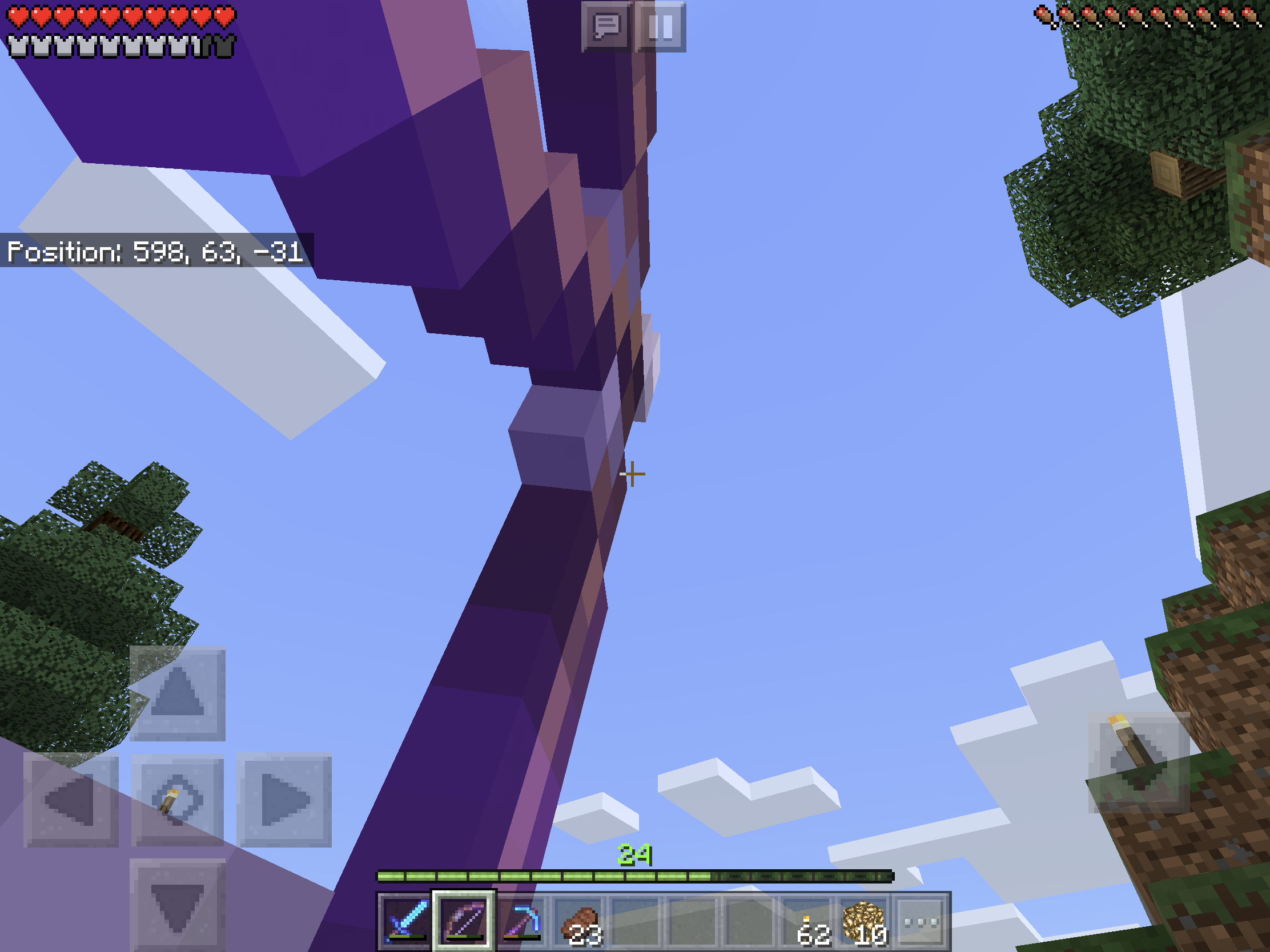
I'm having the same issue on my Xbox One (Bedrock 1.8). Like all bugs, it's super annoying. I tried disconnecting and reconnecting in my old world and it would eliminate this barrier, but if I kept venturing further from my initial spawn, I would run into this problem again. I first discovered this when I was riding my noble steed in a world created when MC was still in 1.7 and first thought my world had gotten messed up due to the recent update to 1.8, until I created a new world and experienced the same scenario.
What email address should I share the link to on OneDrive?
How am I supposed to share the link if I don't know the destination to send it to?
OMG! I managed to get back into my world on my Xbox! ----> https://www.youtube.com/watch?v=SgUJ95uhcbM
What I did was joined my Xbox One world on my PC, went back to the Overworld, because if you remember, the last time I departed this world on Xbox was in the Nether. Anyways, then I replaced my Realms world with the exact same world, but this time in the Overworld, re-downloaded it back onto my Xbox, tried to join, AND IT WORKED! OMG! I never felt so happy!
At the end of the day, I'm pretty sure it has to with departing the world when I'm in the Nether. Xbox One seems to be the only platform where I was unable to join my world this way. Again, on my PC it loaded up just fine. I haven't tried loading this world on my iOS device, but I try it out and see if that also works.
Are you able to access the link from here? I simply copied it with the option that anyone can edit it. Hope this works.
https://1drv.ms/u/s!Aoxp4XSQmj-ZqHfcoDq26o7ZddCd?e=eItZuM
Actually no worries. I’ll just export my world into my PC’s SSD every time I depart my valuable worlds from day to day from now on. It seems that Minecraft for Win 10 just can’t hold on to world saves on its own. Exporting to a folder it is then!
I can still put the cape on my main custom character, however it automatically gets taken off whenever I exit out of the game and shut down my PC. In other words, the Character Creator feature has pretty much lost the ability to remember that particular preference.
I personally really like wearing a virtual cape. That said, I do not wanna to have to keep putting it back on every time I log into the game only to have it bail out on me upon turning off my device.
Also the CC feature decided to kill off one of my other custom characters, so that's one more bug to keep in mind.
I believe this issue is gone now. Thank you for everything that you do in eradicating these unwanted bugs!
Yes, but I hear 1.16.1 will fix this problem, so I won't have to sacrifice that minor modification.
This bug also exists on Win 10.
Update:
Okay so I just deactivated the resource pack for the modified walking animations and I got my custom characters back. It's frankly not really a big loss in my opinion, as emotes now exist so.
Whoops lol! I should've went with Eff 3 instead of 5! Had no idea I had to do it in that specific order. False alarm my bad! https://www.youtube.com/watch?v=lAViMXCIG-0