 jredfox
- jredfox
- jredfox
- America/Chicago
- Yes
- No
 MC-58530
 MCL-19612
 WEB-3690
 MCPE-128658




well mr. mod i was off of touch screen before then and then i turned it on for awhile it worked then it stopped working
creative was not working right and when it did you could only get one block at a time no stack. i hate the draging macanics for the creative and any block it should be like 1.6.4 but, with more bioms that look more realistic like 1.6.4 the maps are zoomed in that should be fixed back to were it was before then.
look at this video i made https://www.youtube.com/watch?v=sOYSr-HY-HQ&list=UU1lqxDVm0DirYVvPGu_pU4g
this bug has been delt with? i want to talk to jeb or notch or somebuddy working for minecraft with issues they have made on purpose like boat machanics and maps zoomed in. like apples comming from oak tree. creative you dragg the item and you still 1.7.9
this bug has been delt with
? i want to talk to jeb or notch or somebuddy working for minecraft with issues they have made on purpose like boat machanics and maps zoomed in. like apples comming from oak tree. creative you dragg the item and you still 1.7.9this bug has been delt with there is still more stuff that has ruined minecraft machanics that is not a bug. i will poast another video and poast on the issue shortly
i uploaded my skin at my account (jredfox). i go back and log in online it is the same skin. i then reupload it 2 more times it still does it. it launches the old skin fro before. i then went to 1.7.10 and it was there but, went back to 1.5.2 and was the old skin again. please fix i can't play any different skin besides my old one except 1.7.10 and posibly 1.8 . this is originated from a technical issue from minecraft.net cause, it an't loading any other versions for the new uploaded skin.
here is the file i tried to upload. and it didn't come up as that for any version except 1.7.10 and posibly 1.8 . i would like my skin to be uploaded to all versions when i change my skin what changed?
i uploaded my skin at my account (jredfox). i go back and log in online it is the same skin. i then reupload it 2 more times it still does it. it launches the old skin fro before. i then went to 1.7.10 and it was there but, went back to 1.5.2 and was the old skin again. please fix i can't play any different skin besides my old one except 1.7.10 and posibly 1.8 . this is originated from a technical issue from minecraft.net cause, it an't loading any other versions for the new uploaded skin.
here is the file i tried to upload. and it didn't come up as that for any version except 1.7.10 and posibly 1.8 . i would like my skin to be uploaded to all versions when i change my skin what changed? i did go on a server in 1.7.10 and my new skin worked on that server in that version.
i uploaded my skin at my account (jredfox). i go back and log in online it is the same skin. i then reupload it 2 more times it still does it. it launches the old skin fro before. i then went to 1.7.10 and it was there but, went back to 1.5.2 and was the old skin again. please fix i can't play any different skin besides my old one except 1.7.10 and posibly 1.8 . this is originated from a technical issue from minecraft.net cause, it an't loading any other versions for the new uploaded skin.
here is the file i tried to upload. and it didn't come up as that for any version except 1.7.10 and posibly 1.8 . i would like my skin to be uploaded to all versions when i change my skin what changed? i did go on a server in 1.7.10 and my new skin worked on that server in that version. watch youtube video when comes up
i uploaded my skin at my account (jredfox). i go back and log in online it is the same skin. i then reupload it 2 more times it still does it. it launches the old skin fro before. i then went to 1.7.10 and it was there but, went back to 1.5.2 and was the old skin again. please fix i can't play any different skin besides my old one except 1.7.10 and posibly 1.8 . this is originated from a technical issue from minecraft.net cause, it an't loading any other versions for the new uploaded skin.
here is the file i tried to upload. and it didn't come up as that for any version except 1.7.10 and posibly 1.8 . i would like my skin to be uploaded to all versions when i change my skin what changed? i did go on a server in 1.7.10 and my new skin worked on that server in that version. watch youtube video when comes up. " Note: Skin changes in Minecraft version 1.7.9 and future versions should happen immediately. If you are playing version 1.7.8 or an earlier version, skin changes may take up to an hour to be applied. If you are playing version 1.3 or earlier, skin changes will not be reflected in-game." fix this bug please . i remember 1.7.10 skin changes hapenen admediatly for any version before then to. what's the deal?
/setblock ~ ~+1 ~ mob_spawner 0 replace SpawnPotentials[{Weight:1,Entity:
{id:"Zombie"}}] First off I can't seem to get the riding tag of the mob to even work or any NBT and I can't find it off of the wiki second off event if it did I noticed that 1.8.9 didn't have proper jockey support definitions only a fixed nbt section of spawners. This means if you have the riding tag it will be that same mob created from nbt every time when There is no dynamic support for creating the mob spawner if specified no nbt for the rider to create the entity by name spawn in world with the on spawn with egg interface. That being said I updated the world to this version with a previously mounted spawners and It didn't render properly. It seemed to only have the top mob render sitting down rather then the entire mob jockey. Also I am not sure if this is still an issue but, A mob spawners once goes to spawn potentials never goes back, B spawn potentials doesn't support individual spawner tags such has delay for they individual section so I can configure how fast each one is dynamically for maps and mods (I am making a mod and I found many problems with your Tile Entity Mob Spawner and Mob Spawner Logic as stated above.
/setblock ~ ~+1 ~ mob_spawner 0 replace SpawnPotentials[{Weight:1,Entity:
{id:"Zombie"}}]
First off I can't seem to get the riding tag of the mob to even work or any NBT and I can't find it off of the wiki second off event if it did I noticed that 1.8.9 didn't have proper jockey support definitions only a fixed nbt section of spawners. This means if you have the riding tag it will be that same mob created from nbt every time when There is no dynamic support for creating the mob spawner if specified no nbt for the rider to create the entity by name spawn in world with the on spawn with egg interface. That being said I updated the world to this version with a previously mounted spawners and It didn't render properly. It seemed to only have the top mob render sitting down rather then the entire mob jockey. Also I am not sure if this is still an issue but, A mob spawners once goes to spawn potentials never goes back, B spawn potentials doesn't support individual spawner tags such has delay for they individual section so I can configure how fast each one is dynamically for maps and mods (I am making a mod and I found many problems with your Tile Entity Mob Spawner and Mob Spawner Logic as stated above.
Mob Spawners LackingSupportBoth Rendering and Improper Definition of Jockey Spawners Leading to issuesMob Spawners Issues/Lack of Support For Vanilla Featurs
First off I can't seem to get the riding tag of the mob to even work or any NBT and I can't find it off of the wiki second off even
tif it did I noticed that 1.8.9 didn't have proper jockey support definitions only a fixed nbt section of spawners. This means if you have the riding tag it will be that same mob created from nbt every time when There is no dynamic support for creating the mob spawner if specified no nbt for the rider to create the entity by name spawn in world with the on spawn with egg interface. That being said I updated the world to this version with a previously mounted spawners and It didn't render properly. It seemed to only have the top mob render sitting down rather then the entire mob jockey. Also I am not sure if this is still an issue but, A mob spawners once goes to spawn potentials never goes back, B spawn potentials doesn't support individual spawner tags such has delay for they individual section so I can configure how fast each one is dynamically for maps and mods (I am making a mod and I found many problems with your Tile Entity Mob Spawner and Mob Spawner Logic as stated above.
Edit: as of 1.11 spawners are completly broken for rendering
1.11 Renders As Pig Summons Zombies
/setblock ~ ~1 ~ minecraft:mob_spawner 0 replace {SpawnData:{id:"Zombie"}}
Screenshot
http://imgur.com/A1Gln6r1.10.2
First off I can't seem to get the riding tag of the mob to even work or any NBT and I can't find it off of the wiki second off even if it did I noticed that 1.8.9 didn't have proper jockey support definitions only a fixed nbt section of spawners. This means if you have the riding tag it will be that same mob created from nbt every time when There is no dynamic support for creating the mob spawner if specified no nbt for the rider to create the entity by name spawn in world with the on spawn with egg interface. That being said I updated the world to this version with a previously mounted spawners and It didn't render properly. It seemed to only have the top mob render sitting down rather then the entire mob jockey. Also I am not sure if this is still an issue but, A mob spawners once goes to spawn potentials never goes back, B spawn potentials doesn't support individual spawner tags such has delay for they individual section so I can configure how fast each one is dynamically for maps and mods (I am making a mod and I found many problems with your Tile Entity Mob Spawner and Mob Spawner Logic as stated above.
Edit: as of 1.11 spawners are completly broken for rendering
1.11 Renders As Pig Summons Zombies
/setblock ~ ~1 ~ minecraft:mob_spawner 0 replace {SpawnData:{id:"Zombie"}}
Screenshot
http://imgur.com/A1Gln6r1.10.2
First off I can't seem to get the riding tag of the mob to even work or any NBT and I can't find it off of the wiki second off even if it didI noticed that 1.8.9 didn't have proper jockey support definitions only a fixed nbt section of spawners. This means if you have theridingtag it will be that same mob created from nbt every time when There is no dynamic support for creating the mob spawner if specified no nbt for the rider to create the entity by name spawn in world with the on spawn with egg interface. That being said I updated the world to this version with a previously mounted spawners and It didn't render properly. It seemed to only have the top mob render sitting down rather then the entire mob jockey. Also I am not sure if this is still an issue but, A mob spawners once goes to spawn potentials never goes back, B spawn potentials doesn't support individual spawner tags such has delay for they individual section so I can configure how fast each one is dynamically for maps and mods (I am making a mod and I found many problems with your Tile Entity Mob Spawner and Mob Spawner Logic as stated above.Edit: as of 1.11 spawners are completly broken for rendering
1.11 Renders As Pig Summons Zombies
/setblock ~ ~1 ~ minecraft:mob_spawner 0 replace {SpawnData:{id:"Zombie"}}
Screenshot
http://imgur.com/A1Gln6r1.10.2+
No Proper Definition for passangers always creates them from nbt rather then my intension if doesn't have any other tags to create them by name and have the on spawn with egg interface
Doesn't Render the entire Mount only renders bottom mobCommand
{id:Zombie}
/setblock ~ ~+1 ~ minecraft:mob_spawner 0 replace {SpawnData:,SpawnPotentials:[{Weight:1,Entity:{id:"Skeleton",SkeletonType:1,Passengers:[
{id:Skeleton}] }}]}
Screenshot
http://imgur.com/a/6JJ4PI noticed that 1.8.9+ didn't have proper jockey support definitions only a fixed nbt section of spawners. This means if you have the passenger tag it will be that same mob created from nbt every time when There is no dynamic support for creating the mob spawner if specified no nbt for the rider to create the entity by name spawn in world with the on spawn with egg interface. That being said I updated the world to this version with a previously mounted spawners and It didn't render properly. It seemed to only have the top mob render sitting down rather then the entire mob jockey. Also I am not sure if this is still an issue but, A mob spawners once goes to spawn potentials never goes back, B spawn potentials doesn't support individual spawner tags such has delay for they individual section so I can configure how fast each one is dynamically for maps and mods (I am making a mod and I found many problems with your Tile Entity Mob Spawner and Mob Spawner Logic as stated above.
Edit: as of 1.11 spawners are completly broken for rendering
1.11 Renders As Pig Summons Zombies
/setblock ~ ~1 ~ minecraft:mob_spawner 0 replace {SpawnData:{id:"Zombie"}}
Screenshot
http://imgur.com/A1Gln6r1.10.2+
No Proper Definition for passangers always createsthemfrom nbt rather then my intension if doesn't have any other tags to create them by name and have the on spawn with egg interface
Doesn't Render the entire Mount only renders bottom mobCommand
{id:Zombie}
/setblock ~ ~+1 ~ minecraft:mob_spawner 0 replace {SpawnData:,SpawnPotentials:[{Weight:1,Entity:{id:"Skeleton",SkeletonType:1,Passengers:[
{id:Skeleton}] }}]}
Screenshot
http://imgur.com/a/6JJ4PI noticed that 1.8.9+ didn't have proper jockey support definitions only a fixed nbt section of spawners. This means if you have the passenger tag it will be that same mob created from nbt every time when There is no dynamic support for creating the mob spawner if specified no nbt for the rider to create the entity by name spawn in world with the on spawn with egg interface. That being said I updated the world to this version with a previously mounted spawners and It didn't render properly. It seemed to only have the top mob render sitting down rather then the entire mob jockey. Also I am not sure if this is still an issue but, A mob spawners once goes to spawn potentials never goes back, B spawn potentials doesn't support individual spawner tags such has delay for they individual section so I can configure how fast each one is dynamically for maps and mods (I am making a mod and I found many problems with your Tile Entity Mob Spawner and Mob Spawner Logic as stated above.
Edit: as of 1.11 spawners are completly broken for rendering
1.11 Renders As Pig Summons Zombies
/setblock ~ ~1 ~ minecraft:mob_spawner 0 replace {SpawnData:{id:"Zombie"}}
Screenshot
http://imgur.com/A1Gln6r1.10.2+
No Proper Definition for passangers always creates passangers from nbt rather then my intention if doesn't have any other tags to create them by name and have the on spawn with egg interface giving equipment and specified properties randomized.
Doesn't Render the entire Mount only renders bottom mob in mob spawnerCommand
{id:Zombie}
/setblock ~ ~+1 ~ minecraft:mob_spawner 0 replace {SpawnData:,SpawnPotentials:[{Weight:1,Entity:{id:"Skeleton",SkeletonType:1,Passengers:[
{id:Skeleton}] }}]}
Screenshot
http://imgur.com/a/6JJ4PI noticed that 1.8.9+ didn't have proper jockey support definitions only a fixed nbt section of spawners. This means if you have the passenger tag it will be that same mob created from nbt every time when There is no dynamic support for creating the mob spawner if specified no nbt for the rider to create the entity by name spawn in world with the on spawn with egg interface. That being said I updated the world to this version with a previously mounted spawners and It didn't render properly. It seemed to only have the top mob render sitting down rather then the entire mob jockey. Also I am not sure if this is still an issue but, A mob spawners once goes to spawn potentials never goes back, B spawn potentials doesn't support individual spawner tags such has delay for they individual section so I can configure how fast each one is dynamically for maps and mods (I am making a mod and I found many problems with your Tile Entity Mob Spawner and Mob Spawner Logic as stated above.
Edit: as of 1.11 spawners are completly broken for rendering
1.11 Renders As Pig Summons Zombies
/setblock ~ ~1 ~ minecraft:mob_spawner 0 replace {SpawnData:{id:"Zombie"}}
Screenshot
http://imgur.com/A1Gln6r1.10.2+
No Proper Definition for passangers always createspassangersfrom nbt rather then my intention if doesn't have any other tags to create them by name and have the on spawn with egg interface giving equipment and specified properties randomized.
Doesn't Render the entire Mount only renders bottom mob in mob spawnerCommand
{id:Zombie}
/setblock ~ ~+1 ~ minecraft:mob_spawner 0 replace {SpawnData:,SpawnPotentials:[{Weight:1,Entity:{id:"Skeleton",SkeletonType:1,Passengers:[
{id:Skeleton}] }}]}
Screenshot
http://imgur.com/a/6JJ4PI noticed that 1.8.9+ didn't have proper jockey support definitions only a fixed nbt section of spawners. This means if you have the passenger tag it will be that same mob created from nbt every time when There is no dynamic support for creating the mob spawner if specified no nbt for the rider to create the entity by name spawn in world with the on spawn with egg interface. That being said I updated the world to this version with a previously mounted spawners and It didn't render properly. It seemed to only have the top mob render sitting down rather then the entire mob jockey. Also I am not sure if this is still an issue but, A mob spawners once goes to spawn potentials never goes back, B spawn potentials doesn't support individual spawner tags such has delay for they individual section so I can configure how fast each one is dynamically for maps and mods (I am making a mod and I found many problems with your Tile Entity Mob Spawner and Mob Spawner Logic as stated above.
Edit: as of 1.11 spawners are completly broken for rendering
1.11 Renders As Pig Summons Zombies
/setblock ~ ~1 ~ minecraft:mob_spawner 0 replace {SpawnData:{id:"Zombie"}}
Screenshot
http://imgur.com/A1Gln6r1.10.2+
No Proper Definition for passengers in mob spawners always creates them from nbt rather then my intention if doesn't have any other tags to create them by name and have the on spawn with egg interface giving equipment and specified properties randomized. This is where the old tag Properties:{} would be nice to differentiate the difference between the two. I suggest fixing up the /summon command as well while your at itDoesn't Render the entire Mount only renders bottom mob in mob spawner
Command
{id:Zombie}
/setblock ~ ~+1 ~ minecraft:mob_spawner 0 replace {SpawnData:,SpawnPotentials:[{Weight:1,Entity:{id:"Skeleton",SkeletonType:1,Passengers:[
{id:Skeleton}] }}]}
Screenshot
http://imgur.com/a/6JJ4PI noticed that 1.8.9+ didn't have proper jockey support definitions only a fixed nbt section of spawners. This means if you have the passenger tag it will be that same mob created from nbt every time when There is no dynamic support for creating the mob spawner if specified no nbt for the rider to create the entity by name spawn in world with the on spawn with egg interface. That being said I updated the world to this version with a previously mounted spawners and It didn't render properly. It seemed to only have the top mob render sitting down rather then the entire mob jockey. Also I am not sure if this is still an issue but, A mob spawners once goes to spawn potentials never goes back, B spawn potentials doesn't support individual spawner tags such has delay for they individual section so I can configure how fast each one is dynamically for maps and mods (I am making a mod and I found many problems with your Tile Entity Mob Spawner and Mob Spawner Logic as stated above.
Edit: as of 1.11 spawners are completly broken for rendering
1.11 Renders As Pig Summons Zombies
/setblock ~ ~1 ~ minecraft:mob_spawner 0 replace {SpawnData:{id:"Zombie"}}
Screenshot
http://imgur.com/A1Gln6r1.10.2+
No Proper Definition for passengers in mob spawners always creates them from nbt rather then my intention if doesn't have any other tags to create them by name and have the on spawn with egg interface giving equipment and specified properties randomized. This is where the old tag Properties:{} would be nice to differentiate the difference between the two. I suggest fixing up the /summon command as well while your at itDoesn't Render the entire Mount only renders bottom mob in mob spawner
Command
{id:Zombie}
/setblock ~ ~+1 ~ minecraft:mob_spawner 0 replace {SpawnData:,SpawnPotentials:[{Weight:1,Entity:{id:"Skeleton",SkeletonType:1,Passengers:[
{id:Skeleton}] }}]}
Screenshot
http://imgur.com/a/6JJ4PI noticed that 1.8.9+ didn't have proper jockey support definitions only a fixed nbt section of spawners. This means if you have the passenger tag it will be that same mob created from nbt every time when There is no dynamic support for creating the mob spawner if specified no nbt for the rider to create the entity by name spawn in world with the on spawn with egg interface. That being said I updated the world to this version with a previously mounted spawners and It didn't render properly. It seemed to only have the top mob render sitting down rather then the entire mob jockey. Also I am not sure if this is still an issue but, A mob spawners once goes to spawn potentials never goes back, B spawn potentials doesn't support individual spawner tags such has delay for they individual section so I can configure how fast each one is dynamically for maps and mods (I am making a mod and I found many problems with your Tile Entity Mob Spawner and Mob Spawner Logic as stated above.
Edit: as of 1.11 spawners are completly broken for rendering
1.11 Renders As Pig Summons Zombies
/setblock ~ ~1 ~ minecraft:mob_spawner 0 replace {SpawnData:{id:"Zombie"}}
Screenshot
http://imgur.com/A1Gln6r1.10.2+
{id:Skeleton}
No Proper Definition for passengers in mob spawners always creates them from nbt rather then my intention if doesn't have any other tags to create them by name and have the on spawn with egg interface giving equipment and specified properties randomized. This is where the old tag Properties:{} would be nice to differentiate the difference between the two. I suggest fixing up the /summon command as well while your at it . So it would work like /summon mob ~ ~ ~ {,Passengers:[{id:Skeleton,,Passengers:[] }] Since neither one has the properties tag it will create them by name and use the on spawn with egg interface giving the skeletons their equipment.
Doesn't Render the entire Mount only renders bottom mob in mob spawner
Command
{id:Zombie}
/setblock ~ ~+1 ~ minecraft:mob_spawner 0 replace {SpawnData:,SpawnPotentials:[{Weight:1,Entity:{id:"Skeleton",SkeletonType:1,Passengers:[
{id:Skeleton}] }}]}
Screenshot
http://imgur.com/a/6JJ4PI noticed that 1.8.9+ didn't have proper jockey support definitions only a fixed nbt section of spawners. This means if you have the passenger tag it will be that same mob created from nbt every time when There is no dynamic support for creating the mob spawner if specified no nbt for the rider to create the entity by name spawn in world with the on spawn with egg interface. That being said I updated the world to this version with a previously mounted spawners and It didn't render properly. It seemed to only have the top mob render sitting down rather then the entire mob jockey. Also I am not sure if this is still an issue but, A mob spawners once goes to spawn potentials never goes back, B spawn potentials doesn't support individual spawner tags such has delay for they individual section so I can configure how fast each one is dynamically for maps and mods (I am making a mod and I found many problems with your Tile Entity Mob Spawner and Mob Spawner Logic as stated above.
The original release for the snapshot 20w49a json was:https://launchermeta.mojang.com/v1/packages/ef769cdc1302b41eddfa04a0e8d96f6c16648020/20w49a.json
Points to assets index:
https://launchermeta.mojang.com/v1/packages/e022240e3d70866f41dd88a3b342cf842a7b31bd/1.17.jsonIt was modified after the next snapshot or two happened to: https://launchermeta.mojang.com/v1/packages/13ef29a79cc0512e124963fd964e44fd11efe369/20w49a.json
Points to asset Index:
https://launchermeta.mojang.com/v1/packages/ecd216d8188230180af4163ee4f4901e28acee29/1.17.jsonWhat was modified was the assets index url. I have seen some sounds change from this or another snapshot of the chest.
Conclusion: your web json api gets modified or regenerated after each snapshot when it shouldn't modify older snapshot jsons. This is a bug what if you had totally different sounds/textures it would be noticeable by everyone playing that snapshot.
Steps to reproduce:
click new profile of an older version say 1.2.2
click play
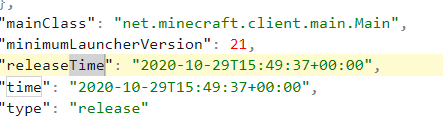
go to %appdata%/.minecraft/versions/1.2.2 notice the timestamp says 2020 on last modified instead of the tiemstamp on the json either from "releaseTime" or "time" It's suppose to say 2012 or something like thatThis doesn't just effect the minecraft client jar. It effects all libraries, all minecraft individual version json files, all minecraft assets.
Minecraft launchers years ago use to download the audio files with the correct timestamp. I see you guys have tried to do this at least for the client.jar but, it's not getting applied even though it's in your json api.
Steps to reproduce:
click new profile of an older version say 1.2.2
click play
go to %appdata%/.minecraft/versions/1.2.2 notice the timestamp says 2020 on last modified instead of thetiemstamp on the json either from "releaseTime" or "time"It's suppose to say 2012 or something like thatThis doesn't just effect the minecraft client jar. It effects all libraries, all minecraft individual version json files, all minecraft assets.
Minecraft launchers years ago use to download the audio files with the correct timestamp. I see you guys have tried to do this at least for the client.jar but, it's not getting applied even though it's in your json api.
Steps to reproduce:
click new profile of an older version say 1.2.2
click play
go to %appdata%/.minecraft/versions/1.2.2 notice the timestamp says 2020 on last modified instead of the timestamp on the json either from "releaseTime" or "time" It's suppose to say 2012 or something like thatThis doesn't just effect the minecraft client jar. It effects all libraries, all minecraft individual version json files, all minecraft assets.
Minecraft launchers years ago use to download the audio files with the correct timestamp. I see you guys have tried to do this at least for the client.jar but, it's not getting applied even though it's in your json api.
Steps to reproduce:
click new profile of an older version say 1.2.2
click play
go to %appdata%/.minecraft/versions/1.2.2 notice the timestamp says 2020 on last modified instead of the timestamp on the json either from "releaseTime" or "time" It's suppose to say 2012 or something like thatThis doesn't just effect the minecraft client jar. It effects all libraries, all minecraft individual version json files, all minecraft assets.
Minecraft launchers years ago use to download the audio files with the correct timestamp. I see you guys have tried to do this at least for the client.jar but, it's not getting applied even though it's in your json api.
Steps to reproduce:
click new profile of an older version say 1.2.2
click play
go to %appdata%/.minecraft/versions/1.2.2 notice the timestamp says 2020 on last modified instead of the timestamp on the json either from "releaseTime" or "time" It's suppose to say 2012 or something like thatThis doesn't just effect the minecraft client jar. It effects all libraries, all minecraft individual version json files, all minecraft assets. The assets use to use minecraft.net or amazon aws depending on the minecraft version to get the timestamp and set it from that info. The libraries are also not set to the last modified timestamp as it doesn't exist. you download any file from the launcher it will always say the current date. There is evidence of intent by their being a "time" tag in the launcher for current intent at least on the client.jar which doesn't get set. And I think when they converted to post 1.5.2 aka 1.6+ they forgot about setting the assets to the last modified date of the file and adding it to the assets index. the libraries never getting set to the last modfied was always an issue
Minecraft launchers years ago use to download the audio files with the correct timestamp. I see you guys have tried to do this at least for the client.jar but, it's not getting applied even though it's in your json api.
Steps to reproduce:
click new profile of an older version say 1.2.2
click play
go to %appdata%/.minecraft/versions/1.2.2 notice the timestamp says 2020 on last modified instead of the timestamp on the json either from "releaseTime" or "time" It's suppose to say 2012 or something like thatThis doesn't just effect the minecraft client jar. It effects all libraries, all minecraft individual version json files, all minecraft assets. The assets use to use minecraft.net or amazon aws depending on the minecraft version to get the timestamp and set it from that info.
The libraries are also not set to the last modified timestamp as it doesn't exist. you download any file from the launcher it will always say the current date. There is evidence of intent by their being a "time" tag in thelauncher for current intentat least on the client.jar which doesn't get set. And I think when they converted to post 1.5.2 aka 1.6+ they forgot about setting the assets to the last modified date of the file and adding it to the assets index. the libraries never getting set to the last modfied was always an issueMinecraft launchers years ago use to download the audio files with the correct timestamp. I see you guys have tried to do this at least for the client.jar but, it's not getting applied even though it's in your json api.
Steps to reproduce:
click new profile of an older version say 1.2.2
click play
go to %appdata%/.minecraft/versions/1.2.2 notice the timestamp says 2020 on last modified instead of the timestamp on the json either from "releaseTime" or "time" It's suppose to say 2012 or something like thatThis doesn't just effect the minecraft client jar. It effects all libraries, all minecraft individual version json files, all minecraft assets. The assets use to use minecraft.net or amazon aws depending on the minecraft version to get the timestamp and set it from that info.The libraries are also not set to the last modified timestamp as it doesn't exist. you download any file from the launcher it will always say the current date. There is evidence of intent by there being a "time" tag in the client.json for at least on the client.jar which doesn't get used/set. And I think when they converted to post 1.5.2 aka 1.6+ they forgot about setting the assets to the last modified date of the file and adding it to the assets index. the libraries never getting set to the last modfied was always an issue
Minecraft launchers years ago use to download the audio files with the correct timestamp. I see you guys have tried to do this at least for the client.jar but, it's not getting applied even though it's in your json api.
Steps to reproduce:
click new profile of an older version say 1.2.2
click play
go to %appdata%/.minecraft/versions/1.2.2 notice the timestamp says 2020 on last modified instead of the timestamp on the json either from "releaseTime" or "time" It's suppose to say 2012 or something like thatThis doesn't just effect the minecraft client jar. It effects all libraries, all minecraft individual version json files, all minecraft assets. The assets use to use minecraft.net or amazon aws depending on the minecraft version to get the timestamp and set it from that info.The libraries are also not set to the last modified timestamp as it doesn't exist. you download any file from the launcher it will always say the current date. There is evidence of intent by there being a "time" tag in the client.json for at least on the client.jar which doesn't get used/set. And I think when they converted to post 1.5.2 aka 1.6+ they forgot about setting the assets to the last modified date of the file and adding it to the assets index. the libraries never getting set to the last modfied was always an issue. Also the timestamp it uses is not in UTC which means it will be hours apart per user if applied. So you need to convert your timestamps to UTC first then apply them
Minecraft launchers years ago use to download the audio files with the correct timestamp. I see you guys have tried to do this at least for the client.jar but, it's not getting applied even though it's in your json api.
Steps to reproduce:
click new profile of an older version say 1.2.2
click play
go to %appdata%/.minecraft/versions/1.2.2 notice the timestamp says 2020 on last modified instead of the timestamp on the json either from "releaseTime" or "time" It's suppose to say 2012 or something like thatThis doesn't just effect the minecraft client jar. It effects all libraries, all minecraft individual version json files, all minecraft assets. The assets use to use minecraft.net or amazon aws depending on the minecraft version to get the timestamp and set it from that info.The libraries are also not set to the last modified timestamp as it doesn't exist. you download any file from the launcher it will always say the current date. There is evidence of intent by there being a "time" tag in the client.json for at least on the client.jar which doesn't get used/set. And I think when they converted to post 1.5.2 aka 1.6+ they forgot about setting the assets to the last modified date of the file and adding it to the assets index. the libraries never getting set to the last modfied was always an issue.
Also the timestamp it uses is not in UTC which means it will be hours apart per user if applied. So you need to convert your timestamps to UTC first then apply them
Minecraft launchers years ago use to download the audio fileswith the correct timestamp. I see you guys have tried to do this at least for the client.jar but, it's not getting applied even though it's in your json api.Steps to reproduce:
click new profile of an older version say 1.2.2
click play
go to %appdata%/.minecraft/versions/1.2.2 notice the timestamp says 2020 on last modified instead of the timestamp on the json either from "releaseTime" or "time" It's suppose to say 2012 or something like thatThis doesn't just effect the minecraft client jar. It effects all libraries, all minecraft individual version json files, all minecraft assets. The assets use to use minecraft.net or amazon aws depending on the minecraft version to get the timestamp and set it from that info.The libraries are also not set to the last modified timestamp as it doesn't exist. you download any file from the launcher it will always say the current date. There is evidence of intent by there being a "time" tag in the client.json for at least on the client.jar which doesn't get used/set. And I think when they converted to post 1.5.2 aka 1.6+ they forgot about setting the assets to the last modified date of the file and adding it to the assets index. the libraries never getting set to the last modfied was always an issue.
Also the timestamp it uses is not in UTC which means it will be hours apart per user if applied. So you need to convert your timestamps to UTC first then apply them
Minecraft launchers years ago use to download the audio files with the correct timestamp. I see you guys have tried to do this at least for the client.jar but, it's not getting applied even though it's in your json api.
Steps to reproduce:
click new profile of an older version say 1.2.2
click play
go to %appdata%/.minecraft/versions/1.2.2 notice the timestamp says 2020 on last modified instead of the timestamp on the json either from "releaseTime" or "time" It's suppose to say 2012 or something like thatThis doesn't just effect the minecraft client jar. It effects all libraries, all minecraft individual version json files, all minecraft assets. The assets use to use minecraft.net or amazon aws depending on the minecraft version to get the timestamp and set it from that info.The libraries are also not set to the last modified timestamp as it doesn't exist. you download any file from the launcher it will always say the current date. There is evidence of intent by there being a "time" tag in the client.json for at least on the client.jar which doesn't get used/set. And I think when they converted to post 1.5.2 aka 1.6+ they forgot about setting the assets to the last modified date of the file and adding it to the assets index. the libraries never getting set to the last modfied was always an issue.
Also the timestamp it uses is not in UTC which means it will be hours apart per user if applied. So you need to convert your timestamps to UTC first then apply themMinecraft launchers years ago use to download the audio files with the correct timestamp. I see you guys have tried to do this at least for the client.jar but, it's not getting applied even though it's in your json api.
Steps to reproduce:
click new profile of an older version say 1.2.2
click play
go to %appdata%/.minecraft/versions/1.2.2 notice the timestamp says 2020 on last modified instead of the timestamp on the json either from "releaseTime" or "time" It's suppose to say 2012 or something like thatThis doesn't just effect the minecraft client jar. It effects all libraries, all minecraft individual version json files, all minecraft assets. The assets use to use minecraft.net or amazon aws depending on the minecraft version to get the timestamp and set it from that info.The libraries are also not set to the last modified timestamp as it doesn't exist. you download any file from the launcher it will always say the current date. There is evidence of intent by there being a "time" tag in the client.json for at least on the client.jar which doesn't get used/set. And I think when they converted to post 1.5.2 aka 1.6+ they forgot about setting the assets to the last modified date of the file and adding it to the assets index. the libraries never getting set to the last modfied was always an issue.
Minecraft launchers years ago use to download the audio files with the correct timestamp. I see you guys have tried to do this at least for the client.jar but, it's not getting applied even though it's in your json api.
Steps to reproduce:
click new profile of an older version say 1.2.2
click play
go to %appdata%/.minecraft/versions/1.2.2 notice the timestamp says 2020 on last modified instead of the timestamp on the json either from "releaseTime" or "time" It's suppose to say 2012 or something like thatThis doesn't just effect the minecraft client jar. It effects all libraries, all minecraft individual version json files, all minecraft assets. The assets use to use minecraft.net or amazon aws depending on the minecraft version to get the timestamp and set it from that info.The libraries are also not set to the last modified timestamp as it doesn't exist. you download any file from the launcher it will always say the current date. There is evidence of intent by there being a "time" tag in the client.json for at least on the client.jar which doesn't get used/set. And I think when they converted to post 1.5.2 aka 1.6+ they forgot about setting the assets to the last modified date of the file and adding it to the assets index. the libraries never getting set to the last modfied was always an issue.
Minecraft launchers years ago use to download the audio files with the correct timestamp. I see you guys have tried to do this at least for the client.jar but, it's not getting applied even though it's in your json api.
Edit:
And to be perfectly clear the timestamp no longer exists for audio and I believe in the alpha days and perhaps even pre 1.6 launcher days existed. I think it would be a good idea to preserve the assets timestamps so you can know when the file was released. URLConnection#lastModified or add them to your jsons as a long timestamp and set it that way
Steps to reproduce:
click new profile of an older version say 1.2.2
click play
go to %appdata%/.minecraft/versions/1.2.2 notice the timestamp says 2020 on last modified instead of the timestamp on the json either from "releaseTime" or "time" It's suppose to say 2012 or something like thatThis doesn't just effect the minecraft client jar. It effects all libraries, all minecraft individual version json files, all minecraft assets. The assets use to use minecraft.net or amazon aws depending on the minecraft version to get the timestamp and set it from that info.The libraries are also not set to the last modified timestamp as it doesn't exist. you download any file from the launcher it will always say the current date. There is evidence of intent by there being a "time" tag in the client.json for at least on the client.jar which doesn't get used/set. And I think when they converted to post 1.5.2 aka 1.6+ they forgot about setting the assets to the last modified date of the file and adding it to the assets index. the libraries never getting set to the last modfied was always an issue.
Minecraft launchers years ago use to download the audio files with the correct timestamp. I see you guys have tried to do this at least for the client.jar but, it's not getting applied even though it's in your json api.
Edit:
And to be perfectly clear the timestamp no longer exists for audio and I believe in the alpha days and perhaps even pre 1.6 launcher days existed. I think it would be a good idea to preserve the assets timestamps so you can know when the file was released. URLConnection#lastModified or add them to your jsons as a long timestamp and set it that way. So I consider it a bug because it's use to be intended to preserve the last modified of the original audio files. As for the client jar and possibly other assets it looks like you guys started with the timestamps but, never set them to the file after it's done downloading.
Steps to reproduce:
click new profile of an older version say 1.2.2
click play
go to %appdata%/.minecraft/versions/1.2.2 notice the timestamp says 2020 on last modified instead of the timestamp on the json either from "releaseTime" or "time" It's suppose to say 2012 or something like thatThis doesn't just effect the minecraft client jar. It effects all libraries, all minecraft individual version json files, all minecraft assets. The assets use to use minecraft.net or amazon aws depending on the minecraft version to get the timestamp and set it from that info.The libraries are also not set to the last modified timestamp as it doesn't exist. you download any file from the launcher it will always say the current date. There is evidence of intent by there being a "time" tag in the client.json for at least on the client.jar which doesn't get used/set. And I think when they converted to post 1.5.2 aka 1.6+ they forgot about setting the assets to the last modified date of the file and adding it to the assets index. the libraries never getting set to the last modfied was always an issue.
Minecraft launchers years ago use to download the audio files with the correct timestamp. I see you guys have tried to do this at least for the client.jar but, it's not getting applied even though it's in your json api.
Edit:
And to be perfectly clear the timestamp no longer exists for audio and I believe in the alpha days and perhaps even pre 1.6 launcher days existed. I think it would be a good idea to preserve the assets timestamps so you can know when the file was released. URLConnection#lastModified or add them to your jsons as a long timestamp and set it that way. So I consider it a bug because* it's use to be intended to preserve the last modified of the original audio files*. As for the client jar and possibly other assets it looks like you guys started with the timestamps but, never set them to the file after it's done downloading.
Steps to reproduce:
click new profile of an older version say 1.2.2
click play
go to %appdata%/.minecraft/versions/1.2.2 notice the timestamp says 2020 on last modified instead of the timestamp on the json either from "releaseTime" or "time" It's suppose to say 2012 or something like thatThis doesn't just effect the minecraft client jar. It effects all libraries, all minecraft individual version json files, all minecraft assets. The assets use to use minecraft.net or amazon aws depending on the minecraft version to get the timestamp and set it from that info.The libraries are also not set to the last modified timestamp as it doesn't exist. you download any file from the launcher it will always say the current date. There is evidence of intent by there being a "time" tag in the client.json for at least on the client.jar which doesn't get used/set. And I think when they converted to post 1.5.2 aka 1.6+ they forgot about setting the assets to the last modified date of the file and adding it to the assets index. the libraries never getting set to the last modfied was always an issue.
Minecraft launchers years ago use to download the audio files with the correct timestamp. I see you guys have tried to do this at least for the client.jar but, it's not getting applied even though it's in your json api.
Edit:
And to be perfectly clear the timestamp no longer exists for audio and I believe in the alpha days and perhaps even pre 1.6 launcher days existed. I think it would be a good idea to preserve the assets timestamps so you can know when the file was released. URLConnection#lastModified or add them to your jsons as a long timestamp and set it that way. So I consider it a bug because* it's use to be intended to preserve the last modified of the original audio files*. As for the client jar and possibly other assets it looks like you guys started with the timestamps but, never set them to the file after it's done downloading.Steps to reproduce:
click new profile of an older version say 1.2.2
click play
go to %appdata%/.minecraft/versions/1.2.2 notice the timestamp says 2020 on last modified instead of the timestamp on the json either from "releaseTime" or "time" It's suppose to say 2012 or something like thatThis doesn't just effect the minecraft client jar. It effects all libraries, all minecraft individual version json files, all minecraft assets. The assets use to use minecraft.net or amazon aws depending on the minecraft version to get the timestamp and set it from that info.The libraries are also not set to the last modified timestamp as it doesn't exist. you download any file from the launcher it will always say the current date. There is evidence of intent by there being a "time" tag in the client.json for at least on the client.jar which doesn't get used/set. And I think when they converted to post 1.5.2 aka 1.6+ they forgot about setting the assets to the last modified date of the file and adding it to the assets index. the libraries never getting set to the last modfied was always an issue.
Minecraft launchers years ago use to download the audio files with the correct timestamp. I see you guys have tried to do this at least for the client.jar but, it's not getting applied even though it's in your json api.
Edit:
And to be perfectly clear the timestamp no longer exists for audio and I believe in the alpha days and perhaps even pre 1.6 launcher days existed. I think it would be a good idea to preserve the assets timestamps so you can know when the file was released. URLConnection#lastModified or add them to your jsons as a long timestamp and set it that way. So I consider it a bug because it use to be intended to preserve the last modified of the original audio files. As for the client jar and possibly other assets it looks like you guys started with the timestamps but, never set them to the file after it's done downloading.
Steps to reproduce:
click new profile of an older version say 1.2.2
click play
go to %appdata%/.minecraft/versions/1.2.2 notice the timestamp says 2020 on last modified instead of the timestamp on the json either from "releaseTime" or "time" It's suppose to say 2012 or something like thatThis doesn't just effect the minecraft client jar. It effects all libraries, all minecraft individual version json files, all minecraft assets. The assets use to use minecraft.net or amazon aws depending on the minecraft version to get the timestamp and set it from that info.The libraries are also not set to the last modified timestamp as it doesn't exist. you download any file from the launcher it will always say the current date. There is evidence of intent by there being a "time" tag in the client.json for at least on the client.jar which doesn't get used/set. And I think when they converted to post 1.5.2 aka 1.6+ they forgot about setting the assets to the last modified date of the file and adding it to the assets index. the libraries never getting set to the last modfied was always an issue.
Minecraft launchers years ago use to download the audio files with the correct timestamp. I see you guys have tried to do this at least for the client.jar but, it's not getting applied even though it's in your json api.
Edit:
And to be perfectly clear the timestamp no longer exists for audio and I believe in the alpha days and perhaps even pre 1.6 launcher days existed. I think it would be a good idea to preserve the assets timestamps so you can know when the file was released. URLConnection#lastModified or add them to your jsons as a long timestamp and set it that way. So I consider it a bug because it use to be intended to preserve the last modified of the original audio files. As for the client jar and possibly other assets it looks like you guys started with the timestamps but, never set them to the file after it's done downloading. And if your doing it for assets/jars why not also apply the same download method to grab them from your libraries as well. I already confirmed with my own download java code that you can do this with the libs as well with their original timestamps on your amazon aws servers
Steps to reproduce:
click new profile of an older version say 1.2.2
click play
go to %appdata%/.minecraft/versions/1.2.2 notice the timestamp says 2020 on last modified instead of the timestamp on the json either from "releaseTime" or "time" It's suppose to say 2012 or something like thatThis doesn't just effect the minecraft client jar. It effects all libraries, all minecraft individual version json files, all minecraft assets. The assets use to use minecraft.net or amazon aws depending on the minecraft version to get the timestamp and set it from that info.The libraries are also not set to the last modified timestamp as it doesn't exist. you download any file from the launcher it will always say the current date. There is evidence of intent by there being a "time" tag in the client.json for at least on the client.jar which doesn't get used/set. And I think when they converted to post 1.5.2 aka 1.6+ they forgot about setting the assets to the last modified date of the file and adding it to the assets index. the libraries never getting set to the last modfied was always an issue.
Minecraft launchers years ago use to download the audio files with the correct timestamp. I see you guys have tried to do this at least for the client.jar but, it's not getting applied even though it's in your json api.
Edit:
And to be perfectly clear the timestamp no longer exists for audio and I believe in the alpha days and perhaps even pre 1.6 launcher days existed. I think it would be a good idea to preserve the assets timestamps so you can know when the file was released. URLConnection#lastModified or add them to your jsons as a long timestamp and set it that way. So I consider it a bug because it use to be intended to preserve the last modified of the original audio files. As for the client jar and possibly other assets it looks like you guys started with the timestamps but, never set them to the file after it's done downloading. And if your doing it for assets/jars why not also apply the same download method to grab them from your libraries as well. I already confirmed with my own download java code that you can do this with the libs as well with their original timestamps on your amazon aws serversIf you guys no longer wish to preserve the integrity of the download date and no longer care then close this issue. If not then please fix this when you have time.
Steps to reproduce:
click new profile of an older version say 1.2.2
click play
go to %appdata%/.minecraft/versions/1.2.2 notice the timestamp says 2020 on last modified instead of the timestamp on the json either from "releaseTime" or "time" It's suppose to say 2012 or something like thatThis doesn't just effect the minecraft client jar. It effects all libraries, all minecraft individual version json files, all minecraft assets. The assets use to use minecraft.net or amazon aws depending on the minecraft version to get the timestamp and set it from that info.The libraries are also not set to the last modified timestamp as it doesn't exist. you download any file from the launcher it will always say the current date. There is evidence of intent by there being a "time" tag in the client.json for at least on the client.jar which doesn't get used/set. And I think when they converted to post 1.5.2 aka 1.6+ they forgot about setting the assets to the last modified date of the file and adding it to the assets index. the libraries never getting set to the last modfied was always an issue.
Minecraft launchers years ago use to download the audio files with the correct timestamp. I see you guys have tried to do this at least for the client.jar but, it's not getting applied even though it's in your json api.
Edit:
And to be perfectly clear the timestamp no longer exists for audio and I believe in the alpha days and perhaps even pre 1.6 launcher days existed. I think it would be a good idea to preserve the assets timestamps so you can know when the file was released.URLConnection#lastModified or add them to your jsons as a long timestamp and set it that way.So I consider it a bug because it use to be intended to preserve the last modified of the original audio files. As for the client jar and possibly other assets it looks like you guys started with the timestamps but, never set them to the file after it's done downloading. And if your doing it for assets/jars why not also apply the same download method to grab them from your libraries as well. I already confirmed with my own download java code that you can do this with the libs as well with their original timestamps on your amazon aws serversIf you guys no longer wish to preserve the integrity of the download date and no longer care then close this issue. If not then please fix this when you have time.
Steps to reproduce:
click new profile of an older version say 1.2.2
click play
go to %appdata%/.minecraft/versions/1.2.2 notice the timestamp says 2020 on last modified instead of the timestamp on the json either from "releaseTime" or "time" It's suppose to say 2012 or something like thatThis doesn't just effect the minecraft client jar. It effects all libraries, all minecraft individual version json files, all minecraft assets. The assets use to use minecraft.net or amazon aws depending on the minecraft version to get the timestamp and set it from that info.The libraries are also not set to the last modified timestamp as it doesn't exist. you download any file from the launcher it will always say the current date. There is evidence of intent by there being a "time" tag in the client.json for at least on the client.jar which doesn't get used/set. And I think when they converted to post 1.5.2 aka 1.6+ they forgot about setting the assets to the last modified date of the file and adding it to the assets index. the libraries never getting set to the last modfied was always an issue.
Minecraft launchers years ago use to download the audio files with the correct timestamp. I see you guys have tried to do this at least for the client.jar but, it's not getting applied even though it's in your json api.
Edit:
And to be perfectly clear the timestamp no longer exists for audio and I believe in the alpha days and perhaps even pre 1.6 launcher days existed. I think it would be a good idea to preserve the assets timestamps so you can know when the file was released. URLConnection#lastModified *or add them to your jsons as a long timestamp and set it that way. So I consider it a bug because *it use to be intended to preserve the last modified of the original audio files. As for the client jar and possibly other assets it looks like you guys started with the timestamps but, never set them to the file after it's done downloading. And if your doing it for assets/jars why not also apply the same download method to grab them from your libraries as well. I already confirmed with my own download java code that you can do this with the libs as well with their original timestamps on your amazon aws serversIf you guys no longer wish to preserve the integrity of the download date and no longer care then close this issue. If not then please fix this when you have time.
Steps to reproduce:
click new profile of an older version say 1.2.2
click play
go to %appdata%/.minecraft/versions/1.2.2 notice the timestamp says 2020 on last modified instead of the timestamp on the json either from "releaseTime" or "time" It's suppose to say 2012 or something like thatThis doesn't just effect the minecraft client jar. It effects all libraries, all minecraft individual version json files, all minecraft assets. The assets use to use minecraft.net or amazon aws depending on the minecraft version to get the timestamp and set it from that info.The libraries are also not set to the last modified timestamp as it doesn't exist. you download any file from the launcher it will always say the current date. There is evidence of intent by there being a "time" tag in the client.json for at least on the client.jar which doesn't get used/set. And I think when they converted to post 1.5.2 aka 1.6+ they forgot about setting the assets to the last modified date of the file and adding it to the assets index. the libraries never getting set to the last modfied was always an issue.
Minecraft launchers years ago use to download the audio files with the correct timestamp. I see you guys have tried to do this at least for the client.jar but, it's not getting applied even though it's in your json api.
Edit:
And to be perfectly clear the timestamp no longer exists for audio and I believe in the alpha days and perhaps even pre 1.6 launcher days existed. I think it would be a good idea to preserve the assets timestamps so you can know when the file was released. URLConnection#lastModified *or add them to your jsons as a long timestamp and set it that way. So I consider it a bug because *it use to be intended to preserve the last modified of the original audio files. As for the client jar and possibly other assets it looks like you guys started with the timestamps but, never set them to the file after it's done downloading. And if your doing it for assets/jars why not also apply the same download method to grab them from your libraries as well. I already confirmed with my own download java code that you can do this with the libs as well with their original timestamps on your amazon aws serversIf you guys no longer wish to preserve the integrity of the download date and no longer care then close this issue. If not then please fix this when you have time.
Steps to reproduce:
click new profile of an older version say 1.2.2
click play
go to %appdata%/.minecraft/versions/1.2.2 notice the timestamp says 2020 on last modified instead of the timestamp on the json either from "releaseTime" or "time" It's suppose to say 2012 or something like thatThis doesn't just effect the minecraft client jar. It effects all libraries, all minecraft individual version json files, all minecraft assets. The assets use to use minecraft.net or amazon aws depending on the minecraft version to get the timestamp and set it from that info.The libraries are also not set to the last modified timestamp as it doesn't exist. you download any file from the launcher it will always say the current date. There is evidence of intent by there being a "time" tag in the client.json for at least on the client.jar which doesn't get used/set. And I think when they converted to post 1.5.2 aka 1.6+ they forgot about setting the assets to the last modified date of the file and adding it to the assets index. the libraries never getting set to the last modfied was always an issue.
Minecraft launchers years ago use to download the audio files with the correct timestamp. I see you guys have tried to do this at least for the client.jar but, it's not getting applied even though it's in your json api.
Edit:
And to be perfectly clear the timestamp no longer exists for audio and I believe in the alpha days and perhaps even pre 1.6 launcher days existed. I think it would be a good idea to preserve the assets timestamps so you can know when the file was released. URLConnection#lastModified or add them to your jsons as a long timestamp and set it that way. So I consider it a bug because it use to be intended to preserve the last modified of the original audio files. As for the client jar and possibly other assets it looks like you guys started with the timestamps but, never set them to the file after it's done downloading. And if your doing it for assets/jars why not also apply the same download method to grab them from your libraries as well. I already confirmed with my own download java code that you can do this with the libs as well with their original timestamps on your amazon aws serversIf you guys no longer wish to preserve the integrity of the download date and no longer care then close this issue. If not then please fix this when you have time.
Steps to reproduce:
click new profile of an older version say 1.2.2
click play
go to %appdata%/.minecraft/versions/1.2.2 notice the timestamp says 2020 on last modified instead of the timestamp on the json either from "releaseTime" or "time" It's suppose to say 2012 or something like thatThis doesn't just effect the minecraft client jar. It effects all libraries, all minecraft individual version json files, all minecraft assets. The assets use to use minecraft.net or amazon aws depending on the minecraft version to get the timestamp and set it from that info.The libraries are also not set to the last modified timestamp as it doesn't exist. you download any file from the launcher it will always say the current date. There is evidence of intent by there being a "time" tag in the client.json for at least on the client.jar which doesn't get used/set. And I think when they converted to post 1.5.2 aka 1.6+ they forgot about setting the assets to the last modified date of the file and adding it to the assets index. the libraries never getting set to the last modfied was always an issue.
Minecraft launchers years ago use to download the audio files with the correct timestamp. I see you guys have tried to do this at least for the client.jar but, it's not getting applied even though it's in your json api.
Edit:
And to be perfectly clear the timestamp no longer exists for audio and I believe in the alpha days and perhaps even pre 1.6 launcher days existed. I think it would be a good idea to preserve the assets timestamps so you can know when the file was released. URLConnection#lastModified or add them to your jsons as a long timestamp and set it that way. So I consider it a bug because it use to be intended to preserve the last modified of the original audio files. As for the client jar and possibly other assets it looks like you guys started with the timestamps but, never set them to the file after it's done downloading. And if your doing it for assets/jars why not also apply the same download method to grab them from your libraries as well. I already confirmed with my own download java code that you can do this with the libs as well with their original timestamps on your amazon aws serversIf you guys no longer wish to preserve the integrity of the download date
and no longer carethen close this issue. If not then please fix this when you have time.
So I was making an archiving program to cache any new files from mojang servers. I was looking at the json apis they were all pretty good to figure out what path to store the files in except for the minor version json. (the client.json example: 1.7.10.json).
What's wrong:
The worst thing about the minor json api is it's missing the "type" tag. so I don't know what type the client.json is if it's old_alpha,old_beta,snapshot, or release
The other thing is the rest of the api is unessarly complex. Let me go into specifications about thisSpecifications on what I think should be the json api:
{
provide the "type" tag like in the major json
then the rest should look something like```
version:"1.7.10"
type:"release"
libs:[ {libType:"library", path:"org.apache.commons", url:"link"}, {libType:"classifyer", path:"", url:""} ]
versionFiles:assetsIndex:"1.7.10 or URL",client:"https://launcher.mojang.com/v1/objects/fbbaae784b1de315a8d08a82c6c345a583fb676b/client.jar",server:"https://launcher.mojang.com/v1/objects/4cec86a928ec171fdc0c6b40de2de102f21601b5/server.jar",clientMappings:"url"serverMappings:"url"}```
So I was making an archiving program to cache any new files from mojang servers. I was looking at the json apis they were all pretty good to figure out what path to store the files in except for the minor version json. (the client.json example: 1.7.10.json).
What's wrong:
The worst thing about the minor json api is it's missing the "type" tag. so I don't know what type the client.json is if it's old_alpha,old_beta,snapshot, or release
The other thing is the rest of the api is unessarly complex. Let me go into specifications about thisSpecifications on what I think should be the json api:
provide the "type" tag like in the major json
then the rest should look something like<code>
{ assetsIndex:"1.7.10 or URL", client:"https://launcher.mojang.com/v1/objects/fbbaae784b1de315a8d08a82c6c345a583fb676b/client.jar", server:"https://launcher.mojang.com/v1/objects/4cec86a928ec171fdc0c6b40de2de102f21601b5/server.jar", clientMappings:"url" serverMappings:"url" }
version:"1.7.10"
type:"release"
libs:[ {libType:"library", path:"org.apache.commons", url:"link"}, {libType:"classifyer", path:"", url:""} ]
versionFiles:<code>
So I was making an archiving program to cache any new files from mojang servers. I was looking at the json apis they were all pretty good to figure out what path to store the files in except for the minor version json. (the client.json example: 1.7.10.json).
What's wrong:
The worst thing about the minor json api is it's missing the "type" tag. so I don't know what type the client.json is if it's old_alpha,old_beta,snapshot, or release
The other thing is the rest of the api is unessarly complex. Let me go into specifications about thisSpecifications on what I think should be the json api:
provide the "type" tag like in the major json
then the rest should look something like<code>
{ assetsIndex:"1.7.10 or URL", client:"https://launcher.mojang.com/v1/objects/fbbaae784b1de315a8d08a82c6c345a583fb676b/client.jar", server:"https://launcher.mojang.com/v1/objects/4cec86a928ec171fdc0c6b40de2de102f21601b5/server.jar", clientMappings:"url" serverMappings:"url" }
version:"1.7.10"
type:"release"
libs:[ {libType:"library", path:"org.apache.commons", url:"link"}, {libType:"classifyer", path:"", url:""} ]
versionFiles:</code>
So I was making an archiving program to cache any new files from mojang servers. I was looking at the json apis they were all pretty good to figure out what path to store the files in except for the minor version json. (the client.json example: 1.7.10.json).
What's wrong:
The worst thing about the minor json api is it's missing the "type" tag. so I don't know what type the client.json is if it's old_alpha,old_beta,snapshot, or release
The other thing is the rest of the api is unessarly complex. Let me go into specifications about thisSpecifications on what I think should be the json api:
provide the "type" tag like in the major json
then the rest should look something like<code>
{ assetsIndex:"1.7.10 or URL", client:"https://launcher.mojang.com/v1/objects/fbbaae784b1de315a8d08a82c6c345a583fb676b/client.jar", server:"https://launcher.mojang.com/v1/objects/4cec86a928ec171fdc0c6b40de2de102f21601b5/server.jar", clientMappings:"url" serverMappings:"url" }
version:"1.7.10"
type:"release"
libs:[ {libType:"library", path:"org.apache.commons", url:"link"}, {libType:"classifyer", path:"", url:""} ]
versionFiles:</code>
So I was making an archiving program to cache any new files from mojang servers. I was looking at the json apis they were all pretty good to figure out what path to store the files in except for the minor version json. (the client.json example: 1.7.10.json).
What's wrong:
The worst thing about the minor json api is it's missing the "type" tag. so I don't know what type the client.json is if it's old_alpha,old_beta,snapshot, or release
The other thing is the rest of the api is unessarly complex. Let me go into specifications about thisSpecifications on what I think should be the json api:
provide the "type" tag like in the major json
then the rest should look something like<code>
{ assetsIndex:"1.7.10 or URL", client:"https://launcher.mojang.com/v1/objects/fbbaae784b1de315a8d08a82c6c345a583fb676b/client.jar", server:"https://launcher.mojang.com/v1/objects/4cec86a928ec171fdc0c6b40de2de102f21601b5/server.jar", clientMappings:"url" serverMappings:"url" }
version:"1.7.10"
type:"release"
libs:[ {libType:"library", path:"org.apache.commons", url:"link"}, {libType:"classifyer", path:"", url:""} ]
versionFiles:rules:[{}]//insert your custom rules here like custom jvm/program args or rules like I see in the minor json. At least I think that's what it is
</code>
So I was making an archiving program to cache any new files from mojang servers. I was looking at the json apis they were all pretty good to figure out what path to store the files in except for the minor version json. (the client.json example: 1.7.10.json).
What's wrong:
The worst thing about the minor json api is it's missing the "type" tag. so I don't know what type the client.json is if it's old_alpha,old_beta,snapshot, or release
The other thing is the rest of the api is unessarly complex. Let me go into specifications about thisSpecifications on what I think should be the json api:
provide the "type" tag like in the major json
then the rest should look something like<code>
version:"1.7.10"
type:"release"
libs:[ {libType:"library", path:"org.apache.commons", url:"link"}, {libType:"classifyer", path:"", url:""} ]
versionFiles:{ assetsIndex:"1.7.10 or URL", client:"https://launcher.mojang.com/v1/objects/fbbaae784b1de315a8d08a82c6c345a583fb676b/client.jar", server:"https://launcher.mojang.com/v1/objects/4cec86a928ec171fdc0c6b40de2de102f21601b5/server.jar", clientMappings:"url" serverMappings:"url" }rules:[{}]//insert your custom rules here like custom jvm/program args or rules like I see in the minor json. At least I think that's what it is
</code>So I was making an archiving program to cache any new files from mojang servers. I was looking at the json apis they were all pretty good to figure out what path to store the files in except for the minor version json. (the client.json example: 1.7.10.json).
What's wrong:
The worst thing about the minor json api is it's missing the "type" tag. so I don't know what type the client.json is if it's old_alpha,old_beta,snapshot, or release
The other thing is the rest of the api is unessarly complex. Let me go into specifications about thisSpecifications on what I think should be the json api:
provide the "type" tag like in the major json
then the rest should look something like<code>
{ assetsIndex:"1.7.10 or URL", client:"https://launcher.mojang.com/v1/objects/fbbaae784b1de315a8d08a82c6c345a583fb676b/client.jar", server:"https://launcher.mojang.com/v1/objects/4cec86a928ec171fdc0c6b40de2de102f21601b5/server.jar", clientMappings:"url" serverMappings:"url" }
version:"1.7.10"
type:"release"
libs:[ {libType:"library", path:"org.apache.commons", url:"link"}, {libType:"classifyer", path:"", url:""} ]
versionFiles:rules:[{}]//insert your custom rules here like custom jvm/program args or rules like I see in the minor json. At least I think that's what it is
</code>
So I was making an archiving program to cache any new files from mojang servers. I was looking at the json apis they were all pretty good to figure out what path to store the files in except for the minor version json. (the client.json example: 1.7.10.json).
What's wrong:
The worst thing about the minor json api is it's missing the "type" tag. so I don't know what type the client.json is if it's old_alpha,old_beta,snapshot, or release
The other thing is the rest of the api is unessarly complex. Let me go into specifications about thisSpecifications on what I think should be the json api:
provide the "type" tag like in the major json
then the rest should look something like<code>
{ assetsIndex:"1.7.10 or URL", client:"https://launcher.mojang.com/v1/objects/fbbaae784b1de315a8d08a82c6c345a583fb676b/client.jar", server:"https://launcher.mojang.com/v1/objects/4cec86a928ec171fdc0c6b40de2de102f21601b5/server.jar", clientMappings:"url" serverMappings:"url" logging:"url"//if you really need more then this create a separate tag }
version:"1.7.10"
type:"release"
libs:[ {libType:"library", path:"org.apache.commons", url:"link"}, {libType:"classifyer", path:"", url:""} ]
versionFiles:rules:[{}]//insert your custom rules here like custom jvm/program args or rules like I see in the minor json. At least I think that's what it is
</code>Issue caused by not improving. without the version tag archiving programs cannot for sure determine what a minor version json type is. The overly complex api provides difficult to download. Another thing is it will be more optimized if you simplify the parsing process necessary to launch mc. won't be huge as modern systems can parse large amounts of decent size json files in a single seconds.
[Required-Enhancment] JSON API for Minor Version Clients needs improvementDelete this invalid issue
So I was making an archiving program to cache any new files from mojang servers. I was looking at the json apis they were all pretty good to figure outwhat path to store the files in except for the minor version json. (the client.json example: 1.7.10.json).What's wrong:
The worst thing about the minor json api is it's missing the "type" tag. so I don't know what type the client.json is if it's old_alpha,old_beta,snapshot, or release
The other thing is the rest of the api is unessarly complex. Let me go into specifications about thisSpecifications on what I think should be the json api:
provide the "type" tag like in the major json
then the rest should look something like<code>
{ assetsIndex:"1.7.10 or URL", client:"https://launcher.mojang.com/v1/objects/fbbaae784b1de315a8d08a82c6c345a583fb676b/client.jar", server:"https://launcher.mojang.com/v1/objects/4cec86a928ec171fdc0c6b40de2de102f21601b5/server.jar", clientMappings:"url" serverMappings:"url" logging:"url"//if you really need more then this create a separate tag }
version:"1.7.10"
type:"release"
libs:[ {libType:"library", path:"org.apache.commons", url:"link"}, {libType:"classifyer", path:"", url:""} ]
versionFiles:rules:[{}]//insert your custom rules here like custom jvm/program args or rules like I see in the minor json. At least I think that's what it is
</code>Issue caused by not improving. without the version tag archiving programs cannot for sure determine what a minor version json type is. The overly complex api provides difficult to download. Another thing is it will be more optimized if you simplify the parsing process necessary to launch mc. won't be huge as modern systems can parse large amounts of decent size json files in a single seconds.
delete this issue. I thought it was missing the time tag for one of the jsons but, it must have been edited or corrupted.
```
(main) Debug Download from https://resources.download.minecraft.net/37/3742137186eb3dabb367c744f8a49a4704907287 passed checksum check.
```
The launcher log on minecraft launch prints debug download.What I think this means is that it's downloading the file and then doing a checksum on it. The hash is A: in the url, B: inside of the jsons. So I don't understand why the launcher is downloading it every launch possibly.
What it could mean: it dls the resource to a tmp folder. either way the message appears misleading or the process itself downloads the file every launch?
Why should this get fixed: massive bandwidth could be saved if you do this. It would also optimize the launcher startup time
What I expected the launcher to do: use apache codecs to get the files sha1 and compare it with either the json's or url sha1. And if they match the physical file to skip the download process. theoretically if the launcher works it should update the version.json from the manifest.json which gets updated every launch so their should be no hash mismatches
DL Debugdownload instead of using SHA1 hash?DL Debug Title misleading
```
(main) Debug Download from https://resources.download.minecraft.net/37/3742137186eb3dabb367c744f8a49a4704907287 passed checksum check.
```
The launcher log on minecraft launch prints debug download.What I think this means is that it's downloading the file and then doing a checksum on it. The hash is A: in the url, B: inside of the jsons. So I don't understand why the launcher is downloading it every launch possibly.
What it
couldmean: itdls the resource to a tmp folder. either way the message appears misleading or the process itselfdownloadsthe fileeverylaunch?Why should this get fixed: massive bandwidth could be saved if you do this. It would also optimize the launcher startup time
What I expected the launcher to do: use apache codecs to get the files sha1 and compare it with either the json's or url sha1. And if they match the physical file to skip the download process. theoretically if the launcher works it should update the version.json from the manifest.json which gets updated every launch so their should be no hash mismatches
```
(main) Debug Download from https://resources.download.minecraft.net/37/3742137186eb3dabb367c744f8a49a4704907287 passed checksum check.
```
The launcher log on minecraft launch prints debug download.What I think this means is that it's downloading the file and then doing a checksum on it. The hash is A: in the url, B: inside of the jsons. So I don't understand why the launcher is downloading it every launch possibly.
What it actually means: it's downloading it to a tmp folder before moving to the proper location? What I thought it meant is it was downloading the files to grab the hash each launch.
Issue: extracts entire resources from the assetsIndex when "map_to_resources" is set to true. That's expected but, the issue is it writes all the files every launch rather then skipping the files that already exist with their proper sha1 checksum. checksums are faster then extracting the files every launch.
Steps to reproduce:
- launch < 1.6 jars
- view launcher log it says extracting
- notice it says in task manager 5.0+MB/s on the disk
- repeat the process with the exact same files in the resource folder observe it does the same disk intensive process delaying startup time on SSD by 5s and HDD even more
How to fix:
- get the hash of the asset which should be inside of the assetsIndex.json
- compare the path's hash. if it exists and the hash matches the checksum sha1 then skip the extraction
- if the ms it takes is less you have fixed the issue. if it's more or the same on HDD drives then close this issue. But, I bet you sha1 checksums are faster then extracting the file each time to the path
Issue: extracts entire resources from the assetsIndex when "map_to_resources" is set to true. That's expected but, the issue is it writes all the files every launch rather then skipping the files that already exist with their proper sha1 checksum. checksums are faster then extracting the files every launch.
Steps to reproduce:
- launch < 1.6 jars
- view launcher log it says extracting
- notice it says in task manager 5.0+MB/s on the disk
- repeat the process with the exact same files in the resource folder observe it does the same disk intensive process delaying startup time on SSD by 5s and HDD even more
How to fix:
- get the hash of the asset which should be inside of the assetsIndex.json
- compare the path's hash. if it exists and the hash matches the checksum sha1 then skip the extraction. For example "d68bae1949299ccd8297aaa423dd12e041e83773" to path: "newsound/ambient/weather/rain1.ogg". where the original sha1 is in the json comparing to the physical file in the path. if it doesn't match override it
- if the ms it takes is less you have fixed the issue. if it's more or the same on HDD drives then close this issue. But, I bet you sha1 checksums are faster then extracting the file each time to the path
Issue: extracts entire resources from the assetsIndex when "map_to_resources" is set to true. That's expected but, the issue is it writes all the files every launch rather then skipping the files that already exist with their proper sha1 checksum. checksums are faster then extracting the files every launch.
Steps to reproduce:
- launch < 1.6 jars
- view launcher log it says extracting
- notice it says in task manager 5.0+MB/s on the disk
- repeat the process with the exact same files in the resource folder observe it does the same disk intensive process delaying startup time on SSD by 5s and HDD even more
How to fix:
- get the hash of the asset which should be inside of the assetsIndex.json
- compare the path's hash. if it exists and the hash matches the checksum sha1 then skip the extraction. For example "d68bae1949299ccd8297aaa423dd12e041e83773" to path: "newsound/ambient/weather/rain1.ogg". where the original sha1 is in the json comparing to the physical file in the path. if it doesn't match or the file doesn't exist override it
- if the ms it takes is less you have fixed the issue. if it's more or the same on HDD drives then close this issue. But, I bet you sha1 checksums are faster then extracting the file each time to the path
Issue: extracts entire resources from the assetsIndex when "map_to_resources" is set to true. That's expected but, the issue is it writes all the files every launch rather then skipping the files that already exist with their proper sha1 checksum. checksums are faster then extracting the files every launch.
Steps to reproduce:
- launch < 1.6 jars
- view launcher log it says extracting
- notice it says in task manager 5.0+MB/s on the disk for 5-6s
- repeat the process with the exact same files in the resource folder observe it does the same disk intensive process delaying startup time on SSD by 5s and HDD even more
How to fix:
- get the hash of the asset which should be inside of the assetsIndex.json
- compare the path's hash. if it exists and the hash matches the checksum sha1 then skip the extraction. For example "d68bae1949299ccd8297aaa423dd12e041e83773" to path: "newsound/ambient/weather/rain1.ogg". where the original sha1 is in the json comparing to the physical file in the path. if it doesn't match or the file doesn't exist override it
- if the ms it takes is less you have fixed the issue. if it's more or the same on HDD drives then close this issue. But, I bet you sha1 checksums are faster then extracting the file each time to the path
Issue: extracts entire resources from the assetsIndex when "map_to_resources" is set to true. That's expected but, the issue is it writes all the files every launch rather then skipping the files that already exist with their proper sha1 checksum. checksums are faster then extracting the files every launch.
Steps to reproduce:
- launch < 1.6 jars
- view launcher log it says extracting
- notice it says in task manager 5.0+MB/s on the disk for 5-6s
- repeat the process with the exact same files in the resource folder observe it does the same disk intensive process delaying startup time on SSD by 5s and HDD even more
How to fix:
- get the hash of the asset which should be inside of the assetsIndex.json
- compare the path's hash. if it exists and the hash matches the checksum sha1 then skip the extraction. For example "d68bae1949299ccd8297aaa423dd12e041e83773" to path: "newsound/ambient/weather/rain1.ogg". where the original sha1 is in the json comparing to the physical file in the path. if it doesn't match or the file doesn't exist override it
- if the ms it takes is less you have fixed the issue. if it's more or the same on HDD drives then close this issue. But, I bet you sha1 checksums are faster then extracting the file each time to the path
- also you probably know this already but, make sure to call File#exists before checking file hash as it's a faster process
Issue: extracts entire resources from the assetsIndex when "map_to_resources" is set to true. That's expected but, the issue is it writes all the files every launch rather then skipping the files that already exist with their proper sha1 checksum. checksums are faster then extracting the files every launch.
Steps to reproduce:
- launch < 1.6 jars
- view launcher log it says extracting
- notice it says in task manager 5.0+MB/s on the disk for 5-6s
- repeat the process with the exact same files in the resource folder observe it does the same disk intensive process delaying startup time on SSD by 5s and HDD even more
How to fix:
- get the hash of the asset which should be inside of the assetsIndex.json
- compare the path's hash. if it exists and the hash matches the checksum sha1 then skip the extraction. For example "d68bae1949299ccd8297aaa423dd12e041e83773" to path: "newsound/ambient/weather/rain1.ogg". where the original sha1 is in the json comparing to the physical file in the path. if it doesn't match or the file doesn't exist override it
- if the ms it takes is less you have fixed the issue. if it's more or the same on HDD drives then close this issue. But, I bet you sha1 checksums are faster then extracting the file each time to the path
- also you probably know this already but, make sure to call File#exists before checking file hash as it's a faster process
Suggestion to speed up check even more on map to resources launch:
- compare md5s instead of sha1s unless there is a malwere attack on the .minecraft/resource folder there won't be collisions and will generate much faster and then you can compare it inside of the json as well for faster comparing.
Issue: extracts entire resources from the assetsIndex when "map_to_resources" is set to true. That's expected but, the issue is it writes all the files every launch rather then skipping the files that already exist with their proper sha1 checksum. checksums are faster then extracting the files every launch.
Steps to reproduce:
- launch < 1.6 jars
- view launcher log it says extracting
- notice it says in task manager 5.0+MB/s on the disk for 5-6s
- repeat the process with the exact same files in the resource folder observe it does the same disk intensive process delaying startup time on SSD by 5s and HDD even more
How to fix:
- get the hash of the asset which should be inside of the assetsIndex.json
- compare the path's hash. if it exists and the hash matches the checksum sha1 then skip the extraction. For example "d68bae1949299ccd8297aaa423dd12e041e83773" to path: "newsound/ambient/weather/rain1.ogg". where the original sha1 is in the json comparing to the physical file in the path. if it doesn't match or the file doesn't exist override it
- if the ms it takes is less you have fixed the issue. if it's more or the same on HDD drives then close this issue. But, I bet you sha1 checksums are faster then extracting the file each time to the path
- also you probably know this already but, make sure to call File#exists before checking file hash as it's a faster process
Suggestion to speed up check even more on map to resources launch:
- compare md5s instead of sha1s unless there is a malwere attack on the .minecraft/resource folder there won't be collisions and will generate much faster and then you can compare it inside of the json as well for faster comparing. you can still check sha1s on the entire assetsIndex.json if you felt like it but, I also think it would be a good idea just to use md5 on that for static checking the hashes on launch rather. when downloading you can still keep sha1s
Issue: extracts entire resources from the assetsIndex when "map_to_resources" is set to true. That's expected but, the issue is it writes all the files every launch rather then skipping the files that already exist with their proper sha1 checksum. checksums are faster then extracting the files every launch.
Steps to reproduce:
- launch < 1.6 jars
- view launcher log it says extracting
- notice it says in task manager 5.0+MB/s on the disk for 5-6s
- repeat the process with the exact same files in the resource folder observe it does the same disk intensive process delaying startup time on SSD by 5s and HDD even more
How to fix:
- get the hash of the asset which should be inside of the assetsIndex.json
- compare the path's hash. if it exists and the hash matches the checksum sha1 then skip the extraction. For example "d68bae1949299ccd8297aaa423dd12e041e83773" to path: "newsound/ambient/weather/rain1.ogg". where the original sha1 is in the json comparing to the physical file in the path. if it doesn't match or the file doesn't exist override it
- if the ms it takes is less you have fixed the issue. if it's more or the same on HDD drives then close this issue. But, I bet you sha1 checksums are faster then extracting the file each time to the path
- also you probably know this already but, make sure to call File#exists before checking file hash as it's a faster process
Suggestion to speed up check even more on map to resources launch:
- compare md5s instead of sha1s unless there is a malwere attack on the .minecraft/resource folder there won't be collisions and will generate much faster and then you can compare it inside of the json as well for faster comparing. you can still check sha1s on the entire assetsIndex.json if you felt like it but, I also think it would be a good idea just to use md5 on that for static checking the hashes on launch rather. when downloading you can still keep sha1s
- multi thread the hash check if you don't already do this
Issue: extracts entire resources from the assetsIndex when "map_to_resources" is set to true. That's expected but, the issue is it writes all the files every launch rather then skipping the files that already exist with their proper sha1 checksum. checksums are faster then extracting the files every launch.
Steps to reproduce:
- launch < 1.6 jars
- view launcher log it says extracting
- notice it says in task manager 5.0+MB/s on the disk for 5-6s
- repeat the process with the exact same files in the resource folder observe it does the same disk intensive process delaying startup time on SSD by 5s and HDD even more
How to fix:
- get the hash of the asset which should be inside of the assetsIndex.json
- compare the path's hash. if it exists and the hash matches the checksum sha1 then skip the extraction. For example "d68bae1949299ccd8297aaa423dd12e041e83773" to path: "newsound/ambient/weather/rain1.ogg". where the original sha1 is in the json comparing to the physical file in the path. if it doesn't match or the file doesn't exist override it
- if the ms it takes is less you have fixed the issue. if it's more or the same on HDD drives then close this issue. But, I bet you sha1 checksums are faster then extracting the file each time to the path
- also you probably know this already but, make sure to call File#exists before checking file hash as it's a faster process
Suggestion to speed up check even more on map to resources launch:
- compare md5s instead of sha1s unless there is a malwere attack on the .minecraft/resource folder there won't be collisions and will generate much faster and then you can compare it
inside of the json as well for faster comparing. you can still check sha1s on the entire assetsIndex.json if you felt like it but, I also think it would be a good idea just to use md5 on that for static checking the hashes on launch rather. when downloading you can still keep sha1s- multi thread the hash check if you don't already do this
Issue: extracts entire resources from the assetsIndex when "map_to_resources" is set to true. That's expected but, the issue is it writes all the files every launch rather then skipping the files that already exist with their proper sha1 checksum. checksums are faster then extracting the files every launch.
Steps to reproduce:
- launch < 1.6 jars
- view launcher log it says extracting
- notice it says in task manager 5.0+MB/s on the disk for 5-6s
- repeat the process with the exact same files in the resource folder observe it does the same disk intensive process delaying startup time on SSD by 5s and HDD even more
How to fix:
- get the hash of the asset which should be inside of the assetsIndex.json
- compare the path's hash. if it exists and the hash matches the checksum sha1 then skip the extraction. For example "d68bae1949299ccd8297aaa423dd12e041e83773" to path: "newsound/ambient/weather/rain1.ogg". where the original sha1 is in the json comparing to the physical file in the path. if it doesn't match or the file doesn't exist override it
- if the ms it takes is less you have fixed the issue. if it's more or the same on HDD drives then close this issue. But, I bet you sha1 checksums are faster then extracting the file each time to the path
- also you probably know this already but, make sure to call File#exists before checking file hash as it's a faster process
Suggestion to speed up check even more on map to resources launch:
- compare md5s instead of sha1s unless there is a malwere attack on the .minecraft/resource folder there won't be collisions and will generate much faster and then you can compare it. If you want the assets/indexex/objects/* to be secure sha1 that's fine but, if you wanted speed I suggest also converting those checks to md5.
- multi thread the hash check if you don't already do this
Issue: extracts entire resources from the assetsIndex when "map_to_resources" is set to true. That's expected but, the issue is it writes all the files every launch rather then skipping the files that already exist with their proper sha1 checksum. checksums are faster then extracting the files every launch.
Steps to reproduce:
- launch < 1.6 jars
- view launcher log it says extracting
- notice it says in task manager 5.0+MB/s on the disk for 5-6s
- repeat the process with the exact same files in the resource folder observe it does the same disk intensive process delaying startup time on SSD by 5s and HDD even more
How to fix:
- get the hash of the asset which should be inside of the assetsIndex.json
- compare the path's hash. if it exists and the hash matches the checksum sha1 then skip the extraction. For example "d68bae1949299ccd8297aaa423dd12e041e83773" to path: "newsound/ambient/weather/rain1.ogg". where the original sha1 is in the json comparing to the physical file in the path. if it doesn't match or the file doesn't exist override it
- if the ms it takes is less you have fixed the issue. if it's more or the same on HDD drives then close this issue. But, I bet you sha1 checksums are faster then extracting the file each time to the path
- also you probably know this already but, make sure to call File#exists before checking file hash as it's a faster process
Suggestion to speed up check even more on map to resources launch:
- compare md5s instead of sha1s unless there is a malwere attack on the .minecraft/resource folder there won't be collisions and will generate much faster and then you can compare it. If you want the assets/indexex/objects/* to be secure sha1 that's fine but, if you wanted speed I suggest also converting those checks to md5. sometimes it takes a hundred ms per sha1 file to compute simply because the algorithm is really slow and it adds up quick slowing down runtime
- multi thread the hash check if you don't already do this
Issue: extracts entire resources from the assetsIndex when "map_to_resources" is set to true. That's expected but, the issue is it writes all the files every launch rather then skipping the files that already exist with their proper sha1 checksum. checksums are faster then extracting the files every launch.
Steps to reproduce:
- launch < 1.6 jars
- view launcher log it says extracting
- notice it says in task manager 5.0+MB/s on the disk for 5-6s
- repeat the process with the exact same files in the resource folder observe it does the same disk intensive process delaying startup time on SSD by 5s and HDD even more
How to fix:
- get the hash of the asset which should be inside of the assetsIndex.json
- compare the path's hash. if it exists and the hash matches the checksum sha1 then skip the extraction. For example "d68bae1949299ccd8297aaa423dd12e041e83773" to path: "newsound/ambient/weather/rain1.ogg". where the original sha1 is in the json comparing to the physical file in the path. if it doesn't match or the file doesn't exist override it
- if the ms it takes is less you have fixed the issue. if it's more or the same on HDD drives then close this issue. But, I bet you sha1 checksums are faster then extracting the file each time to the path
- also you probably know this already but, make sure to call File#exists before checking file hash as it's a faster process
Suggestion to speed up check even more on map to resources launch:
compare md5s instead of sha1s unless there is a malwere attack on the .minecraft/resource folder there won't be collisions and will generate much faster and then you can compare it. If you want the assets/indexex/objects/* to be secure sha1 that's fine but, if you wanted speed I suggest also converting those checks to md5. sometimes it takes a hundred ms per sha1 file to compute simply because the algorithm is really slow and it adds up quick slowing down runtime- multi thread the hash check if you don't already do this
Issue: extracts entire resources from the assetsIndex when "map_to_resources" is set to true. That's expected but, the issue is it writes all the files every launch rather then skipping the files that already exist with their proper sha1 checksum. checksums are faster then extracting the files every launch.
Steps to reproduce:
- launch < 1.6 jars
- view launcher log it says extracting
- notice it says in task manager 5.0+MB/s on the disk for 5-6s
- repeat the process with the exact same files in the resource folder observe it does the same disk intensive process delaying startup time on SSD by 5s and HDD even more
How to fix:
- get the hash of the asset which should be inside of the assetsIndex.json
- compare the path's hash. if it exists and the hash matches the checksum sha1 then skip the extraction. For example "d68bae1949299ccd8297aaa423dd12e041e83773" to path: "newsound/ambient/weather/rain1.ogg". where the original sha1 is in the json comparing to the physical file in the path. if it doesn't match or the file doesn't exist override it
- if the ms it takes is less you have fixed the issue. if it's more or the same on HDD drives then close this issue. But, I bet you sha1 checksums are faster then extracting the file each time to the path
- also you probably know this already but, make sure to call File#exists before checking file hash as it's a faster process
Suggestion to speed up check even more on map to resources launch:
- for offline file checks you could md5 to speed up the process it's unlikely people will attack their own pc with malwere to produce false hashes offline on the disk.
- multi thread the hash check if you don't already do this
Issue: extracts entire resources from the assetsIndex when "map_to_resources" is set to true. That's expected but, the issue is it writes all the files every launch rather then skipping the files that already exist with their proper sha1 checksum. checksums are faster then extracting the files every launch.
Steps to reproduce:
- launch < 1.6 jars
- view launcher log it says extracting
- notice it says in task manager 5.0+MB/s on the disk for 5-6s
- repeat the process with the exact same files in the resource folder observe it does the same disk intensive process delaying startup time on SSD by 5s and HDD even more
How to fix:
- get the hash of the asset which should be inside of the assetsIndex.json
- compare the path's hash. if it exists and the hash matches the checksum sha1 then skip the extraction. For example "d68bae1949299ccd8297aaa423dd12e041e83773" to path: "newsound/ambient/weather/rain1.ogg". where the original sha1 is in the json comparing to the physical file in the path. if it doesn't match or the file doesn't exist override it
- if the ms it takes is less you have fixed the issue. if it's more or the same on HDD drives then close this issue. But, I bet you sha1 checksums are faster then extracting the file each time to the path
- also you probably know this already but, make sure to call File#exists before checking file hash as it's a faster process
Suggestion to speed up check even more on map to resources launch:
- for offline file checks(files on your physical pc not the web) you could md5 to speed up the process it's unlikely people will attack their own pc with malwere to produce false hashes offline on the disk.
- multi thread the hash check if you don't already do this
Hi so I am making an archiving program called mc ripper 2. I got Java edition backed up and it downloads any new sha1's files that it finds. now the current api for java edition minecraft is
https://launchermeta.mojang.com/mc/game/version_manifest_v2.json .the docs are missing on the
- launcher
- dungeons
- any other games planned on the launcher that would be inside of the .json
What I looked at:
https://launchermeta.mojang.com/v1/products/launcher/d03cf0cf95cce259fa9ea3ab54b65bd28bb0ae82/windows-x86.json
https://piston-meta.mojang.com/v1/products/dungeons/f4c685912beb55eb2d5c9e0713fe1195164bba27/windows-x64.jsonThe issue with the hashed urls:
they are equal to the version.json for the minecraft java edition they are useless without the master index or indexesIs this a security thing?:
no because you still need the login info in order to play the games so I don't see a problem with releasing documentation.Also when the issue is fixed please provide the url in the command or edit this issue containing the url.
Why do users need to cache files from mojang?: mojang is historically known for re-uploading modified jars, modified assets indexes, some audio files with the same path and name. They also don't have all their files and minecraft versions moved over to the newer launcher from the older domains. Omni-Archive and I have been working on compiling a list of assets/jars/snapshots to send to mojang for the new launcher. currently alot of this still remains true.
Hi so I am making an archiving program called mc ripper 2. I got Java edition backed up and it downloads any new sha1's files that it finds. now the current api for java edition minecraft is
https://launchermeta.mojang.com/mc/game/version_manifest_v2.json .the docs are missing on the
- launcher
- dungeons
- any other games planned on the launcher that would be inside of the .json
What I looked at:
https://launchermeta.mojang.com/v1/products/launcher/d03cf0cf95cce259fa9ea3ab54b65bd28bb0ae82/windows-x86.json
https://piston-meta.mojang.com/v1/products/dungeons/f4c685912beb55eb2d5c9e0713fe1195164bba27/windows-x64.jsonThe issue with the hashed urls:
they are equal to the version.json for the minecraft java edition they are useless without the master index or indexesIs this a security thing?:
no because you still need the login info in order to play the games so I don't see a problem with releasing documentation.Also when the issue is fixed please provide the url in the command or edit this issue containing the url.
Why do users need to cache files from mojang?: mojang is historically known for re-uploading modified jars, modified assets indexes, some audio files with the same path and name. They also don't have all their files and minecraft versions moved over to the newer launcher from the older domains. Omni-Archive
andI have been working on compiling a list of assets/jars/snapshots to send to mojang for the new launcher. currently alot of this still remains true.Hi so I am making an archiving program called mc ripper 2. I got Java edition backed up and it downloads any new sha1's files that it finds. now the current api for java edition minecraft is
https://launchermeta.mojang.com/mc/game/version_manifest_v2.json .the docs are missing on the
- launcher
- dungeons
- any other games planned on the launcher that would be inside of the .json
What I looked at:
https://launchermeta.mojang.com/v1/products/launcher/d03cf0cf95cce259fa9ea3ab54b65bd28bb0ae82/windows-x86.json
https://piston-meta.mojang.com/v1/products/dungeons/f4c685912beb55eb2d5c9e0713fe1195164bba27/windows-x64.jsonThe issue with the hashed urls:
they are equal to the version.json for the minecraft java edition they are useless without the master index or indexesIs this a security thing?:
no because you still need the login info in order to play the games so I don't see a problem with releasing documentation.Also when the issue is fixed please provide the url in the command or edit this issue containing the url.
Why do users need to cache files from mojang?: mojang is historically known for re-uploading modified jars, modified assets indexes, some audio files with the same path and name. They also don't have all their files and minecraft versions moved over to the newer launcher from the older domains.* Omni-Archive which jeb_ is also inside of that discord group and* I have been working on compiling a list of assets/jars/snapshots to send to mojang for the new launcher. currently alot of this still remains true.
Hi so I am making an archiving program called mc ripper 2. I got Java edition backed up and it downloads any new sha1's files that it finds. now the current api for java edition minecraft is
https://launchermeta.mojang.com/mc/game/version_manifest_v2.json .the docs are missing on the
- launcher
- dungeons
- any other games planned on the launcher that would be inside of the .json
What I looked at:
https://launchermeta.mojang.com/v1/products/launcher/d03cf0cf95cce259fa9ea3ab54b65bd28bb0ae82/windows-x86.json
https://piston-meta.mojang.com/v1/products/dungeons/f4c685912beb55eb2d5c9e0713fe1195164bba27/windows-x64.jsonThe issue with the hashed urls:
they are equal to the version.json for the minecraft java edition they are useless without the master index or indexesIs this a security thing?:
no because you still need the login info in order to play the games so I don't see a problem with releasing documentation.Also when the issue is fixed please provide the url in the command or edit this issue containing the url.
Why do users need to cache files from mojang?: mojang is historically known for re-uploading modified jars, modified assets indexes, some audio files with the same path and name. They also don't have all their files and minecraft versions moved over to the newer launcher from the older domains.* Omni-Archive which jeb_ is also inside of that discord group and* I have been working on compiling a list of assets/jars/snapshots to send to mojang for the new launcher. currently alot of this still remains true.
Hi so I am making an archiving program called mc ripper 2. I got Java edition backed up and it downloads any new sha1's files that it finds. now the current api for java edition minecraft is
https://launchermeta.mojang.com/mc/game/version_manifest_v2.json .the docs are missing on the
- launcher
- dungeons
- any other games planned on the launcher that would be inside of the .json
What I looked at:
https://launchermeta.mojang.com/v1/products/launcher/d03cf0cf95cce259fa9ea3ab54b65bd28bb0ae82/windows-x86.json
https://piston-meta.mojang.com/v1/products/dungeons/f4c685912beb55eb2d5c9e0713fe1195164bba27/windows-x64.jsonThe issue with the hashed urls:
they are equal to the version.json for the minecraft java edition they are useless without the master index or indexesIs this a security thing?:
no because you still need the login info in order to play the games so I don't see a problem with releasing documentation.Also when the issue is fixed please provide the url in the command or edit this issue containing the url.
Why do users need to cache files from mojang?: mojang is historically known for re-uploading modified jars, modified assets indexes, some audio files with the same path and name. They also don't have all their files and minecraft versions moved over to the newer launcher from the older domains. Omni-Archive which dinnerbone is also inside of that discord group and I have been working on compiling a list of assets/jars/snapshots to send to mojang for the new launcher. currently alot of this still remains true.
basically grass and snow edges are not properly using mip-mapping / anti aliasing right as the models don't render the grass edge's properly, and the blocks in the distance seems to phase in and out. This was suppose to be fixed as of 1.7x but, this bug is still appering in 1.16x.
Possible Solutions:
use bedrock's solution ofanti aliasing as a secondary option instead of mip mapping
increase volume of mip mapping beyond 4 till it supports up to maximum render distanceSteps to reproduce:
set seed 2
go to 42.7 88.06 245.9 facing east
fly up and downincreative mode with default settings and watch it happenvideo of this happening:
https://www.youtube.com/watch?v=O6h3Cz3-5ncbasically grass and snow edges are not properly using mip-mapping / anti aliasing right as the models don't render the grass edge's properly, and the blocks in the distance seems to phase in and out. This was suppose to be fixed as of 1.7x but, this bug is still appering in 1.16x.
Possible Solutions:
use bedrock's solution of anti aliasing as a secondary option instead of mip mapping
increase volume of mip mapping beyond 4 till it supports up to maximum render distanceSteps to reproduce:
set seed 2
go to 42.7 88.06 245.9 facing east
fly up and down in creative mode with default settings and watch it happen.
the grass will start showing dirt on the sides of the midland between the woods and the mountain
the snow in the distance will start waving to as well as regular blocks but especially the snowvideo of this happening:
https://www.youtube.com/watch?v=O6h3Cz3-5nc
basically grass and snow edges are not properly using mip-mapping / anti aliasing right as the models don't render the grass edge's properly, and the blocks in the distance seems to phase in and out. This was suppose to be fixed as of 1.7x but, this bug is still appering in 1.16x.
Possible Solutions:
use bedrock's solution of anti aliasing as a secondary option instead of mip mapping
increase volume of mip mapping beyond 4 till it supports up to maximum render distanceSteps to reproduce:
set seed 2
go to 42.7 88.06 245.9 facing east
fly up and down in creative mode with default settings and watch it happen.
the grass will start showing dirt on the sides of the midland between the woods and the mountain
the snow in the distance will start waving to as well as regular blocks but especially the snowvideo of this happening:
https://www.youtube.com/watch?v=O6h3Cz3-5ncupdate:
occurs with tall grass, custom non 16x16 blocks, leaves
optifine mod for 1.16.5 seems to fix this by turning on mip mapping to tri liniar and turning up anti aliasing to 16. but, optifine's attempt still doesn't look as good as bedrock edition's anti aliasing without mip mapping. I suggest taking the render code from bedrock and porting it to java. or better yet just port bedrock to java
when fetching jsons I found the fallowing hashes are not valid. I found them using my archiver for mc java edition called mc ripper 2.
Log file prints out invalid hashes with the url on your web api domain. The badhashes.hash is a Map<BadHash, ActualHash> in sha1 format. The index.hash repsresents the entire archive of java edition known
For example:
`[2021-07-10T22:13:32.420Z] [Err]: hash mismatch expected hash:016674e6940d040efe6df3a459a4fe10faaa6a40 actual:7ab84bf3169e8f5e9e7c72b9c139496c990d7c2a from:mcripped/jsons/minor/release/1.7.10-016674e6940d040efe6df3a459a4fe10faaa6a40.json url:https://launchermeta.mojang.com/mc/game/016674e6940d040efe6df3a459a4fe10faaa6a40/1.7.10.json`my program spits out hey the hash which the json and url says it is should be: 016674e6940d040efe6df3a459a4fe10faaa6a40 when the actual file hash is: 7ab84bf3169e8f5e9e7c72b9c139496c990d7c2a and gives the link to the file N/A for you guys. Finally it gives you the url of https://launchermeta.mojang.com/mc/game/016674e6940d040efe6df3a459a4fe10faaa6a40/1.7.10.json
when fetching jsons I found the fallowing hashes are not valid. I found them using my archiver for mc java edition called mc ripper 2.
Log file prints out invalid hashes with the url on your web api domain. The badhashes.hash is a Map<BadHash, ActualHash> in sha1 format. The index.hash repsresents the entire archive of java edition known
For example:
`[2021-07-10T22:13:32.420Z] [Err]: hash mismatch expected hash:016674e6940d040efe6df3a459a4fe10faaa6a40 actual:7ab84bf3169e8f5e9e7c72b9c139496c990d7c2a from:mcripped/jsons/minor/release/1.7.10-016674e6940d040efe6df3a459a4fe10faaa6a40.json url:https://launchermeta.mojang.com/mc/game/016674e6940d040efe6df3a459a4fe10faaa6a40/1.7.10.json`
my program spits out hey the hash which the json and url says it is should be: 016674e6940d040efe6df3a459a4fe10faaa6a40 when the actual file hash is: 7ab84bf3169e8f5e9e7c72b9c139496c990d7c2a and gives the link to the file N/A for you guys. Finally it gives you the url ofhttps://launchermeta.mojang.com/mc/game/016674e6940d040efe6df3a459a4fe10faaa6a40/1.7.10.jsonwhen fetching jsons I found the fallowing hashes are not valid. I found them using my archiver for mc java edition called mc ripper 2.
Log file prints out invalid hashes with the url on your web api domain. The badhashes.hash is a Map<BadHash, ActualHash> in sha1 format. The index.hash repsresents the entire archive of java edition known
For example:
`[2021-07-10T22:13:32.420Z] [Err]: hash mismatch expected hash:016674e6940d040efe6df3a459a4fe10faaa6a40 actual:7ab84bf3169e8f5e9e7c72b9c139496c990d7c2a from:mcripped/jsons/minor/release/1.7.10-016674e6940d040efe6df3a459a4fe10faaa6a40.json url:https://launchermeta.mojang.com/mc/game/016674e6940d040efe6df3a459a4fe10faaa6a40/1.7.10.json`What this means:
SHA1 of what the json and URL says: 016674e6940d040efe6df3a459a4fe10faaa6a40
Actual file Hash: 7ab84bf3169e8f5e9e7c72b9c139496c990d7c2a
URL: https://launchermeta.mojang.com/mc/game/016674e6940d040efe6df3a459a4fe10faaa6a40/1.7.10.jsonif you look at the log it will spit out all of the urls. If you look at the badhashes.hash it will give you a map of all of them I found so far
when fetching jsons I found the fallowing hashes are not valid. I found them using my archiver for mc java edition called mc ripper 2.
Log file prints out invalid hashes with the url on your web api domain. The badhashes.hash is a Map<BadHash, ActualHash> in sha1 format. The index.hash repsresents the entire archive of java edition known
For example:
`[2021-07-10T22:13:32.420Z] [Err]: hash mismatch expected hash:016674e6940d040efe6df3a459a4fe10faaa6a40 actual:7ab84bf3169e8f5e9e7c72b9c139496c990d7c2a from:mcripped/jsons/minor/release/1.7.10-016674e6940d040efe6df3a459a4fe10faaa6a40.json url:https://launchermeta.mojang.com/mc/game/016674e6940d040efe6df3a459a4fe10faaa6a40/1.7.10.json`What this means:
SHA1 of what the json and URL says: 016674e6940d040efe6df3a459a4fe10faaa6a40
Actual fileHash: 7ab84bf3169e8f5e9e7c72b9c139496c990d7c2a
URL: https://launchermeta.mojang.com/mc/game/016674e6940d040efe6df3a459a4fe10faaa6a40/1.7.10.jsonif you look at the log it will spit out all of the urls. If you look at the badhashes.hash it will give you a map of all of them I found so far
when fetching jsons I found the fallowing hashes are not valid. I found them using my archiver for mc java edition called mc ripper 2.
Log file prints out invalid hashes with the url on your web api domain. The badhashes.hash is a Map<BadHash, ActualHash> in sha1 format. The index.hash repsresents the entire archive of java edition known
For example:
`[2021-07-10T22:13:32.420Z] [Err]: hash mismatch expected hash:016674e6940d040efe6df3a459a4fe10faaa6a40 actual:7ab84bf3169e8f5e9e7c72b9c139496c990d7c2a from:mcripped/jsons/minor/release/1.7.10-016674e6940d040efe6df3a459a4fe10faaa6a40.json url:https://launchermeta.mojang.com/mc/game/016674e6940d040efe6df3a459a4fe10faaa6a40/1.7.10.json`What this means:
SHA1 of what the json and URL says: 016674e6940d040efe6df3a459a4fe10faaa6a40
Actual file SHA1: 7ab84bf3169e8f5e9e7c72b9c139496c990d7c2a
URL: https://launchermeta.mojang.com/mc/game/016674e6940d040efe6df3a459a4fe10faaa6a40/1.7.10.jsonif you look at the log it will spit out all of the urls. If you look at the badhashes.hash it will give you a map of all of them I found so far
when fetching jsons I found the fallowing hashes are not valid. I found them using my archiver for mc java edition called mc ripper 2.
Log file prints out invalid hashes with the url on your web api domain. The badhashes.hash is a Map<BadHash, ActualHash> in sha1 format. The index.hash repsresents the entire archive of java edition known
For example:
`[2021-07-10T22:13:32.420Z] [Err]: hash mismatch expected hash:016674e6940d040efe6df3a459a4fe10faaa6a40 actual:7ab84bf3169e8f5e9e7c72b9c139496c990d7c2a from:mcripped/jsons/minor/release/1.7.10-016674e6940d040efe6df3a459a4fe10faaa6a40.json url:https://launchermeta.mojang.com/mc/game/016674e6940d040efe6df3a459a4fe10faaa6a40/1.7.10.json`What this means:
SHA1 of what the json and URL says: 016674e6940d040efe6df3a459a4fe10faaa6a40
Actual file SHA1: 7ab84bf3169e8f5e9e7c72b9c139496c990d7c2a
URL: https://launchermeta.mojang.com/mc/game/016674e6940d040efe6df3a459a4fe10faaa6a40/1.7.10.jsonif you look at the log it will spit out all of the urls. If you look at the badhashes.hash it will give you a map of all of them I found so far
Probable cause:
In all of the json files I observed that don't match their actual hash. The json is in pretty print format instead of condensed default mojang format.
when fetching jsons I found the fallowing hashes are not valid. I found them using my archiver for mc java edition called mc ripper 2.
Log file prints out invalid hashes with the url on your web api domain. The badhashes.hash is a Map<BadHash, ActualHash> in sha1 format. The index.hash repsresents the entire archive of java edition known
For example:
`[2021-07-10T22:13:32.420Z] [Err]: hash mismatch expected hash:016674e6940d040efe6df3a459a4fe10faaa6a40 actual:7ab84bf3169e8f5e9e7c72b9c139496c990d7c2a from:mcripped/jsons/minor/release/1.7.10-016674e6940d040efe6df3a459a4fe10faaa6a40.json url:https://launchermeta.mojang.com/mc/game/016674e6940d040efe6df3a459a4fe10faaa6a40/1.7.10.json`What this means:
SHA1 of what the json and URL says: 016674e6940d040efe6df3a459a4fe10faaa6a40
Actual file SHA1: 7ab84bf3169e8f5e9e7c72b9c139496c990d7c2a
URL: https://launchermeta.mojang.com/mc/game/016674e6940d040efe6df3a459a4fe10faaa6a40/1.7.10.jsonif you look at the log it will spit out all of the urls. If you look at the badhashes.hash it will give you a map of all of them I found so far
Probable cause:
In all of the json files I observed that don't match their actual hash. The json is in pretty print format instead of condensed default mojang format.
when fetching jsons I found the fallowing hashes are not valid. I found them using my archiver for mc java edition called mc ripper 2.
Log file prints out invalid hashes with the url on your web api domain. The badhashes.hash is a Map<BadHash, ActualHash> in sha1 format. The index.hash repsresents the entire archive of java edition known
For example:
`[2021-07-10T22:13:32.420Z] [Err]: hash mismatch expected hash:016674e6940d040efe6df3a459a4fe10faaa6a40 actual:7ab84bf3169e8f5e9e7c72b9c139496c990d7c2a from:mcripped/jsons/minor/release/1.7.10-016674e6940d040efe6df3a459a4fe10faaa6a40.json url:https://launchermeta.mojang.com/mc/game/016674e6940d040efe6df3a459a4fe10faaa6a40/1.7.10.json`What this means:
SHA1 of what the json and URL says: 016674e6940d040efe6df3a459a4fe10faaa6a40
Actual file SHA1: 7ab84bf3169e8f5e9e7c72b9c139496c990d7c2a
URL: https://launchermeta.mojang.com/mc/game/016674e6940d040efe6df3a459a4fe10faaa6a40/1.7.10.jsonif you look at the log it will spit out all of the urls. If you look at the badhashes.hash it will give you a map of all of them I found so far
Probable cause:
In all of the json files I observed that don't match their actual hash.The json is in pretty print format instead of condensed default mojang format.when fetching jsons I found the fallowing hashes are not valid. I found them using my archiver for mc java edition called mc ripper 2.
Log file prints out invalid hashes with the url on your web api domain. The badhashes.hash is a Map<BadHash, ActualHash> in sha1 format. The index.hash repsresents the entire archive of java edition known
For example:
`[2021-07-10T22:13:32.420Z] [Err]: hash mismatch expected hash:016674e6940d040efe6df3a459a4fe10faaa6a40 actual:7ab84bf3169e8f5e9e7c72b9c139496c990d7c2a from:mcripped/jsons/minor/release/1.7.10-016674e6940d040efe6df3a459a4fe10faaa6a40.json url:https://launchermeta.mojang.com/mc/game/016674e6940d040efe6df3a459a4fe10faaa6a40/1.7.10.json`What this means:
SHA1 of what the json and URL says: 016674e6940d040efe6df3a459a4fe10faaa6a40
Actual file SHA1: 7ab84bf3169e8f5e9e7c72b9c139496c990d7c2a
URL: https://launchermeta.mojang.com/mc/game/016674e6940d040efe6df3a459a4fe10faaa6a40/1.7.10.jsonif you look at the log it will spit out all of the urls. If you look at the badhashes.hash it will give you a map of all of them I found so far
Probable cause:
In all of the json files I observed that don't match their actual hash; The json is in pretty print format instead of condensed default mojang format.
when fetching jsons I found the fallowing hashes are not valid. I found them using my archiver for mc java edition called mc ripper 2.
Log file prints out invalid hashes with the url on your web api domain. The badhashes.hash is a Map<BadHash, ActualHash> in sha1 format. The index.hash repsresents the entire archive of java edition known
For example:
`[2021-07-10T22:13:32.420Z] [Err]: hash mismatch expected hash:016674e6940d040efe6df3a459a4fe10faaa6a40 actual:7ab84bf3169e8f5e9e7c72b9c139496c990d7c2a from:mcripped/jsons/minor/release/1.7.10-016674e6940d040efe6df3a459a4fe10faaa6a40.json url:https://launchermeta.mojang.com/mc/game/016674e6940d040efe6df3a459a4fe10faaa6a40/1.7.10.json`What this means:
SHA1 of what the json and URL says: 016674e6940d040efe6df3a459a4fe10faaa6a40
Actual file SHA1: 7ab84bf3169e8f5e9e7c72b9c139496c990d7c2a
URL: https://launchermeta.mojang.com/mc/game/016674e6940d040efe6df3a459a4fe10faaa6a40/1.7.10.jsonif you look at the log it will spit out all of the urls. If you look at the badhashes.hash it will give you a map of all of them I found so far
Probable cause:
In all of the json files I observed that don't match their actual hash; The json is in pretty print format instead of condensed defaultmojangformat.
when fetching jsons I found the fallowing hashes are not valid. I found them using my archiver for mc java edition called mc ripper 2.
Log file prints out invalid hashes with the url on your web api domain. The badhashes.hash is a Map<BadHash, ActualHash> in sha1 format. The index.hash repsresents the entire archive of java edition known
For example:
`[2021-07-10T22:13:32.420Z] [Err]: hash mismatch expected hash:016674e6940d040efe6df3a459a4fe10faaa6a40 actual:7ab84bf3169e8f5e9e7c72b9c139496c990d7c2a from:mcripped/jsons/minor/release/1.7.10-016674e6940d040efe6df3a459a4fe10faaa6a40.json url:https://launchermeta.mojang.com/mc/game/016674e6940d040efe6df3a459a4fe10faaa6a40/1.7.10.json`What this means:
SHA1 of what the json and URL says: 016674e6940d040efe6df3a459a4fe10faaa6a40
Actual file SHA1: 7ab84bf3169e8f5e9e7c72b9c139496c990d7c2a
URL: https://launchermeta.mojang.com/mc/game/016674e6940d040efe6df3a459a4fe10faaa6a40/1.7.10.jsonif you look at the log it will spit out all of the urls. If you look at the badhashes.hash it will give you a map of all of them I found so far
Probable cause:
In all of the json files I observed that don't match their actual hash; The json is in pretty print format instead of condensed default format. when the api is probably computing the expected hash for non pretty print.
index.hash
go into a create a creative world world `/kill @p` and the command doesn't work
The Java Garbage Collector GC no longer works a recent windows 10 update broke it. Minecraft Uses unlimited amount of ram no matter how much you give it and continues until your computer is out of ram.
steps to reproduce
- Launch world all default settings
- Open Task manager and not notice anything too ram yet
- Open to Lan
- Close World
- Open World
- Open to Lan
- Look at task manager the GC(Garbage Collector) didn't work
- Repeat Process 10x and watch it go to 3-5GB
This bug doesn't effect just the current minecraft version but all minecraft java versions. It's actually a bug from windows that makes java's Garbage collector not work anymore. Manually calling the garbage collector with a mod the game freezes as expected but the ram still stays the same in task manager.
It appears to be less in the latest release but still occurs I was able to reproduce latest release of minecraft with +1.7GB of ram more then java allocated and it stayed there. In older java or minecraft versions it was worse and would continue until your computer went out of memory
Effected Java versions
- Java 8u51 (bundled with the launcher itself for mc versions <= 1.12.2)
- Java 7*
- Java 17* (bundled with the launcher itself on latest release)
- Java 8*
Effected Minecraft Versions
- Minecraft *
Was This ever fixed in the past?:
- The only time this bug doesn't effect the game is if you are 1.12.2 and you went to the main menu (not fixed for in game) or you were on windows 7 with java 6, 7, or 8 and you were playing <= MC 1.12.2. If you are on MC 1.20.4 going to the main menu doesn't clear the ram leak nor does the in game garbage collector clear it
The Java Garbage Collector GC no longer works a recent windows 10 update broke it. Minecraft Uses unlimited amount of ram no matter how much you give it and continues until your computer is out of ram.
steps to reproduce
- Launch world all default settings
- Open Task manager and not notice anything too ram yet
- Open to Lan
- Close World
- Open World
- Open to Lan
- Look at task manager the GC(Garbage Collector) didn't work
- Repeat Process 10x and watch it go to 3-5GB
This bug doesn't effect just the current minecraft version but all minecraft java versions. It's actually a bug from windows that makes java's Garbage collector not work anymore. Manually calling the garbage collector with a mod the game freezes as expected but the ram still stays the same in task manager.
It appears to be less in the latest release but still occurs I was able to reproduce latest release of minecraft with +1.7GB of ram more then java allocated and it stayed there. In older java or minecraft versions it was worse and would continue until your computer went out of memory
Effected Java
versions
- Java 8u51 (bundled with the launcher itself for mc versions <= 1.12.2)
- Java
7*- Java 17* (bundled with the launcher itself on latest release)
- Java
8*Effected Minecraft Versions
- Minecraft *
Was This ever fixed in the past?:
- The only time this bug doesn't effect the game is if you are 1.12.2 and you went to the main menu (not fixed for in game) or you were on windows 7 with java 6, 7, or 8 and you were playing <= MC 1.12.2. If you are on MC 1.20.4 going to the main menu doesn't clear the ram leak nor does the in game garbage collector clear it
The Java Garbage Collector GC no longer works a recent windows 10 update broke it. Minecraft Uses unlimited amount of ram no matter how much you give it and continues until your computer is out of ram.
steps to reproduce
- Launch world all default settings
- Open Task manager and not notice anything too ram yet
- Open to Lan
- Close World
- Open World
- Open to Lan
- Look at task manager the GC(Garbage Collector) didn't work
- Repeat Process 10x and watch it go to 3-5GB
This bug doesn't effect just the current minecraft version but all minecraft java versions. It's actually a bug from windows that makes java's Garbage collector not work anymore. Manually calling the garbage collector with a mod the game freezes as expected but the ram still stays the same in task manager.
It appears to be less in the latest release but still occurs I was able to reproduce latest release of minecraft with +1.7GB of ram more then java allocated and it stayed there. In older java or minecraft versions it was worse and would continue until your computer went out of memory
Effected Java (Oracle & OpenJDK) versions On Windows 10
- Java 8u51 (bundled with the launcher itself for mc versions <= 1.12.2)
- Java 8*
- Java 7*
- Java 6 (64 bit) *
- Java 17* (bundled with the launcher itself on latest release)
Effected Minecraft Versions
- Minecraft *
Was This ever fixed in the past?:
- The only time this bug doesn't effect the game is if you are 1.12.2 and you went to the main menu (not fixed for in game) or you were on windows 7 with java 6, 7, or 8 and you were playing <= MC 1.12.2. If you are on MC 1.20.4 going to the main menu doesn't clear the ram leak nor does the in game garbage collector clear it
The Java Garbage Collector GC no longer works a recent windows 10 update broke it. Minecraft Uses unlimited amount of ram no matter how much you give it and continues until your computer is out of ram.
steps to reproduce
- Launch world all default settings
- Open Task manager and not notice anything too ram yet
- Open to Lan
- Close World
- Open World
- Open to Lan
- Look at task manager the GC(Garbage Collector) didn't work
- Repeat Process 10x and watch it go to 3-5GB
- If your on an Intel System or NVIDIA it may take longer to reproduce but it still does happen. AMD is the quickest way to get High and Fast Ram Leaks.
According to legacy launcher developers this issue is caused by the GlobalRenderer display list having millions of entries and never clearing. The memory is inside of the DLL's (NATIVES) memory and doesn't show up in game
This bug doesn't effect just the current minecraft version but all minecraft java versions. It's actually a bug from windows that makes java's Garbage collector not work anymore. Manually calling the garbage collector with a mod the game freezes as expected but the ram still stays the same in task manager.
It appears to be less in the latest release but still occurs I was able to reproduce latest release of minecraft with +1.7GB of ram more then java allocated and it stayed there. In older java or minecraft versions it was worse and would continue until your computer went out of memory
Effected Java (Oracle & OpenJDK) versions On Windows 10
- Java 8u51 (bundled with the launcher itself for mc versions <= 1.12.2)
- Java 8*
- Java 7*
- Java 6 (64 bit) *
- Java 17* (bundled with the launcher itself on latest release)
Effected Minecraft Versions
- Minecraft *
Was This ever fixed in the past?:
- The only time this bug doesn't effect the game is if you are 1.12.2 and you went to the main menu (not fixed for in game) or you were on windows 7 with java 6, 7, or 8 and you were playing <= MC 1.12.2. If you are on MC 1.20.4 going to the main menu doesn't clear the ram leak nor does the in game garbage collector clear it
The Java Garbage Collector GC no longer works a recent windows 10 update broke it. Minecraft Uses unlimited amount of ram no matter how much you give it and continues until your computer is out of ram.
steps to reproduce
- Launch world all default settings
- Open Task manager and not notice anything too ram yet
- Open to Lan
- Close World
- Open World
- Open to Lan
- Look at task manager the GC(Garbage Collector) didn't work
- Repeat Process 10x and watch it go to 3-5GB
- If your on an Intel System or NVIDIA it may take longer to reproduce but it still does happen. AMD is the quickest way to get High and Fast Ram Leaks.
According to legacy launcher developers this issue is caused by the GlobalRenderer display list having millions of entries and never clearing. The memory is inside of the DLL's (NATIVES) memory and doesn't show up in game's F3 mode as it's not in java's memory
This bug doesn't effect just the current minecraft version but all minecraft java versions. It's actually a bug from windows that makes java's Garbage collector not work anymore. Manually calling the garbage collector with a mod the game freezes as expected but the ram still stays the same in task manager.
It appears to be less in the latest release but still occurs I was able to reproduce latest release of minecraft with +1.7GB of ram more then java allocated and it stayed there. In older java or minecraft versions it was worse and would continue until your computer went out of memory
Effected Java (Oracle & OpenJDK) versions On Windows 10
- Java 8u51 (bundled with the launcher itself for mc versions <= 1.12.2)
- Java 8*
- Java 7*
- Java 6 (64 bit) *
- Java 17* (bundled with the launcher itself on latest release)
Effected Minecraft Versions
- Minecraft *
Was This ever fixed in the past?:
- The only time this bug doesn't effect the game is if you are 1.12.2 and you went to the main menu (not fixed for in game) or you were on windows 7 with java 6, 7, or 8 and you were playing <= MC 1.12.2. If you are on MC 1.20.4 going to the main menu doesn't clear the ram leak nor does the in game garbage collector clear it
You do have enough information it's reproducible on any GPU or APU System but seems to effect AMD alot more quickly. The steps to reproduce are listed if you don't get it quick enough fly around in full screen for 30 minuets. Java 21 doesn't fix the issue nor does the latest snapshot. it's not a java issue but instead a windows 10 update that broke everything
The Java Garbage Collector GC no longer works a recent windows 10 update broke it. Minecraft Uses unlimited amount of ram no matter how much you give it and continues until your computer is out of ram.
steps to reproduce
- Launch world all default settings
- Open Task manager and not notice anything too ram yet
- Open to Lan
- Close World
- Open World
- Open to Lan
- Look at task manager the GC(Garbage Collector) didn't work
- Repeat Process 10x and watch it go to 3-5GB
- If
your on an Intel System or NVIDIA it may take longer to reproduce but it still does happen. AMD is the quickest way to get High and Fast Ram Leaks.According to legacy launcher developers this issue is caused by the GlobalRenderer display list having millions of entries and never clearing. The memory is inside of the DLL's (NATIVES) memory and doesn't show up in game's F3 mode as it's not in java's memory
This bug doesn't effect just the current minecraft version but all minecraft java versions. It's actually a bug from windows that makes java's Garbage collector not work anymore. Manually calling the garbage collector with a mod the game freezes as expected but the ram still stays the same in task manager.
It appears to be less in the latest release but still occurs I was able to reproduce latest release of minecraft with +1.7GB of ram more then java allocated and it stayed there. In older java or minecraft versions it was worse and would continue until your computer went out of memory
Effected Java (Oracle & OpenJDK) versions On Windows 10
- Java 8u51 (bundled with the launcher itself for mc versions <= 1.12.2)
- Java 8*
- Java 7*
- Java 6 (64 bit) *
- Java 17* (bundled with the launcher itself on latest release)
Effected Minecraft Versions
- Minecraft *
Was This ever fixed in the past?:
- The only time this bug doesn't effect the game is if you are 1.12.2 and you went to the main menu (not fixed for in game) or you were on windows 7 with java 6, 7, or 8 and you were playing <= MC 1.12.2. If you are on MC 1.20.4 going to the main menu doesn't clear the ram leak nor does the in game garbage collector clear it
The Java Garbage Collector GC no longer works a recent windows 10 update broke it. Minecraft Uses unlimited amount of ram no matter how much you give it and continues until your computer is out of ram.
steps to reproduce
- Launch world all default settings
- Open Task manager and not notice anything too ram yet
- Open to Lan
- Close World
- Open World
- Open to Lan
- Look at task manager the GC(Garbage Collector) didn't work
- Repeat Process 10x and watch it go to 3-5GB
- If that isn't enough to do it sprint fly around in full screen for 30 minuets
- If your on an Intel System or NVIDIA it may take longer to reproduce but it still does happen. AMD is the quickest way to get High and Fast Ram Leaks.
According to legacy launcher developers this issue is caused by the GlobalRenderer display list having millions of entries and never clearing. The memory is inside of the DLL's (NATIVES) memory and doesn't show up in game's F3 mode as it's not in java's memory and it started happening around 2022-2023
This bug doesn't effect just the current minecraft version but all minecraft java versions. It's actually a bug from windows that makes java's Garbage collector not work anymore. Manually calling the garbage collector with a mod the game freezes as expected but the ram still stays the same in task manager.
It appears to be less in the latest release but still occurs I was able to reproduce latest release of minecraft with +1.7GB of ram more then java allocated and it stayed there. In older java or minecraft versions it was worse and would continue until your computer went out of memory
Effected Java (Oracle & OpenJDK) versions On Windows 10
- Java 8u51 (bundled with the launcher itself for mc versions <= 1.12.2)
- Java 8*
- Java 7*
- Java 6 (64 bit) *
- Java 17* (bundled with the launcher itself on latest release)
Effected Minecraft Versions
- Minecraft * Releases
Was This ever fixed in the past?:
- The only time this bug doesn't effect the game is if you are 1.12.2 and you went to the main menu (not fixed for in game) or you were on windows 7 with java 6, 7, or 8 and you were playing <= MC 1.12.2. If you are on MC 1.20.4 going to the main menu doesn't clear the ram leak nor does the in game garbage collector clear it

Hi jredfox, that indeed sounds strange! I've been checking at our version manifests that we are publishing, and it looks to me like 1.2.2 has the release time set to "2012-02-29T22:00:01+00:00".
Would you mind checking that for me? https://launchermeta.mojang.com/mc/game/version_manifest_v2.json
I am not sure how your local files have decided to derail from this timestamp, and instead taken the release time for 1.16.4. Try deleting your installation and version, and see if a fresh download will fix it 
thank you for fixing the lag bug? i realy want to talk to dinner (jeb) bone about sugestions for minecraft. could you give me his email i have some good sugestions that everyone would be happy about
It's confirmed. I was just going to report this as a bug. I even got a screenshot of my java pathways. here is my crash http://pastebin.com/0bFVZ0k9
here is my java path http://imgur.com/lV2xGrT
this is the actual file http://pastebin.com/pvuyf9cT
and this is it's name without the quotes "hs_err_pid3932"
here is where the crash is stored : C:\Users\jjred\AppData\Roaming\.minecraft\hs_err_pid3932.log
it's not a regular crash it's a java error. what the heck did mojang do to break minecraft this far for 1.9?
My graphics card is 100% up to date and it still crashes. My graphics card works with all other versions of minecraft except 1.9 so I an't updating till you fix this SHIT!
My graphics card is 100% up to date and it still crashes. My graphics card works with all other versions of minecraft except 1.9 so I an't updating till you fix this SHIT!
There is no crash it is a bug though. I could attatch some screenshots but, no crash. You can diagnose this as an issue by testing out the commands yourself. If you don't know how to do that then send someone that will.
Did you even read?!!?!?!?! Why do you have any permisions on here if you can't read and or code. I didn't say entity id anywhere in the command
1.11 Renders As Pig Summons Zombies
/setblock ~ ~1 ~ minecraft:mob_spawner 0 replace {SpawnData:{id:"Zombie"}}
For 1.11+ It's completly broken this renders as a pig but, spawns in zombies. There are other issues like it not supporting delay tag and other tags in spawn potentials specifically that needs fixed. I request to talk to an actual coder of minecraft not someone who skims over something and then closes a valid issue because, he/she is too lazy to read
Also I would consider it not rendering the entire stack of mobs at least with no option to turn it on or off via settings a bug. Yes when this get's implemented it would render outside the block and that's why it would look so cool. I am tired of fixing up vanilla via forge event handlers/creating new tile entities. Fix this now
Improper support for mounted spawners:
Did I even say Riding:{} tags? I said the newer tag Passengers:[] which by the way always creates them from nbt even in the spawner tags which is an improper definition if I want a horse riding a skeleton or vise versa it will always be created from nbt and not dynamically using the On spawn with egg interface. The on spawn with egg inteface isn't what it sounds like it's also used in the /summon command. It simply makes the mob transforms it's data and nbt type to a different sub type or size like slimes and horses, also can have equipment ment on the entity. So I don't want the tile entity mob spawner having no proper deifinitions for passages I want the option to have the spawner create them with the on spawn with egg interface. and if you don't know what this means then talk to an actual coder. Don't just close the issue because, you don't know what I am talking about because, you don't code or setup maps.
The onspawn with egg interface I am not talking about the spawn eggs I am talking about an entity interface and if you don't know what that is then send this message to someone that does (an actual minecraft coder).
Um hellow the issue is not resolved do I have to call for technical help and contact mojang or are you going to resolve this issue. It's not resolved
Spawn potentials is not a suggestion it's already been implemented. for example:
/summon Skeleton ~ ~ ~
{passangers:[id:Spider]}No mobs creating always by nbt unlike in spawn data tag has to be a bug. Both you and microsoft ruined the game I don't care do your dumb render code, have your dumb features of it not rendering outside the spawner and being super tiny ugly looking, of it not supporting creating the mobs dynamically unlike spawndata, no proper support for passenger mob no nothing. If jeb read this bug report and mojang wasn't microsoft he would have fixed it.
I was suggestion a suggestion to fix the bug of it always creating spawn potentials by nbt if there was a passenger and if that passenger didn't have any other tags I except it to use the onspawn with egg interface like the spawn data tag.
You either create create them all by nbt or have option of nbt you don't have spawn data nbt be optional and then spawn potentials be forcefully nbt that's a bug. If you say that's a suggestion your from microsoft themselves. Windows 10 sucks so did 8. I want my windows 7 back but, updated to support newer systems.
All of these I reported are bugs the new feature I was suggestion was to fix both spawners and the /summon command at the same time. I will no longer report bugs here as your system is corrupt and doesn't take any bugs.
Spawn Data > Supports dynamically creating mobs without nbt
Spawn Potentials > forcefully creates nbt againts will even if it's just a passenger tag which also needs dynamic support for
Mounted Mobs > no render stack tower (I would be ok with a limit of 5 mobs stacked)
New Render > Not fan but, would be ok with it if the bugs were fixed
Mounted Support > No official support for mounted mobs
1.10.2
/summon ~ ~ ~ Skeleton //is on the hash map I shouldn't have to say minecraft:Skeleton for the spawner id tag as I don't even think mobs begin with minecraft:mob unless your trying to ruin forge from registering it's entities
You have been extremely rude mrp disregarding my issues and then when you finally read them you just simply called them ideas when they are issues. It's an issue of a mob spawner if it doesn't render what it's going to spawn in. I spent 5 hours tracking these down and just for you to do this. I don't even want to report these as separate issues because, of your rudeness and you would take them down anyways.
Did I saw spawn potentials is part of the summon command? No I said the /summon command had the same issue
No they don't work as intended and screw you no wonder why everyone hates microsoft
Edit: you didn't read the crash log it's right there in pastebin.com approved for text by everybody here. I will see if it still crashes
I could test this specific issue but, the others are both valid
this isn't an issue with the launcher it's an issue with an outdated version having an error thrown due to the website data being down that it's trying to find.
A solution would be to have mojang create the data that it's looking for from their servers on the same website and domain it's looking for.
HMMMM.... I checked back later today and it suddenly contained the type tag? closing
Close this issue. If you want to change the crappy api to a newer simpler better format that's up to you. the main reason why I reported said issue is the "type" tag was missing
@Avoma the issue is the launcher doesn't use the json api to set the File#lastModified(long ms) timestamp because it no longer exists 1.6+ for assetsIndex, and for client.jar it doesn't get set using their "time" tag. They use to set the last modified for the assets pre 1.6 and I guess no one noticed it because they didn't look in the assets/objects/twochar/hash to verify the download integrity.
The log is irrelevant as the code doesn't exist anymore so nothing will print. Evidence that it is intended to set the timestamp after download could be found in the client.json file with the "time" tag. And pre 1.6 launcher use to use domains from minecraft.net s3.amazonaws.com to use the lastmodified tag on their index to set it. If it didn't do it there it definitively did it back in alpha days you can still see proxies of minecraft sounds with the timestamp and file size being linked with the file and once downloaded would say the last modified specified by the domain.
Edit: I found out you can do URLConnection.getlastModified() if it doesn't return 0 they could set the timestamp. if their web provider doesn't preserve their timestamps well or consistently then you can simply provide one inside of the json file like stated above. Either way once you get the long you simply call File#setLastModified. if your in c++ it may be an integer.
ok so I deleted the:
manifest json
the 1.16.4 folder
relaunched the launcher
redownloaded the game
and it's still here. (perhaps it's fixed in the beta launcher but, not the releases?)
https://bugs.mojang.com/secure/attachment/366503/Capture-1.PNG
Edit: I noticed it still occurs with older jars such as 1.2.2 and 1.5.2 and the last modified says on the file the current date
And to be perfectly clear the timestamp no longer exists for audio and I believe in the alpha days and perhaps even pre 1.6 launcher days existed. I think it would be a good idea to preserve the assets timestamps so you can know when the file was released. URLConnection#lastModified or add them to your jsons as a long timestamp and set it that way, updating this comment to the main issue
I ran my program mc ripper 2 and confirmed this still happened when the latest snapshot got pushed. the assetsIndex is getting modified from previous snapshots still
right but if you go into a previous version the seed read as 2. it will say a different seed again if you plug it in.
I just tried a much larger seed with 7777777777 and it still randomized it.
for me it was right click and left click and basically anything... sorry for marking it unreleased
thanks for marking it as dupe this was just for tracking and info purposes.
ok thanks you can close this then
This occurs in windows 10 edition in 1.19 latest release as of 11/27/22. I spent all day in creative trying to make the xp farms I saw via youtube that claimed to work with bedrock edition only to find out that the XP orbs stand still in flowing water. They are also suppose to float but Imma assume that's broken to
probably because when creating froglights xp isn't dropped. I don't know if missing xp is intended for sculk catalyst or not. as that's how that block works.
This is not a duplicate of
MC-270127that deals with CPU USAGE and this is RAMMY ISSUE IS NOT A DUPLICATE OF THIS ONE THEY CLOSED IT THINKING RAM AND CPU ARE THE SAME THING
MC-270226I have updated the bug report to reflect my findings after 24hrs of testing different versions and windows combinations. Windows 7 with java 6-8 has it fixed or if it does occur it's 1MB per hour I seen the in game memory cleaner take care of the extra ram from the resource manager "Task Manager --> Resource Monitor Windows 7 stuffs" I also seen it was fixed for 1.12.2 if you went to the menu 9/10 times. Occasionally it wouldn't clear. I also added more screenshots proving it also effects older versions that simply use to just work. I believe a feature the GC uses broke after a windows 10 update
It appears to be partially fixed in the latest snapshot. It's also not 100% fixed in the latest snapshot. I can reproduce 1.2GB of Natives memory before it starts clearing. Also going into the main menu doesn't seem to clear the natives memory it stays on whatever it was in game.
that being said I think they should fix the underlying issue from windows side on what broke everything. Because why let windows update break compatibility with all minecraft releases even released this year? I reported it here so microsoft would realize whatever they did broke minecraft & java.
Still applicable to minecraft so keep it open.