 komaramune
- komaramune
- komaramune
- Asia/Tokyo
- Yes
- No
 MC-125067
![[Mojang] SHugoh](../../../data/avatars/users/18947.svg)

When executed as "execute @
e[c=2] ~ ~ ~ tp @p ~1 ~ ~ ~90 ~" in 1.12 or earlier, the player moved 2 blocks x direction and rotated 180 degrees.
However, if you try to do the same with the new execute command in 1.13 you should write "execute positioned as @e [limit=2] positioned as @p run tp @p ~1 ~ ~ ~90 ~", but this will only move one block and rotate only 90 °.
This seems to be caused by the fact that the position and the direction are not changed in the iteration of the execute command.
This also affects arguments such as scores and x, y_rotation.
As a result of the optimization of the execute command, this specification is inconvenient because it is impossible to realize such as moving by the number of entities.
I propose the modification so that the following execute command uses the new information when multiple "execute ~ run" are superimposed.When executed as "execute @e [c=2] ~ ~ ~ tp @p ~1 ~ ~ ~90 ~" in 1.12 or earlier, the player moved 2 blocks x direction and rotated 180 degrees.
However, if you try to do the same with the new execute command in 1.13 you should write "execute positioned as @e [limit=2] positioned as @p run tp @p ~1 ~ ~ ~90 ~", but this will only move one block and rotate only 90 °.
This seems to be caused by the fact that the position and the direction are not changed in the iteration of the execute command.
This also affects arguments such as scores and x, y_rotation.
As a result of the optimization of the execute command, this specification is inconvenient because it is impossible to realize such as moving by the number of entities.
I propose the modification so that the following execute command uses the new information when multiple "execute ~ run" are superimposed.
The x-rotation ofentities can only be increased or reduced by at most 90 using /teleport with relative coordinatesThe x-rotation of /teleport is limited to ±90 degrees relative to the entity's original angle.
Summary:
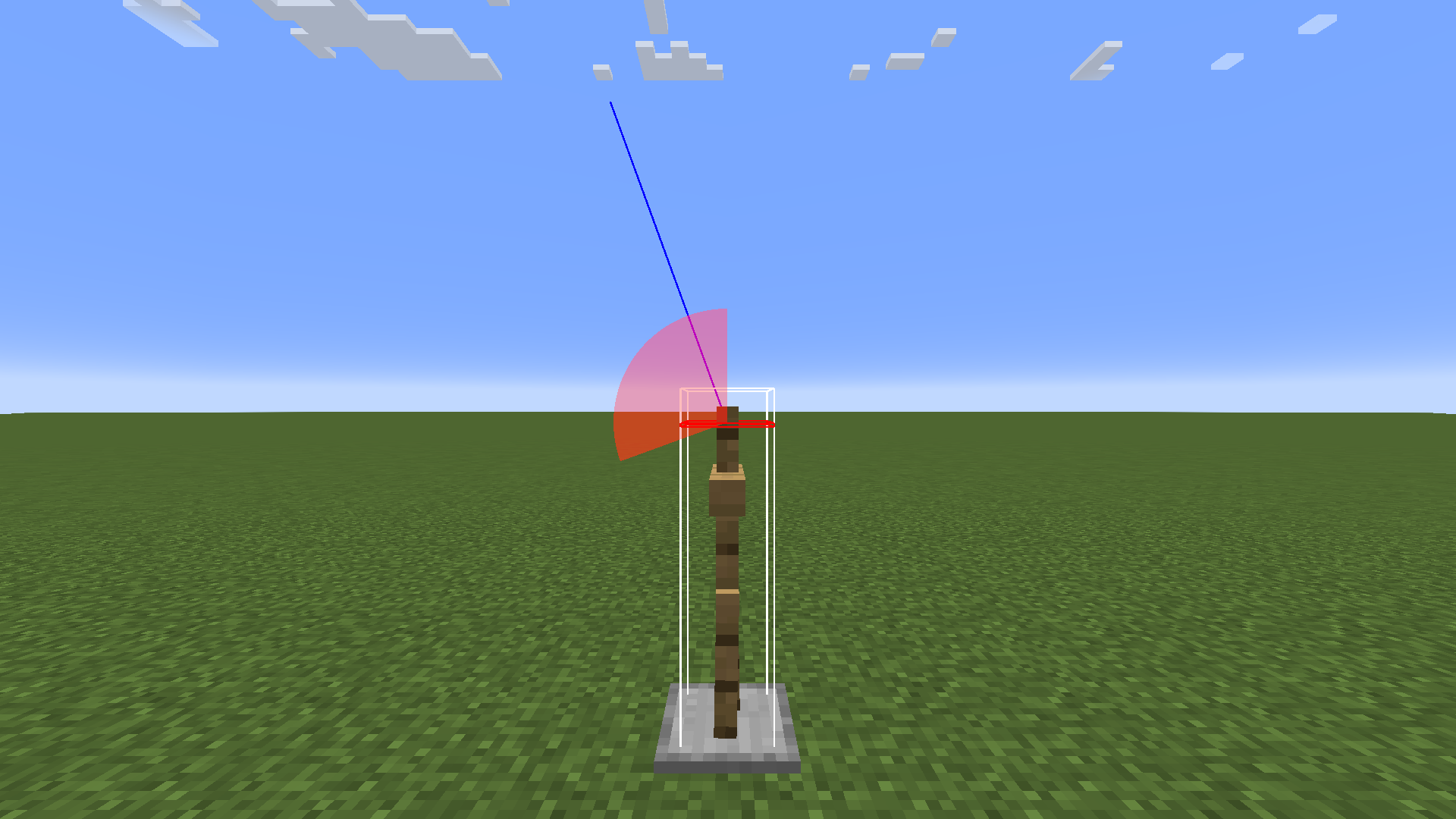
Starting from version 1.21.2, the x-rotation in the /teleport command, when rotated using relative angles, is clamped to within ±90 degrees of the entity's original x-rotation.The red sector in the attached image represents the range of possible rotation.
In version 1.21.1 and earlier, the range of rotation was from directly above to directly below.
However, starting from version 1.21.2, if the initial angle is -70°, the x-rotation can only be lowered to 20°.Steps to reproduce:
Execute the following two commands in the chat box./tp @s ~ ~ ~ ~ -70 /tp @s ~ ~ ~ ~ ~120Expected results:
The player's x-rotation will be set to -70+120 = 50.Observed results:
The player's x-rotation will be set to 20.Note: This issue does not affect the /rotate command.
Summary:
Starting from version 1.21.2, the x-rotation in the /teleport command, when rotated using relative angles, is clamped to within ±90 degrees of the entity's original x-rotation.The red sector in the attached image represents the range of possible rotation.
In version 1.21.1 and earlier, the range of rotation was from directly above to directly below.
However, starting from version 1.21.2, if the initial angle is -70°, the x-rotation can only be lowered to 20°.Steps to reproduce:
Execute the following two commands in the chat box./tp @s ~ ~ ~ ~ -70 /tp @s ~ ~ ~ ~ ~120Expected results:
The player's x-rotation will be set to -70+120 = 50.Observed results:
The player's x-rotation will be set to 20.Note: This issue does not affect the /rotate command.
Summary:
Starting from version 1.21.2, the x-rotation in the /teleport command, when rotated using relative angles, is clamped to within ±90 degrees of the entity's original x-rotation.This bug may cause existing datapacks to malfunction.
The red sector in the attached image represents the range of possible rotation.
In version 1.21.1 and earlier, the range of rotation was from directly above to directly below.
However, starting from version 1.21.2, if the initial angle is -70°, the x-rotation can only be lowered to 20°.
Steps to reproduce1:
Execute the following two commands in the chat box./tp @s ~ ~ ~ ~ -70 /tp @s ~ ~ ~ ~ ~120Expected results1:
The player's x-rotation will be set to -70+120 = 50.Observed results1:
The player's x-rotation will be set to 20.
Steps to Reproduce2:
- Place an armor stand in the world.
- Make the player's orientation face directly downward, and execute the command: teleport @n[type=armor_stand] ~ ~ ~ ~ ~. This will set the armor stand to the same position and orientation as the player.
- Next, make the player's orientation face directly upward and execute the same command again: teleport @n[type=armor_stand] ~ ~ ~ ~ ~.
Expected Results2:
The armor stand should face directly upward, matching the player's orientation.Observed Results2:
Instead of facing the same direction as the player, the armor stand ends up oriented horizontally.
Note: This issue does not affect the /rotate command.
@komaramune: Updated summary and description. Let us know if we missed any important information from the old description.
@violine1101
I'm sorry. There was wasted space in the command.
This command is valid in 1.12.
With this command, you will move two blocks and rotate 180 °.
@violine1101
Perhaps you are doing it in a world where there is no one other than yourself?
My writing is based on the assumption that there are two or more entities.
@violine1101
It was my misunderstanding about rotation. I forgot that the angle of tp is strange. Stupid me too.
But it shows that the phenomenon is more strange.
Even though it rotates twice, it rotates only once.
@violine1101
I hope that a way to rotate and move twice even if the bug is fixed be added.
In the current specification, I have to create a function each time.
@violine1101
It's a great!
I thank you for being writen appropriate sentences instead of me.
I think this "bug" is very serious.
The falling_block that got into this state is very difficult to remove.
This bug often occurs when falling_block is used with a command.
This bug has not been fixed yet.
If the blocks in the range match, the number of matches is returned, but if they do not match, 0 is returned.
It seems that code modification is incomplete.
Oh I'm sorry, I seem to had misunderstood the specification.
However, I think that it is more convenient to have specifications that can acquire the number of matches.
I am very glad that this bug was fixed.
Don't be so sad, It is just that returned to the original state.
Finally I came to be able to summon falling_block without worrying that falling_block will continue to increase in the world.
I have provided feedback on this issue in the feedback Discord server.
If this issue concerns you, please consider voting or sharing your thoughts there.
Of course, I am aware of that change.
However, I interpreted the description to imply clamping within the absolute range of -90 to 90 degrees.
I understand the necessity of restricting the entity's angle to ensure it remains within a valid orientation range of -90 to 90 degrees, but is it truly necessary to impose a limit on the angle for a single rotation of the entity?