 Chaelsie Adkins
- Liftski
- liftski
- Europe/Stockholm
- Yes
- No
 MC-133388
![[Mojang] Grum (Erik Broes)](../../../data/assets/gravatar/grum.png)
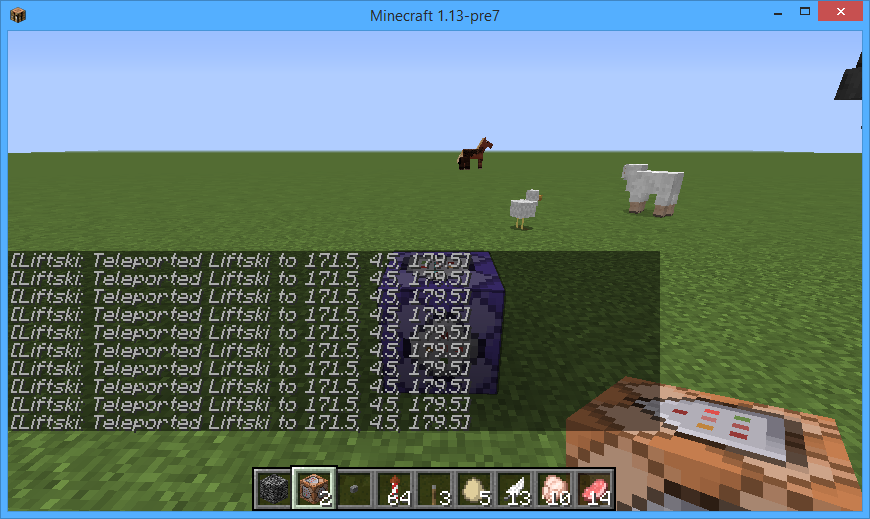
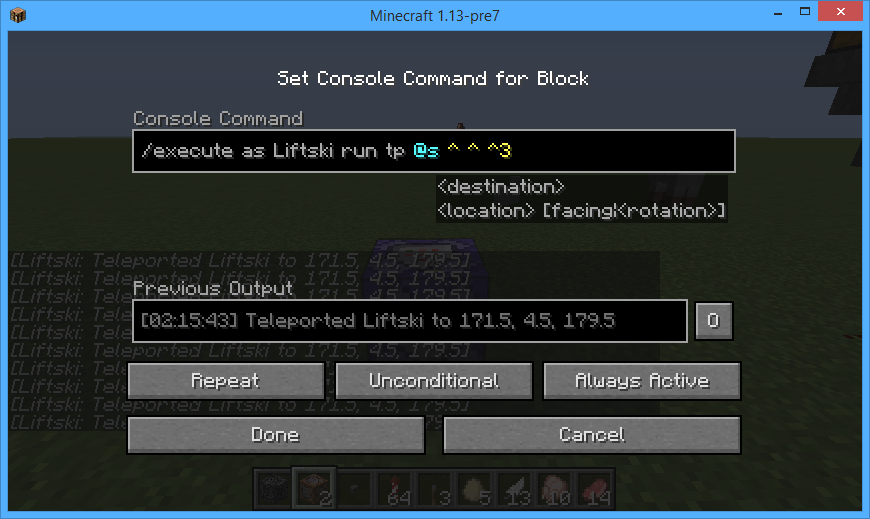




Using a repeat command block with a command like /tp (player) ^ ^ ^3 will not teleport in the direction the player is facing. Instead, it makes the player get stuck in one spot, and it made me have to delete my minecraft 1.13-pre7 world.
How to reproduce:
Run /give (player) command_block. Place it down, type "tp (username) ^ ^ ^3 and set it to repeat. Put a lever on it and flick the lever. It does not work the way it should.
Type the command /execute as (player) run tp ^ ^ ^3 on a repeat command block with always active on. Sometimes, when you click it, it doesnt show the command and acts like the command block is empty.

Type the command /execute as (player) run tp ^ ^ ^3 on a repeat command block with always active on. Sometimes, when you click it, it doesnt show the command and acts like the command block is empty.
Type the command
/execute as (player) run tp ^ ^ ^3 on a repeat command block with always active on. Sometimes, when you click it, it doesnt show the command and acts like the command block is empty.Type the command tp ~ ~ ~3 on a repeat command block with always active on. Sometimes, when you click it, it doesnt show the command and acts like the command block is empty.
Type the command tp
~ ~ ~3 on a repeat command block with always active on. Sometimes, when you click it, it doesnt show the command and acts like the command block is empty.Type the command tp ^ ^ ^3 on a repeat command block with always active on. Sometimes, when you click it, it doesnt show the command and acts like the command block is empty.
Possibly. The command block in the picture actually has the command "tp Liftski ^ ^ ^3" in it.
Type thecommandtp ^ ^ ^3 on a repeat command block with always active on. Sometimes, when you click it, it doesnt show the command and acts like the command block is empty.I put a command block down with either /tp Liftski ^ ^ ^3 (this one was on, and showed in the screenshot) and another one with the command that i thought would work the same, but worked how i thought it should, but was off.
What i thought would happen:
I opened the command block, and 100% of the time it said the command inside.
What happened:
The command block worked like it had the command in it, and only about 30% of the time it displayed the command that the block held. The other 70% of the time it acted like i just placed the block down.
How to reproduce:
Place down a command block, and put any text in it. Close out with done to save what you put in the command block ex. "Say TEST!" and run it to make sure you entered a valid command. Click the command block a few times. Sometimes, you won't see the text you entered, ex: "Say TEST!" doesnt display but it acts like it has "Say TEST!" in it when you run it.
I feel like this bug could let you break command blocks if you write text in its bugged state, in a way that it could run a certain command. While it could be useful for an adventure map with a random ending, if it works that way, it could also possibly be very annoying, if you had a command in there that you wanted to expand. Please fix this bug!
I put a command block down with either /tp Liftski ^ ^ ^3 (this one was
on, andshowed in the screenshot)and another one with the command that i thought would work the same, but worked how i thought it should, but was off.What i thought would happen:
I opened the command block, and 100% of the time it said the command inside.
What happened:
The command block worked like it had the command in it, and only about 30% of the time it displayed the command that the block held. The other 70% of the time it acted like i just placed the block down.
How to reproduce:
Place down a command block, and put any text in it. Close out with done to save what you put in the command block ex. "Say TEST!" and run it to make sure you entered a valid command. Click the command block a few times. Sometimes, you won't see the text you entered, ex: "Say TEST!" doesnt display but it acts like it has "Say TEST!" in it when you run it.
I feel like this bug could let you break command blocks if you write text in its bugged state, in a way that it could run a certain command. While it could be useful for an adventure map with a random ending, if it works that way, it could also possibly be very annoying, if you had a command in there that you wanted to expand. Please fix this bug!
I put a command block down with either /tp Liftski ^ ^ ^3 (this one was showed in the screenshot)
What i thought would happen:
I opened the command block, and 100% of the time it said the command inside.
What happened:
The command block worked like it had the command in it, and only about 30% of the time it displayed the command that the block held. The other 70% of the time it acted like i just placed the block down.
How to reproduce:
Place down a command block, and put any text in it. Close out with done to save what you put in the command block ex. "Say TEST!" and run it to make sure you entered a valid command. Click the command block a few times. Sometimes, you won't see the text you entered, ex: "Say TEST!" doesnt display but it acts like it has "Say TEST!" in it when you run it.
I feel like this bug could let you break command blocks if you write text in its bugged state, in a way that it could run a certain command.
While it could be useful for an adventure map with a random ending,if it works that way, it couldalsopossibly be very annoying, if you had a command in there that you wanted to expand. Please fix this bug!I put a command block down with either /tp Liftski ^ ^ ^3 (this one was showed in the screenshot)
What i thought would happen:
I opened the command block, and 100% of the time it said the command inside.
What happened:
The command block worked like it had the command in it, and only about 30% of the time it displayed the command that the block held. The other 70% of the time it acted like i just placed the block down.
How to reproduce:
Place down a command block, and put any text in it. Close out with done to save what you put in the command block ex. "Say TEST!" and run it to make sure you entered a valid command. Click the command block a few times. Sometimes, you won't see the text you entered, ex: "Say TEST!" doesnt display but it acts like it has "Say TEST!" in it when you run it.
I feel like this bug could let you break command blocks if you write text in its bugged state, in a way that it could run a certain command. if it works that way, it could possibly be very annoying, if you had a command in there that you wanted to expand. Please fix this bug!
NOTE: This kind-of happens with command blocks that are off, but they go back to normal after about 2 seconds.
I put a command block down with either /tp Liftski ^ ^ ^3 (this one was showed in the screenshot)
What i thought would happen:
I opened the command block, and 100% of the time it said the command inside.
What happened:
The command block worked like it had the command in it, and only about 30% of the time it displayed the command that the block held. The other 70% of the time it acted like i just placed the block down.
How to reproduce:
Place down a command block, and put any text in it. Close out with done to save what you put in the command block ex. "Say TEST!" and run it to make sure you entered a valid command. Click the command block a few times. Sometimes, you won't see the text you entered, ex: "Say TEST!" doesnt display but it acts like it has "Say TEST!" in it when you run it.
I feel like this bug could let you break command blocks if you write text in its bugged state, in a way that it could run a certain command. if it works that way, it could possibly be very annoying, if you had a command in there that you wanted to expand. Please fix this bug!
NOTE: This kind-of happens with command blocks that are off, but they go back to normal after about 0-2 seconds.
I put a command block down with either /tp Liftski ^ ^ ^3 (this one was showed in the screenshot) or /execute as Liftski run tp @s ^ ^ ^3 (pre-8)
What i thought would happen:
I opened the command block, and 100% of the time it said the command inside.
What happened:
The command block worked like it had the command in it, and only about 30% of the time it displayed the command that the block held. The other 70% of the time it acted like i just placed the block down.
How to reproduce:
Place down a command block, and put any text in it. Close out with done to save what you put in the command block ex. "Say TEST!" and run it to make sure you entered a valid command. Click the command block a few times. Sometimes, you won't see the text you entered, ex: "Say TEST!" doesnt display but it acts like it has "Say TEST!" in it when you run it. It will take 0-2 seconds to load that text. If typing /execute as (player) run tp @s ^ ^ ^3 (pre-7 and pre-8) it wont load at all
I feel like this bug could let you break command blocks if you write text in its bugged state, in a way that it could run a certain command. if it works that way, it could possibly be very annoying, if you had a command in there that you wanted to expand. Please fix this bug!
NOTE: This kind-of happens with command blocks that are off, but they go back to normal after about 0-2 seconds.
I put a command block down with either /tp Liftski ^ ^ ^3 (this one was showed in the screenshot) or /execute as Liftski run tp @s ^ ^ ^3 (pre-8)
What i thought would happen:
I opened the command block, and 100% of the time it said the command inside.
What happened:
The command block worked like it had the command in it, and only about 30% of the time it displayed the command that the block held. The other 70% of the time it acted like i just placed the block down.
How to reproduce:
Place down a command block, and put any text in it. Close out with done to save what you put in the command block ex. "Say TEST!" and run it to make sure you entered a valid command. Click the command block a few times. Sometimes, you won't see the text you entered, ex: "Say TEST!" doesnt display but it acts like it has "Say TEST!" in it when you run it. It will take 0-2 seconds to load that text. If typing /execute as (player) run tp @s ^ ^ ^3 (pre-7 and pre-8) it wont load at all, if looking in the right place
I feel like this bug could let you break command blocks if you write text in its bugged state, in a way that it could run a certain command. if it works that way, it could possibly be very annoying, if you had a command in there that you wanted to expand. Please fix this bug!
NOTE: This kind-of happens with command blocks that are off, but they go back to normal after about 0-2 seconds.
I put a command block down with either /tp Liftski ^ ^ ^3 (this one was showed in the screenshot) or /execute as Liftski run tp @s ^ ^ ^3 (pre-8)
What i thought would happen:
I opened the command block, and 100% of the time it said the command inside.
What happened:
The command block worked like it had the command in it, and only about 30% of the time it displayed the command that the block held. The other 70% of the time it acted like i just placed the block down.
How to reproduce:
Place down a command block, and put any text in it. Close out with done to save what you put in the command block ex. "Say TEST!" and run it to make sure you entered a valid command. Click the command block a few times. Sometimes, you won't see the text you entered, ex: "Say TEST!" doesnt display but it acts like it has "Say TEST!" in it when you run it. It will take 0-2 seconds to load that text. If typing /execute as (player) run tp @s ^ ^ ^3 (pre-7 and pre-8) it wont load at all, if looking in the right place
I feel like this bug could let you break command blocks if you write text in its bugged state, in a way that it could run a certain command. if it works that way, it could possibly be very annoying, if you had a command in there that you wanted to expand. Please fix this bug!
NOTE: This kind-of happens with command blocks that are off, but they go back to normal after about 0-2 seconds.
I put a command block down with either /tp Liftski ^ ^ ^3 (this one was showed in the screenshot) or /execute as Liftski run tp @s ^ ^ ^3 (pre-8)
What i thought would happen:
I opened the command block, and 100% of the time it said the command inside.
What happened:
The command block worked like it had the command in it, and only about 30% of the time it displayed the command that the block held. The other 70% of the time it acted like i just placed the block down.
How to reproduce:
Place down a command block, and put any text in it. Close out with done to save what you put in the command block ex. "Say TEST!" and run it to make sure you entered a valid command. Click the command block a few times. Sometimes, you won't see the text you entered, ex: "Say TEST!" doesnt display but it acts like it has "Say TEST!" in it when you run it. It will take 0-2 seconds to load that text. If typing /execute as (player) run tp @s ^ ^ ^3 (pre-7 and pre-8) it wont load at all, if looking in the right place
NOTE: Clicking a command block that's off will
I feel like this bug could let you break command blocks if you write text in its bugged state, in a way that it could run a certain command. if it works that way, it could possibly be very annoying, if you had a command in there that you wanted to expand. Please fix this bug!
NOTE: This kind-of happens with command blocks that are off, but they go back to normal after about 0-2 seconds.
I put a command block down with either /tp Liftski ^ ^ ^3 (this one was showed in the screenshot) or /execute as Liftski run tp @s ^ ^ ^3 (pre-8)
What i thought would happen:
I opened the command block, and 100% of the time it said the command inside.
What happened:
The command block worked like it had the command in it, and only about 30% of the time it displayed the command that the block held. The other 70% of the time it acted like i just placed the block down.
How to reproduce:
Place down a command block, and put any text in it. Close out with done to save what you put in the command block ex. "Say TEST!" and run it to make sure you entered a valid command. Click the command block a few times. Sometimes, you won't see the text you entered, ex: "Say TEST!" doesnt display but it acts like it has "Say TEST!" in it when you run it. It will take 0-2 seconds to load that text. If typing /execute as (player) run tp @s ^ ^ ^3 (pre-7 and pre-8) it wont load at all, if looking in the right place
NOTE: Clicking a command block that's off will
I feel like this bug could let you break command blocks if you write text in its bugged state, in a way that it could run a certain command. if it works that way, it could possibly be very annoying, if you had a command in there that you wanted to expand. Please fix this bug!
NOTE: This kind-of happens with command blocks that are off, but they go back to normal after about 0-2 seconds.
I put a command block down with either /tp Liftski ^ ^ ^3 (this one was showed in the screenshot) or /execute as Liftski run tp @s ^ ^ ^3 (pre-8)
What i thought would happen:
I opened the command block, and 100% of the time it said the command inside.
What happened:
The command block worked like it had the command in it, and only about 30% of the time it displayed the command that the block held. The other 70% of the time it acted like i just placed the block down.
How to reproduce:
Place down a command block, and put any text in it. Close out with done to save what you put in the command block ex. "Say TEST!" and run it to make sure you entered a valid command. Click the command block a few times. Sometimes, you won't see the text you entered, ex: "Say TEST!" doesnt display but it acts like it has "Say TEST!" in it when you run it. It will take 0-2 seconds to load that text. If typing /execute as (player) run tp @s ^ ^ ^3 (pre-7 and pre-8) it wont load at all, if looking in the right place
NOTE: Clicking a command block that's off will not show the command IF you click it in the right spot.
I feel like this bug could let you break command blocks if you write text in its bugged state, in a way that it could run a certain command. if it works that way, it could possibly be very annoying, if you had a command in there that you wanted to expand. Please fix this bug!
NOTE: This kind-of happens with command blocks that are off, but they go back to normal after about 0-2 seconds.
When trying to see if
MC-133389happens in 1.13-pre8,i found that /tp Liftski ^ ^ ^3 was invalid. I dont know if this just affects command blocks, but it definitely doesn't seem like its supposed to work.How to Reproduce:
Grab a repeating command block, place it anywhere, and type the command "tp (player) ^ ^ ^3" and click always active. It will say that /tp (player) ^ ^ ^3 is invalid syntax, while i discovered
MC-133389by discoveringMC-133388, which had the command /tp Liftski ^ ^ ^3. This could be VERY bad for adventure maps. NOTE: It does not glitch out with /execute as (player) run tp @s ^ ^ ^3, so the game is certainly bugging out.
When trying to see if
MC-133389happens in 1.13-pre8,i found that /tp Liftski ^ ^ ^3 was invalid. I dont know if this just affects command blocks, but it definitely doesn't seem like its supposed to work.How to Reproduce:
Grab a repeating command block, place it anywhere, and type the command "tp (player) ^ ^ ^3" and click always active. It will say that /tp (player) ^ ^ ^3 is invalid syntax, while i discovered
MC-133389by discoveringMC-133388, which had the command /tp Liftski ^ ^ ^3. This could be VERY bad for adventure maps. NOTE: It does not glitch out with /execute as (player) run tp @s ^ ^ ^3, so the game is certainly bugging out.
Note: As said in a comment, i accidentally hit the spacebar.
I entered an invalid server name, but i removed it instead of editing the server to connect to. What i thought would happen:
It would say what i named the button to join the multiplayer server would be lost
What ACTUALLY happened:
It said the name, then a weird format error.
Note: this bug DOES NOT happen with 1.12.2
I entered an invalid server name, but i removed it instead of editing the server to connect to. What i thought would happen:
It would say what i named the button to join the multiplayer server would be lost
What ACTUALLY happened:
It said the name, then a weird format error.
Note: this bug DOES NOT happen with 1.12.2
How to reproduce:
Add any minecraft server to minecraft (it doesnt have to be a valid server, either)
Click delete with the invalid server selected and thats literally it
I saw a horse in my minecraft world... What???
Steps to reproduce:
Spawn a horse
Look at the horse
Update: This isnt a bug. Sorry for thinking it was. I was using a texture pack for 1.12.2
I saw a horse in my minecraft world... What???
Steps to reproduce:
Spawn a horse
Look at the horse
Update: This isnt a bug. Sorry for thinking it was. I was using a texture pack for 1.12.2 Simply removing the texture pack fixed horses.
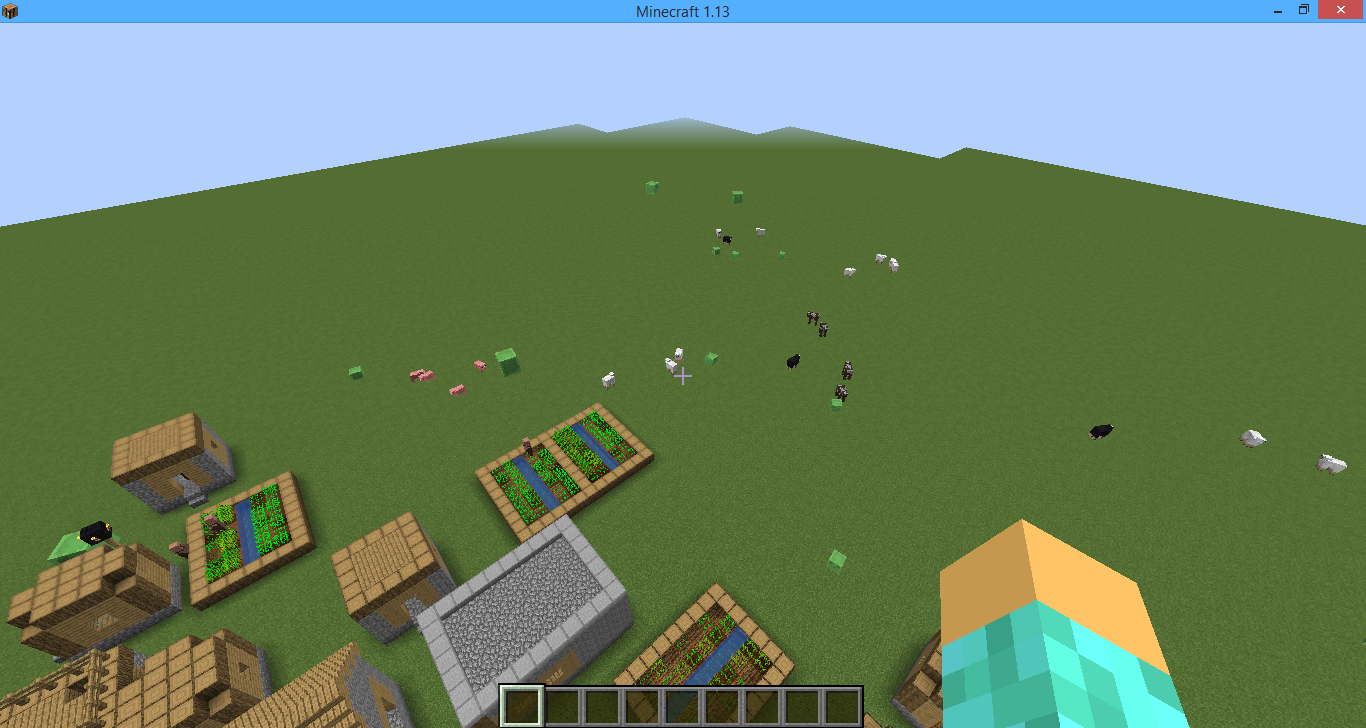
I went to two villages - They generated normally exept the paths were not there
How to reproduce:
Go to or do /locate Village
Fly above the village. You will not see any grass paths or gravel
Ahh, thanks. I thought it was a glitch, so its good to know that it isnt.
Update: That doesn't work either. It teleports the player to a spot 3 blocks away from the command block still. It might be a glitch, still
Thanks. That helps, now i have a little thing in my Minecraft world!
Seed is -6131523426419344794. At coords -207 55 155 you can and will find a village with no path. Try it on a superflat world.
No, i sadly didn't.