 magib1
- magib1
- magib1
- America/New_York
- Yes
- No
 MC-11534
![[Mojang] Searge (Michael Stoyke)](../../../data/assets/gravatar/searge.png)
 Low
Low


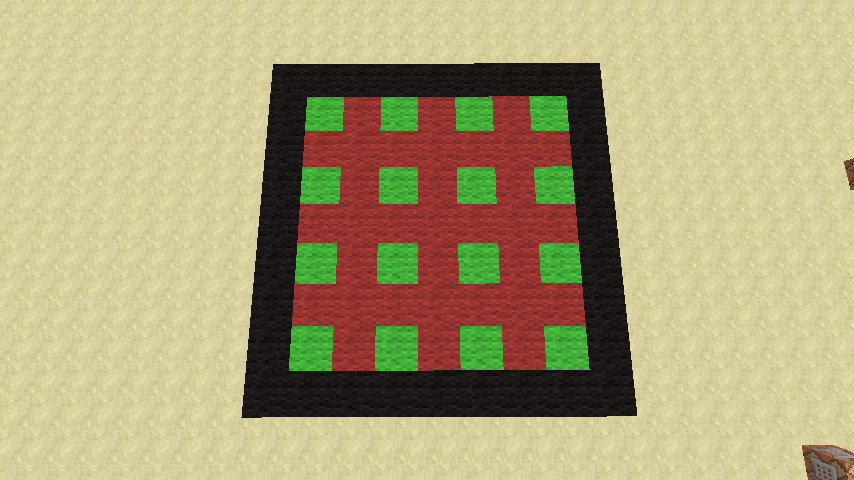


The two walls seen in the image are 50x50 (checkerboard) and 56x50 (iron wall). Whenever I load up the map, these black boxes appear. Placing light source blocks within the black region does not prevent this from occurring.
The only two ways I've managed to get them to go away is to place/break surrounding blocks, or to get within ~3 blocks of the wall.
I have a second, identical set of walls rotate 180 degrees from this set, and it doesn't have either of these box issues. When facing the affected checkerboard wall, I'm facing West. When facing the affected Iron wall, I'm facing North.
If you are unable to recreate the bug let me know and I can either post up the map or put up an IP for a server with the map loaded on it.
EDIT: Somone on the forums suggested turning off mipmapping - this had no effect.
Spreadplayerscan't spread as many entities as it should be able toSpreadplayers incorrect entity limit
When using /replaceitem or trying to directly summon a mob with equipment in the head slot, all "rotated" blocks show the "error" texture.
Command to recreate issue:
{id:log,Damage:4}
/entitydata @e[type=ArmorStand] {Equipment:[,{},{},{},{}]}
This affects all blocks that have damage values that are a rotation of another damage value, including, but not limited to:
log (damage value 4+)
log2 (damage value 2+)
stairs (damage value 1+)
quartz_block (damage values 3+)
rail variants (damage 1+)
piston variants (damage 1+)
wooden_slab (damage 6+)
stone_slab (damage 8+)
Rotated blocks displaying "error" texture in equipment head slotRotated blocks displaying "error" texture in equipment held slot
Rotated blocks displaying "error" texture inequipmentheld slot
Rotated blocks displaying "error" texture in held and head slots
When using /replaceitem or trying to directly summon a mob with equipment in the head slot, all "rotated" blocks show the "error" texture.
Command to recreate issue:
{id:log,Damage:4}
/entitydata @e[type=ArmorStand] {Equipment:[,{},{},{},
{}]}This affects all blocks that have damage values that are a rotation of another damage value, including, but not limited to:
log (damage value 4+)
log2 (damage value 2+)
stairs (damage value 1+)
quartz_block (damage values 3+)
rail variants (damage 1+)
piston variants (damage 1+)
wooden_slab (damage 6+)
stone_slab (damage 8+)When using /replaceitem or trying to directly summon a mob with equipment in the head slot, all "rotated" blocks show the "error" texture.
Command to recreate issue:
{id:log,Damage:4}
/entitydata @e[type=ArmorStand] {Equipment:[,{},{},{},
{id:cobblestone_stairs,Damage:1}]}
This affects all blocks that have damage values that are a rotation of another damage value, including, but not limited to:
log (damage value 4+)
log2 (damage value 2+)
stairs (damage value 1+)
quartz_block (damage values 3+)
rail variants (damage 1+)
piston variants (damage 1+)
wooden_slab (damage 6+)
stone_slab (damage 8+)
When using /replaceitem or trying to directly summon a mob with equipment in the head slot, all "rotated" blocks show the "error" texture.
Command to recreate issue:
{id:log,Damage:4}
/entitydata @e[type=ArmorStand] {Equipment:[,{},{},{},
{id:cobblestone_stairs,Damage:1}]}
This affects all blocks that have damage values that are a rotation of another damage value, including, but not limited to:
log (damage value 4+)
log2 (damage value 2+)
stairs (damage value 1+)
quartz_block (damage values 3+)
rail variants (damage 1+)
piston variants (damage 1+)
wooden_slab (damage 6+)
stone_slab (damage 8+)
When using /entitydata to change the block type of FallingSand, the rendered block isn't updated until the sand touches the ground and becomes a solid block.
/summon FallingSand ~ ~ ~ {Block:iron_ore,Time:1,Riding:{id:ArmorStand,NoGravity:1}}
/entitydata @e[type=FallingSand]
{Block:diamond_ore} {/code}When using /entitydata to change the block type of FallingSand, the rendered block isn't updated until the sand touches the ground and becomes a solid block.
/summon FallingSand ~ ~ ~ {Block:iron_ore,Time:1,Riding:{id:ArmorStand,NoGravity:1}}

/entitydata @e[type=FallingSand] {Block:diamond_ore}
When using /entitydata to change the block type of FallingSand, the rendered block isn't updated until the sand touches the ground and becomes a solid block, or until the player relogs.
/summon FallingSand ~ ~ ~ {Block:iron_ore,Time:1,Riding:{id:ArmorStand,NoGravity:1}} /entitydata @e[type=FallingSand] {Block:diamond_ore}
 Shade Bug Report.zip
Any item can still be put on a player's head via replaceitem, but mobs can only wear helmets. This appears unintentional as per
https://twitter.com/SeargeDP/status/623125935445921792Works:
/replaceitem entity @e[type=ArmorStand] slot.armor.head minecraft:diamond_helmetDoes not work:
/replaceitem entity @e[type=ArmorStand] slot.armor.head minecraft:appleUPDATE: As of 15w32a this bug only exists for Armor Stands. All other mobs and players appear to work.
Any item can still be put on a player's head via replaceitem, but mobs can only wear helmets. This appears unintentional as per https://twitter.com/SeargeDP/status/623125935445921792
Works:
/replaceitem entity @e[type=ArmorStand] slot.armor.head minecraft:diamond_helmetDoes not work:
/replaceitem entity @e[type=ArmorStand] slot.armor.head minecraft:apple
/replaceitem cannot place non-armor items intomobs' head slot/replaceitem cannot place non-armor items into Armor Stands' head slot
stat.mineBlock will only increase if a block is broken in survival or adventure mode. Because command blocks can only be destroyed in creative mode, stat.mineBlock.minecraft.command_block can never be increased, rendering it useless.
Blocks that can only be destroyed in Creative mode should allow stat.mineBlock to track breaking in Creative mode, or the statistic should be removed to prevent confusion (although Creative mode tracking would be much preferred for these types of blocks).
If you move far enough from a stacked entity to cause it to stop rendering, it will desynch from the entity it is riding until you save/quit/reload the world. I was only able to test this in Singleplayer, I don't know if it's an issue in multiplayer as well.
GIF: http://gfycat.com/SpeedyElectricDesertpupfish
Process to replicate:
{id:Villager,PersistenceRequired:1,NoAI:1,Silent:1}
{{/summon ArmorStand ~ ~1 ~ {CustomName:test,PersistenceRequired:1,NoGravity:1,Marker:1,Passengers:[]}}}
Fly away until the Villager stops rendering, but the ArmorStand is still visible.
/tp @e[name=test] @p
The ArmorStand will appear instantly, but the Villager will either:
1) Still be rendered at the original position, if you moved close enough to it to make it visible again before running the tp command; or
2) Display after a second if you ran the tp command while the Villager was not in render distance. If you move and run the tp command again, the Villager will not come with the ArmorStand.If you save and quit to title, and then reload the world, the Villager will once again become a passenger of the ArmorStand, and teleporting will work (so long as the Villager is within render distance).
If you move far enough from a stacked entity to cause it to stop rendering, it will desynch from the entity it is riding until you save/quit/reload the world. I was only able to test this in Singleplayer, I don't know if it's an issue in multiplayer as well.
GIF: http://gfycat.com/SpeedyElectricDesertpupfish
Process to replicate:
/summon ArmorStand ~ ~1 ~ {CustomName:test,PersistenceRequired:1,NoGravity:1,Marker:1,Passengers:[{id:Villager,PersistenceRequired:1,NoAI:1,Silent:1}]}Fly away until the Villager stops rendering, but the ArmorStand is still visible.
/tp @e[name=test] @p
The ArmorStand will appear instantly, but the Villager will either:
1) Still be rendered at the original position, if you moved close enough to it to make it visible again before running the tp command; or
2) Display after a second if you ran the tp command while the Villager was not in render distance. If you move and run the tp command again, the Villager will not come with the ArmorStand.If you save and quit to title, and then reload the world, the Villager will once again become a passenger of the ArmorStand, and teleporting will work (so long as the Villager is within render distance).
If you move far enough from a stacked entity to cause it to stop rendering, it will desynch from the entity it is riding until you save/quit/reload the world. I was only able to test this in Singleplayer, I don't know if it's an issue in multiplayer as well.
GIF: http://gfycat.com/SpeedyElectricDesertpupfish
Process to replicate:
/summon ArmorStand ~ ~1 ~ {CustomName:test,PersistenceRequired:1,NoGravity:1,Marker:1,Passengers:[{id:Villager,PersistenceRequired:1,NoAI:1,Silent:1}]}Fly away until the Villager stops rendering, but the ArmorStand is still visible.
/tp @e[name=test] @p
The ArmorStand will appear instantly, but the Villager will either:
1) Still be rendered at the original position, if you moved close enough to it to make it visible again before running the tp command; or
2) Display after a second if you ran the tp command while the Villager was not in render distance. If you move and run the tp command again, the Villager will not come with the ArmorStand.If you save and quit to title, and then reload the world, the Villager will once again become a passenger of the ArmorStand, and teleporting will work (so long as the Villager is within render distance).
If you move far enough from a stacked entity to cause it to stop rendering, it will desynch from the entity it is riding until you save/quit/reload the world. I was only able to test this in Singleplayer, I don't know if it's an issue in multiplayer as well.
GIF: http://gfycat.com/SpeedyElectricDesertpupfish
Process to replicate:
/summon ArmorStand ~ ~1 ~ {CustomName:test,PersistenceRequired:1,NoGravity:1,Marker:1,Passengers:[{id:Villager,PersistenceRequired:1,NoAI:1,Silent:1}]}Fly away until the Villager stops rendering, but the ArmorStand is still visible.
/tp @e[name=test] @pThe ArmorStand will appear instantly, but the Villager will either:
1) Still be rendered at the original position, if you moved close enough to it to make it visible again before running the tp command; or
2) Display after a second if you ran the tp command while the Villager was not in render distance. If you move and run the tp command again, the Villager will not come with the ArmorStand.If you save and quit to title, and then reload the world, the Villager will once again become a passenger of the ArmorStand, and teleporting will work (so long as the Villager is within render distance).
If you move far enough from a stacked entity to cause it to stop rendering, it will desynch from the entity it is riding until you save/quit/reload the world. I was only able to test this in Singleplayer, I don't know if it's an issue in multiplayer as well.
GIF of the bug: http://gfycat.com/SpeedyElectricDesertpupfish
Process to replicate:
/summon ArmorStand ~ ~1 ~ {CustomName:test,PersistenceRequired:1,NoGravity:1,Marker:1,Passengers:[{id:Villager,PersistenceRequired:1,NoAI:1,Silent:1}]}Fly away until the Villager stops rendering, but the ArmorStand is still visible.
/tp @e[name=test] @pThe ArmorStand will appear instantly, but the Villager will either:
1) Still be rendered at the original position, if you moved close enough to it to make it visible again before running the tp command; or
2) Display after a second if you ran the tp command while the Villager was not in render distance. If you move and run the tp command again, the Villager will not come with the ArmorStand.If you save and quit to title, and then reload the world, the Villager will once again become a passenger of the ArmorStand, and teleporting will work (so long as the Villager is within render distance).
Structure blocks don'texistingoverwrite files until loadedStructure blocks don't overwrite existing files until loaded
Structure blocks don't overwrite existing filesuntil loadedStructure blocks don't overwrite existing files when saved
I managed to solve this by moving the project to a new map with mcedit. Unsure if it is still an issue in more recent versions (I no longer have the map file that I reported this on).
I believe the issue is with OnGround:2b. OnGround is binary and can only be 0 or 1.
Still present in 1.8.1-pre5
Confirmed in 1.8.2-pre1.
Confirmed in 1.8.2-pre3.
Confirmed for 1.8.2-pre6.
Confirmed for 1.8.2-pre7.
Confirmed for 1.8.2.
Confirmed for 1.8.3.
As requested, added a resource pack implementing the example item model code for the white wool block. Note that this was zipped on a mac, so there may be some extra (unnecessary) files in the zip.
Possibly related to
MC-72866Yes, it worked in 15w31a (https://i.imgur.com/MqMsbh6.png) and should be working as per tweets from Searge (https://twitter.com/SeargeDP/status/623125935445921792) and Grum (https://twitter.com/_grum/status/623411853109141504)
Never worked in 1.8.x for items. Replaceitem was broken in 15w31a, so no way to know (ignore my claim above that it did work in 31a, clearly wasn't thinking). Tested summoning with the item and that does work in this snapshot, though it makes no sense to me that summoning with the item works, but replaceitem doesn't.
"/replaceitem takes into accout if it is able to be placed in that slot"
It seems odd to me that all blocks are considered "permitted" items, but not all items, particularly now that items can be properly rendered. I'm not buying it's intended (perhaps out of wishful thinking). Massively cuts the utility of allowing item rendering in the head slot if a new entity has to be summoned every time you want to change the item, or if you have to use entitydata.
EDIT: Glad to see it'll be fixed
Still present in 15w31c.
Still an issue in 15w31c.
Still affects Armor Stands in 15w32a, though not any other mobs or players.
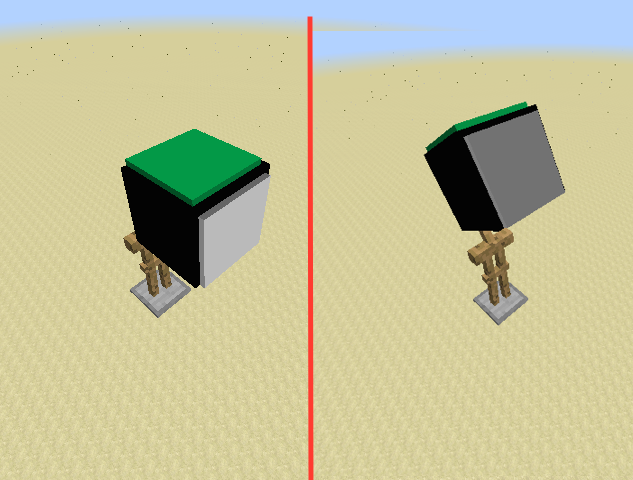
Added an image to highlight why "shade": false not working for item models is a problem.
Left ArmorStand rotation: Head:[0f,0f,0f]
Right ArmorStand rotation: Head:[30f,0f,0f]
Updated the attached resource pack to a 1.9-compatible pack. To put the item model on the head of an armor stand use:
Still an issue in 15w34c.
Why was the status of this changed to "Awaiting Response" after Simplius updated the "Affects Version/s" field to include 1.10 in response to bleuthoot's question?