 mariogoon
- mariogoon
- mariogoon
- Asia/Seoul
- Yes
- No
 MCPE-45023
 MC-239962
 MCL-20193MC-243107


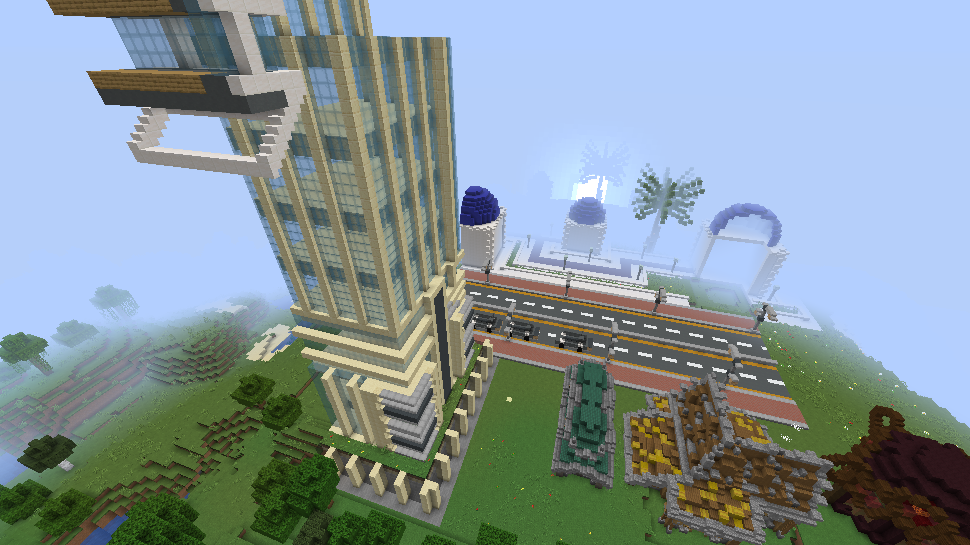




When upgrade the old world, the existing building is seriously damaged, and the new terrain occurs on the existing terrain.
Files description:
2021-10-28_22.50.04.png - old world (1.10.2 -> 1.17.1)
2021-10-28_22.28.45.png - this snapshot(1.10.2 -> 1.17.1 -> 21w43a)
2021-10-28_22.28.08.png - terrain comparison
When upgrade the old world, the existing building is seriously damaged, and the new terrain occurs on the existing terrain.
Files description:
2021-10-28_22.50.04.png - old world (1.10.2 -> 1.17.1)
2021-10-28_22.28.45.png - this snapshot(1.10.2 -> 1.17.1 -> 21w43a)
2021-10-28_22.28.08.png - terrain comparison
2021-11-27_11.47.40.png - rc3 -> 1.17.1
When upgrade the old world, the existing building is seriously damaged, and the new terrain occurs on the existing terrain.
Files description:
2021-1
0-28_22.50.04.png - old world (1.10.2 -> 1.17.1)2021-10-28_22.
28.45.png -this snapshot(1.10.2 -> 1.17.1-> 21w43a)2021-10-28_22.28.
08.png -terrain comparison2021-1
1-27_11.47.40.png - rc3 -> 1.17.1
When upgrade the old world, the existing building is seriously damaged, and the new terrain occurs on the existing terrain.
Files description:
2021-11-27_11.47.40.png - 1.10.2 -> 1.18-rc3
2021-10-28_22.50.04.png - old world (1.10.2 -> 1.17.1)
2021-10-28_22.28.45.png - 1.10.2 -> 1.17.1 -> 21w43a
2021-10-28_22.28.08.png - terrain comparison
When upgrade the old world, the existing building is seriously damaged, and the new terrain occurs on the existing terrain.
Files description:
2021-1
1-27_11.47.40.png -1.10.2 -> 1.18-rc32021-10-28_22.
50.04.png -old world (1.10.2 -> 1.17.1)2021-10-28_22.28.
45.png -1.10.2 -> 1.17.1 -> 21w43a2021-1
0-28_22.28.08.png - terrain comparison
When upgrade the old world, the existing building is seriously damaged, and the new terrain occurs on the existing terrain.
Files description:
2021-10-28_22.50.04.png - old world (1.10.2 -> 1.17.1)
2021-10-28_22.28.45.png - 1.10.2 -> 1.17.1 -> 21w43a
2021-10-28_22.28.08.png - terrain comparison
2021-11-27_11.47.40.png - 1.10.2 -> 1.18-rc3
2021-11-27_11.47.40.png
When upgrade the old world, the existing building is seriously damaged, and the new terrain occurs on the existing terrain.
Files description:
2021-10-28_22.50.04.png - old world (1.10.2 -> 1.17.1)
2021-10-28_22.28.45.png - 1.10.2 -> 1.17.1 -> 21w43a
2021-10-28_22.28.08.png - terrain comparison
2021-11-27_11.47.40.png - 1.10.2 -> 1.18-rc3 / 1.18-rc2 -> 1.18-rc3
When upgrade the old world, the existing building is seriously damaged, and the new terrain occurs on the existing terrain.
Files description:
2021-10-28_22.50.04.png - old world (1.10.2 -> 1.17.1)
2021-10-28_22.28.45.png - 1.10.2 -> 1.17.1 -> 21w43a
2021-10-28_22.28.08.png - terrain comparison
2021-11-27_11.47.40.png - 1.10.2 -> 1.18-rc
3 / 1.18-rc2 -> 1.18-rc3
When upgrade the old world, the existing building is seriously damaged, and the new terrain occurs on the existing terrain.
Files description:
2021-10-28_22.50.04.png - old world (1.10.2 -> 1.17.1)
2021-10-28_22.28.45.png - 1.10.2 -> 1.17.1 -> 21w43a
2021-10-28_22.28.08.png - terrain comparison
2021-11-27_11.47.40.png - 1.10.2 -> 1.18-rc2, rc3
When upgrade the old world, the existing building is seriously damaged, and the new terrain occurs on the existing terrain.
Files description:
2021-10-28_22.50.04.png - old world (1.10.2 -> 1.17.1)
2021-10-28_22.28.45.png - 1.10.2 -> 1.17.1 -> 21w43a
2021-10-28_22.28.08.png - terrain comparison
2021-11-27_11.47.40.png - 1.10.2 -> 1.18-rc2, rc3
When upgrade the old world, the existing building is seriously damaged, and the new terrain occurs on the existing terrain.
Files description:
2021-10-28_22.50.04.png - old world (1.10.2 -> 1.17.1)
2021-10-28_22.28.45.png - 1.10.2 -> 1.17.1 -> 21w43a
2021-10-28_22.28.08.png - terrain comparison
2021-11-27_11.47.40.png - 1.10.2 -> 1.18-pre8, rc2, rc3
(NOMALLY WORKED IN 1.18-pre7)
Seem to be upgraded fully than when 1.17's upgrade. (it is solved)

If select another drive in the XBOX app and install it, it won't be able to run
Default drive (example: C
: executable
Another drive (D:, E:, F:, ...): impracticability (The route cannot pass because the route contains unreliable mounting points -> see screenshot)
If select another drive in the XBOX app and install it, it won't be able to run
Default drive (example: C: ) executable
Another drive (D:, E:, F:, ...): impracticability (The route cannot pass because the route contains unreliable mounting points -> see screenshot)
When upgrade the old world, the light block doesn't shine. (It's working only when it's placed again)
mods used, but only for shader.
(edited to Vanilla)
PLEASE READ FOR MOD:
When upgrade the old world, the light block doesn't shine. (It's working only when it's placed again)
(edited to Vanilla)
PLEASE READ FOR MOD:
When upgrade the old world, the light block doesn't shine. (It's working only when it's placed again)
(2021/11/27: edited to Vanilla)
PLEASE READ THIS FOR MOD: https://bugs.mojang.com/browse/MC-239962
When upgrade the old world, the light block doesn't shine. (It's working only when it's placed again)
(2021/11/27: edited to Vanilla's screenshot)
PLEASE READ THIS FOR MOD: https://bugs.mojang.com/browse/MC-239962
When upgrade the old world, the light block doesn't shine. (It's working only when it's placed again)
(2021/11/27: edited to Vanilla's screenshot)
PLEASE READ THIS FOR MODERATOR: https://bugs.mojang.com/browse/MC-239962
When upgrade the old world, the light block doesn't shine. (It's working only when it's placed again)
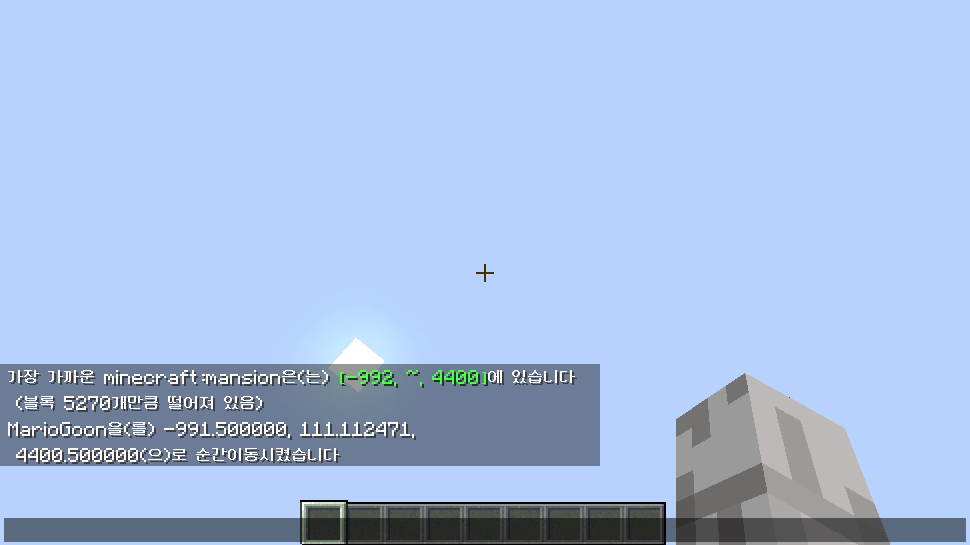
If teleport to Pillager Outpost or Mansion, the game stops without loading the world.
Symptom
- when instantaneously move to the structure, the chunk will not load.
the game has stopped, so commands, changing game modes, and interacting with mobs are not working.
Exception *
Create the world from the previous version(ex: 22w12a), move it to that structure, and return to the current version(22w13a), and it will be loaded normally.
Screenshots: when near the structure, the chunk does not loading.
If teleport to Pillager Outpost or Mansion, the game stops without loading the world.
Symptom
- when instantaneously move to the structure, the chunk will not load.
- the game has stopped, so commands, changing game modes, and interacting with mobs are not working.
E xception
- Create the world from the previous version(ex: 22w12a), move it to that structure, and return to the current version(22w13a), and it will be loaded normally.
Screenshots: when near the structure, the chunk does not loading.
Korean is missing in minecraft launcher(2.3.324)'s language setting.
As described in the picture(=k.png), there was Korean in that location, but it disappeared after the update.
As a result, it became impossible to set it in Korean, and the user previously set in Korean was changed to English.*Same symptoms: https://bugs.mojang.com/browse/MCL-22070*
Korean is missing in minecraft launcher(2.3.324)'s language setting.As described in the picture(=k.png), there was Korean in that location, but it disappeared after the update.
As a result, it became impossible to set it in Korean, and the user previously set in Korean was changed to English.
*Same symptoms:https://bugs.mojang.com/browse/MCL-22070*
Korean is missing in minecraft launcher(2.3.324)'s language setting.As described in the picture(=k.png), there was Korean in that location, but it disappeared after the update.
As a result, it became impossible to set it in Korean, and the user previously set in Korean was changed to English.Same symptoms: *https://bugs.mojang.com/browse/MCL-22070*
Korean is missing in minecraft launcher(2.3.324)'s language setting.
As described in the picture(=k.png), there was Korean in that location, but it disappeared after the update.
As a result, it became impossible to set it in Korean, and the user previously set in Korean was changed to English.
{*}Although it is set to KO-KR like ks.png, it is not displayed in Korean.
Same symptoms: *https://bugs.mojang.com/browse/MCL-22070*
Korean is missing in minecraft launcher(2.3.324)'s language setting.
As described in the picture(=k.png), there was Korean in that location, but it disappeared after the update.
As a result, it became impossible to set it in Korean, and the user previously set in Korean was changed to English.
{*}Although it is set to KO-KR like ks.png, it is not displayed in Korean.
Same symptoms: *https://bugs.mojang.com/browse/MCL-22070
*Korean is missing in minecraft launcher(2.3.324)'s language setting.
As described in the picture(=k.png), there was Korean in that location, but it disappeared after the update.
As a result, it became impossible to set it in Korean, and the user previously set in Korean was changed to English.
Although it is set to KO-KR like ks.png, it is not displayed in Korean.
Same symptoms: https://bugs.mojang.com/browse/MCL-22070
Korean is missing in minecraft launcher(2.3.324)'s language setting.
As described in the picture(=k.png), there was Korean in that location, but it disappeared after the update.
As a result, it became impossible to set it in Korean, and the user previously set in Korean was changed to English.
Although it is set to KO-KR like ks.png, it is not displayed in Korean.
yes. it is today's work too.
now edited to vanilla screenshot.
It's the second most serious problem after the world optimization problem.
Please fix it quickly, and read this issue: https://bugs.mojang.com/browse/MC-239962
yes
here this file (Google Drive)
here this (Google Drive)
※ A block that has already been light is a block that has been replaced in the current version.
The bug is not displayed in Korean even if you set it as you said.
Please refer to the link below for details:
MCL-22079