 Nomadic Nom
- NomadicNom
- JIRAUSER648518
- America/Chicago
- Yes
- No
 MCL-20018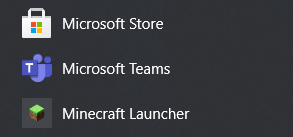
Changed Description:
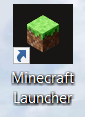
After installing the new Minecraft launcher and uninstalling the old one, the new launcher icon appears to have a solid-color background (black in my case) rather than a transparent one.
This is somewhat visible in the Start menu app list, but it is much more noticeable when attempting to make a desktop shortcut for the new launcher (both Start Menu and Desktop appearance cases attached).
Changed Summary:
New Minecraft launcherlogohas a solid color background instead of a transparent oneNew Minecraft launcher icon has a solid color background instead of a transparent one
Possible, but in the case of the desktop appearance it definitely doesn't look intentional.
I'm partly guessing the icon was not designed with the desktop in mind, because if you get the new launcher and then uninstall the old one, there is never a prompt (that I saw) to even put a desktop shortcut down at all.
It does appear to be a UWP issue, but I'd wonder if it couldn't be resolved by either:
1) using a flat-face icon instead that uses the full area (like the side of a grass block) or
2) automatically assigning a different icon texture to the desktop shortcut?