 ParadoxV5
- ParadoxV5
- paradoxv5
- America/Edmonton
- Yes
- No
 MC-115711
 MCL-9749

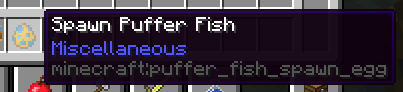


New pufferfish items were named with "Puffer Fish" while the old pufferfish is still "Pufferfish".
Additionally, their internal id's are totally inconsistent as well, see attached screenshots (cropped).
New pufferfish items were named with "Puffer Fish" while the old pufferfish is still "Pufferfish".
Additionally, their internal id's are
totallyinconsistent as well, see attached screenshots (cropped).
New pufferfish items were named with "Puffer Fish" while the old pufferfish is still "Pufferfish".
Additionally, their internal id's aretotallyinconsistent as well, see attached screenshots (cropped).New pufferfish items were named with "Puffer Fish" while the old pufferfish is still "Pufferfish".
Additionally, their internal id's are inconsistent as well, see attached screenshots (cropped).
This line is removed becuause it is a duplicate of
New pufferfish items were named with "Puffer Fish" while the old pufferfish is still "Pufferfish".
Additionally, their internal id's are inconsistent as well, see attached screenshots (cropped).
This line is removed becuause itisa duplicate ofNew pufferfish items were named with "Puffer Fish" while the old pufferfish is still "Pufferfish".
Additionally, their internal id's are inconsistent as well, see attached screenshots (cropped).
This line is removed because it got considered a duplicate of
New pufferfish items were named with "Puffer Fish" while the old pufferfish is still "Pufferfish".
Additionally, their internal id's are inconsistent as well, see attached screenshots (cropped).
This line is removed because it got considered a duplicate ofMC-124190
New pufferfish items were named with "Puffer Fish" while the old pufferfish is still "Pufferfish".
Additionally, their internal id's are inconsistent as well, see attached screenshots (cropped).
This line is removed because it got considered a duplicate ofMC-124190.
To reproduce:
Existing Configuration using Game Directory Option:
- Launch a profile previously created with a custom Game Directory
- Cannot launch: The game directory is invalid or inaccessible. Existing: directory
Create New or Edit Configuration with the Game Directory Option:
- Create a new Configuration, or edit an existing Configuration, with a custom Game Directory (I've tested this path: _C:_ .)
- Go back to "edit" the new/edited Configuration: Game Directory is switched on, but the text box is blank.
- Try to launch with the new/edited Configuration: The game directory is invalid or inaccessible.
- Check %appdata%/.minecraft/launcher_profiles.json: "gameDir": is not
found inthe new/edited Configuration but those previously created with custom Game Directories.To reproduce:
Existing Configuration using Game Directory Option:
- Launch a profile previously created with a custom Game Directory
- Cannot launch: The game directory is invalid or inaccessible. Existing: directory
Create New or Edit Configuration with the Game Directory Option:
- Create a new Configuration, or edit an existing Configuration, with a custom Game Directory (I've tested this path: C: .)
- Go back to "edit" the new/edited Configuration: Game Directory is switched on, but the text box is blank.
- Try to launch with the new/edited Configuration: The game directory is invalid or inaccessible.
- Check %appdata%/.minecraft/launcher_profiles.json: "gameDir": is not recorded for the new/edited Configuration but those previously created with custom Game Directories.
To reproduce:
Existing Configuration using Game Directory Option:
- Launch a profile previously created with a custom Game Directory
- Cannot launch: The game directory is invalid or inaccessible. Existing: directory
Create New or Edit Configuration with the Game Directory Option:
- Create a new Configuration, or edit an existing Configuration, with a custom Game Directory (I've tested this path: C: .)
- Go back to "edit" the new/edited Configuration: Game Directory is switched on, but the text box is blank.
- Try to launch with the new/edited Configuration: The game directory is invalid or inaccessible.
- Check %appdata%/.minecraft/launcher_profiles.json: "gameDir": is not recorded for the new/edited Configuration but those previously created with custom Game Directories.
To reproduce:
Existing Configuration using Game Directory Option:
- Launch a profile previously created with a custom Game Directory
- Cannot launch: The game directory is invalid or inaccessible. Existing: directory
Create New or Edit Configuration with the Game Directory Option:
- Create a new Configuration, or edit an existing Configuration, with a custom Game Directory (I've tested this path: _C:_ .)
- Go back to "edit" the new/edited Configuration: Game Directory is switched on, but the text box is blank.
- Try to launch with the new/edited Configuration: The game directory is invalid or inaccessible.
- Check %appdata%/.minecraft/launcher_profiles.json: "gameDir": is not recorded for the new/edited Configuration but those previously created with custom Game Directories.
To reproduce:
Existing Configuration using Game Directory Option:
- Launch a profile previously created with a custom Game Directory
- Cannot launch: The game directory is invalid or inaccessible. Existing: directory
Create New or Edit Configuration with the Game Directory Option:
- Create a new Configuration, or edit an existing Configuration, with a custom Game Directory (I've tested this path: _C:_ .)
- Go back to "edit" the new/edited Configuration: Game Directory is switched on, but the text box is blank.
- Try to launch with the new/edited Configuration: The game directory is invalid or inaccessible.
- Check %appdata%/.minecraft/launcher_profiles.json: "gameDir": is not recorded for the new/edited Configuration but those previously created with custom Game Directories.
To reproduce:
Existing Configuration using Game Directory Option:
- Launch a profile previously created with a custom Game Directory
- Cannot launch: The game directory is invalid or inaccessible. Existing: directory
Create New or Edit Configuration with the Game Directory Option:
- Create a new Configuration, or edit an existing Configuration, with a custom Game Directory (I've tested this path: _C:
_ .)
- Go back to "edit" the new/edited Configuration: Game Directory is switched on, but the text box is blank.
- Try to launch with the new/edited Configuration: The game directory is invalid or inaccessible.
- Check %appdata%/.minecraft/launcher_profiles.json: "gameDir": is not recorded for the new/edited Configuration but those previously created with custom Game Directories.
To reproduce:
Existing Configuration using Game Directory Option:
- Launch a profile previously created with a custom Game Directory
- Cannot launch: The game directory is invalid or inaccessible. Existing: directory
Create New or Edit Configuration with the Game Directory Option:
- Create a new Configuration, or edit an existing Configuration, with a custom Game Directory (I've tested this path:
_C:_.)
- Go back to "edit" the new/edited Configuration: Game Directory is switched on, but the text box is blank.
- Try to launch with the new/edited Configuration: The game directory is invalid or inaccessible.
- Check %appdata%/.minecraft/launcher_profiles.json: "gameDir": is not recorded for the new/edited Configuration but those previously created with custom Game Directories.
To reproduce:
Existing Configuration using Game Directory Option:
- Launch a profile previously created with a custom Game Directory
- Cannot launch: The game directory is invalid or inaccessible. Existing: directory
Create New or Edit Configuration with the Game Directory Option:
- Create a new Configuration, or edit an existing Configuration, with a custom Game Directory (I've tested this path: C:/ .)
- Go back to "edit" the new/edited Configuration: Game Directory is switched on, but the text box is blank.
- Try to launch with the new/edited Configuration: The game directory is invalid or inaccessible.
- Check %appdata%/.minecraft/launcher_profiles.json: "gameDir": is not recorded for the new/edited Configuration but those previously created with custom Game Directories.
To reproduce:
Existing Configuration
using Game Directory Option:
- Launch a profile previously created
with a custom Game Directory
- Cannot launch: The game directory is invalid or inaccessible. Existing: directory
Create New or Edit Configuration with the Game Directory Option:
- Create a new Configuration, or edit an existing Configuration, with a custom Game Directory (I've tested this path: C:/ .)
- Go back to "edit" the new/edited Configuration: Game Directory is switched on, but the text box is blank.
- Try to launch with the new/edited Configuration: The game directory is invalid or inaccessible.
- Check %appdata%/.minecraft/launcher_profiles.json: "gameDir": is not recorded for the new/edited Configuration but those previously created with custom Game Directories.
To reproduce:
Existing Configuration:
- Launch a profile previously created
- Cannot launch: The game directory is invalid or inaccessible. Existing: directory
Create New or Edit Configuration with the Game Directory Option:
- Create a new Configuration, or edit an existing Configuration, with a custom Game Directory (I've tested this path: C:/ .)
- Go back to "edit" the new/edited Configuration: Game Directory is switched on, but the text box is blank.
- Try to launch with the new/edited Configuration: The game directory is invalid or inaccessible.
- Check %appdata%/.minecraft/launcher_profiles.json: "gameDir": is not recorded for the new/edited Configuration but those previously created with custom Game Directories.
Edit: I previously thought the bug only exists on previously created configs with custom Game Directories. Turns out, affects those using default directory too.
The launcher appears to launch and finalize launching but immediately crashes with [quote] Exit Code 0 [unquote] due to cannot load net.minecraft.client.main.Main (as shown by the attachments).
I found it occuring on both 21w39a, 1.17.1 and 1.12.2.Relates to the other bajillion “Error Code 0” issues.
The launcher appears to launch and finalize launching but immediately crashes with [quote] Exit Code 0 [unquote] due to cannot load net.minecraft.client.main.Main (as shown by the attachments).
I found it occuring on both 21w39a, 1.17.1 and 1.12.2.Relates to the other bajillion “Error Code 0” issues.
The launcher appears to launch and finalize launching but immediately crashes with [quote] Exit Code 0 [unquote] due to cannot load net.minecraft.client.main.Main (as shown by the attachments).
I found it occuring on both 21w39a, 1.17.1 and 1.12.2, suggesting that it’s potentially regardless of Minecraft version.Relates to the other bajillion “Error Code 0” issues.
The launcher appears to launch and finalize launching but immediately crashes with [quote] Exit Code 0 [unquote] due to cannot load net.minecraft.client.main.Main (as shown by the attachments).
I found it occuring on both21w39a, 1.17.1 and1.12.2, suggesting that it’s potentially regardless of Minecraft version.Relates to the other bajillion “Error Code 0” issues.
The launcher appears to launch and finalize launching but immediately crashes with [quote] Exit Code 0 [unquote] due to cannot load net.minecraft.client.main.Main (as shown by the attachments).
P.S. I found it occuring on both 1.12.2 (previously-downloaded), 1.17.1 (newly-downlaoded) and 21w39a (tried both), suggesting that it’s potentially regardless of Minecraft version.Relates to the other bajillion “Error Code 0” issues.
launcher_log.txt
Oops. Found the original. Duplicate of
MC-122978. How do I delete/mark as duplicate?P.S. May be related to other similar issues.
我帮你翻译吧。。
Possible fixes:
Excuse me? This ain’t a feature request: Chains can’t float because Weeping Vines can’t float.
@Seaworths Important in servers so no moderator can crash the server, players’ clients, or both simply by executing some top-secret command.
The video shows that they crafted a stone pickaxe, then without using it, broke two infested stone instantly, which they confused as two regular stones that broke instantly and didn’t drop cobblestone. (No silverfish was spawned either; however, by the unorganized, low-food inventory, I conclude that this
noobconfused user was likely playing Peaceful.)P.S. Therefore, close this as Invalid or WAI.
P.S. Does not affect Minecraft Dungeons
I can confirm as I got hit by this too. My relative path is minecraft, but attempting to launch Minecraft (any version) results in a crash (exit code 0; Error: Could not find or load main class net.minecraft.client.main.Main) (which I contextless reported at
MCL-19780(I’ll ask that be closed as “Incompete”))@Whomsky Thank you for your direction. I have identified my root issue to be
MCL-14155. I request this ticket be closed as “Incomplete”.