 Alex Pine
- Piney84
- piney84
- Europe/Stockholm
- Yes
- No
 MCL-1842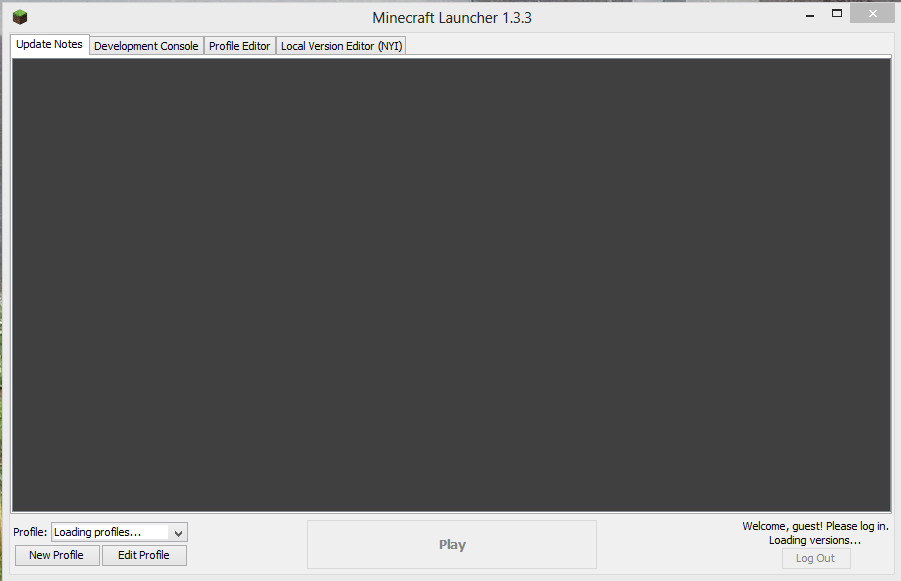
Today I bought Minecraft, downloaded the exe and ran it, all I get is a frozen launcher screen.
The version is actually 1.3.3 but your website does not accept that.
I have tried the following:
Restarting the computer
Removing the .minecraft folder completely
Redownloading the minecraft.exe
Diagnostic startup with MSCONFIG
Ran minecraft.exe as administratorI get the same thing every time.
I would like my money refunded if the game isn't going to work.Today I bought Minecraft, downloaded the exe and ran it, all I get is a frozen launcher screen.
The version is actually 1.3.3 but your website does not accept that.
I have tried the following:
Restarting the computer
Removing the .minecraft folder completely
Redownloading the minecraft.exe
Diagnostic startup with MSCONFIG
Ran minecraft.exe as administratorupdate: Also tried old launcher which also freezes as soon as it opens
I get the same thing every time.
I would like my money refunded if the game isn't going to work.
Today I bought Minecraft, downloaded the exe and ran it, all I get is a frozen launcher screen.
The version is actually 1.3.3 but your website does not accept that.
I have tried the following:
Restarting the computer
Removing the .minecraft folder completely
Redownloading the minecraft.exe
Diagnostic startup with MSCONFIG
Ran minecraft.exe as administrator
Disabled windows defenderupdate: Also tried old launcher which also freezes as soon as it opens
I get the same thing every time.
I would like my money refunded if the game isn't going to work.
Today I bought Minecraft, downloaded the exe and ran it, all I get is a frozen launcher screen.
The version is actually 1.3.3 but your website does not accept that.
I have tried the following:
Restarting the computer
Removing the .minecraft folder completely
Redownloading the minecraft.exe
Diagnostic startup with MSCONFIG
Ran minecraft.exe as administrator
Disabled windows defender
update:Also tried old launcher which also freezes as soon as it opensI get the same thing every time.
I would like my money refunded if the game isn't going to work.Today I bought Minecraft, downloaded the exe and ran it, all I get is a frozen launcher screen.
The version is actually 1.3.3 but your website does not accept that.
I have tried the following:
Restarting the computer
Removing the .minecraft folder completely
Redownloading the minecraft.exe
Diagnostic startup with MSCONFIG
Ran minecraft.exe as administrator
Disabled windows defender
Also tried old launcher which also freezes as soon as it opensI get the same thing every time.
I would like my money refunded if the game isn't going to work.
I have the same issue with launcher 1.3.3 on win 8, removed the .minecraft folder completely and it still does the same thing.
[IMG]http://lookpic.com/O/i2/1596/YrPVXApD.png[/IMG]
No tabs were accessible.
To solve this issue I had to uninstall all versions of Java and install the EA version of Java 8.
32bit - http://www.java.net/download/jdk8/archive/b105/binaries/jre-8-ea-bin-b105-windows-i586-29_aug_2013.exe
64bit - http://www.java.net/download/jdk8/archive/b105/binaries/jre-8-ea-bin-b105-windows-x64-29_aug_2013.exe