 Quin
Quin
- QuinoaFalafel
- quinoafalafel
- Europe/Stockholm
- Yes
- No
 MC-214578
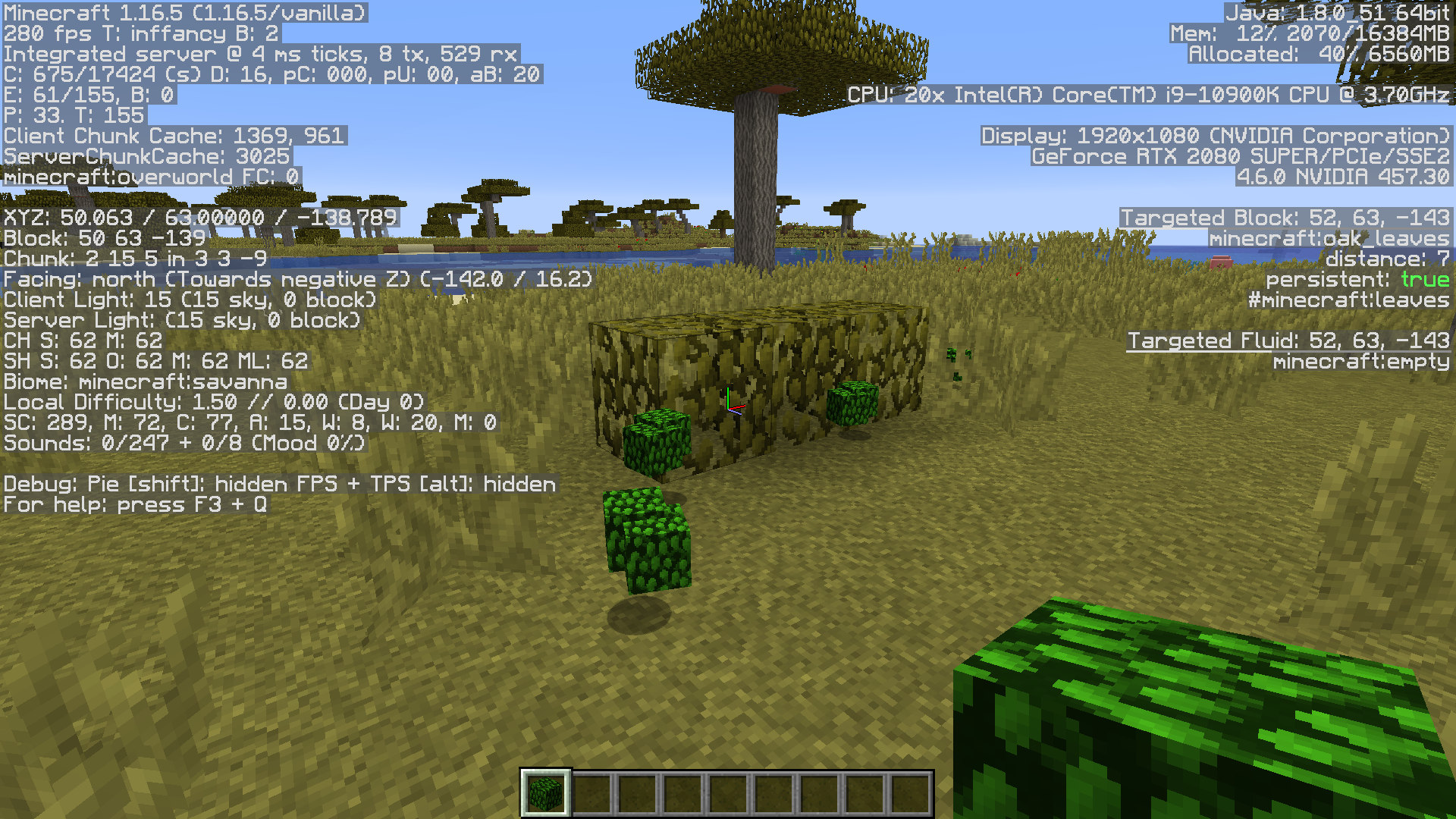

Yes, the game is modified with a resource pack because the bug is about the resource pack system. If the issue is invalid ** because you don't support this feature of the resource pack system, I fully understand, but I would really appreciate if that was made clear. This response makes it seem as if the issue wasn't even given a chance, and that the report was simply ignored on account of seeing a resource pack.
Please note that a resource pack is used in the attached screenshot because this issue is about the resource pack mechanics. The default textures cannot be used because they do not utilize the feature in discussion. I fully understand if this feature was accidental and is unsupported, and thus this report is invalid, but I wanted to report this nonetheless in case that the feature is supported.
In Minecraft 1.8, when the fast graphics leaf textures were removed, the game instead just read the alpha as black when fast graphics mode was enabled, and removed the ability to customize the fast graphics background. However, I discovered that it was still possible to customize the background by using opacity.
That is to say, you could make the fast graphics texture, drop the opacity to 1% so that it is essentially invisible, and then overlay the fancy graphics version on top of it. When fancy graphics was enabled, the game would regard the low opacity to be invisible, but when fast graphics was enabled it would make it fully opaque, essentially having the same effect of the pre-1.8 textures.
This is still the case, but as of 1.15, using this method causes the leaf item models to appear fully opaque, while the blocks remain transparent. The attached image gives an example of what I'm talking about.
I realize that this method likely wasn't intended to work in the first place, but it did allow for a lot more customization, and enabled fast graphics to be a lot more aesthetically pleasing. And given that it was fully functional until relatively recently, I thought I'd report it anyway on the off chance that the previous functionality could be added back.
Resource Pack Link: https://www.curseforge.com/minecraft/texture-packs/immersion/files/3179317
Please note that a resource pack is used in the attached screenshot because this issue is about the resource pack mechanics. The default textures cannot be used because they do not utilize the feature in discussion. I fully understand if this feature was accidental and is unsupported, and thus this report is invalid, but I wanted to report this nonetheless in the case that the feature is supported.
In Minecraft 1.8, when the fast graphics leaf textures were removed, the game instead just read the alpha as black when fast graphics mode was enabled, and removed the ability to customize the fast graphics background. However, I discovered that it was still possible to customize the background by using opacity.
That is to say, you could make the fast graphics texture, drop the opacity to 1% so that it is essentially invisible, and then overlay the fancy graphics version on top of it. When fancy graphics was enabled, the game would regard the low opacity to be invisible, but when fast graphics was enabled it would make it fully opaque, essentially having the same effect of the pre-1.8 textures.
This is still the case, but as of 1.15, using this method causes the leaf item models to appear fully opaque, while the blocks remain transparent. The attached image gives an example of what I'm talking about.
I realize that this method likely wasn't intended to work in the first place, but it did allow for a lot more customization, and enabled fast graphics to be a lot more aesthetically pleasing. And given that it was fully functional until relatively recently, I thought I'd report it anyway on the off chance that the previous functionality could be added back.
Resource Pack Link: https://www.curseforge.com/minecraft/texture-packs/immersion/files/3179317
When on fast graphics, leaf items render with transparency as though they were on fancy graphics, while the blocks properly render as opaque.
After testing, I determined that this bug was actually introduced in Snapshot 14w25a, when the fast/fancy graphics were being re-worked for Minecraft 1.8, and it's been in the game ever since.
This is still a very real and immersion breaking issue in 1.14.2
I'm not sure if this is related, but it seems to be the best place to mention it:
I have experienced issues with disappearing villagers in my main world (vanilla server) for years now, and the issue has never resolved itself. We have always kept the world vanilla (though we do now use a couple of datapacks).
I make periodic backups of the world, to safeguard progress and to catalog historic moments in the world. I was just going through some of my backups, when I noticed definitive proof that villagers do in fact disappear, and not just die.
The proof mentioned is in regards to a particular villager, named Nola Perrin. He was a carrot farmer in a large automated vertical farm, well lit and with 4 iron golems for protection. I found that between different backups, he was sometimes present, and sometimes not. here are some more specific details:
June 19 2019 Backup: Day 11039 - visible, command /tp @e[type=minecraft:villager,name="Nola Perrin"] @p was successful
July 7 2019 Backup: Day 11263 - invisible, command /tp @e[type=minecraft:villager,name="Nola Perrin"] @p was unsuccessful
July 18 2019 Backup: Day 11341 - visible, command /tp @e[type=minecraft:villager,name="Nola Perrin"] @p was successful
November 24 2019 Backup: Day 11449 - invisible, command /tp @e[type=minecraft:villager,name="Nola Perrin"] @p was unsuccessful
December 11 2019 Backup: Day 11631 - visible, command /tp @e[type=minecraft:villager,name="Nola Perrin"] @p was successful
December 26 2019 Backup: Day 11883 - invisible, command /tp @e[type=minecraft:villager,name="Nola Perrin"] @p was unsuccessful
The first 5 backups were all originally version 1.13.2, but when testing, I loaded them into 1.14.4. The final backup was in 1.14.4. I do still have all of the original backups, as well as more backups dating as far back as July 30 2014. If you want copies of any of these to try and determine the cause, just let me know.
Edit: Unlike with
MC-65040, the villager is not in the Spawn Chunks, nor chunks that are loaded by a chunk loader. This glitch has also occurred, though with less proof, to many different villagers in the world, in many different places in the world.Edit 2:
It appears the issue is actually of a very different nature. I recalled that some time ago, the villager, Nola Perrin, duplicated. I believe it was while the world was in 1.13.2, though I'm unsure. I then named one of the duplicates August Perrin, and transported him to another floor of the farm.
I went back through all of the backups mentioned earlier, this time using version 1.13.2, and found the same result as when using 1.14.
It appears that the game does not understand how to handle the duplicated villager, and so it alternates between the two versions. In every backup where Nola Perrin is gone, August Perrin is present, and vice versa. Time will tell if the alternation between states persists in 1.14.4 and beyond.
I updated the post adding the link to the resource pack.
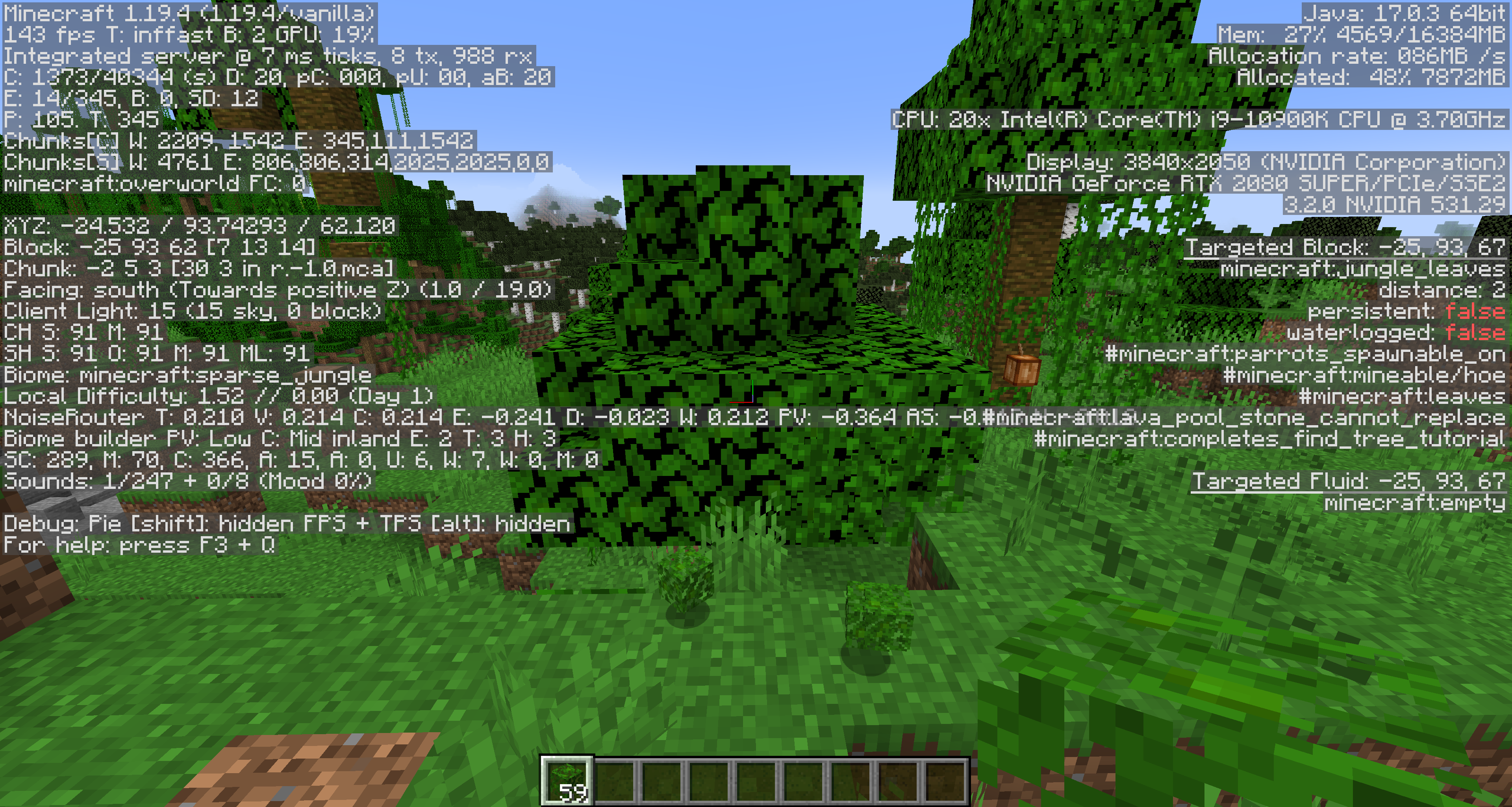
I just tested it in 1.18.2 pre-release 1 as well, and the rendering issue seems to have inverted. As in, with Fast graphics, leaf items render the transparency, whereas the blocks do not.
I just tested this in 1.19.3, and the inverted issue is still present. See the attachment as an example:
The inverted issue still persists in 1.19.4 as well as in snapshot 23w12a. However, I discovered that this variation of the bug doesn't actually require a resource pack, and exists in a fully vanilla instance of the game. As such, I created a new bug report (https://bugs.mojang.com/browse/MC-261217) for the issue. This bug can be considered resolved now.
After some testing, I discovered that this particular issue was fixed in Snapshot 21w10a for Minecraft 1.17, so that can be the labelled Fix Version.