 Rasenmaher28
- Rasenmaher28
- JIRAUSER729526
- Europe/Stockholm
- Yes
- No
 MCL-22095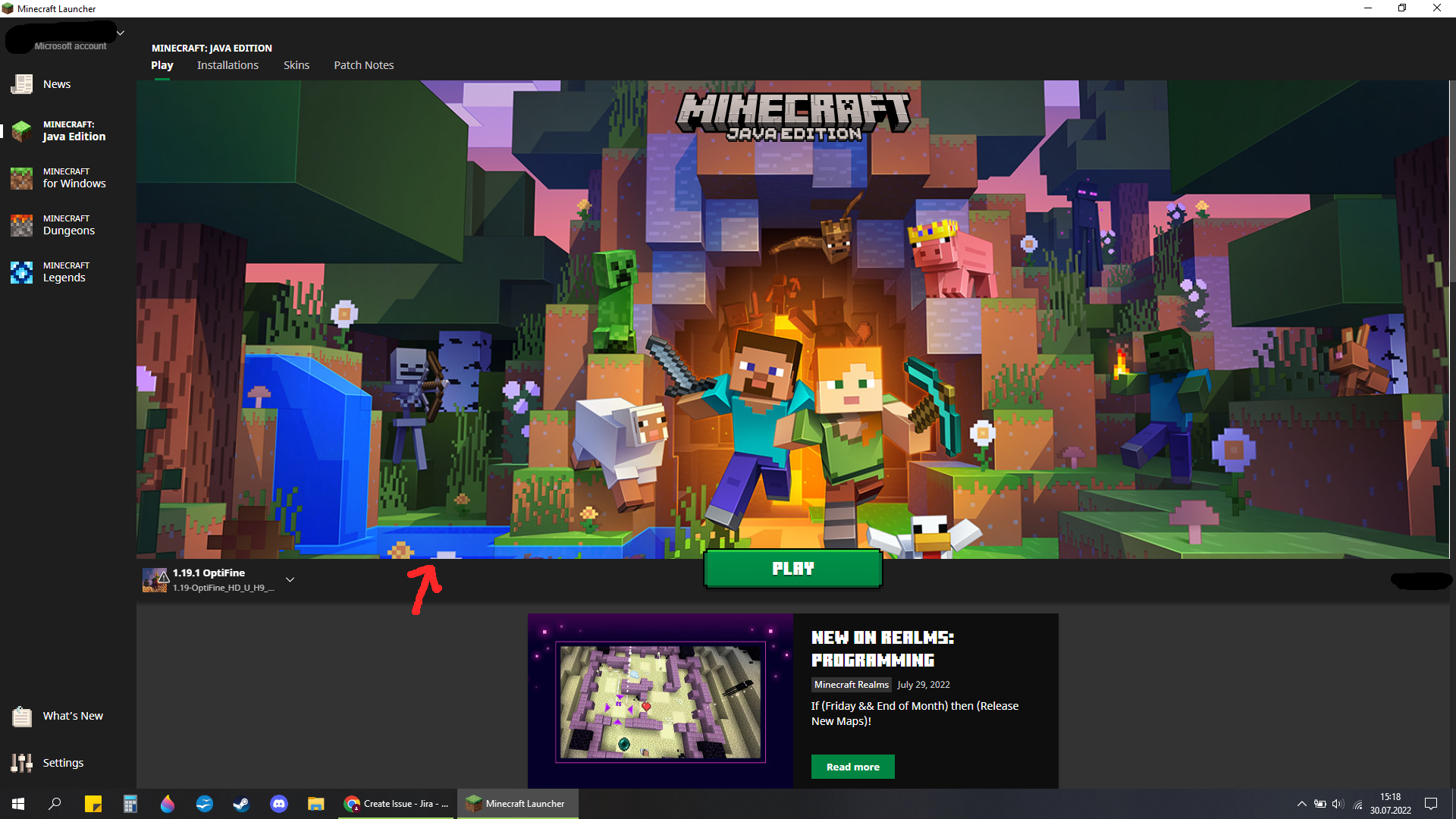

The dark grey bar that holds the "Play"-Button on either the Bedrock and Dungeon, or the other way around (on Java and Legends), Play Page is off by maybe just one pixel. Either way, two of the Pages line up and the other two do not.
Screenshots show Java/Bedrock Page comparison. Pretty visible at the
white flower above my mouse cursor.Recreate: Open Launcher and switch between the Pages. It will be visible on all different window sizes i've tried.
(More a Design issue than an actual bug!)
The dark grey bar that holds the "Play"-Button on either the Bedrock and Dungeon, or the other way around (on Java and Legends), Play Page is off by maybe just one pixel. Either way, two of the Pages line up and the other two do not.
Screenshots show Java/Bedrock Page comparison. Pretty visible at the flowers one quarter
Recreate: Open Launcher and switch between the Pages. It will be visible on all different window sizes i've tried.
(More a Design issue than an actual bug!)
The dark grey bar that holds the "Play"-Button on either the Bedrock and Dungeon, or the other way around (on Java and Legends), Play Page is off by maybe just one pixel. Either way, two of the Pages line up and the other two do not.
Screenshots show Java/Bedrock Page comparison. Pretty visible
attheflowers one quarterRecreate: Open Launcher and switch between the Pages. It will be visible on all different window sizes i've tried.
(More a Design issue than an actual bug!)
The dark grey bar that holds the "Play"-Button on either the Bedrock and Dungeon, or the other way around (on Java and Legends), Play Page is off by maybe just one pixel. Either way, two of the Pages line up and the other two do not.
Screenshots show Java/Bedrock Page comparison. Pretty visible on the, pointed at, flowers.
Recreate: Open Launcher and switch between the Pages. It will be visible on all different window sizes i've tried.
(More a Design issue than an actual bug!)
Bedrock and Dungeons Play Page's Design fallsout of line by a few pixels
MinecraftJava.png
The dark grey bar that holds the "Play"-Button on either the Bedrock and Dungeon, or the other way around (on Java and Legends), Play Page is off by maybe just one pixel. Either way, two of the Pages line up and the other two do not.
Screenshots show Java/Bedrock Page comparison. Pretty visible on the
,pointed at,flowers.Recreate: Open Launcher and switch between the Pages. It will be visible on all different window sizes i've tried.
(More a Design issue than an actual bug!)
The dark grey bar that holds the "Play"-Button on either the Bedrock and Dungeon, or the other way around (on Java and Legends), Play Page is off by maybe just one pixel. Either way, two of the Pages line up and the other two do not.
Screenshots show Java/Bedrock Page comparison. Pretty visible on the pointed at flowers.
Recreate: Open Launcher and switch between the Pages. It will be visible on all different window sizes i've tried.
(More a Design issue than an actual bug!)
The dark grey bar that holds the "Play"-Button on either the Bedrock and Dungeon, or the other way around (on Java and Legends), Play Page is off by maybe just one pixel. Either way, two of the Pages line up and the other two do not.
Screenshots show Java/Bedrock Page comparison. Pretty visible on the pointed at flowers.
Recreate: Open Launcher and switch between the Pages. It will be visible on all different window sizes i've tried.
(More a Design issue than an actual bug!)
Windows 10
.0 2.3.324; Microsoft Store Launcher on 2.3.324Windows 10 Home 21H2; Microsoft Store Launcher on 2.3.324
yep also still occurs for me.
Don't think so. My Buttons look normal.
This is also the case for the Minecraft Legends tab.