 jvc
jvc
- Robotoid2
- robotoid2
- Europe/Stockholm
- Yes
- No
 MC-137809




The game gives off a lag spike when any piston pushes or pulls an object.
video evidence: https://www.youtube.com/watch?v=F6r8H-15irw
The game gives off a lag spike when any sticky piston pushes or pulls an object.
video evidence: https://www.youtube.com/watch?v=F6r8H-15irw
Severe lag with sticky pistons moving blocks
this is client-side, implied by until you rejoin the world
what is supposed to happen: the slab doesn't place and stays in player's inventory
affects 18w44a, though the world border starts shy of 30 million default.

image-2018-11-01-13-45-21-261.png
If you fly with elytra and land beneath a carpet that is 1 block in the air (possible with fences or /setblock), a weird visual bug occurs. Your camera continues to be one block lower than it is supposed to be, as though you are flying, but your player model stands straight up, clipping through the carpet.
This does not affect ordinary midair non-transparent blocks, because the player is not allowed to fly under those.
If you fly with elytra and land beneath a
carpet that is 1 block in the air(possible with fences or /setblock), a weird visual bug occurs. Your camera continues to be one block lower than it is supposed to be, as though you are flying, but your player model stands straight up, clipping through the carpet.This does not affect ordinary midair non-transparent blocks, because the player is not allowed to fly under those.
If you fly with elytra and land beneath a transparent that is 1 block in the air, a weird visual bug occurs. Your camera continues to be one block lower than it is supposed to be, as though you are flying, but your player model stands straight up, clipping through the carpet.
This does not affect ordinary midair non-transparent blocks, because the player is not allowed to fly under those.
Flying with elytra underneath midaircarpetcauses camera/player mismatchFlying with elytra underneath midair transparent block causes camera/player mismatch
If you fly with elytra and land beneath a transparent that is 1 block in the air, a weird visual bug occurs. Your camera continues to be one block lower than it is supposed to be, as though you are flying, but your player model stands straight up, clipping through the carpet.
This does not affect ordinary midair non-transparent blocks, because the player is not allowed to fly under those.
The bug I'm trying to show here is how the camera is mismatched from the player model's face when flying underneath a block, not that one can fly underneath a block.
Game crashes when
"Video Settings" isclicked, whether or not the player is in-game or on the title screen.---- Minecraft Crash Report ---- // Oops. Time: 2/20/19 6:29 PM Description: mouseClicked event handler java.lang.NullPointerException: mouseClicked event handler at cqz.b(SourceFile:206) at cqz$$Lambda$1410/1903745041.apply(Unknown Source) at cqp.c(SourceFile:38) at cqp.a(SourceFile:27) at csl$a.<init>(SourceFile:56) at csl.<init>(SourceFile:23) at cvo.c(SourceFile:61) at cvi.a(SourceFile:312) at cqw.a(SourceFile:829) at cvb$9.a(SourceFile:99) at crz.a(SourceFile:153) at csu.a(SourceFile:22) at cqx.b(SourceFile:86) at cqx$$Lambda$1704/1423824868.run(Unknown Source) at cvi.a(SourceFile:430) at cqx.a(SourceFile:86) at cqx$$Lambda$1478/1956658133.invoke(Unknown Source) at org.lwjgl.glfw.GLFWMouseButtonCallbackI.callback(GLFWMouseButtonCallbackI.java:36) at org.lwjgl.system.JNI.invokeV(Native Method) at org.lwjgl.glfw.GLFW.glfwPollEvents(GLFW.java:3050) at cpo.l(SourceFile:422) at cpo.c(SourceFile:280) at cqw.b_(SourceFile:1022) at cqw.d(SourceFile:975) at cqw.b(SourceFile:412) at net.minecraft.client.main.Main.main(SourceFile:154) A detailed walkthrough of the error, its code path and all known details is as follows: --------------------------------------------------------------------------------------- -- Head -- Thread: Client thread Stacktrace: at cqz.b(SourceFile:206) at cqz$$Lambda$1410/1903745041.apply(Unknown Source) at cqp.c(SourceFile:38) at cqp.a(SourceFile:27) at csl$a.<init>(SourceFile:56) at csl.<init>(SourceFile:23) at cvo.c(SourceFile:61) at cvi.a(SourceFile:312) at cqw.a(SourceFile:829) at cvb$9.a(SourceFile:99) at crz.a(SourceFile:153) at csu.a(SourceFile:22) at cqx.b(SourceFile:86) at cqx$$Lambda$1704/1423824868.run(Unknown Source) -- Affected screen -- Details: Screen name: cvb Stacktrace: at cvi.a(SourceFile:430) at cqx.a(SourceFile:86) at cqx$$Lambda$1478/1956658133.invoke(Unknown Source) at org.lwjgl.glfw.GLFWMouseButtonCallbackI.callback(GLFWMouseButtonCallbackI.java:36) at org.lwjgl.system.JNI.invokeV(Native Method) at org.lwjgl.glfw.GLFW.glfwPollEvents(GLFW.java:3050) at cpo.l(SourceFile:422) at cpo.c(SourceFile:280) -- Affected level -- Details: Level name: MpServer All players: 1 total; [dft['tangy8'/227, l='MpServer', x=-187.50, y=68.00, z=89.50]] Chunk stats: MultiplayerChunkCache: 625, 441 Level seed: 0 Level generator: ID 00 - default, ver 1. Features enabled: false Level generator options: {} Level spawn location: World: (-192,68,80), Chunk: (at 0,4,0 in -12,5; contains blocks -192,0,80 to -177,255,95), Region: (-1,0; contains chunks -32,0 to -1,31, blocks -512,0,0 to -1,255,511) Level time: 105 game time, 105 day time Level dimension: 0 Level storage version: 0x00000 - Unknown? Level weather: Rain time: 0 (now: false), thunder time: 0 (now: false) Level game mode: Game mode: survival (ID 0). Hardcore: false. Cheats: false Server brand: vanilla Server type: Integrated singleplayer server Stacktrace: at ddi.a(SourceFile:449) at cqw.b(SourceFile:1919) at cqw.b(SourceFile:420) at net.minecraft.client.main.Main.main(SourceFile:154) -- System Details -- Details: Minecraft Version: 19w08a Operating System: Windows 10 (amd64) version 10.0 Java Version: 1.8.0_51, Oracle Corporation Java VM Version: Java HotSpot(TM) 64-Bit Server VM (mixed mode), Oracle Corporation Memory: 930347528 bytes (887 MB) / 2013265920 bytes (1920 MB) up to 2147483648 bytes (2048 MB) JVM Flags: 9 total; -XX:HeapDumpPath=MojangTricksIntelDriversForPerformance_javaw.exe_minecraft.exe.heapdump -Xss1M -Xmx2G -XX:+UnlockExperimentalVMOptions -XX:+UseG1GC -XX:G1NewSizePercent=20 -XX:G1ReservePercent=20 -XX:MaxGCPauseMillis=50 -XX:G1HeapRegionSize=32M Launched Version: 19w08a LWJGL: 3.2.1 build 12 OpenGL: Quadro 600/PCIe/SSE2 GL version 4.5.0 NVIDIA 369.09, NVIDIA Corporation GL Caps: Using GL 1.3 multitexturing. Using GL 1.3 texture combiners. Using framebuffer objects because OpenGL 3.0 is supported and separate blending is supported. Shaders are available because OpenGL 2.1 is supported. VBOs are available because OpenGL 1.5 is supported. Using VBOs: Yes Is Modded: Probably not. Jar signature remains and client brand is untouched. Type: Client (map_client.txt) Resource Packs: Current Language: English (US) CPU: 16x Intel(R) Xeon(R) CPU E5-2660 0 @ 2.20GHzGame crashes when certain settings are clicked, whether or not the player is in-game or on the title screen.
These cause a crash:
- "Video Settings"
- "Chat Settings"
---- Minecraft Crash Report ----
// Oops.

Time: 2/20/19 6:29 PM
Description: mouseClicked event handler

java.lang.NullPointerException: mouseClicked event handler
	at cqz.b(SourceFile:206)
	at cqz$$Lambda$1410/1903745041.apply(Unknown Source)
	at cqp.c(SourceFile:38)
	at cqp.a(SourceFile:27)
	at csl$a.<init>(SourceFile:56)
	at csl.<init>(SourceFile:23)
	at cvo.c(SourceFile:61)
	at cvi.a(SourceFile:312)
	at cqw.a(SourceFile:829)
	at cvb$9.a(SourceFile:99)
	at crz.a(SourceFile:153)
	at csu.a(SourceFile:22)
	at cqx.b(SourceFile:86)
	at cqx$$Lambda$1704/1423824868.run(Unknown Source)
	at cvi.a(SourceFile:430)
	at cqx.a(SourceFile:86)
	at cqx$$Lambda$1478/1956658133.invoke(Unknown Source)
	at org.lwjgl.glfw.GLFWMouseButtonCallbackI.callback(GLFWMouseButtonCallbackI.java:36)
	at org.lwjgl.system.JNI.invokeV(Native Method)
	at org.lwjgl.glfw.GLFW.glfwPollEvents(GLFW.java:3050)
	at cpo.l(SourceFile:422)
	at cpo.c(SourceFile:280)
	at cqw.b_(SourceFile:1022)
	at cqw.d(SourceFile:975)
	at cqw.b(SourceFile:412)
	at net.minecraft.client.main.Main.main(SourceFile:154)


A detailed walkthrough of the error, its code path and all known details is as follows:
---------------------------------------------------------------------------------------

-- Head --
Thread: Client thread
Stacktrace:
	at cqz.b(SourceFile:206)
	at cqz$$Lambda$1410/1903745041.apply(Unknown Source)
	at cqp.c(SourceFile:38)
	at cqp.a(SourceFile:27)
	at csl$a.<init>(SourceFile:56)
	at csl.<init>(SourceFile:23)
	at cvo.c(SourceFile:61)
	at cvi.a(SourceFile:312)
	at cqw.a(SourceFile:829)
	at cvb$9.a(SourceFile:99)
	at crz.a(SourceFile:153)
	at csu.a(SourceFile:22)
	at cqx.b(SourceFile:86)
	at cqx$$Lambda$1704/1423824868.run(Unknown Source)

-- Affected screen --
Details:
	Screen name: cvb
Stacktrace:
	at cvi.a(SourceFile:430)
	at cqx.a(SourceFile:86)
	at cqx$$Lambda$1478/1956658133.invoke(Unknown Source)
	at org.lwjgl.glfw.GLFWMouseButtonCallbackI.callback(GLFWMouseButtonCallbackI.java:36)
	at org.lwjgl.system.JNI.invokeV(Native Method)
	at org.lwjgl.glfw.GLFW.glfwPollEvents(GLFW.java:3050)
	at cpo.l(SourceFile:422)
	at cpo.c(SourceFile:280)

-- Affected level --
Details:
	Level name: MpServer
	All players: 1 total; [dft['tangy8'/227, l='MpServer', x=-187.50, y=68.00, z=89.50]]
	Chunk stats: MultiplayerChunkCache: 625, 441
	Level seed: 0
	Level generator: ID 00 - default, ver 1. Features enabled: false
	Level generator options: {}
	Level spawn location: World: (-192,68,80), Chunk: (at 0,4,0 in -12,5; contains blocks -192,0,80 to -177,255,95), Region: (-1,0; contains chunks -32,0 to -1,31, blocks -512,0,0 to -1,255,511)
	Level time: 105 game time, 105 day time
	Level dimension: 0
	Level storage version: 0x00000 - Unknown?
	Level weather: Rain time: 0 (now: false), thunder time: 0 (now: false)
	Level game mode: Game mode: survival (ID 0). Hardcore: false. Cheats: false
	Server brand: vanilla
	Server type: Integrated singleplayer server
Stacktrace:
	at ddi.a(SourceFile:449)
	at cqw.b(SourceFile:1919)
	at cqw.b(SourceFile:420)
	at net.minecraft.client.main.Main.main(SourceFile:154)

-- System Details --
Details:
	Minecraft Version: 19w08a
	Operating System: Windows 10 (amd64) version 10.0
	Java Version: 1.8.0_51, Oracle Corporation
	Java VM Version: Java HotSpot(TM) 64-Bit Server VM (mixed mode), Oracle Corporation
	Memory: 930347528 bytes (887 MB) / 2013265920 bytes (1920 MB) up to 2147483648 bytes (2048 MB)
	JVM Flags: 9 total; -XX:HeapDumpPath=MojangTricksIntelDriversForPerformance_javaw.exe_minecraft.exe.heapdump -Xss1M -Xmx2G -XX:+UnlockExperimentalVMOptions -XX:+UseG1GC -XX:G1NewSizePercent=20 -XX:G1ReservePercent=20 -XX:MaxGCPauseMillis=50 -XX:G1HeapRegionSize=32M
	Launched Version: 19w08a
	LWJGL: 3.2.1 build 12
	OpenGL: Quadro 600/PCIe/SSE2 GL version 4.5.0 NVIDIA 369.09, NVIDIA Corporation
	GL Caps: Using GL 1.3 multitexturing.
Using GL 1.3 texture combiners.
Using framebuffer objects because OpenGL 3.0 is supported and separate blending is supported.
Shaders are available because OpenGL 2.1 is supported.
VBOs are available because OpenGL 1.5 is supported.

	Using VBOs: Yes
	Is Modded: Probably not. Jar signature remains and client brand is untouched.
	Type: Client (map_client.txt)
	Resource Packs:
	Current Language: English (US)
	CPU: 16x Intel(R) Xeon(R) CPU E5-2660 0 @ 2.20GHz

Game crashes when"Video Settings" isclickedGame crashes when certain settings are clicked
Blocks in the hotbar have weird lighting for a split second after being picked up (during the pickup animation- when the block is squashed and stretched)
Normal
Blocks in the hotbar have weird lighting for a split second after being picked up (during the pickup animation- when the block is squashed and stretched)
Normal
During pickup animation


When an item placed in the offhand is enchanted, the enchantment glint z-fights with the item texture. The effect is most pronounced on an enchanted bow, and moves around erratically every time the camera moves.
When an item placed in the offhand is enchanted, the enchantment glint z-fights with the item texture. The effect is most pronounced on an enchanted bow, and moves around erratically every time the camera moves.
Z-fighting on enchantment glint inoff-handZ-fighting on enchantment glint in hand item
When an item placed in the
offhand is enchanted, the enchantment glint z-fights with the item texture. The effect is most pronounced on an enchanted bow, and moves around erratically every time the camera moves.
When an item placed in either hand is enchanted, the enchantment glint z-fights with the item texture. The effect is most pronounced on an enchanted bow, and moves around erratically every time the camera moves.
Z-fighting on enchantment glint in hand itemZ-fighting on enchantment glint in held item
still present in snapshot 13w25b
same with fire
Happens to me, also i looked at the launcher when it was happening and it shows "Cannot keep up!" error
can reproduce in 18w43b
can reproduce in 18w43a and 18w43b.
bamboo generates sporadically in regular jungles.
no screenshot?
this is working as intended: when a village originally generated on Grass intersects with Sand, the paths change from Grass Path to Gravel, and if paths go over water they become bridges made of Planks.
remove all resource packs and see if issue persists. include screenshot
In order to explain this, I will have to explain a few small details about how village generation works.
The "Biome" a village spawns as depends solely on the location of the center well.
The center well here is located in a Plains. Therefore the village is a plains village.
Plains villages replace grass with grass paths, but they replace sand with gravel, as opposed to a desert village which would replace sand with sandstone and grass with gravel.
This is the game working as intended - It just so happens to be coincidence that your village generated neatly on the border between a plains and a desert.
Addendum: This diagram explains the seam in the gravel road and why it is partly grass path.
This is simply the border between plains and desert being in the middle of the road.
can reproduce in 18w43c
WAI - jumping on farmland is supposed to revert it. it is walking on farmland that doesn't do anything
cannot reproduce.
that said, blue orchid / dandelion suspicious stew will probably only give saturation for one tick in the future
video evidence of screen turning red on hit: https://www.youtube.com/watch?v=Avyg0-M-DXo
video evidence of screen turning white on spectral arrow hit: https://www.youtube.com/watch?v=CAqehYPEJUg
Screen remains white even when game is paused.
cannot reproduce in 18w43c - all ocelots, when tamed, stay ocelots
blast furnaces, smokers, and barrels are not meant to be opened yet. probably invalid
WAI. All the colors of stained glass have their own textures. Those textures have not been updated yet.
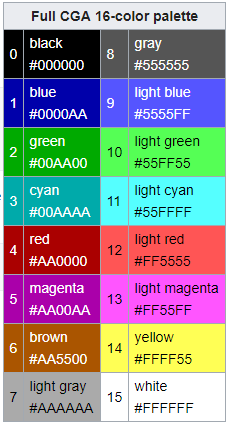
Minecraft text formatting colors are based on CGA which only has 16 colors.
Minecraft dye colors are not minecraft text formatting colors.
affects 18w44a
still in 18w44a
partially blocked in 18w44a - player can only fly under transparent blocks now
Here is a diagram to explain how Dinnerbone and Grumm flip entities and why that appears to fail on shulkers who are facing walls.
(edit: Dinnerbone and Grumm do not++ flip any entity around its own axis, only one axis for every entity. To "fix" this would be to create an inconsistency in how Dinnerbone and Grumm affect entities.)
What is supposed to happen is that the spectator is supposed to have Bad Omen remain whether or not they are nearby a village.
Players in spectator mode are not affected by beacons nor are supposed to be able to get or clear status effects automatically.
this is such a ridiculously specific bug. how do people even find things like this?
WAI - you cannot place seeds on farmland with a light value of less than 7. Try putting more lighting inside your base.