 ShaneBee
- ShaneBolenback
- shanebolenback
- America/Vancouver
- Yes
- No
 MC-127399
 Important
![[Mojang] Searge (Michael Stoyke)](../../../data/assets/gravatar/searge.png)
 MCL-10161










MacBook Pro with Mac OS 10.12.6, Java Version 9.0.4 (Build 9.0.4+11) x86_64
MacBook Pro OSX 10.13.4
Java version "1.8.0_162"
Java(TM) SE Runtime Environment (build 1.8.0_162-b12)
When I run the Snapshots for MC Java Edition 1.13 I get a fullscreen resolution of 3360x2100. My Mac has a screen resolution of 2880 x 1800. Because of this, my computer runs very hard when playing the snapshot. Heats up quite quickly (which isn't normal) fans are going like crazy, my FPS drops easily below 50 (Normally get around 60 on 1.12) and the game becomes VERY VERY laggy whenever I place any blocks or break blocks.
When I try to change the screen resolution in the options the game minimizes into my doc, I can not re-open it and I have to force quit it.When I run the Snapshots for MC Java Edition 1.13 I get a fullscreen resolution of 3360x2100. My Mac has a screen resolution of 2880 x 1800. Because of this, my computer runs very hard when playing the snapshot. Heats up quite quickly (which isn't normal) fans are going like crazy, my FPS drops easily below 50 (Normally get around 60 on 1.12) and the game becomes VERY VERY laggy whenever I place any blocks or break blocks.
Screenshot 2024-09-27 at 9.34.29 AM-1.png
Yeah, like i said " I manually have to change it to match my screen size which causes weird glitches in the game"
When I change the screen resolution for fullscreen mode, it forces the screen resolution of my computer to change, which then does weird stuff. Like, it won't stay in one resolution size. It forces itself back to a larger size. Then I have to set it to one lower. Wait for it to change size. Then go up one size. It'll stay until the next time i restart the game. Then I have to do these few steps all over.
I also use a program called JoyStick Mapper so I can use a ps4 controller with my game. When that program is open, for some reason if i change the screen resolution size.... it forces my game into the dock of my mac, and i cant open it. This never happened in 1.12. In 1.12 i started the game, the full screen matched the resolution of my computer
Since this issue was ignored and set to resolved, I will made a video later of the problem its doing, post it on youtube, create a NEW bug report with a link to the video, and maybe you guys will actually look into it.
sorry... i misread the resolution thing... i thought it meant DONE... im new to this site.
I have to head out for a bit but when I have some time Ill make a little video.
I know HALF of this problem is a problem with the game, the other half is this super old joystick mapper.... but that aside, it is odd to me that when i first open the game, it forces into a resolution MUCH LARGER than my actual screens resolution. If it would load into the correct resolution I would be a SUPER happy camper
Ah yes, I had taken that picture when I first reported it, but I had updated the information when I updated Java, hoping that may fix the issue.
My MacBook Pro is set to the custom size resolution 1 RIGHT of the default one. "Looks like 1680x1050"
I tried to do a screen recording with Quicktime, but as soon as I changed the resolution in the game (from default) the game minimized into the dock, and it stopped the screen recording
I tried to do a video, but when i was doing the screen recording, as soon as I tried to change the screen resolution in the MineCraft video settings, it forced the game into the dock .... and forced the video recording to stop
I don't quite understand why mojang changed MineCraft to run on macs using their retina screen size?
I mean, I get the retina screen size, but the actual pixels on my screen are not matching the retina size.
To me it would make sense for DEFAULT to = the real resolution of the screen, and for players to be able to change their resolution higher or lower depending on their liking.
Yes I have my retina settings to a scaled option. but when I have MineCraft open on my screen it looks like its set for a 50" TV screen. Plus I am having issues with changing the resolution and it crashing.
Hence why I suggest that you guys change it back, so the default matches the actual pixels of the mac's screen
OH also Like I said, in my macs settings I have set my screen resolution to the one that says "Looks like 1680x1050" but why Is MineCraft showing a resolution of 3360x2100 ... I do not understand where that number is coming from. Its literally 4 times the size of my current screen resolution
Dam you MacOS and your lies.
So is this out of your guys control?
I know I personally would love to see it go back to the old way, where MineCraft just matched the screen resolution or at least the "scaled" version rather this insanely high retina version
I agree with Jake here.
Macbook pro 15" Screen resolution: 2880 x 1800
Settings Scaling: 1680 x 1050
Screenshot of screen: 3360 x 2100
MineCraft 1.12.2 Fullscreen: 1680x1050 (matches my scaling) When I fly around with vsync off, i get around 100-120 fps. If I change my computers resolution back to default scaling MC1.12.2 runs at a resolution of 1440 x 900 (which is macs default scaling)
MineCraft 1.13 Fullscreen: 3360 x 2100 matches retina? But why? That servers absolutely no purpose, If I fly around with vsync off i get about 55 fps. If I change my computer back to default scaling in the options, then MC1.13 goes back to 2880 x 1800... but then I have to constantly bounce my scaling around. I prefer the smaller things on my screen, as the default is much too big.
I just do not see how it servers any purpose to use apples Lie of a retina resolution, when clearly the screen has 2880 x 1880 pixels. I can't see more than that, so why force my game into a resolution of 3360 x 2100?
I really hope you guys take the suggestions from the people who are playing on mac, and change it to NOT match the resolution of retina (as it servers no purpose) but the revert back to what 1.12.2 did and match the scaling of the computer itself.
Hey Matthew .... I installed RDM and it works like a charm.
Thank you so much
Still affects 1.13.2 Pre-1
I was just about to report this. Glad you beat me to it.
I noticed the same thing. A pillager was facing me (in creative mode) and shooting a villager behind him. I mean he must have great aim I guess haha! But yeah I noticed they dont face where they are shooting!
Oh forgot to add, if when I go back to full screen mode and my frames have jumped to 200+, If I go into options, turn off vsync and back on right away, then it functions as expected and they lock in at 60fps
Well my email decided to put this in the junk folder, so I wasnt getting updates. Fixed that issue, anyways I can confirm with these other guys, also running at retina resolution, computer revs up quite quickly.
Im probably going to have to create another issue because since this preview, the sync has just been way off, the game stutters as you are moving around. (vsync = on)
I agree with Peter.
At first I thought "Oh man this is annoying"
But after playing more and more it seems to affect more than the rolling shutter. It almost seems like some frames are behind, borderline lagging.
I wouldn't exactly call this a bug.
Phantoms have a spawn rule, where they only spawn near players that have not slept in 3 days, but it's never been said they won't attack other players.
In my opinion, this shouldn't be changed.
I can confirm this as well. I would like to add that each time the launcher is opened, it doesnt save the position on the screen.
ex: I like to centre my apps on the screen, when I close and reopen it pops up in the upper left corner of the screen each time.
I created a little video to show off this as well as the main issue with not saving the order of launched versions
https://youtu.be/ksSQz_dtVRw
Thank you for reporting this. I logged on today to do it, glad to see its already been done.
I can confirm this. I tried pasting some village pieces, and none of the "turns into" functions seem to work. The jigsaw block stays a jigsaw block.
Can confirm this for myself also.
Played on the ps4 pro with no issues. The Nintendo Switch has a similar issue but not nearly as bad as the ps5, it is extremely distracting.
I understand that Mojang may not reply anytime soon as it might be difficult for them to get their hands on a ps5, but I do hope this is resolved soon.
I've noticed this as well.
The screen which should show the Mojang logo does not visually play, the audio is there, I can hear it, but it's just a black screen.
I just popped in to say I just noticed the same issue.
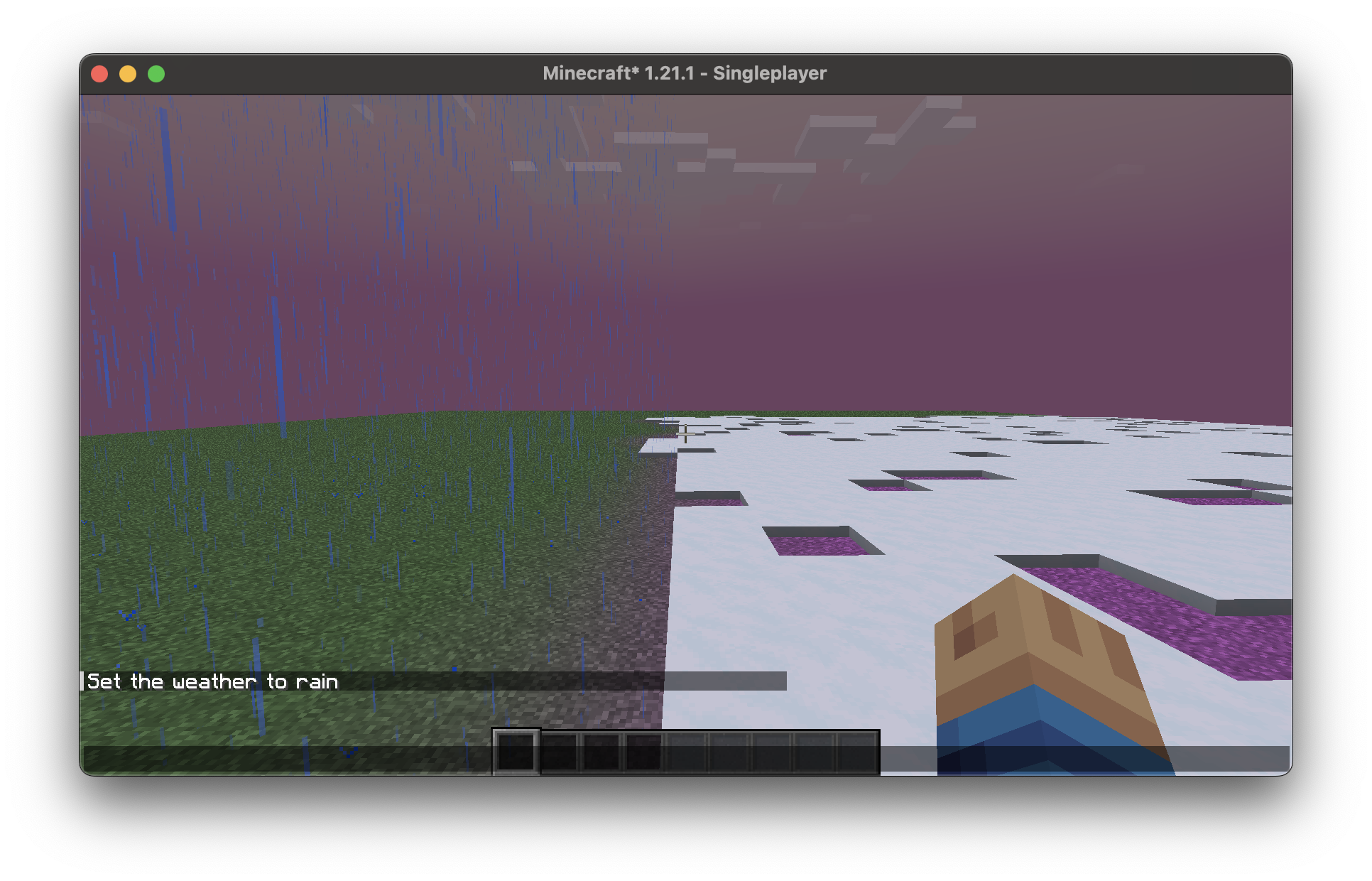
When having a biome with a temp below 0.15, and precipitation set to false, snow will form on the ground even tho its not visually snowing/raining.
I saw in the remapped code the same as stated above, in `ServerLevel#tickPrecipitation()` it checks if `itsRaining` (which even tho returns true, is not correct) then goes on to check `shouldSnow` which only checks based on temperature, and NOT based on whether precipitation is true/false.
This was tested on 1.21.1
Biome from my data pack:
{ "temperature": 0.05, "downfall": 0.4, "has_precipitation": false, "effects": { "sky_color": 16753935, "fog_color": 16728403, "water_color": 65426, "water_fog_color": 329011, "grass_color": 16749055, "foliage_color": 15527168 }, "spawners": {}, "spawn_costs": {}, "carvers": {}, "features": [] }visual example, you can see snow forming on the ground, yet it is not "snowing".
(ok, so the pic is above, doesn't go here apparently)
It looks like it's close yeah.
I can confirm this too.
Running a PaperMC server, previously we could set the compass target of a player, which sent a packet telling the player the spawn of said world changed.
As of 1.21.4, this is no longer possible.
The compass in all custom worlds just spins.
Looking at the client code, it appears the code checks in this order:
EDIT:
Ok, after much digging, the code I mentioned above refers to code to build the resource pack.
This now appears to be handled in the resource pack....
I have tested by creating a modified pack, and it works.
I have included the pack if anyone wants to test.
Long story short:
For the compass, I set it so it will spin in the end/nether, but all other dimensions will use said dimensions spawn point
For the clock, I set it so it will spin in the end/enther, but all other dimensions will show correct time.