 Benjamin Sigmon
- superbds8
- superbds8@hotmail.com
- America/Havana
- Yes
- No
 MC-96709
When inserting items into a line of hopper using multiple droppers, the output order (of items) does not match the input order after reloading the world.
The switching of items happens when using a minimum of three hoppers and continues in a pattern if more hoppers and droppers are added to the chain.
I originally thought this was part of
MC-81661but could not replicate that issue on 1.8.9.This bug does not appear to be chunk based as the machine was built inside of chunk boundaries. The bug is also consistent unlike
MC-81661.Unexpected Outcome
Item inserted into second hopper appears last in the chest after the item that was inserted into the third hopper.Numbering of hoppers showed here, corresponds to attached picture
3 2 1Expected Outcome
Items should appear in the order they were insertedHow to replicate
1. Build a machine like the one in the attached picture
2. Add unique items into each dropper.
3. Push button
4. Notice the order that items appear in the chest.
5. Save and quit world
6. Reopen world repeat steps 3 & 4.The chain hoppers/droppers can be longer which will cause more switching.
When inserting items into a line of hopper using multiple droppers, the output order (of items) does not match the input order after reloading the world.
The switching of items happens when using a minimum of three hoppers and continues in a pattern if more hoppers and droppers are added to the chain.
I originally thought this was part of
MC-81661but could not replicate that issue on 1.8.9.This bug does not appear to be chunk based as the machine was built inside of chunk boundaries. The bug is also consistent unlike
MC-81661.Unexpected Outcome
Item inserted into second hopper appears last in the chest after the item that was inserted into the third hopper.Numbering of hoppers showed here, corresponds to attached picture
3 2 1Expected Outcome
Items should appear in the order they were insertedHow to replicate
1. Build a machine like the one in the attached picture
2. Add unique items into each dropper.
3. Push button
4. Notice the order that items appear in the chest.
5. Save and quit world
6. Reopen world repeat steps 3 & 4.The chain hoppers/droppers can be longer which will cause more switching.
When inserting items into a line of hopper using multiple droppers, the output order (of items) does not match the input order after reloading the world/chunks.
The switching of items happens when using a minimum of three hoppers and continues in a pattern if more hoppers and droppers are added to the chain.
I originally thought this was part of
MC-81661but could not replicate that issue on 1.8.9.This bug does not appear to be chunk based as the machine was built inside of chunk boundaries. The bug is also consistent unlike
MC-81661.Unexpected Outcome
Item inserted into second hopper appears last in the chest after the item that was inserted into the third hopper.Numbering of hoppers showed here, corresponds to attached picture.
3 2 1Expected Outcome
Items should appear in the order they were inserted.How to replicate
1. Build a machine like the one in the attached picture.
2. Add unique items into each dropper.
3. Push button.
4. Notice the order that items appear in the chest.
5. Save and quit world/unload the chunks the machine is in.
6. Reopen world/Reload Chunks, repeat steps 3 & 4.The chain hoppers/droppers can be longer which will cause more switching.
When inserting items into a line of hopper using multiple droppers, the output order (of items) does not match the input order after reloading the world/chunks.
The switching of items happens when using a minimum of three hoppers and continues in a pattern if more hoppers and droppers are added to the chain.
I originally thought this was part of
MC-81661but could not replicate that issue on 1.8.9.This bug does not appear to be chunk border based as the machine was built inside of chunk boundaries. The bug is also consistent unlike
MC-81661.Unexpected Outcome
Item inserted into second hopper appears last in the chest after the item that was inserted into the third hopper.Numbering of hoppers showed here, corresponds to attached picture.
3 2 1Expected Outcome
Items should appear in the order they were inserted.How to replicate
1. Build a machine like the one in the attached picture.
2. Add unique items into each dropper.
3. Push button.
4. Notice the order that items appear in the chest.
5. Save and quit world/unload the chunks the machine is in.
6. Reopen world/Reload Chunks, repeat steps 3 & 4.The chain hoppers/droppers can be longer which will cause more switching.
When inserting items into a line of hopper using multiple droppers, the output order (of items) does not match the input order after reloading the world/chunks.
The switching of items happens when using a minimum of three hoppers and continues in a pattern if more hoppers and droppers are added to the chain.
I originally thought this was part of
MC-81661but could not replicate that issue on 1.8.9.This bug does not appear to be chunk border based as the machine was built inside of chunk boundaries. The bug is also consistent unlike
MC-81661.Note: After testing previous versions, this bug seems to have existed since hoppers were introduced in 1.5.1
Unexpected Outcome
Item inserted into second hopper appears last in the chest after the item that was inserted into the third hopper.Numbering of hoppers showed here, corresponds to attached picture.
3 2 1Expected Outcome
Items should appear in the order they were inserted.How to replicate
1. Build a machine like the one in the attached picture.
2. Add unique items into each dropper.
3. Push button.
4. Notice the order that items appear in the chest.
5. Save and quit world/unload the chunks the machine is in.
6. Reopen world/Reload Chunks, repeat steps 3 & 4.The chain hoppers/droppers can be longer which will cause more switching.
When inserting items into a line of hopper using multiple droppers, the output order (of items)
doesnot match the input orderafter reloading the world/chunks.
The switching of items happens when using a minimum of three hoppers and continues in a pattern if more hoppers and droppers are added to the chain.
I originally thought this was part ofMC-81661but could not replicate that issue on 1.8.9.
This bug does not appear to be chunk border based as the machine was built inside of chunk boundaries. The bug is also consistent unlikeMC-81661.Note: After testing previous versions, this bug seems to have existed since hoppers were introduced in 1.5.1
Unexpected Outcome
Item inserted into second hopper appears last in the chest after the item that was inserted into the third hopper.Numbering of hoppers showed here, corresponds to attached picture.
3 2 1Expected Outcome
Items should appear in the order they were inserted.How to replicate
1.Build a machine like the one in the attached picture.
2.Add unique items into each dropper.
3.Push button.
4. Notice the order that items appear in the chest.
5.Save and quitworld/unload the chunks the machine is in.
6. Reopen world/Reload Chunks, repeat steps3&4.The chain hoppers/droppers can be longer which will cause more switching.
When inserting items into a line of hopper using multiple droppers, two items appear in a single hopper. This causes the output order (of items) to not match the input order. I will call this hopper where the items "bunch" together the glitch hopper.
Note: After testing previous versions, this bug seems to have existed since hoppers were introduced in 1.5.1
Unexpected Outcome
Two items appear in hopper 1 at the same time.
Item inserted into second hopper appears last in the chest after the item that was inserted into the third hopper.Numbering of hoppers showed here, corresponds to attached picture.
3 2 1Expected Outcome
Items should flow in a line so that a hopper only contains a single item at any given time.
Items should appear in the chest in the order closest to where they were inserted in the hopper line.How to replicate
Method 1, Manually placing a glitch hopper
1. Build a machine like the one in the attached picture.
2. Destroy and then replace the hopper pointing into the chest. (This will be the glitch hopper)
3. Add unique items into each dropper.
4. Push button.
5. Notice the order that items appear in the chest
Or Notice how two items appear in the glitch hopper.Method 2, Reloading chunks to cause a glitch hopper
1. Locate the bottom most northeast coordinate in any chunk
2. Place a block there. (Standing on top of this block with f3 should show "Chunk: 15 0 0")
3. This or any block in a checkerboard pattern to this block can be where a glitched hopper will be placed. (see attached picture for example of checkerboard pattern)
4. Build machine so the hopper facing into the chest is in one of the coordinates from above.
5. Add unique items into each dropper.
6. Push button.
7. Notice the order that items appear in the chest, clear chest
8. Reload world or unload the chunk
9. Repeat steps 6 & 7.Relations to other glitches
I originally thought this was part ofMC-81661but could not replicate that issue on 1.8.9.
This bug does not appear to be chunk border based as the machine was built inside of chunk boundaries. The bug is also consistent unlikeMC-81661.
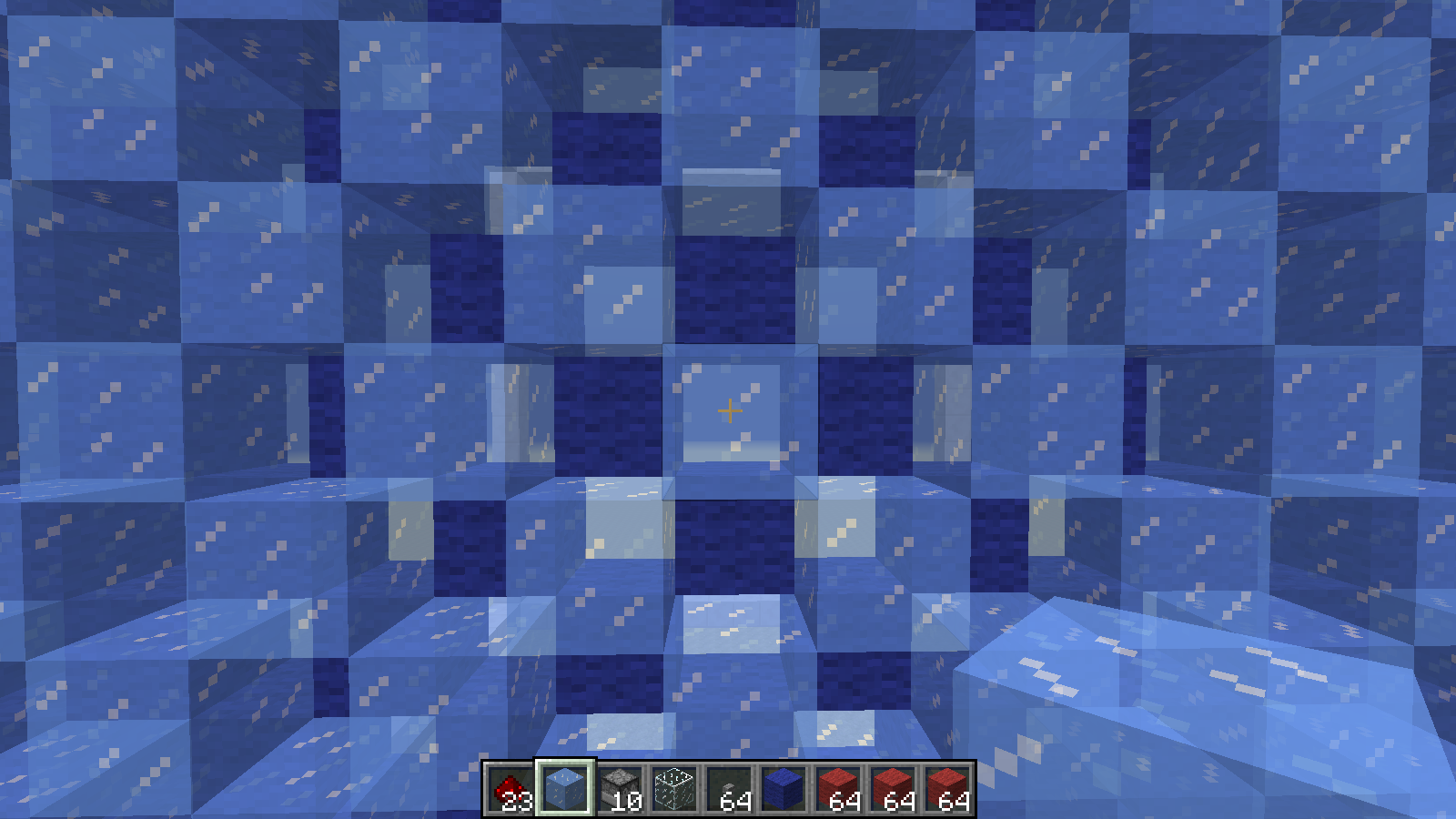
The first layer is Ice and the Second Layer is Blue Wool. This pattern can be repeated endlessly to find where a glitched hopper will be located after a reload of the chunks.
When inserting items into a line of hopper using multiple droppers, two items appear in a single hopper. This causes the output order (of items) to not match the input order. I will call this hopper where the items "bunch" together the glitch hopper.
Note: After testing previous versions, this bug seems to have existed since hoppers were introduced in 1.5.1
Unexpected Outcome
Two items appear in hopper 1 at the same time.
Item inserted into second hopper appears last in the chest after the item that was inserted into the third hopper.Numbering of hoppers showed here, corresponds to attached picture.
3 2 1Expected Outcome
Items should flow in a line so that a hopper only contains a single item at any given time.
Items should appear in the chest in the order closest to where they were inserted in the hopper line.How to replicate
Method 1, Manually placing a glitch hopper
1. Build a machine like the one in the attached picture.
2. Destroy and then replace the hopper pointing into the chest. (This will be the glitch hopper)
3. Add unique items into each dropper.
4. Push button.
5. Notice the order that items appear in the chest
Or Notice how two items appear in the glitch hopper.Method 2, Reloading chunks to cause a glitch hopper
1. Locate the bottom most northeast coordinate in any chunk
2. Place a block there. (Standing on top of this block with f3 should show "Chunk: 15 0 0")
3. This or any block in a checkerboard pattern to this block can be where a glitched hopper will be placed. (see attached picture for example of checkerboard pattern)
4. Build machine so the hopper facing into the chest is in one of the coordinates from above.
5. Add unique items into each dropper.
6. Push button.
7. Notice the order that items appear in the chest, clear chest
8. Reload world or unload the chunk
9. Repeat steps 6 & 7.Note: Any manually glitched hopper will become normal upon reload if it is not in one of the default glitched locations found by method 2.
Relations to other glitches
I originally thought this was part ofMC-81661but could not replicate that issue on 1.8.9.
This bug does not appear to be chunk border based as the machine was built inside of chunk boundaries. The bug is also consistent unlikeMC-81661.
When inserting items into a line of hopper using multiple droppers, two items appear in a single hopper. This causes the output order (of items) to not match the input order. I will call this hopper where the items "bunch" together the glitch hopper.
Note: After testing previous versions, this bug seems tohave existed sincehopperswereintroduced in 1.5.1Unexpected Outcome
Two items appear in hopper 1 at the same time.
Item inserted into second hopper appears last in the chest after the item that was inserted into the third hopper.Numbering of hoppers showed here, corresponds to attached picture.
3 2 1Expected Outcome
Items should flow in a line so that a hopper only contains a single item at any given time.
Items should appear in the chest in the order closest to where they were inserted in the hopper line.Relations to other glitches
I originally thought this was part ofMC-81661but could not replicate that issue on 1.8.9.
This bug does not appear to be chunk border based as the machine was built inside of chunk boundaries. The bug is also consistent unlikeMC-81661.Reproduction steps
Method 1, Manually placing a glitch hopper
- Build a machine like the one in the attached picture.
- Destroy and then replace the hopper pointing into the chest. (This will be the glitch hopper)
- Add unique items into each dropper.
- Push button.
- Notice the order that items appear in the chest
Or Notice how two items appear in the glitch hopper.Method 2, Reloading chunks to cause a glitch hopper
- Locate the bottom most northeast coordinate in any chunk
- Place a block there. (Standing on top of this block with f3 should show "Chunk: 15 0 0")
- This or any block in a checkerboard pattern to this block can be where a glitched hopper will be placed. (see attached picture for example of checkerboard pattern)
- Build machine so the hopper facing into the chest is in one of the coordinates from above.
- Add unique items into each dropper.
- Push button.
- Notice the order that items appear in the chest, clear chest
- Reload world or unload the chunk
- Repeat steps 6 & 7.
Note: Any manually glitched hopper will become normal upon reload if it is not in one of the default glitched locations found by method 2.
Edit : As explained by new title, hopper can act based on order placement but this can break when reloading chunks. This means method 1 is not a glitch but a mechanic entirely controlled by the player.
When inserting items into a line of hopper using multiple droppers, two items appear in a single hopper. This causes the output order (of items) to not match the input order. I will call this hopper where the items "bunch" together the glitch hopper.
Note: After testing previous versions, this bug seems to have existed since hoppers were introduced in 1.5.1
Unexpected Outcome
Two items appear in hopper 1 at the same time.
Item inserted into second hopper appears last in the chest after the item that was inserted into the third hopper.Numbering of hoppers showed here, corresponds to attached picture.
3 2 1Expected Outcome
Items should flow in a line so that a hopper only contains a single item at any given time.
Items should appear in the chest in the order closest to where they were inserted in the hopper line.Relations to other glitches
I originally thought this was part ofMC-81661but could not replicate that issue on 1.8.9.
This bug does not appear to be chunk border based as the machine was built inside of chunk boundaries. The bug is also consistent unlikeMC-81661.Reproduction steps
Method 1, Manually placing a glitch hopper
- Build a machine like the one in the attached picture.
- Destroy and then replace the hopper pointing into the chest. (This will be the glitch hopper)
- Add unique items into each dropper.
- Push button.
- Notice the order that items appear in the chest
Or Notice how two items appear in the glitch hopper.Method 2, Reloading chunks to cause a glitch hopper
- Locate the bottom most northeast coordinate in any chunk
- Place a block there. (Standing on top of this block with f3 should show "Chunk: 15 0 0")
- This or any block in a checkerboard pattern to this block can be where a glitched hopper will be placed. (see attached picture for example of checkerboard pattern)
- Build machine so the hopper facing into the chest is in one of the coordinates from above.
- Add unique items into each dropper.
- Push button.
- Notice the order that items appear in the chest, clear chest
- Reload world or unload the chunk
- Repeat steps 6 & 7.
Note: Any manually glitched hopper will become normal upon reload if it is not in one of the default glitched locations found by method 2.
Edit : As explained by new title, hopper can act based on order placement but this can break when reloading chunks. This means method 1 is not a glitch but a mechanic entirely controlled by the player.
When inserting items into a line of hopper using multiple droppers, two items appear in a single hopper. This causes the output order (of items) to not match the input order. I will call this hopper where the items "bunch" together the glitch hopper.
Note: After testing previous versions, this bug seems to have existed since hoppers were introduced in 1.5.1
Unexpected Outcome
Two items appear in hopper 1 at the same time.
Item inserted into second hopper appears last in the chest after the item that was inserted into the third hopper.Numbering of hoppers showed here, corresponds to attached picture.
3 2 1Expected Outcome
Items should flow in a line so that a hopper only contains a single item at any given time.
Items should appear in the chest in the order closest to where they were inserted in the hopper line.Relations to other glitches
I originally thought this was part ofMC-81661but could not replicate that issue on 1.8.9.
This bug does not appear to be chunk border based as the machine was built inside of chunk boundaries. The bug is also consistent unlikeMC-81661.Reproduction steps
Method 1, Manually placing a glitch hopper
- Build a machine like the one in the attached picture.
- Destroy and then replace the hopper pointing into the chest. (This will be the glitch hopper)
- Add unique items into each dropper.
- Push button.
- Notice the order that items appear in the chest
Or Notice how two items appear in the glitch hopper.Method 2, Reloading chunks to cause a glitch hopper
- Locate the bottom most northeast coordinate in any chunk
- Place a block there. (Standing on top of this block with f3 should show "Chunk: 15 0 0")
- This or any block in a checkerboard pattern to this block can be where a glitched hopper will be placed. (see attached picture for example of checkerboard pattern)
- Build machine so the hopper facing into the chest is in one of the coordinates from above.
- Add unique items into each dropper.
- Push button.
- Notice the order that items appear in the chest, clear chest
- Reload world or unload the chunk
- Repeat steps 6 & 7.
Note: Any manually glitched hopper will become normal upon reload if it is not in one of the default glitched locations found by method 2.
Edit : As explained by new title, hopper
canact based on order placement but this can break when reloading chunks. This means method 1 is not a glitch but a mechanic entirely controlled by the player.
When inserting items into a line of hopper using multiple droppers, two items appear in a single hopper. This causes the output order (of items) to not match the input order. I will call this hopper where the items "bunch" together the glitch hopper.
Note: After testing previous versions, this bug seems to have existed since hoppers were introduced in 1.5.1
Unexpected Outcome
Two items appear in hopper 1 at the same time.
Item inserted into second hopper appears last in the chest after the item that was inserted into the third hopper.Numbering of hoppers showed here, corresponds to attached picture.
3 2 1Expected Outcome
Items should flow in a line so that a hopper only contains a single item at any given time.
Items should appear in the chest in the order closest to where they were inserted in the hopper line.Relations to other glitches
I originally thought this was part ofMC-81661but could not replicate that issue on 1.8.9.
This bug does not appear to be chunk border based as the machine was built inside of chunk boundaries. The bug is also consistent unlikeMC-81661.Reproduction steps
Method 1, Manually placing a glitch hopper
- Build a machine like the one in the attached picture.
- Destroy and then replace the hopper pointing into the chest. (This will be the glitch hopper)
- Add unique items into each dropper.
- Push button.
- Notice the order that items appear in the chest
Or Notice how two items appear in the glitch hopper.Method 2, Reloading chunks to cause a glitch hopper
- Locate the bottom most northeast coordinate in any chunk
- Place a block there. (Standing on top of this block with f3 should show "Chunk: 15 0 0")
- This or any block in a checkerboard pattern to this block can be where a glitched hopper will be placed. (see attached picture for example of checkerboard pattern)
- Build machine so the hopper facing into the chest is in one of the coordinates from above.
- Add unique items into each dropper.
- Push button.
- Notice the order that items appear in the chest, clear chest
- Reload world or unload the chunk
- Repeat steps 6 & 7.
Note: Any manually glitched hopper will become normal upon reload if it is not in one of the default glitched locations found by method 2.
Edit : As explained by new title, hoppers act based on order placement but this can break when reloading chunks. This means method 1 is not a glitch but a mechanic entirely controlled by the player. See the comments below this post for more explanation.
Original Description:
When inserting items into a line of hopper using multiple droppers, two items appear in a single hopper. This causes the output order (of items) to not match the input order. I will call this hopper where the items "bunch" together the glitch hopper.
Note: After testing previous versions, this bug seems to have existed since hoppers were introduced in 1.5.1
Unexpected Outcome
Two items appear in hopper 1 at the same time.
Item inserted into second hopper appears last in the chest after the item that was inserted into the third hopper.Numbering of hoppers showed here, corresponds to attached picture.
3 2 1Expected Outcome
Items should flow in a line so that a hopper only contains a single item at any given time.
Items should appear in the chest in the order closest to where they were inserted in the hopper line.Relations to other glitches
I originally thought this was part ofMC-81661but could not replicate that issue on 1.8.9.
This bug does not appear to be chunk border based as the machine was built inside of chunk boundaries. The bug is also consistent unlikeMC-81661.Reproduction steps
Method 1, Manually placing a glitch hopper
- Build a machine like the one in the attached picture.
- Destroy and then replace the hopper pointing into the chest. (This will be the glitch hopper)
- Add unique items into each dropper.
- Push button.
- Notice the order that items appear in the chest
Or Notice how two items appear in the glitch hopper.Method 2, Reloading chunks to cause a glitch hopper
- Locate the bottom most northeast coordinate in any chunk
- Place a block there. (Standing on top of this block with f3 should show "Chunk: 15 0 0")
- This or any block in a checkerboard pattern to this block can be where a glitched hopper will be placed. (see attached picture for example of checkerboard pattern)
- Build machine so the hopper facing into the chest is in one of the coordinates from above.
- Add unique items into each dropper.
- Push button.
- Notice the order that items appear in the chest, clear chest
- Reload world or unload the chunk
- Repeat steps 6 & 7.
Note: Any manually glitched hopper will become normal upon reload if it is not in one of the default glitched locations found by method 2.
Edit : As explained by the new title, hoppers act based on order placement but this can break when reloading chunks. This means method 1 is not a glitch but a mechanic entirely controlled by the player. See the comments below this post for more explanation.
Original Description:
When inserting items into a line of hopper using multiple droppers, two items appear in a single hopper. This causes the output order (of items) to not match the input order. I will call this hopper where the items "bunch" together the glitch hopper.
Note: After testing previous versions, this bug seems to have existed since hoppers were introduced in 1.5.1
Unexpected Outcome
Two items appear in hopper 1 at the same time.
Item inserted into second hopper appears last in the chest after the item that was inserted into the third hopper.Numbering of hoppers showed here, corresponds to attached picture.
3 2 1Expected Outcome
Items should flow in a line so that a hopper only contains a single item at any given time.
Items should appear in the chest in the order closest to where they were inserted in the hopper line.Relations to other glitches
I originally thought this was part ofMC-81661but could not replicate that issue on 1.8.9.
This bug does not appear to be chunk border based as the machine was built inside of chunk boundaries. The bug is also consistent unlikeMC-81661.Reproduction steps
Method 1, Manually placing a glitch hopper
- Build a machine like the one in the attached picture.
- Destroy and then replace the hopper pointing into the chest. (This will be the glitch hopper)
- Add unique items into each dropper.
- Push button.
- Notice the order that items appear in the chest
Or Notice how two items appear in the glitch hopper.Method 2, Reloading chunks to cause a glitch hopper
- Locate the bottom most northeast coordinate in any chunk
- Place a block there. (Standing on top of this block with f3 should show "Chunk: 15 0 0")
- This or any block in a checkerboard pattern to this block can be where a glitched hopper will be placed. (see attached picture for example of checkerboard pattern)
- Build machine so the hopper facing into the chest is in one of the coordinates from above.
- Add unique items into each dropper.
- Push button.
- Notice the order that items appear in the chest, clear chest
- Reload world or unload the chunk
- Repeat steps 6 & 7.
Note: Any manually glitched hopper will become normal upon reload if it is not in one of the default glitched locations found by method 2.