 syme
syme
- syme31
- syme31
- Europe/Stockholm
- Yes
- No
 MCL-6602


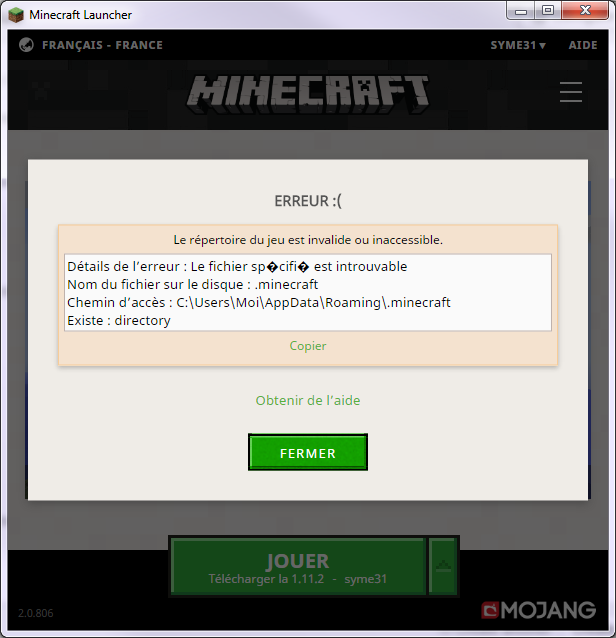

Today I started the MinecraftLauncher.exe.
The new version (native launcher) has been downloaded, then started.I clicked the button "PLAY / Download 1.11.2 - syme31".
I expected the download of 1.11.2 before play.
Instead, I got an error: "The game directory is invalid or inaccessible."
I clicked "see more details".Details: The specified file can not be found.
Name: .minecraft
Path: C:\Users\Moi\AppData\Roaming\.minecraft
Exist: directoryMy C: is an SSD. Minecraft write a lot of data, then since 2015 I created a junction.
C:\Users\Moi\AppData\Roaming are directories but C:\Users\Moi\AppData\Roaming\.minecraft is a junction to another volume (hard drive).With the previous versions of the launcher, it has never been a problem .minecraft is a junction to a directory (instead of a directory itself).
Additional informations about version:
- I can see from the procexp.exe the command line:
MinecraftLauncher.exe tools/NativeUpdater.exe MinecraftLauncher.exe S:/Program Files/Minecraft/game/tmpLauncher.tmp --nativeLauncherVersion 307
- At the bottom left of the Minecraft Launcher, I can see version 2.0.806.
I didn't search at the right place before to create it.
Maybe it's a duplicate of
MCL-5528.I'm going to look at its solution.
I confirm it's a duplicate. I apologise.
The option --workDir worked.