 Timothy Flick
- tkflick
- tkflick@yahoo.com
- America/Chicago
- Yes
- No
3 issues
Key
Summary
Status
Reporter
Assignee
Created
 MCPE-14372
 MCL-8730




Added Attachments:
Added Attachments:
Added Labels: launcher-bug shutsdown
Added Attachments:
Changed Description:
When I click the menu link to launch the game, the launch screen comes up and seems to hang, then closes. I've uploaded a video of this to youtube: https://youtu.be/8JCYDvuBCF0
The launcher_log.txt file is attached and seems to indicate
dthat the launcher cannot access the refresh token. This started on or around 12/18/2018 and has been happening ever since. I kept hoping another release would come out that would fix it, but that hasn't happened yet.I have also attached a text file with the error that is logged to the event viewer.
Please let me know if there's anything I can check or provide to you to help diagnose this bug.
Added Attachments:
Today's 14.3 release seems to have fixed the issue!
They continually leave doors open in the Win10 PC server. This allows zombies to enter and kill the villagers. So in a very short time, all your villagers are gone.
This looks like the same issue I'm reporting in
MCL-8730. It does not create a crash report, but the launcher_log reports that the game is unable to access the refresh token.This has been happening for me since I tried logging on back on 12/18.
I have attached the log and the error from my event viewer in my issue report.
I've attached a screen shot of the crash report folder. There is no crash report being generated. According to the launcher_log.txt, the launcher is just timing out and shutting down while trying to refresh the access token.
What kind of additional information do you need?
I click on the icon... the launcher starts, I see the Mojang splash page on the launcher for about 3 minutes, then the launcher just shuts down.
It's been doing this since i tried to play the game on the 18th. I kept hoping a new release or patch would be pushed out, but it never happened.
I see several other open tickets complaining of the same thing, but they were all closed due to insufficient info, and none of them posted any additional info for the dev team to investigate.
Is there anything else I can check or any additional info I can give you to help track down this issue?
These reports all seem to be referring to the same issue I'm seeing:
MC-123668MCPE-14372MCL-8728MCL-8710When I get home I will update this ticket with the screen shot of my .minecraft folder.
And yes, it seems to be the launcher that is "crashing". See the launcher_log.txt file I attached when I created the ticket. It seems to show the launcher trying to refresh an access token and failing. It says "Staying on the log in screen". It then waits about 3 minutes and shuts down (crashes) to desktop.
From the attached launcher_log.txt above:
[1227/230237:INFO:ClientHandler.cpp(859)] App: Failed to refresh access token. Staying on login screen.
[1227/230516:INFO:ClientHandler.cpp(149)] Shutting down!
Fair enough, as I was searching, the symptoms just seemed to be very similar.
I've made a video showing what happens when I start the game, but it exceeds the 10 mb limit. is there someplace else I can upload it? Or can I send you a link to it in my dropbox?
I've uploaded it to youtube.
https://youtu.be/8JCYDvuBCF0
Ahh.. gotcha! I could swear I mentioned that it was Minecraft Windows 10 in the initial comment. Sorry for the confusion.
I will move this over to the other bug tracker. Thank you for your help.
I have not tried reinstalling.
I will give that a try when I get home from work this evening and let you know if that fixed the issue.
No, that did not work. I backed up my saved games and uninstalled the game. I verified that the entire directory was gone from the ./AppData/Local/Packages folder. Then I went to the windows store and reinstalled it. When I tried to start the game, the exact same thing happened again. The launcher comes up and after a minute or so, it just shuts down.
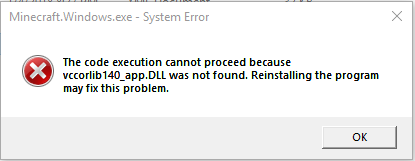
I notice that if I go to C:\Program Files\WindowsApps\Microsoft.MinecraftUWP_1.2.800.0_x64__8wekyb3d8bbwe and run Minecraft.Windows.exe manually, I get a series of error dialog boxes. I've attached screen shots of all 4 error messages.
I tried uninstalling and reinstalling a second time, but it didn't help. If I click the icon, the launcher comes up, then just shuts down. If I double click Minecraft.Windows.exe, I get the error messages.
So any other ideas I can try? Or any more info I can provide to help you track this down?
Any word on when there might be a fix for this? It's been nearly 3 months since I've been able to get the game to come up.
Any word on this? It's been nearly 5 months since I've been able to play the game.
The 1.4 aquatic update May 16th seems to have fixed this issue. I can now log into the game again.