 Justin Elliott
- Toa56584
- toa56584
- America/Chicago
- Yes
- No
 MC-79023
I was playing single-player "Minecraft 1.8-OptiFine_HD_U_A6" as according to the launcher, and that version has never had a problem before....
I have no other mods installed for Minecraft 1.8 other than Optifine.
When I press F6 to start streaming or click on "Broadcast Options" in any Menu screen:
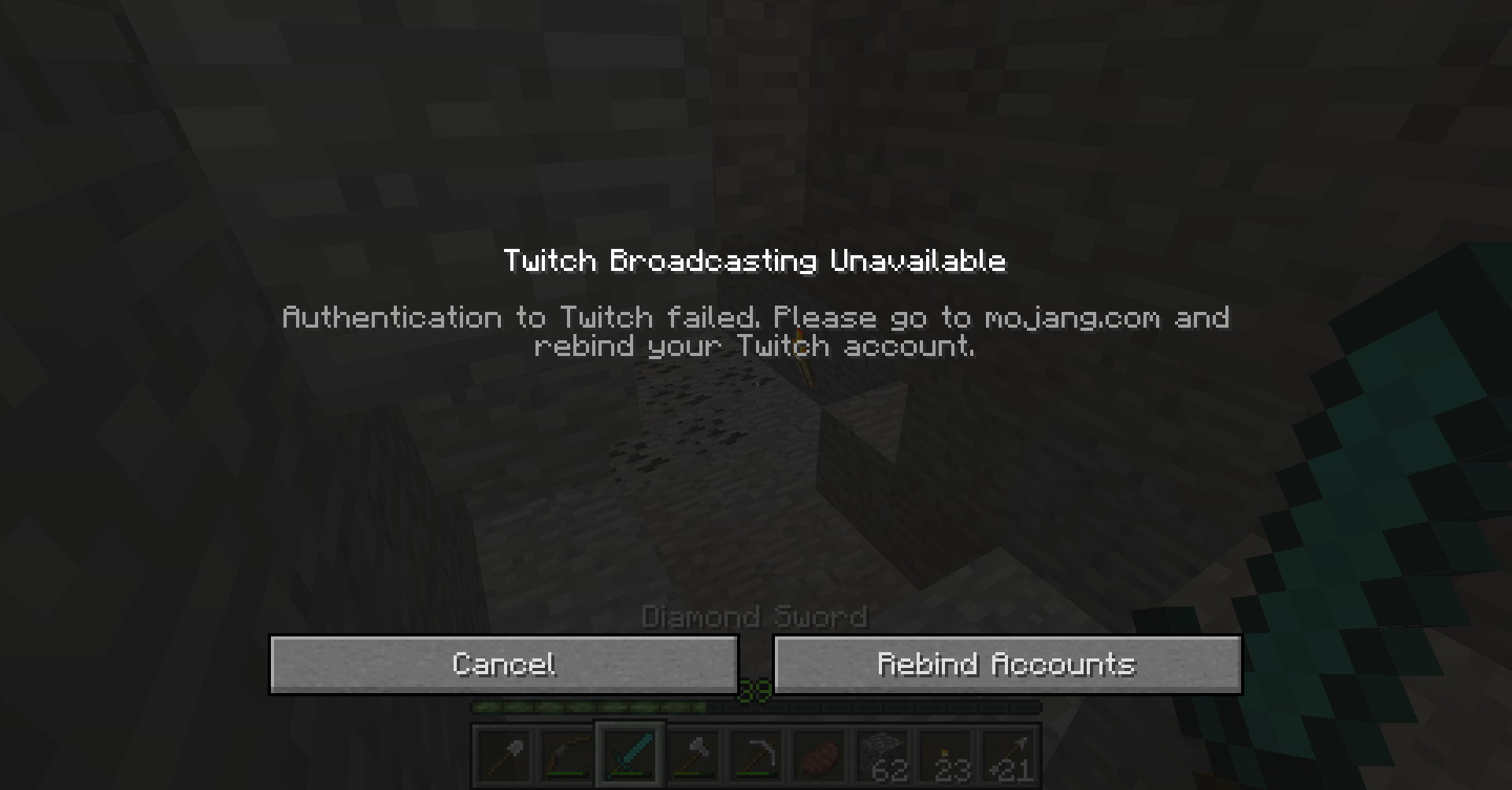
Twitch Broadcasting Unavailable Authentication to Twitch failed. Please go to mojang.com and rebind your Twitch account. My Mojang account page says it is linked, and my Twitch settings say it has been linked for 7 hours, which seems impossible, – although my Twitch was possibly hacked on 3/23/2015 ... – because I had just unlinked and then re-linked the two accounts less than 30 minutes earlier, after said issues were discovered.
I have tried closing out of and restarting the launcher but I haven't tried much else yet.
I searched for this issue and only found one that came anywhere close, although it was still obviously not the same issue as I was having.
I have not tried rebooting my desktop or logging in and back out again, and I can't stream as well when Optifine isn't being used: I have tried it before (before today), but the render distance and graphics options always had to be extremely low, whereas with Optifine I could have my graphics much more noticeably improved and have a some-what increased render distance as well as higher FPS during livestreams.
I was playing single-player "Minecraft 1.8-OptiFine_HD_U_A6" as according to the launcher, and that version has never had a problem before....
I was testing out the same single-player world using "Minecraft 1.8" as according to the launcher, and that version has never this problem before, either....
I have no other mods installed for Minecraft 1.8 other than Optifine.
When I press F6 to start streaming or click on "Broadcast Options" in any Menu screen:
Twitch Broadcasting Unavailable Authentication to Twitch failed. Please go to mojang.com and rebind your Twitch account. My Mojang account page says it is linked, and my Twitch settings say it has been linked for 7 hours, which seems impossible, – although my Twitch was possibly hacked on 3/23/2015 ... – because I had just unlinked and then re-linked the two accounts less than 30 minutes earlier, after said issues were discovered.
I have tried closing out of and restarting the launcher but I haven't tried much else yet.
I searched for this issue and only found one that came anywhere close, although it was still obviously not the same issue as I was having.
I have not tried rebooting my desktop or logging in and back out again, and I can't stream as well when Optifine isn't being used: I have tried it before (before today), but the render distance and graphics options always had to be extremely low, whereas with Optifine I could have my graphics much more noticeably improved and have a some-what increased render distance as well as higher FPS during livestreams.
I was playing single-player "Minecraft 1.8-OptiFine_HD_U_A6" as according to the launcher, and that version has never had a problem before....
I was testing out the same single-player world using "Minecraft 1.8" as according to the launcher, and that version has never this problem before, either....
I ha
veno other mods installed for Minecraft 1.8 other than Optifine.When I press F6 to start streaming or click on "Broadcast Options" in any Menu screen:
Twitch Broadcasting Unavailable Authentication to Twitch failed. Please go to mojang.com and rebind your Twitch account. My Mojang account page says it is linked, and my Twitch settings say it has been linked for 7 hours, which seems impossible, – although my Twitch was possibly hacked on 3/23/2015 ... – because I had just unlinked and then re-linked the two accounts less than 30 minutes earlier, after said issues were discovered.
I have tried closing out of and restarting the launcher but I haven't tried much else yet.
I searched for this issue and only found one that came anywhere close, although it was still obviously not the same issue as I was having.
I have not tried rebooting my desktop or logging in and back out again, and I can't stream as well when Optifine isn't being used: I have tried it before (before today), but the render distance and graphics options always had to be extremely low, whereas with Optifine I could have my graphics much more noticeably improved and have a some-what increased render distance as well as higher FPS during livestreams.
I was playing single-player "Minecraft 1.8-OptiFine_HD_U_A6" as according to the launcher, and that version has never had a problem before....
I was testing out the same single-player world using "Minecraft 1.8" as according to the launcher, and that version has never this problem before, either....
I had no other mods installed for Minecraft 1.8 other than Optifine when I was using the non-vanilla version.
What I expected to happen was...:
When I tried to access the Broadcast Options, to move to that options screen freely, as usual;
When I tried to stream using the game's built-in stream start/stop keyboard shortcut, to begin streaming.
What actually happened was...:
A Twitch error message/screen appears, as shown below.How it happened, etc:
When I press F6 to start streaming or click on "Broadcast Options" in any Menu screen:
Twitch Broadcasting Unavailable Authentication to Twitch failed. Please go to mojang.com and rebind your Twitch account. My Mojang account page says it is linked, and my Twitch settings say it has been linked for 7 hours, which seems impossible, – although my Twitch was possibly hacked on 3/23/2015 ... – because I had just unlinked and then re-linked the two accounts less than 30 minutes earlier, after said issues were discovered.
I have tried closing out of and restarting the launcher but I haven't tried much else yet.
I searched for this issue and only found one that came anywhere close, although it was still obviously not the same issue as I was having.
I have not tried rebooting my desktop or logging in and back out again, and I can't stream as well when Optifine isn't being used: I have tried it before (before today), but the render distance and graphics options always had to be extremely low, whereas with Optifine I could have my graphics much more noticeably improved and have a some-what increased render distance as well as higher FPS during livestreams.
I was playing single-player "Minecraft 1.8-OptiFine_HD_U_A6" as according to the launcher, and that version has never had a problem before....
I was testing out the same single-player world using "Minecraft 1.8" as according to the launcher, and that version has never this problem before, either....
I had no other mods installed for Minecraft
1.8other than Optifinewhen I was using the non-vanilla version.What I expected to happen was...:
When I tried to access the Broadcast Options, to move to that options screen freely, as usual;
When I tried to stream using the game's built-in stream start/stop keyboard shortcut, to begin streaming.
What actually happened was...:
A Twitch error message/screen appears, as shown below.How it happened, etc:
When I press F6 to start streaming or click on "Broadcast Options" in any Menu screen:
Twitch Broadcasting Unavailable Authentication to Twitch failed. Please go to mojang.com and rebind your Twitch account. My Mojang account page says it is linked, and my Twitch settings say it has been linked for 7 hours, which seems impossible, – although my Twitch was possibly hacked on 3/23/2015 ... – because I had just unlinked and then re-linked the two accounts less than 30 minutes earlier, after said issues were discovered.
I have tried closing out of and restarting the launcher but I haven't tried much else yet.
I searched for this issue and only found one that came anywhere close, although it was still obviously not the same issue as I was having.
I have not tried rebooting my desktop or logging in and back out again, and I can't stream as well when Optifine isn't being used: I have tried it before (before today), but the render distance and graphics options always had to be extremely low, whereas with Optifine I could have my graphics much more noticeably improved and have a some-what increased render distance as well as higher FPS during livestreams.
I was playing single-player "Minecraft 1.8-OptiFine_HD_U_A6" as according to the launcher, and that version has never had a problem before....
I was testing out the same single-player world using "Minecraft 1.8" as according to the launcher, and that version has never this problem before, either....
I had no other mods installed for Minecraft other than Optifine on the modded 1.8 version previously used.
What I expected to happen was...:
When I tried to access the Broadcast Options, to move to that options screen freely, as usual;
When I tried to stream using the game's built-in stream start/stop keyboard shortcut, to begin streaming.
What actually happened was...:
A Twitch error message/screen appears, as shown below.How it happened, etc:
When I press F6 to start streaming or click on "Broadcast Options" in any Menu screen:
Twitch Broadcasting Unavailable Authentication to Twitch failed. Please go to mojang.com and rebind your Twitch account. My Mojang account page says it is linked, and my Twitch settings say it has been linked for 7 hours, which seems impossible, – although my Twitch was possibly hacked on 3/23/2015 ... – because I had just unlinked and then re-linked the two accounts less than 30 minutes earlier, after said issues were discovered.
I have tried closing out of and restarting the launcher but I haven't tried much else yet.
I searched for this issue and only found one that came anywhere close, although it was still obviously not the same issue as I was having.
I have not tried rebooting my desktop or logging in and back out again, and I can't stream as well when Optifine isn't being used: I have tried it before (before today), but the render distance and graphics options always had to be extremely low, whereas with Optifine I could have my graphics much more noticeably improved and have a some-what increased render distance as well as higher FPS during livestreams.
I was playing single-player "Minecraft 1.8-OptiFine_HD_U_A6" as according to the launcher, and that version has never had a problem before....
I was testing out the same single-player world using "Minecraft 1.8" as according to the launcher, and that version has never this problem before, either....
I had no other mods installed for Minecraft other than Optifine on the modded 1.8 version previously used.
What I expected to happen was...:
When I tried to access the Broadcast Options, to move to that options screen freely, as usual;
When I tried to stream using the game's built-in stream start/stop keyboard shortcut, to begin streaming.
What actually happened was...:
A Twitch error message/screen appears, as shown below.How it happened, etc:
When I press F6 to start streaming or click on "Broadcast Options" in any Menu screen:
Twitch Broadcasting Unavailable Authentication to Twitch failed. Please go to mojang.com and rebind your Twitch account. My Mojang account page says it is linked, and my Twitch settings say it has been linked for 7 hours, which seems impossible, – although my Twitch was possibly hacked on 3/23/2015 ... – because I had just unlinked and then re-linked the two accounts less than 30 minutes earlier, after said issues were discovered.
I have tried closing out of and restarting the launcher but I haven't tried much else yet.
I searched for this issue and only found one that came anywhere close, although it was still obviously not the same issue as I was having.
I have not tried rebooting my desktop or logging
inand backout again, and I can't stream as well when Optifine isn't being used: I have tried it before (before today), but the render distance and graphics options always had to be extremely low, whereaswithOptifine I could have my graphicsmuch more noticeably improved and have a some-what increased render distance as well as higher FPS during livestreams.I was playing single-player "Minecraft 1.8-OptiFine_HD_U_A6" as according to the launcher, and that version has never had a problem before....
I was testing out the same single-player world using "Minecraft 1.8" as according to the launcher, and that version has never this problem before, either....
I had no other mods installed for Minecraft other than Optifine on the modded 1.8 version previously used.
What I expected to happen was...:
When I tried to access the Broadcast Options, to move to that options screen freely, as usual;
When I tried to stream using the game's built-in stream start/stop keyboard shortcut, to begin streaming.
What actually happened was...:
A Twitch error message/screen appears, as shown below.How it happened, etc:
When I press F6 to start streaming or click on "Broadcast Options" in any Menu screen:
Twitch Broadcasting Unavailable Authentication to Twitch failed. Please go to mojang.com and rebind your Twitch account. My Mojang account page says it is linked, and my Twitch settings say it has been linked for 7 hours, which seems impossible, – although my Twitch was possibly hacked on 3/23/2015 ... – because I had just unlinked and then re-linked the two accounts less than 30 minutes earlier, after said issues were discovered.
I have tried closing out of and restarting the launcher but I haven't tried much else yet.
I searched for this issue and only found one that came anywhere close, although it was still obviously not the same issue as I was having.
I have not tried rebooting my desktop or logging out and back into the launcher, but I have shut down and powered it up again, just not in the same day (I have yet to see if that fixed it or not).
I have a theory as to why this problem occurred, but I won't know until sometime next week as to whether or not it could have had even the slightest effect on the situation.
Minecraft Launcher 1.6.11
Operating System: Windows 7
" ('os.version') == '6.1' "
" ('os.arch') == 'x86' "
Java: Version 8 Update 40 (build 1.8.0_40-b26)
" ('sun.arch.data.model') == '32' "
" proxy == DIRECT "
Minecraft Launcher 1.6.11 Operating System: Windows 7
"('os.version') == '6.1'" "('os.arch') == 'x86'" Java: Version 8 Update 40 (build 1.8.0_40-b26)
"('sun.arch.data.model') == '32'" " proxy == DIRECT"
Minecraft Launcher 1.6.11 Operating System: Windows 7
"('os.version') == '6.1'" "('os.arch') == 'x86'" Java: Version 8 Update 40 (build 1.8.0_40-b26)
"('sun.arch.data.model') == '32'" " proxy == DIRECT" Minecraft Launcher 1.6.11
Operating System: Windows 7
"('os.version') == '6.1'" "('os.arch') == 'x86'" Java: Version 8 Update 40 (build 1.8.0_40-b26)
"('sun.arch.data.model') == '32'" " proxy == DIRECT"
Minecraft Launcher 1.6.11
Operating System: Windows 7
"('os.version') == '6.1'""('os.arch') == 'x86'" Java: Version 8 Update 40 (build 1.8.0_40-b26)
"('sun.arch.data.model') == '32'" " proxy == DIRECT"
I was playing single-player "Minecraft 1.8-OptiFine_HD_U_A6" as according to the launcher, and that version has never had a problem before....
I was testing out the same single-player world using "Minecraft 1.8" as according to the launcher, and that version has never this problem before, either....
I had no other mods installed for Minecraft other than Optifine on the modded 1.8 version previously used.
What I expected to happen was...:
When I tried to access the Broadcast Options, to move to that options screen freely, as usual;
When I tried to stream using the game's built-in stream start/stop keyboard shortcut, to begin streaming.
What actually happened was...:
A Twitch error message/screen appears, as shown below.How it happened, etc:
When I press F6 to start streaming or click on "Broadcast Options" in any Menu screen:
Twitch Broadcasting Unavailable Authentication to Twitch failed. Please go to mojang.com and rebind your Twitch account. My Mojang account page says it is linked, and my Twitch settings say it has been linked for 7 hours, which seems impossible, – although my Twitch was possibly hacked on 3/23/2015 ... – because I had just unlinked and then re-linked the two accounts less than 30 minutes earlier, after said issues were discovered.
I have tried closing out of and restarting the launcher but I haven't tried much else yet.
I searched for this issue and only found one that came anywhere close, although it was still obviously not the same issue as I was having.
I have not tried rebooting my desktop or logging out and back into the launcher, but I have shut down and powered it up again, just not in the same day (I have yet to see if that fixed it or not).
I have a theory as to why this problem occurred, but I won't know until sometime next week as to whether or not it could have had even the slightest effect on the situation.I was playing single-player "Minecraft 1.8-OptiFine_HD_U_A6" as according to the launcher, and that version has never had a problem before....
I was testing out the same single-player world using "Minecraft 1.8" as according to the launcher, and that version has never this problem before, either....
**I had no other mods installed for Minecraft other than Optifine on the modded 1.8 version previously used.What I expected to happen was...:
When I tried to access the Broadcast Options, to move to that options screen freely, as usual;
When I tried to stream using the game's built-in stream start/stop keyboard shortcut, to begin streaming.
What actually happened was...:
A Twitch error message/screen appears, as shown below.How it happened, etc:
When I press F6 to start streaming or click on "Broadcast Options" in any Menu screen:
Twitch Broadcasting Unavailable Authentication to Twitch failed. Please go to mojang.com and rebind your Twitch account. My Mojang account page says it is linked, and my Twitch settings say it has been linked for 7 hours, which seems impossible, – although my Twitch was possibly hacked on 3/23/2015 ... – because I had just unlinked and then re-linked the two accounts less than 30 minutes earlier, after said issues were discovered.
I have tried closing out of and restarting the launcher but I haven't tried much else yet.
I searched for this issue and only found one that came anywhere close, although it was still obviously not the same issue as I was having.
I have not tried rebooting my desktop or logging out and back into the launcher, but I have shut down and powered it up again, just not in the same day (I have yet to see if that fixed it or not).
I have a theory as to why this problem could have occurred, but I won't know until sometime next week as to whether or not it could have had even the slightest effect on the situation.
Operating System: Windows 7
"('os.version') == '6.1'" "('os.arch') == 'x86'" Java: Version 8 Update 40 (build 1.8.0_40-b26)
"('sun.arch.data.model') == '32'"
System Manufacturer: Hewlett-Packard Model: HP Compaq dc5850 Small Form Factor Total amount of system memory: 4.00 GB RAM System type: 32-bit operating system Number of processor cores: 2 64-bit capable: Yes Storage Total size of hard disk(s): Disk partition (C :
:
Operating System: Windows 7
" ('os.version') == '6.1'""('os.arch') == 'x86'" Java: Version 8 Update 40 (build 1.8.0_40-b26)
"('sun.arch.data.model') == '32'"
System Manufacturer: Hewlett-Packard Model: HP Compaq dc5850 Small Form Factor Total amount of system memory: 4.00 GB RAM System type: 32-bit operating system Number of processor cores: 2 64-bit capable: Yes Storage Total size of hard disk(s):Disk partition (C : Operating System: Windows 7
OS Version: 6.1.7601
Microsoft DirectX Version: DirectX 11
OpenGL Version: 6.1.7600.16385 (win7_rtm.090713-1255)"('os.arch') == 'x86'" Java: Version 8 Update 40 (build 1.8.0_40-b26)
"('sun.arch.data.model') == '32'"
Operating System: Windows 7
OS Version: 6.1.7601
Microsoft DirectX Version: DirectX 11
OpenGL Version: 6.1.7600.16385 (win7_rtm.090713-1255)"('os.arch') == 'x86'" Java: Version 8 Update 40 (build 1.8.0_40-b26)
"('s un.arch.data.model') == '32'"
From "IObit System Information" program: Operating System: Microsoft Windows 7 Home Premium
OS Version: 6.1.7601
Microsoft DirectX Version: DirectX 11
OpenGL Version: 6.1.7600.16385 (win7_rtm.090713-1255)
CPU Name: AMD Athlon(tm) Dual Core Processor 4450B
From "About Java" application: Java: Version 8 Update 40 (build 1.8.0_40-b26)
Info from "Minecraft Launcher 1.6.11" startup log:
"('os.arch') == 'x86'" "('sun.arch.data.model') == '32'"
Detailed Info (from Windows "Performance Information and Tools";
Storage, 'Video Adapter', & 'Video Memory' stats from "IObit System Information"):
From "IObit System Information" program: Operating System: Microsoft Windows 7 Home Premium
OS Version: 6.1.7601
Microsoft DirectX Version: DirectX 11
OpenGL Version: 6.1.7600.16385 (win7_rtm.090713-1255)
CPU Name: AMD Athlon(tm) Dual Core Processor 4450B
From "About Java" application: Java: Version 8 Update 40 (build 1.8.0_40-b26)
Info from "Minecraft Launcher 1.6.11" startup log and :
"('os.arch') == 'x86'" "('sun.arch.data.model') == '32'"
Detailed Info (from Windows "Performance Information and Tools";
Storage, 'Video Adapter', & 'Video Memory' stats from "IObit System Information"):
I was playing single-player "Minecraft 1.8-OptiFine_HD_U_A6" as according to the launcher, and that version has never had a problem before....
I was testing out the same single-player world using "Minecraft 1.8" as according to the launcher, and that version has never this problem before, either....
**I had no other mods installed for Minecraft other than Optifine on the modded 1.8 version previously used.What I expected to happen was...:
When I tried to access the Broadcast Options, to move to that options screen freely, as usual;
When I tried to stream using the game's built-in stream start/stop keyboard shortcut, to begin streaming.
What actually happened was...:
A Twitch error message/screen appears, as shown below.How it happened, etc:
When I press F6 to start streaming or click on "Broadcast Options" in any Menu screen:
Twitch Broadcasting Unavailable Authentication to Twitch failed. Please go to mojang.com and rebind your Twitch account. My Mojang account page says it is linked, and my Twitch settings say it has been linked for 7 hours, which seems impossible, – although my Twitch was possibly hacked on 3/23/2015 ... – because I had just unlinked and then re-linked the two accounts less than 30 minutes earlier, after said issues were discovered.
I have tried closing out of and restarting the launcher but I haven't tried much else yet.
I searched for this issue and only found one that came anywhere close, although it was still obviously not the same issue as I was having.
I have not tried rebooting my desktop or logging out and back into the launcher, but I have shut down and powered it up again, just not in the same day (I have yet to see if that fixed it or not).
I have a theory as to why this problem could have occurred, but I won't know until sometime next week as to whether or not it could have had even the slightest effect on the situation.Nevermind, it is fixed for Vanilla 1.8; not sure about Optifine 1.8 version....
I was playing single-player "Minecraft 1.8-OptiFine_HD_U_A6" as according to the launcher, and that version has never had a problem before....
I was testing out the same single-player world using "Minecraft 1.8" as according to the launcher, and that version has never this problem before, either....
**I had no other mods installed for Minecraft other than Optifine on the modded 1.8 version previously used.What I expected to happen was...:
When I tried to access the Broadcast Options, to move to that options screen freely, as usual;
When I tried to stream using the game's built-in stream start/stop keyboard shortcut, to begin streaming.
What actually happened was...:
A Twitch error message/screen appears, as shown below.How it happened, etc:
When I press F6 to start streaming or click on "Broadcast Options" in any Menu screen:
Twitch Broadcasting Unavailable Authentication to Twitch failed. Please go to mojang.com and rebind your Twitch account. My Mojang account page says it is linked, and my Twitch settings say it has been linked for 7 hours, which seems impossible, – although my Twitch was possibly hacked on 3/23/2015 ... – because I had just unlinked and then re-linked the two accounts less than 30 minutes earlier, after said issues were discovered.
I have tried closing out of and restarting the launcher but I haven't tried much else yet.
I searched for this issue and only found one that came anywhere close, although it was still obviously not the same issue as I was having.
I have not tried rebooting my desktop or logging out and back into the launcher, but I have shut down and powered it up again, just not in the same day (I have yet to see if that fixed it or not).
I have a theory as to why this problem could have occurred, but I won't know until sometime next week as to whether or not it could have had even the slightest effect on the situation.Nevermind, it is fixed for Vanilla 1.8;
not sure aboutOptifine 1.8 version....I was playing single-player "Minecraft 1.8-OptiFine_HD_U_A6" as according to the launcher, and that version has never had a problem before....
I was testing out the same single-player world using "Minecraft 1.8" as according to the launcher, and that version has never this problem before, either....
**I had no other mods installed for Minecraft other than Optifine on the modded 1.8 version previously used.What I expected to happen was...:
When I tried to access the Broadcast Options, to move to that options screen freely, as usual;
When I tried to stream using the game's built-in stream start/stop keyboard shortcut, to begin streaming.
What actually happened was...:
A Twitch error message/screen appears, as shown below.How it happened, etc:
When I press F6 to start streaming or click on "Broadcast Options" in any Menu screen:
Twitch Broadcasting Unavailable Authentication to Twitch failed. Please go to mojang.com and rebind your Twitch account. My Mojang account page says it is linked, and my Twitch settings say it has been linked for 7 hours, which seems impossible, – although my Twitch was possibly hacked on 3/23/2015 ... – because I had just unlinked and then re-linked the two accounts less than 30 minutes earlier, after said issues were discovered.
I have tried closing out of and restarting the launcher but I haven't tried much else yet.
I searched for this issue and only found one that came anywhere close, although it was still obviously not the same issue as I was having.
I have not tried rebooting my desktop or logging out and back into the launcher, but I have shut down and powered it up again, just not in the same day (I have yet to see if that fixed it or not).
I have a theory as to why this problem could have occurred, but I won't know until sometime next week as to whether or not it could have had even the slightest effect on the situation.Nevermind, it is fixed for Vanilla 1.8; Optifine 1.8 version seems to be fixed as well... maybe turning the desktop off and back on did it?
I was playing single-player "Minecraft 1.8-OptiFine_HD_U_A6" as according to the launcher, and that version has never had a problem before....
I was testing out the same single-player world using "Minecraft 1.8" as according to the launcher, and that version has never this problem before, either....
**I had no other mods installed for Minecraft other than Optifine on the modded 1.8 version previously used.What I expected to happen was...:
When I tried to access the Broadcast Options, to move to that options screen freely, as usual;
When I tried to stream using the game's built-in stream start/stop keyboard shortcut, to begin streaming.
What actually happened was...:
A Twitch error message/screen appears, as shown below.How it happened, etc:
When I press F6 to start streaming or click on "Broadcast Options" in any Menu screen:
Twitch Broadcasting Unavailable Authentication to Twitch failed. Please go to mojang.com and rebind your Twitch account. My Mojang account page says it is linked, and my Twitch settings say it has been linked for 7 hours, which seems impossible, – although my Twitch was possibly hacked on 3/23/2015 ... – because I had just unlinked and then re-linked the two accounts less than 30 minutes earlier, after said issues were discovered.
I have tried closing out of and restarting the launcher but I haven't tried much else yet.
I searched for this issue and only found one that came anywhere close, although it was still obviously not the same issue as I was having.
I have not tried rebooting my desktop or logging out and back into the launcher, but I have shut down and powered it up again, just not in the same day (I have yet to see if that fixed it or not).
I have a theory as to why this problem could have occurred, but I won't know until sometime next week as to whether or not it could have had even the slightest effect on the situation.Nevermind, it is fixed for Vanilla 1.8; Optifine 1.8 version seems to be fixed as well... maybe turning the desktop off and back on did it?
I was playing single-player "Minecraft 1.8-OptiFine_HD_U_A6" as according to the launcher, and that version has never had a problem before....
I was testing out the same single-player world using "Minecraft 1.8" as according to the launcher, and that version has never this problem before, either....
**I had no other mods installed for Minecraft other than Optifine on the modded 1.8 version previously used.What I expected to happen was...:
When I tried to access the Broadcast Options, to move to that options screen freely, as usual;
When I tried to stream using the game's built-in stream start/stop keyboard shortcut, to begin streaming.
What actually happened was...:
A Twitch error message/screen appears, as shown below.How it happened, etc:
When I press F6 to start streaming or click on "Broadcast Options" in any Menu screen:
Twitch Broadcasting Unavailable Authentication to Twitch failed. Please go to mojang.com and rebind your Twitch account. My Mojang account page says it is linked, and my Twitch settings say it has been linked for 7 hours, which seems impossible, – although my Twitch was possibly hacked on 3/23/2015 ... – because I had just unlinked and then re-linked the two accounts less than 30 minutes earlier, after said issues were discovered.
I have tried closing out of and restarting the launcher but I haven't tried much else yet.
I searched for this issue and only found one that came anywhere close, although it was still obviously not the same issue as I was having.
I have not tried rebooting my desktop or logging out and back into the launcher, but I have shut down and powered it up again, just not in the same day (I have yet to see if that fixed it or not).
I have a theory as to why this problem could have occurred, but I won't know until sometime next week as to whether or not it could have had even the slightest effect on the situation.Nevermind, it is fixed for Vanilla 1.8; Optifine 1.8 version seems to be fixed as well... maybe turning the desktop off and back on did it?
I just tried it in vanilla 1.8 and same thing happened. I'd put up a video to prove it more authentically, but that might be somewhat difficult to do... .
Not Resolved!
That I did, Sonic:
I check my Twitch and Twitter to make sure everything is in order before I stream, but today when I logged into Twitch, I was forced to change my password by the Twitch website because of what had happened.
After that I made sure everything else on Twitch was as it should be, before running the game and encountering the error message.
Resolved itself?Resolved itself!