 Alan
Alan
- Traccia
- JIRAUSER691856
- Europe/Stockholm
- Yes
- No
 MCPE-177670
 BDS-19283




Since 1-october-2021 Minecraft on PS4 crashes every time I enter a specific world (my personal one) or any of its copies. It doesn't happen with other worlds. I enter then after few seconds, regardless of doing something or nothing, it crashes and gives error CE-38700-8, making that
fewmonths old world and its copies unplayable since yesterday.I uninstalled and then reinstalled the game but nothing changed.
As coincidence, the previous day (30-september-2021) has been installed an update (2.30 version for PS4). So I suspect the problem may be related to this update.
Since 1-october-2021 Minecraft on PS4 crashes every time I enter a specific world (my personal one) or any of its copies. It doesn't happen with other worlds. I enter then after few seconds, regardless of doing something or nothing, it crashes and gives error CE-38700-8, making that months old world and its copies unplayable since yesterday.
I uninstalled and then reinstalled the game but nothing changed.
As coincidence, the previous day (30-september-2021) has been installed an update (2.30 version for PS4). So I suspect the problem may be related to this update.
Since 1-october-2021 Minecraft on PS4 crashes every time I enter a specific world (my personal one) or any of its copies. It doesn't happen with other worlds. I enter then after few seconds, regardless of doing something or nothing, it crashes and gives error CE-38700-8, making that
months old world and its copies unplayable since yesterday.I uninstalled and then reinstalled the game but nothing changed.
As coincidence, the previous day (30-september-2021) has been installed an update (2.30 version for PS4). So I suspect the problem may be related to this update.
These days I found out the audio is glitched with swimming, running and driving boat: sometimes these sounds, for a fraction of second, are like repeated multiple times, resulting in a distorted, glitched audio. It seems it happens especially while
driving boat, raining and the game loading.These days I found out the audio is glitched with swimming, running and driving boat: sometimes these sounds, for a fraction of second, are like repeated multiple times, resulting in a distorted, glitched audio. It seems it happens especially while raining.
I made a clip of my character running in rain with the audio of running and swimming glitching multiple times
[^Minecraft_20220713192507.mp4]
[^Minecraft_20220713192507_001.mp4]
I crafted a couple of map today and none of them showed the pointer on map.
In the pics below, the almost explored map shows the pointer on top right and it was made many weeks ago. The other unexplored has been made few minutes ago.
Very big issue with downloading packs: Marketplace (out of storage) and Server (error downloading) on PS4 Pro. 2.79 - v1.20.51
While playing, whenever the game is "autosaving" and so the chest icon appears, every time it freeze for a moment, could be for 2 second or even 5 seconds.
Its not even a big world, only a 90mb size and I explored one entire map of overworld and very few of nether and end
While playing, whenever the game is "autosaving" and so the chest icon appears, every time it freeze for a moment, could be for 2 second or even 5 seconds.
Its not even a big world, only a 90mb size and I explored one entire map of overworld and very few of nether and end, son nothing heavy
VideoCapture_20240709-215828-1.jpg
I have the same problem. I enter a particular world and then it chrashes and gives error ce-38700-8.
For what I know now, for me happens with a specific world and not others
As if it is invalid report. Don't how but it selected Java edition instead of Bedrock; ok maybe I clicked it wrongly on my phone. Just small error.
My report won't considered just for that?
Don't give me this kind of comment. I just lost a almost year old world most likely because of an update that made the game (for which I paid for) defective. So I don't care too much if click a wrong tag or version.
I will copy this report if it is so problematic now.
I seriously can't believe it. I contacted "Mojang support" on Twitter and sent me to "Minecraft help center"; here I wrote my issue and "agent Thor" answered me and told me to check this bug tracker and write a report. I did all of this and finally my report... is invalid?!
My report is wrote in the wrong site...so it won't be considered?! I followed all of your instructions and that's it? Invalid?
Actually "invalid", pointless and inefficient is the support given to players. You clearly don't know how to provide support: you just make fool of players telling them to do things that finally are wrong.
So what am I supposed to do know? This is the wrong place to report this issue, so which is the right one, IF you have one?
Your final advise is even useless: I already wrote the steps to reproduce this "bug". You just read the title and nothing in description? You may have set this report as resolved, but in the end it still remains UNSOLVED, and I still, after days, don't know how and why it actually happened nor how and if it can be solved.
As I wrote before, a supporter "agent" told me to come here, check for similar issues and eventually report it. I blindly followed his instructions.
Honestly, he should have told me before that devices sends automatically diagnostic information, I would have spared the time of writing here.
I also didn't read these "Bug Tracker Guidelines", since I didn't notice them because I was only concerned on reporting.
Furthermore, I didn't catch the meaning of your first comment: "Crashes like this are logged automatically...". That's because once I read the report was invalid I thought It wouldn't have been considered and that I wouldn't have received any help. That thought irritated me and didn't catch your comment's meaning.
My dissatisfaction is still towards "agents" that provide false information or don't provide the right ones, causing then situations of doubt and uncertainty.
You just did your job and gave the right informations you are supposed to provide. Thanks for the attention.
I'll just wait for new updates hoping that they'll fix the problem.
I have this same audio issue but not constant as you do in the video. I experience it mostly with running, swimming, driving boat. While raining it get worse and almost every sound is glitched
The explored one was crafted with compass, the unexplored one is "empty map"and was either bought by villager or found somewhere. I just remembered it by reading the link.
When I noticed no pointer I worried and quickly made the report rather than find info on wiki.
I fixed the map in game by crafting it in anvil with compass.. Problem solved. Sorry for the waste of time.
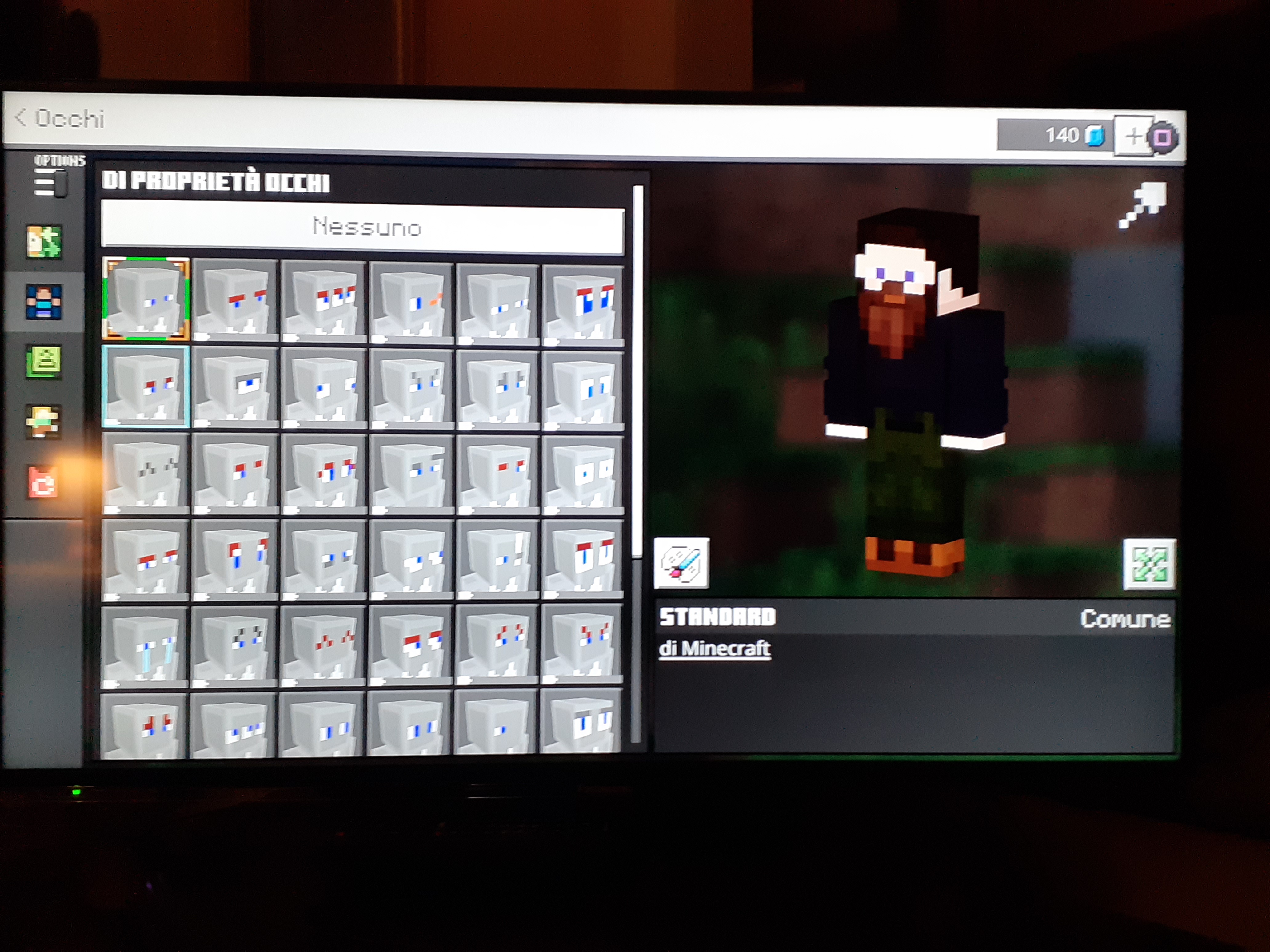
No it doesn't. My problem is: when I click on an aesthetic element like a type of eyes, an haircut or a beard, it simply doesn't appear. My character stays as he was before and it keeps "loading" (the loading animation is near the character's head, not near the coins, it consists in picaxe, shovel and axe).
It loads for some time. I waited many minutes but still loads.
It happens for a lot of aesthetic elements, few are those I can change fine.
Example in the 2 pics. 1st pic is with the default eyes. In the 2nd other I choose the eyes just below the default but it keeps loading (note the shovel near the head). It the changes in picaxe, then axe, then shovel and again and again. Even now that I m writing it still loads.
I haven't issue with wifi, net, nothing of it.
The problem still remain even after today's update 2.59 for Bedrock patch version 1.19.70
Yo. My Minecraft crashed with ce 34878-0 for 3 times this evening like in a 1 hour. It became almost unplayable.
I have noticed a couple of things about this problem.
1) Now I'm playing a survival which is now around 250 MB. I've explored and mapped so far the total of 2 complete maps territory more or less.
Its not much, its still early game. However, the game is "saving" (i mean chest pic appears up right corner) too often, with consegmquence of slowing and freezing for seconds the game. HERE the error happens most of time.
2) Many times also the game is lagging, like you are destroying a block, the block should be gone but it visually is still there and you can pass through it, then the image of block disappears after seconds.
So, this 250MB file is lagging and slow like a 953MB file.
3) the error also has happened 99% while exploring. It ALWAYS HAPPEN this way: im exploring while riding a horse, it crashes, I re-enter the world, I spawn many blocks BEFORE the point where i crashed.
I spawn on foot, i walk to the point i crashed and my horse is THERE. Approaching at around 20 blocks from the horse, the game puts me back on the horse, even if i wasnt near enough to ride him.
But is with this issues that most times the game crashes with error CE 34878-0
Same problem, i noticed recently. Ps4 pro bedroc version 1.20.81
When offline, every pack I downloaded disappear, texture and add-on packs cant be found.
I only see the "worlds" from marketplace but they are locked, there a little qhite padlock pic, and i cant use them as model when creating a new world.
Besides, existing world, where were active packs, just turn default with default texture minecrafg and nothing else
Another thing: when offline, i cant use any of the skins/ character i usually use while the internet is on.
They too disappear, and the only available are a couple of default skin, the dark-coloured skin ones. Alex and Steve are not set by default and besides they doesnt even appear. I cqnt even create new ones with default settibngs nothing
Now im at bedrock ps4 minecraft 1.20.81, still there s this bug.
I have been experiencing this poisoning bug for years. I dare to say that this bug is the cancer of minecraft worlds.
I have created more or less 7 Worlds and almost all of them are fully played over the years.
Everytime my world reach big size of the save file, it becomes more and more unplayable. When its too much to endure it, I create a new one.
However even when at small size, it still freeze, even for few seconds but it happens every damn time.
The moment between the game freeze and game starts again, it happens everything that was supposed to happen during that freezing moment, but it happens right after it starts again
Many times i have died because
creeper was approching BEFORE the freeze, cant move because freezed, then AFTER the freeze it was already blown up and killed me.
Mobs were about to kill me, i could have escape, but the game freeze, and after freeze i got dead.
While flyjng with elytra, I smashed into a wall because the Freezing moment prevented me from change direction.
Or I end up into lava while flying over it, but the game freeze and then somehow swim into it
Let alone the chunks not loading while flyng, and ending with being stuck in middle of air with half of world under me not loadkng at all...
Cant this autosave just be REMOVED or at least could the player CHOOSE to turn it on or off, with an update?
This issue is HALF SOLVED as for today after new update 1.21.2. I couldn t upload video due to size so i upload pics. In order are:
DRESS ROOM WITH INTERNET ON: you can see my charaters and skins available, I can change with other downloaded skins from clicking the left panel, i can edit my characters
DRESS ROOM WITH INTERNET OFF: I open Minecraft with already internet off. NO PREVIOUS CHARACTER/SKIN available, can't access to skins from left panel, cant acces even classic skins, cant of course edit character. In game it applies Steve or Alex or other default skin
CREATING WORLD WITH AND WITHOUT INTERNET: this part is SOLVED TO ME:
IN both this situation i could create a world using few of my packs.
Issue still present, even after 1.21.2
Now my world is around 450 MB and I explored almost 4 maps.
Sometimes, especially when entering in villages, it severely lag as: entities stay still while i can move around, but i cant interact with block or hit anything.
Is like the time stopped for everything except me, a ZA WARUDO thing
1.21.23
Still I can t access my edited skins while offline, it only drops default skins differents from Steve ot Alex. The moment i turn internet on, even while still in game, i manage to access my edited skins
Keeps lagging. Now my world is unplayable, every minute there are brief lagging moment, other times it freeze for seconds. While fighting or mining or doing other stuff it happens very often. Now the game is not fluid anymore.
So sad that a game that is supposed to let you to infinitely explore and built, and give space to your creativity, in the end it blocks it due to lag.
Now the limit to the world is 450 MB. After that, you have to abandon everything you have done in it
Same problem. Bigger file size, worse the lag. In addition, there s the slow chunk loading that makes flying with elytra impossivle