 DeathSinger4221
- UrbanMinecraft
- JIRAUSER585685
- Europe/Stockholm
- Yes
- No
 MCPE-111805
 REALMS-11147





Having a player kicked trough a Repeating Command block with /kick causes the realm to crash for an unknown reason.
This bug only happens on a realm and I couldn't reproduce in a single player world.
Might be useful to know, the realm had Beta API & Upcoming Creator Features enabled.
Steps to Reproduce:
1. Join a Realm with a Friend or more
2. Place a Repeating command block with 0 ticks delay containing the command: /kick friendName
3. Then power the command block with redstone power or set the command block to always active.Observed Results:
The friend that had his name inside the command block will get kicked, however the Realm crashed completely shortly after it happens. (I believe the command somehow manages to execute a second or more times on the already kicked player)Expected Results:
The friend that has his name in the command block should be kicked without the realm crashing.
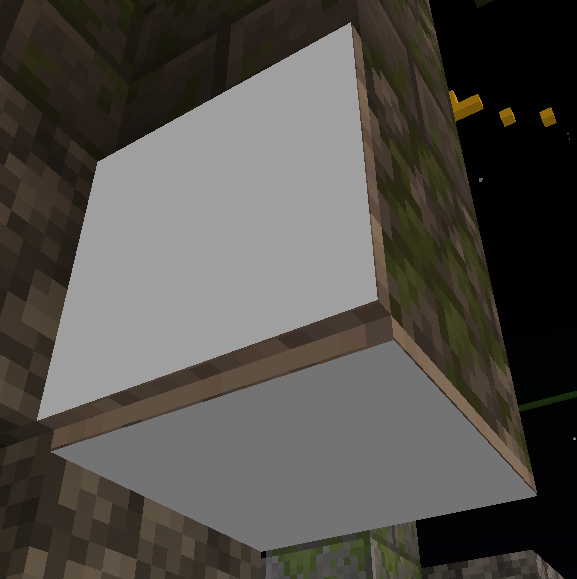
The minecraft glowing item frame is being affected by the blockface dimming feature.
It isn't being rendered the same way as a minecraft light source block should be. eg. Glowstone Block.
As I belive, glowing item frames shouldn't be subject to the darkening of the block texture depending on which side it's facing. Like a true light source block.
I am aware that a glow farm doesn't actually emmit any light. Yet I still belive it's fair for it not be be darkened. Since the name Glowing ItemframeThe minecraft glowing item frame is being affected by the blockface dimming feature.
It isn't being rendered the same way as a minecraft light source block should be. eg. Glowstone Block.Steps to Reproduce
- 1. Place a block in the air where all sides of that block are visible/not blocked by any other block.
- 2. Place a glow_frame on each side of the block. (On top of it, under it & all the sides)
- 3. (Optional) Place a filled map in all of the glow frames for better visibility of the issue.
Observed Results
The glow frame & the map/item being displayed inside it are darkened depending on which side of the block they're placed on. On the top of the block there is no blockface dimming. But on the sides & the bottom, they are slighly darker than on the top, and at them bottom it's the most.
Glow frames have "face_dimming" setting in the "material_instances" set to "true" in the block's behavior json file, even though it's a glow frame.
Expected Behavior
Glow frame's "face_dimming" setting should be set to "false", since it's a glow frame so it should have similar render properties like a glowstone block, or any other light source. Just the differnece being that it doesn't emmit actual light.
The minecraft glowing item frame is being affected by the blockface dimming feature.
It isn't being rendered the same way as a minecraft light source block should be. eg. Glowstone Block.Steps to Reproduce
1.Place a block in the air where all sides of that block are visible/not blocked by any other block.2.Place a glow_frame on each side of the block. (On top of it, under it & all the sides)3.(Optional) Place a filled map in all of the glow frames for better visibility of the issue.Observed Results
The glow frame & the map/item being displayed inside it are darkened depending on which side of the block they're placed on. On the top of the block there is no blockface dimming. But on the sides & the bottom, they are slighly darker than on the top, and at them bottom it's the most.
Glow frames have "face_dimming" setting in the "material_instances" set to "true" in the block's behavior json file, even though it's a glow frame.
Expected Behavior
Glow frame's "face_dimming" setting should be set to "false", since it's a glow frame so it should have similar render properties like a glowstone block, or any other light source. Just the differnece being that it doesn't emmit actual light.
Explination
When getting
block.loaction or
entity.location
In the context of a Realm, the resulting Vector3 has its X and Z values flipped.
Meaing; When one calls for a block's location that is at "x: 15 y: 6 z: -75", the script will return "x: -75 y: 6 z: 15" instaed of "x: 15 y: 6 z: -75"
8mb.video-5tl-6NKOO6E5.mp4demonst
artes this bug as it is on a Realm VS a self-hosted world
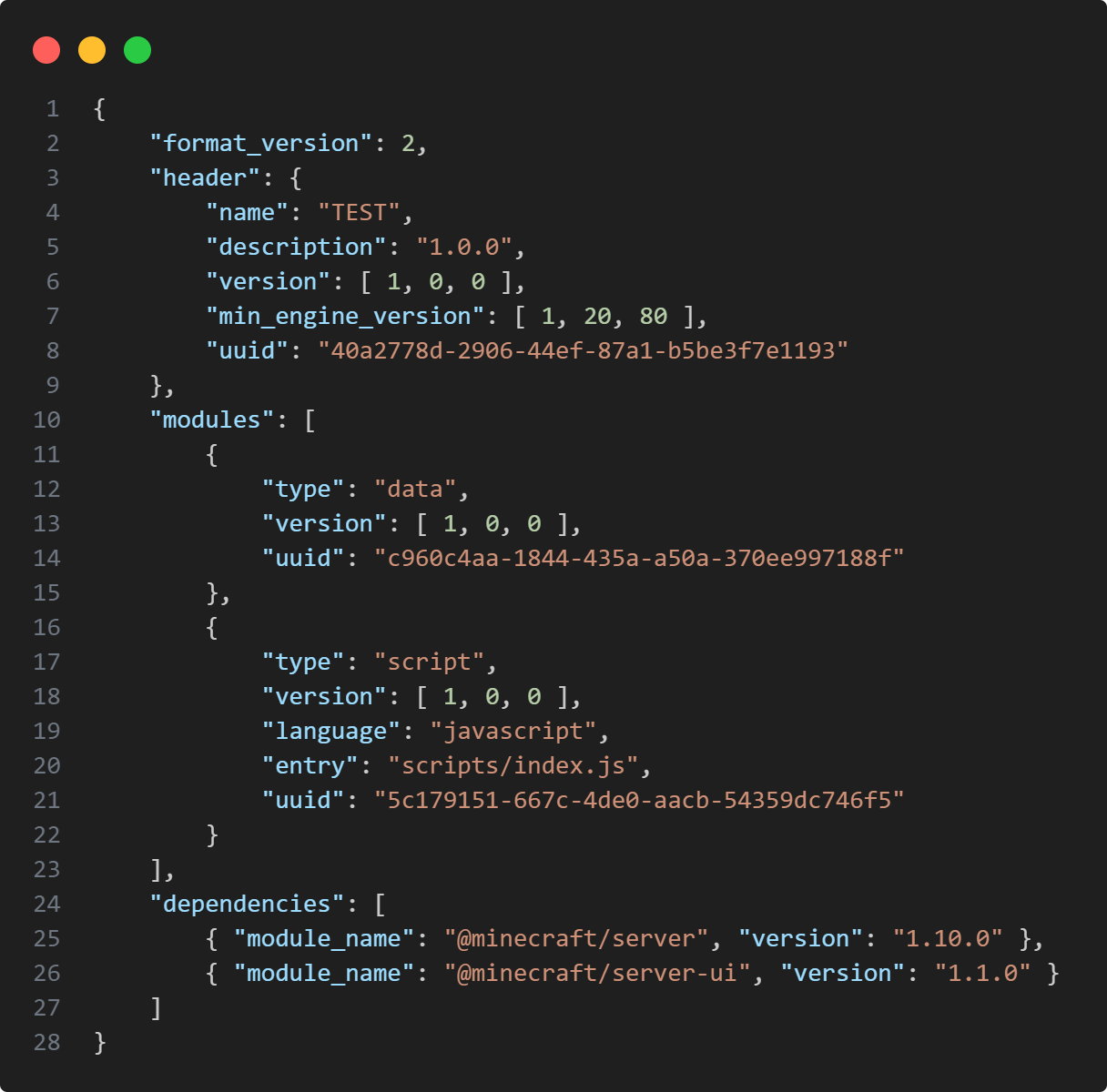
With the demonstration, are linked photos of the pack's manifest.json and the script's index.js
Showing the bug is accuring within the 1.10.0-Stable Version of the Scriting API"dependencies": [{ "module_name": "@minecraft/server", "version": "1.10.0" },{ "module_name": "@minecraft/server-ui", "version": "1.1.0" }]import { world } from '@minecraft/server'; world.afterEvents.buttonPush.subscribe(({ source, block }) => { world.sendMessage('§eButton V3Pos:§7 ' + Object.values(block.location).map(v => v.toFixed(2)).join(' ')); world.sendMessage('§6Player V3Pos:§7 ' + Object.values(source.location).map(v => v.toFixed(2)).join(' '));});Reproduction
To reprodude this bug on your own, download the TEST.mcpack
Then activate the pack on a Minecraft Bedrock Edition Realm and simply press a button.
It should send in the game chat, the coordinates of the button pressed and the player who pressed it and with that you will be able to deduce your self that the X and Z values of the actual coordinates have been switched.
Yet repeat the same experiment on a normal world, you will obtain the expected value in your game chat, where X stays at the X position and Z at Z's.Explination
When getting
block.loaction or
entity.location
In the context of a Realm, the resulting Vector3 has its X and Z values flipped.
Meaning; When one calls for a block's location that is at "x: 15 y: 6 z: -75", the script will return "x: -75 y: 6 z: 15" instead of "x: 15 y: 6 z: -75"
8mb.video-5tl-6NKOO6E5.mp4
With the demonstration, are linked photos of the pack's manifest.json and the script's index.js
Showing the bug is accuring within the 1.10.0-Stable Version of the Scriting API"dependencies": [{ "module_name": "@minecraft/server", "version": "1.10.0" },{ "module_name": "@minecraft/server-ui", "version": "1.1.0" }]import { world } from '@minecraft/server'; world.afterEvents.buttonPush.subscribe(({ source, block }) => { world.sendMessage('§eButton V3Pos:§7 ' + Object.values(block.location).map(v => v.toFixed(2)).join(' ')); world.sendMessage('§6Player V3Pos:§7 ' + Object.values(source.location).map(v => v.toFixed(2)).join(' '));});Reproduction
To reprodude this bug on your own, download the TEST.mcpack
Then activate the pack on a Minecraft Bedrock Edition Realm and simply press a button.
It should send in the game chat, the coordinates of the button pressed and the player who pressed it and with that you will be able to deduce your self that the X and Z values of the actual coordinates have been switched.
Yet repeat the same experiment on a normal world, you will obtain the expected value in your game chat, where X stays at the X position and Z at Z's.