 MC-121494
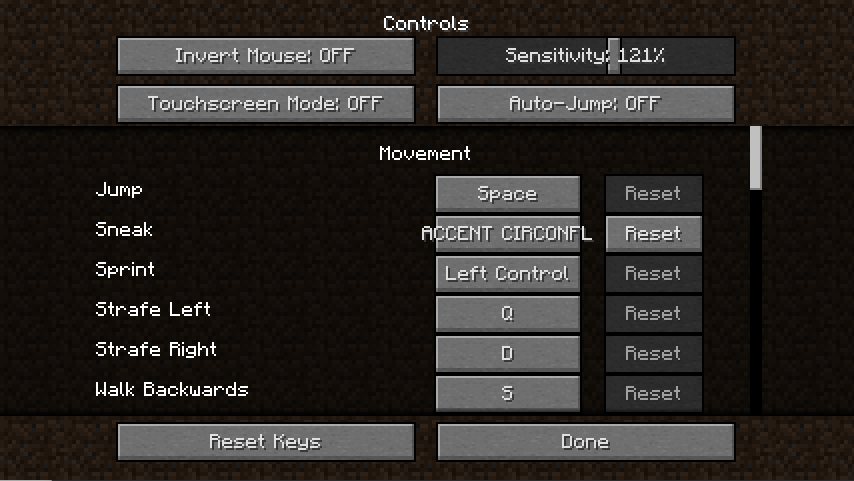
Dead key "accent circonflex" doesn't display correctly in controls
The bug
Trying to assign a control to the
"^"
key (dead key) in the controls menu of Minecraft using a French AZERTY keyboard results in the game displaying the text "ACCE CIRCONFLEX" instead of the accent symbol which firstly doesn't fit into the button and secondly is cut off ("ACCENT CIRCONFLEX" is the full description of the key).
Environment
Microsoft Windows [Version 10.0.15063]
Intel(R) Core(TM) i5-3570K CPU @ 3.40GHz, 3.40 GHz
64-bit operating system, x64-based processor; 8.00 GB RAM
NVIDIA GeForce GT 630; GeForce Game Ready Driver Version 385.28
Java 1.8.0_144-b01 (64-bit)
![[Mod] bemoty](../../../data/avatars/users/50554.png)

Created Issue:
Dead key "circumflex accent" doesn't display correctly in controls
The bug
Trying to assign a control to the "" key (dead key) in the controls menu of Minecraft using a German QWERTZ keyboard results in the game displaying the text "CIRCUMFLEX ACCE" instead of "" which firstly doesn't fit into the button and secondly is cut off ("CIRCUMFLEX ACCENT" is the full description of the key).
Environment
Microsoft Windows [Version 10.0.15063]
Intel(R) Core(TM) i5-3570K CPU @ 3.40GHz, 3.40 GHz
64-bit operating system, x64-based processor; 8.00 GB RAM
NVIDIA GeForce GT 630; GeForce Game Ready Driver Version 385.28
Java 1.8.0_144-b01 (64-bit)
Attachments1
The bug
Trying to assign a control to the
""key (dead key) in the controls menu of Minecraft using a German QWERTZ keyboard results in the game displaying the text "CIRCUMFLEX ACCE" instead of""which firstly doesn't fit into the button and secondly is cut off ("CIRCUMFLEX ACCENT" is the full description of the key).The bug
Trying to assign a control to the "" key (dead key) in the controls menu of Minecraft using a German QWERTZ keyboard results in the game displaying the text "CIRCUMFLEX ACCE" instead of "" which firstly doesn't fit into the button and secondly is cut off ("CIRCUMFLEX ACCENT" is the full description of the key).
The bug
Trying to assign a control to the "" key (dead key) in the controls menu of Minecraft using a German QWERTZ keyboard results in the game displaying the text "CIRCUMFLEX ACCE" instead of "" which firstly doesn't fit into the button and secondly is cut off ("CIRCUMFLEX ACCENT" is the full description of the key).
The bug
Trying to assign a control to the
"^"key (dead key) in the controls menu of Minecraft using a German QWERTZ keyboard results in the game displaying the text "CIRCUMFLEX ACCE" instead of "^" which firstly doesn't fit into the button and secondly is cut off ("CIRCUMFLEX ACCENT" is the full description of the key).
The bug
Trying to assign a control to the
"^"key (dead key) in the controls menu of Minecraft using a German QWERTZ keyboard results in the game displaying the text "CIRCUMFLEX ACCE" instead of "^" which firstly doesn't fit into the button and secondly is cut off ("CIRCUMFLEX ACCENT" is the full description of the key).
The bug
Trying to assign a control to the
"^"key (dead key) in the controls menu of Minecraft using a German QWERTZ keyboard results in the game displaying the text "CIRCUMFLEX ACCE" instead of
"^"which firstly doesn't fit into the button and secondly is cut off ("CIRCUMFLEX ACCENT" is the full description of the key).The bug
Trying to assign a control to the
"^"key (dead key) in the controls menu of Minecraft using a German QWERTZ keyboard results in the game displaying the text "CIRCUMFLEX ACCE" instead of the accent symbol which firstly doesn't fit into the button and secondly is cut off ("CIRCUMFLEX ACCENT" is the full description of the key).

chromeinstall-8u151.exe
![[Bot] Arisa](../../../data/assets/gravatar/mustek2.png)
The bug
Trying to assign a control to the
"^"key (dead key) in the controls menu of Minecraft using a German QWERTZ keyboard results in the game displaying the text "CIRCUMFLEX ACCE" instead of the accent symbol which firstly doesn't fit into the button and secondly is cut off ("CIRCUMFLEX ACCENT" is the full description of the key).
Note: This only happens if the OS language is set to English.
![[Mod] Michael Wobst](../../../data/avatars/users/37868.png)
The bug
Trying to assign a control to the
"^"key (dead key) in the controls menu of Minecraft using a
German QWERTZkeyboard results in the game displaying the text "CIRCUMFLEXACCE" instead of the accent symbol which firstly doesn't fit into the button and secondly is cut off ("CIRCUMFLEXACCENT" is the full description of the key).Note: This only happens if the OS language is set to English.
The bug
Trying to assign a control to the
"^"key (dead key) in the controls menu of Minecraft using a French AZERTY keyboard results in the game displaying the text "ACCE CIRCONFLEX" instead of the accent symbol which firstly doesn't fit into the button and secondly is cut off ("ACCENT CIRCONFLEX" is the full description of the key).
Dead key "circumflexaccent" doesn't display correctly in controlsDead key "accent circonflex" doesn't display correctly in controls
![[Mojang] Adrian Östergård](../../../data/assets/gravatar/nighter.jpeg)
![[Mojang] Georgii Gavrichev](../../../data/avatars/users/22428.png) [Mojang] Georgii Gavrichev
[Mojang] Georgii Gavrichev
This is how GLFW works, this can be fixed only on their side.